wheel TOYOTA PRIUS PRIME 2023 Manual PDF
[x] Cancel search | Manufacturer: TOYOTA, Model Year: 2023, Model line: PRIUS PRIME, Model: TOYOTA PRIUS PRIME 2023Pages: 680, PDF Size: 14.97 MB
Page 349 of 680
3495-5. Using the driving support systems
5
Driving
Jam Assist is started, the follow-
ing message will be displayed:
“Allow Driver Monitor Camera
Recording?”
When recording is approved, the
system records images of the area
around the driver in certain crash or
near crash-like situations, such as
an SRS airbag being deployed or
the vehicle hitting an object on the
road. ( P.7)
WARNING
■For safe use
●Driving safely is solely the
responsibility of the driver. Do
not overly rely on this system,
and pay careful attention to the
surrounding conditions in order
to ensure safe driving.
●The Traffic Jam Assist function
is not an automated driving sys-
tem. This function provides the
driver with information and driv-
ing assistance a ccording to the
road shape and conditions, traf-
fic conditions, and the condition
of the driver themself. Always
pay careful attention to the sur-
rounding conditions as use of
the system is the responsibility
of the driver.
●Depending on the condition of
the surrounding area, the road,
or the driver, the Traffic Jam
Assist function may not operate
or operation may be sus-
pended. Also, it may not always
be able to achieve the same
level of performance. Read the
operating conditions of the func-
tion carefully. Do not overly rely
on this function and always
drive carefully.
●As the recognition performance
and control performance of the
Traffic Jam Assist function are
limited, driver operation is nec-
essary to ensure safety while
the system is operating. Also,
the steering assist of this sys-
tem is designed to operate only
for slow steering operations
during a traffic jam. While this
function is operating, the lane
deviation control function of the
LDA will not operate. If, for
some reason, the vehicle is
about to deviate the lane, it is
the driver’s responsibility to
drive properly.
●Even if Traffic Jam Assist is
operating properly, the sur-
rounding conditions as recog-
nized by the driver and detected
by the system may differ. There-
fore, it is necessary for the
driver to pay attention, assess
risks, and ensure safety. Over-
reliance on this system to drive
the vehicle safely may lead to
an accident resulting in death or
serious injury.
●While the Traffi c Jam Assist
function is operating, as driver
operation may become neces-
sary, the driver must ensure
they have clear visibility of their
surroundings.
●In certain situations, a message
urging the driver to hold the
steering wheel may be dis-
played by the Traffic Jam Assist
function. In this case, hold the
steering wheel and drive the
vehicle manually to ensure
safety.
Page 350 of 680
3505-5. Using the driving support systems
WARNING
●The Traffic Jam Assist function
cannot detect the following
objects. Operate the steering
wheel, accelerator pedal, or
brake pedal as necessary to
avoid a collision. As the function
will not be able to provide
appropriate control, using it may
lead to an accident resulting in
death or serious injury.
• Objects on the road surface
• Vehicles outside of a lane (such as on the shoulder of the road)
• Potholes, cracks, ruts, or other road damage
• Road construction zones
• Vehicles running in parallel with your vehicle or nearby walls
• Animals
■Situations in which Traffic
Jam Assist Function should
not be used
Do not use Traffic Jam Assist
Function in situations such as the
following. As the system will not
be able to provide appropriate
control, using it may lead to an
accident resulting in death or seri-
ous injury.
■When it is necessary to dis-
able the system
P.284
■Situations in which the sen-
sors may not operate prop-
erly
P.289
■Situations in which the lane
may not be detected
P.291
■Situations in which the func-
tion may not operate properly
In situations such as the following,
the Traffic Jam Assist function
may not operate properly. Manu-
ally operate the vehicle as neces-
sary.
●When a sensor is splashed by
water
●When the ambient temperature
is high or low
●When a vehicle cuts in front of
your vehicle
●When another lane merges into
the lane in the same traveling
direction as your vehicle
●When driving in low visibility
conditions
●When the vehicle posture is
changing
●When the traction on the road
surface differs greatly between
the left and right side tires
●When driving on an expressway
with no median strips or when
driving on an expressway
equipped with temporary
median markers, such as poles.
●When there is a significant dif-
ference in speed between your
vehicle and the other vehicle
●The map data has not been
updated properly.
■To prevent malfunction of the
radar sensors
P.286
■To prevent malfunction of the
front camera
P.287
Page 351 of 680
3515-5. Using the driving support systems
5
Driving
■Operating conditions of the
function
This function is operable when all of
the following conditions are met:
●The system detects lane lines and
the path of preceding or surround-
ing vehicles.
●The dynamic radar cruise control
and the lane tracing assist are
operating.
●The turn signal lever is not being
operated.
●The vehicle is not being driven
around a sharp curve.
●The vehicle is being driven in the
center of a lane.
●The driver monitor camera is
detecting that the driver is facing
front of the vehicle.
●The vehicle is driving in traffic jam
on a highway or expressway at
approximately 25 mph (40 km/h)
or less. (In some situations, such
as when a traffic jam starts, this
function may be operational at
approximately 20 mph (30 km/h)
or less.)
●It is necessary to enter a con-
nected services contract, provided
by Toyota, to use these functions.
For details, contact your Toyota
dealer.
●The driver’s door is closed.
●The driver’s seat belt is fastened.
●Customized setting of the Traffic
Jam Assist is not set to off.
●Functions and components com-
posing the system are in proper
condition.
●Customized setting of the PCS (Pre-Collision System) is not set
to off.
●Customized setting of the dynamic
radar cruise control (re-start time
extension) is not set to off.
■Temporary cancelation of the
function
●When the operating conditions are
no longer met, a function may be
temporarily canceled. However,
when the operation conditions are
met again, operation of the func-
tion will automatically be restored.
●If the operating conditions of a
function are no longer met while
the function is operating, a buzzer
may sound with a display to indi-
cate that the function has been
temporarily canceled. If no driver’s
responses to the
indication are
detected, the driver emergency
stop assist function may operate.
For types of display and action to
be taken, see the page mentioned
below. ( P.352)
■Driving operations during con-
trolled driving:
●Accelerator pedal
As with normal driving, acceleration
can be performed by depressing the
accelerator pedal. When the accel-
erator pedal is depressed at approx-
imately 10 km/h (6 mph) or more,
this function will be canceled.
●Brake pedal
As with normal driving, deceleration
can be performed by depressing the
brake pedal. However, controlled
driving will be cancelled.
●Steering wheel
As with normal driving, the steering
wheel can be operated. If the steer-
ing wheel is operated more than a
certain amount, controlled driving
will be cancelled.
WARNING
■Front camera installation area
on the windshield
P.288
Page 352 of 680
3525-5. Using the driving support systems
■When a warning message is
displayed
●“Traffic Jam Asst System Malfunc-
tion Visit Your Dealer”
The Traffic Jam Assist function may
not be operating properly.
●“Traffic Jam Asst Unavailable
Stop Assist Activated”
The system temporarily cannot be
used as the driver emergency stop
assist function has operated.
The setting of Traffic Jam
Assist can be enabled/dis-
abled through a customize
setting. ( P.628)
The setting of driver monitor
camera recording can be
enabled/disabled through a
customize setting. ( P.628)
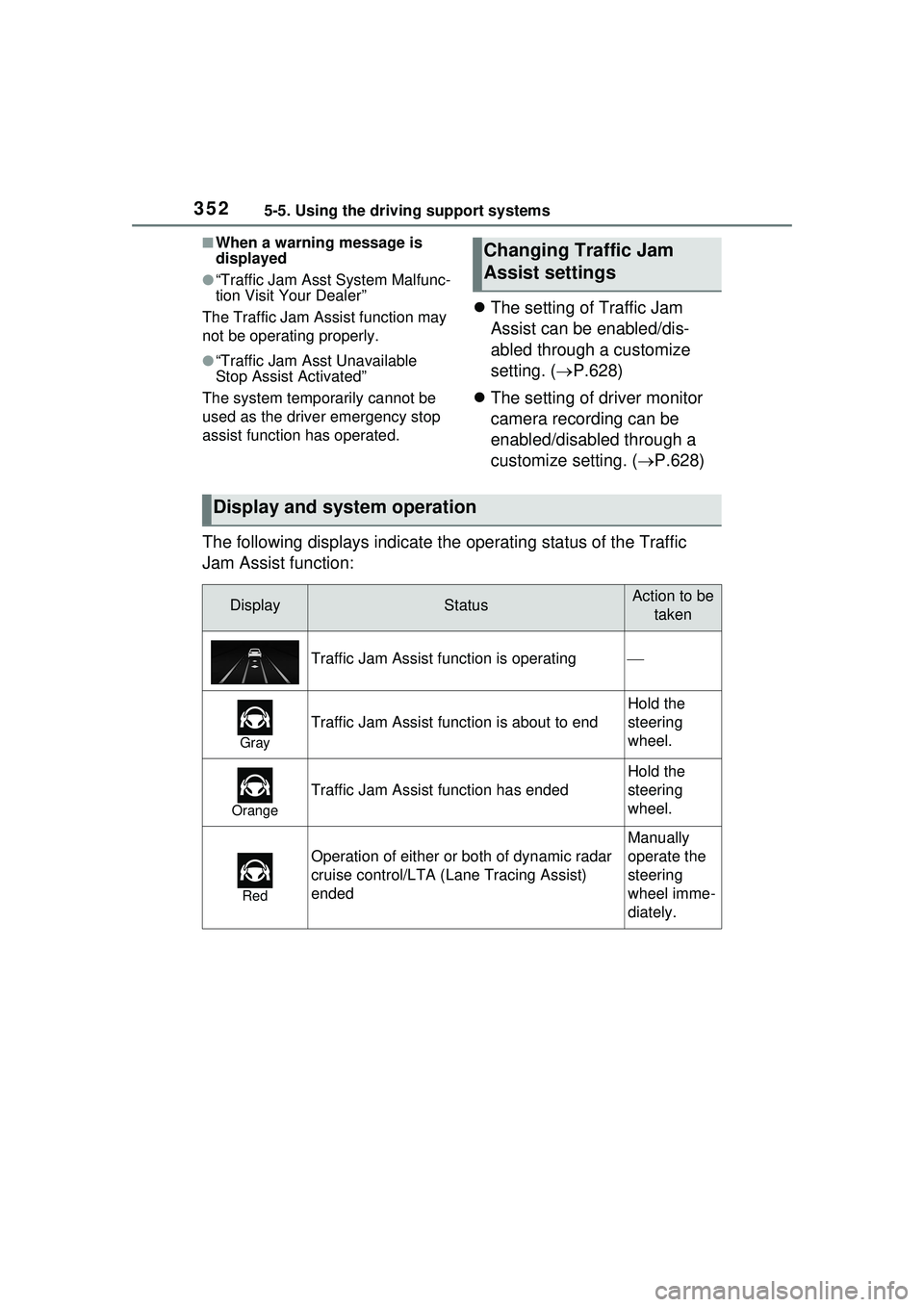
The following displays indicate the operating status of the Traffic
Jam Assist function:
Changing Traffic Jam
Assist settings
Display and system operation
DisplayStatusAction to be taken
Traffic Jam Assist function is operating
Gray
Traffic Jam Assist function is about to end
Hold the
steering
wheel.
Orange
Traffic Jam Assist function has ended
Hold the
steering
wheel.
Red
Operation of either or both of dynamic radar
cruise control/LTA ( Lane Tracing Assist)
ended
Manually
operate the
steering
wheel imme-
diately.
Page 353 of 680
3535-5. Using the driving support systems
5
Driving
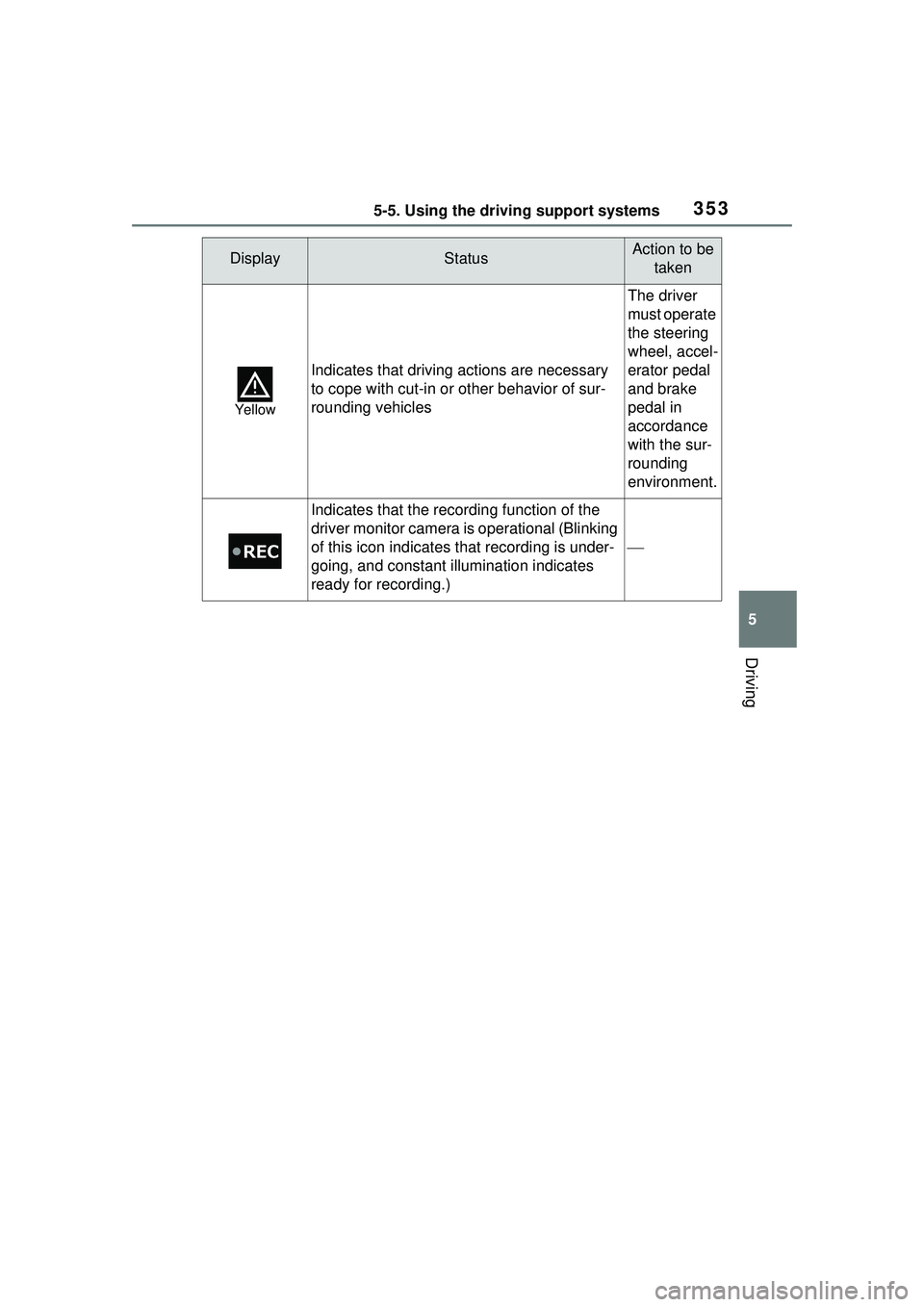
Yellow
Indicates that driving actions are necessary
to cope with cut-in or other behavior of sur-
rounding vehicles
The driver
must operate
the steering
wheel, accel-
erator pedal
and brake
pedal in
accordance
with the sur-
rounding
environment.
Indicates that the recording function of the
driver monitor camera is operational (Blinking
of this icon indicates that recording is under-
going, and constant illumination indicates
ready for recording.)
DisplayStatusAction to be taken
Page 395 of 680
3955-5. Using the driving support systems
5
Driving
■Detection area of the Parking
Support Brake function (rear
pedestrians)
The detection area of the Parking
Support Brake function (rear pedes-
trians) differs from the detection
area of the RCD function ( P.378).
Therefore, even if the RCD function
detects a pedestrian and provides
an alert, the Parking Support Brake
function (rear pedestrians) may not
start operating.
■Situations in which the system
may not operate properly
P.380
■Situations in which the system
may operate unexpectedly
P.381
*: If equipped
The Advanced Park is a system
which assists in a safe and
smooth parking or exiting from a
parking space by displaying the
blind spots around the vehicle
and the target parking spot
through a bird’s eye view, deliv-
ering operation guidance
through displays and buzzer
operation, and changing the
shift position, operating the
steering wheel, accelerator
pedal, and brake pedal.
Additionally, the panoramic view
monitor
* can display the area in
front, behind, and from above
the vehicle, helping confirm the
condition of the area around the
vehicle.
The turn signal lights will blink
automatically when the parking
assistance starts until the vehi-
cle reaches the target parking
spot, to notify people around the
vehicle that parking is being per-
formed.
Depending on the condition of
the road surface or the vehicle,
the distance between the vehi-
cle and a parking space, etc., it
may not be possible to assist in
parking in the target space.
Toyota Teammate
Advanced Park*
Function description
Page 397 of 680
3975-5. Using the driving support systems
5
Driving
WARNING
●As following objects may not be
detected, make sure to check
the safety of the area around
your vehicle and depress the
brake pedal to stop the vehicle if
it may collide with an object.
• Wires, fences, ropes, etc.
• Cotton, snow and other materi- als that absorb sound waves
• Sharply-angled objects
• Low objects (curb stones, park- ing blocks, etc.)
• Tall objects with upper sections projecting outwards in the direc-
tion of your vehicle
●Even if there is an object in the
target parking space, it may not
be detected and assistance
may be performed.
●While the system is operating, if
it is likely that your vehicle will
collide with a nearby vehicle,
parking block, object, or person,
depress the brake pedal to stop
the vehicle and press the
Advanced Park main switch to
disable the system.
●Never use only the Multimedia
Display to view the area behind
the vehicle. The image dis-
played may differ than the
actual situation. Using only the
screen when backing up may
lead to an accident, such as a
collision with anot her vehicle.
When backing up, make sure to
look directly or use the mirrors
to check the safety of the area
around your vehicle, especially
behind the vehicle.
●When the ambient temperature
is extremely low, the screen
may appear dark or the dis-
played image may become
unclear. Also, as moving
objects may appear distorted or
may not be able to be seen on
the screen, make sure to
directly check the safety of the
area around your vehicle.
●In the following situations, while
the vehicle is stopped and held
by Advanced Park, it may be
canceled and the vehicle may
start moving. Immediately
depress the brake pedal. Fail-
ure to do so may lead to an
accident.
• When the driver’s door is opened
• When operations instructed by the system are not performed
within a certain amount of time
• When the brake pedal is depressed and the vehicle is
stopped for a certain amount of
time
• When the system malfunctions
●As the steering wheel will turn
while this system is operating,
pay attention to the following.
• Be careful so that a necktie, scarf, or arm does not get
caught. Keep your upper body
away from the steering wheel.
Also, keep children away from
the steering wheel.
• Long fingernails may be caught and when the steering wheel is
rotating, leading to injury.
• In an emergency, depress the brake pedal to stop the vehicle,
and then press the Advanced
Park main switch to disable the
system.
Page 399 of 680
3995-5. Using the driving support systems
5
Driving
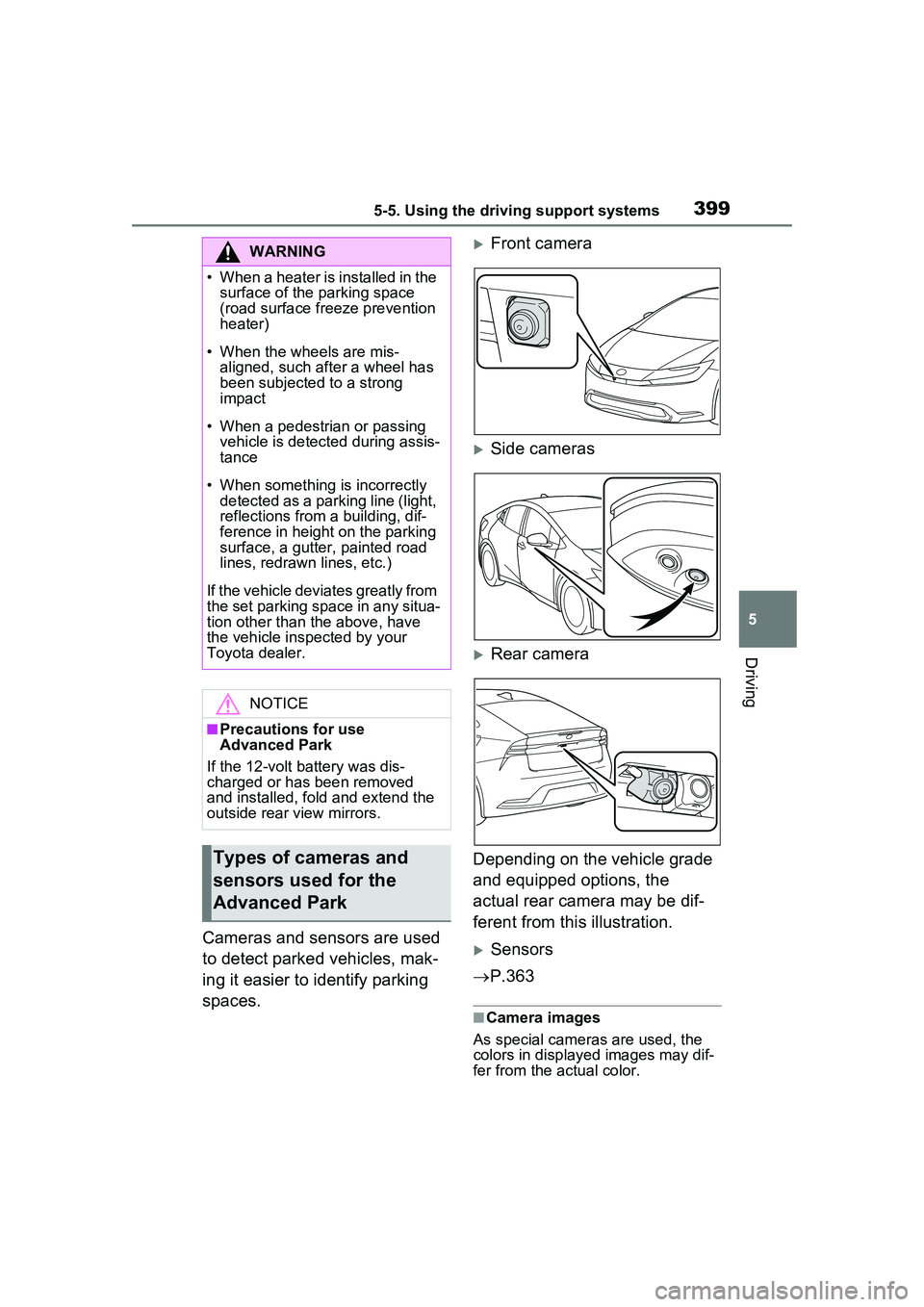
Cameras and sensors are used
to detect parked vehicles, mak-
ing it easier to identify parking
spaces.
Front camera
Side cameras
Rear camera
Depending on the vehicle grade
and equipped options, the
actual rear camera may be dif-
ferent from this illustration.
Sensors
P.363
■Camera images
As special cameras are used, the
colors in displa yed images may dif-
fer from the actual color.
WARNING
• When a heater is installed in the surface of the parking space
(road surface freeze prevention
heater)
• When the wheels are mis- aligned, such a fter a wheel has
been subjected to a strong
impact
• When a pedestrian or passing vehicle is detected during assis-
tance
• When something is incorrectly detected as a parking line (light,
reflections from a building, dif-
ference in height on the parking
surface, a gutter, painted road
lines, redrawn lines, etc.)
If the vehicle deviates greatly from
the set parking space in any situa-
tion other than the above, have
the vehicle inspected by your
Toyota dealer.
NOTICE
■Precautions for use
Advanced Park
If the 12-volt battery was dis-
charged or has been removed
and installed, fold and extend the
outside rear view mirrors.
Types of cameras and
sensors used for the
Advanced Park
Page 401 of 680
4015-5. Using the driving support systems
5
Driving
unclear
• When the appearance of the park- ing space is affected by the
shadow of the vehicle or trees
■Sensor detection information
P.365
■Objects which the sensor may
not be properly detected
P.366
■Situations in which the sensor
may not operate properly
P.366
■Situations in which parking
assistance may not operate
even if there is no possibility of
a collision
P.367
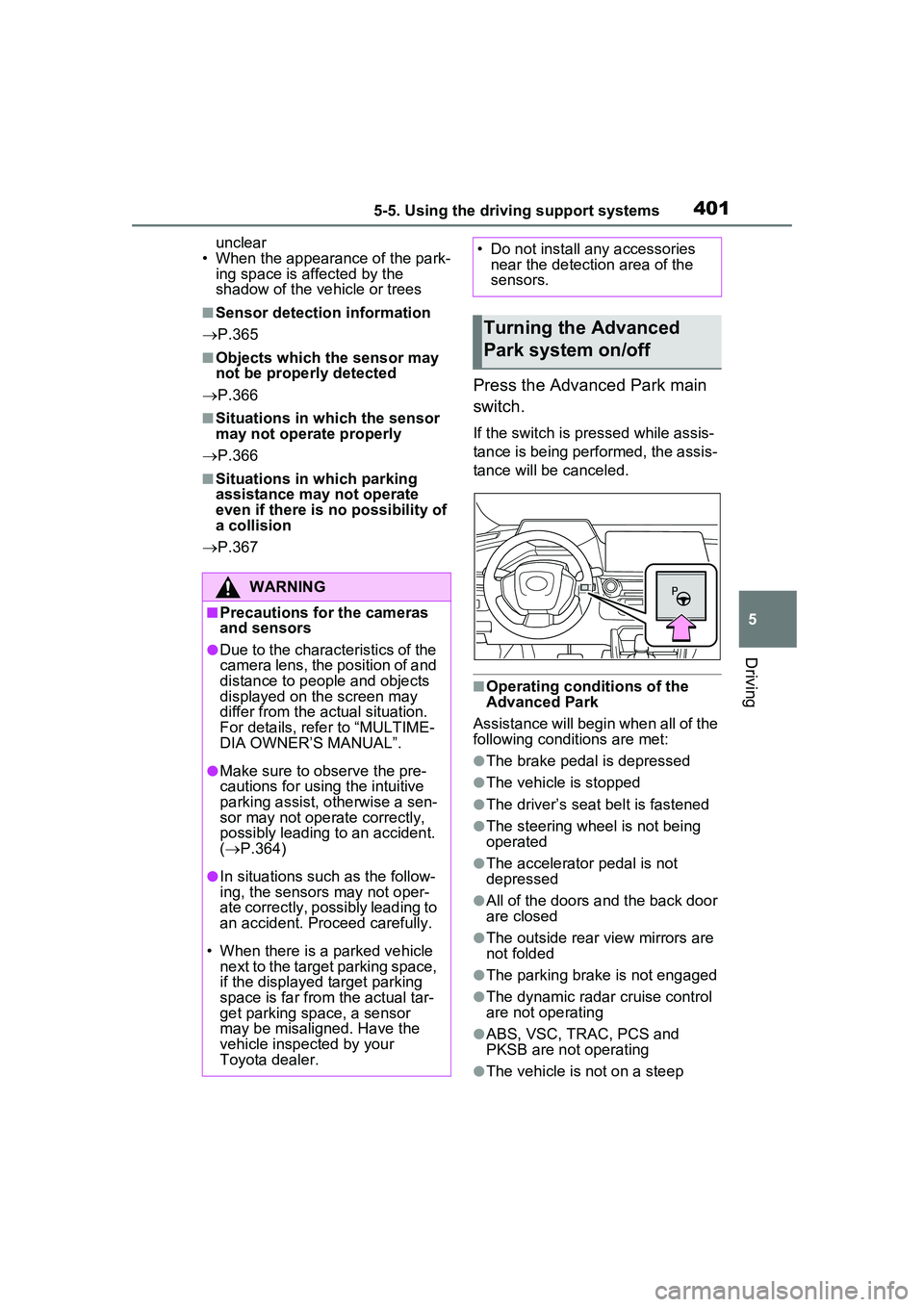
Press the Advanced Park main
switch.
If the switch is pressed while assis-
tance is being performed, the assis-
tance will be canceled.
■Operating conditions of the
Advanced Park
Assistance will begin when all of the
following conditions are met:
●The brake pedal is depressed
●The vehicle is stopped
●The driver’s seat belt is fastened
●The steering wheel is not being
operated
●The accelerator pedal is not
depressed
●All of the doors and the back door
are closed
●The outside rear view mirrors are
not folded
●The parking brake is not engaged
●The dynamic radar cruise control
are not operating
●ABS, VSC, TRAC, PCS and
PKSB are not operating
●The vehicle is not on a steep
WARNING
■Precautions for the cameras
and sensors
●Due to the characteristics of the
camera lens, the position of and
distance to people and objects
displayed on the screen may
differ from the actual situation.
For details, refer to “MULTIME-
DIA OWNER’S MANUAL”.
●Make sure to observe the pre-
cautions for using the intuitive
parking assist, otherwise a sen-
sor may not operate correctly,
possibly leading to an accident.
( P.364)
●In situations such as the follow-
ing, the sensors may not oper-
ate correctly, possibly leading to
an accident. Proceed carefully.
• When there is a parked vehicle next to the target parking space,
if the displayed target parking
space is far from the actual tar-
get parking space, a sensor
may be misaligned. Have the
vehicle inspected by your
Toyota dealer.
• Do not install any accessories near the detection area of the
sensors.
Turning the Advanced
Park system on/off
Page 407 of 680
4075-5. Using the driving support systems
5
Driving
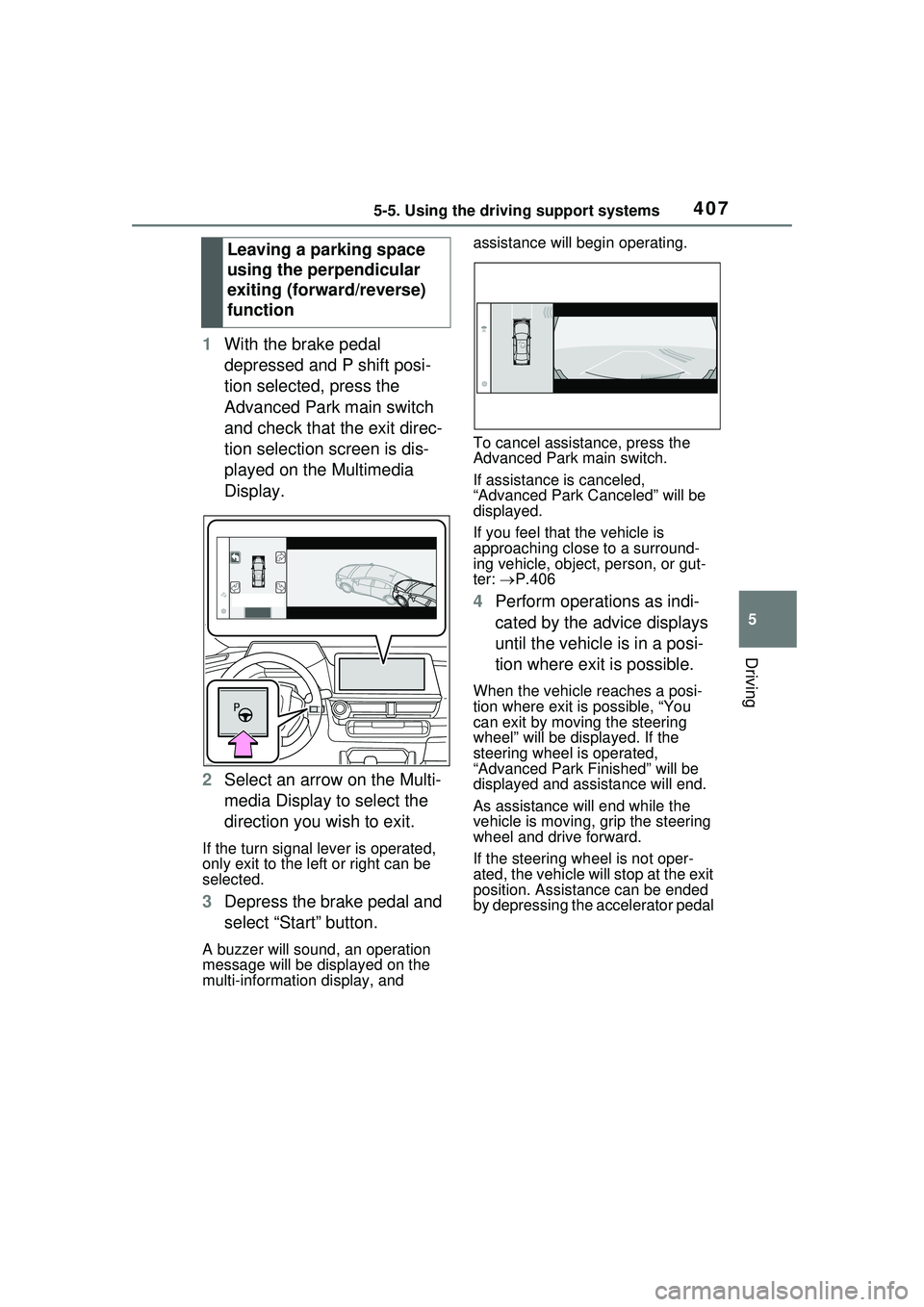
1With the brake pedal
depressed and P shift posi-
tion selected, press the
Advanced Park main switch
and check that the exit direc-
tion selection screen is dis-
played on the Multimedia
Display.
2 Select an arrow on the Multi-
media Display to select the
direction you wish to exit.
If the turn signal lever is operated,
only exit to the left or right can be
selected.
3Depress the brake pedal and
select “Start” button.
A buzzer will sound, an operation
message will be displayed on the
multi-information display, and assistance will begin operating.
To cancel assistance, press the
Advanced Park main switch.
If assistance is canceled,
“Advanced Park Canceled” will be
displayed.
If you feel that the vehicle is
approaching close to a surround-
ing vehicle, object, person, or gut-
ter:
P.406
4 Perform operations as indi-
cated by the advice displays
until the vehicle is in a posi-
tion where exit is possible.
When the vehicle reaches a posi-
tion where exit is possible, “You
can exit by moving the steering
wheel” will be displayed. If the
steering wheel is operated,
“Advanced Park Finished” will be
displayed and assistance will end.
As assistance will end while the
vehicle is moving, grip the steering
wheel and drive forward.
If the steering wheel is not oper-
ated, the vehicle will stop at the exit
position. Assistance can be ended
by depressing the accelerator pedal
Leaving a parking space
using the perpendicular
exiting (forward/reverse)
function