ABS TOYOTA PRIUS PRIME 2023 Owners Manual
[x] Cancel search | Manufacturer: TOYOTA, Model Year: 2023, Model line: PRIUS PRIME, Model: TOYOTA PRIUS PRIME 2023Pages: 680, PDF Size: 14.97 MB
Page 70 of 680
701-4. Theft deterrent system
1-4.Theft deterrent system
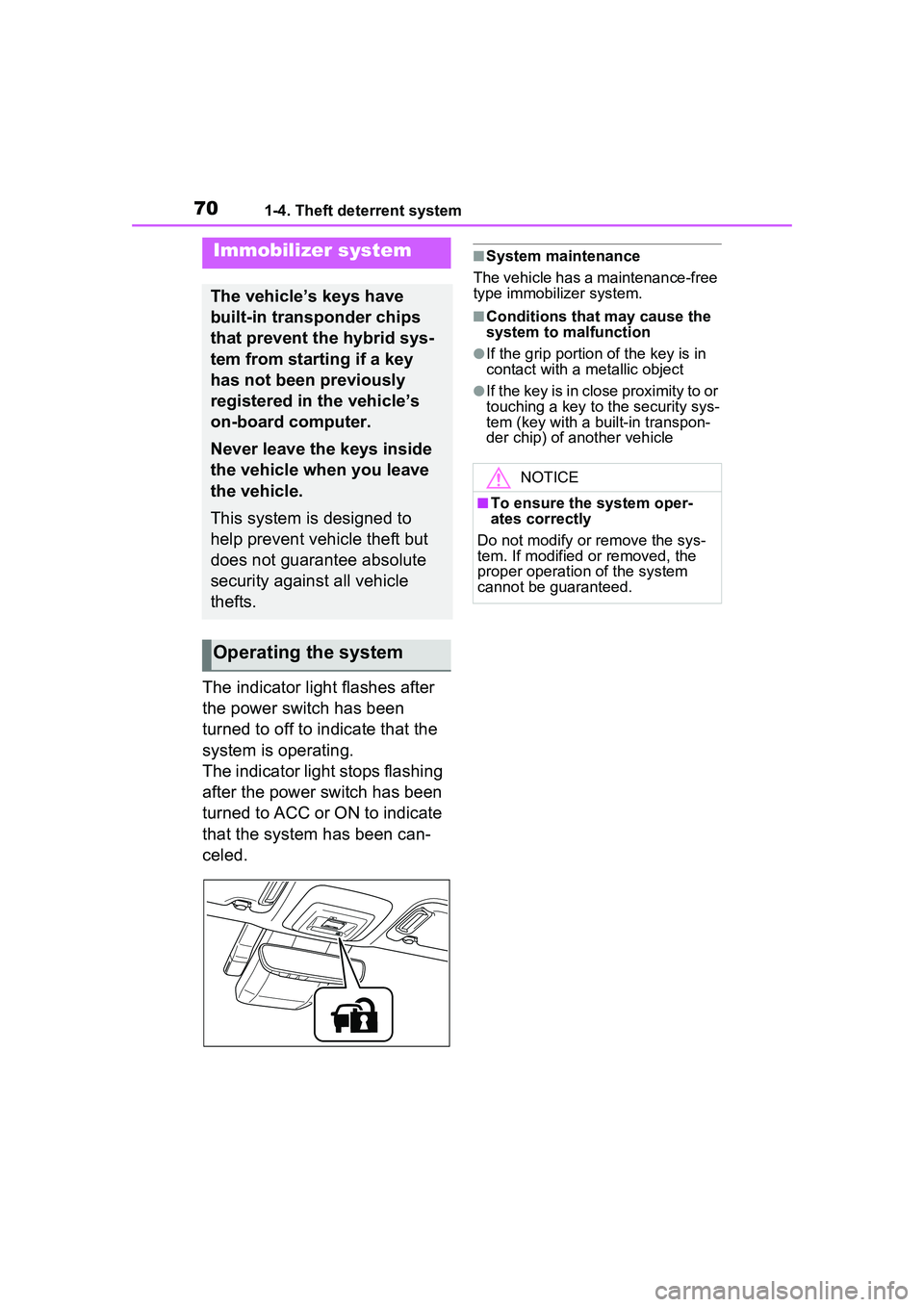
The indicator light flashes after
the power switch has been
turned to off to indicate that the
system is operating.
The indicator light stops flashing
after the power switch has been
turned to ACC or ON to indicate
that the system has been can-
celed.
■System maintenance
The vehicle has a maintenance-free
type immobilizer system.
■Conditions that may cause the
system to malfunction
●If the grip portion of the key is in
contact with a metallic object
●If the key is in close proximity to or
touching a key to the security sys-
tem (key with a built-in transpon-
der chip) of another vehicle
Immobilizer system
The vehicle’s keys have
built-in transponder chips
that prevent the hybrid sys-
tem from starting if a key
has not been previously
registered in the vehicle’s
on-board computer.
Never leave the keys inside
the vehicle when you leave
the vehicle.
This system is designed to
help prevent vehicle theft but
does not guarantee absolute
security against all vehicle
thefts.
Operating the system
NOTICE
■To ensure the system oper-
ates correctly
Do not modify or remove the sys-
tem. If modified or removed, the
proper operation of the system
cannot be guaranteed.
Page 151 of 680
1513-1. Instrument cluster
3
Vehicle status information and indicators
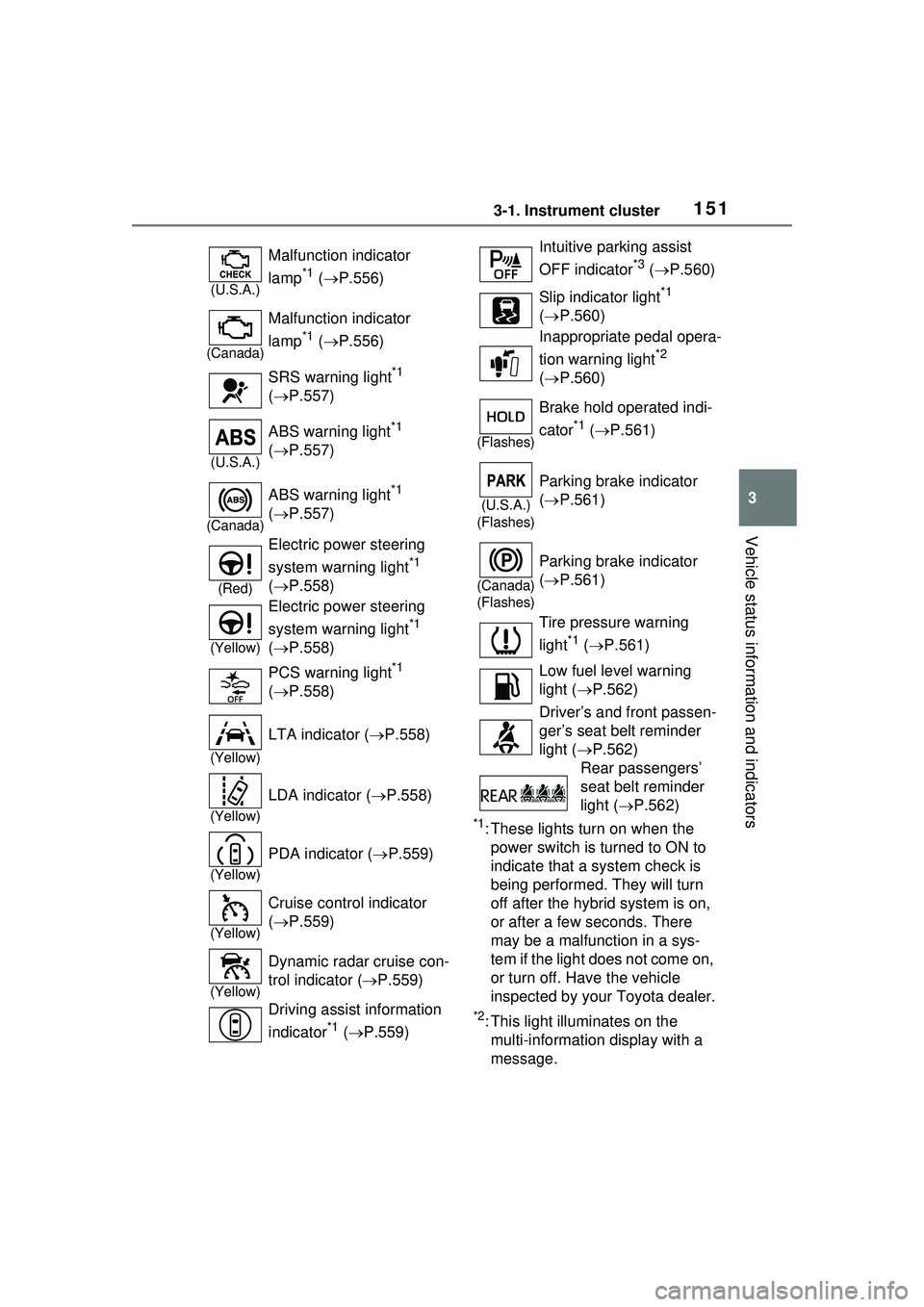
*1: These lights turn on when the power switch is turned to ON to
indicate that a system check is
being performed. They will turn
off after the hybrid system is on,
or after a few seconds. There
may be a malfunction in a sys-
tem if the light does not come on,
or turn off. Have the vehicle
inspected by your Toyota dealer.
*2: This light illuminates on the multi-informatio n display with a
message.
(U.S.A.)
Malfunction indicator
lamp
*1 ( P.556)
(Canada)
Malfunction indicator
lamp
*1 ( P.556)
SRS warning light
*1
( P.557)
(U.S.A.)
ABS warning light*1
( P.557)
(Canada)
ABS warning light*1
( P.557)
(Red)
Electric power steering
system warning light
*1
( P.558)
(Yellow)
Electric power steering
system warning light
*1
( P.558)
PCS warning light
*1
( P.558)
(Yellow)
LTA indicator ( P.558)
(Yellow)
LDA indicator ( P.558)
(Yellow)
PDA indicator ( P.559)
(Yellow)
Cruise control indicator
( P.559)
(Yellow)
Dynamic radar cruise con-
trol indicator ( P.559)
Driving assist information
indicator
*1 ( P.559)
Intuitive parking assist
OFF indicator
*3 ( P.560)
Slip indicator light
*1
( P.560)
Inappropriate pedal opera-
tion warning light
*2
( P.560)
(Flashes)
Brake hold operated indi-
cator
*1 ( P.561)
(U.S.A.)
(Flashes)
Parking brake indicator
( P.561)
(Canada)
(Flashes)
Parking brake indicator
( P.561)
Tire pressure warning
light
*1 ( P.561)
Low fuel level warning
light ( P.562)
Driver’s and front passen-
ger’s seat belt reminder
light ( P.562)
Rear passengers’
seat belt reminder
light ( P.562)
Page 152 of 680
1523-1. Instrument cluster
*3: Intuitive parking assist OFF indi-cator turns on when the power
switch is turned to ON while the
Intuitive parking assist function is
on. It will turn off after a few sec-
onds.
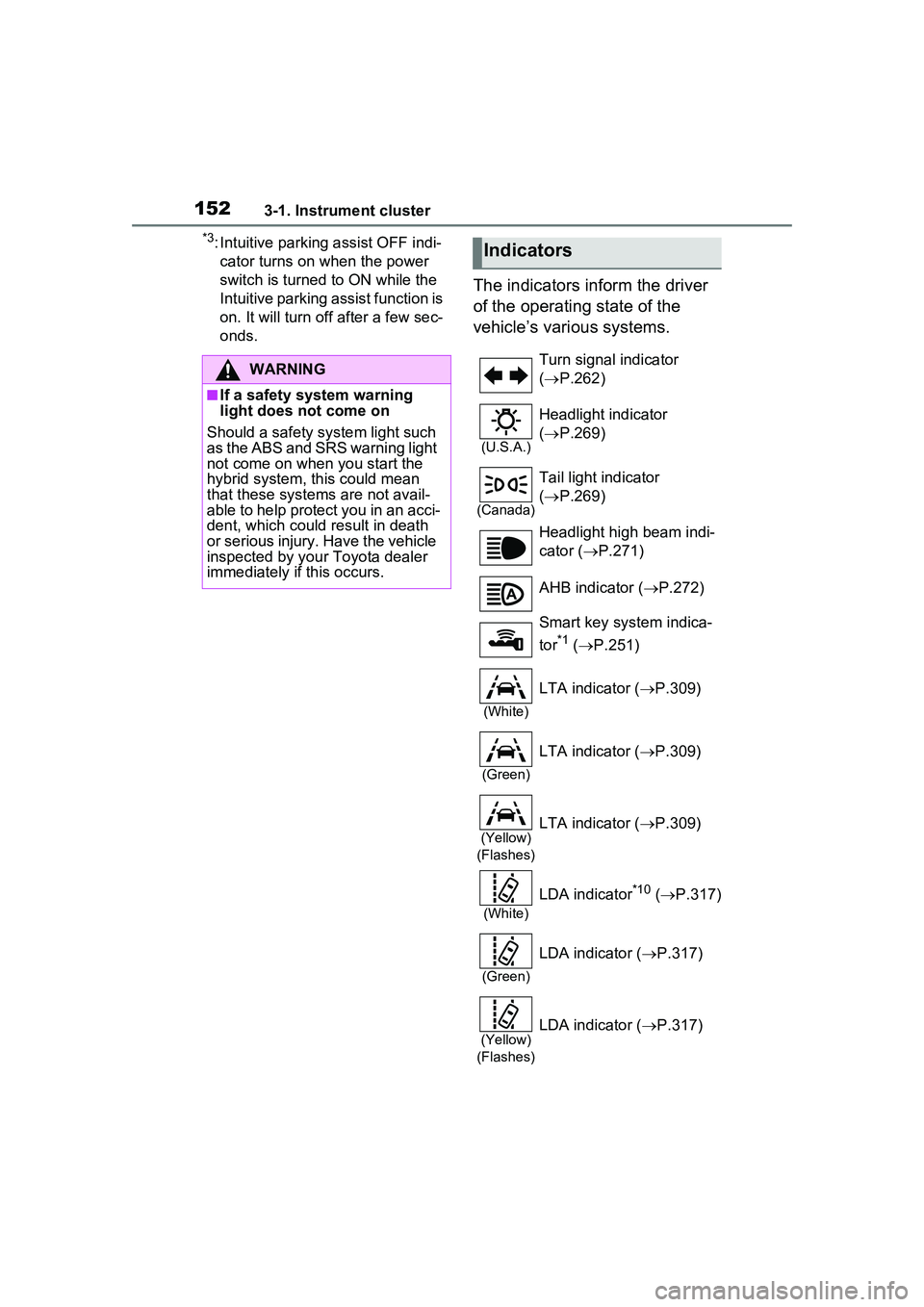
The indicators inform the driver
of the operating state of the
vehicle’s various systems.
WARNING
■If a safety system warning
light does not come on
Should a safety system light such
as the ABS and SRS warning light
not come on when you start the
hybrid system, this could mean
that these systems are not avail-
able to help protect you in an acci-
dent, which could result in death
or serious injury. Have the vehicle
inspected by your Toyota dealer
immediately if this occurs.
Indicators
Turn signal indicator
( P.262)
(U.S.A.)
Headlight indicator
( P.269)
(Canada)
Tail light indicator
( P.269)
Headlight high beam indi-
cator ( P.271)
AHB indicator ( P.272)
Smart key system indica-
tor
*1 ( P.251)
(White)
LTA indicator ( P.309)
(Green)
LTA indicator ( P.309)
(Yellow)
(Flashes)LTA indicator ( P.309)
(White)
LDA indicator*10 ( P.317)
(Green)
LDA indicator ( P.317)
(Yellow)
(Flashes)LDA indicator ( P.317)
Page 332 of 680
3325-5. Using the driving support systems
WARNING
●Set the speed appropriately
according to the speed limit,
traffic flow, road conditions,
weather conditions, etc. The
driver is responsible for confirm-
ing the set speed.
●Even if the system is operating
correctly, the condition of a pre-
ceding vehicle as recognized by
the driver and detected by the
system may differ. Therefore, it
is necessary for the driver to
pay attention, assess risks, and
ensure safety. Over-reliance on
this system to drive the vehicle
safely may lead to an accident
resulting in death or serious
injury.
■Precautions for the driving
assist systems
Observe the following precau-
tions, as there are limitations to
the assistance provided by the
system. Over-reliance on this sys-
tem may lead to an accident
resulting in death or serious
injury.
●Details of support provided for
the driver’s vision
The dynamic radar cruise control
is only intended to help the driver
in determining the distance
between the driver’s own vehicle
and a designated preceding vehi-
cle. It is not a system which allows
for careless or i nattentive driving,
and is not a system which assists
in poor visibility conditions.
The driver must pay attention to
their surroundings, even when the
vehicle stops.
●Details of support provided for
the driver’s judgement
The dynamic radar cruise control
determines whether the distance
between the driver’s own vehicle
and a designated preceding vehi-
cle is within a set range. It is not
capable of making any other type
of judgement. Therefore, it is
absolutely necessary for the
driver to remain vigilant and to
determine whether or not there is
a possibility of danger.
●Details of support provided for
the driver’s operation
The dynamic radar cruise control
does not include functions which
will prevent or avoid collisions
with vehicles ahead of your vehi-
cle. Therefore, if there is ever any
possibility of danger, the driver
must take immediate and direct
control of the vehicle and act
appropriately in order to ensure
safety.
■Situations in which the
dynamic radar cruise control
should not be used
Do not use the dynamic radar
cruise control in the following situ-
ations. As the system will not be
able to provide appropriate con-
trol, using it may lead to an acci-
dent resulting in death or serious
injury.
●Roads where there are pedes-
trians, cyclists, etc.
●When driving on a highway or
expressway entrance or exit
●When the approach warning
sounds frequently
●Situations in which the sensors
may not operate properly:
P.289
●Situations in which the lane may
not be detected: P.291
Page 366 of 680
3665-5. Using the driving support systems
■Objects which the system may
not properly detect
The shape of the object may pre-
vent the sensor from detecting it.
Pay particular attention to the fol-
lowing objects:
●Wires, fences, ropes, etc.
●Cotton, snow and other materials
that absorb sound waves
●Sharply-angled objects
●Low objects
●Tall objects with upper sections
projecting outwards in the direc-
tion of your vehicle
People may not be detected if they
are wearing certain types of cloth-
ing.
■Situations in which the system
may not operate properly
Certain vehicle conditions and the
surrounding environment may affect
the ability of a sensor to correctly
detect objects. Particular instances
where this may occur are listed
below.
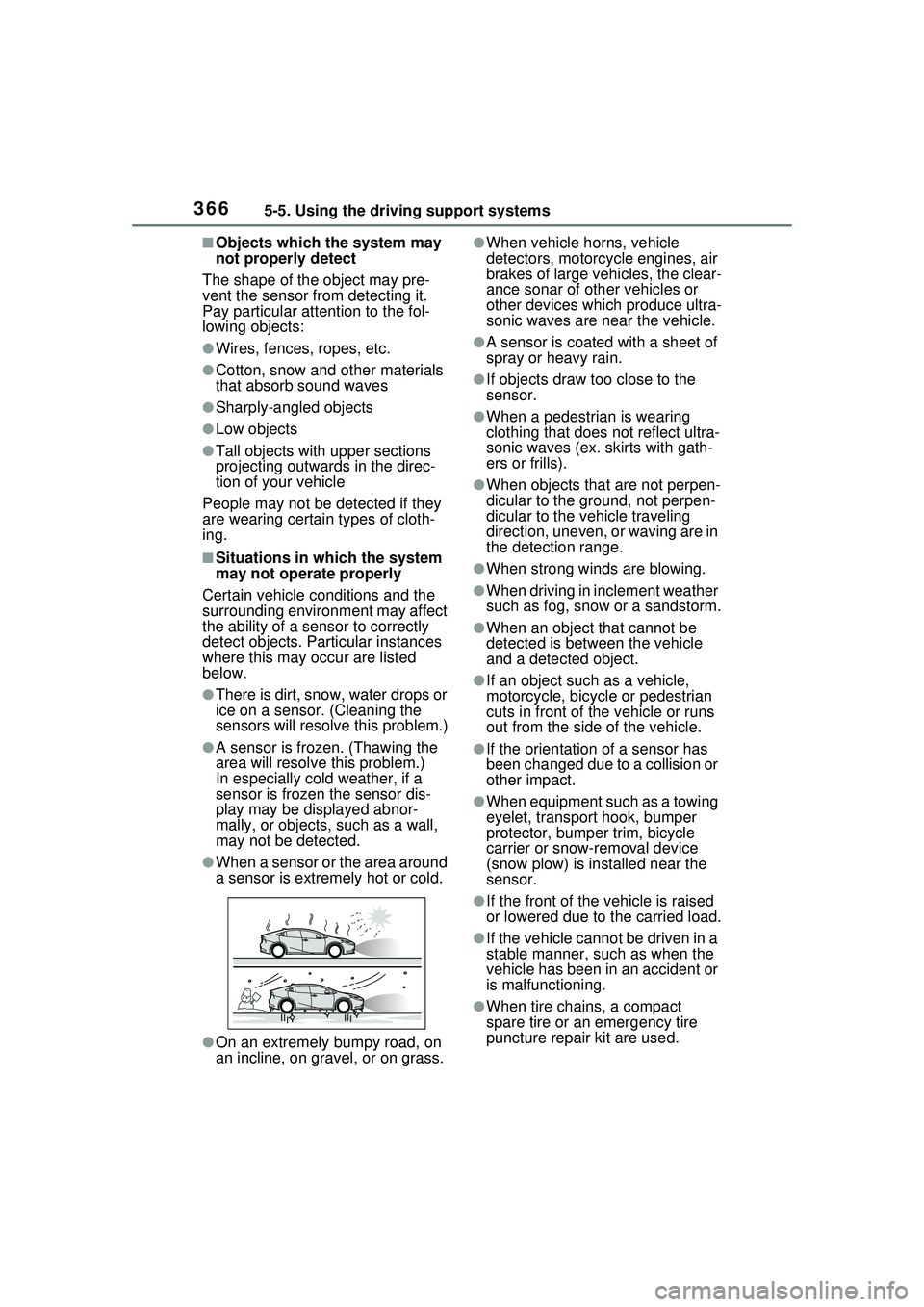
●There is dirt, snow, water drops or
ice on a sensor. (Cleaning the
sensors will resolve this problem.)
●A sensor is frozen. (Thawing the
area will resolve this problem.)
In especially cold weather, if a
sensor is frozen the sensor dis-
play may be displayed abnor-
mally, or objects, such as a wall,
may not be detected.
●When a sensor or the area around
a sensor is extremely hot or cold.
●On an extremely bumpy road, on
an incline, on gravel, or on grass.
●When vehicle horns, vehicle
detectors, motorcycle engines, air
brakes of large vehicles, the clear-
ance sonar of other vehicles or
other devices which produce ultra-
sonic waves are near the vehicle.
●A sensor is coated with a sheet of
spray or heavy rain.
●If objects draw too close to the
sensor.
●When a pedestrian is wearing
clothing that does not reflect ultra-
sonic waves (ex. skirts with gath-
ers or frills).
●When objects that are not perpen-
dicular to the ground, not perpen-
dicular to the vehicle traveling
direction, uneven, or waving are in
the detection range.
●When strong winds are blowing.
●When driving in inclement weather
such as fog, snow or a sandstorm.
●When an object that cannot be
detected is between the vehicle
and a detected object.
●If an object such as a vehicle,
motorcycle, bicycle or pedestrian
cuts in front of the vehicle or runs
out from the side of the vehicle.
●If the orientation of a sensor has
been changed due to a collision or
other impact.
●When equipment such as a towing
eyelet, transport hook, bumper
protector, bumper trim, bicycle
carrier or snow-removal device
(snow plow) is installed near the
sensor.
●If the front of the vehicle is raised
or lowered due to the carried load.
●If the vehicle cannot be driven in a
stable manner, such as when the
vehicle has been in an accident or
is malfunctioning.
●When tire chains, a compact
spare tire or an emergency tire
puncture repair kit are used.
Page 397 of 680
3975-5. Using the driving support systems
5
Driving
WARNING
●As following objects may not be
detected, make sure to check
the safety of the area around
your vehicle and depress the
brake pedal to stop the vehicle if
it may collide with an object.
• Wires, fences, ropes, etc.
• Cotton, snow and other materi- als that absorb sound waves
• Sharply-angled objects
• Low objects (curb stones, park- ing blocks, etc.)
• Tall objects with upper sections projecting outwards in the direc-
tion of your vehicle
●Even if there is an object in the
target parking space, it may not
be detected and assistance
may be performed.
●While the system is operating, if
it is likely that your vehicle will
collide with a nearby vehicle,
parking block, object, or person,
depress the brake pedal to stop
the vehicle and press the
Advanced Park main switch to
disable the system.
●Never use only the Multimedia
Display to view the area behind
the vehicle. The image dis-
played may differ than the
actual situation. Using only the
screen when backing up may
lead to an accident, such as a
collision with anot her vehicle.
When backing up, make sure to
look directly or use the mirrors
to check the safety of the area
around your vehicle, especially
behind the vehicle.
●When the ambient temperature
is extremely low, the screen
may appear dark or the dis-
played image may become
unclear. Also, as moving
objects may appear distorted or
may not be able to be seen on
the screen, make sure to
directly check the safety of the
area around your vehicle.
●In the following situations, while
the vehicle is stopped and held
by Advanced Park, it may be
canceled and the vehicle may
start moving. Immediately
depress the brake pedal. Fail-
ure to do so may lead to an
accident.
• When the driver’s door is opened
• When operations instructed by the system are not performed
within a certain amount of time
• When the brake pedal is depressed and the vehicle is
stopped for a certain amount of
time
• When the system malfunctions
●As the steering wheel will turn
while this system is operating,
pay attention to the following.
• Be careful so that a necktie, scarf, or arm does not get
caught. Keep your upper body
away from the steering wheel.
Also, keep children away from
the steering wheel.
• Long fingernails may be caught and when the steering wheel is
rotating, leading to injury.
• In an emergency, depress the brake pedal to stop the vehicle,
and then press the Advanced
Park main switch to disable the
system.
Page 401 of 680
4015-5. Using the driving support systems
5
Driving
unclear
• When the appearance of the park- ing space is affected by the
shadow of the vehicle or trees
■Sensor detection information
P.365
■Objects which the sensor may
not be properly detected
P.366
■Situations in which the sensor
may not operate properly
P.366
■Situations in which parking
assistance may not operate
even if there is no possibility of
a collision
P.367
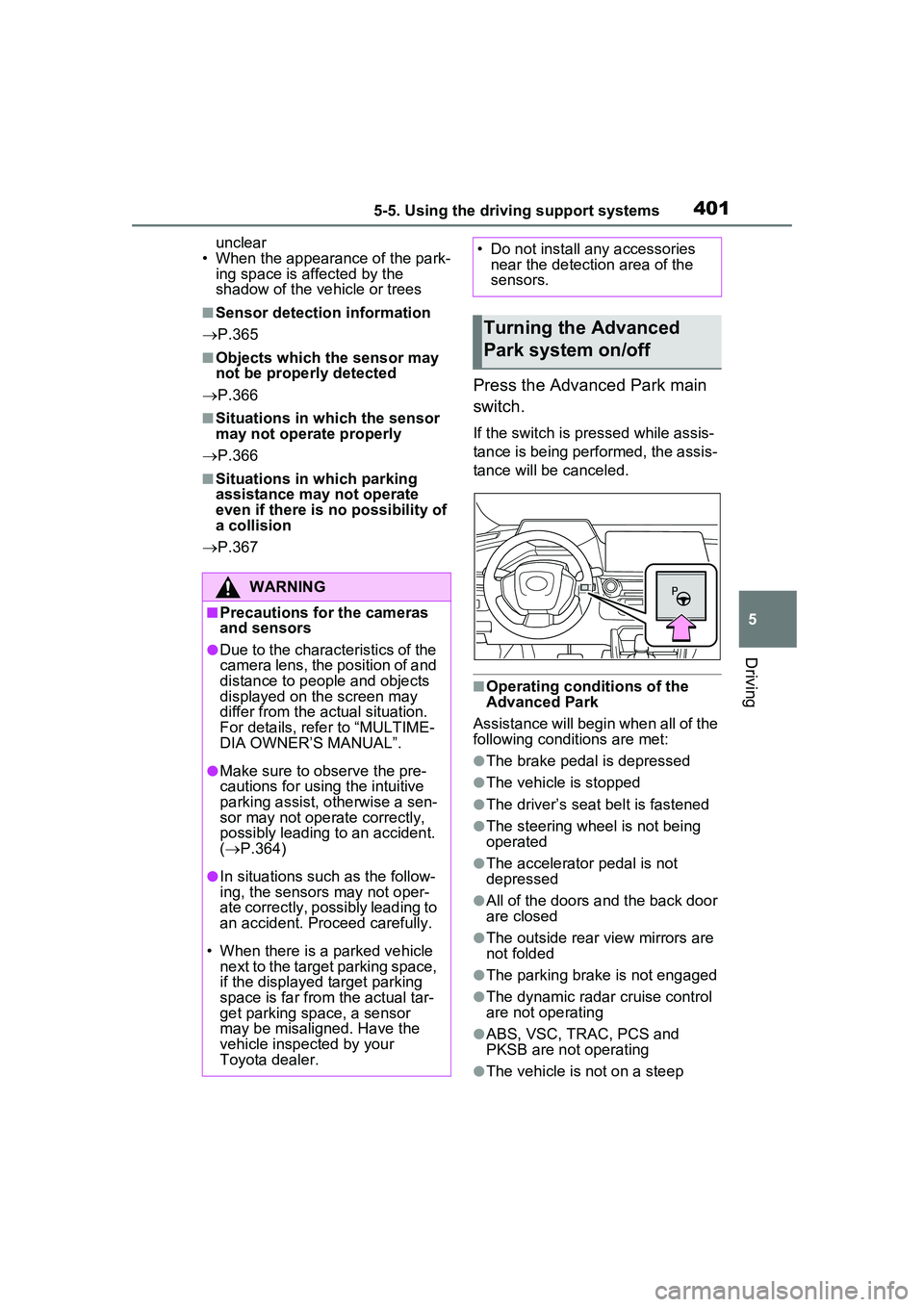
Press the Advanced Park main
switch.
If the switch is pressed while assis-
tance is being performed, the assis-
tance will be canceled.
■Operating conditions of the
Advanced Park
Assistance will begin when all of the
following conditions are met:
●The brake pedal is depressed
●The vehicle is stopped
●The driver’s seat belt is fastened
●The steering wheel is not being
operated
●The accelerator pedal is not
depressed
●All of the doors and the back door
are closed
●The outside rear view mirrors are
not folded
●The parking brake is not engaged
●The dynamic radar cruise control
are not operating
●ABS, VSC, TRAC, PCS and
PKSB are not operating
●The vehicle is not on a steep
WARNING
■Precautions for the cameras
and sensors
●Due to the characteristics of the
camera lens, the position of and
distance to people and objects
displayed on the screen may
differ from the actual situation.
For details, refer to “MULTIME-
DIA OWNER’S MANUAL”.
●Make sure to observe the pre-
cautions for using the intuitive
parking assist, otherwise a sen-
sor may not operate correctly,
possibly leading to an accident.
( P.364)
●In situations such as the follow-
ing, the sensors may not oper-
ate correctly, possibly leading to
an accident. Proceed carefully.
• When there is a parked vehicle next to the target parking space,
if the displayed target parking
space is far from the actual tar-
get parking space, a sensor
may be misaligned. Have the
vehicle inspected by your
Toyota dealer.
• Do not install any accessories near the detection area of the
sensors.
Turning the Advanced
Park system on/off
Page 419 of 680
4195-5. Using the driving support systems
5
Driving
■Assistance will be can-
celed when
In situations such as the follow-
ing, Advanced Park operation
will be canceled. Firmly hold the
steering wheel and depress the
brake pedal to stop the vehicle.
As system operation has been
canceled, begin the operation
again or continue parking manu-
ally, using the steering wheel.
The Advanced Park main
switch is pushed
The shift position has been
changed to P
The parking brake is engaged
A door or the back door is
opened
The driver’s seat belt is unfas-
tened
The outside rear view mirrors
are folded
The TRAC or VSC is turned
off
The TRAC, VSC or ABS oper-
ates
The power switch is pressed
The system determines assis-
tance cannot be continued in
the current parking environ-
ment
The system malfunctions
While the vehicle was stopped, “Cancel” was
selected on the Multimedia
Display■Assistance will be sus-
pended when
In situations such as the follow-
ing, Advanced Park operation
will be suspended.
Assistance can be started again
by following the directions dis-
played on the Multimedia Dis-
play.
Also, when assistance is sus-
pended, if the shift position is
changed twice with the brake
pedal depressed, assistance will
be canceled in that shift posi-
tion. However, if assistance is
suspended by changing the shift
position, assistance will be can-
celed if the shift position is
changed once.
The steering wheel is oper-
ated
The accelerator pedal is
depressed
The shift position has been
changed
A moving object or stationary
object that may collide with
your vehicle has been
detected, resulting in the
operation of the hybrid system
output control/braking control.
Camera switch is pressed
Advanced Park cancel-
ation/suspension
Page 424 of 680
4245-5. Using the driving support systems
■ECB (Electronically Con-
trolled Brake System)
The electronically controlled
system generates braking force
corresponding to the brake
operation
■ABS (Anti-lock Brake Sys-
tem)
Helps to prevent wheel lock
when the brakes are applied
suddenly, or if the brakes are
applied while driving on a slip-
pery road surface
■Brake assist
Generates an increased level of
braking force after the brake
pedal is depressed when the
system detects a panic stop sit-
uation
■VSC (Vehicle Stability Con-
trol)
Helps the driver to control skid-
ding when swerving suddenly or
turning on slippery road sur-
faces.
■Enhanced VSC (Enhanced
Vehicle Stability Control)
Provides cooperative control of
the ABS, TRAC, VSC and EPS.
Helps to maintain directional
stability when swerving on slip-
pery road surfaces by con-
trolling steering performance.
■TRAC (Traction Control)
Helps to maintain drive power
and prevent the drive wheels
from spinning when starting the
vehicle or accelerating on slip-
pery roads
■Active Cornering Assist
(ACA)
Helps to prevent the vehicle
from drifting to the outer side by
performing inner wheel brake
control when attempting to
accelerate while turning
■Hill-start assist control
Helps to reduce the backward
movement of the vehicle when
starting on an uphill
■EPS (Electric Power Steer-
ing)
Employs an electric motor to
reduce the amount of effort
needed to turn the steering
Driving assist systems
To keep driving safety and
performance, the following
systems operate automati-
cally in response to various
driving situations. Be
aware, however, that these
systems are supplementary
and should not be relied
upon too heavily when oper-
ating the vehicle.
Summary of the driving
assist systems
Page 425 of 680
4255-5. Using the driving support systems
5
Driving
wheel.
■The Secondary Collision
Brake
When the SRS airbag sensor
detects a collision and the sys-
tem operates, the brakes and
brake lights are automatically
controlled to reduce the vehicle
speed and help reduce the pos-
sibility of further damage due to
a secondary collision.
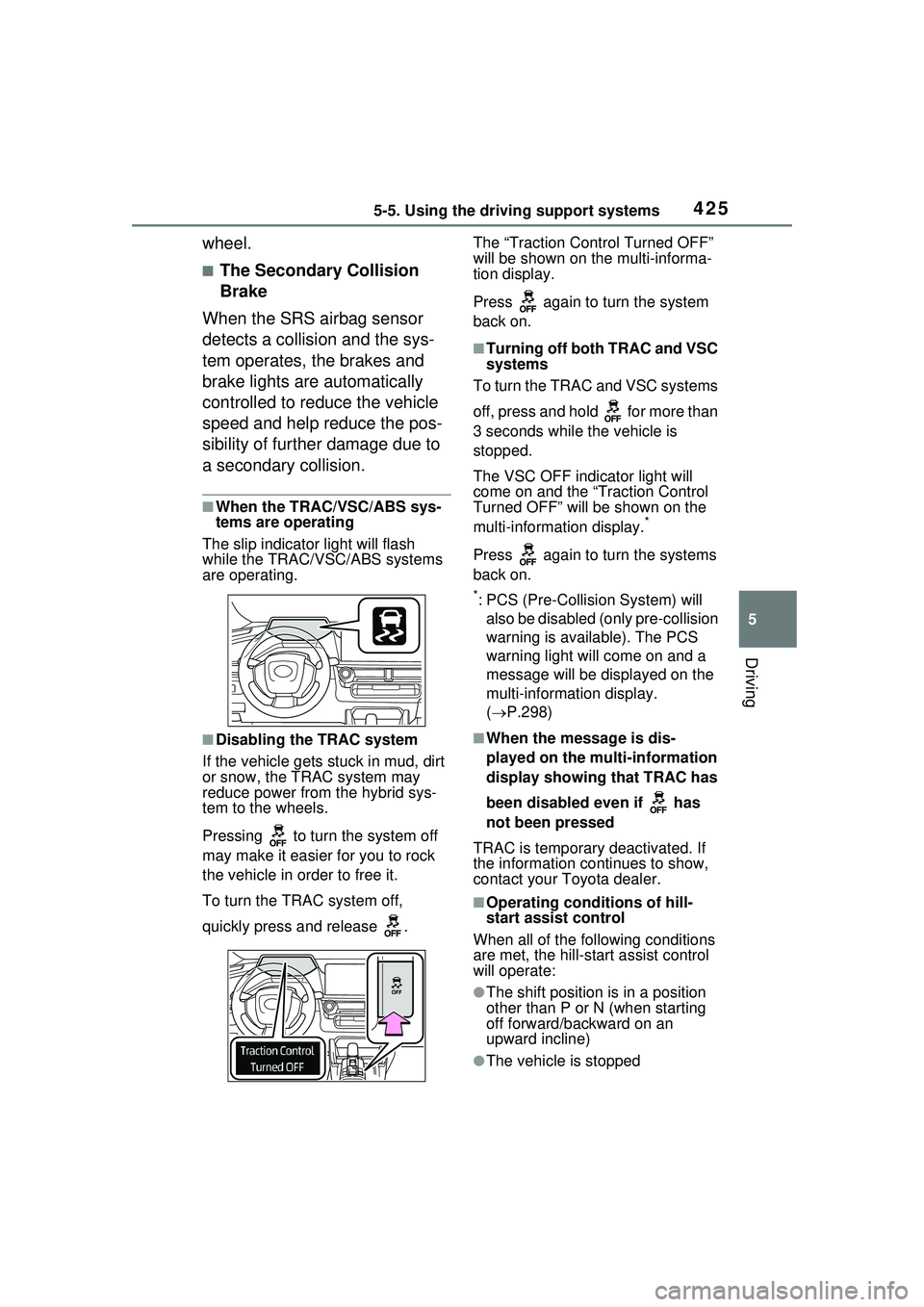
■When the TRAC/VSC/ABS sys-
tems are operating
The slip indicator light will flash
while the TRAC/VSC/ABS systems
are operating.
■Disabling the TRAC system
If the vehicle gets stuck in mud, dirt
or snow, the TRAC system may
reduce power from the hybrid sys-
tem to the wheels.
Pressing to turn the system off
may make it easier for you to rock
the vehicle in order to free it.
To turn the TRAC system off,
quickly press and release . The “Traction Control Turned OFF”
will be shown on the multi-informa-
tion display.
Press again to turn the system
back on.
■Turning off both TRAC and VSC
systems
To turn the TRAC and VSC systems
off, press and hold for more than
3 seconds while the vehicle is
stopped.
The VSC OFF indicator light will
come on and the “Traction Control
Turned OFF” will be shown on the
multi-informat ion display.
*
Press again to turn the systems
back on.
*: PCS (Pre-Collision System) will
also be disabled (only pre-collision
warning is available). The PCS
warning light will come on and a
message will be disp layed on the
multi-information display.
( P.298)
■When the message is dis-
played on the mu lti-information
display showing that TRAC has
been disabled even if has
not been pressed
TRAC is temporary deactivated. If
the information continues to show,
contact your Toyota dealer.
■Operating conditions of hill-
start assist control
When all of the following conditions
are met, the hill-start assist control
will operate:
●The shift position is in a position
other than P or N (when starting
off forward/backward on an
upward incline)
●The vehicle is stopped