radio TOYOTA PRIUS V 2013 Accessories, Audio & Navigation (in English)
[x] Cancel search | Manufacturer: TOYOTA, Model Year: 2013, Model line: PRIUS V, Model: TOYOTA PRIUS V 2013Pages: 228, PDF Size: 3.73 MB
Page 106 of 228
106
1. AUDIO SYSTEM OPERATION
3. RADIO OPERATION
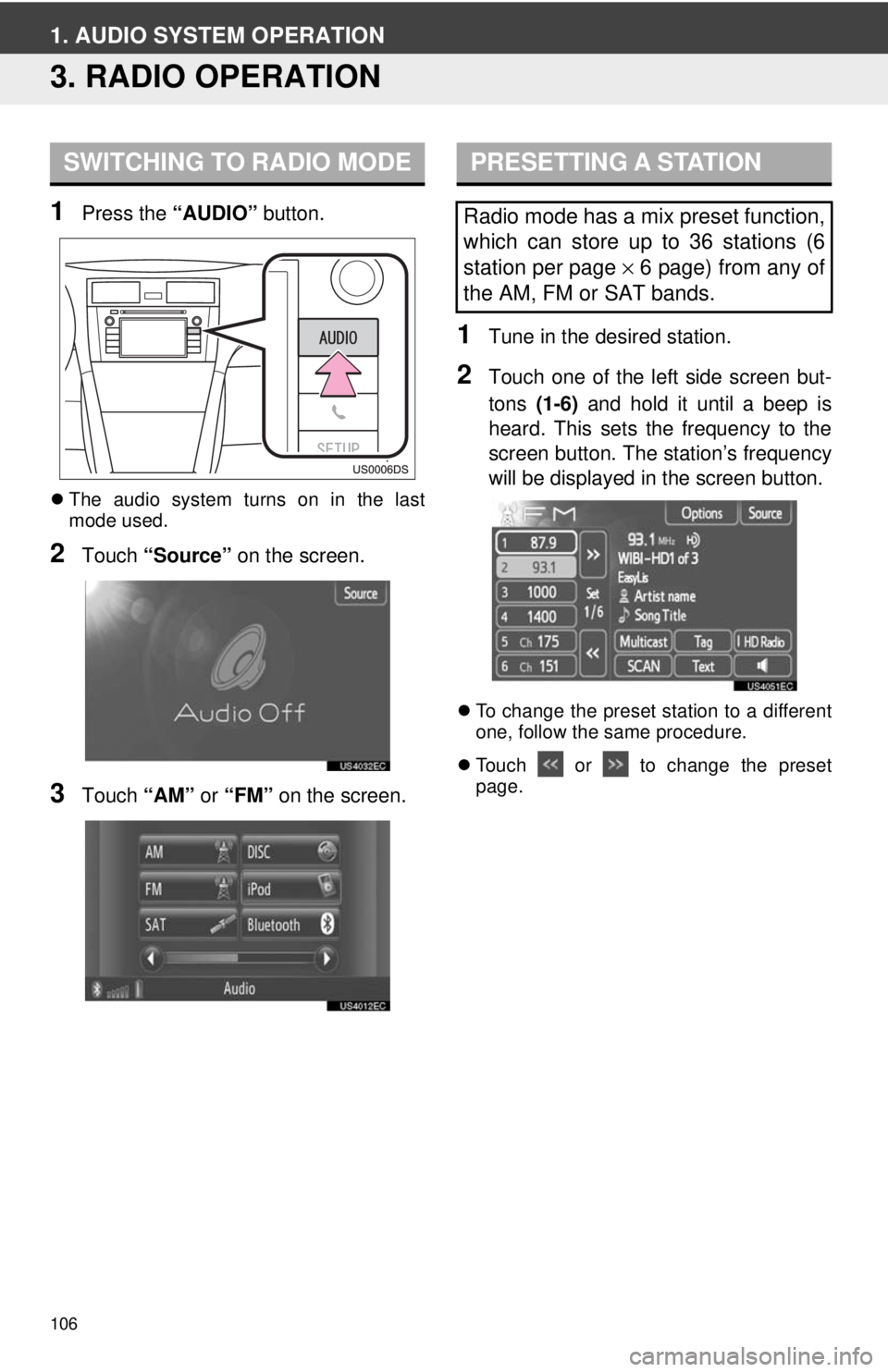
1Press the “AUDIO” button.
The audio system turns on in the last
mode used.
2Touch “Source” on the screen.
3Touch “AM” or “FM” on the screen.
1Tune in the desired station.
2Touch one of the left side screen but-
tons (1-6) and hold it until a beep is
heard. This sets the frequency to the
screen button. The station’s frequency
will be displayed in the screen button.
To change the preset station to a different
one, follow the same procedure.
Touch or to change the preset
page.
SWITCHING TO RADIO MODEPRESETTING A STATION
Radio mode has a mix preset function,
which can store up to 36 stations (6
station per page × 6 page) from any of
the AM, FM or SAT bands.
Page 107 of 228
107
1. AUDIO SYSTEM OPERATION
4
AUDIO SYSTEM
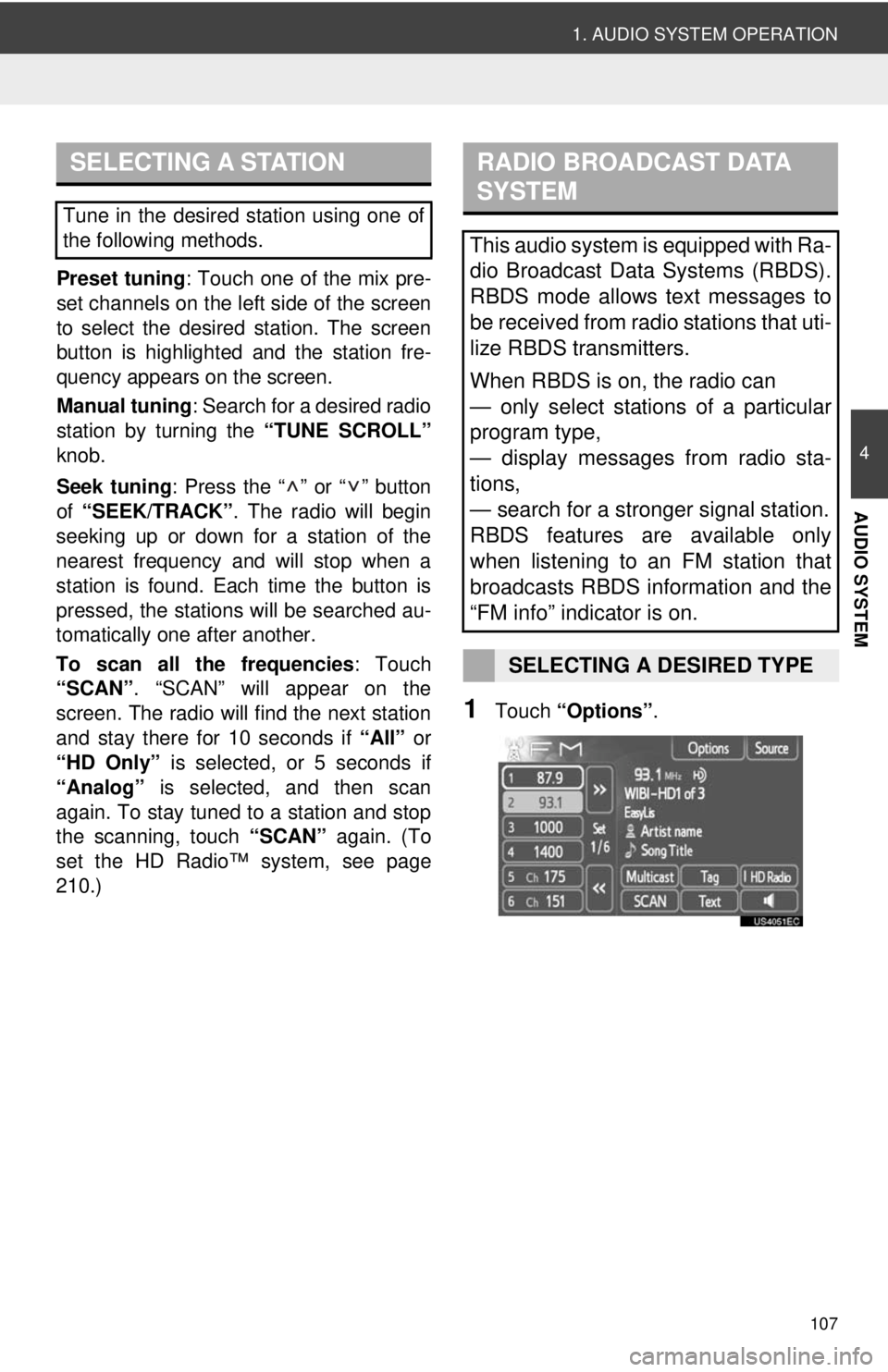
Preset tuning: Touch one of the mix pre-
set channels on the left side of the screen
to select the desired station. The screen
button is highlighted and the station fre-
quency appears on the screen.
Manual tuning: Search for a desired radio
station by turning the “TUNE SCROLL”
knob.
Seek tuning : Press the “ ” or “ ” button
of “SEEK/TRACK” . The radio will begin
seeking up or down for a station of the
nearest frequency and will stop when a
station is found. Ea ch time the button is
pressed, the stations will be searched au-
tomatically one after another.
To scan all the frequencies : Touch
“SCAN” . “SCAN” will appear on the
screen. The radio will find the next station
and stay there for 10 seconds if “All” or
“HD Only” is selected, or 5 seconds if
“Analog” is selected, and then scan
again. To stay tuned to a station and stop
the scanning, touch “SCAN” again. (To
set the HD Radio™ system, see page
210.)
1Touch “Options”.
SELECTING A STATION
Tune in the desired station using one of
the following methods.
RADIO BROADCAST DATA
SYSTEM
This audio system is equipped with Ra-
dio Broadcast Data Systems (RBDS).
RBDS mode allows text messages to
be received from radio stations that uti-
lize RBDS transmitters.
When RBDS is on, the radio can
— only select stations of a particular
program type,
— display messages from radio sta-
tions,
— search for a stronger signal station.
RBDS features are available only
when listening to an FM station that
broadcasts RBDS information and the
“FM info” indicator is on.
SELECTING A DESIRED TYPE
Page 108 of 228
108
1. AUDIO SYSTEM OPERATION
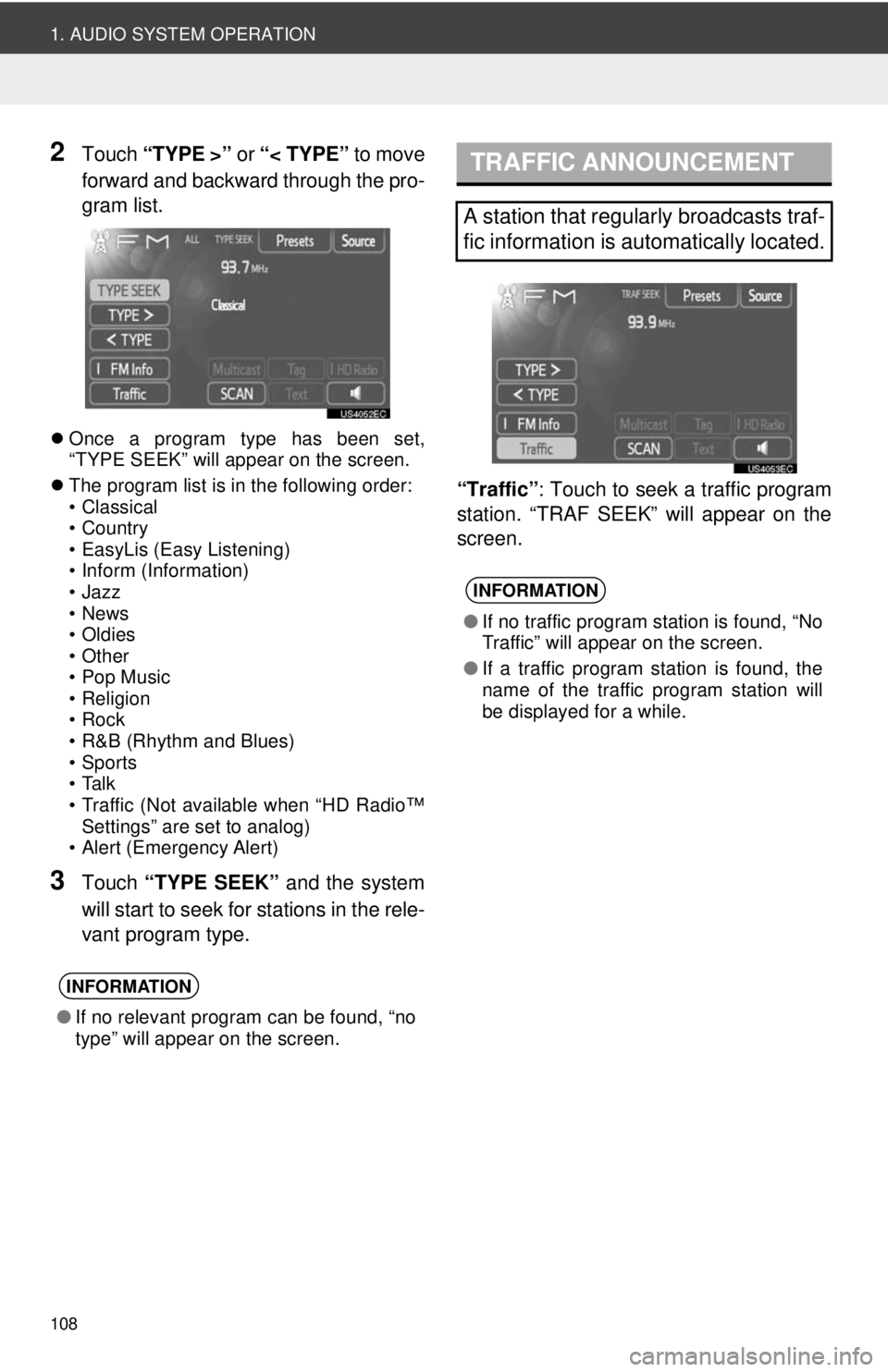
2Touch “TYPE >” or “< TYPE” to move
forward and backward through the pro-
gram list.
Once a program type has been set,
“TYPE SEEK” will appear on the screen.
The program list is in the following order:
• Classical
• Country
• EasyLis (Easy Listening)
• Inform (Information)
•Jazz
•News
• Oldies
•Other
• Pop Music
•Religion
•Rock
• R&B (Rhythm and Blues)
• Sports
•Talk
• Traffic (Not available when “HD Radio™
Settings” are set to analog)
• Alert (Emergency Alert)
3Touch “TYPE SEEK” and the system
will start to seek for stations in the rele-
vant program type. “Traffic”
: Touch to seek a traffic program
station. “TRAF SEEK” will appear on the
screen.
INFORMATION
● If no relevant program can be found, “no
type” will appear on the screen.
TRAFFIC ANNOUNCEMENT
A station that regularly broadcasts traf-
fic information is automatically located.
INFORMATION
●If no traffic program station is found, “No
Traffic” will appear on the screen.
● If a traffic program station is found, the
name of the traffic program station will
be displayed for a while.
Page 109 of 228
109
1. AUDIO SYSTEM OPERATION
4
AUDIO SYSTEM
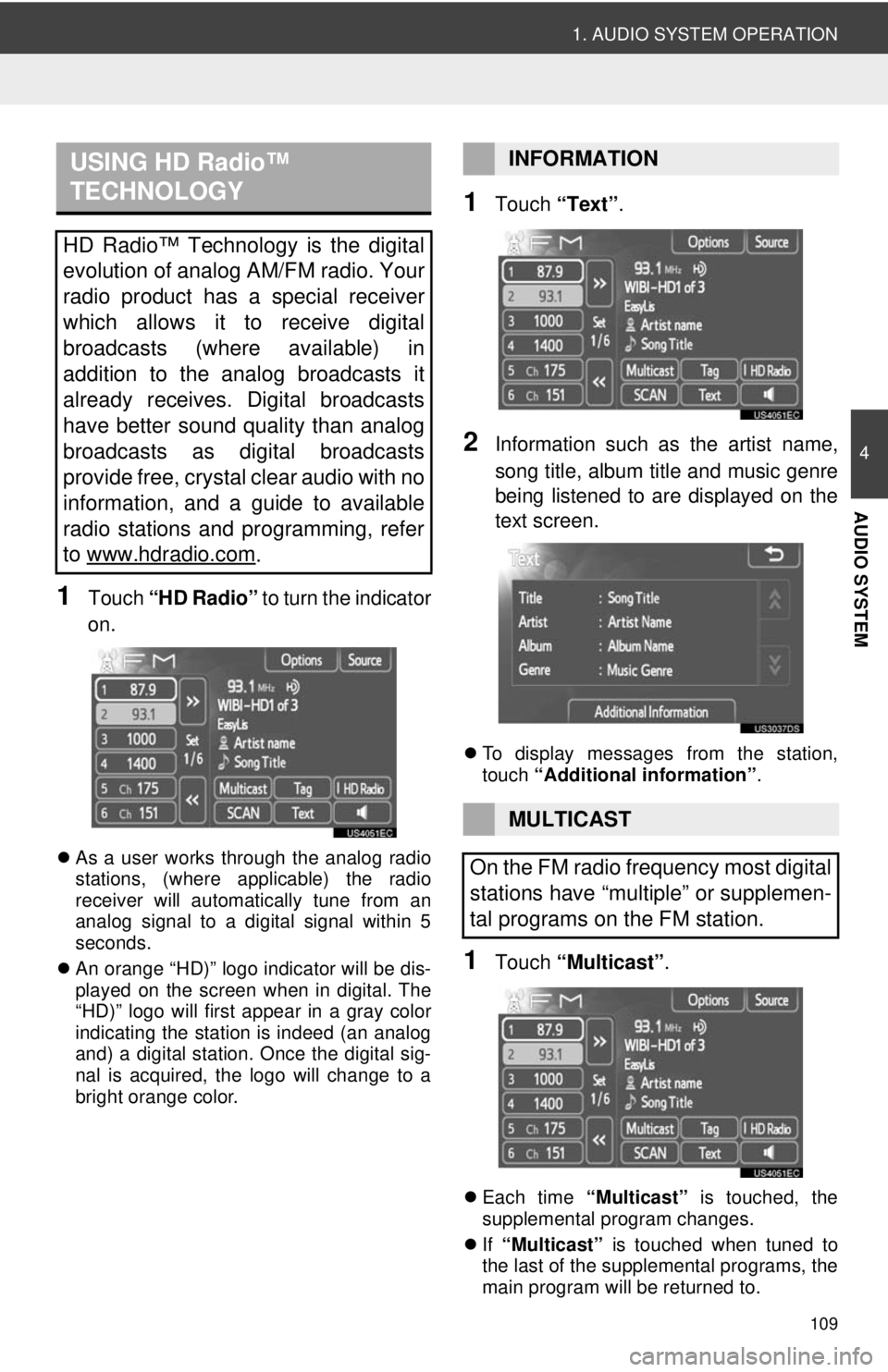
1Touch “HD Radio” to turn the indicator
on.
As a user works through the analog radio
stations, (where applicable) the radio
receiver will automatically tune from an
analog signal to a digital signal within 5
seconds.
An orange “HD)” logo indicator will be dis-
played on the screen when in digital. The
“HD)” logo will first appear in a gray color
indicating the station is indeed (an analog
and) a digital station. Once the digital sig-
nal is acquired, the logo will change to a
bright orange color.
1Touch “Text”.
2Information such as the artist name,
song title, album title and music genre
being listened to are displayed on the
text screen.
To display messages from the station,
touch “Additional information” .
1Touch “Multicast” .
Each time “Multicast” is touched, the
supplemental program changes.
If “Multicast” is touched when tuned to
the last of the supplemental programs, the
main program will be returned to.
USING HD Radio™
TECHNOLOGY
HD Radio™ Technology is the digital
evolution of analog AM/FM radio. Your
radio product has a special receiver
which allows it to receive digital
broadcasts (where available) in
addition to the analog broadcasts it
already receives. Digital broadcasts
have better sound quality than analog
broadcasts as digital broadcasts
provide free, crystal clear audio with no
information, and a guide to available
radio stations and programming, refer
to www.hdradio.com
.
INFORMATION
MULTICAST
On the FM radio frequency most digital
stations have “multiple” or supplemen-
tal programs on the FM station.
Page 110 of 228
110
1. AUDIO SYSTEM OPERATION
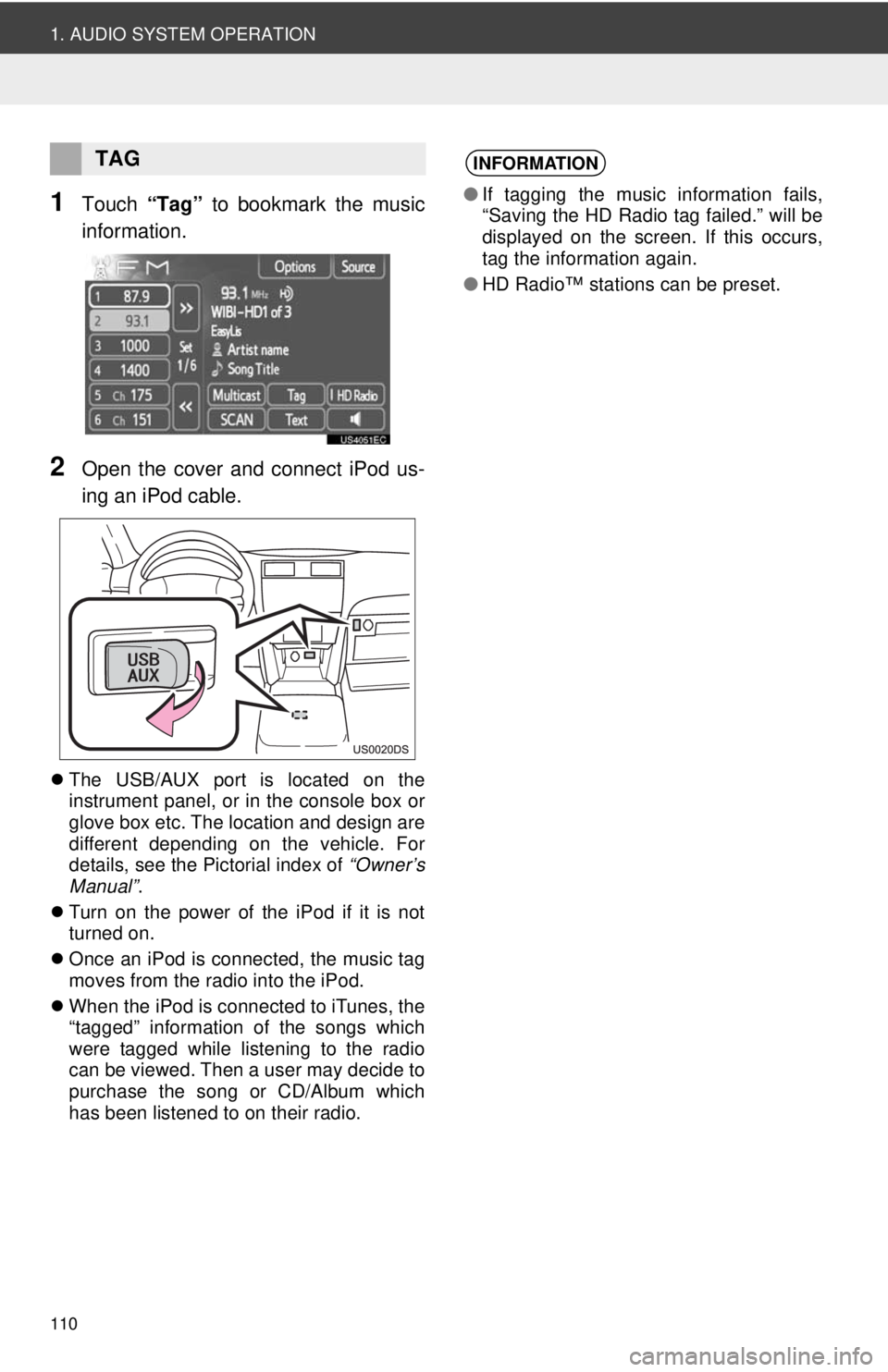
1Touch “Tag” to bookmark the music
information.
2Open the cover and connect iPod us-
ing an iPod cable.
The USB/AUX port is located on the
instrument panel, or in the console box or
glove box etc. The location and design are
different depending on the vehicle. For
details, see the Pictorial index of “Owner’s
Manual” .
Turn on the power of the iPod if it is not
turned on.
Once an iPod is connected, the music tag
moves from the radio into the iPod.
When the iPod is connected to iTunes, the
“tagged” information of the songs which
were tagged while listening to the radio
can be viewed. Then a user may decide to
purchase the song or CD/Album which
has been listened to on their radio.
TAGINFORMATION
●If tagging the music information fails,
“Saving the HD Radio tag failed.” will be
displayed on the screen. If this occurs,
tag the information again.
● HD Radio™ stations can be preset.
Page 111 of 228
111
1. AUDIO SYSTEM OPERATION
4
AUDIO SYSTEM
TROUBLESHOOTING GUIDE
ExperienceCauseAction
Mismatch of time alignment
a users may hear a short
period of programming re-
played or an echo, stutter
or skip.The radio stations analog
and digital volume is not
properly aligned or the sta-
tion is in ballgame mode.
None, radio broadcast issue. A
user can contact the radio station.
Sound fades, blending in
and out.Radio is shifting between
analog and digital audio.
Reception issue, may clear-up as
the vehicle continues to be driven.
Touching “HD Radio” with the in-
dicator off can force radio in an an-
alog audio.
Audio mute condition when
an HD2/HD3 multicast
channel has been playing.The radio does not have
access to digital signals at
the moment.This is normal behavior, wait until
the digital signal returns. If out of
the coverage area, seek a new
station.
Audio mute delay when se-
lecting an HD2/HD3 multi-
cast channel preset.
The digital multicast con-
tent is not available until
HD Radio™ broadcast can
be decoded and make the
audio available. This takes
up to 7 seconds.
This is normal behavior, wait for
the audio to become available.
Text information does not
match the present song au-
dio.Data service issue by the
radio broadcaster.
Broadcaster should be notified.
Complete the form;
www.ibiquity.com/automotive/
report_radio_station_experiences.
No text information shown
for the present selected fre-
quency.Data service issue by the
radio broadcaster.Broadcaster should be notified.
Complete the form;
www.ibiquity.com/automotive/
report_radio_station_experiences.
HD Radio Technology manufactured under li cense from iBiquity Digital Corpora-
tion. U.S. and Foreign Patents. HD Radio™ and the HD, HD Radio, and “Arc” logos
are proprietary trademarks of iBiquity Digital Corp.
Page 112 of 228
112
1. AUDIO SYSTEM OPERATION
4. RADIO OPERATION (XM® Satellite Radio BROADCAST)
If “CH 000” is selected using the
“TUNE SCROLL” knob, the ID code,
which is 8 alphanumeric characters, will
be displayed. If another channel is
selected, the ID code will no longer be
displayed. The channel (000) displays
the radio ID and the specific radio code.
HOW TO SUBSCRIBE TO AN
XM® Satellite Radio
To listen to a satellite radio broadcast
in the vehicle, a subscription to the
XM
® Satellite Radio service is neces-
sary.
An XM
® Satellite Radio is a tuner de-
signed exclusively to receive broad-
casts provided under a separate
subscription. Availability is limited to
the 48 contiguous U.S. states and
some Canadian provinces.
HOW TO SUBSCRIBE
It is necessary to enter into a separate
service agreement with XM
® Satellite
Radio in order to receive satellite
broadcast programming in the vehicle.
Additional activation and service sub-
scription fees apply that are not includ-
ed in the purchase price of the vehicle
and digital satellite tuner.
For complete information on subscrip-
tion rates and terms, or to subscribe to
XM
® Satellite Radio:
U.S.A.
Refer to www.siriusxm.com
or call 1-
800-967-2346.
Canada
Refer to www.xmradio.ca
or call 1-
877-209-0079.
INFORMATION
● XM® Satellite Radio is solely responsi-
ble for the quality, availability and con-
tent of the satellite radio services
provided, which are subject to the terms
and conditions of the XM
® Satellite
Radio customer service agreement.
● Customers should have their radio ID
ready; the radio ID can be found by tun-
ing to “channel 000” on the radio. For
details, see “DISPLAYING THE RADIO
ID” below.
● All fees and programming are the
responsibility of XM
® Satellite Radio and
are subject to change.
SATELLITE TUNER
TECHNOLOGY NOTICE
Toyota’s satellite radio tuners are
awarded Type Approval Certificates
from XM
® Satellite Radio Inc. as proof
of compatibility with the services of-
fered by XM
® Satellite Radio.
DISPLAYING THE RADIO ID
Each XM® tuner is identified with a
unique radio ID. The radio ID is re-
quired when activating an XM
® service
or when reporting a problem.
Page 113 of 228
113
1. AUDIO SYSTEM OPERATION
4
AUDIO SYSTEM
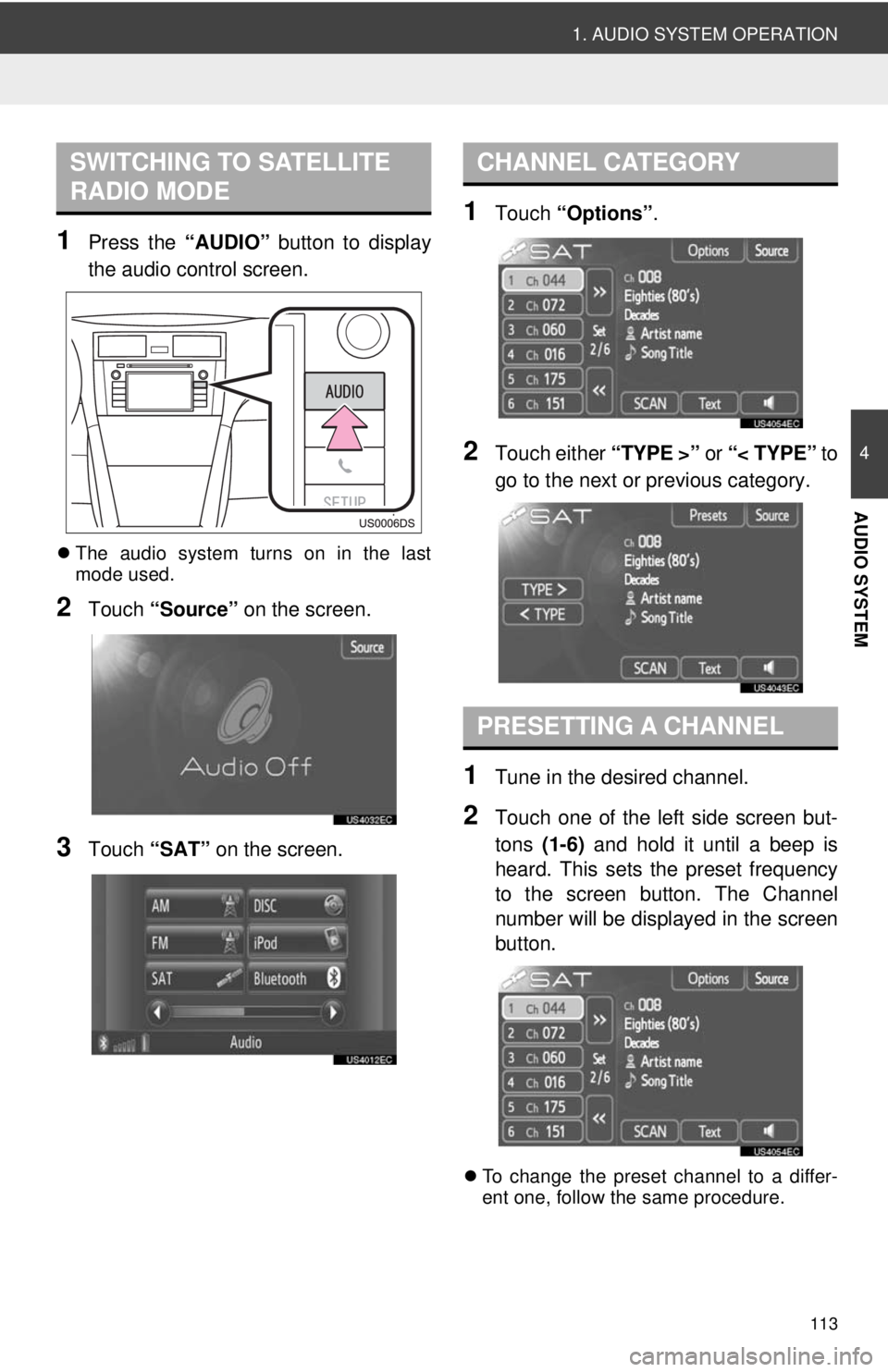
1Press the “AUDIO” button to display
the audio control screen.
The audio system turns on in the last
mode used.
2Touch “Source” on the screen.
3Touch “SAT” on the screen.
1Touch “Options”.
2Touch either “TYPE >” or “< TYPE” to
go to the next or previous category.
1Tune in the desired channel.
2Touch one of the left side screen but-
tons (1-6) and hold it until a beep is
heard. This sets the preset frequency
to the screen button. The Channel
number will be displayed in the screen
button.
To change the preset channel to a differ-
ent one, follow the same procedure.
SWITCHING TO SATELLITE
RADIO MODECHANNEL CATEGORY
PRESETTING A CHANNEL
Page 114 of 228
114
1. AUDIO SYSTEM OPERATION
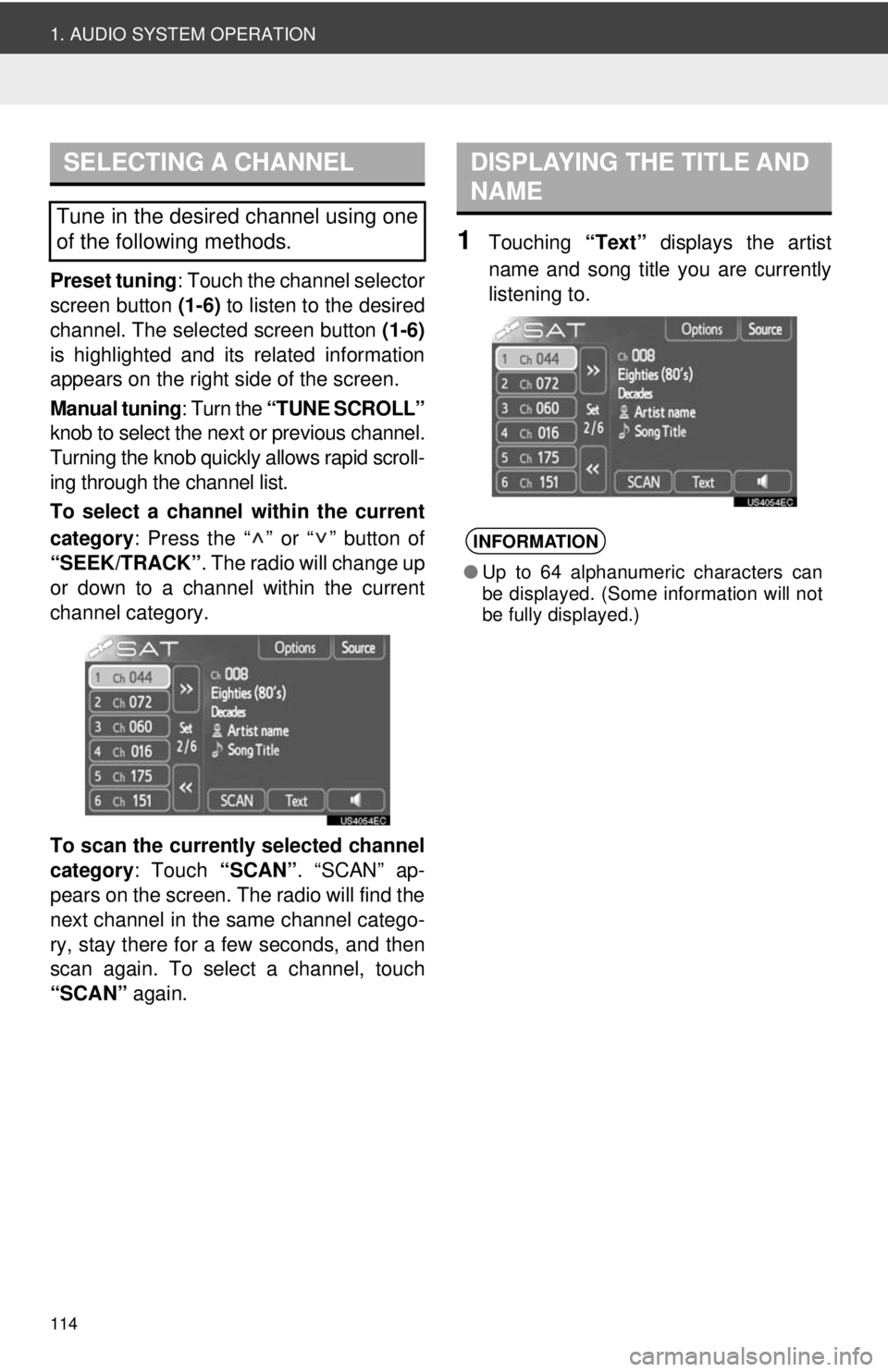
Preset tuning: Touch the channel selector
screen button (1-6) to listen to the desired
channel. The selected screen button (1-6)
is highlighted and its related information
appears on the right side of the screen.
Manual tuning : Turn the “TUNE SCROLL”
knob to select the next or previous channel.
Turning the knob quickly allows rapid scroll-
ing through the channel list.
To select a channel within the current
category : Press the “ ” or “ ” button of
“SEEK/TRACK” . The radio will change up
or down to a channel within the current
channel category.
To scan the currently selected channel
category : Touch “SCAN”. “SCAN” ap-
pears on the screen. The radio will find the
next channel in the same channel catego-
ry, stay there for a few seconds, and then
scan again. To select a channel, touch
“SCAN” again.
1Touching “Text” displays the artist
name and song title you are currently
listening to.
SELECTING A CHANNEL
Tune in the desired channel using one
of the following methods.
DISPLAYING THE TITLE AND
NAME
INFORMATION
● Up to 64 alphanumeric characters can
be displayed. (Some information will not
be fully displayed.)
Page 115 of 228
115
1. AUDIO SYSTEM OPERATION
4
AUDIO SYSTEM
IF THE SATELLITE RADIO TUNER MALFUNCTIONS
When problems occur with the XM® tuner, a message will appear on the screen.
Referring to the table below to identify the problem, take the suggested corrective
action.
MessageExplanation
Ck Antenna
The XM® antenna is not connected. Check whether the XM® an-
tenna cable is attached securely.
A short circuit occurs in the antenna or the surrounding antenna
cable. See a Toyota cert ified dealer for assistance.
Ch Unauth
You have not subscribed to XM® Satellite Radio. The radio is be-
ing updated with the latest encryption code. Contact XM® Satel-
lite Radio for subscription information. When a contract is
canceled, you can choose “CH 000” and all free-to-air channels.
The premium channel you selected is not authorized. Wait for
about 2 seconds until the radio re turns to the previous channel or
“CH001”. If it does not change automatically, select another
channel. To listen to the premium channel, contact XM
® Satellite
Radio.
No SignalThe XM® signal is too weak at the current location. Wait until your
vehicle reaches a locati on with a stronger signal.
LoadingThe unit is acquiring audio or program information. Wait until the
unit has received the information.
Ch Off AirThe channel you selected is not broadcasting any programming.
Select another channel.
-----There is no song/program title or artist name/feature associated
with the channel at that time. No action is required.
Ch Unavail
The channel you selected is no longer available. Wait for about 2
seconds until the radio returns to the previous channel or
“CH001”. If it does not change automatically, select another
channel.
INFORMATION
● Contact the XM® Listener Care Center at 1-800- 967-2346 (U.S.A.) or 1-877-209-0079
(Canada).