cruise control TOYOTA PRIUS V 2013 Owners Manual (in English)
[x] Cancel search | Manufacturer: TOYOTA, Model Year: 2013, Model line: PRIUS V, Model: TOYOTA PRIUS V 2013Pages: 32, PDF Size: 4.4 MB
Page 3 of 32
OVERVIEW
FEATURES/OPERATIONS
SAFETY AND EMERGENCY FEATURES
1
2013
Prius v
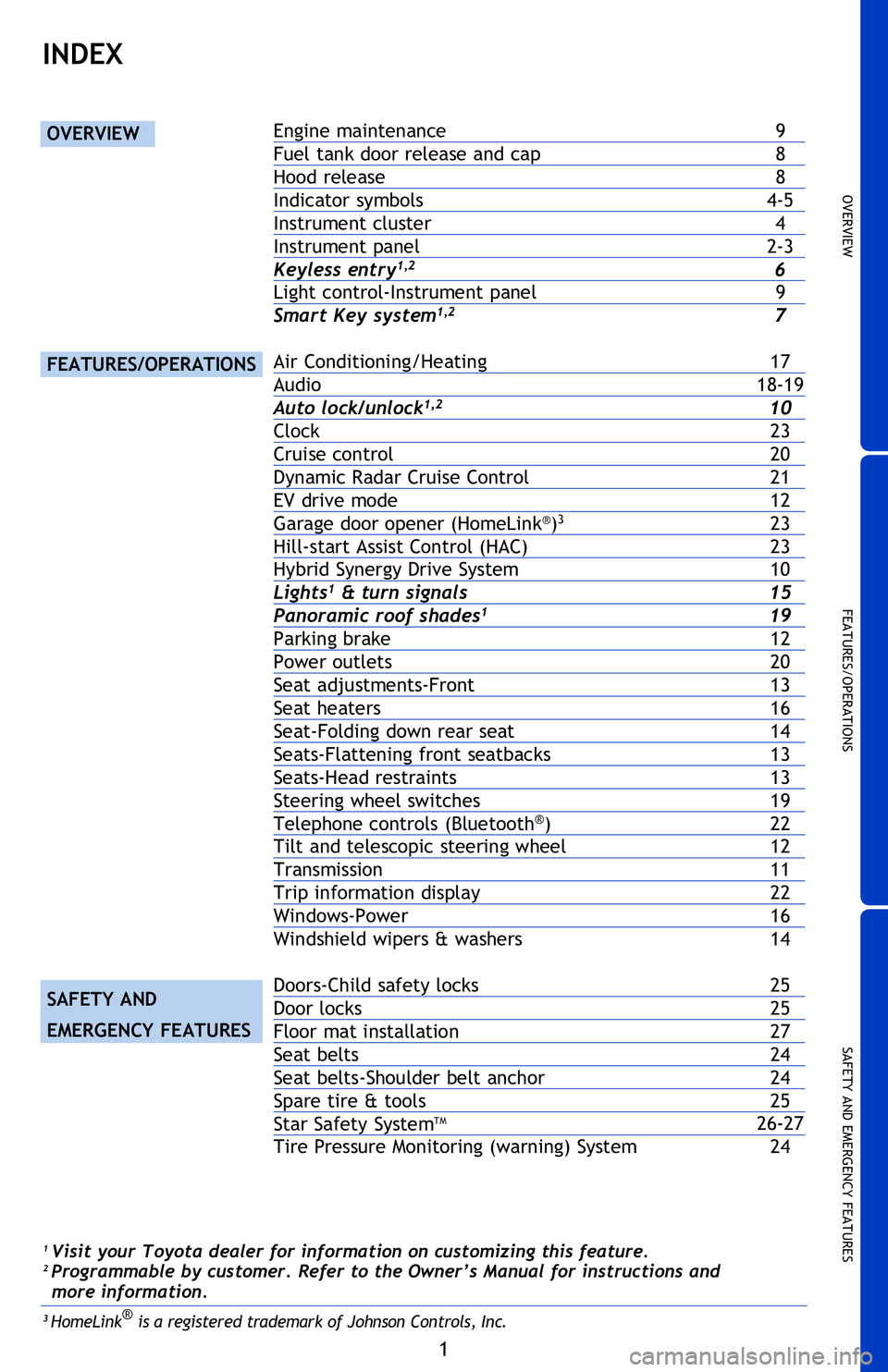
INDEX
OVERVIEW
FEATURES/OPERATIONS
SAFETY AND
EMERGENCY FEATURES
Engine maintenance 9
Fuel tank door release and cap 8
Hood release 8
Indicator symbols 4-5
Instrument cluster 4
Instrument panel 2-3
Keyless entry
1,2 6
Light control-Instrument panel 9
Smart Key system
1,2 7
Air Conditioning/Heating 17
Audio 18-19
Auto lock/unlock
1,2 10
Clock 23
Cruise control 20
Dynamic Radar Cruise Control 21
EV drive mode 12
Garage door opener (HomeLink
®)3 23
Hill-start Assist Control (HAC) 23
Hybrid Synergy Drive System 10
Lights1 & turn signals 15
Panoramic roof shades1 19
Parking brake 12
Power outlets 20
Seat adjustments-Front 13
Seat heaters 16
Seat-Folding down rear seat 14
Seats-Flattening front seatbacks 13
Seats-Head restraints 13
Steering wheel switches 19
Telephone controls (Bluetooth
®) 22
Tilt and telescopic steering wheel 12
Transmission 11
Trip information display 22
Windows-Power 16
Windshield wipers & washers 14
Doors-Child safety locks 25
Door locks 25
Floor mat installation 27
Seat belts 24
Seat belts-Shoulder belt anchor 24
Spare tire & tools 25
Star Safety System
TM 26-27
Tire Pressure Monitoring (warning) System 24
1 Visit your Toyota dealer for information on customizing this feature.2 Programmable by customer. Refer to the Owner’s Manual for instructions and
more information.
3 HomeLink® is a registered trademark of Johnson Controls, Inc.
2013Prius-v.indd 110/2/12 6:48 PM
Page 4 of 32
2
OVERVIEW
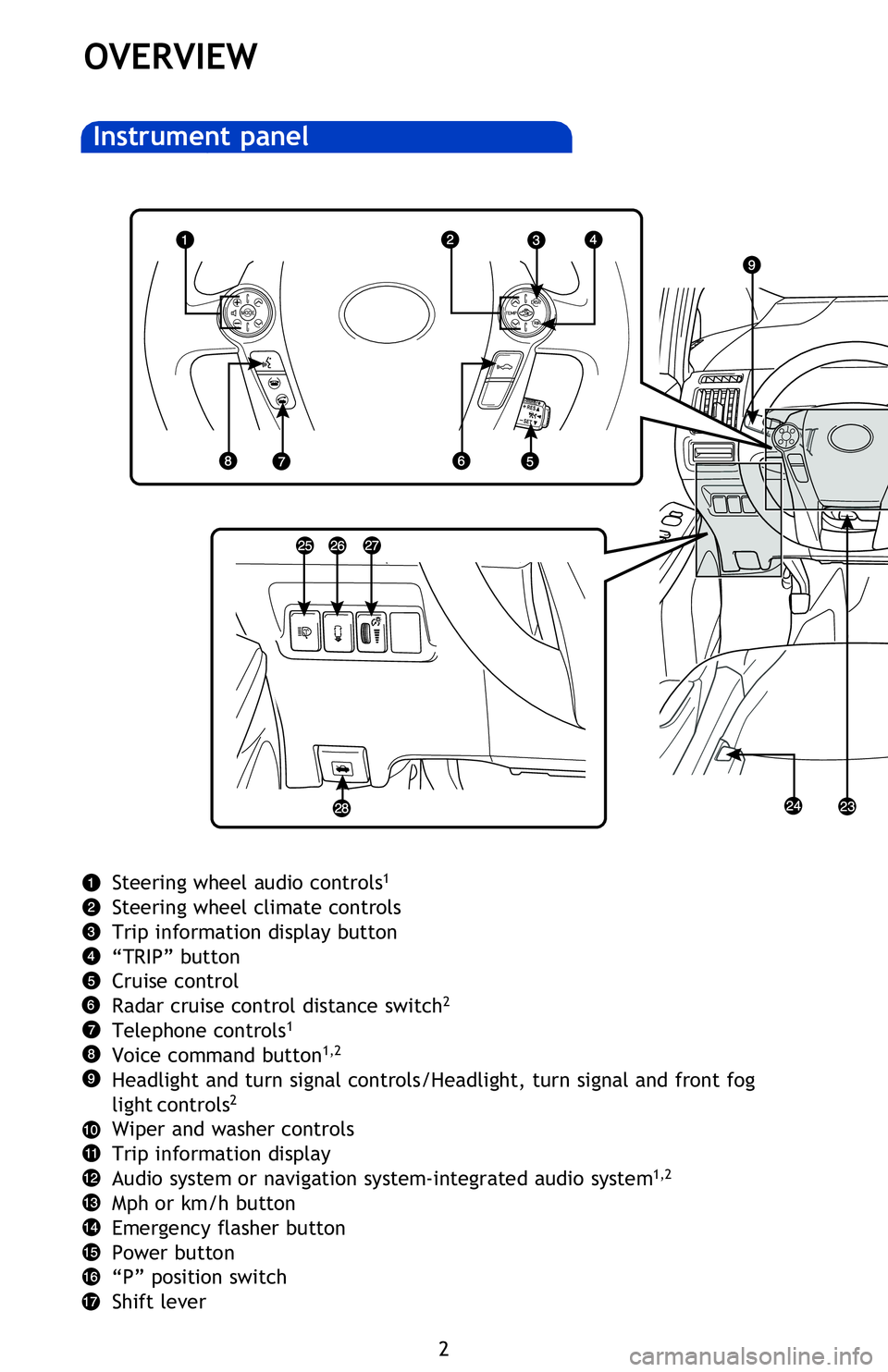
Instrument panel
Air Conditioning controls
Outside rearview mirror/Rear window defogger button
AUX port/USB port
Power outlet
Seat heater switches
2
Tilt and telescopic steering lock release lever
Fuel filler door opener
Headlight cleaner switch
2
Advanced Parking Guidance System switch1,2
Instrument panel light control
Hood lock release lever
1 For vehicles with a display audio or navigation system, refer to the “Display
Audio System Owner’s Manual ” or “Navigation System Owner’s Manual .”
2
If equipped
NOTE: For vehicles equipped with Entune
TM, please consult the “Navigation
System With Entune Quick Reference Guide” or www.toyota.com/entune.
Steering wheel audio controls1
Steering wheel climate controls
Trip information display button
“TRIP” button
Cruise control
Radar cruise control distance switch
2
Telephone controls1
Voice command button1,2
Headlight and turn signal controls/Headlight, turn signal and front fog
light controls2
Wiper and washer controls
Trip information display
Audio system or navigation system-integrated audio system
1,2
Mph or km/h button
Emergency flasher button
Power button
“P” position switch
Shift lever
2013Prius-v.indd 210/2/12 6:50 PM
Page 6 of 32
4
OVERVIEW
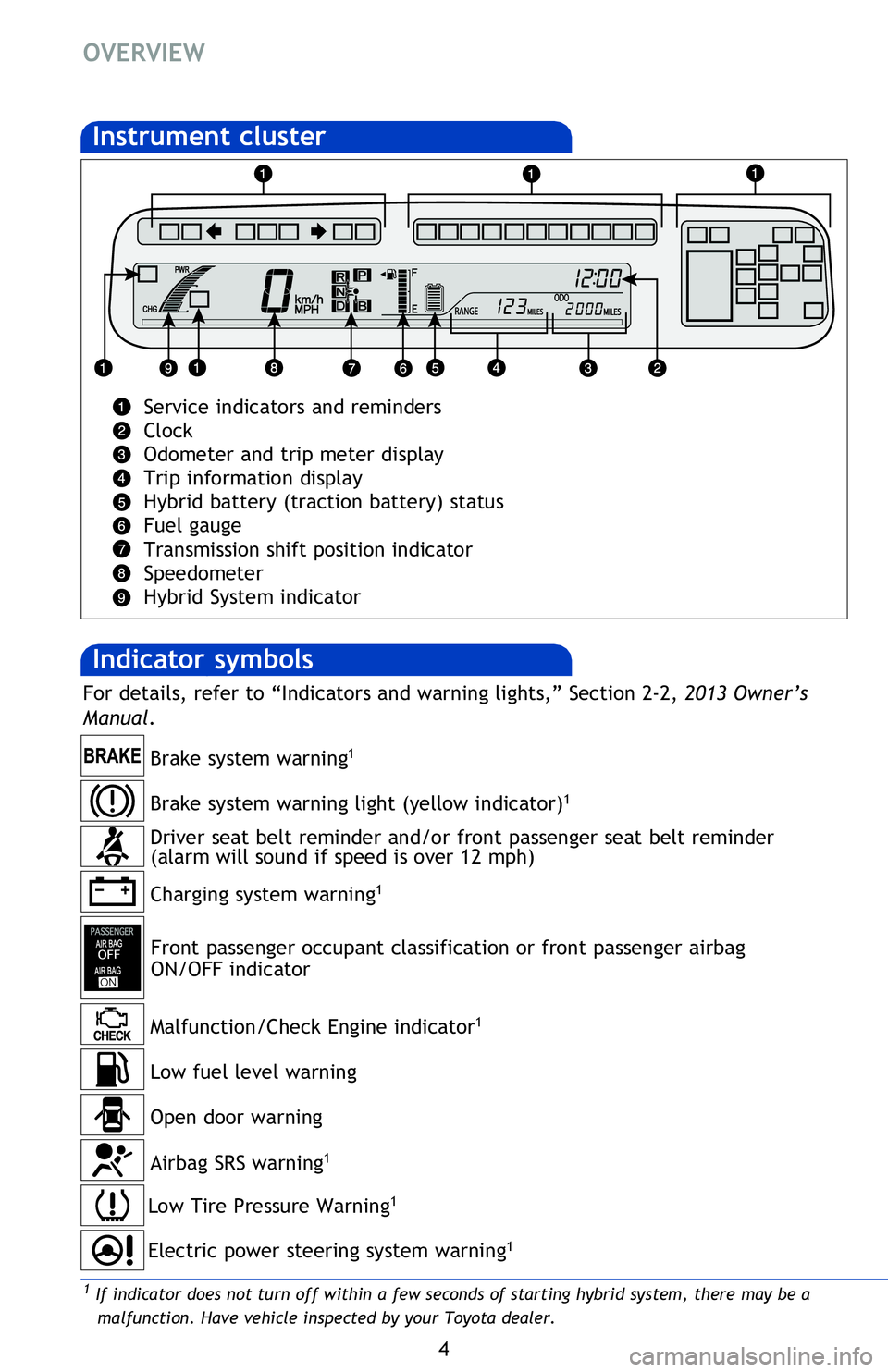
Indicator symbols
Instrument cluster
Service indicators and reminders
Clock
Odometer and trip meter display
Trip information display
Hybrid battery (traction battery) status
Fuel gauge
Transmission shift position indicator
Speedometer
Hybrid System indicator
Charging system warning1
Brake system warning1
Front passenger occupant classification or front passenger airbag
ON/OFF indicator
2 If this light flashes, refer to “Cruise control,” or “Dynamic radar cruise control,” Section 2-4, 2013 Owner’s Manual.
Low Tire Pressure Warning1
Open door warning
Airbag SRS warning1
Driver seat belt reminder and/or front passenger seat belt reminder
(alarm will sound if speed is over 12 mph)
Malfunction/Check Engine indicator
1
Low fuel level warning
Electric power steering system warning1
Brake system warning light (yellow indicator)1
1 If indicator does not turn off within a few seconds of starting hybrid system, there may be a
malfunction. Have vehicle inspected by your Toyota dealer.
For details, refer to “Indicators and warning lights,” Section 2-2, 2013 Owner’s
Manual .
2013Prius-v.indd 410/2/12 6:50 PM
Page 7 of 32
OVERVIEW
FEATURES/OPERATIONS
SAFETY AND EMERGENCY FEATURES
5
Service indicators and reminders
Clock
Odometer and trip meter display
Trip information display
Hybrid battery (traction battery) status
Fuel gauge
Transmission shift position indicator
Speedometer
Hybrid System indicator
2 If this light flashes, refer to “Cruise control,” or “Dynamic radar cruise control,” Section 2-4, 2013 Owner’s Manual.
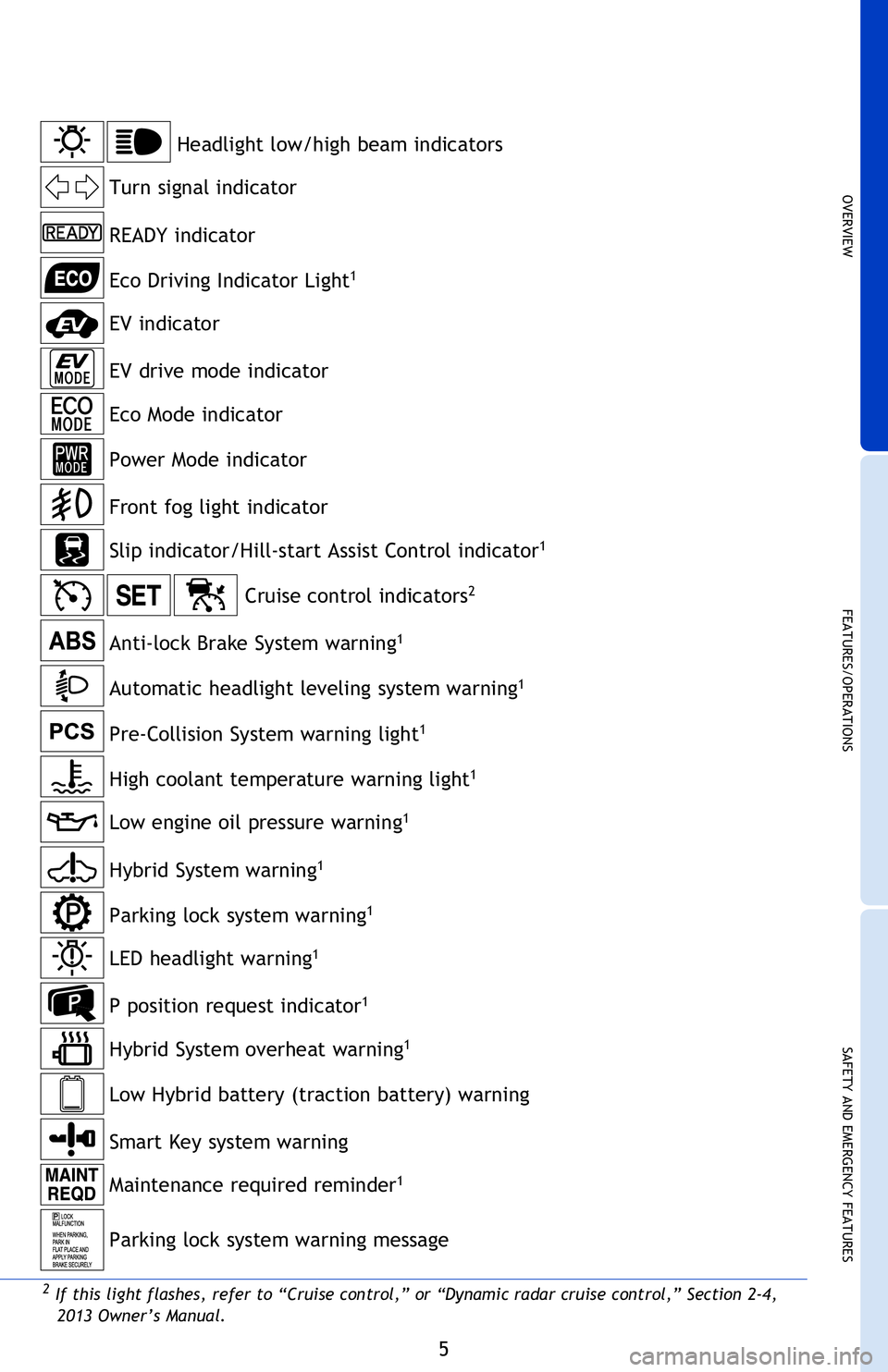
Anti-lock Brake System warning1
Headlight low/high beam indicators
Turn signal indicator
Slip indicator/Hill-start Assist Control indicator
1
Driver seat belt reminder and/or front passenger seat belt reminder
(alarm will sound if speed is over 12 mph)
READY indicator
Front fog light indicator
Eco Mode indicator
EV drive mode indicator
Automatic headlight leveling system warning
1
1 If indicator does not turn off within a few seconds of starting hybrid system, there may be a
malfunction. Have vehicle inspected by your Toyota dealer.
For details, refer to “Indicators and warning lights,” Section 2-2, 2013 Owner’s
Manual .
Cruise control indicators2
Pre-Collision System warning light1
High coolant temperature warning light1
Power Mode indicator
EV indicator
Eco Driving Indicator Light1
Low engine oil pressure warning1
Maintenance required reminder1
Hybrid System warning1
Smart Key system warning
Hybrid System overheat warning1
P position request indicator1
Low Hybrid battery (traction battery) warning
LED headlight warning1
Parking lock system warning1
Parking lock system warning message
2013Prius-v.indd 510/2/12 6:50 PM
Page 22 of 32
20
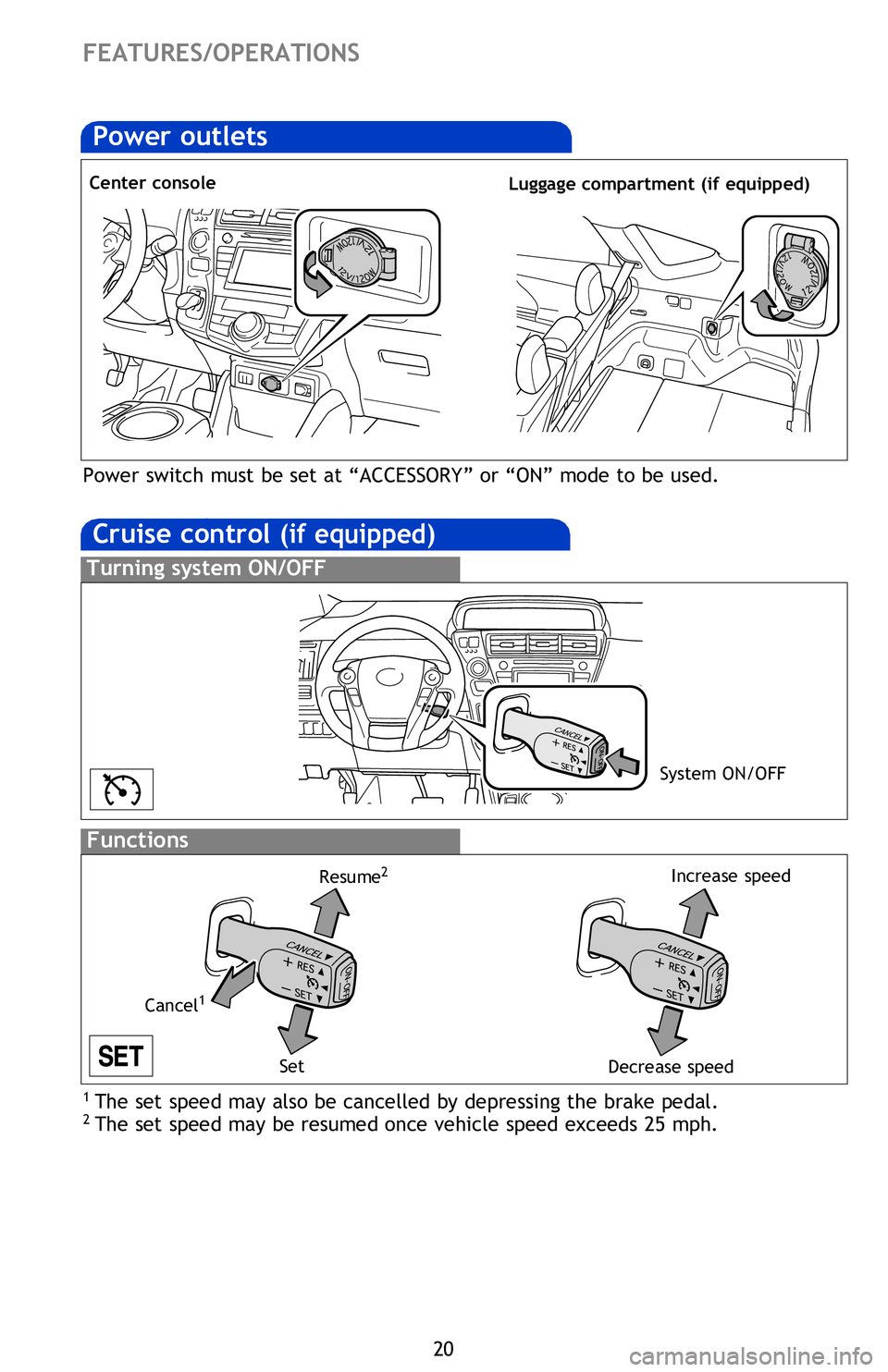
Cruise control (if equipped)
1 The set speed may also be cancelled by depressing the brake pedal.2 The set speed may be resumed once vehicle speed exceeds 25 mph.
Turning system ON/OFF
Functions
System ON/OFF
Increase speed
Decrease speed
Cancel
1
Resume2
Set
Distance control mode will cruise at a set speed, decelerate to maintain selected
distance from a slower vehicle traveling in front of you, and accelerate back up to
the selected speed if the vehicle in front of you changes lanes or speeds up.
(1) To select distance control
mode Push the ON-OFF button. The “” will
come on.
(2) To set, cancel or resume a speed Refer to instructions for Cruise Control
section.
(3) To change the vehicle-to-vehicle distance
Push the distance button to cycle through the settings, which will change
progressively from LONG to MIDDLE to SHORT.
(1) To select conventional/fixed speed control Push the ON-OFF button. Push the lever forward and hold until the “
” indicator appears.
(2) To set, cancel and resume a speed Refer to instructions in the Cruise Control
section.
Fixed speed mode
Refer to the Owner’s Manual for more details and complete safety precautions
before attempting to use “Dynamic Radar Cruise Control.”
Distance control mode
FEATURES/OPERATIONS
Dynamic Radar Cruise Control
(if equipped)Power outlets
Center console Luggage compartment (if equipped)
Power switch must be set at “ACCESSORY” or “ON” mode to be used.
2013Prius-v.indd 2010/2/12 6:52 PM
Page 23 of 32
OVERVIEW
FEATURES/OPERATIONS
SAFETY AND EMERGENCY FEATURES
21
1 The set speed may also be cancelled by depressing the brake pedal.2 The set speed may be resumed once vehicle speed exceeds 25 mph.
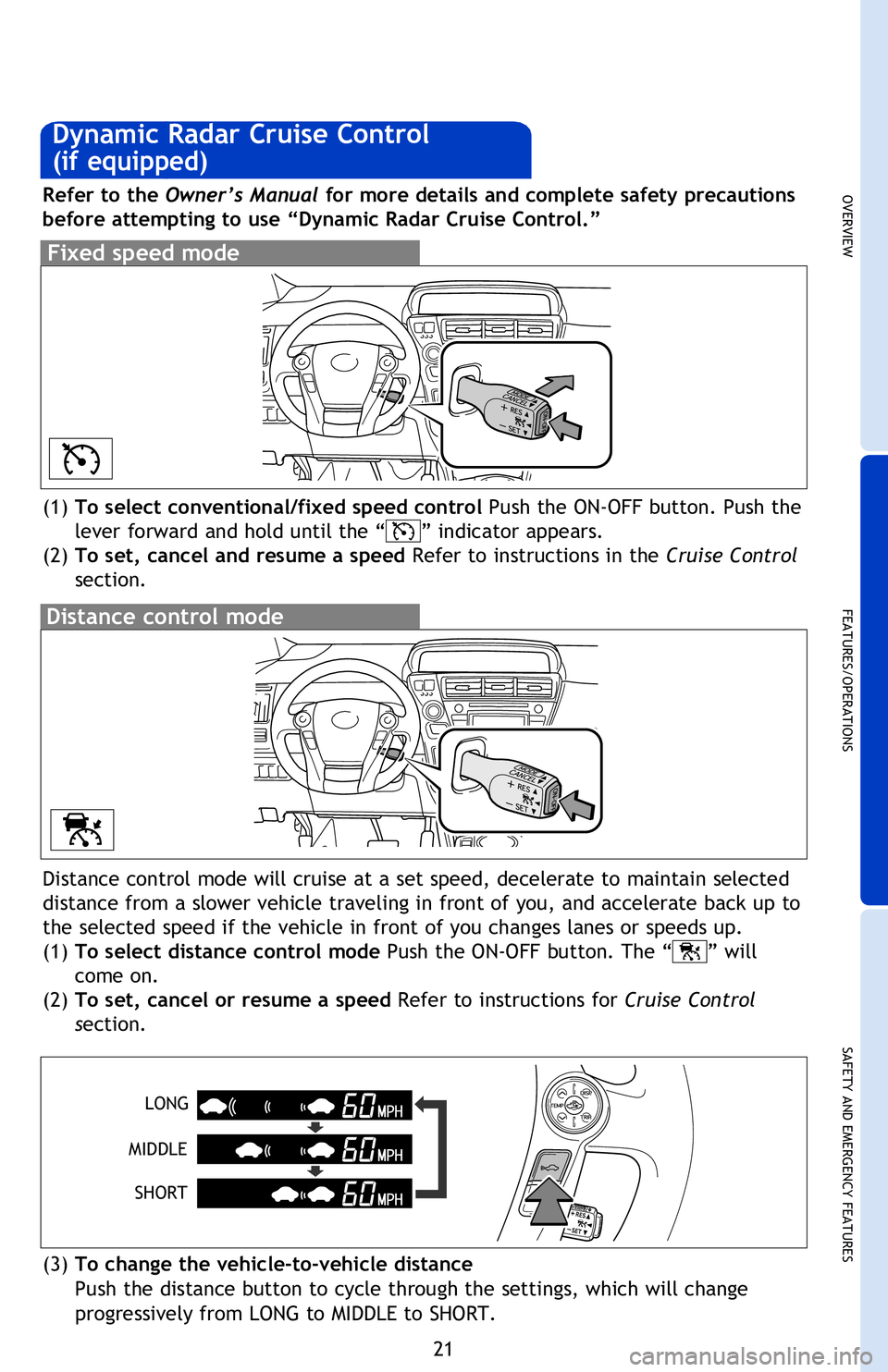
Increase speedDistance control mode will cruise at a set speed, decelerate to maintain selected
distance from a slower vehicle traveling in front of you, and accelerate back up to
the selected speed if the vehicle in front of you changes lanes or speeds up.
(1) To select distance control mode Push the ON-OFF button. The “
” will
come on.
(2) To set, cancel or resume a speed Refer to instructions for Cruise Control
section.
(3) To change the vehicle-to-vehicle distance
Push the distance button to cycle through the settings, which will change
progressively from LONG to MIDDLE to SHORT.
(1)
To select conventional/fixed speed control Push the ON-OFF button. Push the
lever forward and hold until the “
” indicator appears.
(2) To set, cancel and resume a speed Refer to instructions in the Cruise Control
section.
Fixed speed mode
Refer to the Owner’s Manual for more details and complete safety precautions
before attempting to use “Dynamic Radar Cruise Control.”
Distance control mode
Dynamic Radar Cruise Control
(if equipped)
LONG
MIDDLE SHORT
Luggage compartment (if equipped)
Power switch must be set at “ACCESSORY” or “ON” mode to be used.
2013Prius-v.indd 2110/2/12 6:52 PM