radio TOYOTA PRIUS V 2013 Owners Manual (in English)
[x] Cancel search | Manufacturer: TOYOTA, Model Year: 2013, Model line: PRIUS V, Model: TOYOTA PRIUS V 2013Pages: 32, PDF Size: 4.4 MB
Page 9 of 32
OVERVIEW
FEATURES/OPERATIONS
SAFETY AND EMERGENCY FEATURES
7
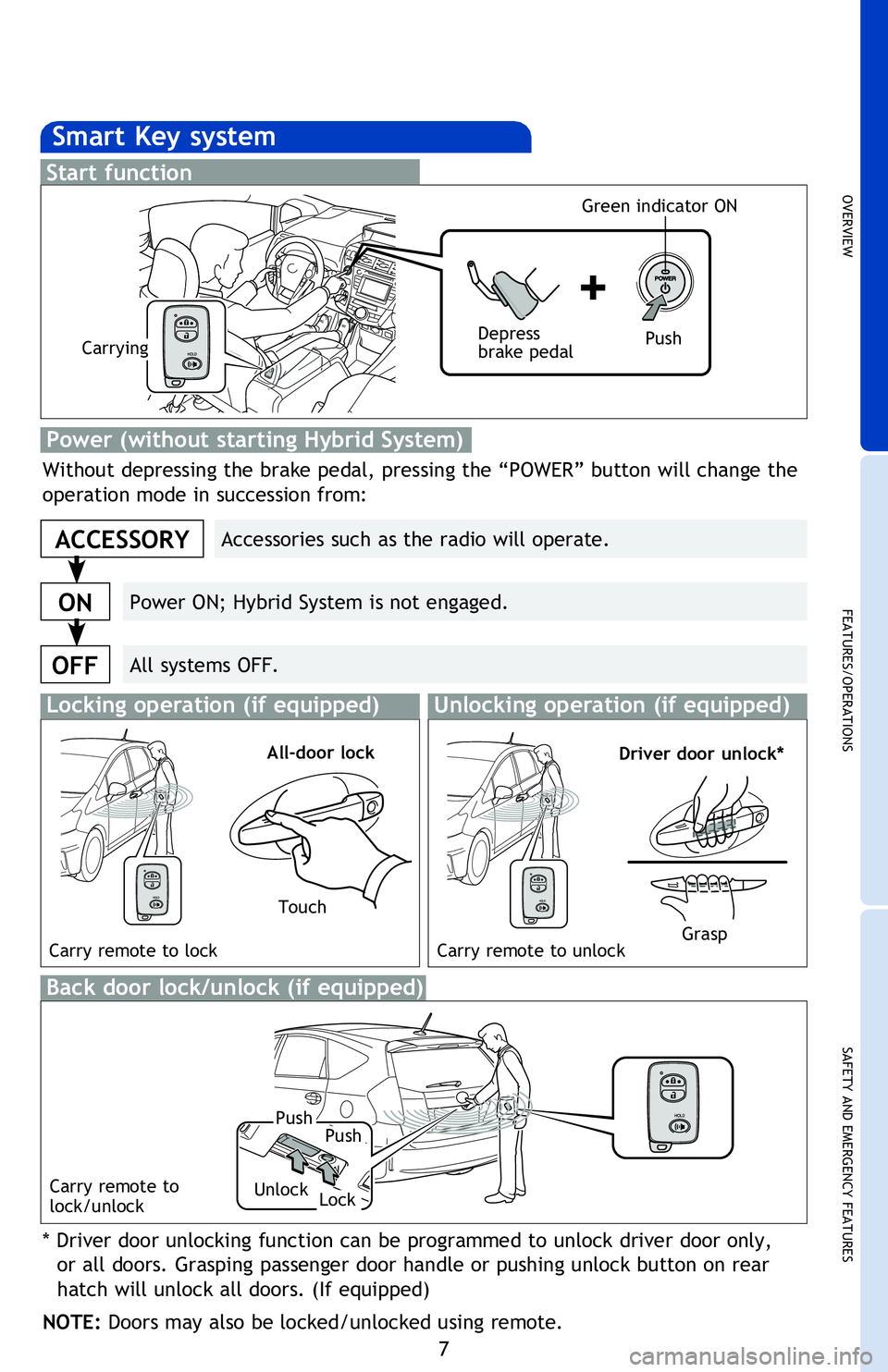
Smart Key system
Start function
Accessories such as the radio will operate.
Power ON; Hybrid System is not engaged.
All systems OFF.
ACCESSORY
ON
OFF
Push
Depress
brake pedalCarrying Green indicator ON
Without depressing the brake pedal, pressing the “POWER” button will change the
operation mode in succession from:
Power (without starting Hybrid System)
NOTE: If a door is not opened within 60 seconds of unlocking, all doors will relock for
safety.
* Driver door unlocking function can be programmed to unlock driver door only,
or all doors. Grasping passenger door handle or pushing unlock button on rear
hatch will unlock all doors. (If equipped)
NOTE: Doors may also be locked/unlocked using remote.
Locking operation (if equipped)Unlocking operation (if equipped)
Carry remote to lock Carry remote to unlock
All-door lockDriver door unlock*
Back door lock/unlock (if equipped)
Carry remote to
lock/unlock
Touch
Grasp
Push
Lock
Push
Unlock
2013Prius-v.indd 710/2/12 7:01 PM
Page 20 of 32
18
FEATURES/OPERATIONS
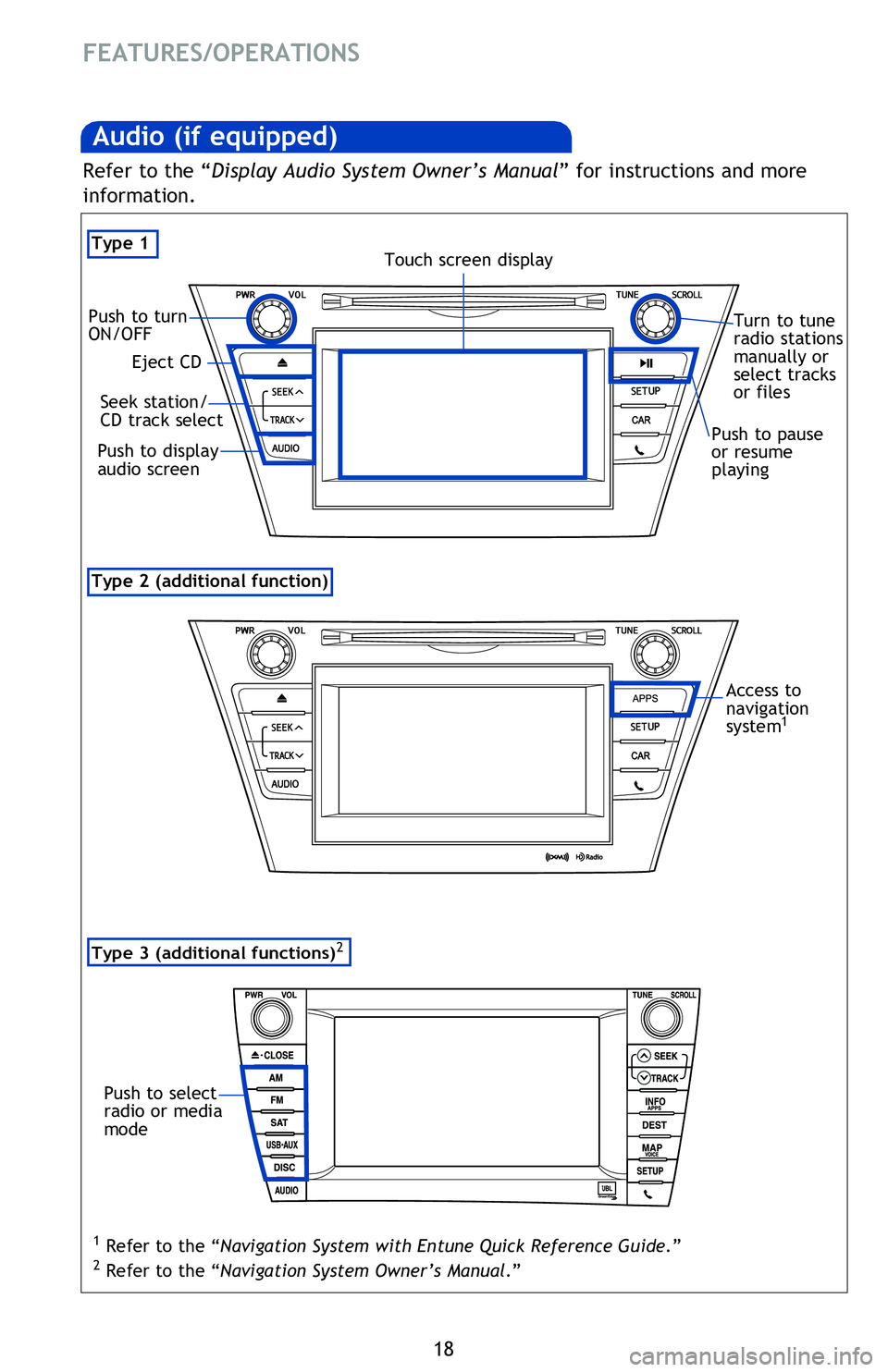
Type 2 (additional function)
Audio (if equipped)
Type 1
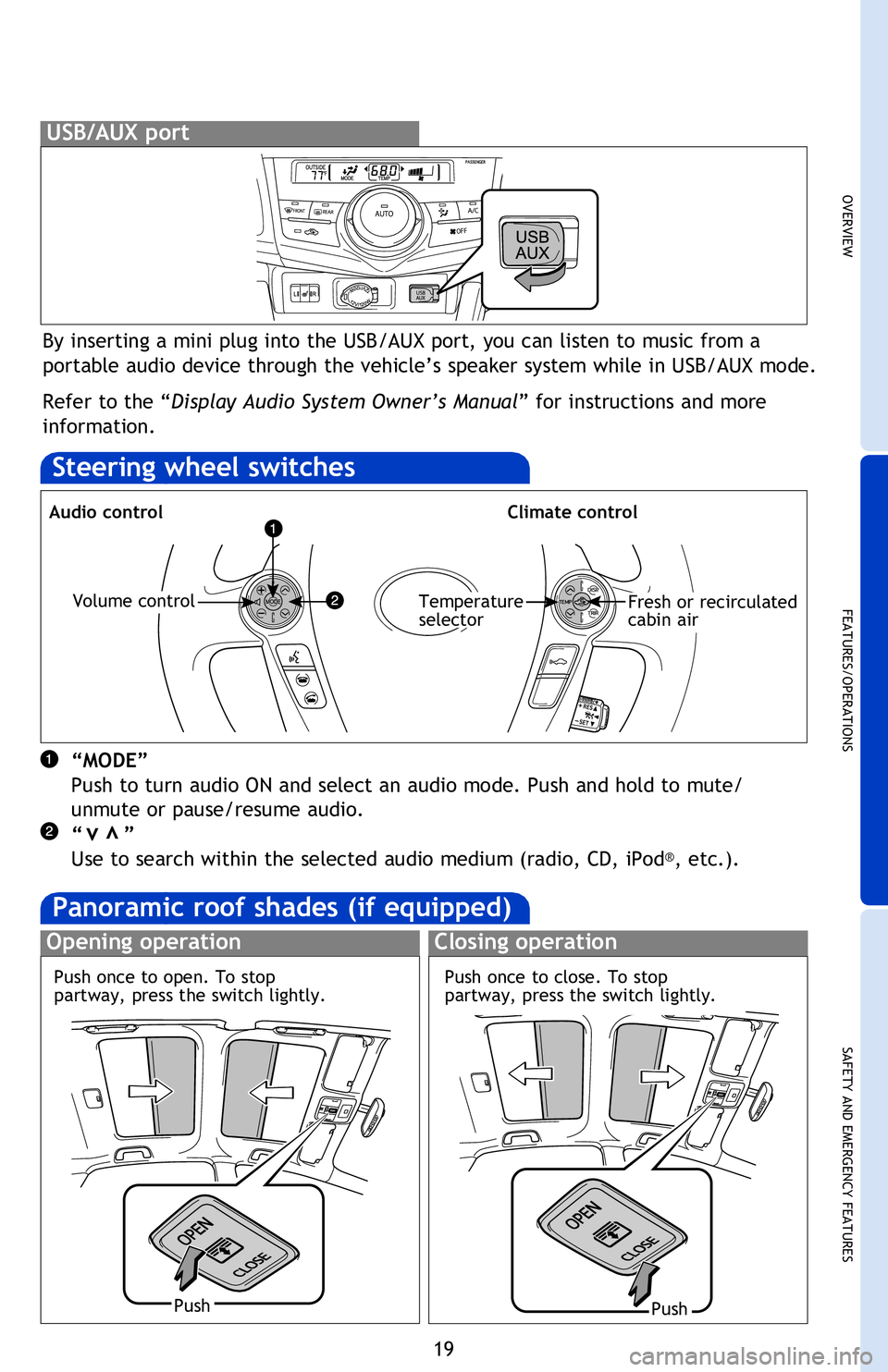
By inserting a mini plug into the USB/AUX port, you can listen to music from a
portable audio device through the vehicle’s speaker system while in USB/AUX mode.
Refer to the “Display Audio System Owner’s Manual ” for instructions and more
information.
USB/AUX port
Steering wheel switches
Audio control
“MODE”
Push to turn audio ON and select an audio mode. Push and hold to mute/
unmute or pause/resume audio.
“ ”
Use to search within the selected audio medium (radio, CD, iPod
®, etc.).
Volume control
Eject CD
Push to turn
ON/OFF
Seek station/
CD track select
Push to display
audio screen
Turn to tune
radio stations
manually or
select tracks
or files
Touch screen display
Push to pause
or resume
playing
Panoramic roof shades (if equipped)
Opening operation
Access to
navigation
system
1
Refer to the “Display Audio System Owner’s Manual ” for instructions and more
information.
Type 3 (additional functions)2
Push to select
radio or media
mode
1 Refer to the “Navigation System with Entune Quick Reference Guide.”
2 Refer to the “Navigation System Owner’s Manual .”
Push once to open. To stop
partway, press the switch lightly.
2013Prius-v.indd 1810/2/12 6:52 PM
Page 21 of 32
OVERVIEW
FEATURES/OPERATIONS
SAFETY AND EMERGENCY FEATURES
19
By inserting a mini plug into the USB/AUX port, you can listen to music from a
portable audio device through the vehicle’s speaker system while in USB/AUX mode.
Refer to the “Display Audio System Owner’s Manual” for instructions and more
information.
USB/AUX port
Steering wheel switches
Audio controlClimate control
“MODE”
Push to turn audio ON and select an audio mode. Push and hold to mute/
unmute or pause/resume audio.
“ ”
Use to search within the selected audio medium (radio, CD, iPod
®, etc.).
vv
Volume controlTemperature
selectorFresh or recirculated
cabin air
Turn to tune
radio stations
manually or
select tracks
or files
Push to pause
or resume
playing
Panoramic roof shades (if equipped)
Opening operationClosing operation
PushPush
Access to
navigation
system
1
Refer to the “Display Audio System Owner’s Manual ” for instructions and more
information.
1 Refer to the “Navigation System with Entune Quick Reference Guide.”
2 Refer to the “Navigation System Owner’s Manual .”
Push once to close. To stop
partway, press the switch lightly.
Push once to open. To stop
partway, press the switch lightly.
2013Prius-v.indd 1910/2/12 6:52 PM