change time TOYOTA PRIUS V 2016 ZVW40 / 1.G User Guide
[x] Cancel search | Manufacturer: TOYOTA, Model Year: 2016, Model line: PRIUS V, Model: TOYOTA PRIUS V 2016 ZVW40 / 1.GPages: 620, PDF Size: 29.83 MB
Page 254 of 620
254
PRIUS v_OM_OM47B12U_(U)
4-5. Using the driving support systems
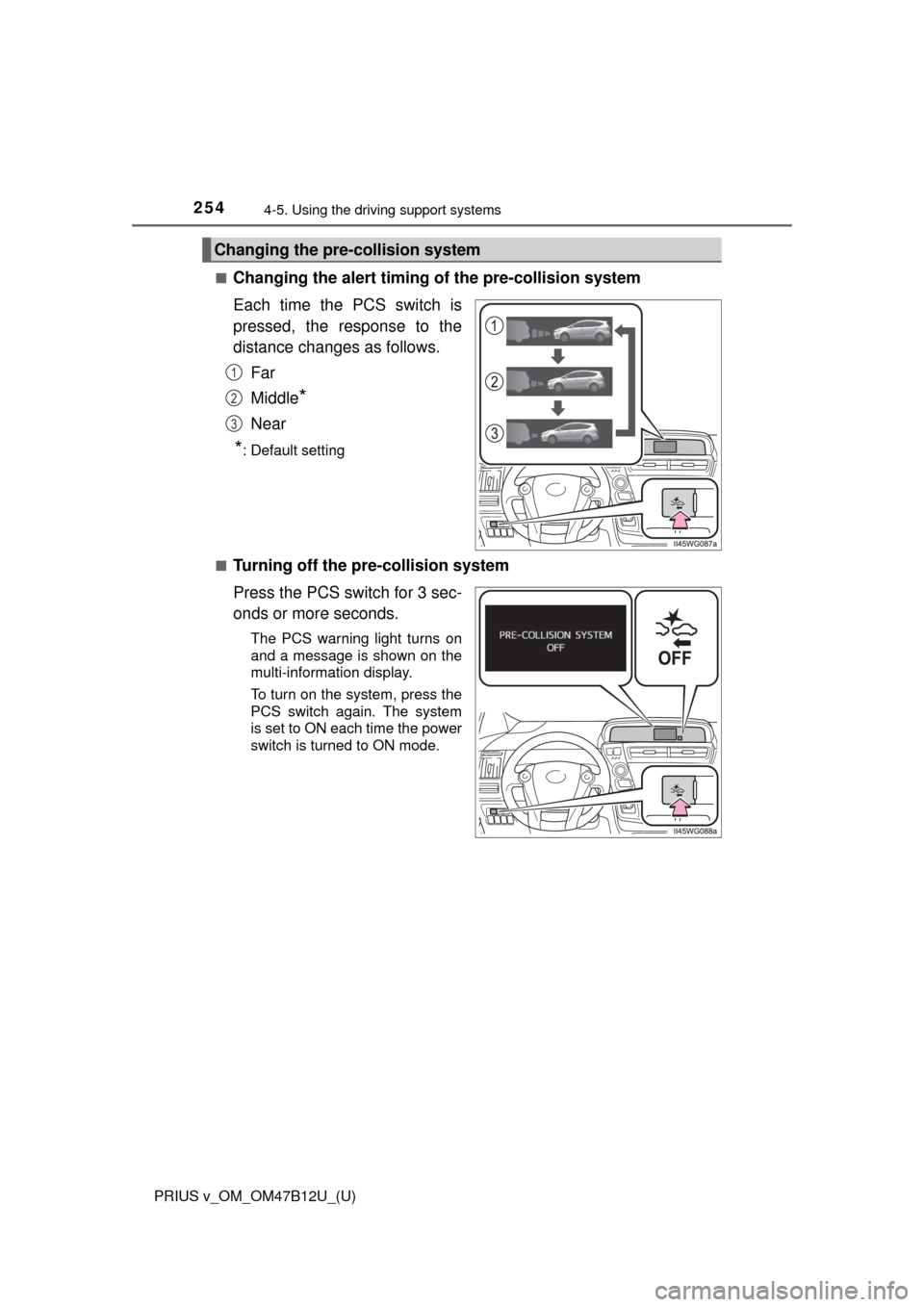
■Changing the alert timing of the pre-collision system
Each time the PCS switch is
pressed, the response to the
distance changes as follows.
Far
Middle
*
Near
*: Default setting
■
Turning off the pre-collision system
Press the PCS switch for 3 sec-
onds or more seconds.
The PCS warning light turns on
and a message is shown on the
multi-information display.
To turn on the system, press the
PCS switch again. The system
is set to ON each time the power
switch is turned to ON mode.
Changing the pre-collision system
1
2
3
Page 258 of 620

258
PRIUS v_OM_OM47B12U_(U)
4-5. Using the driving support systems
WARNING
■Limitations of the pre-collision system
It is the driver’s responsibility to drive safely. The driver should be aware of
the surroundings and strive for safe driving.
Do not rely on the pre-collision system instead of normal braking opera-
tions. This system does not avoid or reduce collisions in every situation.
Overly relying on the system and entrusting it with safety may cause an
unexpected accident which could lead to death or serious injury.
Although the system is designed for the purpose to support in avoiding colli-
sions or reducing the damage of a collision, the effect changes according to
various conditions. (P. 255)
Therefore, it does not always provide the same performance. Also, the pre-
collision braking does not work depending on the operating conditions of the
driver. When the driver has stepped on the brake pedal and is operating the
steering wheel, the system judges that the driver is taking avoiding action
and the automatic braking may not operate.
■Handling the radar sensor
Observe the following to ensure the pre-collision system can function effec-
tively.
Otherwise, the system may not function correctly and could result in an
accident.
●Keep the sensor and grille cover clean at all times.
Clean the sensor and grille cover with a soft cloth so you do not mark or
damage them.
●Do not subject the sensor or surrounding area to a strong impact.
If the sensor moves even slightly off position, the system may become
inaccurate or malfunction. If the sensor or surrounding area is subject to a
strong impact, always have the area inspected and adjusted by your
Toyota dealer.
●Do not disassemble the sensor.
●Do not attach accessories or stickers to the sensor, grille cover or sur-
rounding area.
●Do not modify or paint the sensor and grille cover.
●If the sensor needs to be replaced, contact your Toyota dealer.
Page 285 of 620
285
PRIUS v_OM_OM47B12U_(U)
5-3. Using the Multimedia system
5
Audio system
Selecting the audio source
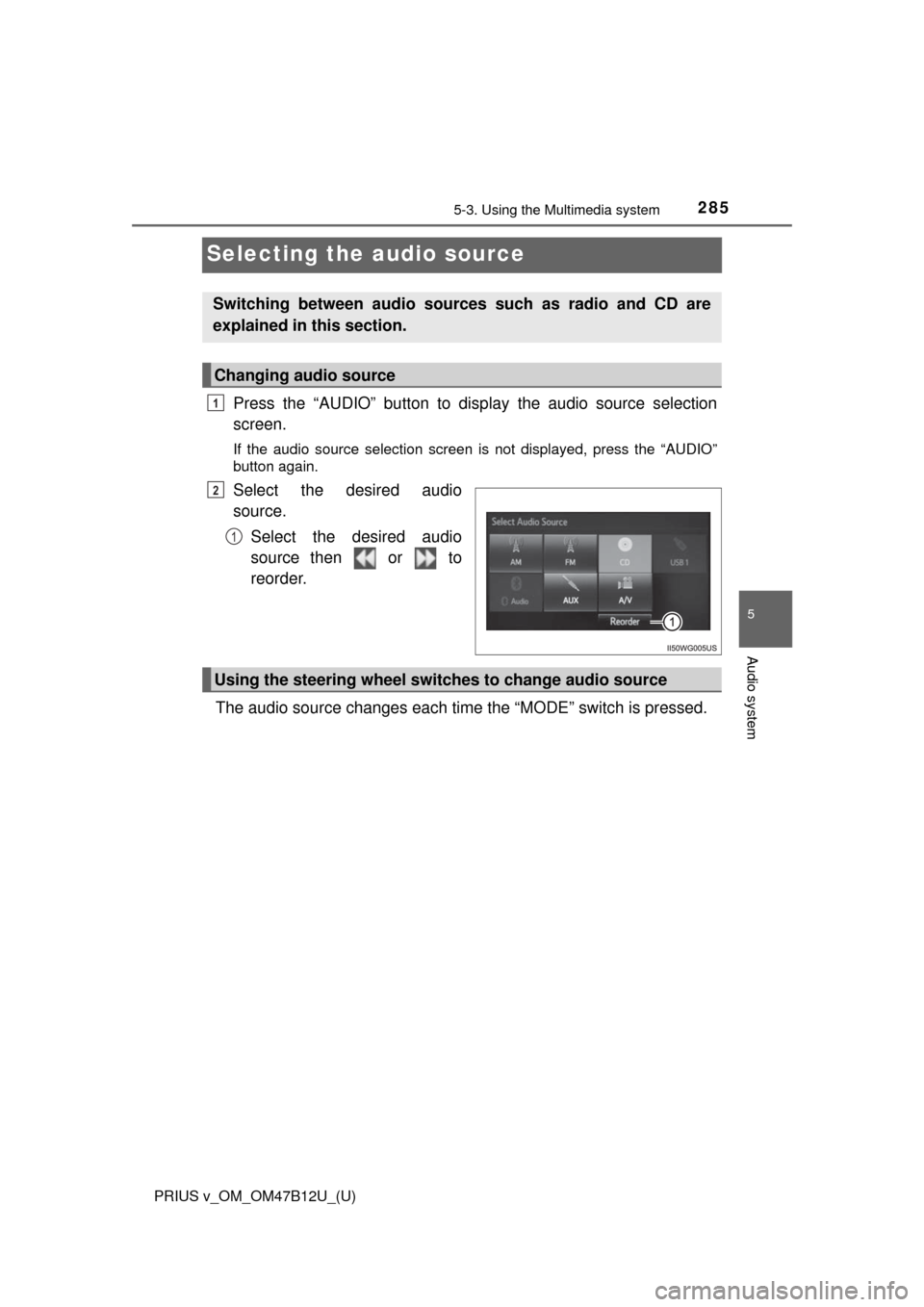
Press the “AUDIO” button to display the audio source selection
screen.
If the audio source selection screen is not displayed, press the “AUDIO”
button again.
Select the desired audio
source.
Select the desired audio
source then or to
reorder.
The audio source changes each time the “MODE” switch is pressed.
Switching between audio sources such as radio and CD are
explained in this section.
Changing audio source
1
2
1
Using the steering wheel switches to change audio source
Page 291 of 620
PRIUS v_OM_OM47B12U_(U)
2915-4. Using the radio
5
Audio system
Search for desired stations by turning the “TUNE SCROLL” knob or
pressing the “” or “” button on “SEEK/TRACK”.
Select “(add new)”.
To change the preset station to a different one, select and hold the preset
station.
Select “Yes”.
Select “OK” after setting the new preset station.
■Refreshing the station list
Select “Refresh” on the “Station List” screen.
To cancel the refresh, select “Cancel Refresh”.
■Reception sensitivity
●Maintaining perfect radio reception at all times is difficult due to the continu-
ally changing position of the antenna, differences in signal strength and sur-
rounding objects, such as trains, transmitters, etc.
●The radio antenna is mounted on the roof. The antenna can be removed
from the base by turning it.
Setting station presets
1
2
3
4
Page 300 of 620
3005-6. Using an external device
PRIUS v_OM_OM47B12U_(U)
■About iPod
●“Made for iPod” and “Made for iPhone” mean that an electronic accessory
has been designed to connect specifically to iPod or iPhone, respectively,
and has been certified by the developer to meet Apple performance stan-
dards.
●Apple is not responsible for the operation of this device or its compliance
with safety and regulatory standards. Please note that the use of this acces-
sory with iPod or iPhone may affect wireless performance.
●iPhone, iPod, iPod classic, iPod nano, and iPod touch are trademarks of
Apple Inc., registered in the U.S. and other countries. Lightning is a trade-
mark of Apple Inc.
■iPod cover art
●Depending on the iPod and songs in the iPod, iPod cover art may be dis-
played.
●This function can be changed to on/off. (P. 279)
●It may take time to display iPod cover art, and the iPod may not be operated
while the cover art display is in process.
●Only iPod cover art that is saved in JPEG format can be displayed.
■iPod functions
●When an iPod is connected and the audio source is changed to iPod mode,
the iPod will resume play from the same point in which it was last used.
●Depending on the iPod that is connected to the system, certain functions
may not be available. If a function is unavailable due to a malfunction (as
opposed to a system specification), disconnecting the device and recon-
necting it may resolve the problem.
●While connected to the system, the iPod cannot be operated with its own
controls. It is necessary to use the controls of the vehicle’s audio system
instead.
●When the battery level of an iPod is very low, the iPod may not operate. If
so, charge the iPod before use.
●Compatible models (P. 302)
Page 369 of 620
PRIUS v_OM_OM47B12U_(U)
3696-1. Using the air conditioning system and defogger
6
Interior features
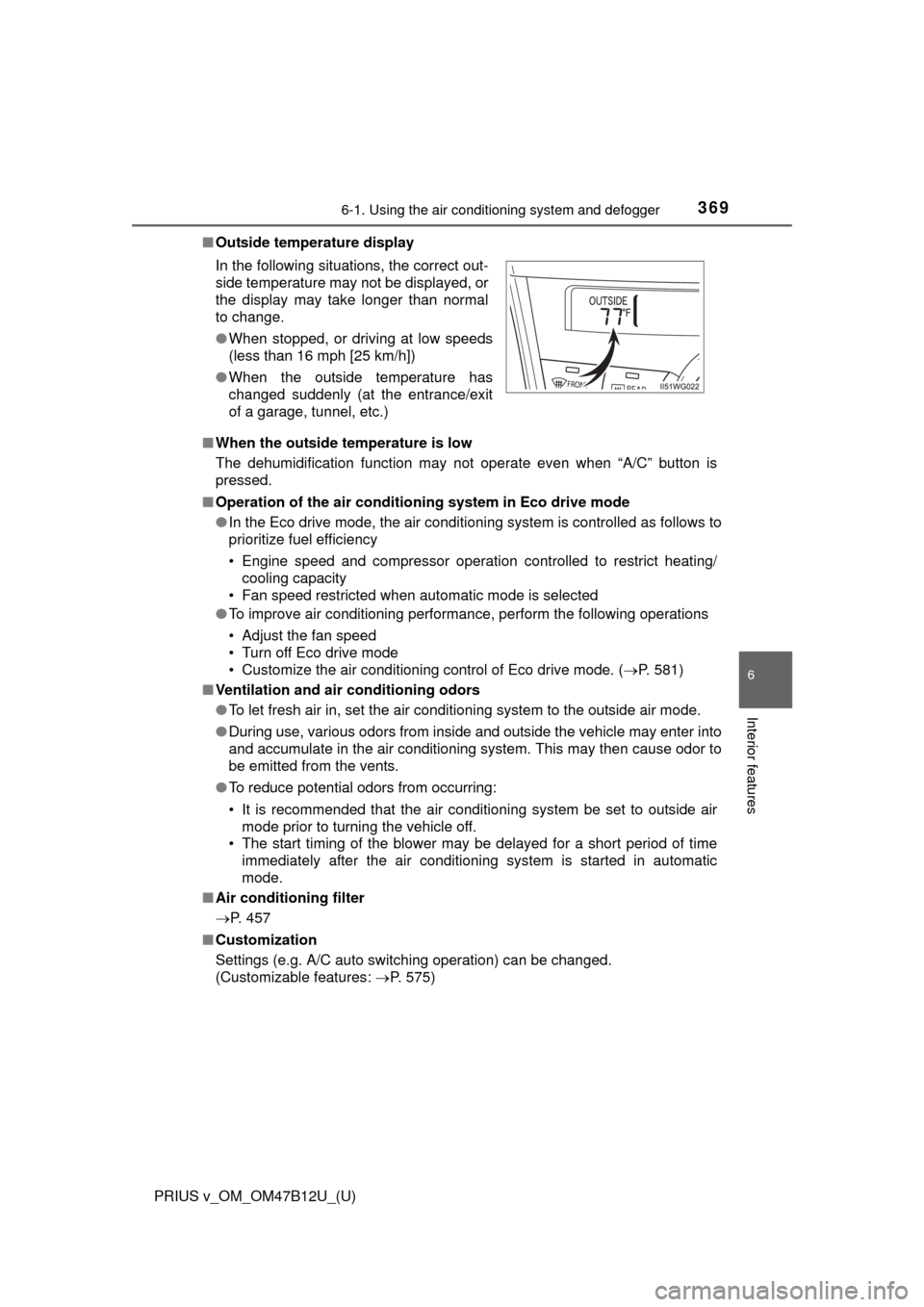
■Outside temperature display
■When the outside temperature is low
The dehumidification function may not operate even when “A/C” button is
pressed.
■Operation of the air conditioning system in Eco drive mode
●In the Eco drive mode, the air conditioning system is controlled as follows to
prioritize fuel efficiency
• Engine speed and compressor operation controlled to restrict heating/
cooling capacity
• Fan speed restricted when automatic mode is selected
●To improve air conditioning performance, perform the following operations
• Adjust the fan speed
• Turn off Eco drive mode
• Customize the air conditioning control of Eco drive mode. (P. 581)
■Ventilation and air conditioning odors
●To let fresh air in, set the air conditioning system to the outside air mode.
●During use, various odors from inside and outside the vehicle may enter into
and accumulate in the air conditioning system. This may then cause odor to
be emitted from the vents.
●To reduce potential odors from occurring:
• It is recommended that the air conditioning system be set to outside air
mode prior to turning the vehicle off.
• The start timing of the blower may be delayed for a short period of time
immediately after the air conditioning system is started in automatic
mode.
■Air conditioning filter
P. 457
■Customization
Settings (e.g. A/C auto switching operation) can be changed.
(Customizable features: P. 575) In the following situations, the correct out-
side temperature may not be displayed, or
the display may take longer than normal
to change.
●When stopped, or driving at low speeds
(less than 16 mph [25 km/h])
●When the outside temperature has
changed suddenly (at the entrance/exit
of a garage, tunnel, etc.)
Page 371 of 620
371
PRIUS v_OM_OM47B12U_(U)
6-1. Using the air conditioning system and defogger
6
Interior features
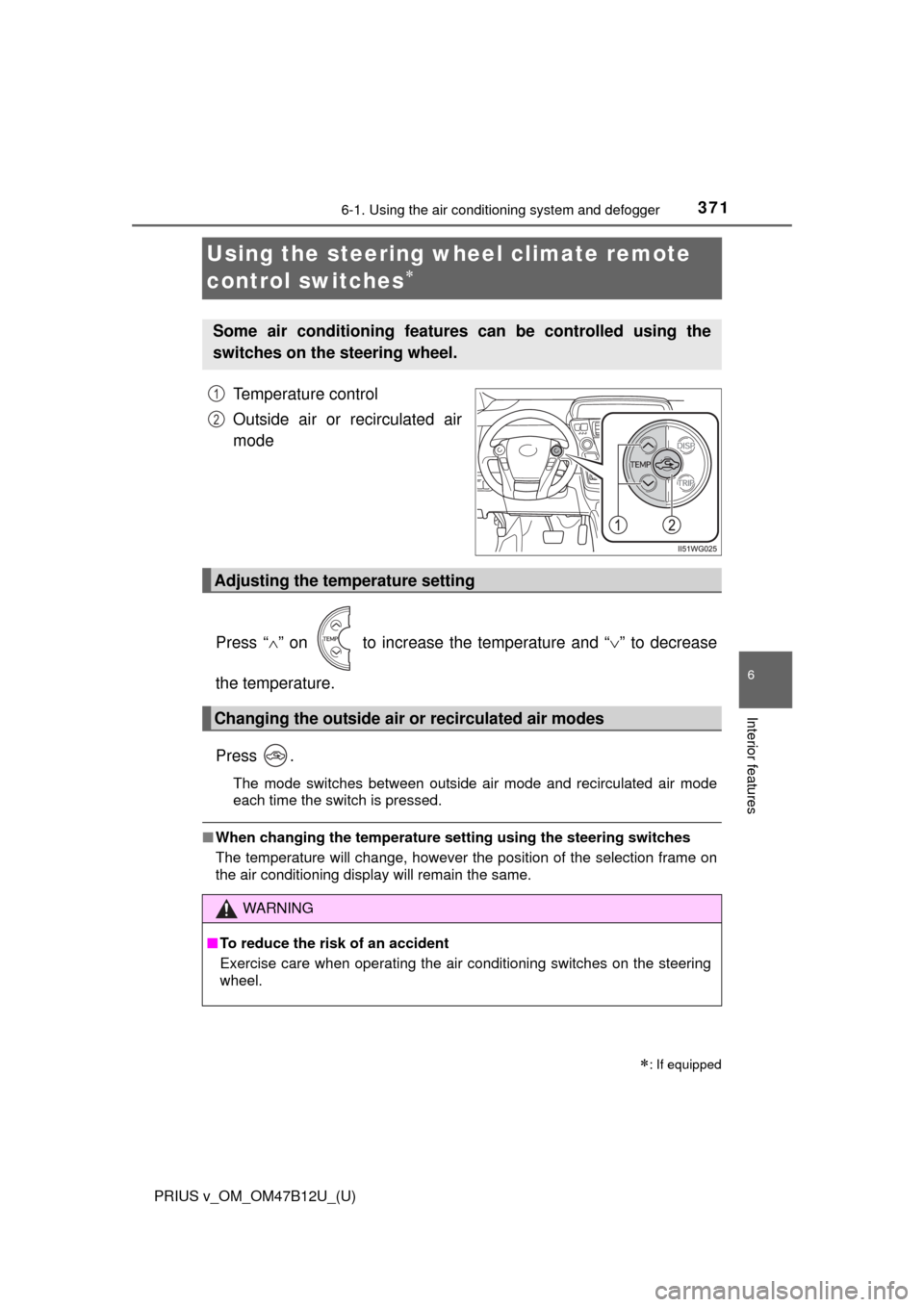
Using the steering wheel climate remote
control switches
Temperature control
Outside air or recirculated air
mode
Press “” on to increase the temperature and “” to decrease
the temperature.
Press .
The mode switches between outside air mode and recirculated air mode
each time the switch is pressed.
■When changing the temperature setting using the steering switches
The temperature will change, however the position of the selection frame on
the air conditioning display will remain the same.
: If equipped
Some air conditioning features can be controlled using the
switches on the steering wheel.
1
2
Adjusting the temperature setting
Changing the outside air or recirculated air modes
WARNING
■To reduce the risk of an accident
Exercise care when operating the air conditioning switches on the steering
wheel.
Page 375 of 620
PRIUS v_OM_OM47B12U_(U)
3756-2. Using the interior lights
6
Interior features
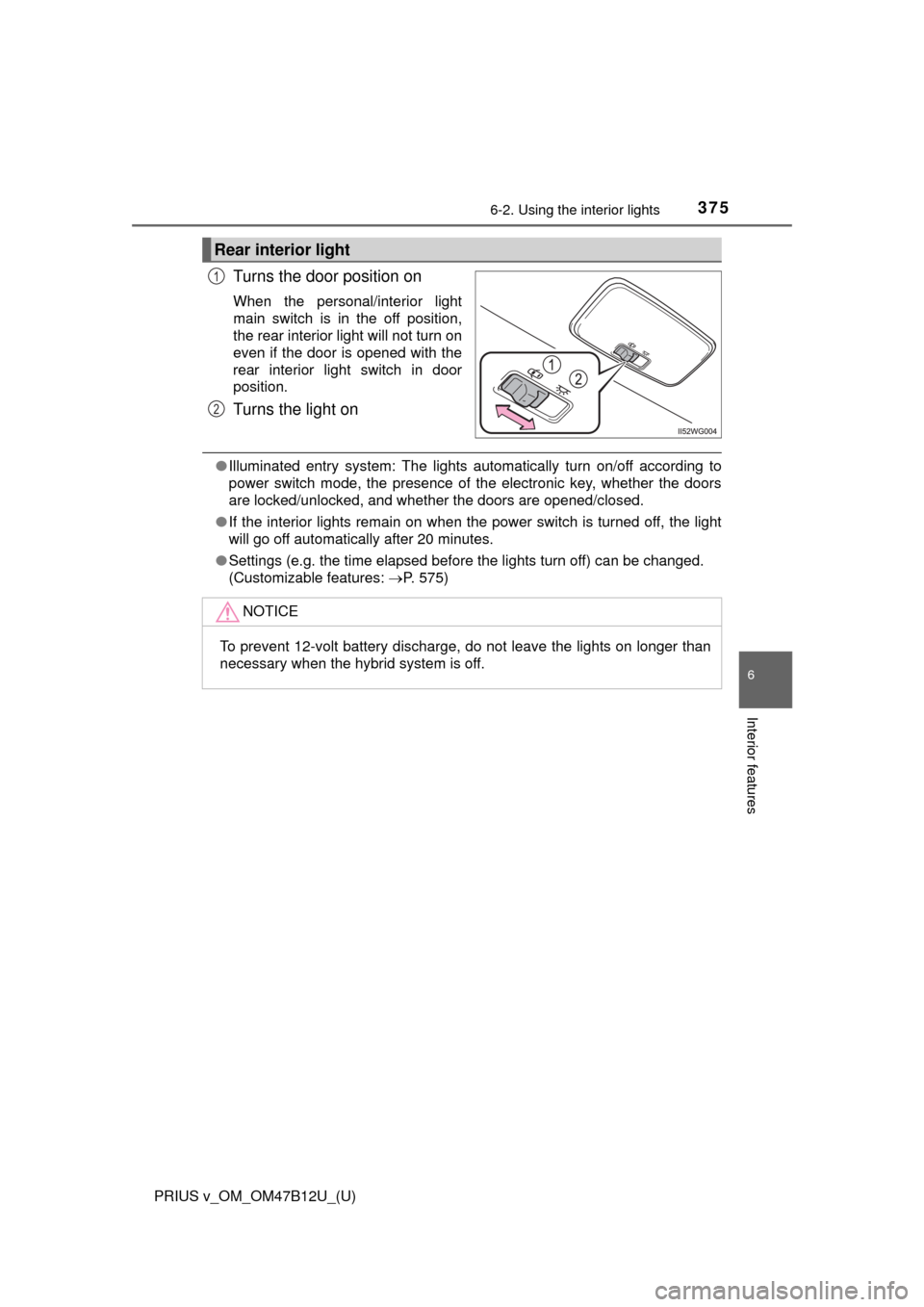
Turns the door position on
When the personal/interior light
main switch is in the off position,
the rear interior light will not turn on
even if the door is opened with the
rear interior light switch in door
position.
Turns the light on
●Illuminated entry system: The lights automatically turn on/off according to
power switch mode, the presence of the electronic key, whether the doors
are locked/unlocked, and whether the doors are opened/closed.
●If the interior lights remain on when the power switch is turned off, the light
will go off automatically after 20 minutes.
●Settings (e.g. the time elapsed before the lights turn off) can be changed.
(Customizable features: P. 575)
Rear interior light
1
2
NOTICE
To prevent 12-volt battery discharge, do not leave the lights on longer than
necessary when the hybrid system is off.
Page 449 of 620

PRIUS v_OM_OM47B12U_(U)
4497-3. Do-it-yourself maintenance
7
Maintenance and care
■The initialization operation
●Make sure to carry out initialization after adjusting the tire inflation pressure.
Also, make sure the tires are cold before carrying out initialization or tire
inflation pressure adjustment.
●If you have accidentally turned the power switch off during initialization, it is
not necessary to press the reset switch again as initialization will restart
automatically when the power switch has been turned to ON mode for the
next time.
●If you accidentally press the reset switch when initialization is not necessary,
adjust the tire inflation pressure to the specified level when the tires are
cold, and conduct initialization again.
■When initialization of the tire pressure warning system has failed
Initialization can be completed in a few minutes. However, in the following
cases, the settings have not been recorded and the system will not operate
properly. If repeated attempts to record tire inflation pressure settings are
unsuccessful, have the vehicle inspected by your Toyota dealer.
●When operating the tire pressure warning reset switch, the tire pressure
warning light does not blink 3 times.
●After carrying out the initialization procedure, the tire pressure warning light
blinks for 1 minute then stays on after driving for 20 minutes.
■Certification for the tire pressure warning system
For vehicles sold in the U.S.A., Guam, Saipan and Puerto Rico
FCC ID: PAXPMV107J
FCC ID: HYQ13BDE
NOTE:
This device complies with part 15 of the FCC Rules. Operation is subject to
the following two conditions: (1) This device may not cause harmful interfer-
ence, and (2) this device must accept any interference received, including
interference that may cause undesired operation.
FCC WARNING:
Changes or modifications not expressly approved by the party responsible for
compliance could void the user’s authority to operate the equipment.
For vehicles sold in Canada
NOTE:
Operation is subject to the following two conditions; (1) this device may not
cause interference, and (2) this device must accept any interference, includ-
ing interference that may cause undesired operation of the device.
Page 493 of 620
4938-2. Steps to take in an emergency
PRIUS v_OM_OM47B12U_(U)
8
When trouble arises
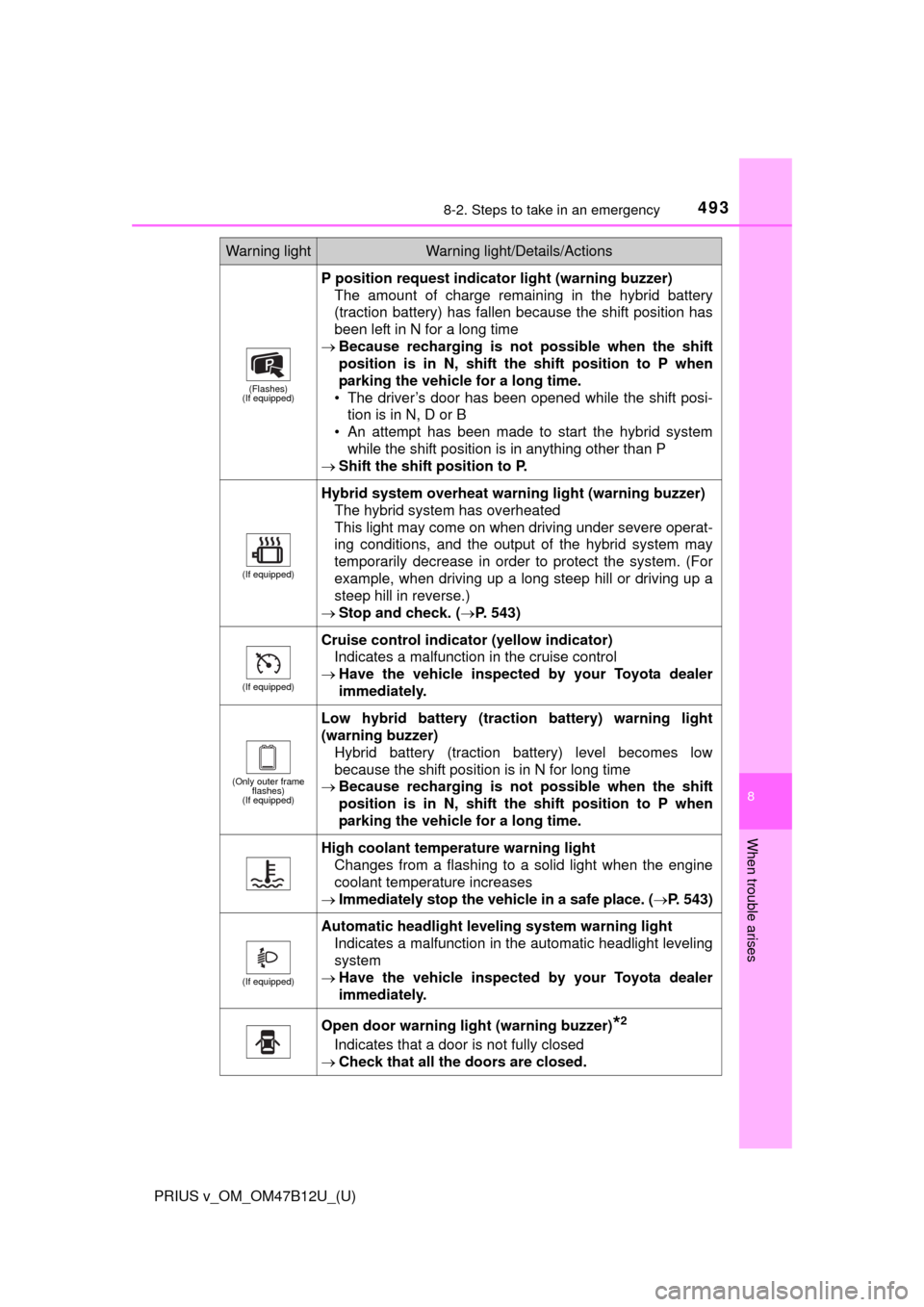
(Flashes)
(If equipped)
P position request indicator light (warning buzzer)
The amount of charge remaining in the hybrid battery
(traction battery) has fallen because the shift position has
been left in N for a long time
Because recharging is not possible when the shift
position is in N, shift the shift position to P when
parking the vehicle for a long time.
• The driver’s door has been opened while the shift posi-
tion is in N, D or B
• An attempt has been made to start the hybrid system
while the shift position is in anything other than P
Shift the shift position to P.
(If equipped)
Hybrid system overheat warning light (warning buzzer)
The hybrid system has overheated
This light may come on when driving under severe operat-
ing conditions, and the output of the hybrid system may
temporarily decrease in order to protect the system. (For
example, when driving up a long steep hill or driving up a
steep hill in reverse.)
Stop and check. (P. 543)
(If equipped)
Cruise control indicator (yellow indicator)
Indicates a malfunction in the cruise control
Have the vehicle inspected by your Toyota dealer
immediately.
(Only outer frame
flashes)
(If equipped)
Low hybrid battery (traction battery) warning light
(warning buzzer)
Hybrid battery (traction battery) level becomes low
because the shift position is in N for long time
Because recharging is not possible when the shift
position is in N, shift the shift position to P when
parking the vehicle for a long time.
High coolant temperature warning light
Changes from a flashing to a solid light when the engine
coolant temperature increases
Immediately stop the vehicle in a safe place. (P. 543)
(If equipped)
Automatic headlight leveling system warning light
Indicates a malfunction in the automatic headlight leveling
system
Have the vehicle inspected by your Toyota dealer
immediately.
Open door warning light (warning buzzer)*2
Indicates that a door is not fully closed
Check that all the doors are closed.
Warning lightWarning light/Details/Actions