remote control TOYOTA PRIUS V 2018 Owner's Manual
[x] Cancel search | Manufacturer: TOYOTA, Model Year: 2018, Model line: PRIUS V, Model: TOYOTA PRIUS V 2018Pages: 607, PDF Size: 41.96 MB
Page 523 of 607
521
PRIUS v_OM_OM47B78U_(U)
8
When trouble arises
8-2. Steps to take in an emergency
If the electronic key does not operate
properly
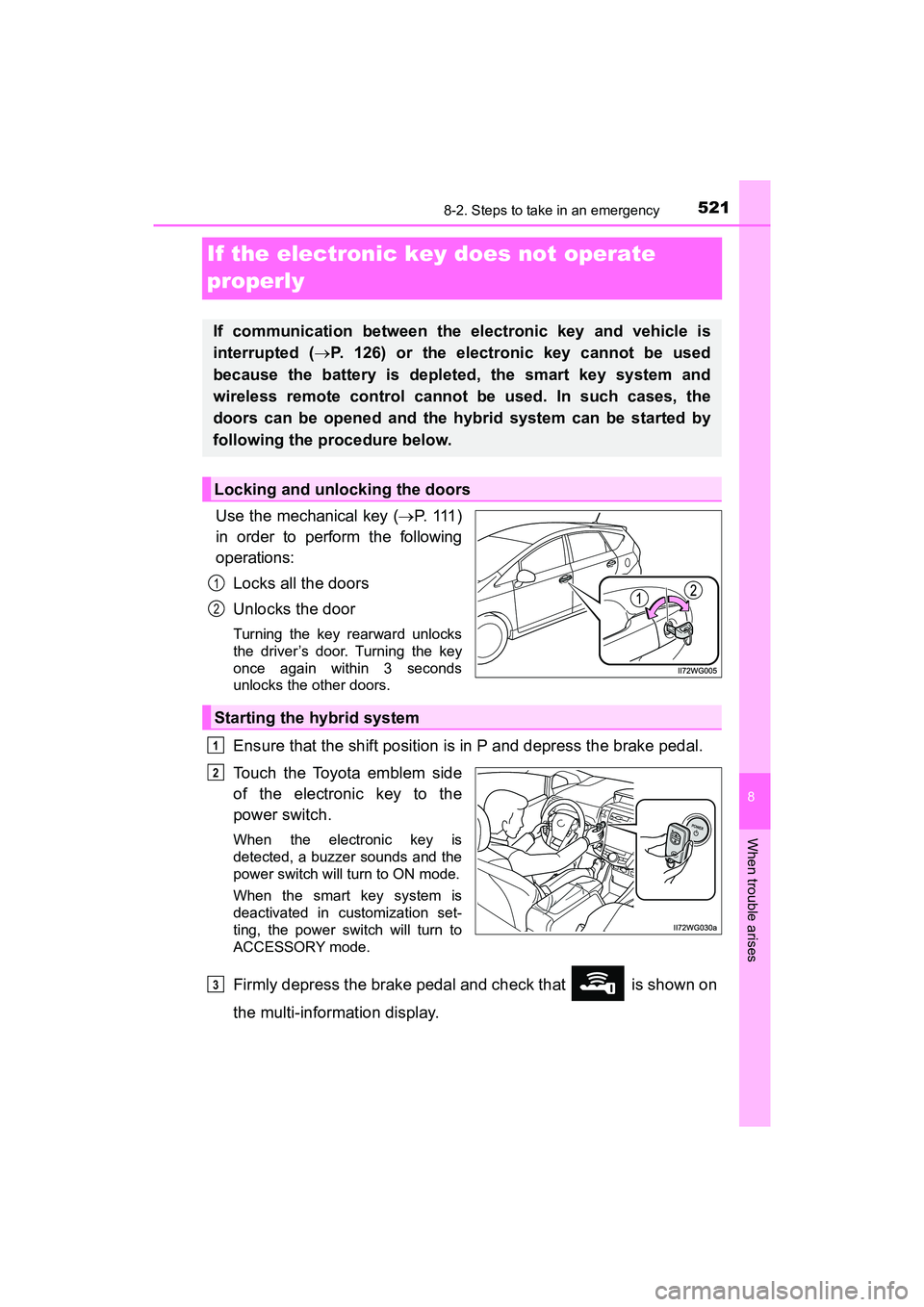
Use the mechanical key (P. 111 )
in order to perform the following
operations:
Locks all the doors
Unlocks the door
Turning the key rearward unlocks
the driver’s door. Turning the key
once again within 3 seconds
unlocks the other doors.
Ensure that the shift position is in P and depress the brake pedal.
Touch the Toyota emblem side
of the electronic key to the
power switch.
When the electronic key is
detected, a buzzer sounds and the
power switch will turn to ON mode.
When the smart key system is
deactivated in customization set-
ting, the power switch will turn to
ACCESSORY mode.
Firmly depress the brake pedal and check that is shown on
the multi-information display.
If communication between the electronic key and vehicle is
interrupted ( P. 126) or the electronic key cannot be used
because the battery is depleted, the smart key system and
wireless remote control cannot be used. In such cases, the
doors can be opened and the hybrid system can be started by
following the procedure below.
Locking and unlocking the doors
1
2
Starting the hybrid system
1
2
3
Page 527 of 607
5258-2. Steps to take in an emergency
PRIUS v_OM_OM47B78U_(U)
8
When trouble arises
Make sure the “READY” indicator comes on. If the indicator light
does not come on, contact your Toyota dealer.
Once the hybrid system has started, remove the jumper cables in
the exact reverse order from which they were connected.
Close the exclusive jump starting terminal cover, and reinstall the
fuse box cover to its original position.
When installing, first hook the fuse box cover onto the two rear tabs.
Once the hybrid system starts, have the vehicle inspected at your
Toyota dealer as soon as possible.
■Starting the hybrid system when the 12-volt battery is discharged
The hybrid system cannot be started by push-starting.
■ To prevent 12-volt battery discharge
●Turn off the headlights and the audio system while the hybrid system is off.
● Turn off any unnecessary electrical components when the vehicle is running
at a low speed for an extended period, such as in heavy traffic.
■ Charging the 12-volt battery
The electricity stored in the 12-volt battery will discharge gradually even when
the vehicle is not in use, due to natural discharge and the draining effects of
certain electrical appliances. If the vehi cle is left for a long time, the 12-volt
battery may discharge, and the hybrid system may be unable to start. (The
12-volt battery recharges automatically while the hybrid system is operating.)
■ When recharging or replacing the 12-volt battery
●In some cases, it may not be possible to unlock the doors using the smart
key system when the 12-volt battery is discharged. Use the wireless remote
control or the mechanical key to lock or unlock the doors.
● The hybrid system may not start on the first attempt after the 12-volt battery
has recharged but will start normally after the second attempt. This is not a
malfunction.
● The power switch mode is memorized by the vehicle. When the 12-volt bat-
tery is reconnected, the system will return to the mode it was in before the
12-volt battery was discharged. Before disconnecting the 12-volt battery,
turn the power switch off. If you are unsure what mode the power switch was
in before the 12-volt battery discharged, be especially careful when recon-
necting the 12-volt battery.
● If the 12-volt battery discharges while the shift position is in P, it may not be
possible to shift the shift position to other positions. In this case, the vehicle
cannot be towed without lifting both front wheels because the front wheels
will be locked. ( P. 472)
● When the 12-volt battery is reconnected, start the hybrid system and con-
firm that the shift position can be changed to each position using the shift
position indicator.
6
7
8
Page 563 of 607
PRIUS v_OM_OM47B78U_(U)
5619-2. Customization
9
Vehicle specifications
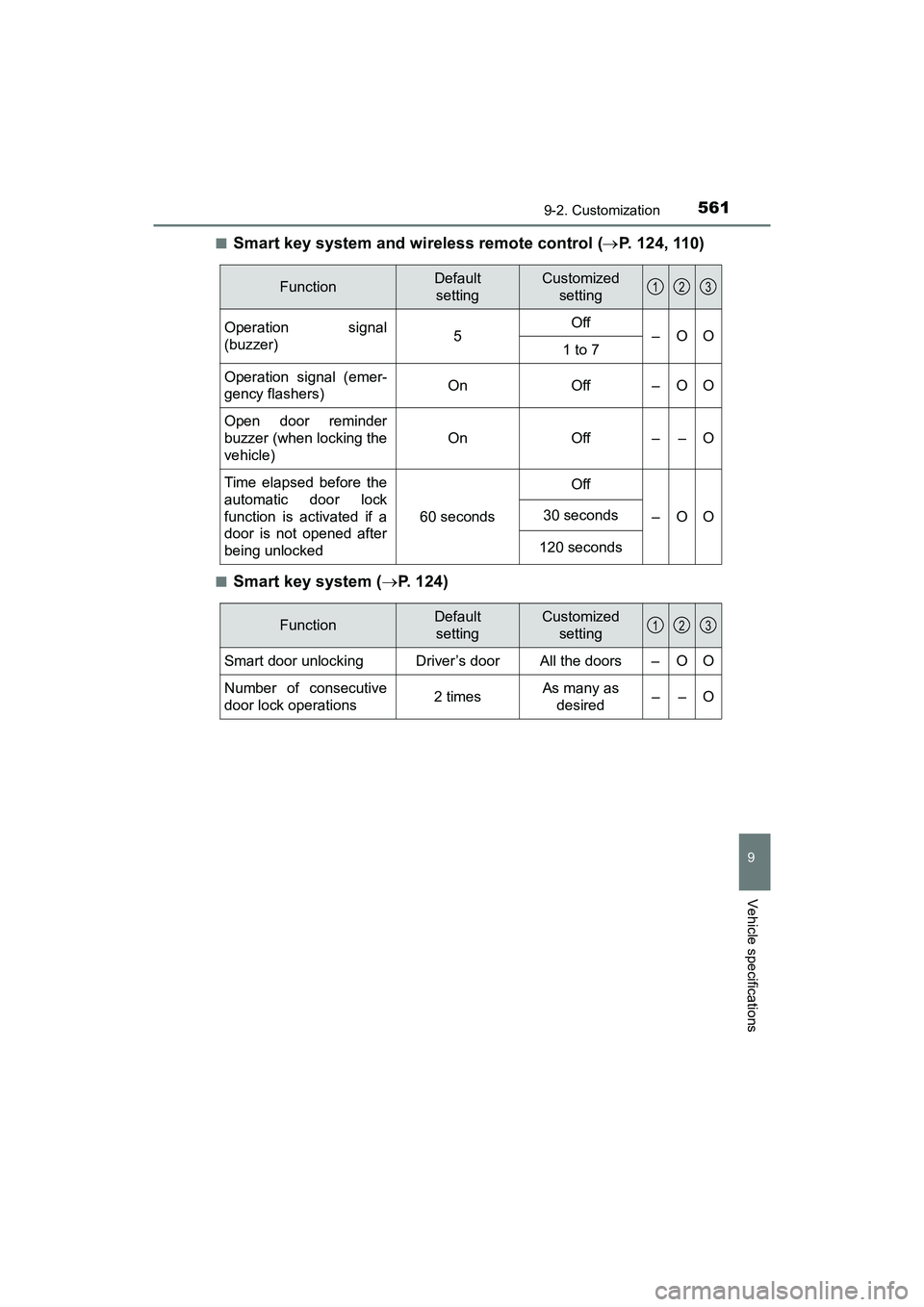
■Smart key system and wireless remote control (P. 124, 110)
■Smart key system ( P. 124)
FunctionDefault
settingCustomized setting
Operation signal
(buzzer) 5Off
–OO
1 to 7
Operation signal (emer-
gency flashers) On Off – O O
Open door reminder
buzzer (when locking the
vehicle)
OnOff––O
Time elapsed before the
automatic door lock
function is activated if a
door is not opened after
being unlocked
60 seconds
Off
–OO30 seconds
120 seconds
123
FunctionDefault
settingCustomized setting
Smart door unlocking Driver’s door All the doors – O O
Number of consecutive
door lock operations2 timesAs many as desired––O
123
Page 564 of 607
562
PRIUS v_OM_OM47B78U_(U)
9-2. Customization
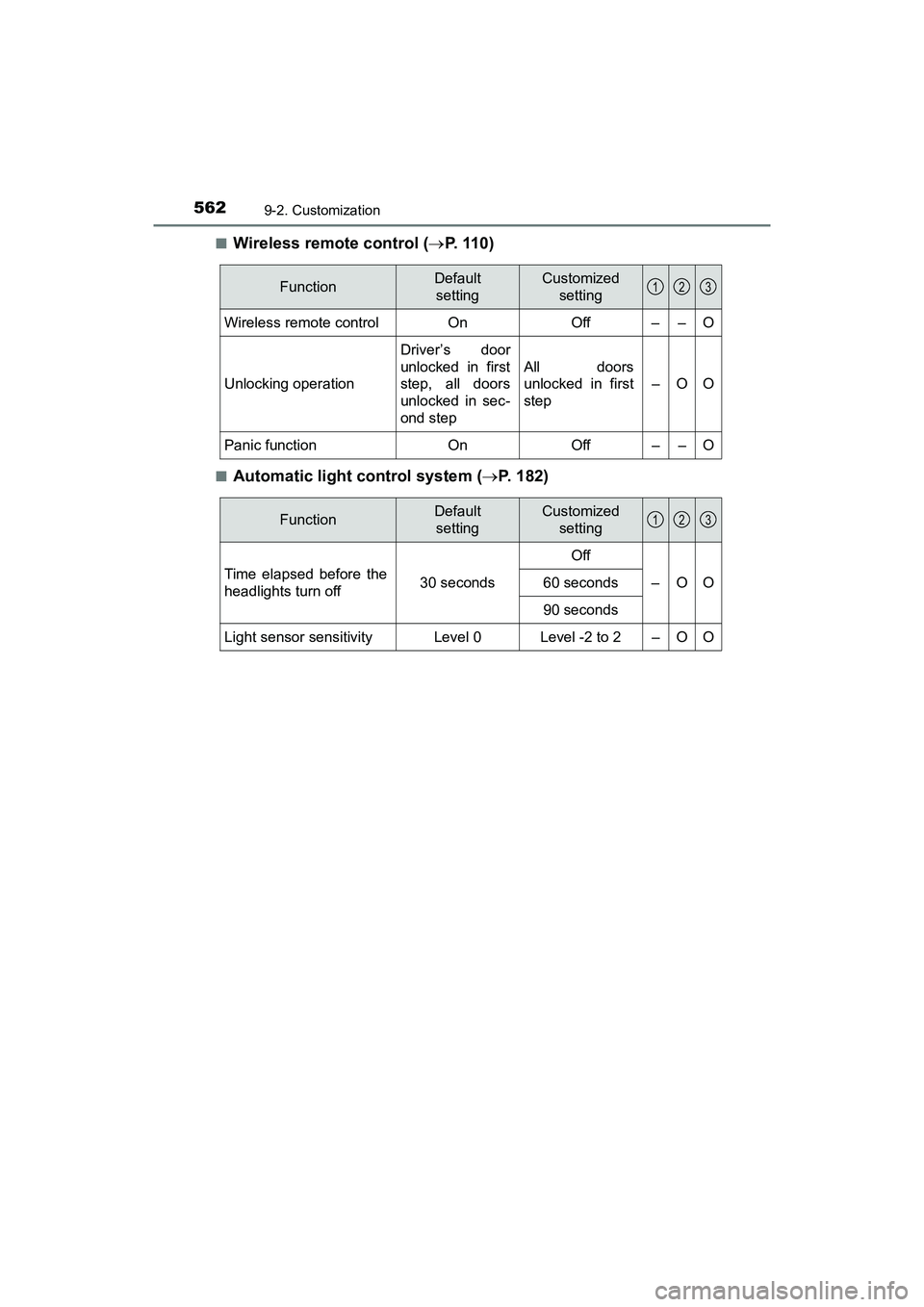
■Wireless remote control (P. 110)
■Automatic light control system ( P. 182)
FunctionDefault
settingCustomized setting
Wireless remote control On Off – – O
Unlocking operation
Driver’s door
unlocked in first
step, all doors
unlocked in sec-
ond step
All doors
unlocked in first
step
–OO
Panic function OnOff––O
123
FunctionDefault
settingCustomized setting
Time elapsed before the
headlights turn off 30 secondsOff
–OO
60 seconds
90 seconds
Light sensor sensitivityLevel 0Level -2 to 2–OO
123
Page 565 of 607
PRIUS v_OM_OM47B78U_(U)
5639-2. Customization
9
Vehicle specifications
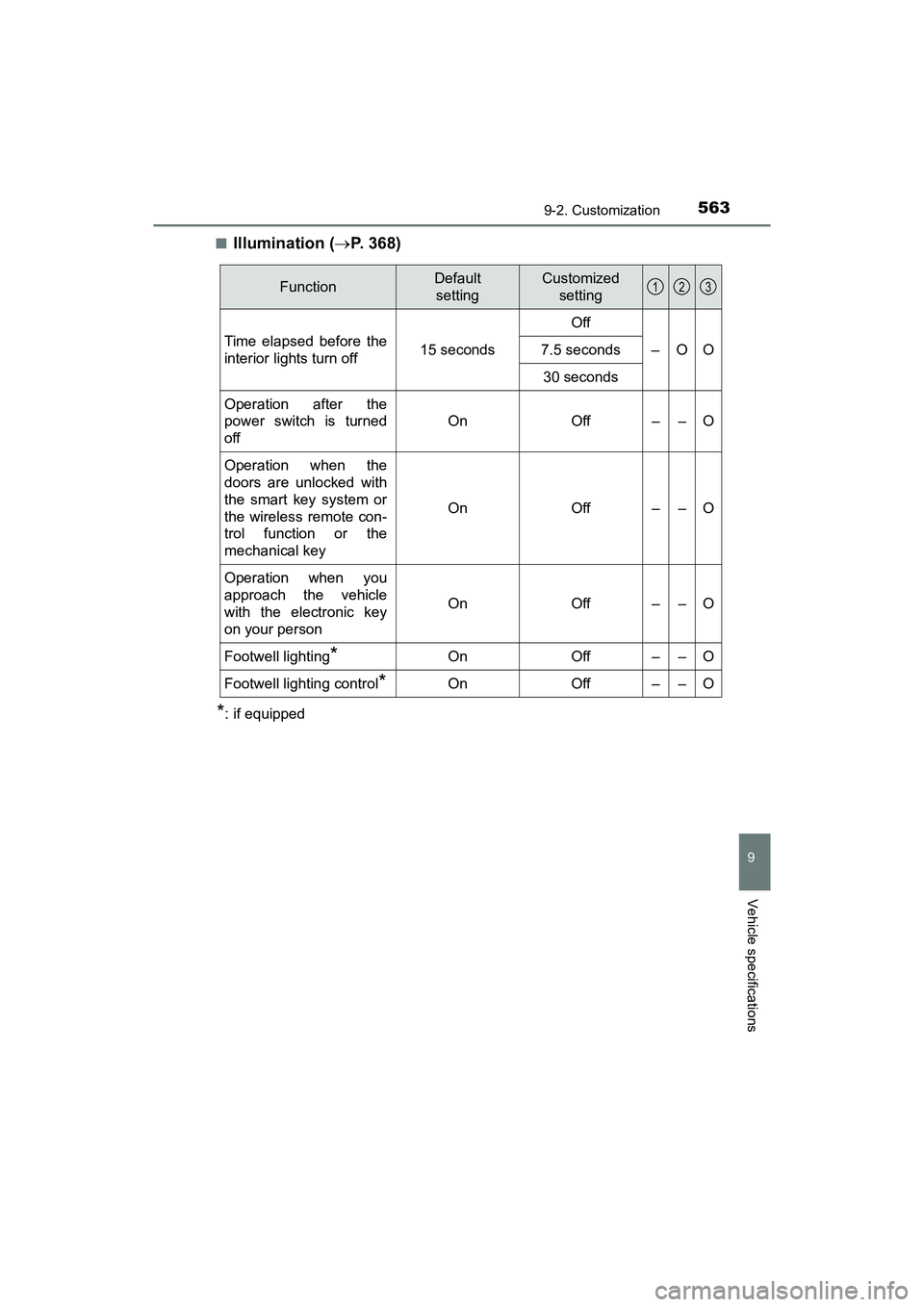
■Illumination (P. 368)
*: if equipped
FunctionDefault
settingCustomized setting
Time elapsed before the
interior lights turn off 15 secondsOff
–OO
7.5 seconds
30 seconds
Operation after the
power switch is turned
off
OnOff––O
Operation when the
doors are unlocked with
the smart key system or
the wireless remote con-
trol function or the
mechanical key
OnOff––O
Operation when you
approach the vehicle
with the electronic key
on your person
OnOff––O
Footwell lighting*OnOff––O
Footwell lighting control*OnOff––O
123
Page 596 of 607
594Alphabetical index
PRIUS v_OM_OM47B78U_(U)
JackPositioning a floor jack .......... 411
Vehicle-equipped jack........... 507
Jack handle .............................. 507
Jam protection function Panoramic roof shades ......... 384
Power windows ..................... 147
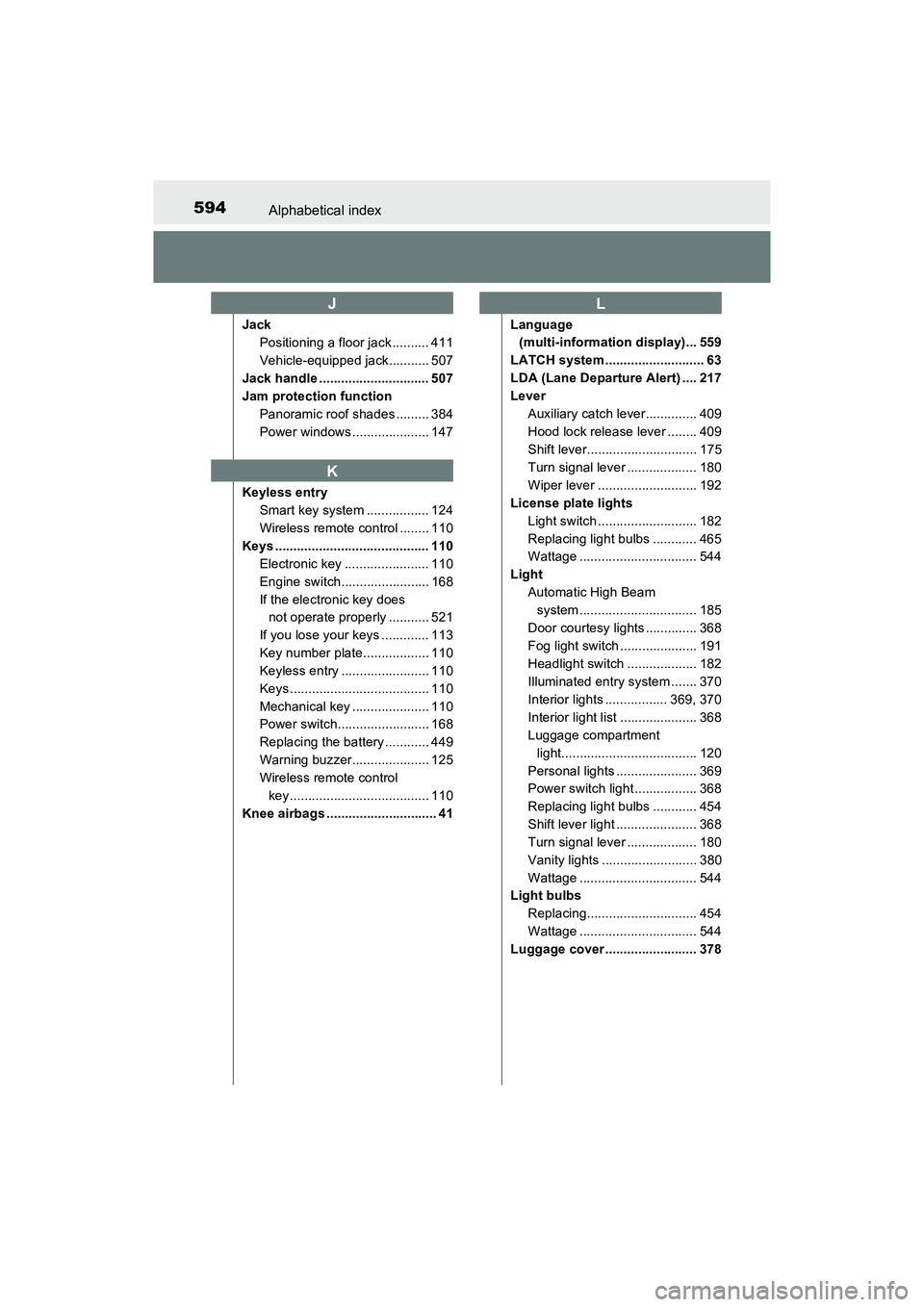
Keyless entry Smart key system ................. 124
Wireless remote control ........ 110
Keys .......................................... 110 Electronic key ....................... 110
Engine switch........................ 168
If the electronic key does not operate properly ........... 521
If you lose your keys ............. 113
Key number plate.................. 110
Keyless entry ........................ 110
Keys ...................................... 110
Mechanical key ..................... 110
Power switch......................... 168
Replacing the battery ............ 449
Warning buzzer..................... 125
Wireless remote control key...................................... 110
Knee airbags .............................. 41 Language
(multi-information display)... 559
LATCH system ........................... 63
LDA (Lane Departure Alert) .... 217
Lever Auxiliary catch lever.............. 409
Hood lock release lever ........ 409
Shift lever.............................. 175
Turn signal lever ................... 180
Wiper lever ........................... 192
License plate lights Light switch ........................... 182
Replacing light bulbs ............ 465
Wattage ................................ 544
Light Automatic High Beam system ................................ 185
Door courtesy lights .............. 368
Fog light switch ..................... 191
Headlight switch ................... 182
Illuminated entry system ....... 370
Interior lights ................. 369, 370
Interior light list ..................... 368
Luggage compartment light..................................... 120
Personal lights ...................... 369
Power switch light ................. 368
Replacing light bulbs ............ 454
Shift lever light ...................... 368
Turn signal lever ................... 180
Vanity lights .......................... 380
Wattage ................................ 544
Light bulbs
Replacing.............................. 454
Wattage ................................ 544
Luggage cover ......................... 378
J
K
L
Page 601 of 607
599Alphabetical index
PRIUS v_OM_OM47B78U_(U)
StuckIf the vehicle becomes stuck ................................... 533
Sun visors ................................ 380
Sunshade Panoramic roof shades ......... 384
Switch Audio remote control switches.............................. 272
Automatic High Beam switch ................................. 185
Clock adjustment buttons ..... 381
Cruise control switch............. 227
Door lock switch.................... 116
Driving mode select switch ... 251
Emergency flashers switch ... 470
Engine switch........................ 168
EV drive mode switch ........... 173
Fog light switch ..................... 191
Garage door opener switches.............................. 386
Ignition switch ....................... 168
LDA (Lane Departure Alert)................................... 221
Light switches ....................... 182 Meter control switches ............ 94
MPH or km/h button................ 91
Outside rear view mirror
switches ............................. 144
Panoramic roof shades......... 384
Power door lock switch ......... 116
Power switch ........................ 168
Power window switch ........... 146
Rear window wiper and
washer switch..................... 194
Rear window and outside
rear view mirror
defoggers switch ................ 362
Seat heater switches ............ 367
Talk switch ............................ 333
Telephone switches .............. 333
Tire pressure warning reset switch ........................ 433
TRIP button ............................ 92
Vehicle-to-vehicle distance switch ................... 234
VSC OFF switch ................... 254
Window lock switch .............. 146
Windshield wipers and washer switch..................... 192
Page 604 of 607
602Alphabetical index
PRIUS v_OM_OM47B78U_(U)
Warning lightsABS....................................... 479
Automatic headlight leveling system ................... 480
Brake Override System......... 151
Brake system ........................ 478
Charging system ................... 478
Drive-Start Control ................ 151
Driver’s seat belt
reminder ............................. 480
Electronic engine control
system ................................ 478
Electric power steering ......... 479
Front passenger’s seat belt reminder ...................... 480
High coolant temperature ..... 480
Low fuel level ........................ 480
Malfunction indicator lamp .... 478
Master warning light.............. 480
Open door ............................. 480
PCS ...................................... 479
Seat belt reminder light ......... 480
Slip indicator ......................... 479
SRS ...................................... 479
Tire pressure......................... 481
Warning messages .................. 487 Washer
Checking............................... 425
Preparing and checking before winter ...................... 262
Switch ........................... 192, 194
Washing and waxing ............... 394
Weights Cargo capacity...................... 165
Load limits ............................ 536
What to do if... (Troubleshooting) ................. 582
Wheels ...................................... 443 Replacing wheels ................. 506
Size....................................... 543
Window glasses ...................... 146
Window lock switch ................ 146
Windows Power windows..................... 146
Rear window defogger.......... 362
Washer ......................... 192, 194
Windshield wipers ................... 192
Winter driving tips ................... 262
Wireless communication ........ 306
Wireless remote control key .......................................... 110Locking/Unlocking ................ 110
Panic mode........................... 111
Replacing the battery............ 449
WMA disc ................................. 289