audio TOYOTA PROACE 2017 Owner's Guide
[x] Cancel search | Manufacturer: TOYOTA, Model Year: 2017, Model line: PROACE, Model: TOYOTA PROACE 2017Pages: 516, PDF Size: 91.65 MB
Page 324 of 516
324
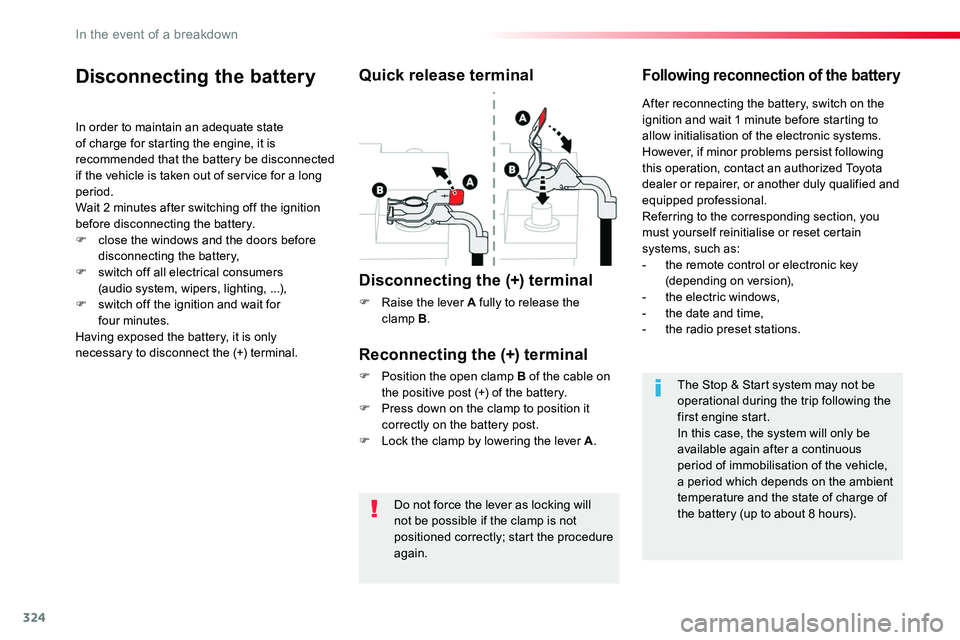
Do not force the lever as locking will not be possible if the clamp is not
positioned correctly; start the procedure again.
Disconnecting the battery
In order to maintain an adequate state of charge for starting the engine, it is recommended that the battery be disconnected if the vehicle is taken out of service for a long period.Wait 2 minutes after switching off the ignition before disconnecting the battery.F close the windows and the doors before disconnecting the battery,F switch off all electrical consumers (audio system, wipers, lighting, ...),F switch off the ignition and wait for four minutes.Having exposed the battery, it is only necessary to disconnect the (+) terminal.
Quick release terminal
Disconnecting the (+) terminal
F Raise the lever A fully to release the clamp B.
Following reconnection of the battery
Reconnecting the (+) terminal
F Position the open clamp B of the cable on the positive post (+) of the battery.F Press down on the clamp to position it correctly on the battery post.F Lock the clamp by lowering the lever A.
After reconnecting the battery, switch on the ignition and wait 1 minute before starting to allow initialisation of the electronic systems.However, if minor problems persist following this operation, contact an authorized Toyota dealer or repairer, or another duly qualified and equipped professional.Referring to the corresponding section, you must yourself reinitialise or reset certain systems, such as:- the remote control or electronic key (depending on version),- the electric windows,- the date and time,- the radio preset stations.
The Stop & Start system may not be operational during the trip following the first engine start.In this case, the system will only be available again after a continuous period of immobilisation of the vehicle, a period which depends on the ambient temperature and the state of charge of the battery (up to about 8 hours).
In the event of a breakdown
Page 338 of 516
338
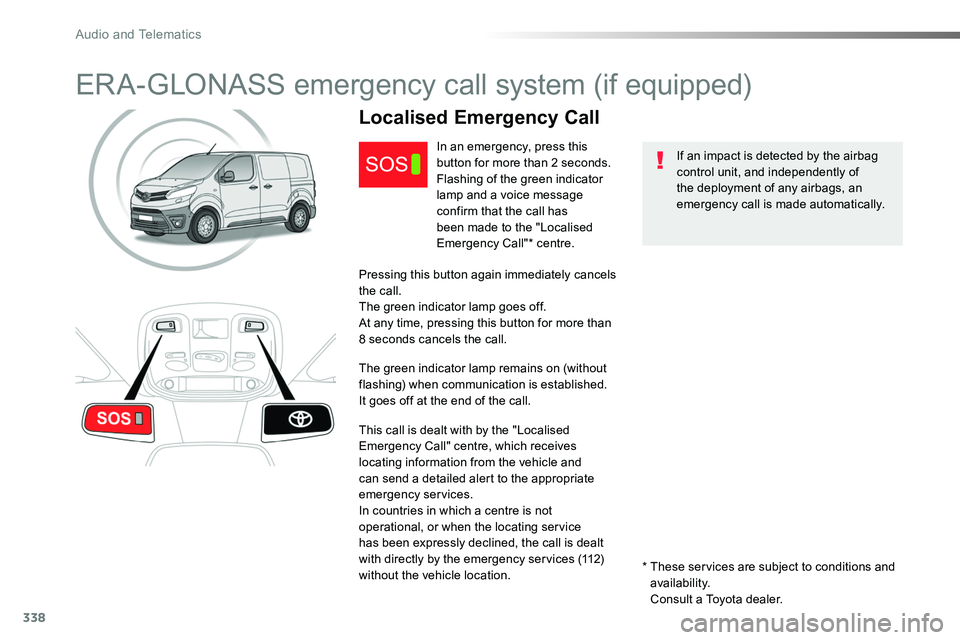
ERA-GLONASS emergency call system (if equipped)
If an impact is detected by the airbag control unit, and independently of the deployment of any airbags, an emergency call is made automatically.
Localised Emergency Call
In an emergency, press this button for more than 2 seconds.Flashing of the green indicator lamp and a voice message confirm that the call has
been made to the "Localised Emergency Call"* centre.
Pressing this button again immediately cancels the call.The green indicator lamp goes off.At any time, pressing this button for more than 8 seconds cancels the call.
The green indicator lamp remains on (without flashing) when communication is established.It goes off at the end of the call.
This call is dealt with by the "Localised Emergency Call" centre, which receives locating information from the vehicle and can send a detailed alert to the appropriate emergency services.In countries in which a centre is not operational, or when the locating service has been expressly declined, the call is dealt with directly by the emergency services (112) without the vehicle location.* These services are subject to conditions and availability.
Consult a Toyota dealer.
Audio and Telematics
Page 339 of 516
339
Localised Assistance Call
For technical reasons, particularly to improve the quality of Telematic services to customers, the manufacturer reserves the right to
carry out updates to the vehicle's on-board telematic system.
The fault with the system does not prevent the vehicle being driven.
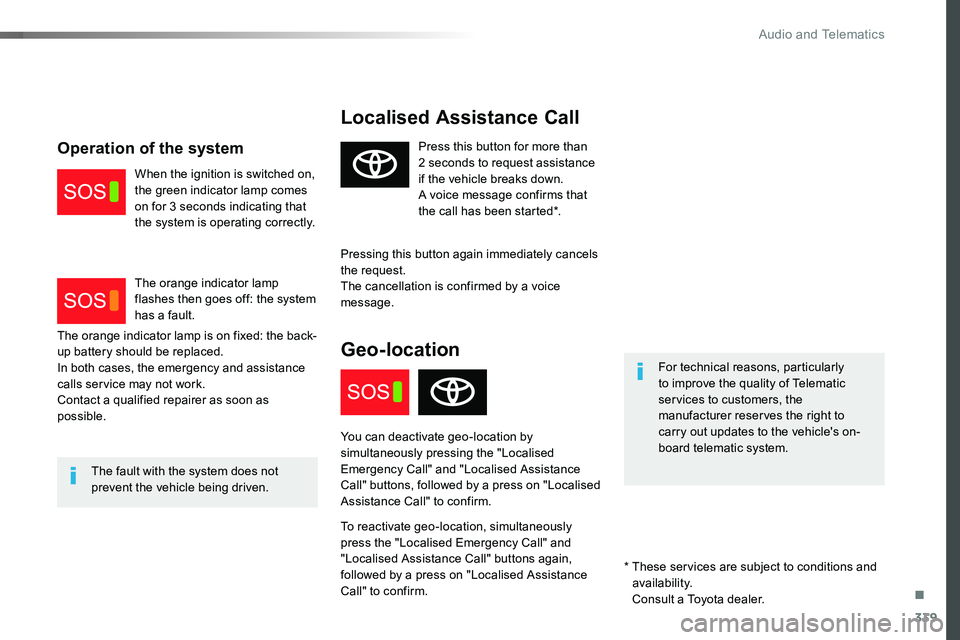
Press this button for more than 2 seconds to request assistance if the vehicle breaks down.A voice message confirms that the call has been started*.
Pressing this button again immediately cancels the request.The cancellation is confirmed by a voice message.
Geo-location
You can deactivate geo-location by simultaneously pressing the "Localised Emergency Call" and "Localised Assistance Call" buttons, followed by a press on "Localised Assistance Call" to confirm.
To reactivate geo-location, simultaneously press the "Localised Emergency Call" and "Localised Assistance Call" buttons again, followed by a press on "Localised Assistance Call" to confirm.
The orange indicator lamp is on fixed: the back-up battery should be replaced.In both cases, the emergency and assistance calls service may not work.Contact a qualified repairer as soon as possible.
Operation of the system
When the ignition is switched on, the green indicator lamp comes on for 3 seconds indicating that the system is operating correctly.
The orange indicator lamp flashes then goes off: the system has a fault.
* These services are subject to conditions and availability.
Consult a Toyota dealer.
.
Audio and Telematics
Page 341 of 516
341
Toyota Pro Touch with navigation system
GPS satellite navigation - Connectivity - Multimedia audio - Bluetooth® telephone
ContentsFirst steps 342
Steering mounted controls 344
Menus 345
Voice commands 346
Navigation 352
Connected navigation 368
Connectivity 378
Radio Media 388
Telephone 400
Settings 412
Frequently asked questions 422
The system is protected in such a way that it will only operate in your vehicle.As a safety measure and because it requires sustained attention by the driver, the pairing of a Bluetooth mobile telephone with the Bluetooth hands-free system of your audio system must be done with the vehicle stationary and the ignition on.The display of the energy economy mode message signals that a change to standby is imminent. For more information on the Energy economy mode refer to the corresponding section.
.
Audio and Telematics
Page 342 of 516
342
FM/87.5 MHz
87.5MHz 12:13
23 °C 87.5 MHz
First steps
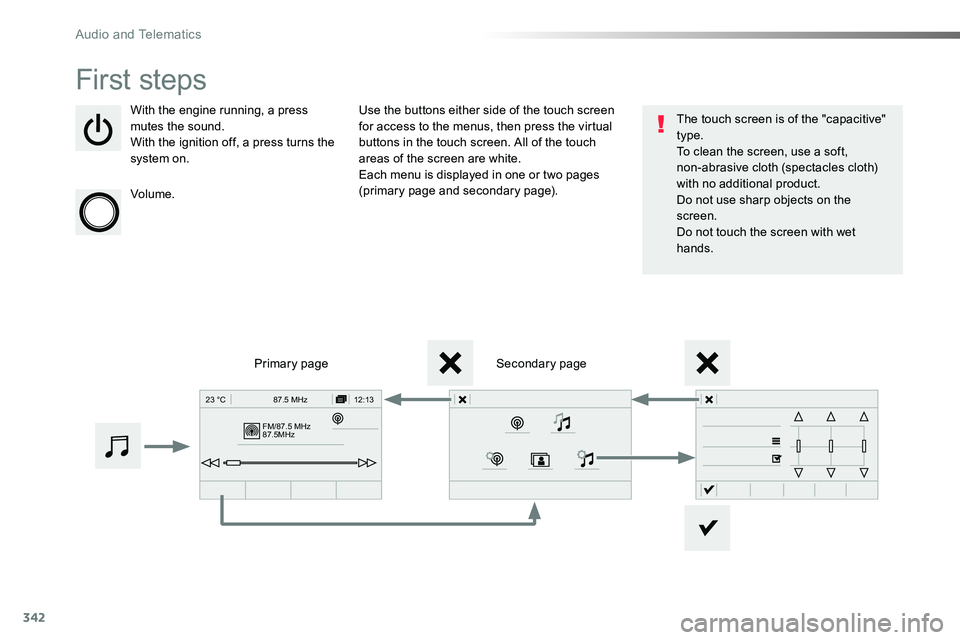
With the engine running, a press mutes the sound.With the ignition off, a press turns the system on.
Volume.
Use the buttons either side of the touch screen for access to the menus, then press the virtual buttons in the touch screen. All of the touch areas of the screen are white.Each menu is displayed in one or two pages (primary page and secondary page).
Secondary pagePrimary page
The touch screen is of the "capacitive" type.To clean the screen, use a soft, non-abrasive cloth (spectacles cloth) with no additional product.Do not use sharp objects on the screen.Do not touch the screen with wet hands.
Audio and Telematics
Page 343 of 516
343
12:13
23 °C531 kHz
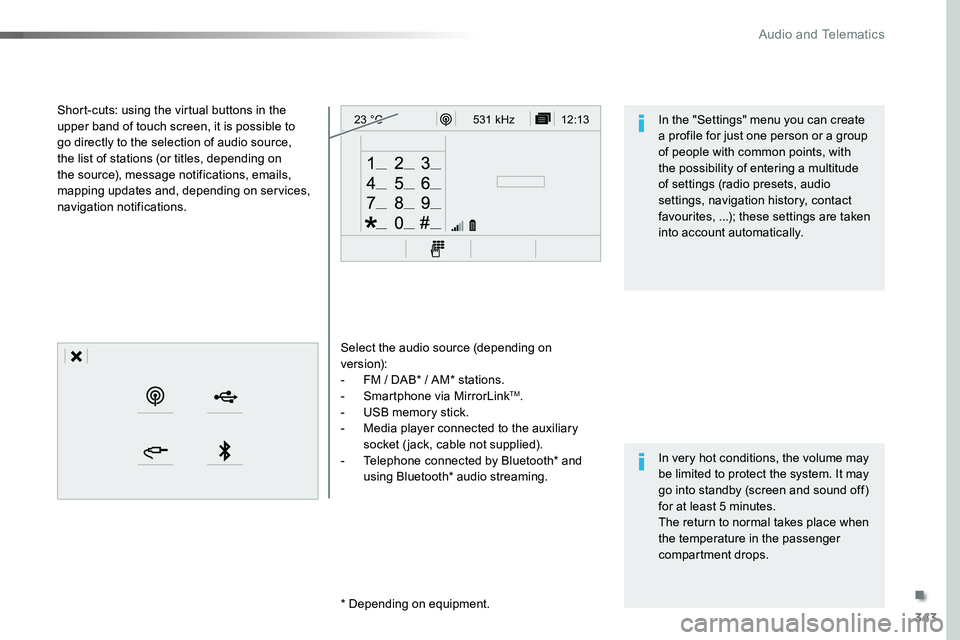
Select the audio source (depending on version):- FM / DAB* / AM* stations.- Smartphone via MirrorLinkTM.- USB memory stick.- Media player connected to the auxiliary socket (jack, cable not supplied).- Telephone connected by Bluetooth* and using Bluetooth* audio streaming.
* Depending on equipment.
Short-cuts: using the virtual buttons in the upper band of touch screen, it is possible to go directly to the selection of audio source, the list of stations (or titles, depending on the source), message notifications, emails, mapping updates and, depending on services, navigation notifications.
In very hot conditions, the volume may be limited to protect the system. It may go into standby (screen and sound off) for at least 5 minutes.The return to normal takes place when the temperature in the passenger compartment drops.
In the "Settings" menu you can create a profile for just one person or a group of people with common points, with the possibility of entering a multitude of settings (radio presets, audio settings, navigation history, contact favourites, ...); these settings are taken into account automatically.
.
Audio and Telematics
Page 344 of 516
344
Steering mounted controls
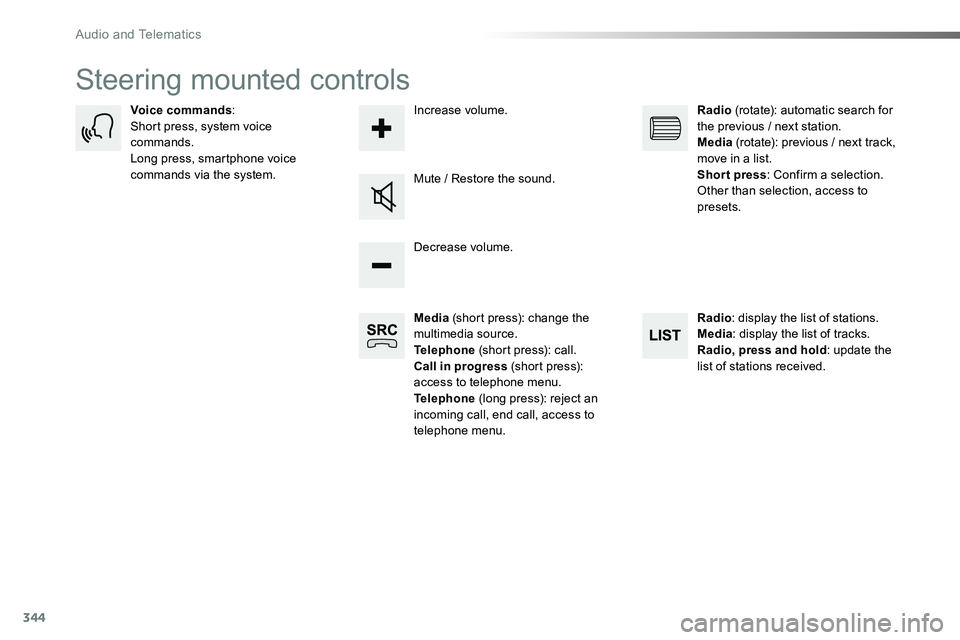
Media (short press): change the multimedia source.Telephone (short press): call.Call in progress (short press): access to telephone menu.Telephone (long press): reject an incoming call, end call, access to telephone menu.
Decrease volume.
Voice commands:Short press, system voice commands.Long press, smartphone voice commands via the system.Mute / Restore the sound.
Radio (rotate): automatic search for the previous / next station.Media (rotate): previous / next track, move in a list.Short press: Confirm a selection. Other than selection, access to presets.
Radio: display the list of stations.Media: display the list of tracks.Radio, press and hold: update the list of stations received.
Increase volume.
Audio and Telematics
Page 345 of 516
345
12:13
23 °C12:13
23 °C531 kH z
FM/87.5 MHz
87.5MH z 12:13
23 °C 87.5 MHz
12:13
23 °C531 kH z12:13
23 °C
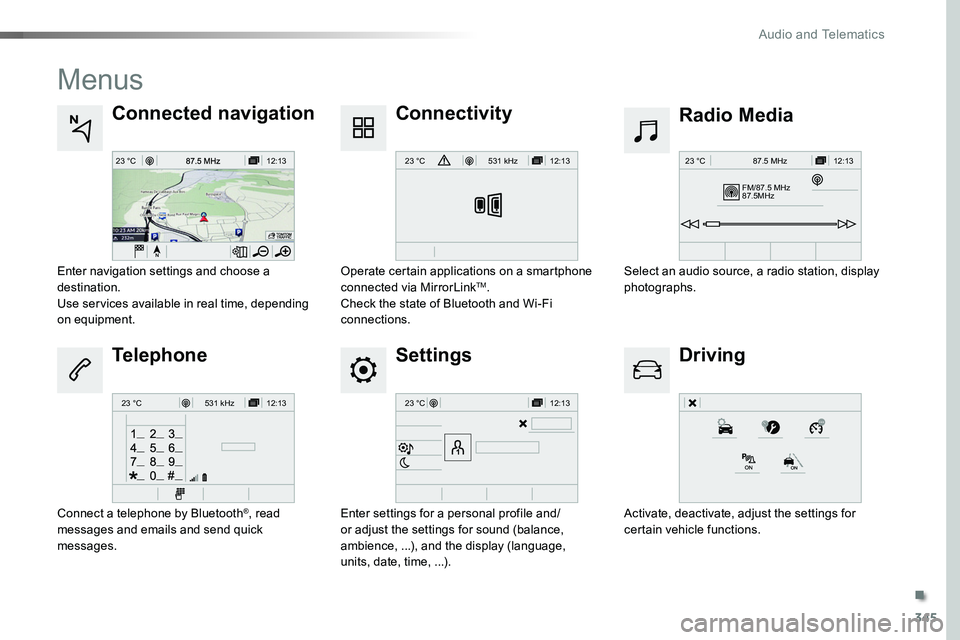
Menus
Settings
Radio MediaConnected navigation
Driving
Connectivity
Telephone
Enter settings for a personal profile and/or adjust the settings for sound (balance, ambience, ...), and the display (language, units, date, time, ...).
Select an audio source, a radio station, display photographs.Enter navigation settings and choose a destination.Use services available in real time, depending on equipment.
Activate, deactivate, adjust the settings for certain vehicle functions.
Operate certain applications on a smartphone connected via MirrorLinkTM.Check the state of Bluetooth and Wi-Fi connections.
Connect a telephone by Bluetooth®, read messages and emails and send quick messages.
.
Audio and Telematics
Page 346 of 516
346
Voice commands
First stepsSteering mounted controlsInformation - Using the system
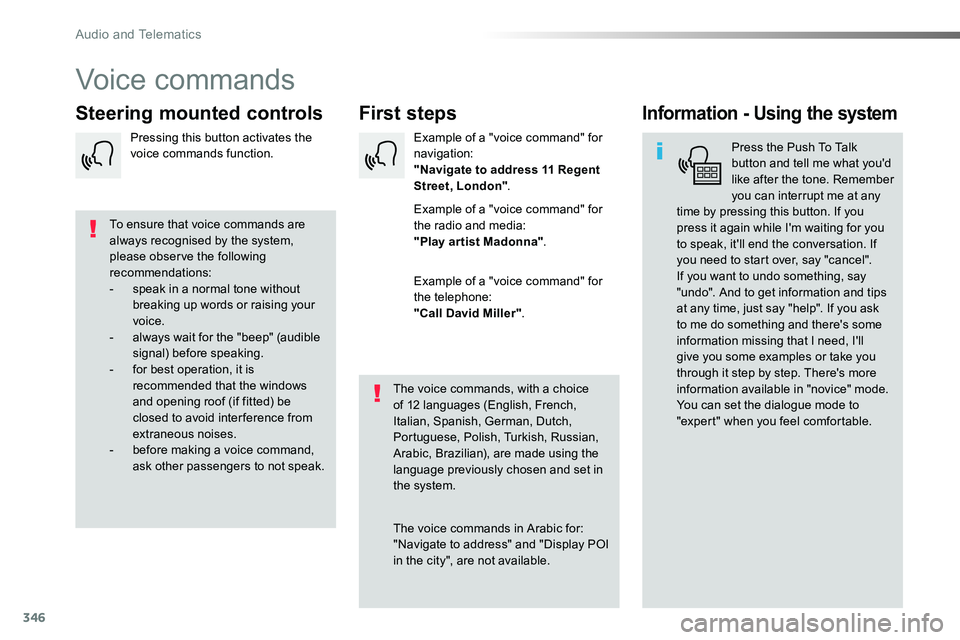
Press the Push To Talk button and tell me what you'd like after the tone. Remember you can interrupt me at any time by pressing this button. If you
press it again while I'm waiting for you to speak, it'll end the conversation. If you need to start over, say "cancel". If you want to undo something, say "undo". And to get information and tips at any time, just say "help". If you ask to me do something and there's some information missing that I need, I'll give you some examples or take you through it step by step. There's more information available in "novice" mode. You can set the dialogue mode to "expert" when you feel comfortable.
To ensure that voice commands are always recognised by the system, please observe the following recommendations:- speak in a normal tone without breaking up words or raising your voice.- always wait for the "beep" (audible signal) before speaking.- for best operation, it is recommended that the windows and opening roof (if fitted) be closed to avoid inter ference from extraneous noises.- before making a voice command, ask other passengers to not speak.
The voice commands, with a choice of 12 languages (English, French, Italian, Spanish, German, Dutch, Portuguese, Polish, Turkish, Russian, Arabic, Brazilian), are made using the language previously chosen and set in the system.
The voice commands in Arabic for: "Navigate to address" and "Display POI in the city", are not available.
Example of a "voice command" for navigation:"Navigate to address 11 Regent Street, London".
Example of a "voice command" for
the radio and media:"Play ar tist Madonna".
Example of a "voice command" for the telephone:"Call David Miller".
Pressing this button activates the voice commands function.
Audio and Telematics
Page 347 of 516
347
Global voice commands
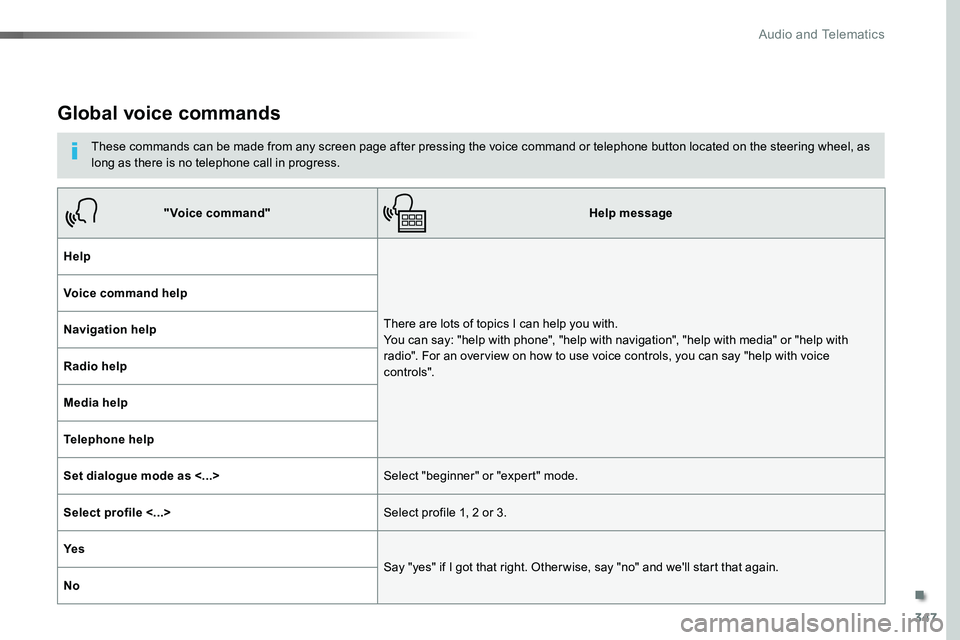
These commands can be made from any screen page after pressing the voice command or telephone button located on the steering wheel, as long as there is no telephone call in progress.
"Voice command"Help message
Help
There are lots of topics I can help you with. You can say: "help with phone", "help with navigation", "help with media" or "help with radio". For an overview on how to use voice controls, you can say "help with voice c ont ro ls".
Voice command help
Navigation help
Radio help
Media help
Telephone help
Set dialogue mode as <...>Select "beginner" or "expert" mode.
Select profile <...>Select profile 1, 2 or 3.
Ye s
Say "yes" if I got that right. Other wise, say "no" and we'll start that again.
No
.
Audio and Telematics