ECO mode TOYOTA PROACE 2017 Service Manual
[x] Cancel search | Manufacturer: TOYOTA, Model Year: 2017, Model line: PROACE, Model: TOYOTA PROACE 2017Pages: 516, PDF Size: 91.65 MB
Page 447 of 516
447
1
1
1
5
12
8
6
13
14
15
9
7
10
11
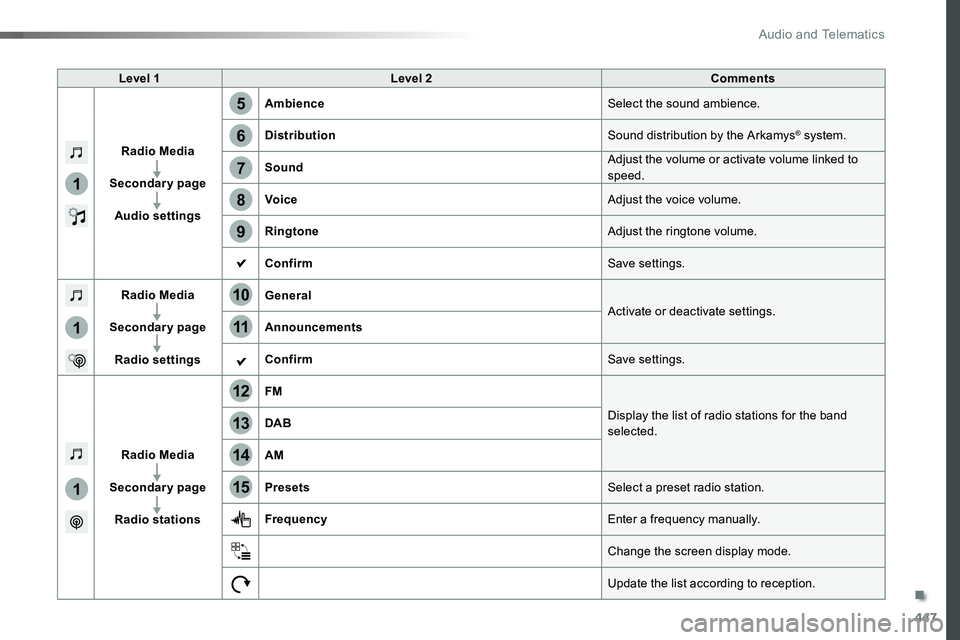
Level 1Level 2Comments
Radio Media
Secondary page
Audio settings
AmbienceSelect the sound ambience.
DistributionSound distribution by the Arkamys® system.
SoundAdjust the volume or activate volume linked to speed.
VoiceAdjust the voice volume.
RingtoneAdjust the ringtone volume.
ConfirmSave settings.
Radio Media
Secondary page
Radio settings
GeneralActivate or deactivate settings.Announcements
ConfirmSave settings.
Radio Media
Secondary page
Radio stations
FM
Display the list of radio stations for the band selected.DAB
AM
PresetsSelect a preset radio station.
FrequencyEnter a frequency manually.
Change the screen display mode.
Update the list according to reception.
.
Audio and Telematics
Page 449 of 516
449
1
1
17
20
18
21
19
16
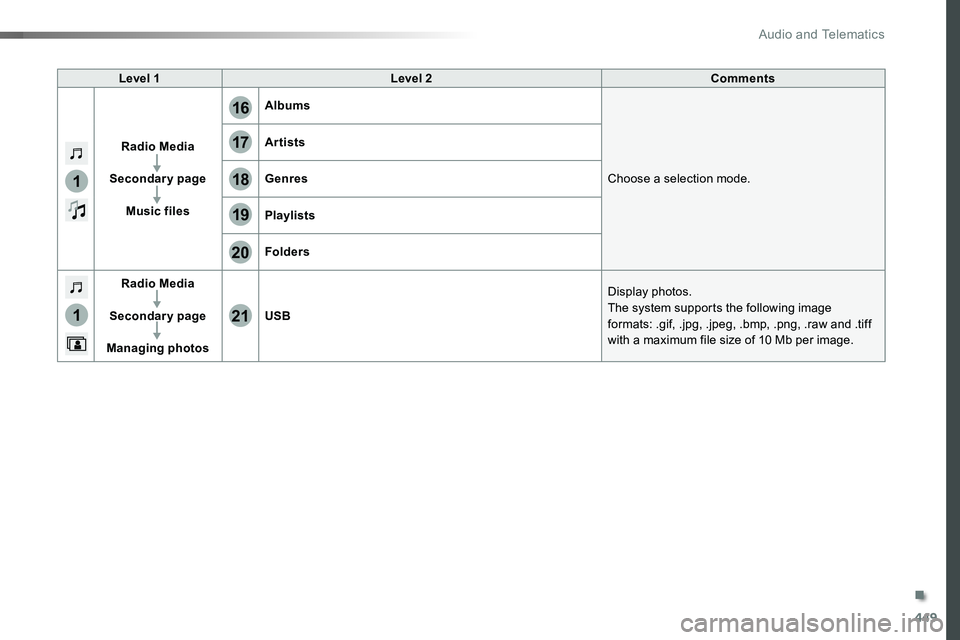
Level 1Level 2Comments
Radio Media
Secondary page
Music files
Albums
Choose a selection mode.
Artists
Genres
Playlists
Folders
Radio Media
Secondary page
Managing photos
USB
Display photos.The system supports the following image formats: .gif, .jpg, .jpeg, .bmp, .png, .raw and .tiff with a maximum file size of 10 Mb per image.
.
Audio and Telematics
Page 450 of 516
450
1
2
2
2
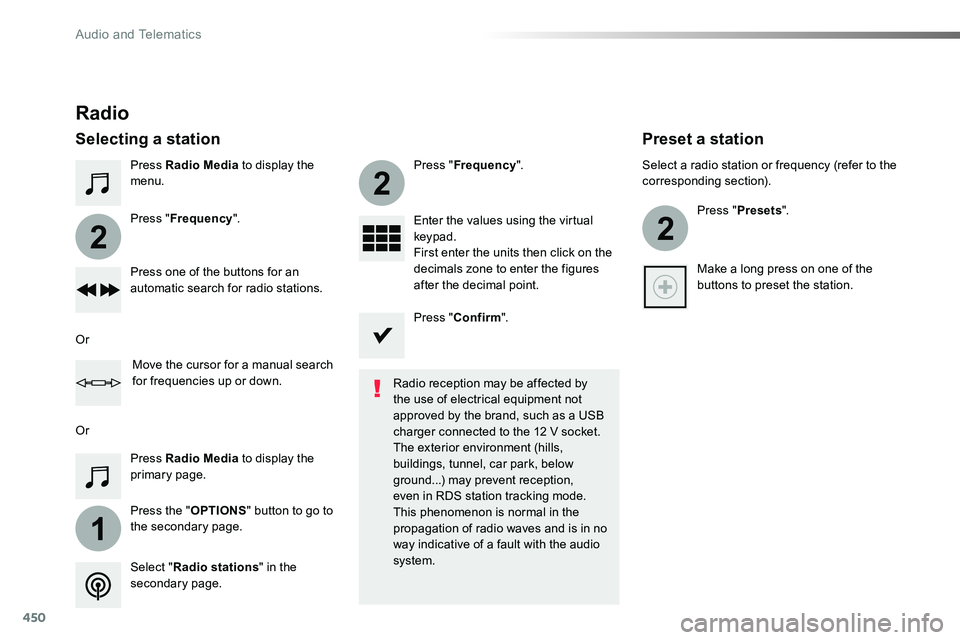
Press Radio Media to display the menu.
Press the "OPTIONS" button to go to the secondary page.
Press "Frequency".
Press "Frequency".
Enter the values using the virtual keypad.First enter the units then click on the decimals zone to enter the figures after the decimal point.Press one of the buttons for an automatic search for radio stations.
Press Radio Media to display the primary page.
Radio
Selecting a station
Radio reception may be affected by the use of electrical equipment not approved by the brand, such as a USB
charger connected to the 12 V socket.The exterior environment (hills, buildings, tunnel, car park, below ground...) may prevent reception, even in RDS station tracking mode. This phenomenon is normal in the propagation of radio waves and is in no way indicative of a fault with the audio system.Select "Radio stations" in the secondary page.
Or
Or
Move the cursor for a manual search for frequencies up or down.
Select a radio station or frequency (refer to the corresponding section).
Press "Presets".
Make a long press on one of the buttons to preset the station.
Preset a station
Press "Confirm".
Audio and Telematics
Page 454 of 516
454
Media
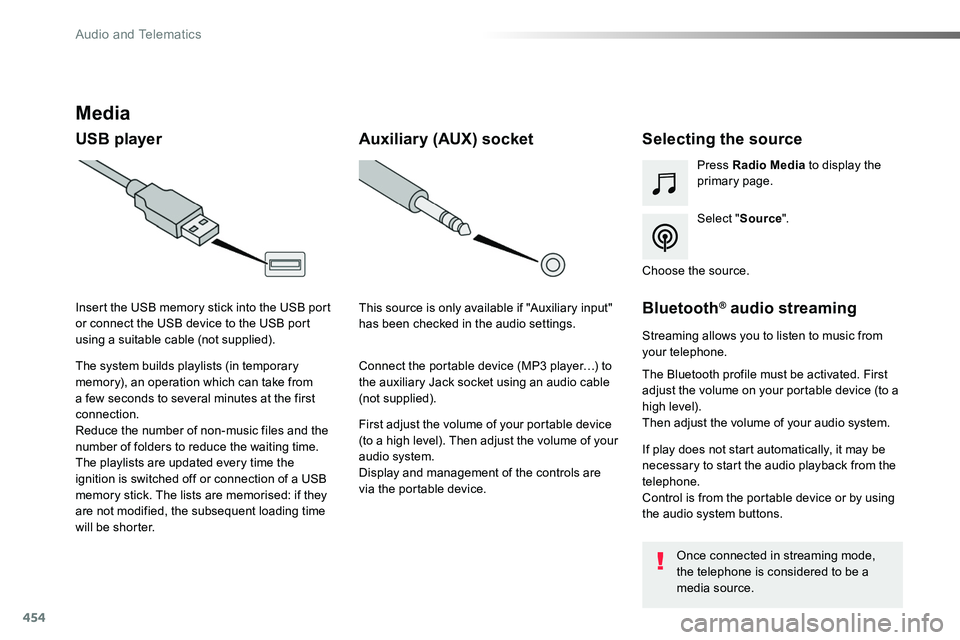
USB playerSelecting the source
Select "Source".
Press Radio Media to display the primary page.
The system builds playlists (in temporary memory), an operation which can take from a few seconds to several minutes at the first connection.
Reduce the number of non-music files and the number of folders to reduce the waiting time.The playlists are updated every time the ignition is switched off or connection of a USB memory stick. The lists are memorised: if they are not modified, the subsequent loading time will be shorter.
Insert the USB memory stick into the USB port or connect the USB device to the USB port using a suitable cable (not supplied).
Auxiliary (AUX) socket
First adjust the volume of your portable device (to a high level). Then adjust the volume of your audio system.Display and management of the controls are via the portable device.
This source is only available if "Auxiliary input" has been checked in the audio settings.
Connect the portable device (MP3 player…) to the auxiliary Jack socket using an audio cable (not supplied).
Choose the source.
Bluetooth® audio streaming
Streaming allows you to listen to music from your telephone.
The Bluetooth profile must be activated. First adjust the volume on your portable device (to a high level).Then adjust the volume of your audio system.
If play does not start automatically, it may be necessary to start the audio playback from the telephone.Control is from the portable device or by using the audio system buttons.
Once connected in streaming mode, the telephone is considered to be a media source.
Audio and Telematics
Page 455 of 516
455
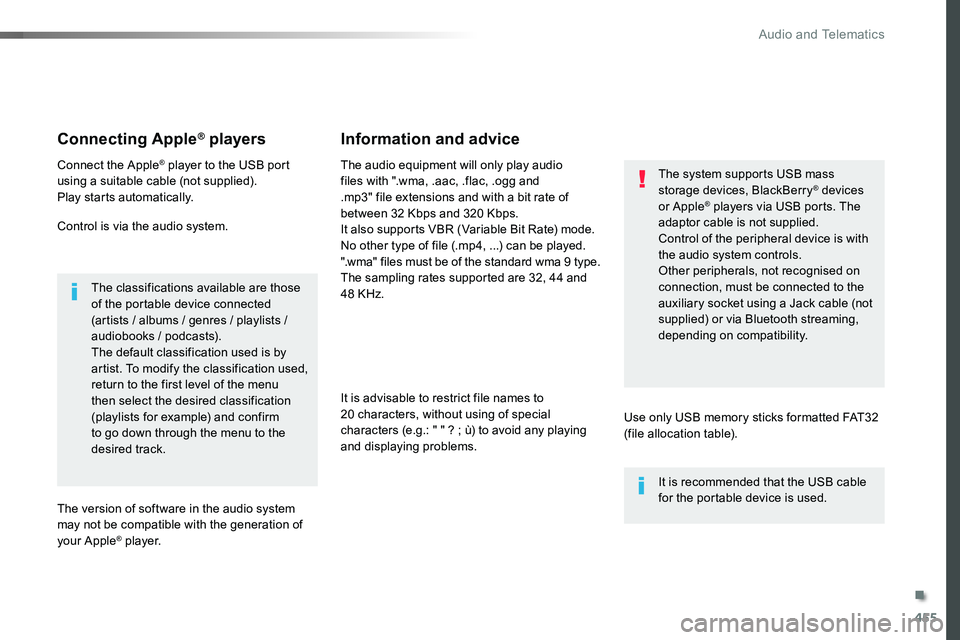
Connecting Apple® players
Connect the Apple® player to the USB port using a suitable cable (not supplied).Play starts automatically.
Control is via the audio system.
The classifications available are those of the portable device connected (artists / albums / genres / playlists / audiobooks / podcasts).The default classification used is by artist. To modify the classification used, return to the first level of the menu then select the desired classification (playlists for example) and confirm to go down through the menu to the desired track.
The version of software in the audio system may not be compatible with the generation of your Apple® p l aye r.
The audio equipment will only play audio files with ".wma, .aac, .flac, .ogg and .mp3" file extensions and with a bit rate of between 32 Kbps and 320 Kbps.It also supports VBR (Variable Bit Rate) mode.No other type of file (.mp4, ...) can be played.".wma" files must be of the standard wma 9 type.The sampling rates supported are 32, 44 and 48 KHz.
It is advisable to restrict file names to 20 characters, without using of special
characters (e.g.: " " ? ; ù) to avoid any playing and displaying problems.
Information and advice
Use only USB memory sticks formatted FAT32 (file allocation table).
The system supports USB mass storage devices, BlackBerry® devices or Apple® players via USB ports. The adaptor cable is not supplied.
Control of the peripheral device is with the audio system controls.Other peripherals, not recognised on connection, must be connected to the auxiliary socket using a Jack cable (not supplied) or via Bluetooth streaming, depending on compatibility.
It is recommended that the USB cable for the portable device is used.
.
Audio and Telematics
Page 478 of 516
478
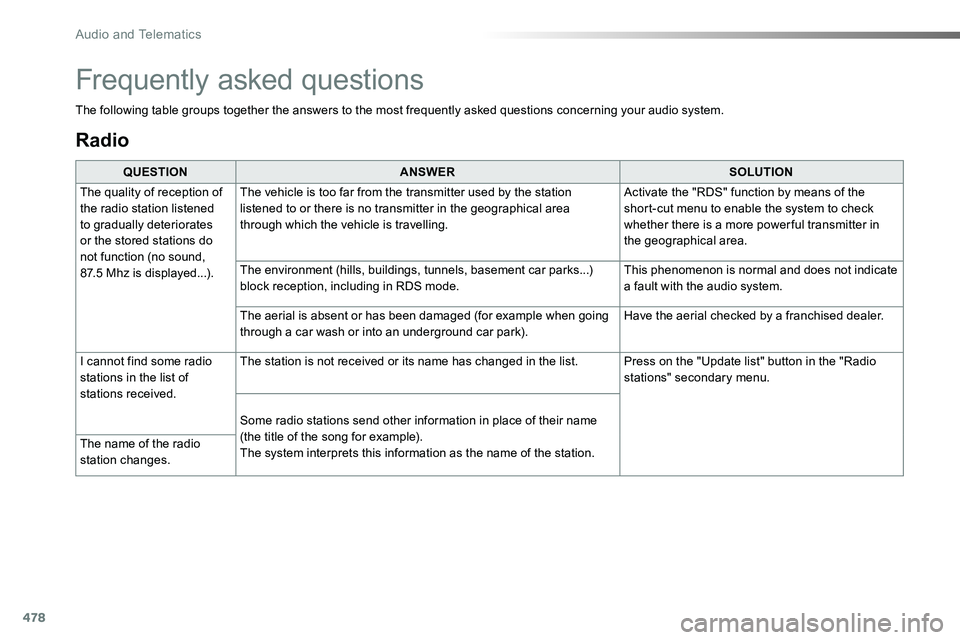
Radio
QUESTIONANSWERSOLUTION
The quality of reception of the radio station listened to gradually deteriorates or the stored stations do not function (no sound, 87.5 Mhz is displayed...).
The vehicle is too far from the transmitter used by the station listened to or there is no transmitter in the geographical area through which the vehicle is travelling.
Activate the "RDS" function by means of the short-cut menu to enable the system to check whether there is a more power ful transmitter in the geographical area.
The environment (hills, buildings, tunnels, basement car parks...) block reception, including in RDS mode.This phenomenon is normal and does not indicate a fault with the audio system.
The aerial is absent or has been damaged (for example when going through a car wash or into an underground car park).Have the aerial checked by a franchised dealer.
I cannot find some radio stations in the list of stations received.
The station is not received or its name has changed in the list.Press on the "Update list" button in the "Radio stations" secondary menu.
Some radio stations send other information in place of their name
(the title of the song for example).The system interprets this information as the name of the station.The name of the radio station changes.
Frequently asked questions
The following table groups together the answers to the most frequently asked questions concerning your audio system.
Audio and Telematics
Page 482 of 516
482
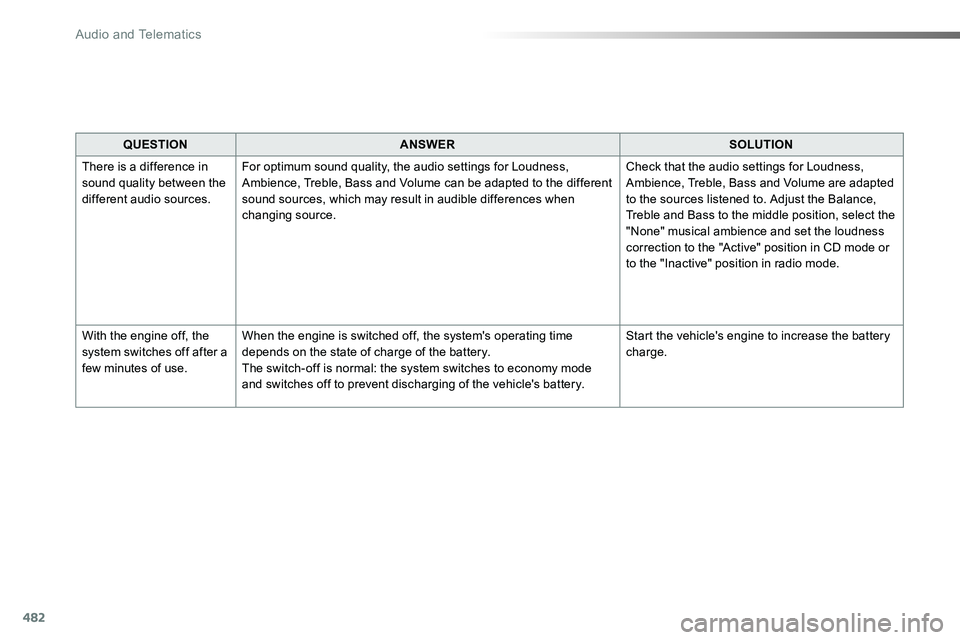
QUESTIONANSWERSOLUTION
There is a difference in sound quality between the different audio sources.
For optimum sound quality, the audio settings for Loudness, Ambience, Treble, Bass and Volume can be adapted to the different sound sources, which may result in audible differences when changing source.
Check that the audio settings for Loudness, Ambience, Treble, Bass and Volume are adapted to the sources listened to. Adjust the Balance, Treble and Bass to the middle position, select the "None" musical ambience and set the loudness correction to the "Active" position in CD mode or to the "Inactive" position in radio mode.
With the engine off, the system switches off after a few minutes of use.
When the engine is switched off, the system's operating time depends on the state of charge of the battery.The switch-off is normal: the system switches to economy mode and switches off to prevent discharging of the vehicle's battery.
Start the vehicle's engine to increase the battery charge.
Audio and Telematics
Page 488 of 516
488
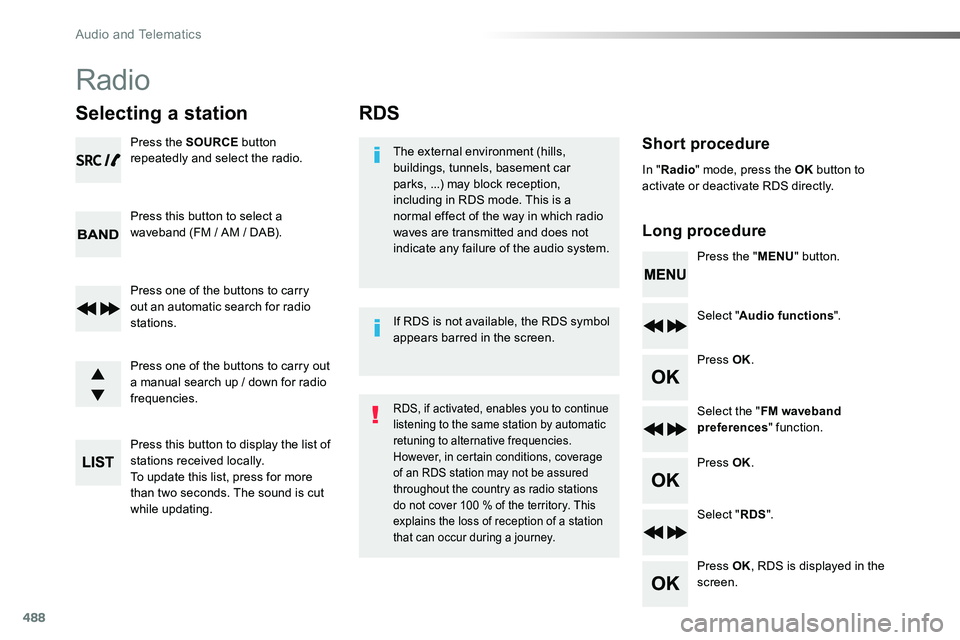
RDS
Short procedure
Long procedure
The external environment (hills, buildings, tunnels, basement car parks, ...) may block reception, including in RDS mode. This is a normal effect of the way in which radio waves are transmitted and does not indicate any failure of the audio system.Press the "MENU" button.
Select "Audio functions".
Press OK.
Select the "FM waveband preferences" function.
Press OK.
Select "RDS".
Press OK, RDS is displayed in the screen.
In "Radio" mode, press the OK button to activate or deactivate RDS directly.
RDS, if activated, enables you to continue listening to the same station by automatic retuning to alternative frequencies. However, in certain conditions, coverage of an RDS station may not be assured throughout the country as radio stations do not cover 100 % of the territory. This explains the loss of reception of a station that can occur during a journey.
If RDS is not available, the RDS symbol appears barred in the screen.
Radio
Selecting a station
Press the SOURCE button repeatedly and select the radio.
Press this button to select a waveband (FM / AM / DAB).
Press one of the buttons to carry out an automatic search for radio stations.
Press one of the buttons to carry out a manual search up / down for radio frequencies.
Press this button to display the list of stations received locally.To update this list, press for more than two seconds. The sound is cut while updating.
Audio and Telematics
Page 492 of 516
492
Media
USB player
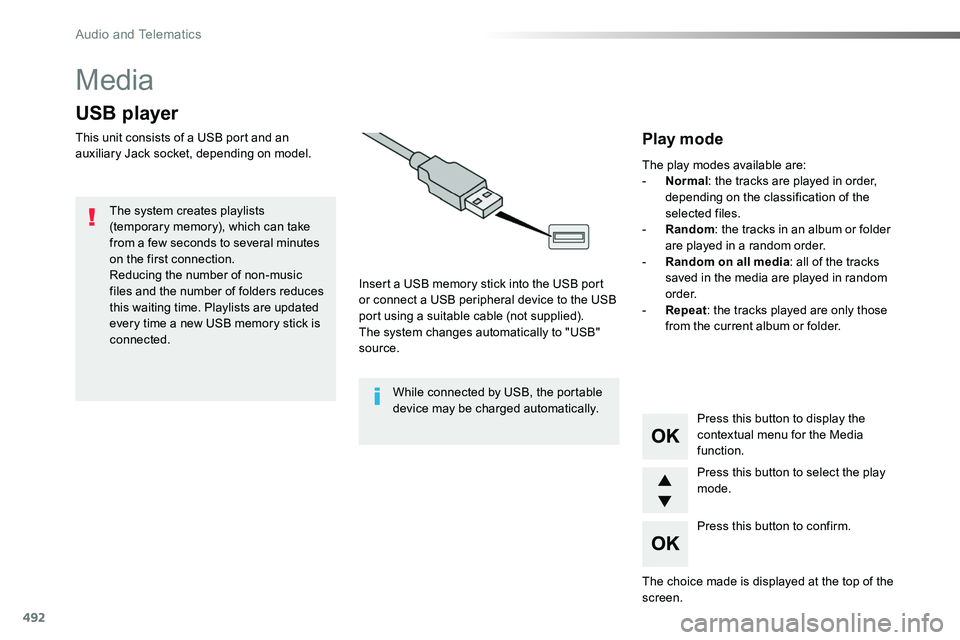
This unit consists of a USB port and an auxiliary Jack socket, depending on model.
Insert a USB memory stick into the USB port or connect a USB peripheral device to the USB port using a suitable cable (not supplied).The system changes automatically to "USB" source.
The system creates playlists (temporary memory), which can take from a few seconds to several minutes on the first connection.Reducing the number of non-music files and the number of folders reduces this waiting time. Playlists are updated every time a new USB memory stick is connected.
Press this button to display the
contextual menu for the Media function.
Press this button to select the play mode.
Press this button to confirm.
Play mode
The play modes available are:- Normal: the tracks are played in order, depending on the classification of the selected files.- Random: the tracks in an album or folder are played in a random order.- Random on all media: all of the tracks saved in the media are played in random o r d e r.- Repeat: the tracks played are only those from the current album or folder.
The choice made is displayed at the top of the screen.
While connected by USB, the portable device may be charged automatically.
Audio and Telematics
Page 496 of 516
496
The CD player can play files with .mp3, .wma, .wav and .aac file extensions, with a bit rate of of 32 to 320 Kbps.It also supports TAG mode (ID3 tag, WMA TAG).Other file types (mp4, ...) may be played.Files of the ".wma" type should be to the wma 9 standard.The sampling rates supported are 11, 22, 44 and 48 KHz.
File names should have less than 20 characters, avoiding special characters (e.g.: " ? ; ù) so as to avoid any reading or display problems.
In order to be able to play a recorded CDR or CDRW, the ISO 9660 level 1. 2 or Joliet file format is recommended when recording.If the disc is recorded in another format, it may not be played correctly.It is recommended that the same recording format is always used for an individual disc, with as low a speed as possible (4x maximum) for optimum sound quality.In the particular case of a multi-session CD, the Joliet format is recommended.
Information and advice
Use only USB memory sticks formatted FAT32 (File Allocation Table).
It is recommended that you use genuine Apple® USB cables for correct operation.
Audio and Telematics