Time set TOYOTA PROACE 2018 Service Manual
[x] Cancel search | Manufacturer: TOYOTA, Model Year: 2018, Model line: PROACE, Model: TOYOTA PROACE 2018Pages: 516, PDF Size: 90.91 MB
Page 454 of 516
454
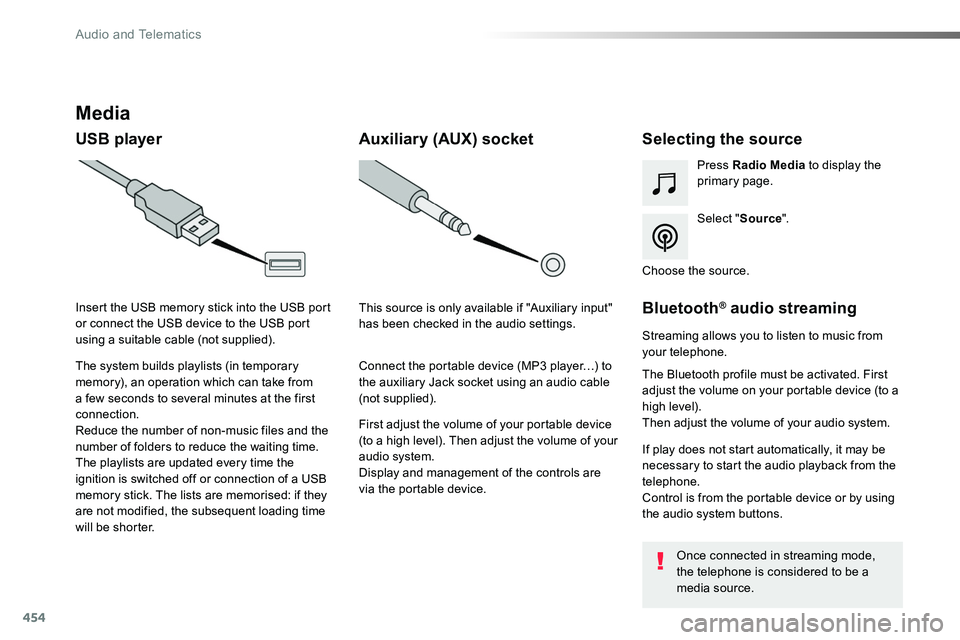
Media
USB playerSelecting the source
Select "Source".
Press Radio Media to display the primary page.
The system builds playlists (in temporary memory), an operation which can take from a few seconds to several minutes at the first connection.
Reduce the number of non-music files and the number of folders to reduce the waiting time.The playlists are updated every time the ignition is switched off or connection of a USB memory stick. The lists are memorised: if they are not modified, the subsequent loading time will be shorter.
Insert the USB memory stick into the USB port or connect the USB device to the USB port using a suitable cable (not supplied).
Auxiliary (AUX) socket
First adjust the volume of your portable device (to a high level). Then adjust the volume of your audio system.Display and management of the controls are via the portable device.
This source is only available if "Auxiliary input" has been checked in the audio settings.
Connect the portable device (MP3 player…) to the auxiliary Jack socket using an audio cable (not supplied).
Choose the source.
Bluetooth® audio streaming
Streaming allows you to listen to music from your telephone.
The Bluetooth profile must be activated. First adjust the volume on your portable device (to a high level).Then adjust the volume of your audio system.
If play does not start automatically, it may be necessary to start the audio playback from the telephone.Control is from the portable device or by using the audio system buttons.
Once connected in streaming mode, the telephone is considered to be a media source.
Audio and Telematics
Page 472 of 516
472
1
1718
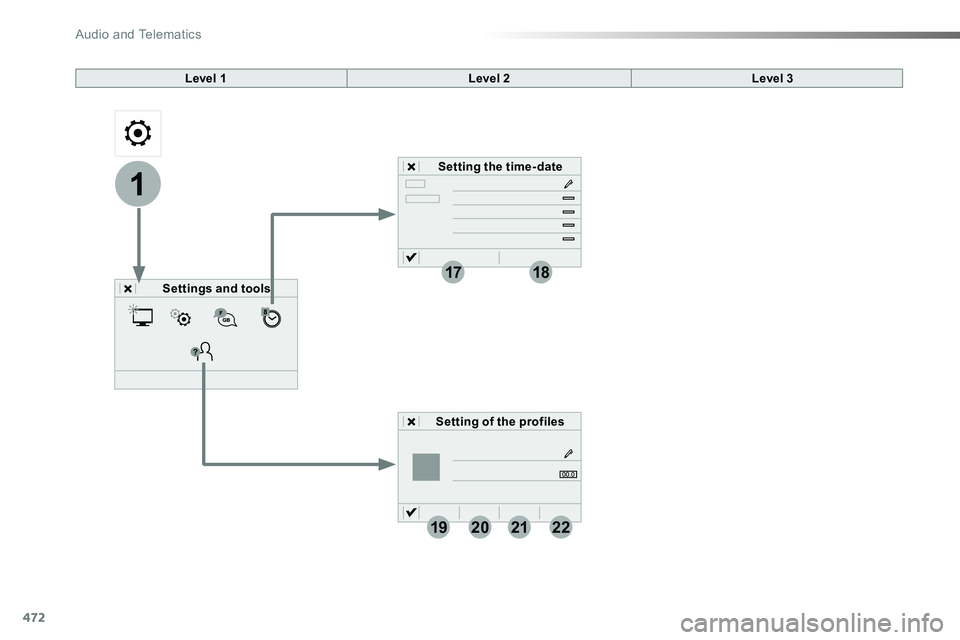
19202122
Level 1Level 2
Settings and tools
Setting the time- date
Setting of the profiles
Level 3
Audio and Telematics
Page 473 of 516
473
1
1
17
18
20
19
21
22
Level 1Level 2Level 3Comments
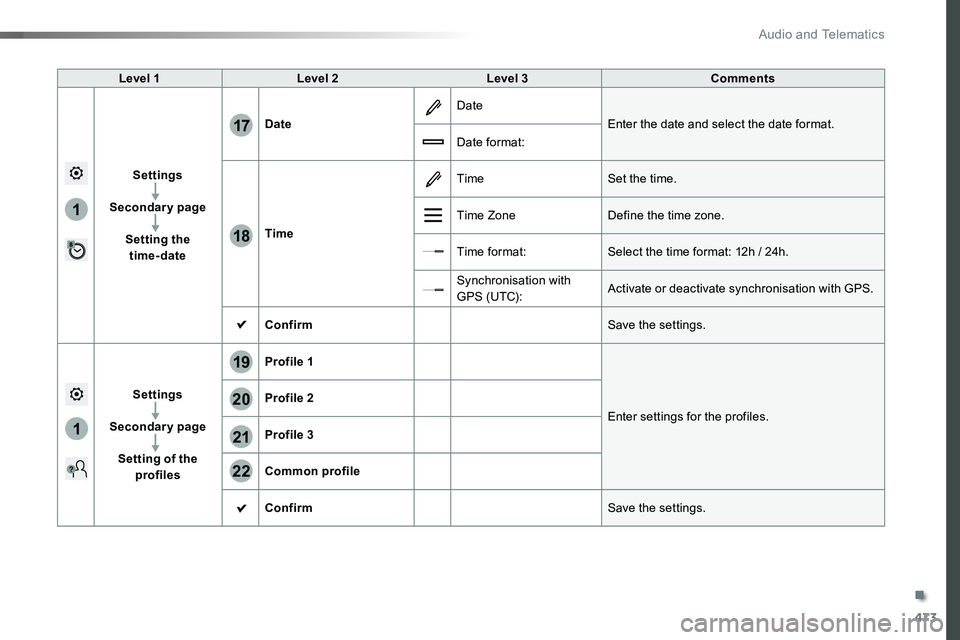
Settings
Secondary page
Setting the time-date
Date
Date
Enter the date and select the date format.
Date format:
Time
TimeSet the time.
Time ZoneDefine the time zone.
Time format:Select the time format: 12h / 24h.
Synchronisation with G PS (UTC):Activate or deactivate synchronisation with GPS.
ConfirmSave the settings.
Settings
Secondary page
Setting of the profiles
Profile 1
Enter settings for the profiles.
Profile 2
Profile 3
Common profile
ConfirmSave the settings.
.
Audio and Telematics
Page 476 of 516
476
111
10
11
12
8
91
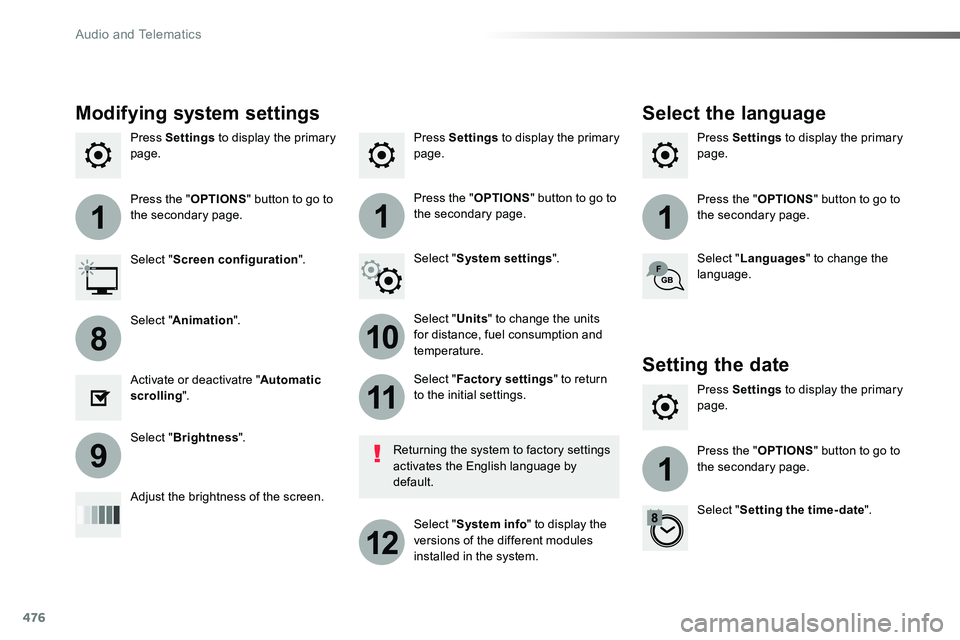
Press Settings to display the primary page.Press Settings to display the primary page.Press Settings to display the primary page.
Press the "OPTIONS" button to go to the secondary page.Press the "OPTIONS" button to go to the secondary page.Press the "OPTIONS" button to go to the secondary page.
Select "System settings".Select "Screen configuration".
Select "Units" to change the units for distance, fuel consumption and temperature.
Select "Languages" to change the language.
Activate or deactivatre "Automatic scrolling".
Adjust the brightness of the screen.
Select "Factory settings" to return to the initial settings.
Select "System info" to display the versions of the different modules installed in the system.
Modifying system settings
Returning the system to factory settings activates the English language by default.
Select "Animation".
Select "Brightness".
Select the language
Press Settings to display the primary page.
Press the "OPTIONS" button to go to the secondary page.
Select "Setting the time- date".
Setting the date
Audio and Telematics
Page 477 of 516
477
1
17
18
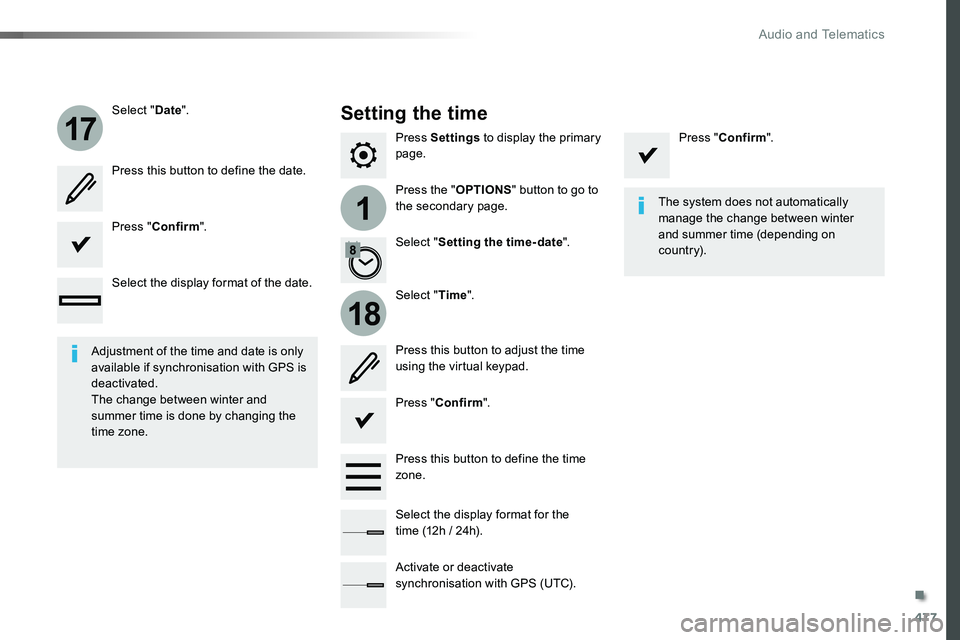
Press Settings to display the primary page.
Press the "OPTIONS" button to go to the secondary page.
Select "Date".
Select "Time".
Select "Setting the time- date".
Adjustment of the time and date is only available if synchronisation with GPS is deactivated.The change between winter and summer time is done by changing the time zone.
The system does not automatically manage the change between winter and summer time (depending on c ountr y).
Setting the time
Press this button to define the date.
Press this button to adjust the time using the virtual keypad.
Press "Confirm".
Press "Confirm".
Press "Confirm".
Press this button to define the time zone.
Select the display format of the date.
Select the display format for the time (12h / 24h).
Activate or deactivate synchronisation with GPS (UTC).
.
Audio and Telematics
Page 482 of 516
482
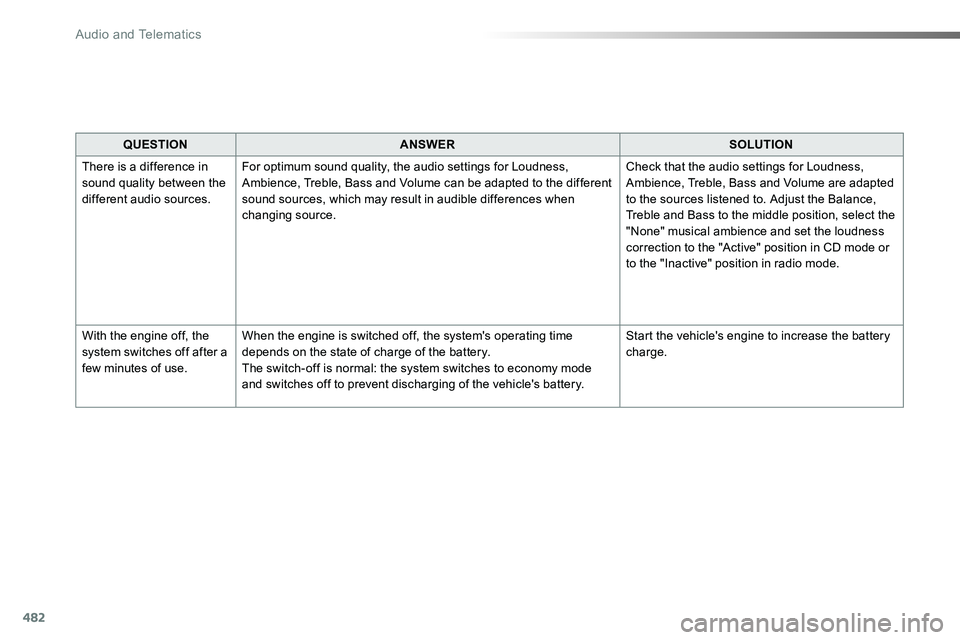
QUESTIONANSWERSOLUTION
There is a difference in sound quality between the different audio sources.
For optimum sound quality, the audio settings for Loudness, Ambience, Treble, Bass and Volume can be adapted to the different sound sources, which may result in audible differences when changing source.
Check that the audio settings for Loudness, Ambience, Treble, Bass and Volume are adapted to the sources listened to. Adjust the Balance, Treble and Bass to the middle position, select the "None" musical ambience and set the loudness correction to the "Active" position in CD mode or to the "Inactive" position in radio mode.
With the engine off, the system switches off after a few minutes of use.
When the engine is switched off, the system's operating time depends on the state of charge of the battery.The switch-off is normal: the system switches to economy mode and switches off to prevent discharging of the vehicle's battery.
Start the vehicle's engine to increase the battery charge.
Audio and Telematics
Page 487 of 516
487
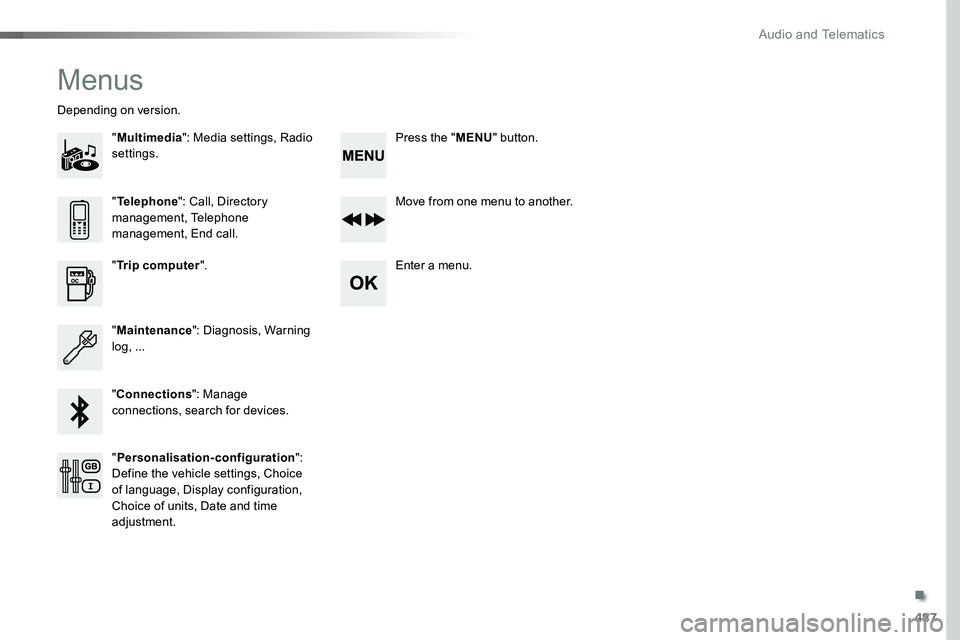
Menus
"Multimedia": Media settings, Radio settings.
Depending on version.
Move from one menu to another.
Enter a menu."Trip computer".
"Maintenance": Diagnosis, Warning log, ...
"Connections": Manage connections, search for devices.
"Telephone": Call, Directory management, Telephone management, End call.
"Personalisation-configuration": Define the vehicle settings, Choice of language, Display configuration, Choice of units, Date and time adjustment.
Press the "MENU" button.
.
Audio and Telematics
Page 502 of 516
502
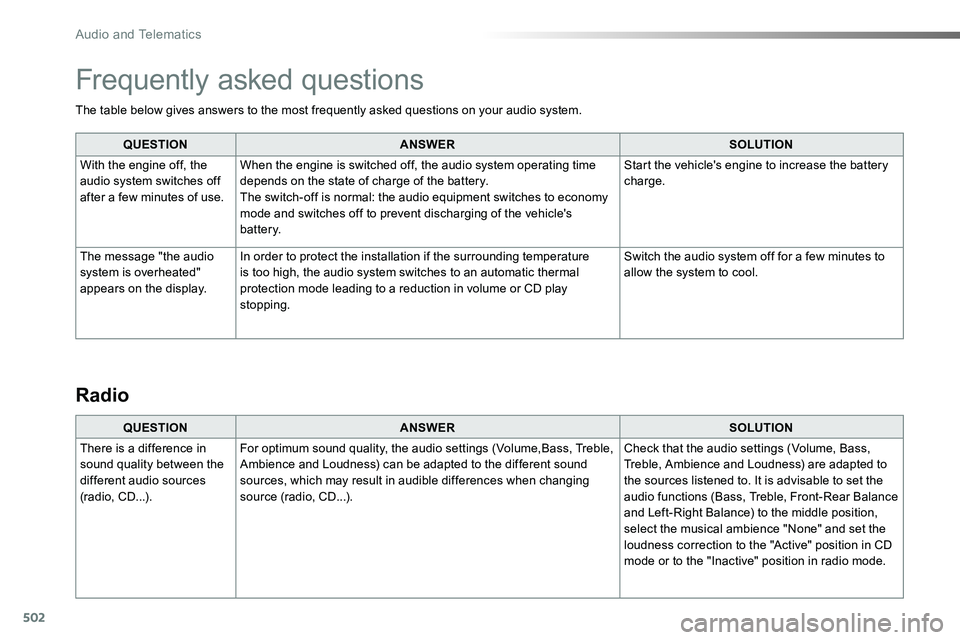
The table below gives answers to the most frequently asked questions on your audio system.
QUESTIONANSWERSOLUTION
With the engine off, the audio system switches off after a few minutes of use.
When the engine is switched off, the audio system operating time depends on the state of charge of the battery.The switch-off is normal: the audio equipment switches to economy mode and switches off to prevent discharging of the vehicle's battery.
Start the vehicle's engine to increase the battery charge.
The message "the audio system is overheated" appears on the display.
In order to protect the installation if the surrounding temperature is too high, the audio system switches to an automatic thermal protection mode leading to a reduction in volume or CD play stopping.
Switch the audio system off for a few minutes to allow the system to cool.
Frequently asked questions
QUESTIONANSWERSOLUTION
There is a difference in sound quality between the different audio sources (radio, CD...).
For optimum sound quality, the audio settings (Volume,Bass, Treble, Ambience and Loudness) can be adapted to the different sound sources, which may result in audible differences when changing source (radio, CD...).
Check that the audio settings (Volume, Bass, Treble, Ambience and Loudness) are adapted to the sources listened to. It is advisable to set the audio functions (Bass, Treble, Front-Rear Balance and Left-Right Balance) to the middle position, select the musical ambience "None" and set the loudness correction to the "Active" position in CD mode or to the "Inactive" position in radio mode.
Radio
Audio and Telematics
Page 504 of 516
504
Media
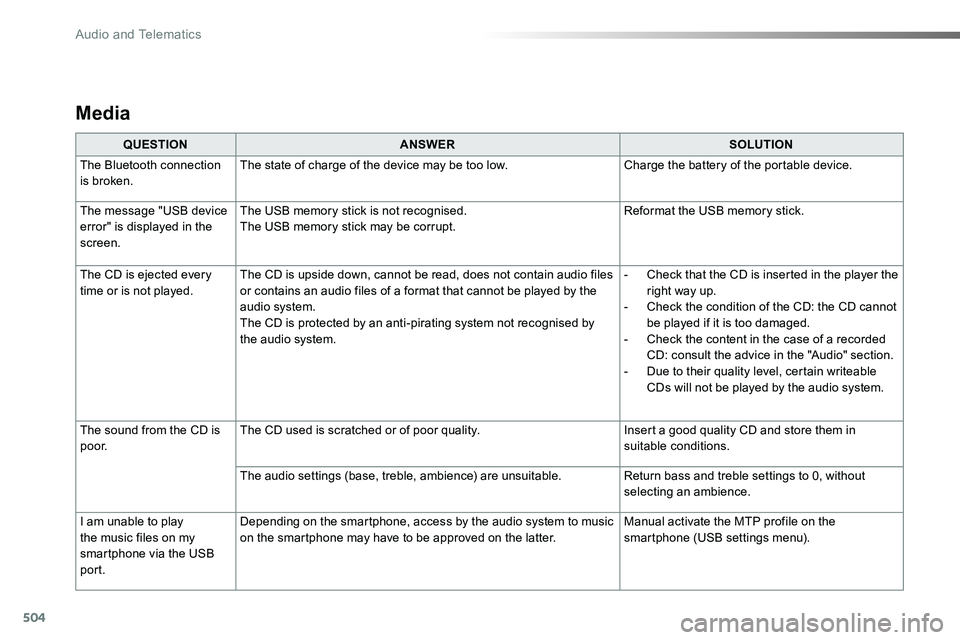
QUESTIONANSWERSOLUTION
The Bluetooth connection is broken.The state of charge of the device may be too low.Charge the battery of the portable device.
The message "USB device
error" is displayed in the screen.
The USB memory stick is not recognised.
The USB memory stick may be corrupt.
Reformat the USB memory stick.
The CD is ejected every time or is not played.The CD is upside down, cannot be read, does not contain audio files or contains an audio files of a format that cannot be played by the audio system.The CD is protected by an anti-pirating system not recognised by the audio system.
- Check that the CD is inserted in the player the right way up.- Check the condition of the CD: the CD cannot be played if it is too damaged.- Check the content in the case of a recorded CD: consult the advice in the "Audio" section.- Due to their quality level, certain writeable CDs will not be played by the audio system.
The sound from the CD is p o o r.The CD used is scratched or of poor quality.Insert a good quality CD and store them in suitable conditions.
The audio settings (base, treble, ambience) are unsuitable.Return bass and treble settings to 0, without selecting an ambience.
I am unable to play
the music files on my smartphone via the USB port.
Depending on the smartphone, access by the audio system to music
on the smartphone may have to be approved on the latter.
Manual activate the MTP profile on the
smartphone (USB settings menu).
Audio and Telematics
Page 507 of 516
507
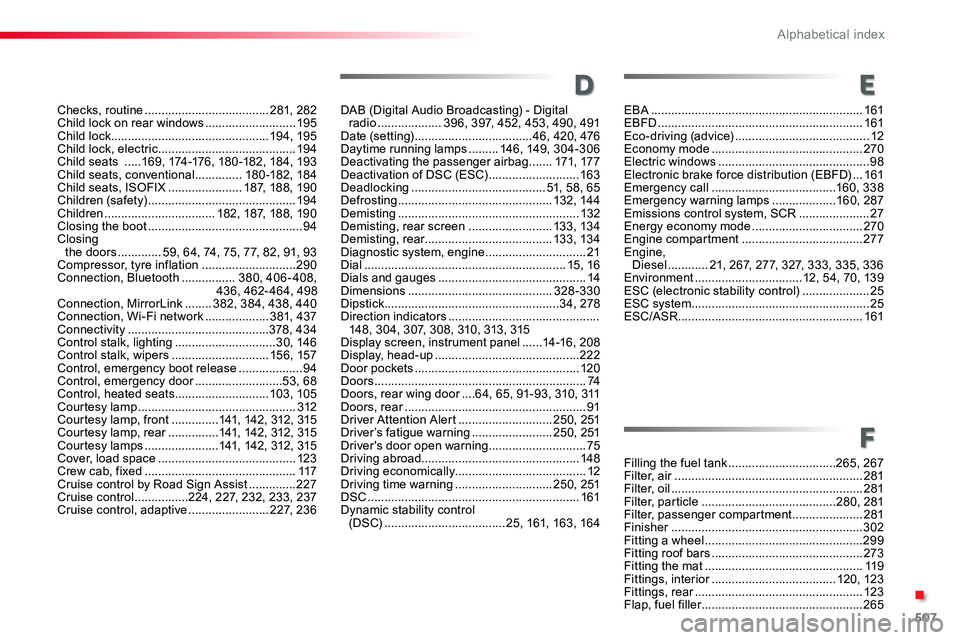
Checks, routine .....................................281, 282Child lock on rear windows ...........................195Child lock ...............................................19 4, 195Child lock, electric .........................................19 4Child seats .....169, 174-176, 180 -182, 184, 193Child seats, conventional ..............180 -182, 18 4Child seats, ISOFIX ......................187, 188, 190Children (safety) ............................................19 4Children .................................182, 187, 188, 190Closing the boot ..............................................94Closing the doors .............59, 64, 74, 75, 77, 82, 91, 93Compressor, tyre inflation ............................290Connection, Bluetooth ................380, 406 - 408,436, 462- 464, 498Connection, MirrorLink ........382, 384, 438, 440Connection, Wi-Fi network ...................381, 437Connectivity ..........................................378, 434Control stalk, lighting ..............................30, 146Control stalk, wipers .............................15 6, 157Control, emergency boot release ...................94Control, emergency door ..........................53, 68Control, heated seats ............................103, 105Courtesy lamp ...............................................312Courtesy lamp, front ..............141, 142, 312, 315Courtesy lamp, rear ...............141, 142, 312, 315Courtesy lamps ......................141, 142, 312, 315Cover, load space .........................................123Crew cab, fixed .............................................117Cruise control by Road Sign Assist ..............227Cruise control ................224, 227, 232, 233, 237Cruise control, adaptive ........................227, 236
Filling the fuel tank ................................265, 267Filter, air ........................................................281Filter, oil .........................................................281Filter, particle ........................................280, 281Filter, passenger compartment .....................281Finisher .........................................................302Fitting a wheel ...............................................299Fitting roof bars .............................................273Fitting the mat ...............................................11 9Fittings, interior .....................................120, 123Fittings, rear ..................................................123Flap, fuel filler ................................................265
D
F
E
DAB (Digital Audio Broadcasting) - Digital radio ...................396, 397, 452, 453, 490, 491Date (setting) ...................................46, 420, 476Daytime running lamps .........146, 149, 304-306Deactivating the passenger airbag .......171, 17 7Deactivation of DSC (ESC) ...........................163Deadlocking ........................................51, 58, 65Defrosting ..............................................132, 144Demisting ......................................................132Demisting, rear screen .........................13 3, 13 4Demisting, rear ......................................13 3, 13 4Diagnostic system, engine ..............................21Dial ............................................................15, 16Dials and gauges ............................................14Dimensions ...........................................328-330Dipstick ....................................................34, 278Direction indicators .............................................148, 304, 307, 308, 310, 313, 315Display screen, instrument panel ......14-16, 208Display, head-up ...........................................222Door pockets .................................................120Doors ...............................................................74Doors, rear wing door ....64, 65, 91-93, 310, 311Doors, rear ......................................................91Driver Attention Alert ............................250, 251Driver’s fatigue warning ........................250, 251Driver's door open warning .............................75Driving abroad...............................................148Driving economically.......................................12Driving time warning .............................250, 251DSC ...............................................................161Dynamic stability control (DSC) ....................................25, 161, 163, 164
EBA ...............................................................161EBFD .............................................................161Eco-driving (advice) ........................................12Economy mode .............................................270Electric windows .............................................98Electronic brake force distribution (EBFD) ...161Emergency call .....................................160, 338Emergency warning lamps ...................160, 287Emissions control system, SCR .....................27Energy economy mode .................................270Engine compartment ....................................277Engine, Diesel ............21, 267, 277, 327, 333, 335, 336Environment ................................12, 54, 70, 139ESC (electronic stability control) ....................25ESC system .....................................................25ESC/ASR .......................................................161
.
Alphabetical index