cruise control TOYOTA PROACE 2019 User Guide
[x] Cancel search | Manufacturer: TOYOTA, Model Year: 2019, Model line: PROACE, Model: TOYOTA PROACE 2019Pages: 516, PDF Size: 90.91 MB
Page 222 of 516
222
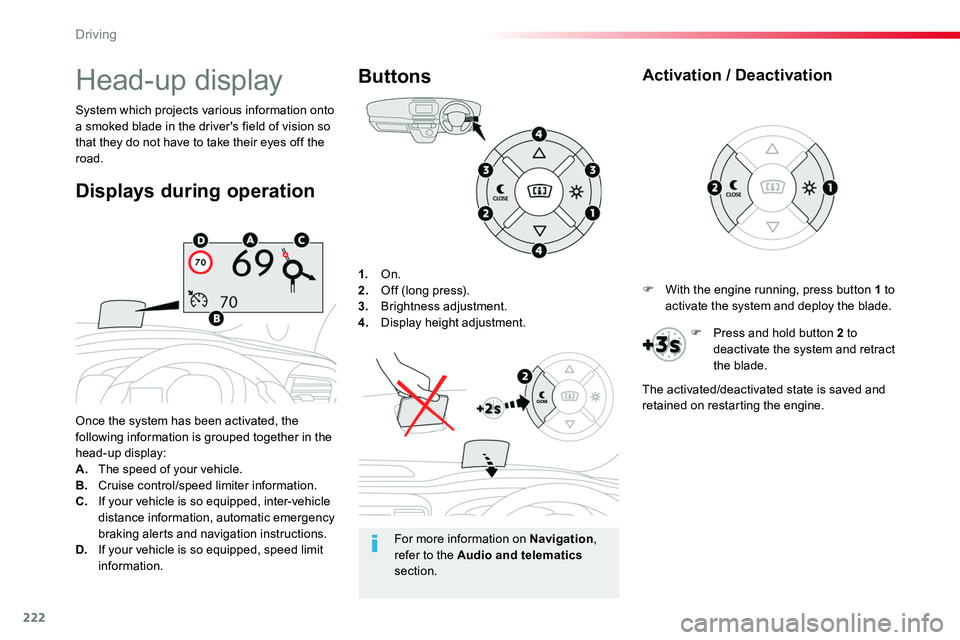
1. On.2. Off (long press).3. Brightness adjustment.4. Display height adjustment.
Once the system has been activated, the following information is grouped together in the head-up display:A. The speed of your vehicle.B. Cruise control/speed limiter information.C. If your vehicle is so equipped, inter-vehicle distance information, automatic emergency
braking alerts and navigation instructions.D. If your vehicle is so equipped, speed limit information.
System which projects various information onto a smoked blade in the driver's field of vision so that they do not have to take their eyes off the road.
Buttons
Displays during operation
Head-up display
For more information on Navigation, refer to the Audio and telematics section.
F With the engine running, press button 1 to activate the system and deploy the blade.
Activation / Deactivation
F Press and hold button 2 to deactivate the system and retract the blade.
The activated/deactivated state is saved and retained on restarting the engine.
Driving
Page 224 of 516
224
MEM
Adjustable Speed Limiter (ASL)
Programming
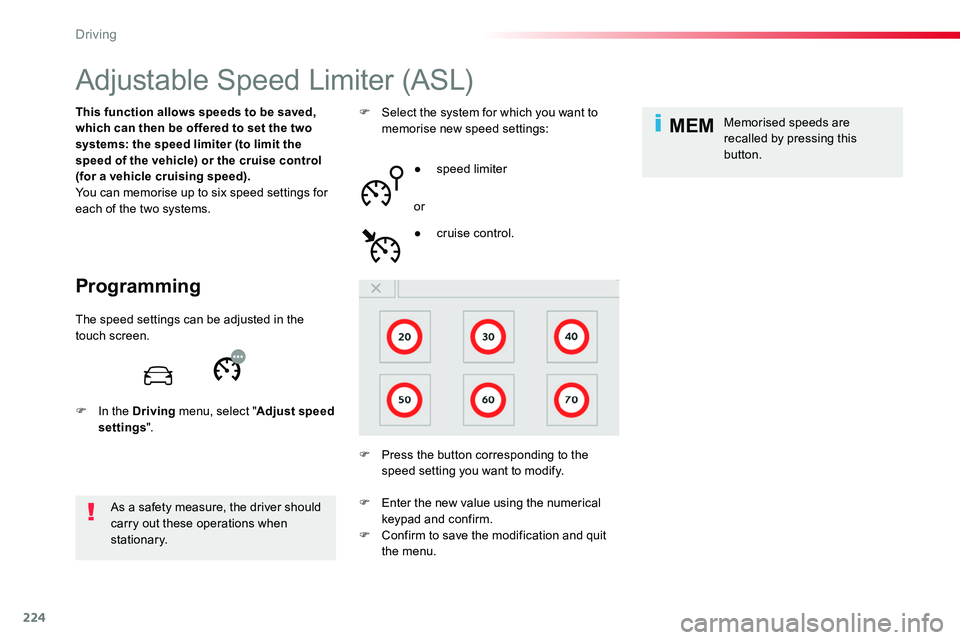
This function allows speeds to be saved, which can then be offered to set the two systems: the speed limiter (to limit the speed of the vehicle) or the cruise control (for a vehicle cruising speed).You can memorise up to six speed settings for each of the two systems.
As a safety measure, the driver should carry out these operations when stationary.
F Select the system for which you want to memorise new speed settings:
● speed limiter
or
F Press the button corresponding to the speed setting you want to modify.
● cruise control.
Memorised speeds are recalled by pressing this button.
The speed settings can be adjusted in the touch screen.
F In the Driving menu, select "Adjust speed settings".
F Enter the new value using the numerical keypad and confirm.F Confirm to save the modification and quit the menu.
Driving
Page 227 of 516
227
Memorising the speed
setting
This memorisation is in addition to the display of Road Sign Assist.
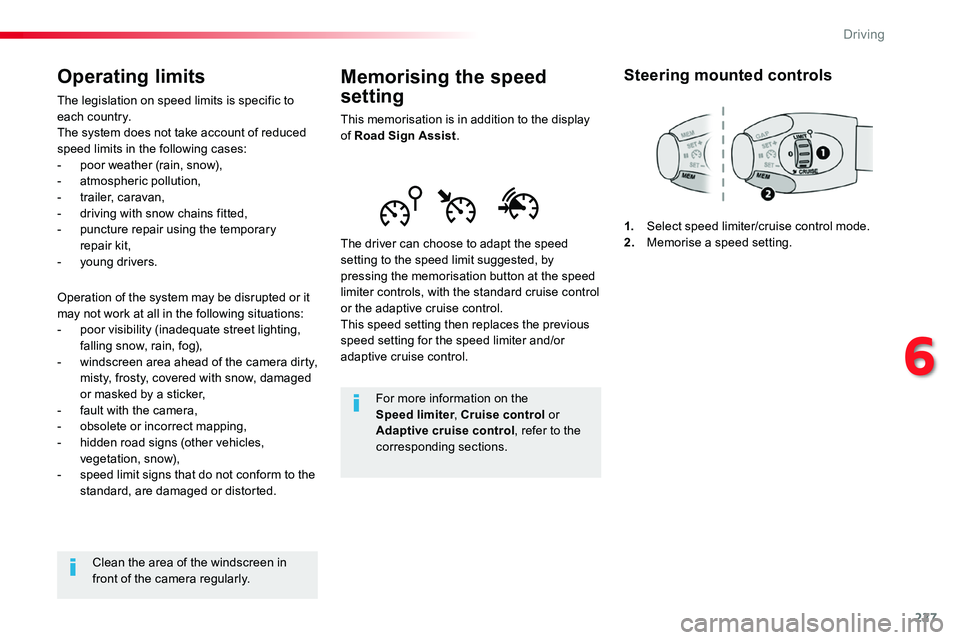
The driver can choose to adapt the speed setting to the speed limit suggested, by pressing the memorisation button at the speed limiter controls, with the standard cruise control or the adaptive cruise control.This speed setting then replaces the previous speed setting for the speed limiter and/or adaptive cruise control.
For more information on the Speed limiter, Cruise control or
Adaptive cruise control, refer to the corresponding sections.
Steering mounted controls
1. Select speed limiter/cruise control mode.2. Memorise a speed setting.
Operating limits
The legislation on speed limits is specific to each country.The system does not take account of reduced speed limits in the following cases:- poor weather (rain, snow),- atmospheric pollution,- trailer, caravan,- driving with snow chains fitted,
- puncture repair using the temporary repair kit,- young drivers.
Operation of the system may be disrupted or it may not work at all in the following situations:- poor visibility (inadequate street lighting, falling snow, rain, fog),- windscreen area ahead of the camera dirty, misty, frosty, covered with snow, damaged or masked by a sticker,- fault with the camera,- obsolete or incorrect mapping,- hidden road signs (other vehicles, vegetation, snow),- speed limit signs that do not conform to the standard, are damaged or distorted.
Clean the area of the windscreen in front of the camera regularly.
6
Driving
Page 228 of 516
228
MEM
MEM
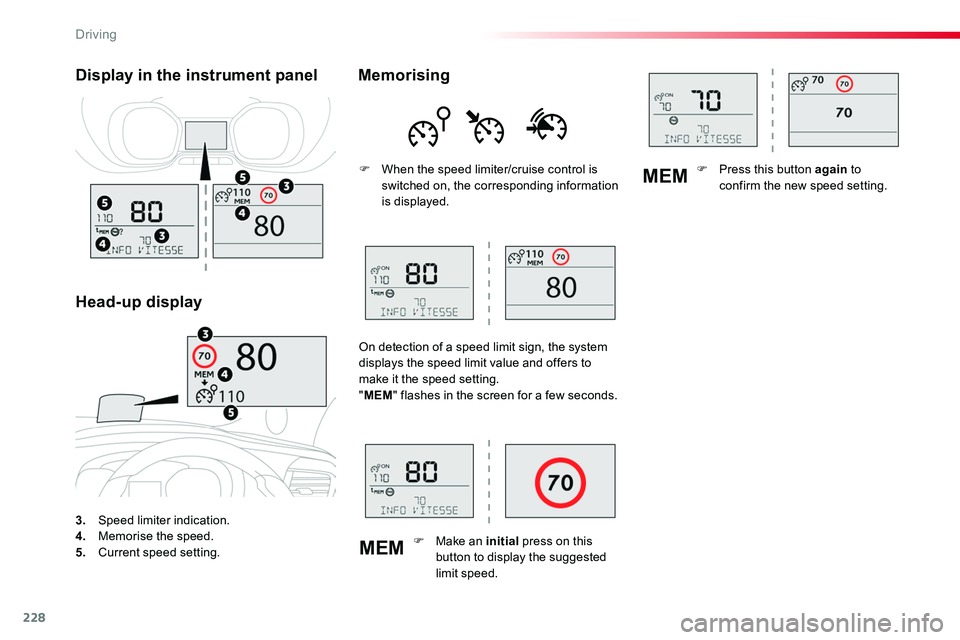
3. Speed limiter indication.4. Memorise the speed.5. Current speed setting.
Display in the instrument panel
Head-up display
Memorising
F When the speed limiter/cruise control is switched on, the corresponding information is displayed.
On detection of a speed limit sign, the system displays the speed limit value and offers to make it the speed setting."MEM" flashes in the screen for a few seconds.
F Make an initial press on this button to display the suggested limit speed.
F Press this button again to confirm the new speed setting.
Driving
Page 229 of 516
229
GAP
MEM
Steering mounted controls
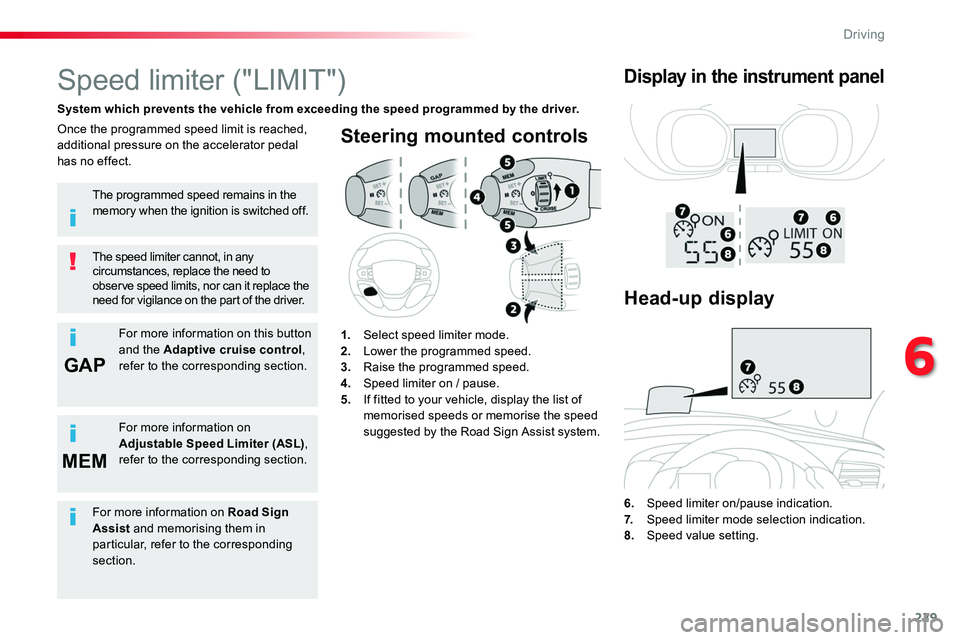
6. Speed limiter on/pause indication.7. Speed limiter mode selection indication.
8. Speed value setting.
Speed limiter ("LIMIT")
System which prevents the vehicle from exceeding the speed programmed by the driver.
The speed limiter cannot, in any circumstances, replace the need to observe speed limits, nor can it replace the need for vigilance on the part of the driver.
Once the programmed speed limit is reached, additional pressure on the accelerator pedal has no effect.
1. Select speed limiter mode.2. Lower the programmed speed.3. Raise the programmed speed.4. Speed limiter on / pause.5. If fitted to your vehicle, display the list of memorised speeds or memorise the speed suggested by the Road Sign Assist system.
Display in the instrument panel
The programmed speed remains in the memory when the ignition is switched off.
For more information on this button and the Adaptive cruise control, refer to the corresponding section.
For more information on Adjustable Speed Limiter (ASL), refer to the corresponding section.
Head-up display
For more information on Road Sign Assist and memorising them in particular, refer to the corresponding section.
6
Driving
Page 232 of 516
232
MEM
MEM
Cruise control ("CRUISE")
System which automatically maintains the speed of the vehicle at the value programmed by the driver, without any action on the accelerator pedal.
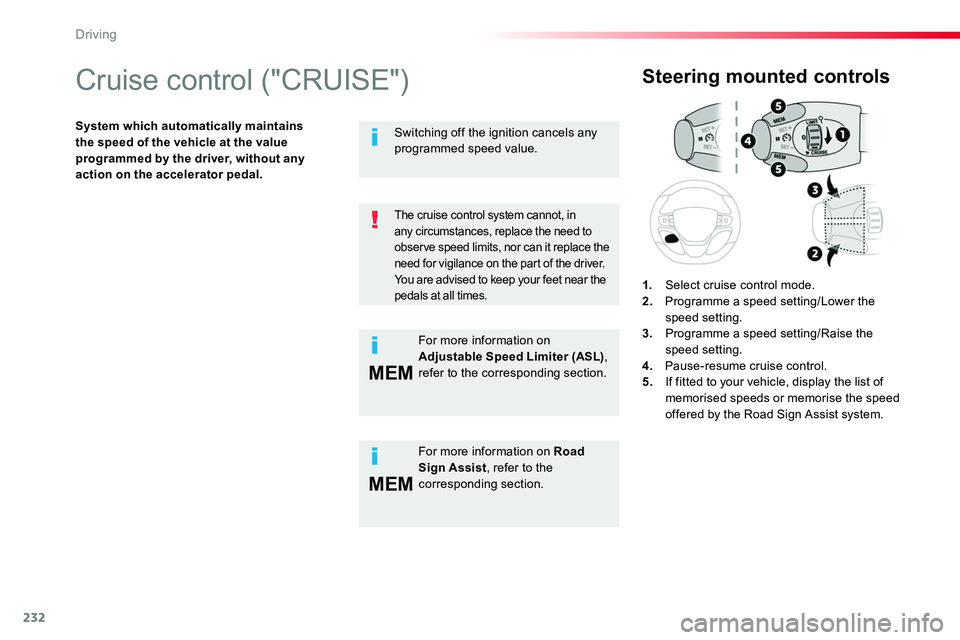
Steering mounted controls
1. Select cruise control mode.2. Programme a speed setting/Lower the speed setting.3. Programme a speed setting/Raise the speed setting.4. Pause-resume cruise control.5. If fitted to your vehicle, display the list of memorised speeds or memorise the speed offered by the Road Sign Assist system.
The cruise control system cannot, in
any circumstances, replace the need to observe speed limits, nor can it replace the need for vigilance on the part of the driver.You are advised to keep your feet near the pedals at all times.
For more information on Road Sign Assist, refer to the corresponding section.
Switching off the ignition cancels any programmed speed value.
For more information on Adjustable Speed Limiter (ASL), refer to the corresponding section.
Driving
Page 233 of 516
233
If your vehicle has a manual gearbox, third or fourth gear, or higher, must be engaged.
If your vehicle has an automatic or electronic gearbox, second gear or higher must be engaged.
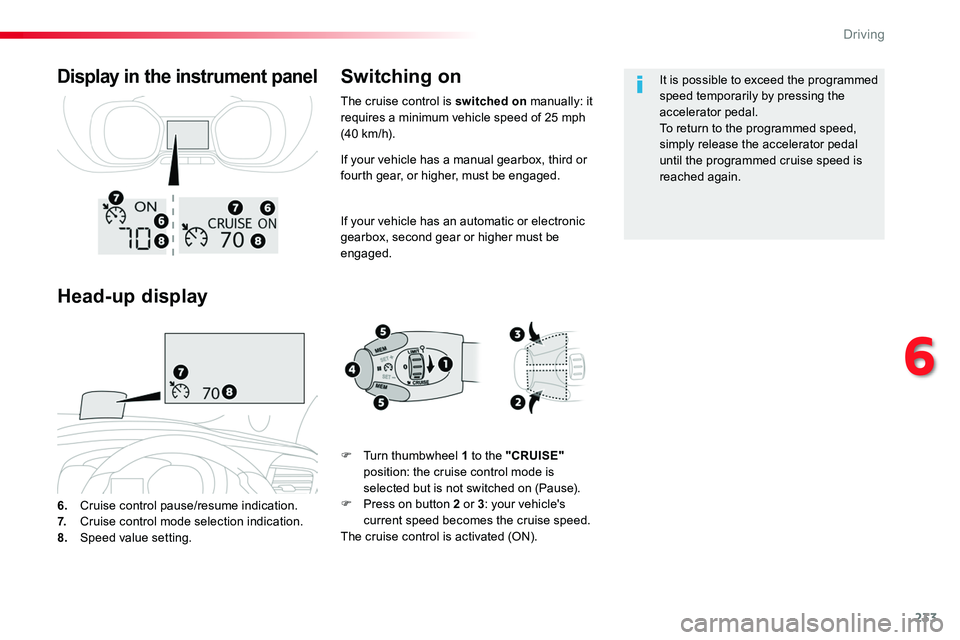
6. Cruise control pause/resume indication.7. Cruise control mode selection indication.
8. Speed value setting.
Display in the instrument panel
Head-up display
Switching on
F Turn thumbwheel 1 to the "CRUISE" position: the cruise control mode is selected but is not switched on (Pause).F Press on button 2 or 3: your vehicle's current speed becomes the cruise speed.The cruise control is activated (ON).
It is possible to exceed the programmed speed temporarily by pressing the accelerator pedal.To return to the programmed speed, simply release the accelerator pedal until the programmed cruise speed is reached again.
The cruise control is switched on manually: it requires a minimum vehicle speed of 25 mph (40 km/h).
6
Driving
Page 234 of 516
234
Pause
The cruise control is paused manually or by pressing the brake or clutch pedal or on triggering of the ESC system for safety reasons.
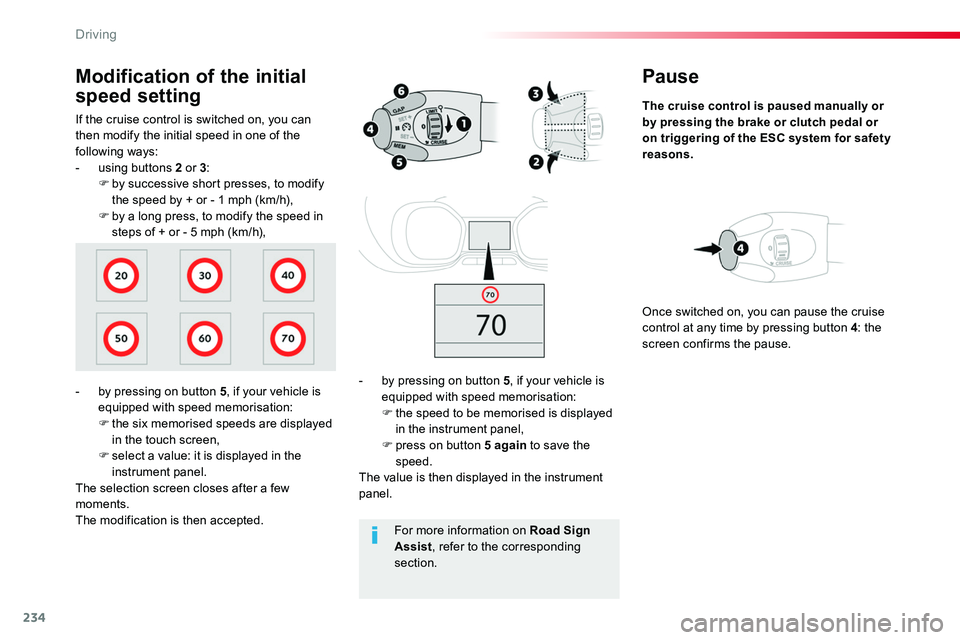
- by pressing on button 5, if your vehicle is equipped with speed memorisation:F the speed to be memorised is displayed in the instrument panel,F press on button 5 again to save the speed.The value is then displayed in the instrument panel.
Once switched on, you can pause the cruise control at any time by pressing button 4: the screen confirms the pause.
If the cruise control is switched on, you can then modify the initial speed in one of the following ways:- using buttons 2 or 3:F by successive short presses, to modify the speed by + or - 1 mph (km/h),F by a long press, to modify the speed in steps of + or - 5 mph (km/h),
Modification of the initial
speed setting
- by pressing on button 5, if your vehicle is equipped with speed memorisation:F the six memorised speeds are displayed in the touch screen,F select a value: it is displayed in the instrument panel.The selection screen closes after a few moments.The modification is then accepted.For more information on Road Sign Assist, refer to the corresponding section.
Driving
Page 235 of 516
235
Exceeding the programmed
speed
If the programmed speed is exceeded, the displayed speed flashes.Once the vehicle returns to the programmed speed, the display becomes steady again.
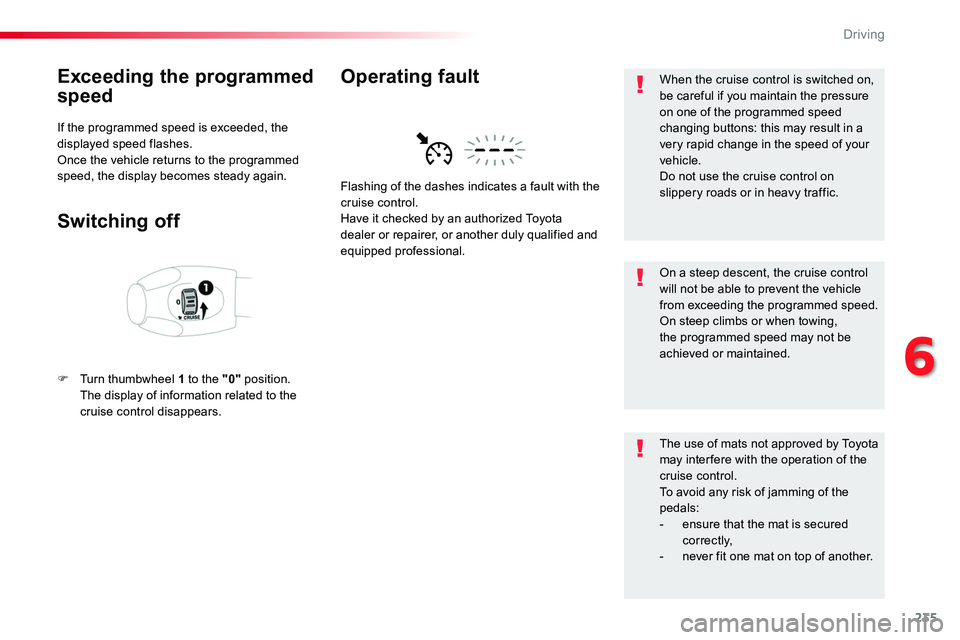
Switching off
F Turn thumbwheel 1 to the "0" position. The display of information related to the cruise control disappears.
Flashing of the dashes indicates a fault with the cruise control.Have it checked by an authorized Toyota
dealer or repairer, or another duly qualified and equipped professional.
Operating faultWhen the cruise control is switched on, be careful if you maintain the pressure on one of the programmed speed changing buttons: this may result in a very rapid change in the speed of your vehicle.Do not use the cruise control on slippery roads or in heavy traffic.
On a steep descent, the cruise control will not be able to prevent the vehicle from exceeding the programmed speed.On steep climbs or when towing, the programmed speed may not be achieved or maintained.
The use of mats not approved by Toyota may inter fere with the operation of the cruise control.To avoid any risk of jamming of the pedals:- ensure that the mat is secured c o r r e c t l y,- never fit one mat on top of another.
6
Driving
Page 236 of 516
236
Adaptive cruise control ("CRUISE")
This systems allows the vehicle's speed to be maintained at a value set by the driver.In addition it allows (when circumstances permit) an inter-vehicle distance that you have selected to be maintained between your vehicle and the vehicle in front.
In the Driving menu, activate/deactivate "Dynamic cruise control".
The state of the system is memorised on switching off the ignition.
Activation / Deactivation
The cruise control selection thumbwheel must be at the "CRUISE" position, other wise the selection is not taken into account.Activation or deactivation of the system is via the vehicle configuration menu.
With the touch screen
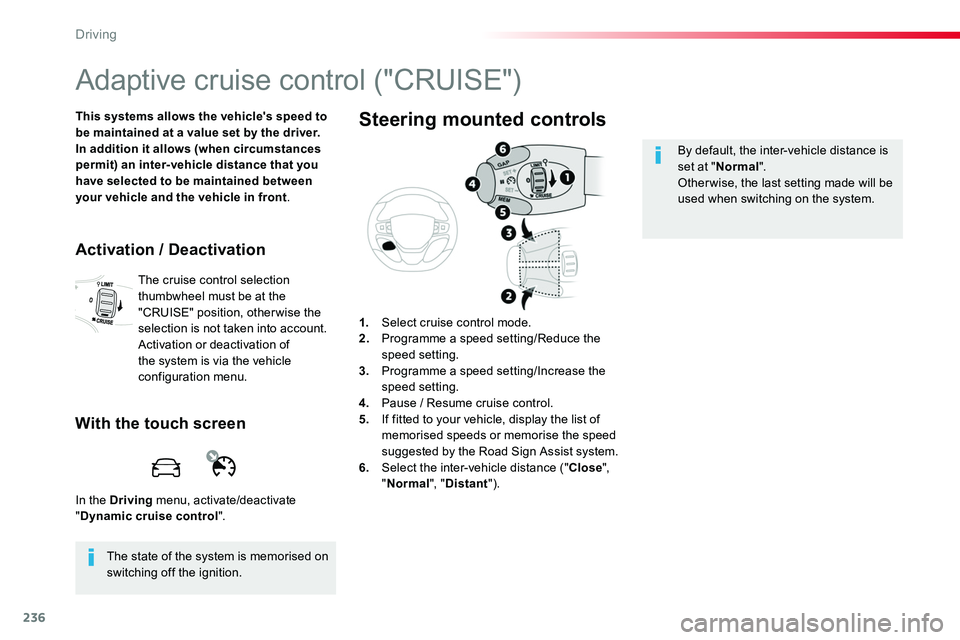
1. Select cruise control mode.2. Programme a speed setting/Reduce the speed setting.3. Programme a speed setting/Increase the speed setting.4. Pause / Resume cruise control.5. If fitted to your vehicle, display the list of
memorised speeds or memorise the speed suggested by the Road Sign Assist system.6. Select the inter-vehicle distance ("Close", "Normal", "Distant").
Steering mounted controls
By default, the inter-vehicle distance is set at "Normal".Other wise, the last setting made will be used when switching on the system.
Driving