ignition TOYOTA PROACE 2020 Owners Manual (in English)
[x] Cancel search | Manufacturer: TOYOTA, Model Year: 2020, Model line: PROACE, Model: TOYOTA PROACE 2020Pages: 430, PDF Size: 48.01 MB
Page 387 of 430
387
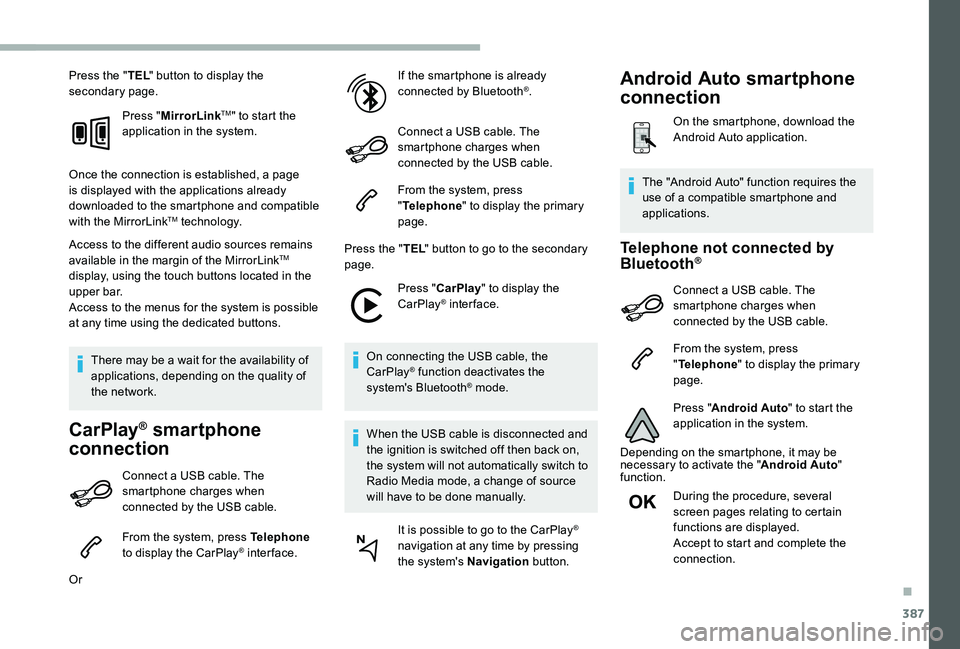
Press the "TEL" button to display the secondary page.
Press "MirrorLinkTM" to start the application in the system.
Once the connection is established, a page is displayed with the applications already downloaded to the smartphone and compatible with the MirrorLinkTM technology.
Access to the different audio sources remains available in the margin of the MirrorLinkTM display, using the touch buttons located in the u p p e r b a r.Access to the menus for the system is possible at any time using the dedicated buttons.
There may be a wait for the availability of applications, depending on the quality of the network.
CarPlay® smartphone
connection
Connect a USB cable. The smartphone charges when connected by the USB cable.
From the system, press Telephone to display the CarPlay® inter face.
Or
If the smartphone is already connected by Bluetooth®.
Connect a USB cable. The smartphone charges when connected by the USB cable.
From the system, press "Telephone" to display the primary page.
Press the "TEL" button to go to the secondary page.
Press "CarPlay" to display the CarPlay® inter face.
On connecting the USB cable, the CarPlay® function deactivates the system's Bluetooth® mode.
When the USB cable is disconnected and
the ignition is switched off then back on, the system will not automatically switch to Radio Media mode, a change of source will have to be done manually.
It is possible to go to the CarPlay® navigation at any time by pressing the system's Navigation button.
Telephone not connected by Bluetooth®
Connect a USB cable. The smartphone charges when connected by the USB cable.
From the system, press "Telephone" to display the primary page.
Press "Android Auto" to start the application in the system.
Depending on the smartphone, it may be necessary to activate the "Android Auto" function.
During the procedure, several screen pages relating to certain functions are displayed.Accept to start and complete the
connection.
The "Android Auto" function requires the use of a compatible smartphone and applications.
Android Auto smartphone
connection
On the smartphone, download the Android Auto application.
.
Page 388 of 430
388
When connecting a smartphone to the system, it is recommended that Bluetooth® be started on the smartphone.
Telephone connected by Bluetooth®
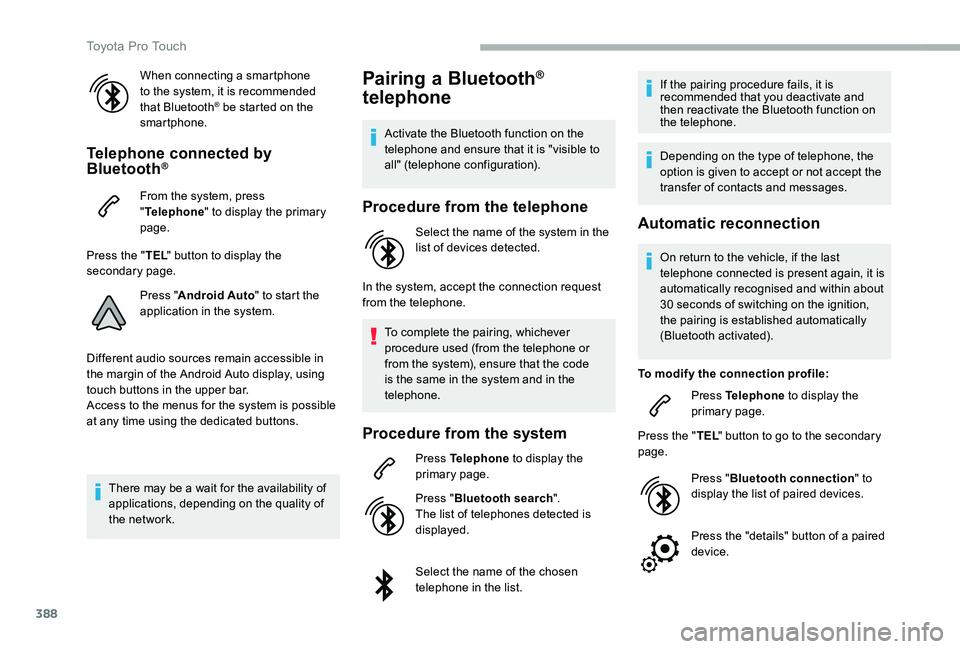
From the system, press "Telephone" to display the primary page.
Press the "TEL" button to display the secondary page.
Press "Android Auto" to start the application in the system.
Different audio sources remain accessible in the margin of the Android Auto display, using touch buttons in the upper bar.Access to the menus for the system is possible at any time using the dedicated buttons.
There may be a wait for the availability of applications, depending on the quality of the network.
Pairing a Bluetooth®
telephone
Activate the Bluetooth function on the telephone and ensure that it is "visible to all" (telephone configuration).
Procedure from the telephone
Select the name of the system in the
list of devices detected.
In the system, accept the connection request from the telephone.
To complete the pairing, whichever procedure used (from the telephone or from the system), ensure that the code is the same in the system and in the telephone.
Procedure from the system
Press Telephone to display the primary page.
Press "Bluetooth search".The list of telephones detected is displayed.
Select the name of the chosen telephone in the list.
If the pairing procedure fails, it is recommended that you deactivate and then reactivate the Bluetooth function on the telephone.
Depending on the type of telephone, the option is given to accept or not accept the transfer of contacts and messages.
Automatic reconnection
On return to the vehicle, if the last telephone connected is present again, it is automatically recognised and within about 30 seconds of switching on the ignition, the pairing is established automatically (Bluetooth activated).
To modify the connection profile:
Press Telephone to display the primary page.
Press the "TEL" button to go to the secondary page.
Press "Bluetooth connection" to display the list of paired devices.
Press the "details" button of a paired device.
Toyota Pro Touch
Page 397 of 430
397
Toyota Radio Bluetooth®
ContentsFirst steps 398
Steering mounted controls - Type 1 399
Steering mounted controls - Type 2 400
Menus 401
Radio 402
DAB (Digital Audio Broadcasting) radio 404
Media 406
Telephone 411
Frequently asked questions 416
Your audio system is coded in such a way that it will only operate in your vehicle.
The different functions and adjustments described vary according to the version and configuration of your vehicle.
As a safety measure and because it requires the sustained attention of the driver, the pairing of your Bluetooth telephone to the Bluetooth hands-free audio system must only be carried out with the vehicle stationary and the ignition on.To avoid discharging the battery, the audio system may switch off after a few minutes if the engine is not running.
.
Audio and Telematics
Page 411 of 430
411
Telephone
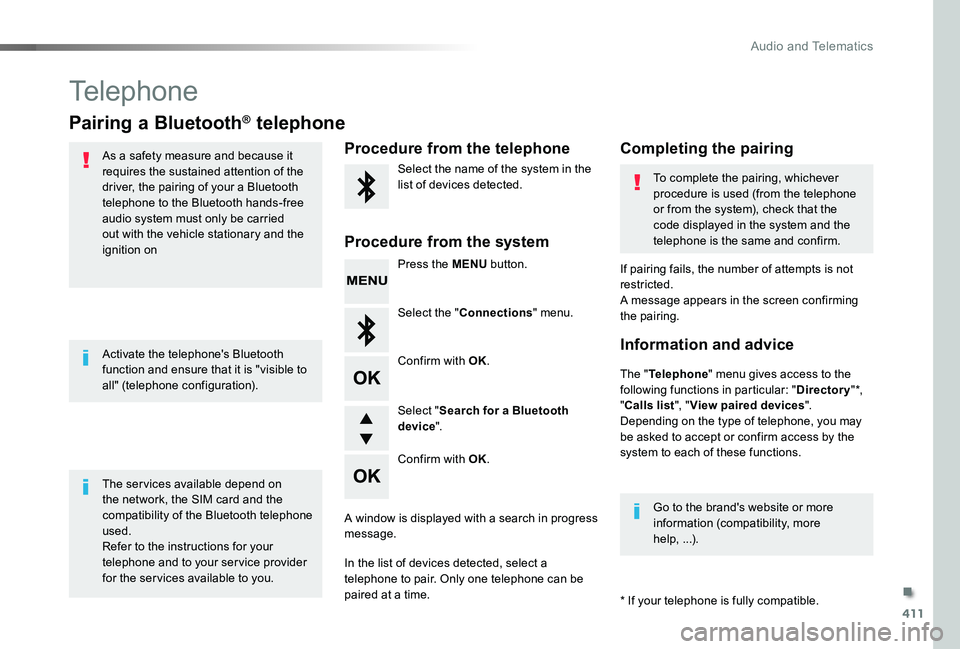
Pairing a Bluetooth® telephone
As a safety measure and because it requires the sustained attention of the driver, the pairing of your a Bluetooth telephone to the Bluetooth hands-free audio system must only be carried out with the vehicle stationary and the ignition on
The services available depend on the network, the SIM card and the compatibility of the Bluetooth telephone used.Refer to the instructions for your telephone and to your service provider for the ser vices available to you.
Activate the telephone's Bluetooth function and ensure that it is "visible to all" (telephone configuration).
* If your telephone is fully compatible.
The "Telephone" menu gives access to the following functions in particular: "Directory" *, "Calls list", "View paired devices".Depending on the type of telephone, you may be asked to accept or confirm access by the system to each of these functions.
If pairing fails, the number of attempts is not restricted.A message appears in the screen confirming the pairing.
Procedure from the telephoneCompleting the pairing
Procedure from the system
Select the name of the system in the list of devices detected.To complete the pairing, whichever procedure is used (from the telephone or from the system), check that the code displayed in the system and the telephone is the same and confirm.
Press the MENU button.
Select the "Connections" menu.
Confirm with OK.
A window is displayed with a search in progress message.
In the list of devices detected, select a telephone to pair. Only one telephone can be paired at a time.
Confirm with OK.
Select "Search for a Bluetooth device".
Information and advice
Go to the brand's website or more information (compatibility, more help, ...).
.
Audio and Telematics
Page 422 of 430
422
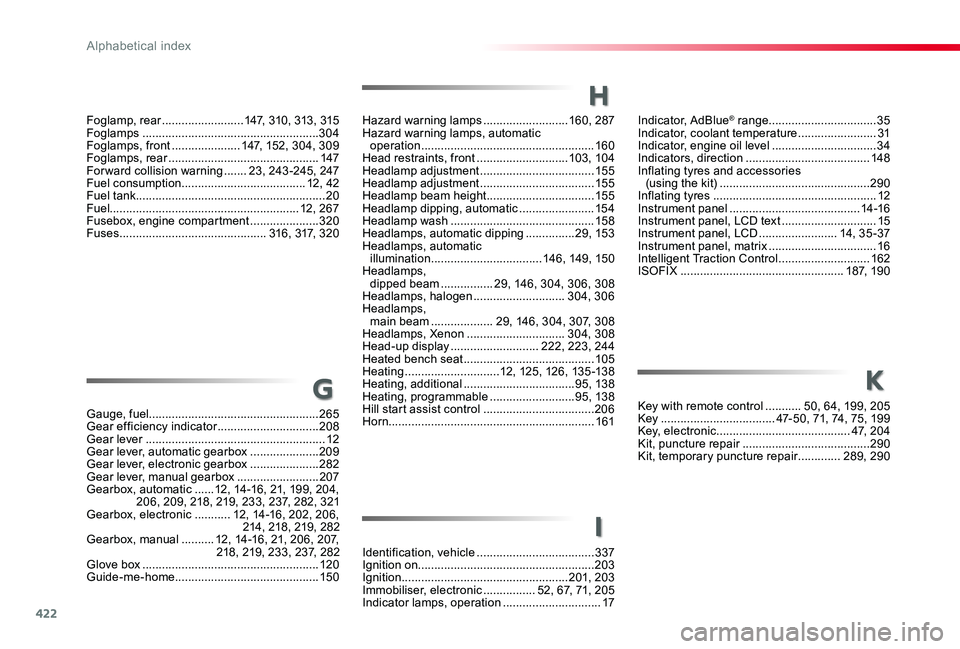
Indicator, AdBlue® range .................................35Indicator, coolant temperature ........................31Indicator, engine oil level ................................34Indicators, direction ......................................148Inflating tyres and accessories (using the kit) ..............................................290Inflating tyres ..................................................12Instrument panel ........................................14 -16Instrument panel, LCD text .............................15Instrument panel, LCD ........................14, 3 5 - 37Instrument panel, matrix .................................16Intelligent Traction Control ............................162ISOFIX ..................................................187, 190
Hazard warning lamps ..........................160, 287Hazard warning lamps, automatic operation .....................................................160Head restraints, front ............................103, 104Headlamp adjustment ...................................15 5Headlamp adjustment ...................................15 5Headlamp beam height .................................15 5Headlamp dipping, automatic .......................15 4Headlamp wash ............................................15 8Headlamps, automatic dipping ...............29, 15 3Headlamps, automatic illumination ..................................14 6, 149, 15 0Headlamps, dipped beam ................29, 146, 304, 306, 308Headlamps, halogen ............................304, 306Headlamps, main beam ...................29, 146, 304, 307, 308Headlamps, Xenon ..............................304, 308Head-up display ...........................222, 223, 244Heated bench seat ........................................105Heating .............................12, 125, 126, 13 5 -13 8Heating, additional ..................................95, 138Heating, programmable ..........................95, 138Hill start assist control ..................................206Horn...............................................................161
H
Foglamp, rear .........................147, 310, 313, 315Foglamps ......................................................304Foglamps, front .....................147, 152, 304, 309Foglamps, rear ..............................................147Forward collision warning .......23, 243 -245, 247Fuel consumption ......................................12, 42Fuel tank..........................................................20Fuel..........................................................12, 267Fusebox, engine compartment .....................320Fuses .............................................316, 317, 320
Gauge, fuel....................................................265Gear efficiency indicator ...............................208Gear lever .......................................................12Gear lever, automatic gearbox .....................209Gear lever, electronic gearbox .....................282Gear lever, manual gearbox .........................207Gearbox, automatic ......12, 14-16, 21, 199, 204, 206, 209, 218, 219, 233, 237, 282, 321Gearbox, electronic ...........12, 14-16, 202, 206, 214, 218, 219, 282Gearbox, manual ..........12, 14-16, 21, 206, 207, 218, 219, 233, 237, 282Glove box ......................................................120Guide-me-home ............................................15 0
GKey with remote control ...........50, 64, 199, 205Key ...................................47-50, 71, 74, 75, 199Key, electronic .........................................4 7, 2 0 4Kit, puncture repair .......................................290Kit, temporary puncture repair .............289, 290
Identification, vehicle ....................................337Ignition on......................................................203Ignition ...................................................201, 203Immobiliser, electronic ................52, 67, 71, 205Indicator lamps, operation ..............................17
K
I
Alphabetical index
Page 424 of 430
424
Safety, children .....................171, 174 -176 , 18 2 , 187, 188, 190, 193Saturation of the Diesel Particle Filter (DPF) ..........................................................281SCR (Selective Catalytic Reduction) ............283SCR system ..................................................283Screen, instrument panel ..........................4 0 , 41Screenwash ..................................................15 8Screenwash, rear ..........................................157Seat and bench seat, rear, on rails ..............11 6Seat and bench seat, rear, fixed ...........113 , 11 6Seat belts ......................166, 168, 169, 180, 181Seat belts, rear ..............................................167Seat, front bench, 2-seat ......................104, 167Seat, rear bench ...........................................11 6Seats, electric ...............................................102Seats, front bench .........................................105Seats, front ......................................99, 101, 102Seats, heated ........................................103, 105Seats, rear .............................................11 0 , 113Selector, gear ................................................214Serial number, vehicle ..................................337Service (warning lamp) ...................................28Service indicator .......................................31, 3 3Service ............................................................28Servicing .........................................................12Side repeater ................................................305Sidelamps .............146, 304-306, 310, 313, 315Sliding side door, electric ............................49, 57, 64, 65, 78 - 84
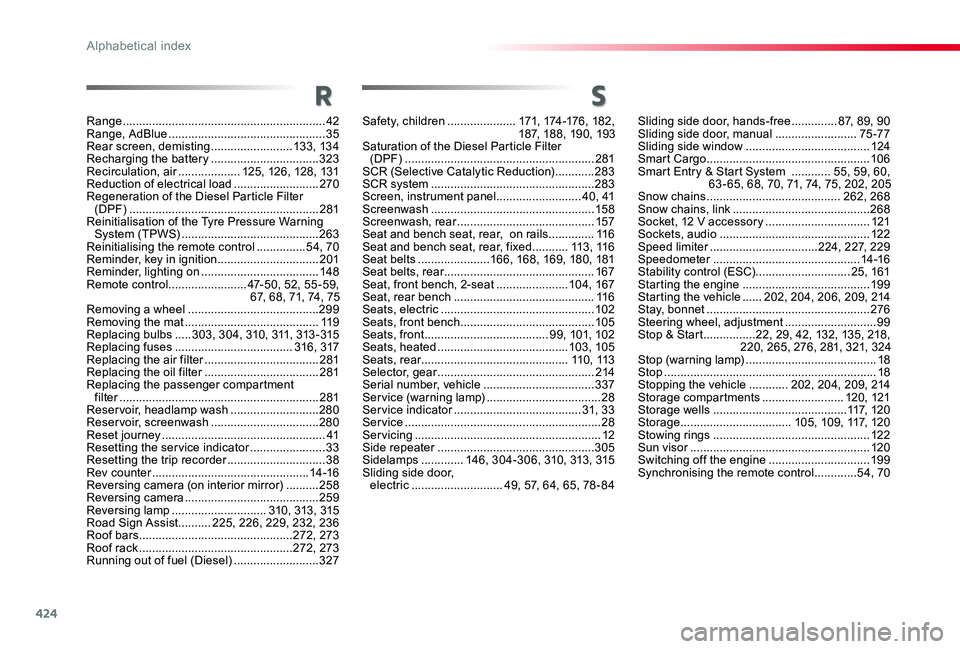
S
Sliding side door, hands-free ..............87, 89, 90Sliding side door, manual .........................75 -77Sliding side window ......................................124Smart Cargo ..................................................10 6Smart Entry & Start System ............55, 59, 60, 63 - 65, 68, 70, 71, 74, 75, 202, 205Snow chains .........................................262, 268Snow chains, link ..........................................268Socket, 12 V accessory ................................121Sockets, audio ..............................................12 2Speed limiter .................................224, 227, 229Speedometer .............................................14 -16Stability control (ESC).............................25, 161Starting the engine .......................................19 9Starting the vehicle ......202, 204, 206, 209, 214Stay, bonnet ..................................................276Steering wheel, adjustment ............................99Stop & Start ................22, 29, 42, 132, 135, 218, 220, 265, 276, 281, 321, 324Stop (warning lamp) ........................................18Stop .................................................................18Stopping the vehicle ............202, 204, 209, 214Storage compartments .........................120, 121Storage wells .........................................117, 1 2 0Storage ..................................105, 109, 117, 120Stowing rings ................................................12 2Sun visor .......................................................120Switching off the engine ...............................19 9Synchronising the remote control .............54, 70
Range ..............................................................42Range, AdBlue ................................................35Rear screen, demisting .........................13 3, 13 4Recharging the battery .................................323Recirculation, air ...................125, 126, 128, 131Reduction of electrical load ..........................270Regeneration of the Diesel Particle Filter (DPF) ..........................................................281Reinitialisation of the Tyre Pressure Warning System (TPWS) ..........................................263Reinitialising the remote control ...............54, 70Reminder, key in ignition ...............................201Reminder, lighting on ....................................148Remote control ........................47-50, 52, 55 -59, 67, 68, 71, 74, 75Removing a wheel ........................................299Removing the mat .........................................11 9Replacing bulbs .....3 03, 3 0 4, 310, 311, 313 - 315Replacing fuses ....................................316, 317Replacing the air filter ...................................281Replacing the oil filter ...................................281Replacing the passenger compartment filter .............................................................281Reservoir, headlamp wash ...........................280Reservoir, screenwash .................................280Reset journey ..................................................41Resetting the service indicator .......................33Resetting the trip recorder ..............................38Rev counter ................................................14 -16Reversing camera (on interior mirror) ..........258Reversing camera .........................................259Reversing lamp .............................310, 313, 315Road Sign Assist ..........225, 226, 229, 232, 236Roof bars ...............................................272, 273Roof rack ...............................................272, 273Running out of fuel (Diesel) ..........................327
R
Alphabetical index