stop start TOYOTA PROACE CITY EV 2021 User Guide
[x] Cancel search | Manufacturer: TOYOTA, Model Year: 2021, Model line: PROACE CITY EV, Model: TOYOTA PROACE CITY EV 2021Pages: 320, PDF Size: 75.81 MB
Page 38 of 320
38
Unlocking
NOTIC E
Unlocking is signalled by rapid flashing of the
direction indicators for a few seconds.Depending on version, the door mirrors unfold and the alarm is deactivated.
With the key
► To completely unlock the vehicle, insert the key in the lock then turn it towards the front of the vehicle.► Then pull the handle to open the door.If fitted to your vehicle, the alarm is not deactivated. Opening a door will trigger the alarm, which can be stopped by switching the ignition on.
Using the remote control
► Press this button to unlock the vehicle.
With the Keyless Entry and
Starting "on your person"
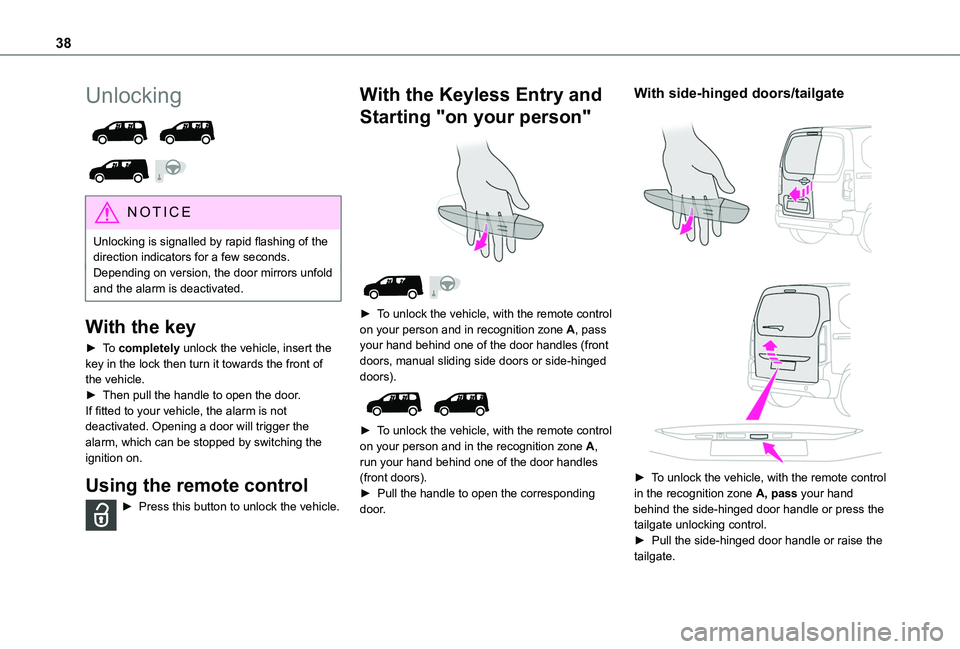
► To unlock the vehicle, with the remote control on your person and in recognition zone A, pass your hand behind one of the door handles (front doors, manual sliding side doors or side-hinged doors).
► To unlock the vehicle, with the remote control
on your person and in the recognition zone A, run your hand behind one of the door handles (front doors).► Pull the handle to open the corresponding door.
With side-hinged doors/tailgate
► To unlock the vehicle, with the remote control in the recognition zone A, pass your hand behind the side-hinged door handle or press the tailgate unlocking control. ► Pull the side-hinged door handle or raise the tailgate.
Page 39 of 320
39
Access
2
With a tailgate opening rear screen
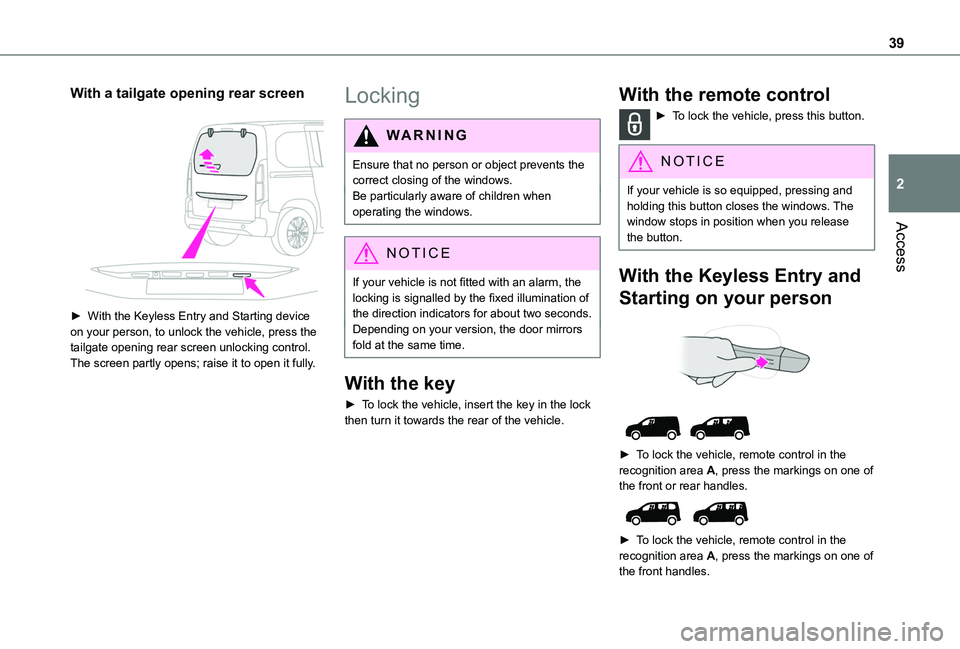
► With the Keyless Entry and Starting device on your person, to unlock the vehicle, press the tailgate opening rear screen unlocking control. The screen partly opens; raise it to open it fully.
Locking
WARNI NG
Ensure that no person or object prevents the correct closing of the windows.Be particularly aware of children when operating the windows.
NOTIC E
If your vehicle is not fitted with an alarm, the locking is signalled by the fixed illumination of the direction indicators for about two seconds.Depending on your version, the door mirrors fold at the same time.
With the key
► To lock the vehicle, insert the key in the lock then turn it towards the rear of the vehicle.
With the remote control
► To lock the vehicle, press this button.
NOTIC E
If your vehicle is so equipped, pressing and holding this button closes the windows. The window stops in position when you release the button.
With the Keyless Entry and
Starting on your person
► To lock the vehicle, remote control in the recognition area A, press the markings on one of the front or rear handles.
► To lock the vehicle, remote control in the recognition area A, press the markings on one of the front handles.
Page 40 of 320
40
With side-hinged doors
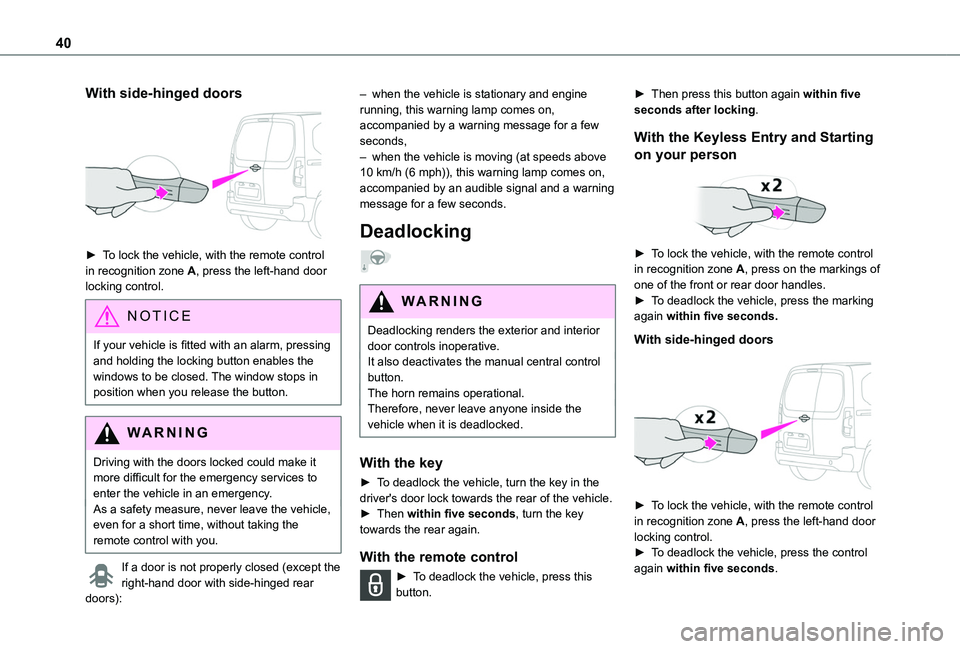
► To lock the vehicle, with the remote control in recognition zone A, press the left-hand door locking control.
NOTIC E
If your vehicle is fitted with an alarm, pressing and holding the locking button enables the windows to be closed. The window stops in position when you release the button.
WARNI NG
Driving with the doors locked could make it more difficult for the emergency services to enter the vehicle in an emergency.As a safety measure, never leave the vehicle, even for a short time, without taking the remote control with you.
If a door is not properly closed (except the right-hand door with side-hinged rear
doors):
– when the vehicle is stationary and engine running, this warning lamp comes on, accompanied by a warning message for a few seconds, – when the vehicle is moving (at speeds above 10 km/h (6 mph)), this warning lamp comes on, accompanied by an audible signal and a warning message for a few seconds.
Deadlocking
WARNI NG
Deadlocking renders the exterior and interior door controls inoperative.It also deactivates the manual central control button.The horn remains operational.Therefore, never leave anyone inside the vehicle when it is deadlocked.
With the key
► To deadlock the vehicle, turn the key in the driver's door lock towards the rear of the vehicle.► Then within five seconds, turn the key towards the rear again.
With the remote control
► To deadlock the vehicle, press this button.
► Then press this button again within five seconds after locking.
With the Keyless Entry and Starting
on your person
► To lock the vehicle, with the remote control in recognition zone A, press on the markings of one of the front or rear door handles.► To deadlock the vehicle, press the marking again within five seconds.
With side-hinged doors
► To lock the vehicle, with the remote control in recognition zone A, press the left-hand door locking control.
► To deadlock the vehicle, press the control again within five seconds.
Page 41 of 320
41
Access
2
Back-up procedures
Lost keys, remote control,
electronic key
Go to a TOYOTA dealer with the vehicle's registration certificate, your personal identification documents and if possible, the label bearing the key code.The TOYOTA dealer will be able to retrieve the key code and the transponder code, enabling a new key to be ordered.
Complete unlocking/locking
of the vehicle with the key
Use this procedure in the following situations:– Remote control battery discharged.– Remote control malfunction.– Vehicle battery discharged.– Vehicle in an area subject to strong electromagnetic interference.In the first case, change the remote control
battery.In the second case, reinitialise the remote control.Refer to the corresponding sections.► Insert the key in the left front door lock.► Turn the key towards the front/rear to unlock/lock the vehicle.► Turn the key towards the rear again within 5 seconds to deadlock the vehicle.
NOTIC E
If the vehicle is fitted with an alarm, it will not be activated when locking with the key.If the alarm is activated, the siren sounds when the door is opened; switch on the ignition to stop it.
NOTIC E
If the vehicle is unlocked with the key in the lock after locking it with the remote control or the Keyless Entry and Starting system, all doors and the boot are unlocked.If the vehicle is unlocked with the key in the lock after locking it with the key, only the doors (front door and sliding side door(s)) are unlocked. The swing doors and tailgate are not unlocked. They can be unlocked after switching on the ignition.
Central locking not
functioning
Use these procedures in the following cases:– Central locking malfunction.– Battery disconnected or discharged.
WARNI NG
In the event of a malfunction of the central
locking system, the battery must be disconnected to ensure that the vehicle is locked fully.
Locking part of the vehicle (front
passenger door/sliding side door/
side-hinged doors)
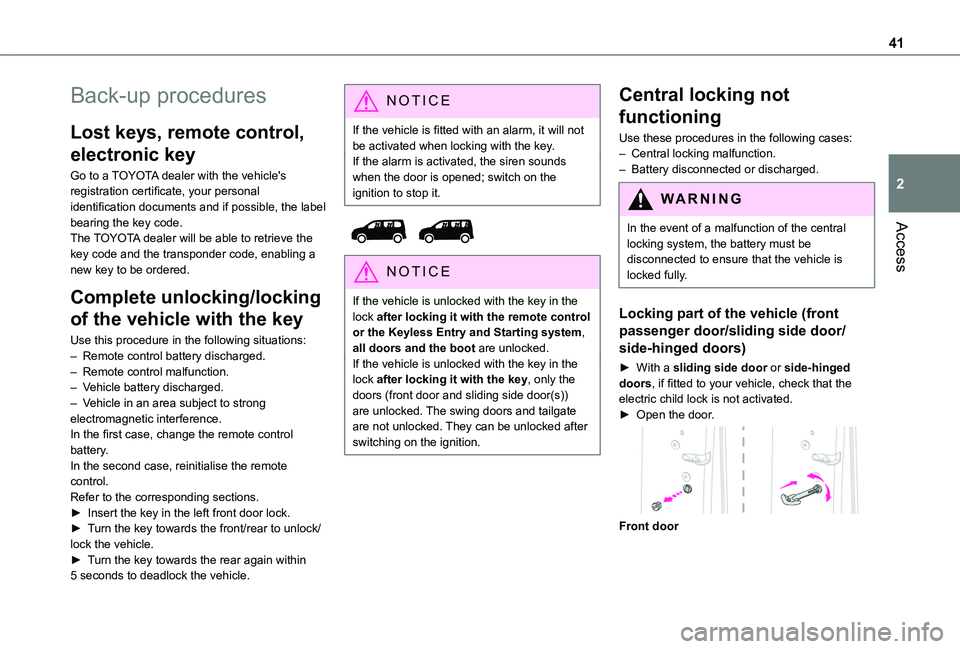
► With a sliding side door or side-hinged doors, if fitted to your vehicle, check that the electric child lock is not activated.► Open the door.
Front door
Page 43 of 320
43
Access
2
With Keyless Entry and Starting
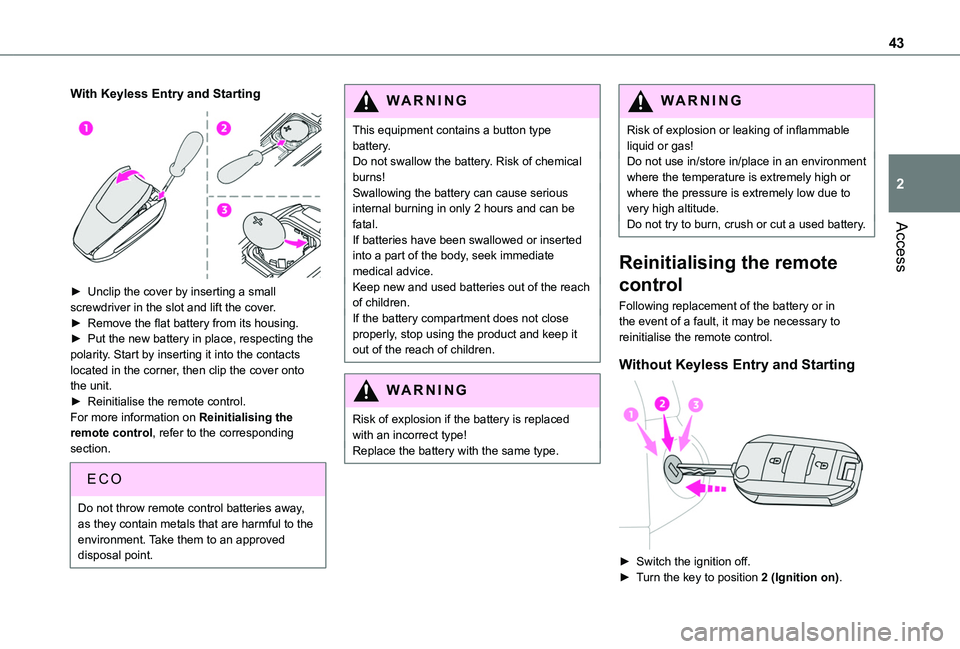
► Unclip the cover by inserting a small screwdriver in the slot and lift the cover.► Remove the flat battery from its housing.► Put the new battery in place, respecting the polarity. Start by inserting it into the contacts located in the corner, then clip the cover onto the unit.► Reinitialise the remote control.For more information on Reinitialising the remote control, refer to the corresponding
section.
EC O
Do not throw remote control batteries away, as they contain metals that are harmful to the environment. Take them to an approved disposal point.
WARNI NG
This equipment contains a button type battery.Do not swallow the battery. Risk of chemical burns!Swallowing the battery can cause serious internal burning in only 2 hours and can be fatal.If batteries have been swallowed or inserted into a part of the body, seek immediate medical advice.Keep new and used batteries out of the reach of children.If the battery compartment does not close properly, stop using the product and keep it out of the reach of children.
WARNI NG
Risk of explosion if the battery is replaced with an incorrect type!Replace the battery with the same type.
WARNI NG
Risk of explosion or leaking of inflammable liquid or gas!Do not use in/store in/place in an environment where the temperature is extremely high or where the pressure is extremely low due to very high altitude.Do not try to burn, crush or cut a used battery.
Reinitialising the remote
control
Following replacement of the battery or in the event of a fault, it may be necessary to reinitialise the remote control.
Without Keyless Entry and Starting
► Switch the ignition off.► Turn the key to position 2 (Ignition on).
Page 44 of 320
44
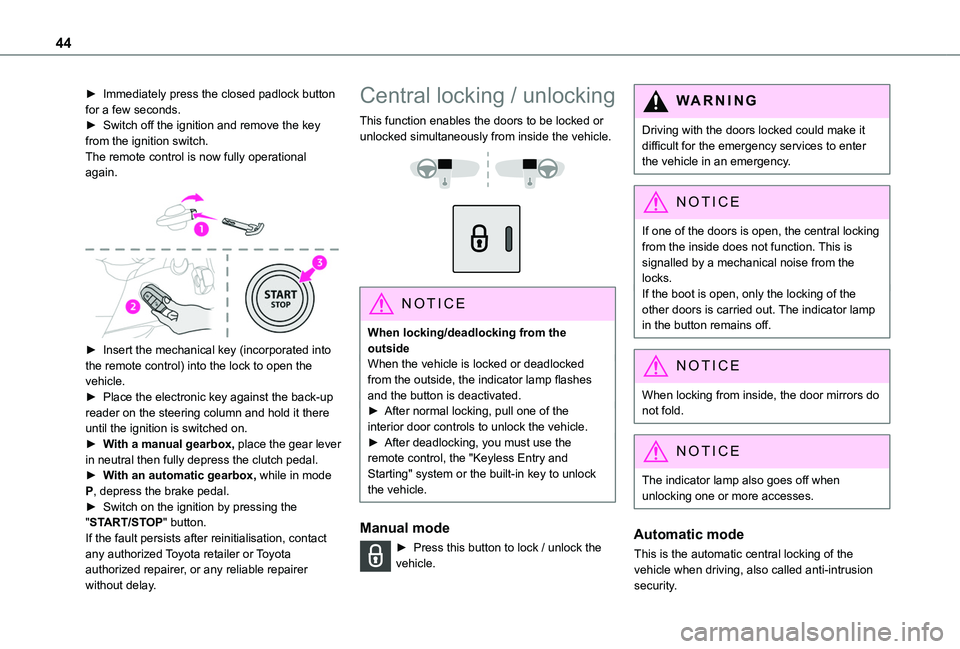
► Immediately press the closed padlock button for a few seconds.► Switch off the ignition and remove the key from the ignition switch.The remote control is now fully operational again.
► Insert the mechanical key (incorporated into the remote control) into the lock to open the vehicle.► Place the electronic key against the back-up reader on the steering column and hold it there until the ignition is switched on.► With a manual gearbox, place the gear lever
in neutral then fully depress the clutch pedal.► With an automatic gearbox, while in mode P, depress the brake pedal.► Switch on the ignition by pressing the "START/STOP" button.If the fault persists after reinitialisation, contact any authorized Toyota retailer or Toyota authorized repairer, or any reliable repairer without delay.
Central locking / unlocking
This function enables the doors to be locked or unlocked simultaneously from inside the vehicle.
NOTIC E
When locking/deadlocking from the outsideWhen the vehicle is locked or deadlocked from the outside, the indicator lamp flashes and the button is deactivated.► After normal locking, pull one of the interior door controls to unlock the vehicle.► After deadlocking, you must use the remote control, the "Keyless Entry and Starting" system or the built-in key to unlock the vehicle.
Manual mode
► Press this button to lock / unlock the vehicle.
WARNI NG
Driving with the doors locked could make it difficult for the emergency services to enter the vehicle in an emergency.
NOTIC E
If one of the doors is open, the central locking
from the inside does not function. This is signalled by a mechanical noise from the locks.If the boot is open, only the locking of the other doors is carried out. The indicator lamp in the button remains off.
NOTIC E
When locking from inside, the door mirrors do not fold.
NOTIC E
The indicator lamp also goes off when unlocking one or more accesses.
Automatic mode
This is the automatic central locking of the vehicle when driving, also called anti-intrusion security.
Page 51 of 320
51
Access
2
Reactivating the interior volumetric
and anti-tilt monitoring
► Deactivate the perimeter monitoring by unlocking the vehicle with the remote control or the Keyless Entry and Starting system.The indicator lamp in the button goes off.► Reactivate all monitoring by locking the vehicle with the remote control or the Keyless Entry and Starting system.The red indicator lamp in the button once again flashes every second.
Triggering of the alarm
This is indicated by sounding of the siren and flashing of the direction indicators for 30 seconds.Depending on the country of sale, certain monitoring functions remain active until the alarm has been triggered eleven times consecutively.When the vehicle is unlocked using the remote control or the "Keyless Entry and Starting" system, rapid flashing of the red indicator lamp
in the button informs you that the alarm was triggered during your absence. When the ignition is switched on, the flashing stops immediately.
Failure of the remote control
To deactivate the monitoring functions:► Unlock the vehicle using the key in the front left-handed door lock.► Open the door; the alarm is triggered.► Switch on the ignition; the alarm stops; the indicator lamp in the button goes off.
Locking the vehicle without
activating the alarm
► Lock or deadlock the vehicle using the key (integral to the remote control) in the driver's door lock.
Malfunction
When the ignition is switched on, the fixed lighting of the red indicator lamp in the button indicates a system malfunction.Have it checked by any authorized Toyota retailer or Toyota authorized repairer, or any reliable repairer.
Automatic activation
(Depending on version)The system is activated automatically 2 minutes after the last door or the boot is closed.► To avoid triggering the alarm on entering the vehicle, first press the unlocking button on the remote control or unlock the vehicle using the “Keyless Entry and Starting” system.
Page 67 of 320
67
Ease of use and comfort
3
12 V accessory socket(s)
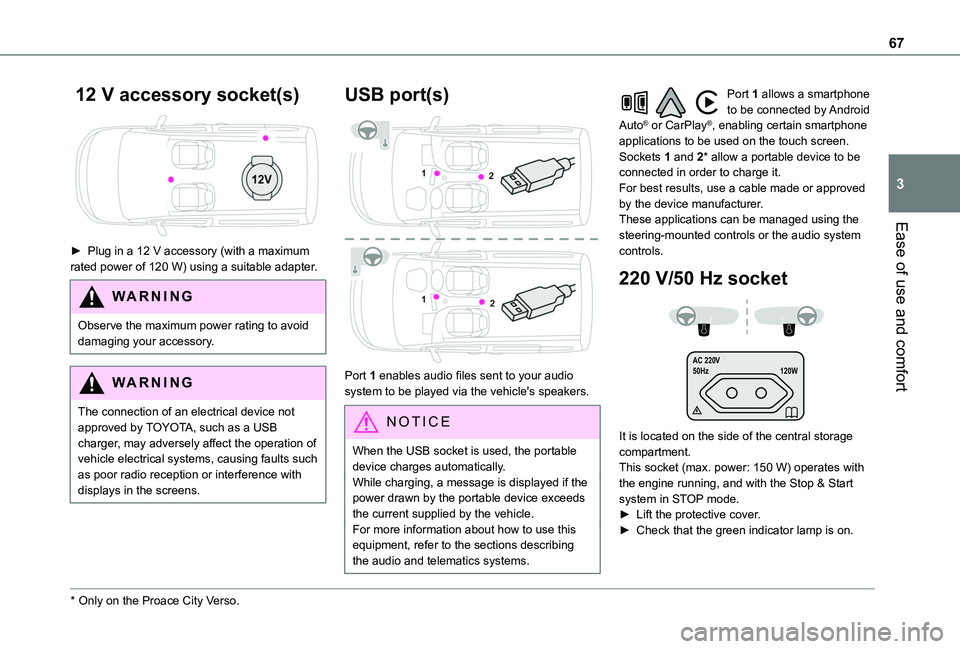
► Plug in a 12 V accessory (with a maximum rated power of 120 W) using a suitable adapter.
WARNI NG
Observe the maximum power rating to avoid damaging your accessory.
WARNI NG
The connection of an electrical device not approved by TOYOTA, such as a USB charger, may adversely affect the operation of vehicle electrical systems, causing faults such as poor radio reception or interference with
displays in the screens.
* Only on the Proace City Verso.
USB port(s)
Port 1 enables audio files sent to your audio system to be played via the vehicle's speakers.
N OTIC E
When the USB socket is used, the portable device charges automatically.While charging, a message is displayed if the power drawn by the portable device exceeds the current supplied by the vehicle.For more information about how to use this
equipment, refer to the sections describing the audio and telematics systems.
Port 1 allows a smartphone to be connected by Android Auto® or CarPlay®, enabling certain smartphone applications to be used on the touch screen.Sockets 1 and 2* allow a portable device to be connected in order to charge it.For best results, use a cable made or approved by the device manufacturer.These applications can be managed using the steering-mounted controls or the audio system controls.
220 V/50 Hz socket
AC 220 V
50Hz 120W
It is located on the side of the central storage compartment.This socket (max. power: 150 W) operates with the engine running, and with the Stop & Start system in STOP mode.► Lift the protective cover.► Check that the green indicator lamp is on.
Page 68 of 320
68
► Connect your multimedia or other electrical device (telephone charger, laptop computer, CD-DVD player, bottle warmer, etc.).In the event of a malfunction, the green indicator lamp flashes.Have the socket checked by a TOYOTA dealer or a qualified workshop.
WARNI NG
Connect only one device at a time to the socket (do not use extension leads or multi-socket adapters).Connect only devices with class II insulation (shown on the device).Do not use metal-cased devices (e.g. electric shaver, etc.).
NOTIC E
As a safety measure, if power consumption is high and power is required by the vehicle's electrical system (due to severe weather conditions, electrical overload, etc.), power to the socket may be cut off, in which case the green indicator lamp goes off.
Wireless smartphone
charger
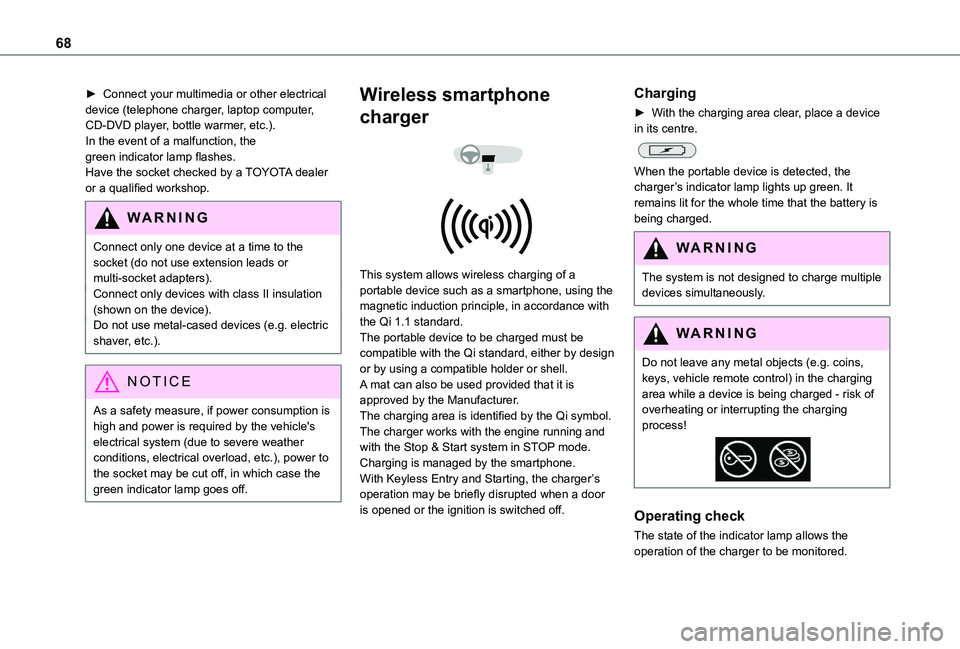
This system allows wireless charging of a portable device such as a smartphone, using the magnetic induction principle, in accordance with the Qi 1.1 standard.The portable device to be charged must be compatible with the Qi standard, either by design or by using a compatible holder or shell.A mat can also be used provided that it is approved by the Manufacturer.The charging area is identified by the Qi symbol.The charger works with the engine running and with the Stop & Start system in STOP mode.Charging is managed by the smartphone.With Keyless Entry and Starting, the charger’s operation may be briefly disrupted when a door is opened or the ignition is switched off.
Charging
► With the charging area clear, place a device in its centre.
When the portable device is detected, the charger’s indicator lamp lights up green. It remains lit for the whole time that the battery is being charged.
WARNI NG
The system is not designed to charge multiple devices simultaneously.
WARNI NG
Do not leave any metal objects (e.g. coins, keys, vehicle remote control) in the charging area while a device is being charged - risk of overheating or interrupting the charging process!
Operating check
The state of the indicator lamp allows the
operation of the charger to be monitored.
Page 81 of 320
81
Ease of use and comfort
3
NOTIC E
Servicing the ventilation and air conditioning system► Ensure that the passenger compartment filter is in good condition and have the filter elements replaced regularly.We recommend using a composite passenger compartment filter. Its specific active additive helps protect against polluting gases and bad smells.► To ensure correct operation of the air conditioning system, have it checked according to the recommendations in the Manufacturer's service schedule.
NOTIC E
Rapid heating of the interior
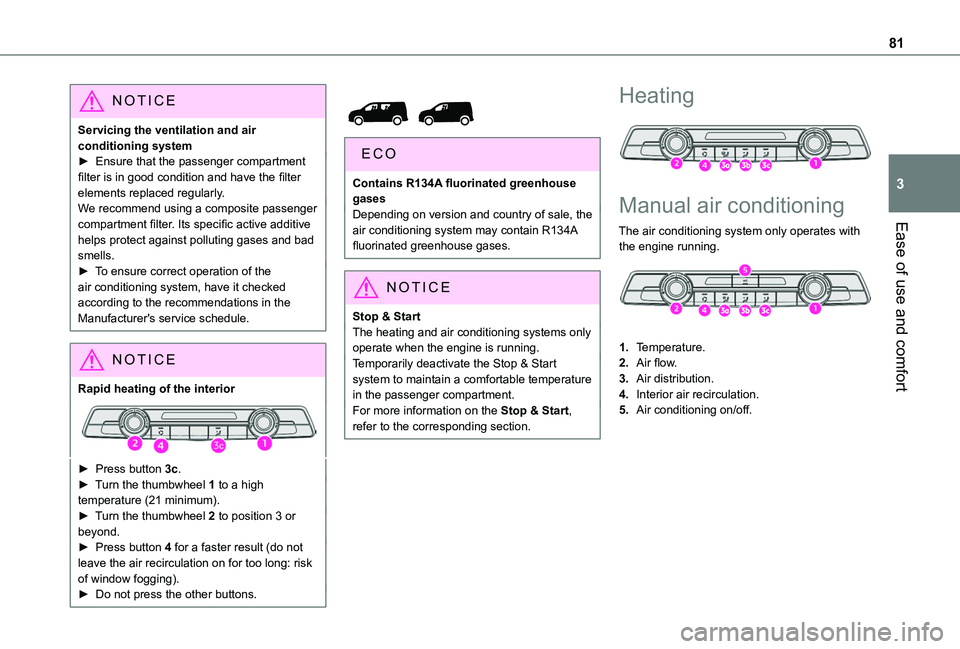
► Press button 3c.► Turn the thumbwheel 1 to a high temperature (21 minimum).► Turn the thumbwheel 2 to position 3 or beyond.► Press button 4 for a faster result (do not leave the air recirculation on for too long: risk of window fogging).► Do not press the other buttons.
Contains R134A fluorinated greenhouse gasesDepending on version and country of sale, the air conditioning system may contain R134A fluorinated greenhouse gases.
NOTIC E
Stop & StartThe heating and air conditioning systems only operate when the engine is running.Temporarily deactivate the Stop & Start system to maintain a comfortable temperature in the passenger compartment.For more information on the Stop & Start, refer to the corresponding section.
Heating
Manual air conditioning
The air conditioning system only operates with
the engine running.
1.Temperature.
2.Air flow.
3.Air distribution.
4.Interior air recirculation.
5.Air conditioning on/off.