gear TOYOTA PROACE CITY EV 2021 Owner's Guide
[x] Cancel search | Manufacturer: TOYOTA, Model Year: 2021, Model line: PROACE CITY EV, Model: TOYOTA PROACE CITY EV 2021Pages: 320, PDF Size: 75.81 MB
Page 144 of 320
144
Invalid value during manual
operation
This symbol is displayed if a gear is not engaged correctly (gear selector between two positions).► Place the selector "correctly" at a position.
Switching off the vehicle
Before switching off the engine, select position P then apply the parking brake to immobilise the vehicle, unless this is set to automatic mode (with electric parking brake).Check that mode P has been engaged and that the electric parking brake has been applied automatically; if not, apply it manually.The corresponding indicator lamps in the selector and the electric parking brake control lever must be on, as well as those on the instrument panel.
NOTIC E
A point of resistance may be noticed when moving to position P.If the selector is not in position P, when the driver's door is opened or approximately 45 seconds after the ignition is switched off, an audible signal sounds and a message appears.► Return the drive selector to position P; the audible signal stops and the message disappears.
WARNI NG
When positioned on a steep slope with a loaded vehicle, depress the brake pedal, select position P, apply the parking brake, unless it is set to automatic mode (with electric parking brake), then release the brake pedal.
WARNI NG
In all circumstances, ensure that the selector is in position P before leaving your vehicle.
Malfunction
In the event of a malfunction, this warning lamp comes on and a message is displayed, when the ignition is switched on.In this case, the gearbox goes into back-up mode and is locked in 3rd gear. You may feel a significant jolt (without risk to the gearbox) when changing from P to R and from N to R.Do not exceed 62 mph (100 km/h), local speed restrictions permitting.Have it checked by any authorized Toyota retailer or Toyota authorized repairer, or any reliable repairer.
WARNI NG
There is a risk of damaging the gearbox:– If the accelerator and brake pedals are depressed simultaneously.– In the event of a battery failure, forcing the selector from position P to another position.
WARNI NG
Automatic gearboxNever try to start the engine by pushing the vehicle.
(Type 2) Automatic
gearbox
Automatic 8-speed gearbox with push selector. It also offers a manual mode with gear changes via control paddles located behind the steering wheel.
Page 145 of 320
145
Driving
6
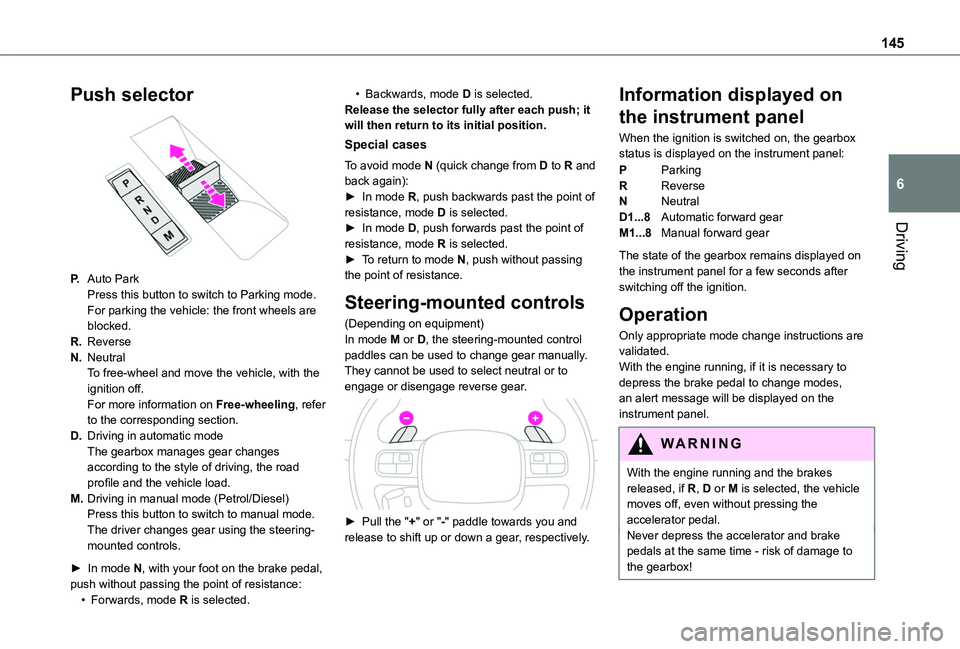
Push selector
P.Auto ParkPress this button to switch to Parking mode.For parking the vehicle: the front wheels are blocked.
R.Reverse
N.NeutralTo free-wheel and move the vehicle, with the ignition off.For more information on Free-wheeling, refer to the corresponding section.
D.Driving in automatic modeThe gearbox manages gear changes according to the style of driving, the road profile and the vehicle load.
M.Driving in manual mode (Petrol/Diesel)Press this button to switch to manual mode.The driver changes gear using the steering-
mounted controls.
► In mode N, with your foot on the brake pedal, push without passing the point of resistance:• Forwards, mode R is selected.
• Backwards, mode D is selected.Release the selector fully after each push; it will then return to its initial position.
Special cases
To avoid mode N (quick change from D to R and back again):► In mode R, push backwards past the point of resistance, mode D is selected.► In mode D, push forwards past the point of resistance, mode R is selected.► To return to mode N, push without passing the point of resistance.
Steering-mounted controls
(Depending on equipment)In mode M or D, the steering-mounted control paddles can be used to change gear manually.They cannot be used to select neutral or to engage or disengage reverse gear.
► Pull the "+" or "-" paddle towards you and release to shift up or down a gear, respectively.
Information displayed on
the instrument panel
When the ignition is switched on, the gearbox status is displayed on the instrument panel:
PParking
RReverse
NNeutral
D1...8Automatic forward gear
M1...8Manual forward gear
The state of the gearbox remains displayed on the instrument panel for a few seconds after switching off the ignition.
Operation
Only appropriate mode change instructions are validated.With the engine running, if it is necessary to depress the brake pedal to change modes, an alert message will be displayed on the instrument panel.
WARNI NG
With the engine running and the brakes released, if R, D or M is selected, the vehicle moves off, even without pressing the accelerator pedal.Never depress the accelerator and brake pedals at the same time - risk of damage to the gearbox!
Page 146 of 320
146
NOTIC E
If you open the driver's door while mode N is engaged, an audible signal will sound and mode P will be engaged. The audible signal stops when the driver's door is closed.
WARNI NG
At speeds below 3 mph (5 km/h), opening the driver’s door will engage mode P - risk of sudden braking!
WARNI NG
In the event of battery failure, it is essential to place the chock(s) supplied with the tool kit against one of the wheels to immobilise the vehicle.
Special aspects of automatic mode
The gearbox selects the gear that provides optimal performance based on ambient temperature, road profile, vehicle loading and driving style.For maximum acceleration, press the accelerator fully down (kick-down). The gearbox changes
down automatically or holds the selected gear until the maximum engine speed is reached.
Steering mounted controls allow the driver to temporarily select a gear, if the vehicle speed and engine speed conditions permit.
Special aspects of manual mode
The gearbox only changes from one gear to another if the vehicle speed and engine speed conditions permit.
Starting the vehicle
► Fully depress the brake pedal.► Start the engine.► With your foot on the brake pedal, push once or twice backwards to select automatic mode D, or forwards to shift into reverse gear R.► Release the brake pedal.► Accelerate gradually to automatically release the electric parking brake.The vehicle moves off immediately.
WARNI NG
Automatic gearbox
Never try to start the engine by pushing the vehicle.
Switching the vehicle off
Regardless of the current gearbox mode, mode P is immediately engaged automatically when the ignition is switched off.However, in mode N, mode P will be engaged after a delay of 5 seconds (time to enable free-wheeling mode).Check that mode P has been engaged and that the electric parking brake was applied automatically; if not, apply it manually.The corresponding indicator lamps on the gear selector and the electric parking brake control must be on, as well as the indicator lamps on the instrument panel.
Gearbox malfunction
This warning lamp comes on, accompanied by an audible signal and the display of a message.Go to any authorized Toyota retailer or Toyota authorized repairer, or any reliable repairer.Do not drive faster than 62 mph (100 km/h),
keeping to the speed limit.
Switching of the gearbox to back-up mode
Mode D locks in third gear.The paddles on the steering wheel do not work and mode M is no longer accessible.You may feel a significant jolt on engaging reverse gear. This will not damage the gearbox.
Page 147 of 320
147
Driving
6
Selector malfunction
Minor malfunction
This warning lamp comes on, accompanied by the display of a message and an audible signal.Drive carefully.Go to any authorized Toyota retailer or Toyota authorized repairer, or any reliable repairer.In some cases, the selector indicator lamps may no longer come on, but the gearbox state is still displayed on the instrument panel.
Major malfunction
This warning lamp comes on, accompanied by the display of a message.
WARNI NG
You must stop the vehicle.Stop as soon as it is safe to do so and switch off the ignition.Contact any authorized Toyota retailer or Toyota authorized repairer, or any reliable repairer.
Drive selector (Electric)
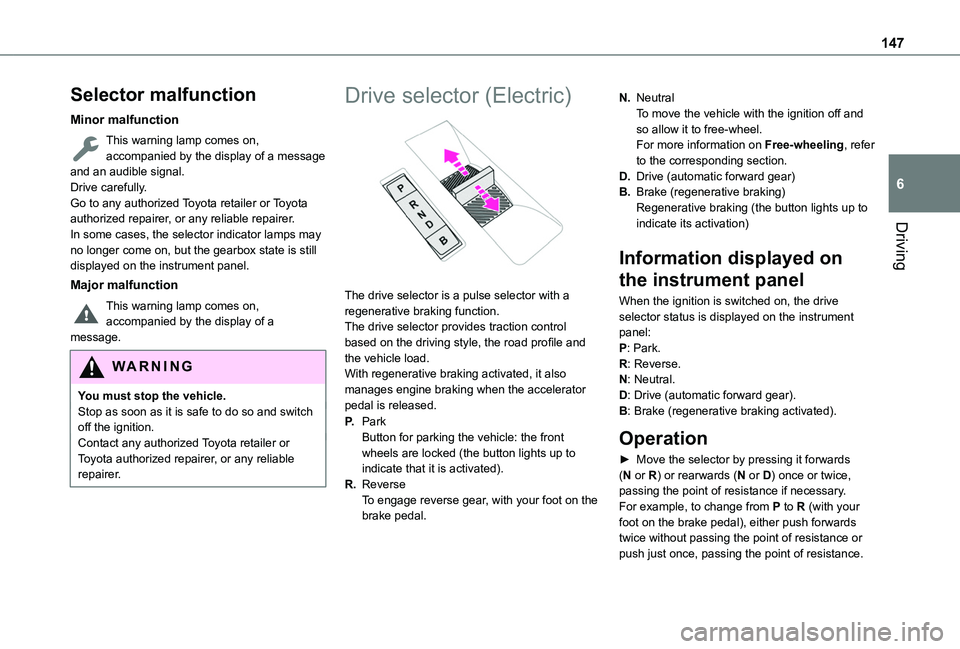
The drive selector is a pulse selector with a regenerative braking function.The drive selector provides traction control based on the driving style, the road profile and the vehicle load.With regenerative braking activated, it also manages engine braking when the accelerator pedal is released.
P.ParkButton for parking the vehicle: the front wheels are locked (the button lights up to indicate that it is activated).
R.ReverseTo engage reverse gear, with your foot on the brake pedal.
N.NeutralTo move the vehicle with the ignition off and so allow it to free-wheel.For more information on Free-wheeling, refer to the corresponding section.
D.Drive (automatic forward gear)
B.Brake (regenerative braking)Regenerative braking (the button lights up to indicate its activation)
Information displayed on
the instrument panel
When the ignition is switched on, the drive selector status is displayed on the instrument panel:P: Park.R: Reverse.N: Neutral.D: Drive (automatic forward gear).B: Brake (regenerative braking activated).
Operation
► Move the selector by pressing it forwards (N or R) or rearwards (N or D) once or twice, passing the point of resistance if necessary.For example, to change from P to R (with your foot on the brake pedal), either push forwards twice without passing the point of resistance or
push just once, passing the point of resistance.
Page 149 of 320
149
Driving
6
NOTIC E
Coasting modesDepending on version or engine, with an EAT8 gearbox and the gear selector in mode D, gradually releasing the accelerator pedal fully allows free-wheeling which can save fuel.A drop in engine speed is normal (rev counter at idle, drop in engine noise).
Gear efficiency indicator
(Depending on engine.)This system helps reduce fuel consumption by recommending the most appropriate gear.
Operation
Depending on the driving situation and the vehicle's equipment, the system may advise to skip one or more gears.Gear shift recommendations should not be considered compulsory. In fact, the road layout,
the traffic density and safety remain the deciding factors when choosing the best gear. The driver therefore remains responsible for deciding whether or not to follow the indications issued by the system.This function cannot be deactivated.
NOTIC E
With an automatic gearbox, the system is only active in manual operation.
The information appears in the instrument panel, in the form of an ascending or descending arrow and the recommended gear.
NOTIC E
The system adapts its gear shift recommendation according to the driving conditions (slope, load, etc.) and the driver’s requirements (power, acceleration, braking, etc.).The system never suggests:– engaging first gear;– engaging reverse.
Stop & Start (Petrol or
Diesel)
The Stop & Start function puts the engine temporarily into standby - STOP mode - during phases when the vehicle is stopped (red lights, queues, etc.). The engine restarts automatically - START mode - as soon as the driver wishes to move off again.Primarily designed for urban use, the function is intended to reduce fuel consumption and
exhaust emissions as well as the noise level when stationary.The function does not affect the functionalities of the vehicle, in particular the braking.
WARNI NG
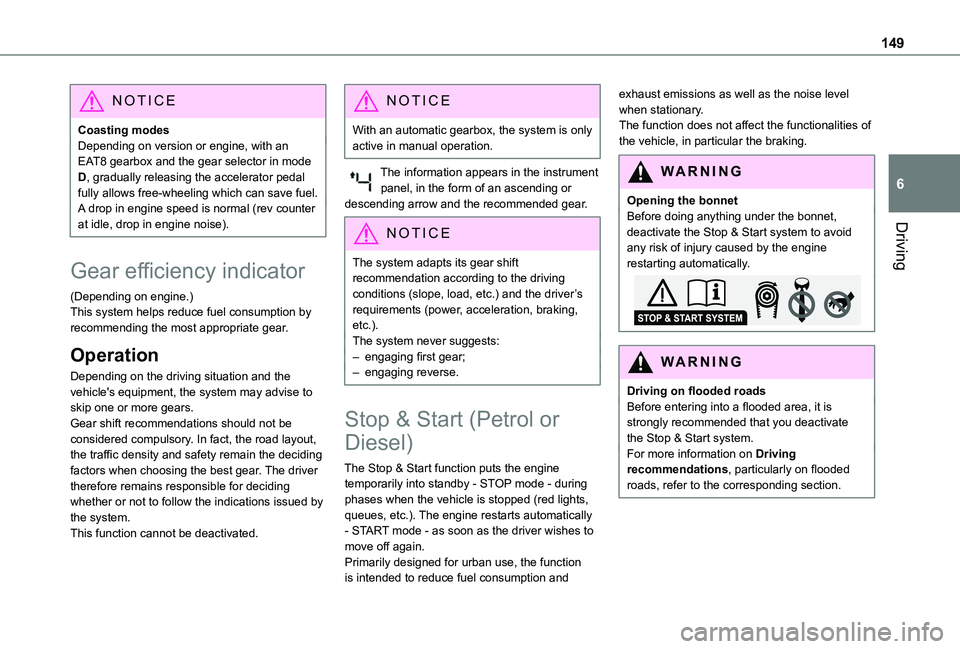
Opening the bonnetBefore doing anything under the bonnet, deactivate the Stop & Start system to avoid any risk of injury caused by the engine restarting automatically.
WARNI NG
Driving on flooded roadsBefore entering into a flooded area, it is strongly recommended that you deactivate the Stop & Start system.For more information on Driving recommendations, particularly on flooded roads, refer to the corresponding section.
Page 150 of 320
150
Deactivation/Activation
With button
► To deactivate or reactivate the system, press this button.The indicator lamp is lit when the system is deactivated.
With touch screen
The system is activated/deactivated via the Driving / Vehicle touch screen menu.
WARNI NG
If the system has been deactivated in STOP mode, the engine restarts immediately.
NOTIC E
The system is reactivated automatically
whenever the engine is started by the driver.
Operation
Main conditions for operation
– The driver’s door must be closed.– The sliding side door must be closed.– The driver's seat belt must be fastened.– The state of charge of the battery must be sufficient.– The temperature of the engine must be within its nominal operating range.– The outside temperature must be between 0°C and 35°C.
Putting the engine into standby
(STOP mode)
The engine automatically goes into standby as soon as the driver indicates the intention of stopping.– With a manual gearbox: at a speed below 3 km/h (2 mph) or with the vehicle stationary (depending on engine), with the gear lever in neutral and the clutch pedal released.– With an automatic gearbox: at a speed below
3 km/h (2 mph) or with the vehicle stationary (depending on engine), with the brake pedal depressed or the gear selector in position N.
Time counter
A time counter adds up the time spent in standby during the journey. It is reset to zero every time the ignition is switched on.
Special cases:
The engine will not go into standby if all of the conditions for operation are not met and in the following cases.– Steep slope (ascending or descending).– Vehicle has not exceeded 10 km/h (6 mph) since the last engine start (with the key or the “START/STOP” button).– The electric parking brake is applied or being applied.– Needed to maintain a comfortable temperature in the passenger compartment.– Demisting active.In these cases, this indicator lamp flashes for a few seconds, then goes off.
NOTIC E
After the engine has restarted, STOP mode is not available until the vehicle has reached a speed of 8 km/h (5 mph).
NOTIC E
During parking manoeuvres, STOP mode is not available for a few seconds after coming out of reverse gear or turning the steering wheel.
Page 151 of 320
151
Driving
6
Restarting the engine (START mode)
The engine automatically restarts as soon as the driver indicates the intention of moving off again.– With a manual gearbox: with the clutch pedal fully depressed.– With an automatic gearbox:• With the selector in position D or M: with the brake pedal released.• With the selector in position N and the brake pedal released: with the selector at D or M.• With the selector in position P and the brake pedal depressed: with the selector at R, N, D or M.
Special cases
The engine will restart automatically if all conditions for operation are met again and in the following case.– Speed of the vehicle exceeds 3 km/h (2 mph) (depending on the engine).In this case, this indicator lamp flashes for a few seconds, then goes off.
Malfunctions
Depending on the vehicle’s equipment:In the event of a system malfunction, this warning lamp flashes on the instrument panel.The warning lamp in this button flashes and a message appears, accompanied by an audible signal.Have the vehicle checked by a TOYOTA dealer or a qualified workshop.
The vehicle stalls in STOP mode
All of the instrument panel warning lamps come on if there is a fault.Depending on version, a warning message may also be displayed, prompting you to place the gear selector in position N and depress the brake pedal.► Switch off the ignition then start the engine again with the key or the "START/STOP" button.
WARNI NG
12 V batteryThe Stop & Start system requires a 12 V battery of specific technology and specification.All work must be carried out only by any authorized Toyota retailer or Toyota authorized repairer, or any reliable repairer.
Under-inflation detection
This system alerts the driver if one or more tyres suffer a drop in pressure.The alert is raised when the vehicle is moving, not when stationary.It compares the information given by the wheel speed sensors with reference values, which must be reinitialised every time the tyre pressures are adjusted or a wheel changed.It takes into account the last values stored during the reinitialisation request. It is therefore essential that the tyre pressure is correct during the operation. This operation is the driver's responsibility.
WARNI NG
The tyre under-inflation detection cannot, in any circumstances, replace the need for vigilance on the part of the driver.This system does not avoid the need to regularly check the tyre pressures (including the spare wheel), especially before a long journey.Driving with under-inflated tyres, particularly in adverse conditions (heavy load, high speed, long journey):– worsens road-holding.– lengthens braking distances.– causes premature wear of the tyres.– increases energy consumption.
Page 155 of 320
155
Driving
6
NOTIC E
Driving aidsYou should hold the steering wheel with both hands, always use the interior and exterior rear view mirrors, always keep the feet close to the pedals and take a break every two hours.
NOTIC E
Manoeuvring aidsThe driver must always check the surroundings of the vehicle before and during the whole manoeuvre, in particular using the mirrors.
WARNI NG
Radar(s)The operation of the radar(s), along with any associated functions, may be affected by the accumulation of dirt (e.g. mud, ice), in poor weather conditions (e.g. heavy rain, snow), or if the bumpers are damaged.If the front bumper is to be repainted, contact any authorized Toyota retailer or Toyota authorized repairer, or any reliable repairer; certain types of paint could interfere with the operation of the radar(s).
WARNI NG
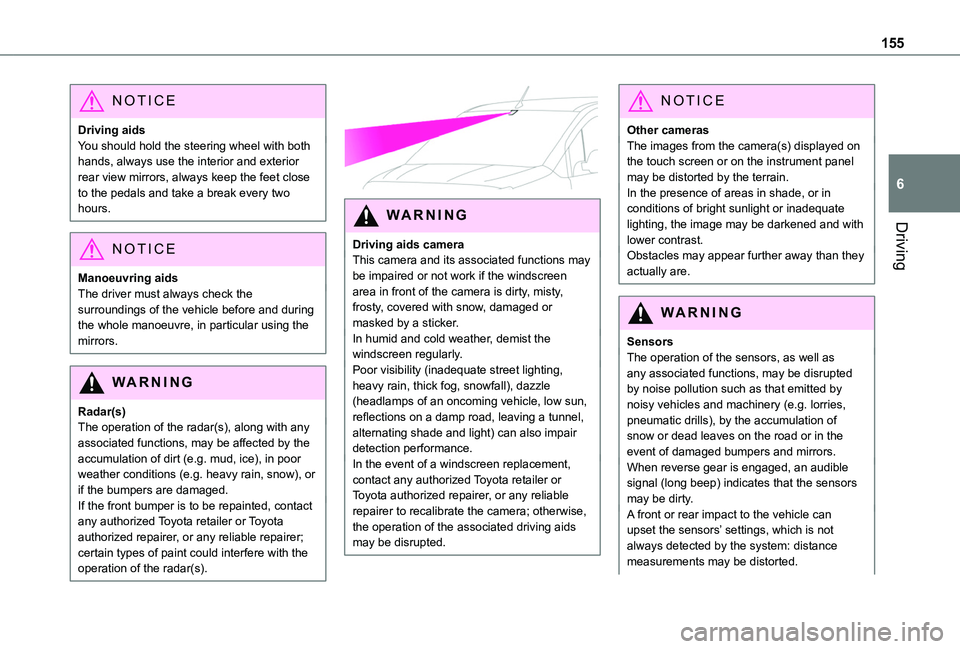
Driving aids cameraThis camera and its associated functions may be impaired or not work if the windscreen area in front of the camera is dirty, misty, frosty, covered with snow, damaged or masked by a sticker.In humid and cold weather, demist the windscreen regularly.Poor visibility (inadequate street lighting, heavy rain, thick fog, snowfall), dazzle (headlamps of an oncoming vehicle, low sun, reflections on a damp road, leaving a tunnel, alternating shade and light) can also impair
detection performance.In the event of a windscreen replacement, contact any authorized Toyota retailer or Toyota authorized repairer, or any reliable repairer to recalibrate the camera; otherwise, the operation of the associated driving aids may be disrupted.
NOTIC E
Other camerasThe images from the camera(s) displayed on the touch screen or on the instrument panel may be distorted by the terrain.In the presence of areas in shade, or in conditions of bright sunlight or inadequate lighting, the image may be darkened and with lower contrast.Obstacles may appear further away than they actually are.
WARNI NG
SensorsThe operation of the sensors, as well as any associated functions, may be disrupted by noise pollution such as that emitted by noisy vehicles and machinery (e.g. lorries, pneumatic drills), by the accumulation of snow or dead leaves on the road or in the
event of damaged bumpers and mirrors.When reverse gear is engaged, an audible signal (long beep) indicates that the sensors may be dirty.A front or rear impact to the vehicle can upset the sensors’ settings, which is not always detected by the system: distance measurements may be distorted.
Page 162 of 320
162
Cruise control - particular
recommendations
WARNI NG
The cruise control function does not guarantee compliance with the maximum authorised speed and the safety distance between vehicles, the driver remains
responsible for their driving.In the interest of public safety, only use cruise control if the traffic conditions enables vehicles to drive at steady speed and maintain an adequate safety distance.Remain vigilant while cruise control is activated. If you press and hold one of the speed setting modification buttons, your vehicle may change speed very abruptly.When descending a steep hill, the cruise control system cannot prevent the vehicle from exceeding the set speed. Brake if necessary to control the vehicle speed.On steep climbs or when towing, the set speed may not be reached or maintained.
NOTIC E
Exceeding the programmed speed settingYou can temporarily exceed the speed setting by pressing the accelerator pedal (the programmed speed flashes).To return to the speed setting, release the accelerator pedal (when the set speed is reached again, the displayed speed stops flashing).
WARNI NG
Operating limitsNever use the system in the following situations:– In an urban area with the risk of pedestrians crossing the road.– In heavy traffic (except versions with the Stop & Go function).– On winding or steep roads.– On slippery or flooded roads.
– In poor weather conditions.– In the event of restricted visibility for the driver.– Driving on a speed circuit.– Driving on a rolling road.– When using a 'space-saver' type spare wheel.– When using snow chains, non-slip covers or studded tyres.
Programmable cruise
control
WARNI NG
For more information, refer to the General recommendations on the use of driving and manoeuvring aids and to Cruise control - particular recommendations.
This system automatically maintains the vehicle’s speed at the value programmed by the driver (speed setting), without the use of the accelerator pedal.Cruise control is switched on manually.It requires a minimum vehicle speed of 25 mph (40 km/h).With a manual gearbox, third gear or higher must be engaged.With an automatic gearbox, mode D or second gear or higher in mode M must be engaged.With a drive selector, mode D or B must be
engaged.
NOTIC E
Cruise control remains active after changing gear, regardless of the gearbox type, on engines fitted with Stop & Start.
Page 165 of 320
165
Driving
6
Switching off
► Turn the thumbwheel 1 to the "0” position: the cruise control information disappears from the screen.
Malfunction
In the event of a malfunction, dashes are displayed flashing and then fixed instead of the speed setting.Have it checked by any authorized Toyota retailer or Toyota authorized repairer, or any reliable repairer.
Adaptive Cruise Control
WARNI NG
For more information, refer to the General recommendations on the use of driving and manoeuvring aids and to Cruise control - particular recommendations.
This system automatically maintains the vehicle speed at a value set by the driver (speed setting), while respecting a safety distance from the vehicle in front (target vehicle) previously set by the driver. The system automatically manages the acceleration and deceleration of the vehicle.With a manual gearbox, the system slows the vehicle down as far as a speed of 30 km/h (19 mph).With the Stop function, the system manages the braking until the vehicle comes to a complete stop.
WARNI NG
The brake lamps come on if the vehicle is slowed down by the system.It can be dangerous to drive if the brake lamps are not in perfect working order.
To do so, the system uses a camera located at the top of the windscreen and, depending on version, a radar located in the front bumper.
WARNI NG
Primarily designed for driving on main roads and motorways, this system only works with moving vehicles driving in the same direction as your vehicle.
NOTIC E
If the driver activates the direction indicator to overtake a slower vehicle, cruise control may temporarily reduce the distance to the target vehicle to facilitate overtaking, without exceeding the speed setting.