parking sensors TOYOTA PROACE CITY VERSO 2020 User Guide
[x] Cancel search | Manufacturer: TOYOTA, Model Year: 2020, Model line: PROACE CITY VERSO, Model: TOYOTA PROACE CITY VERSO 2020Pages: 272, PDF Size: 58.6 MB
Page 143 of 272
143
Driving
6
deactivated if the vehicle speed exceeds 50 km/h (31 mph).
NOTIC E
For "parallel" parking, the space must measure at least the length of your vehicle plus 0.60 m (1 ft 11").For "bay" parking, the space must be at least as wide as your vehicle plus 0.70 m (2 ft 3").
NOTIC E
If the parking sensors function has been deactivated in the Driving/Vehicle touch screen menu, it will be automatically reactivated when the system is activated.
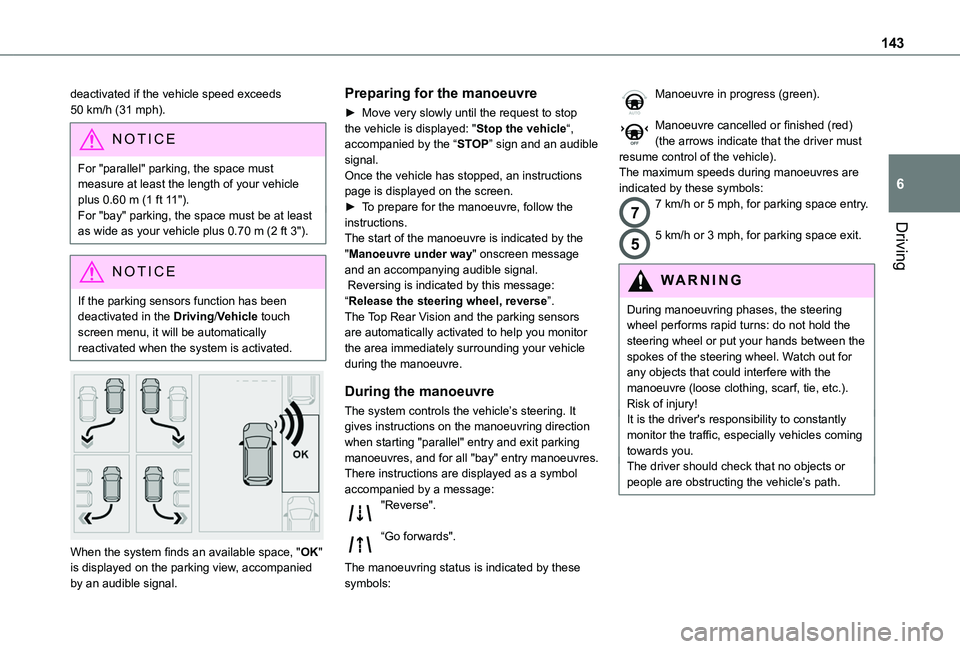
When the system finds an available space, "OK" is displayed on the parking view, accompanied by an audible signal.
Preparing for the manoeuvre
► Move very slowly until the request to stop the vehicle is displayed: "Stop the vehicle“, accompanied by the “STOP” sign and an audible signal.Once the vehicle has stopped, an instructions page is displayed on the screen.► To prepare for the manoeuvre, follow the instructions. The start of the manoeuvre is indicated by the "Manoeuvre under way" onscreen message and an accompanying audible signal. Reversing is indicated by this message: “Release the steering wheel, reverse”.The Top Rear Vision and the parking sensors are automatically activated to help you monitor the area immediately surrounding your vehicle during the manoeuvre.
During the manoeuvre
The system controls the vehicle’s steering. It gives instructions on the manoeuvring direction when starting "parallel" entry and exit parking
manoeuvres, and for all "bay" entry manoeuvres.There instructions are displayed as a symbol accompanied by a message:"Reverse".
“Go forwards".
The manoeuvring status is indicated by these symbols:
Manoeuvre in progress (green).
Manoeuvre cancelled or finished (red) (the arrows indicate that the driver must resume control of the vehicle).The maximum speeds during manoeuvres are indicated by these symbols:
77 km/h or 5 mph, for parking space entry.
55 km/h or 3 mph, for parking space exit.
WARNI NG
During manoeuvring phases, the steering wheel performs rapid turns: do not hold the steering wheel or put your hands between the spokes of the steering wheel. Watch out for any objects that could interfere with the manoeuvre (loose clothing, scarf, tie, etc.). Risk of injury!It is the driver's responsibility to constantly monitor the traffic, especially vehicles coming towards you.The driver should check that no objects or people are obstructing the vehicle’s path.
Page 144 of 272
144
NOTIC E
The images from the camera(s) displayed on the touch screen may be distorted by the terrain.In shady areas, or in inadequate sunlight or lighting conditions, the image may be darkened and with lower contrast
The manoeuvre can be permanently interrupted at any time, either by the driver or automatically by the system.Interruption by the driver:– taking over control of the steering.– activating the direction indicator lamps on the opposite side to that of the manoeuvre.– unfastening the driver's seat belt.– switching off the ignition.Interruption by the system:– vehicle exceeding the speed limit of 7 km/h (5 mph) during parking space entry manoeuvres, or 5 km/h (3 mph) during parking space exit manoeuvres.
– activation of anti-slip regulation on a slippery road.– opening of a door or the boot.– engine stall.– system malfunction.– after 10 manoeuvres to enter or exit a parallel parking space and after 7 manoeuvres to enter a parking bay.Interrupting the manoeuvre automatically
deactivates the function.
The manoeuvre symbol is displayed in red, accompanied by the "Manoeuvre cancelled" message on the touch screen.A message prompts the driver to take back control of the vehicle.The function is deactivated after a few seconds; this warning lamp goes off and the function returns to the initial display.
End of the parking space entry or exit
manoeuvre
The vehicle stops as soon as the manoeuvre is completed.The manoeuvre symbol is displayed in red, accompanied by the message “Manoeuvre completed” on the touch screen.When the function is deactivated, this indicator lamp goes off, accompanied by an audible signal.When entering a parking space, the driver may be required to complete the manoeuvre.
Operating limits
– The system may suggest an unsuitable parking space (No Parking area, work in progress with damaged road surface, location alongside a ditch, etc.).– The system may indicate that a space has been found but not offer it because of a fixed obstacle on the opposite side of the manoeuvre, which would not allow the vehicle to follow the necessary trajectory for parking.
– The system may indicate that a space has been found but not engage the manoeuvre because the road is too narrow.– The system is not designed to perform the parking manoeuvre on a sharp bend.– The system does not detect spaces that are much larger than the vehicle or are bounded by obstacles that are very low (pavements, studs, etc.) or very thin (trees, posts, wire fences, etc.).– Certain obstacles located in the sensors’ blind spots may not be detected or may no longer be detected during the manoeuvre.– Certain materials (fabrics) absorb sound waves: pedestrians may not be detected.– A front or rear impact to the vehicle can upset the sensors’ settings, which is not always detected by the system: distance measurements may be distorted.– If the boot is heavily loaded, the vehicle may tilt, affecting distance measurements.The vehicle's sensors and camera(s) may be impaired by:– accumulated snow or fallen leaves on the
road,– adverse weather conditions (heavy rain, thick fog, falling snow),– noise interference from noisy vehicles and machinery (lorries, pneumatic drills, etc.).
Page 145 of 272
145
Driving
6
WARNI NG
Do not use the function under the following exterior conditions:– Alongside a soft shoulder (e.g. ditch) or quay or on the edge of a drop.– When the road surface is slippery (e.g. ice).
WARNI NG
If any of the following malfunctions occurs, do not use the system:– If a tyre is under-inflated.– If one of the bumpers is damaged.– If one of the cameras is faulty.
WARNI NG
If the vehicle has undergone any of the following modifications, do not use the function:– When carrying an object extending beyond
the dimensions of the vehicle (ladder on the roof bars, bicycle carrier on the tailgate, etc.).– With a non-approved towball in place.– With snow chains fitted.– When driving on a small-diameter or "space-saver" type spare wheel.– When the wheels fitted are a different size from the original ones.– After modifying one or both bumpers
(added protection).
– If the sensors have been repainted other than by the TOYOTA dealer network.– With sensors not approved for the vehicle.
Malfunctions
When the function is not activated, this indicator lamp will flash briefly and an audible signal will be emitted to indicate a system malfunction.If the malfunction occurs while the system is in use, the warning lamp goes off.If the parking sensor malfunction occurs during use, indicated by this warning lamp coming on, it causes the function to deactivate.In the event of a malfunction, have the system checked by a TOYOTA dealer or a qualified workshop.In the event of a power steering malfunction, this warning lamp is displayed on the instrument panel, accompanied by a warning message.You must stop as soon as it is safe to do
so. Contact a TOYOTA dealer or a qualified workshop.
Page 247 of 272
247
Alphabetical index
Lamps, parking 65Lamps, rear 174Lane departure warning active 131, 136LEDs - Light-emitting diodes 65, 171Level, AdBlue® 156Level, brake fluid 156Level, Diesel additive 156–157Level, engine coolant 16, 156Level, engine oil 155Levels and checks 154–156Level, screenwash fluid 68, 156Light-emitting diodes - LEDs 65, 171Lighting 63Lighting, exterior 63Lighting, guide-me home 65Lighting, welcome 66Loading 152Load reduction mode 152Locating your vehicle 24Locking 23–24, 26–27Locking from the inside 31Low fuel level 146–147
Lumbar 39
M
Maintenance (advice) 161Maintenance, routine 11 6, 156Manoeuvring aids (recommendations) 11 4Markings, identification 189Mat 47, 11 6
Memorising a speed 128Menu 210Menu, main 192Menus (audio) 205–206, 218–219Messages 237Messages, quick 237Mirror, child surveillance 42Mirror, rear view 42Mirrors, door 41–42, 58–59, 134Misfuel prevention 147Mountings, ISOFIX 90MP3 CD 196
N
Navigation 224–226Navigation, connected 226–228Net 52–53Net, high load retaining 51Number plate lamps 175
O
Obstacle detection 137Oil change 155Oil consumption 155OIl, engine 155On-board tools 163–164Opening the bonnet 153Opening the boot 23
Opening the doors 23
P
Pads, brake 158Paint 162, 189Paint colour code 189Park Assist 142Parking brake 100, 158Parking brake, electric 101–103, 158Parking sensors, audible and visual 137Parking sensors, front 138Parking sensors, rear 138Plates, identification 189Player, Apple® 196, 209, 234Player, MP3 CD 195–196Player, USB 194, 208, 234Port, USB 48, 194, 208, 229, 234Pressures, tyres 158, 166, 170, 189Pre-tensioning seat belts 81Priming the fuel system 163
Profiles 213, 238Programmable cruise control 122Protecting children 82, 84–87, 89, 92–94Puncture 164, 166
R
Radar (warnings) 11 5Radio 192–193, 206–207, 209, 232
Page 248 of 272
248
Radio, digital (Digital Audio Broadcasting - DAB) 193, 208, 233Range, AdBlue 156RDS 207, 232–233Rear screen, demisting 58–59Recharging the battery 179–180Recirculation, air 55–56Recovery 181Reduction of electrical load 152Regeneration of the particle filter 157Reinitialisation of the under-inflation detection system 11 2Reinitialising the remote control 30Reminder, key in ignition 99Reminder, lighting on 64Remote control 23–26, 28, 96Removing a wheel 167–170Removing the mat 47Replacing bulbs 170–171Replacing fuses 175–177Replacing the air filter 157Replacing the oil filter 157
Replacing the passenger compartment filter 157Reservoir, screenwash 156Reversing camera 11 5, 140Reversing lamps 174Roof 47Roof bars 152–153Running out of fuel (Diesel) 163
S
Safety, children 82, 84–87, 89, 92–94Saturation of the particle filter (Diesel) 157Screen menu map 210Screen, multifunction (with audio system) 192Screenwash, front 68Screenwash, rear 68–69SCR (Selective Catalytic Reduction) 158Seat belts 79–81, 88Seat, rear bench 42, 45Seats, front 38–40Seats, heated 40–41Seats, rear 38, 43–45, 86Sensors (warnings) 11 5Serial number, vehicle 189Service indicator 16Servicing 16, 156Settings, system 214, 239Sidelamps 63, 65, 171–172Side parking sensors 139Side repeater 172
Sliding side door, electric 27, 33Snow chains 11 2, 148Snow chains, link 148Socket, 12 V accessory 47–48Socket, 220 V 49Socket, auxiliary 195Socket, Jack 195Speed limiter 11 8–121, 128Speed limit recognition 11 6, 11 8Speedometer 11 6
Stability control (ESC) 74–77Starting a Diesel engine 146Starting the engine 97Starting the vehicle 98, 100, 105–108Starting using another battery 178Station, radio 192, 206–207, 232–233Stay, bonnet 153–154Steering mounted controls, audio 191, 204, 218Steering wheel, adjustment 41Stickers, customising ~ Stickers, expressive 162Stopping the vehicle 99–100, 105–108Stop & Start 22, 54, 58, 109–111, 146, 153, 157, 178, 181Storage 47Storage boxes 50Stowing rings 53Sunshine sensor 54Switching off the engine 97, 99Synchronising the remote control 30
T
Tables of fuses 175–177Tank, fuel 146–147Technical data 186–187Telephone 49, 197–200, 2 11–213, 235–238Telephone, Bluetooth with voice recognition 200Temperature, coolant 16Three flashes (direction indicators) 64Time (setting) 214, 239TMC (Traffic info) 226