time TOYOTA PROACE EV 2021 User Guide
[x] Cancel search | Manufacturer: TOYOTA, Model Year: 2021, Model line: PROACE EV, Model: TOYOTA PROACE EV 2021Pages: 360, PDF Size: 68.91 MB
Page 28 of 360
28
Remotely-operable
functions (Electric)
(Available soon)
In addition to all the functions of the MyToyota application that you can access from a smartphone, you can access the following functions:– Battery charge management (Deferred charging).
– Temperature pre-conditioning management.– Consultation of the state of charge and range of the vehicle.
Installation procedure
► Download the MyToyota app from the appropriate online store for your smartphone.► Create an account.► Enter the vehicle’s V.I.N. (code beginning with "VF" on the vehicle registration document).For more information on Identification markings, refer to the corresponding section.
NOTIC E
Network coverageIn order to be able to use the various remotely operable features, ensure that your vehicle is located in an area covered by the mobile network.A lack of network coverage may prevent communication with the vehicle (for example, if it is in an underground car park). In such cases, the application will display a message indicating that the connection with the vehicle could not be established.
Setting the date and time
Without Bluetooth® audio
system
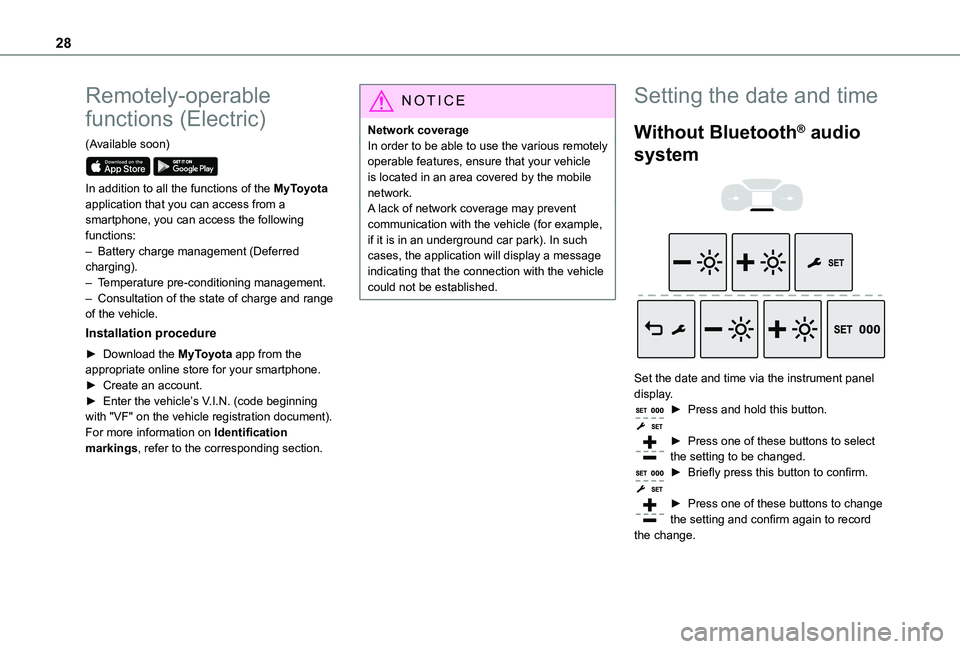
Set the date and time via the instrument panel display.► Press and hold this button.
► Press one of these buttons to select the setting to be changed.► Briefly press this button to confirm.
► Press one of these buttons to change the setting and confirm again to record the change.
Page 29 of 360
29
Instruments
1
With Bluetooth® audio
system
► Press the MENU button for access to the main menu.► Press the "7" or "8" button to select the "Personalisation-configuration" menu, then confirm by pressing the OK button.► Press the "5" or "6" button to select the Display configuration menu, then confirm by pressing the OKbutton.► Press the "5" or "6" and "7" or "8" buttons to adjust the date and time values, then confirm by pressing the OK button.
With TOYOTA Pro Touch
► Select the Settings menu in the upper banner of the touch screen.► Select "Configuration".► Select "Date and time".
► Select "Date" or "Time".► Choose the display formats.
► Change the date and/or time using the numeric keypad.► Confirm with "OK".
With TOYOTA Pro Touch
with navigation system
Time and date settings are only available if GPS synchronisation is deactivated.► Select the Settings menu in the banner of the touch screen.► Press the "OPTIONS" button to access the secondary page.► Select "Setting the time-date".
► Select the "Date:" or "Time" tab.► Set the date and/or time using the numeric keypad.► Confirm with "OK".
Additional settings
You can choose:– To change the time zone.– To change the display format of the date and time (12h/24h).– To activate or deactivate the summer time management function (+1 hour).
– To activate or deactivate GPS synchronisation (UTC).
NOTIC E
The system does not automatically change between winter and summer time (depending on the country of sale).
Page 30 of 360
30
Electronic key with
remote control function
and built-in key,
NOTIC E
If one of the doors or the boot is still open or if the electronic key for the Smart Entry & Start system has been left inside the vehicle, central locking will not take place.However, if the vehicle is fitted with an alarm, it will be activated after 45 seconds.
NOTIC E
If the vehicle is unlocked but the doors or boot are not subsequently opened, the vehicle will automatically lock itself again after about 30 seconds. If the vehicle is fitted with an alarm, it will be reactivated automatically.
NOTIC E
Automatic door mirror folding and unfolding can be deactivated by any authorized Toyota retailer or Toyota authorized repairer, or any reliable repairer.
WARNI NG
As a safety measure, never leave the vehicle, even for a short time, without taking the Smart Entry & Start system’s electronic key with you.Be aware of the risk of theft of the vehicle if the key is present in one of the defined areas while the vehicle is unlocked.
If a door is not properly closed (except the right-hand door with side-hinged rear doors):– when the vehicle is stationary and engine running, this warning lamp comes on, accompanied by a warning message for a few seconds, – when the vehicle is moving (at speeds above 6 mph (10 km/h)), this warning lamp comes on, accompanied by an audible signal and a warning message for a few seconds.
Remote control key
This allows the central locking or unlocking of the vehicle using the door lock or remotely.It also allows the vehicle to be located, the fuel filler cap to be removed and refitted and the engine to be started or switched off, as well as providing protection against theft.
NOTIC E
The remote control buttons are not active with the ignition switched on.
Unfolding / Folding the key
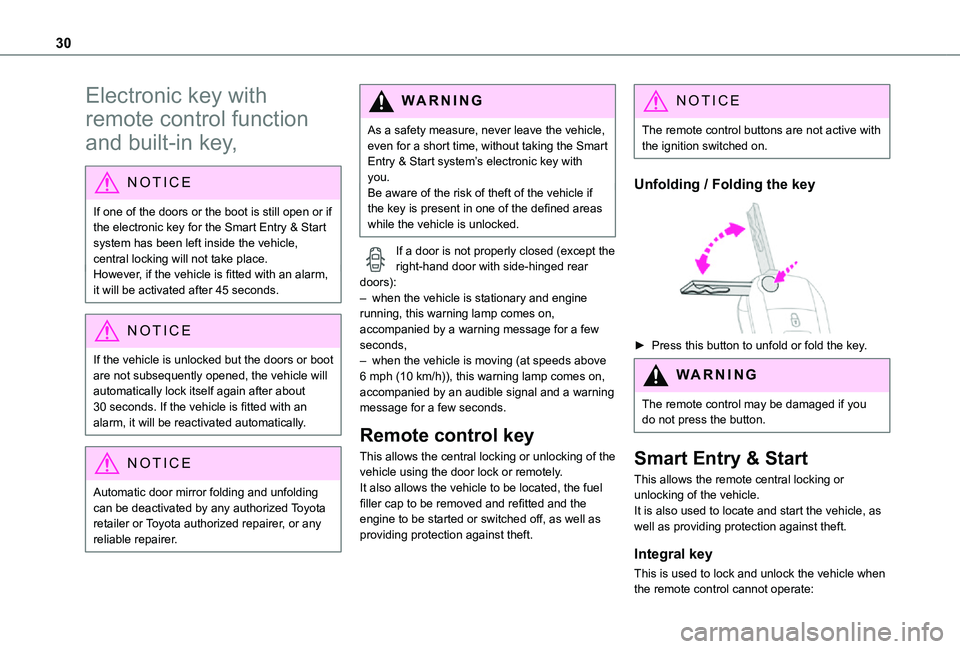
► Press this button to unfold or fold the key.
WARNI NG
The remote control may be damaged if you do not press the button.
Smart Entry & Start
This allows the remote central locking or unlocking of the vehicle.It is also used to locate and start the vehicle, as well as providing protection against theft.
Integral key
This is used to lock and unlock the vehicle when the remote control cannot operate:
Page 31 of 360
31
Access
2
– remote control battery discharged, vehicle battery discharged or disconnected, etc.– vehicle located in an area subject to strong electromagnetic interference.
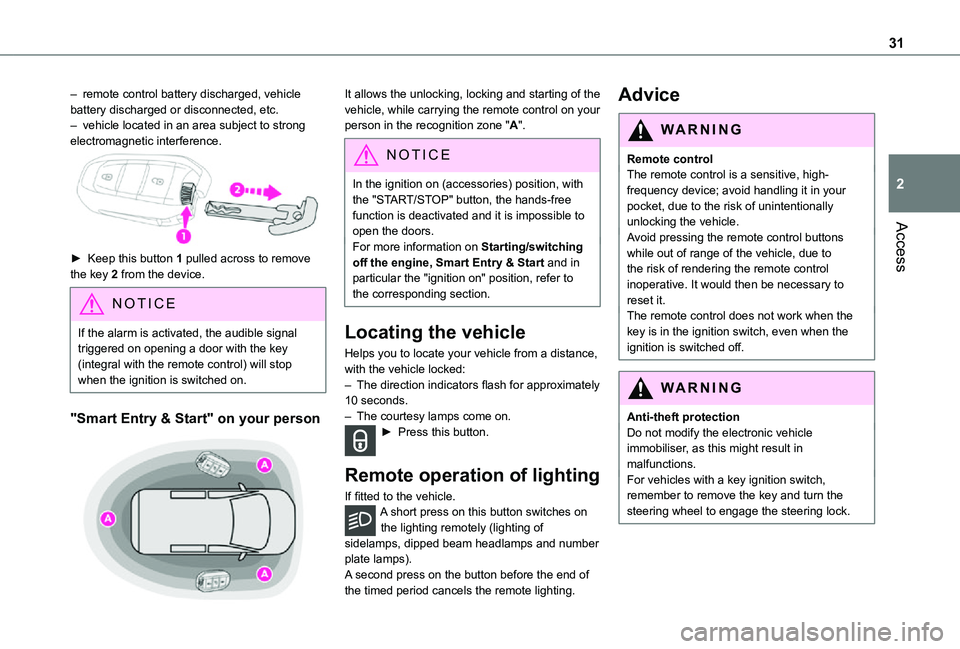
► Keep this button 1 pulled across to remove the key 2 from the device.
NOTIC E
If the alarm is activated, the audible signal triggered on opening a door with the key (integral with the remote control) will stop when the ignition is switched on.
"Smart Entry & Start" on your person
It allows the unlocking, locking and starting of the vehicle, while carrying the remote control on your person in the recognition zone "A".
NOTIC E
In the ignition on (accessories) position, with the "START/STOP" button, the hands-free function is deactivated and it is impossible to open the doors.
For more information on Starting/switching off the engine, Smart Entry & Start and in particular the "ignition on" position, refer to the corresponding section.
Locating the vehicle
Helps you to locate your vehicle from a distance, with the vehicle locked:– The direction indicators flash for approximately 10 seconds.– The courtesy lamps come on.► Press this button.
Remote operation of lighting
If fitted to the vehicle.A short press on this button switches on the lighting remotely (lighting of sidelamps, dipped beam headlamps and number plate lamps).A second press on the button before the end of the timed period cancels the remote lighting.
Advice
WARNI NG
Remote controlThe remote control is a sensitive, high-frequency device; avoid handling it in your pocket, due to the risk of unintentionally unlocking the vehicle.Avoid pressing the remote control buttons
while out of range of the vehicle, due to the risk of rendering the remote control inoperative. It would then be necessary to reset it.The remote control does not work when the key is in the ignition switch, even when the ignition is switched off.
WARNI NG
Anti-theft protectionDo not modify the electronic vehicle immobiliser, as this might result in malfunctions.For vehicles with a key ignition switch, remember to remove the key and turn the steering wheel to engage the steering lock.
Page 32 of 360
32
WARNI NG
Locking the vehicleDriving with the doors locked could make it more difficult for the emergency services to enter the passenger compartment in an emergency.As a safety precaution, remove the key from the ignition or take the electronic key with you when leaving the vehicle, even for a short time.
NOTIC E
Purchasing a second-hand vehicleHave the key codes memorised by any authorized Toyota retailer or Toyota authorized repairer, or any reliable repairer, to ensure that the keys in your possession are the only ones able to start the vehicle.
WARNI NG
To preserve the battery charge in the electronic key and the vehicle's battery, the "hands-free" functions are set to hibernation mode after 21 days without use. To restore these functions, press one of the remote control buttons or start the engine with the electronic key in the reader.For more information on starting with the Smart Entry & Start system, refer to the corresponding section.
NOTIC E
Electrical interferenceThe electronic key may not operate if close to certain electronic devices such as telephones (switched on or on standby) or laptop computers, strong magnetic fields, etc.
WARNI NG
Accumulations (water, dust, grime, salt, etc.) on the inner surface of the door handle may affect detection.If cleaning the inner surface of the door handle using a cloth does not restore detection, contact any authorized Toyota retailer or Toyota authorized repairer, or any reliable repairer.A sudden splash of water (stream of water, high pressure jet washer, etc.) may be identified by the system as the desire to open the vehicle.
Unlocking/Complete or
selective unlocking
What is the purpose of total
or selective unlocking?
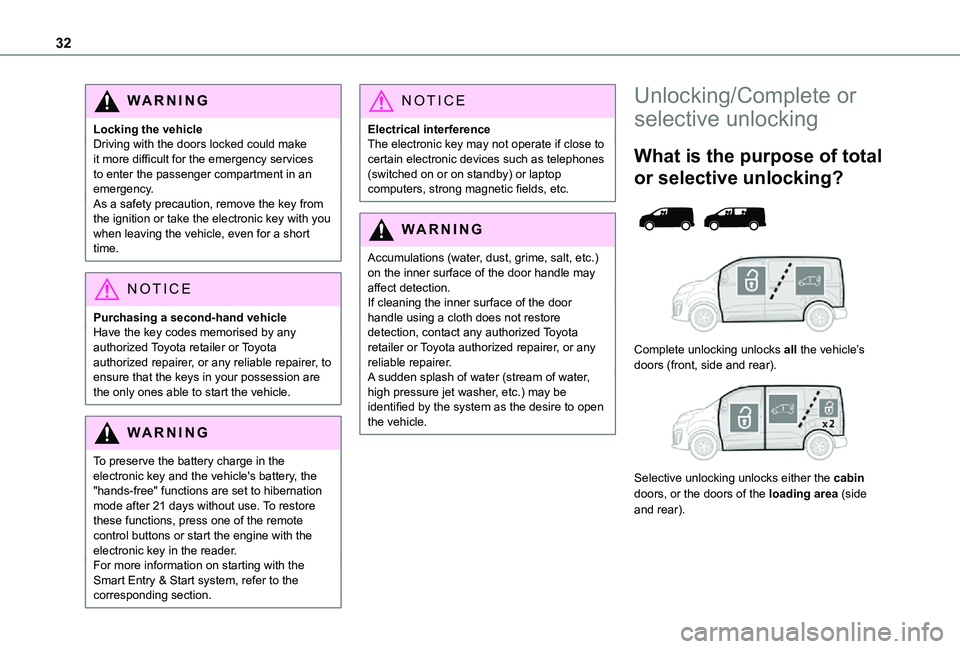
Complete unlocking unlocks all the vehicle’s doors (front, side and rear).
Selective unlocking unlocks either the cabin doors, or the doors of the loading area (side and rear).
Page 34 of 360
34
With tailgate
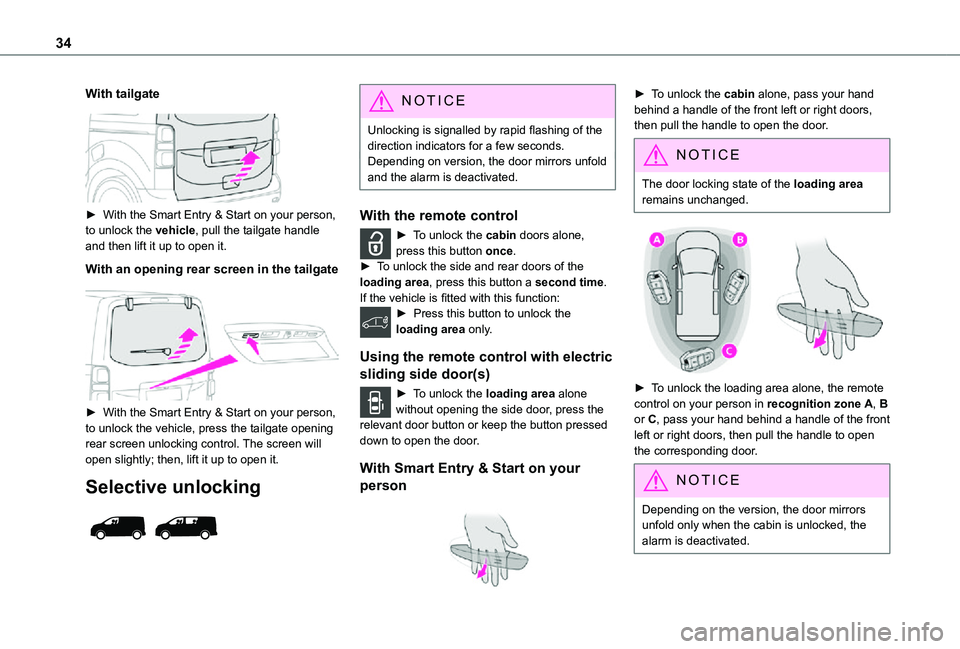
► With the Smart Entry & Start on your person, to unlock the vehicle, pull the tailgate handle and then lift it up to open it.
With an opening rear screen in the tailgate
► With the Smart Entry & Start on your person, to unlock the vehicle, press the tailgate opening rear screen unlocking control. The screen will open slightly; then, lift it up to open it.
Selective unlocking
NOTIC E
Unlocking is signalled by rapid flashing of the direction indicators for a few seconds.Depending on version, the door mirrors unfold and the alarm is deactivated.
With the remote control
► To unlock the cabin doors alone, press this button once.► To unlock the side and rear doors of the loading area, press this button a second time.If the vehicle is fitted with this function:► Press this button to unlock the loading area only.
Using the remote control with electric
sliding side door(s)
► To unlock the loading area alone without opening the side door, press the relevant door button or keep the button pressed down to open the door.
With Smart Entry & Start on your
person
► To unlock the cabin alone, pass your hand behind a handle of the front left or right doors, then pull the handle to open the door.
NOTIC E
The door locking state of the loading area remains unchanged.
► To unlock the loading area alone, the remote control on your person in recognition zone A, B or C, pass your hand behind a handle of the front left or right doors, then pull the handle to open the corresponding door.
NOTIC E
Depending on the version, the door mirrors unfold only when the cabin is unlocked, the alarm is deactivated.
Page 36 of 360
36
NOTIC E
If the vehicle is not fitted with an alarm, locking is signalled by fixed lighting of the direction indicators for approximately two seconds. Depending on version, the door mirrors fold at the same time.
WARNI NG
Driving with the doors locked could make it more difficult for the emergency services to enter the passenger compartment in an emergency.As a safety measure, never leave the vehicle without taking the remote control with you, even for a short time.
Deadlocking
WARNI NG
Deadlocking deactivates the exterior and interior door controls, as well as the central locking button on the dashboard.The horn remains operational.You must therefore never leave anyone inside
the vehicle when it is deadlocked.
With the key
► To deadlock the vehicle, turn the key in the front left-hand door lock towards the rear of the vehicle.► Then, within five seconds, turn the key towards the rear again.
With the remote control
► To deadlock the vehicle, press this button.► Then press this button again within five seconds after locking.
NOTIC E
At the same time, depending on version, the electric door mirrors fold in.
NOTIC E
If the vehicle is not fitted with an alarm, deadlocking is confirmed by fixed illumination of the direction indicators for about two seconds.
With Smart Entry & Start on your
person
To lock the vehicle, the remote control must be in
recognition zone A.
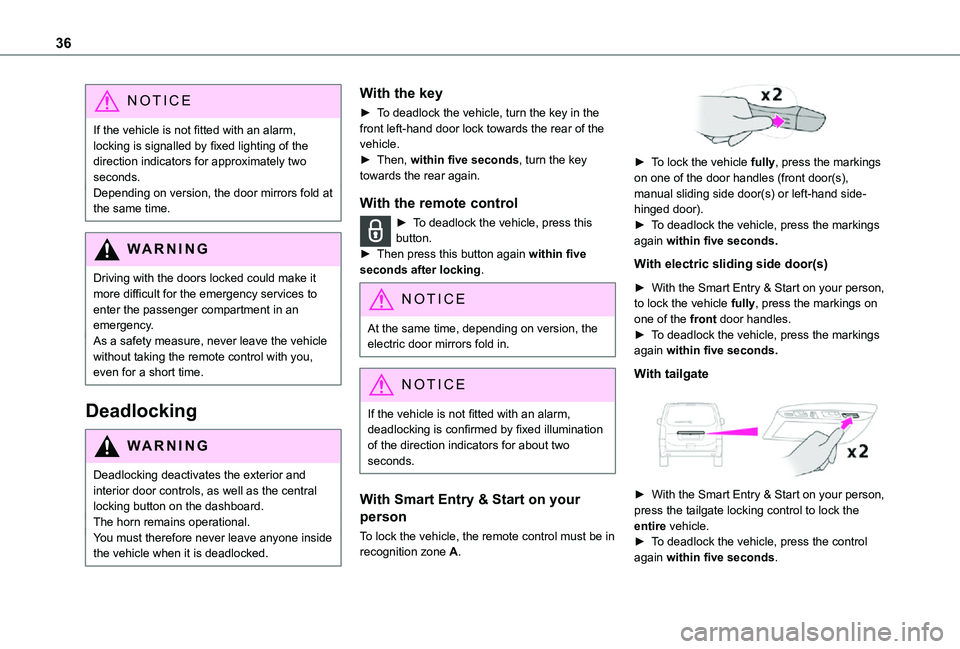
► To lock the vehicle fully, press the markings on one of the door handles (front door(s), manual sliding side door(s) or left-hand side-hinged door).► To deadlock the vehicle, press the markings again within five seconds.
With electric sliding side door(s)
► With the Smart Entry & Start on your person, to lock the vehicle fully, press the markings on one of the front door handles.► To deadlock the vehicle, press the markings again within five seconds.
With tailgate
► With the Smart Entry & Start on your person, press the tailgate locking control to lock the entire vehicle.► To deadlock the vehicle, press the control again within five seconds.
Page 45 of 360
45
Access
2
If your vehicle is on a slope, with the front of the vehicle facing down the slope, the door may not stay open and may close violently with the risk of injury.
WARNI NG
In the case of a steep slope, the door may be driven by its own weight and as a consequence may open or close violently.There would not be time for action at the electric controls to take effect.There would not be time for the obstacle detection system to react.Take care not to leave the vehicle on a steep slope with the door(s) open without supervision. If this advice is not followed, injuries or damage may occur if a person or an object is trapped or caught.
Hands-free sliding side
door(s)
Opening/Closing
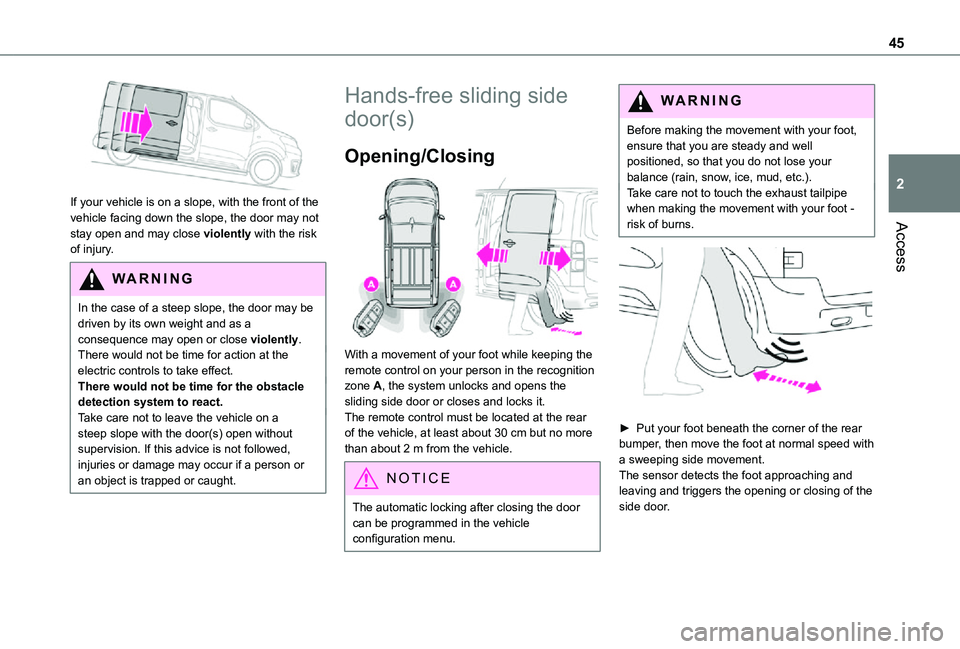
With a movement of your foot while keeping the remote control on your person in the recognition zone A, the system unlocks and opens the sliding side door or closes and locks it.The remote control must be located at the rear of the vehicle, at least about 30 cm but no more
than about 2 m from the vehicle.
NOTIC E
The automatic locking after closing the door can be programmed in the vehicle configuration menu.
WARNI NG
Before making the movement with your foot, ensure that you are steady and well positioned, so that you do not lose your balance (rain, snow, ice, mud, etc.).Take care not to touch the exhaust tailpipe when making the movement with your foot - risk of burns.
► Put your foot beneath the corner of the rear bumper, then move the foot at normal speed with
a sweeping side movement.The sensor detects the foot approaching and leaving and triggers the opening or closing of the side door.
Page 46 of 360
46
NOTIC E
Make the movement without interruption and do not repeat it immediately afterwards or several times.If the door does not open, wait about 2 seconds before trying again.Do not keep the foot in the air.
NOTIC E
Confirmation that the door is going to open or close is signalled by the direction indicators flashing for a few seconds, accompanied by an audible signal.The movement of the door is reversed if the movement of the foot takes place during the manoeuvre.If the vehicle is so equipped, the electric door mirrors fold/unfold on locking/unlocking the vehicle.
Automatic locking
The vehicle locks itself following the hands-free closing of the sliding door.
NOTIC E
If your vehicle is not fitted with an alarm, locking is signalled by the fixed illumination of the direction indicators for about two seconds.Depending on your version, the door mirrors fold at the same time.
Activation/Deactivation
With audio system or touch screen
By default, hands-free access is activated.The "Hands-Free Tailgate Access" function or automatic vehicle locking when the sliding door is closed is activated and deactivated via the vehicle configuration menu.
Malfunction
An audible signal repeated three times while using the function indicates a fault with the system.Contact any authorized Toyota retailer or Toyota authorized repairer, or any reliable repairer to have the system checked.
NOTIC E
If the "Hands-free tailgate access self-locking" option is selected in the vehicle menu and after closing the door, check that the vehicle is properly locked.Locking will not take place:– if the ignition is on,– if one of the doors or the tailgate is open,– if a "Smart Entry & Start" remote control is inside the vehicle. If a number of gestures with your foot have no effect, wait a few seconds before starting again.The system is automatically deactivated in heavy rain or with accumulations of snow.If it does not work, make sure that the remote control is not exposed to a source of electromagnetic interference (smartphone, etc.).Operation may be affected if using a prosthetic leg.This system may not work correctly if your
vehicle is fitted with a towbar.
Page 48 of 360
48
WARNI NG
When parked with the rear doors open to 90°, the doors will cover the rear lamps. In order to warn other road users travelling in the same direction (who may not be aware that the vehicle is stationary) of the vehicle's position, use a warning triangle or other device required by legislation and regulations in your country.
Tailgate
Opening
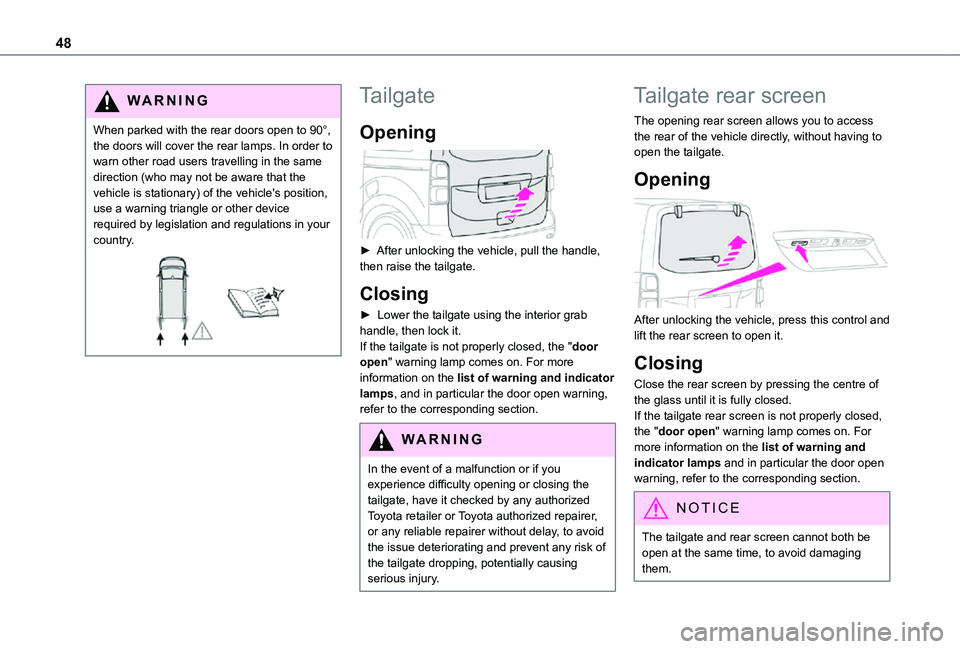
► After unlocking the vehicle, pull the handle, then raise the tailgate.
Closing
► Lower the tailgate using the interior grab handle, then lock it.If the tailgate is not properly closed, the "door open" warning lamp comes on. For more information on the list of warning and indicator lamps, and in particular the door open warning, refer to the corresponding section.
WARNI NG
In the event of a malfunction or if you experience difficulty opening or closing the tailgate, have it checked by any authorized Toyota retailer or Toyota authorized repairer, or any reliable repairer without delay, to avoid the issue deteriorating and prevent any risk of the tailgate dropping, potentially causing serious injury.
Tailgate rear screen
The opening rear screen allows you to access the rear of the vehicle directly, without having to open the tailgate.
Opening
After unlocking the vehicle, press this control and lift the rear screen to open it.
Closing
Close the rear screen by pressing the centre of the glass until it is fully closed.If the tailgate rear screen is not properly closed, the "door open" warning lamp comes on. For more information on the list of warning and indicator lamps and in particular the door open warning, refer to the corresponding section.
NOTIC E
The tailgate and rear screen cannot both be open at the same time, to avoid damaging them.