emergency TOYOTA PROACE EV 2021 Owner's Manual
[x] Cancel search | Manufacturer: TOYOTA, Model Year: 2021, Model line: PROACE EV, Model: TOYOTA PROACE EV 2021Pages: 360, PDF Size: 68.91 MB
Page 200 of 360
200
WARNI NG
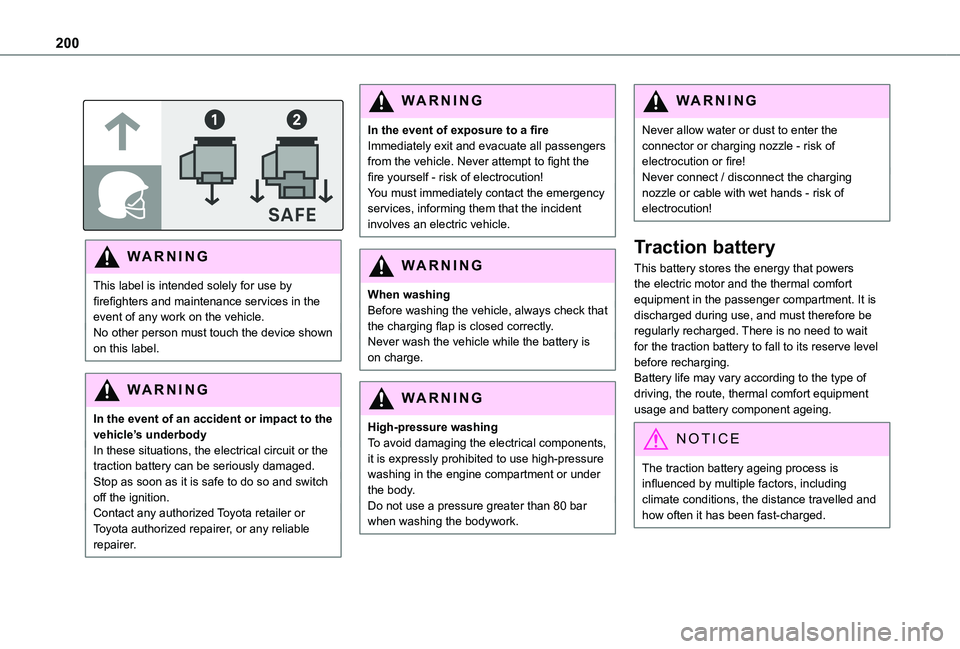
This label is intended solely for use by firefighters and maintenance services in the event of any work on the vehicle.No other person must touch the device shown on this label.
WARNI NG
In the event of an accident or impact to the vehicle’s underbodyIn these situations, the electrical circuit or the traction battery can be seriously damaged.Stop as soon as it is safe to do so and switch off the ignition.Contact any authorized Toyota retailer or Toyota authorized repairer, or any reliable repairer.
WARNI NG
In the event of exposure to a fireImmediately exit and evacuate all passengers from the vehicle. Never attempt to fight the fire yourself - risk of electrocution!You must immediately contact the emergency services, informing them that the incident involves an electric vehicle.
WARNI NG
When washingBefore washing the vehicle, always check that the charging flap is closed correctly.Never wash the vehicle while the battery is on charge.
WARNI NG
High-pressure washingTo avoid damaging the electrical components, it is expressly prohibited to use high-pressure washing in the engine compartment or under the body.Do not use a pressure greater than 80 bar when washing the bodywork.
WARNI NG
Never allow water or dust to enter the connector or charging nozzle - risk of electrocution or fire!Never connect / disconnect the charging nozzle or cable with wet hands - risk of electrocution!
Traction battery
This battery stores the energy that powers the electric motor and the thermal comfort equipment in the passenger compartment. It is discharged during use, and must therefore be regularly recharged. There is no need to wait for the traction battery to fall to its reserve level before recharging.Battery life may vary according to the type of driving, the route, thermal comfort equipment usage and battery component ageing.
NOTIC E
The traction battery ageing process is influenced by multiple factors, including climate conditions, the distance travelled and how often it has been fast-charged.
Page 215 of 360
215
Practical information
7
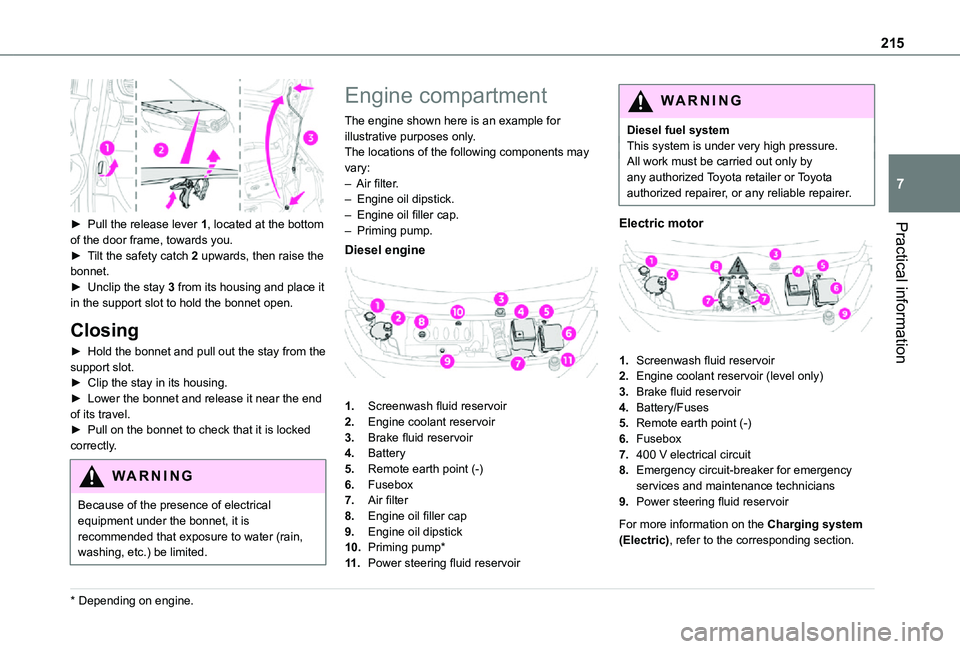
► Pull the release lever 1, located at the bottom of the door frame, towards you.► Tilt the safety catch 2 upwards, then raise the bonnet.► Unclip the stay 3 from its housing and place it in the support slot to hold the bonnet open.
Closing
► Hold the bonnet and pull out the stay from the support slot.► Clip the stay in its housing.► Lower the bonnet and release it near the end of its travel.► Pull on the bonnet to check that it is locked
correctly.
WARNI NG
Because of the presence of electrical equipment under the bonnet, it is recommended that exposure to water (rain, washing, etc.) be limited.
* Depending on engine.
Engine compartment
The engine shown here is an example for illustrative purposes only.The locations of the following components may vary:– Air filter.– Engine oil dipstick.– Engine oil filler cap.– Priming pump.
Diesel engine
1.Screenwash fluid reservoir
2.Engine coolant reservoir
3.Brake fluid reservoir
4.Battery
5.Remote earth point (-)
6.Fusebox
7.Air filter
8.Engine oil filler cap
9.Engine oil dipstick
10.Priming pump*
11 .Power steering fluid reservoir
WARNI NG
Diesel fuel systemThis system is under very high pressure.All work must be carried out only by any authorized Toyota retailer or Toyota authorized repairer, or any reliable repairer.
Electric motor
1.Screenwash fluid reservoir
2.Engine coolant reservoir (level only)
3.Brake fluid reservoir
4.Battery/Fuses
5.Remote earth point (-)
6.Fusebox
7.400 V electrical circuit
8.Emergency circuit-breaker for emergency services and maintenance technicians
9.Power steering fluid reservoir
For more information on the Charging system (Electric), refer to the corresponding section.
Page 217 of 360
217
Practical information
7
Topping up the engine oil level
For the location of the engine oil filler cap, please refer to the corresponding engine compartment illustration.► Add oil in small quantities, avoiding any spills on engine components (risk of fire).► Wait a few minutes before checking the level again using the dipstick.► Top up the level if necessary.► After checking the level, carefully screw the oil filler cap back on and replace the dipstick in its tube.
NOTIC E
The oil level indication displayed on the instrument panel when the ignition is switched on is not valid for 30 minutes following an addition of oil.
Brake fluid
The level of this fluid should be close to the "MAX" mark. If not, check the brake pad wear.To know how often the brake fluid should be replaced, refer to the manufacturer's servicing schedule.
WARNI NG
If topping up, clean the cap before replacing it. Use only DOT4 brake fluid from a sealed canister.
Power steering fluid
The level of this fluid should be close to the "MAX" mark. Check it, with the vehicle parked on level ground and with the engine cold, by reading the level on the filler neck.
Engine coolant
(Diesel)
It is normal to top up this fluid between two services.The check and top-up must only be done with the engine cold.A level of coolant that is too low risks causing major damage to the engine; the coolant level must be close to the "MAX" mark without ever
going above it.If the level is close to or below the "MIN" mark, it is essential to top it up.When the engine is hot, the temperature of the coolant is regulated by the fan.As the cooling system is pressurised, wait at least one hour after switching off the engine before carrying out any work.In order to avoid the risk of scalding if you need to top up in an emergency, wrap a cloth around
the cap and unscrew the cap by two turns to allow the pressure to drop.Once the pressure has dropped, remove the cap and top up to the required level.
(Electric)
WARNI NG
Do not top up the coolant.
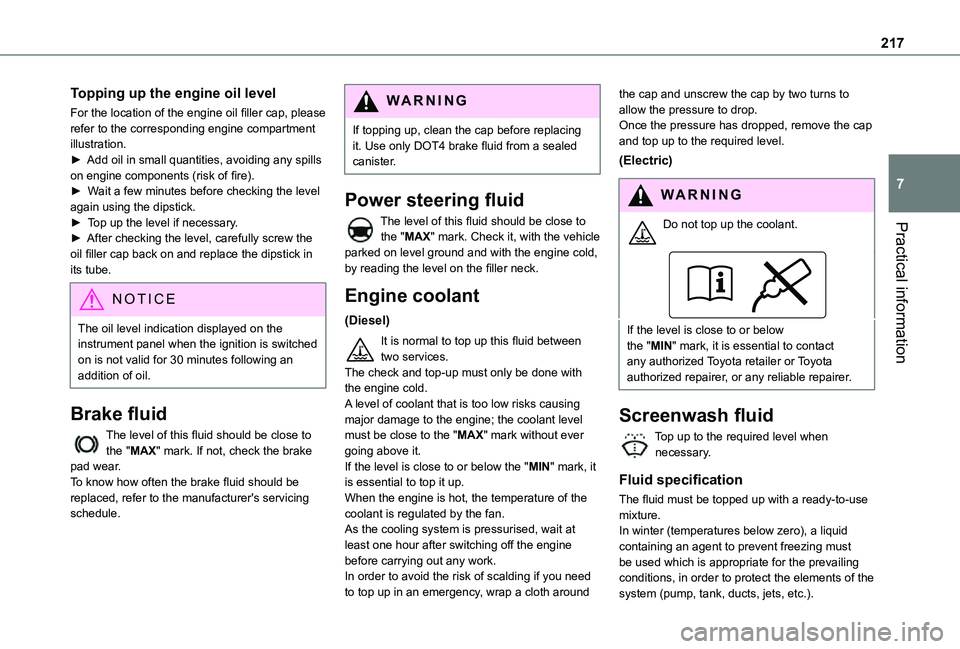
If the level is close to or below the "MIN" mark, it is essential to contact any authorized Toyota retailer or Toyota authorized repairer, or any reliable repairer.
Screenwash fluid
Top up to the required level when necessary.
Fluid specification
The fluid must be topped up with a ready-to-use mixture.In winter (temperatures below zero), a liquid
containing an agent to prevent freezing must be used which is appropriate for the prevailing conditions, in order to protect the elements of the system (pump, tank, ducts, jets, etc.).
Page 244 of 360
244
WARNI NG
The replacement of a fuse not shown in the allocation tables could cause a serious malfunction of the vehicle.Consult any authorized Toyota retailer or Toyota authorized repairer, or any reliable repairer.
GoodFaulty
Tweezers
NOTIC E
Installing electrical accessoriesThe vehicle's electrical system is designed to
operate with standard or optional equipment.Before fitting other electrical equipment or accessories to your vehicle, contact any authorized Toyota retailer or Toyota
authorized repairer, or any reliable repairer.
WARNI NG
TOYOTA accepts no responsibility for the cost incurred in repairing the vehicle or for rectifying malfunctions resulting from the installation of accessories not supplied or not recommended by TOYOTA and not installed in accordance with its recommendations, in particular when the combined power consumption of all of the additional equipment connected exceeds 10 milliamperes.
NOTIC E
For more information on installing a towbar or TAXI type equipment, contact any authorized Toyota retailer or Toyota authorized repairer, or any reliable repairer.
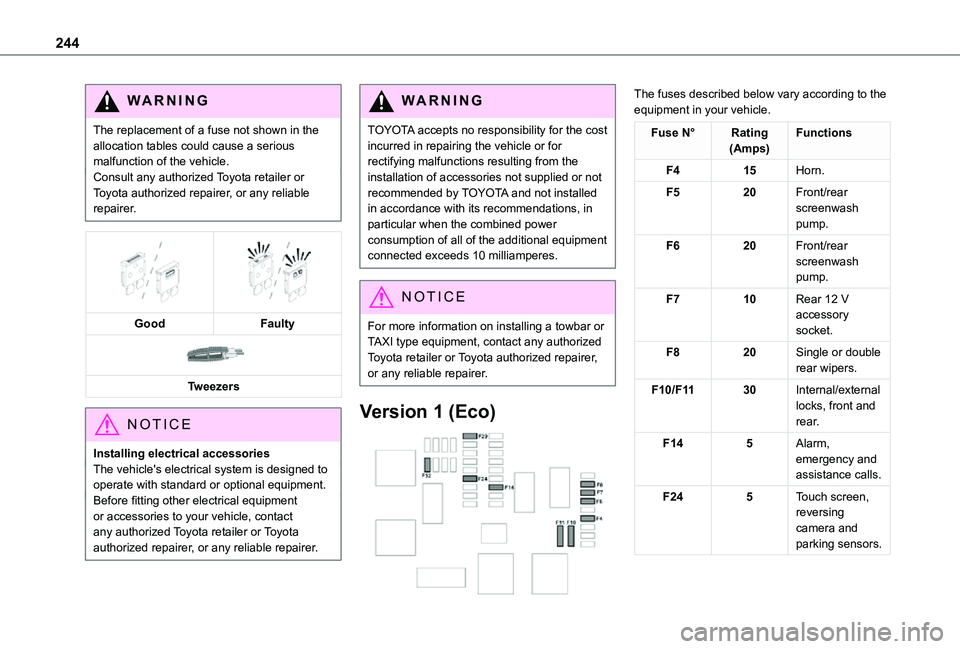
Version 1 (Eco)
The fuses described below vary according to the equipment in your vehicle.
Fuse N°Rating(Amps)Functions
F415Horn.
F520Front/rear screenwash pump.
F620Front/rear screenwash pump.
F710Rear 12 V accessory socket.
F820Single or double rear wipers.
F10/F1130Internal/external locks, front and rear.
F145Alarm, emergency and assistance calls.
F245Touch screen, reversing camera and parking sensors.
Page 305 of 360
305
TOYOTA Pro Touch with navigation system
12
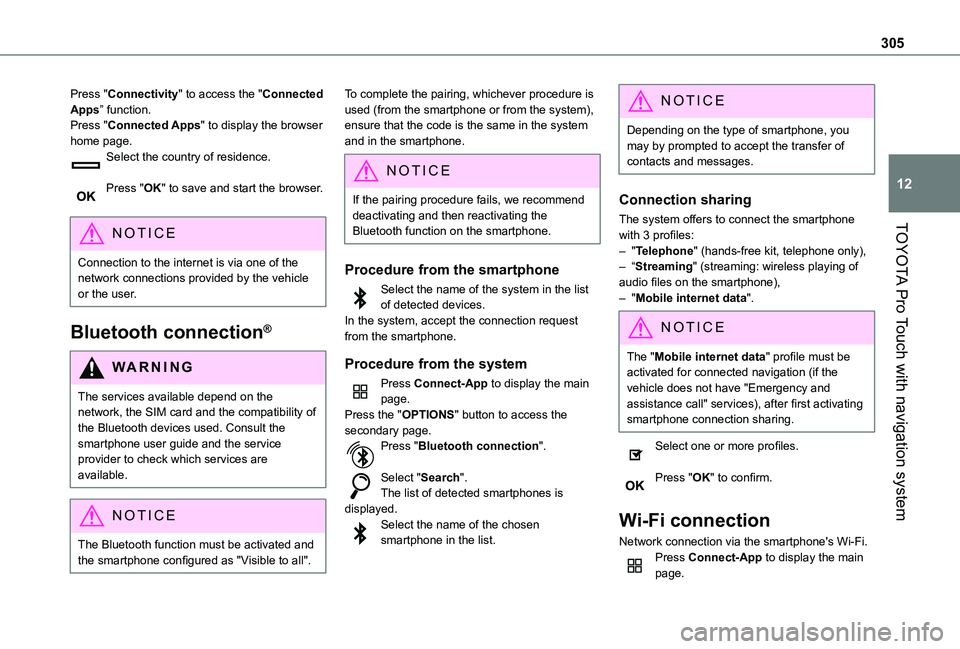
Press "Connectivity" to access the "Connected Apps” function.Press "Connected Apps" to display the browser home page.Select the country of residence.
Press "OK" to save and start the browser.
NOTIC E
Connection to the internet is via one of the network connections provided by the vehicle or the user.
Bluetooth connection®
WARNI NG
The services available depend on the network, the SIM card and the compatibility of the Bluetooth devices used. Consult the smartphone user guide and the service provider to check which services are available.
NOTIC E
The Bluetooth function must be activated and the smartphone configured as "Visible to all".
To complete the pairing, whichever procedure is used (from the smartphone or from the system), ensure that the code is the same in the system and in the smartphone.
NOTIC E
If the pairing procedure fails, we recommend deactivating and then reactivating the Bluetooth function on the smartphone.
Procedure from the smartphone
Select the name of the system in the list of detected devices.In the system, accept the connection request from the smartphone.
Procedure from the system
Press Connect-App to display the main page.Press the "OPTIONS" button to access the secondary page.Press "Bluetooth connection".
Select "Search".The list of detected smartphones is displayed.Select the name of the chosen smartphone in the list.
NOTIC E
Depending on the type of smartphone, you may by prompted to accept the transfer of contacts and messages.
Connection sharing
The system offers to connect the smartphone with 3 profiles:– "Telephone" (hands-free kit, telephone only),– “Streaming" (streaming: wireless playing of audio files on the smartphone),– "Mobile internet data".
NOTIC E
The "Mobile internet data" profile must be activated for connected navigation (if the vehicle does not have "Emergency and assistance call" services), after first activating smartphone connection sharing.
Select one or more profiles.
Press "OK" to confirm.
Wi-Fi connection
Network connection via the smartphone's Wi-Fi.Press Connect-App to display the main page.
Page 318 of 360
318
A
ABS 11 2Accelerated charging unit (Wallbox) 202Accessories 109, 154Access to the 3rd row 64, 66Access to the spare wheel 234Active Safety Brake 185–187AdBlue® 19, 221AdBlue® tank 222Additive, Diesel 218–219Adjusting head restraints 54Adjusting seat 52–54Adjusting the air distribution 89–90Adjusting the air flow 89–90Adjusting the date 29, 288, 314Adjusting the height and reach of the steering wheel 57Adjusting the lumbar support 52Adjusting the seat angle 52, 54Adjusting the seat belt height 11 7Adjusting the temperature 89–90
Adjusting the time 29, 288, 314Advice on care and maintenance 200, 225Advice on driving 8, 148–149Airbags 120, 122–123, 126Airbags, curtain 122–123Airbags, front 121, 123, 127Airbags, lateral 121, 123Air conditioning 87, 90, 92, 92–93Air conditioning, digital 91Air conditioning, dual-zone automatic 89–90
Air conditioning, manual 88, 91Air intake 89–91Air vents 87Alarm 49–50Android Auto connection 284, 304Anti-lock braking system (ABS) 11 2Anti-pinch 82Antitheft / Immobiliser 31Apple CarPlay connection 284, 304Applications 304Area, loading 32–33, 40–41, 80Armrest, front 55, 75Assistance call 11 0–111Assistance, emergency braking 11 2, 186Audible warning 111Audio streaming (Bluetooth) 270, 282–283, 309
B
Battery 2 11, 246
Battery, 12 V 218, 246–249Battery, ancillaries 246Battery, charging 247–248Battery, remote control 38–39, 95Bench seat, one-piece, fixed 64–65Blind, panoramic roof 82Blind spot monitoring system 191Blind spot sensors 190Blinds, side 82Bluetooth (hands-free) 271, 285–286, 310
Bluetooth (telephone) 285–286, 310–3 11Bodywork 225Bonnet 214–215Boot 48Boot lid 35–36, 38, 48Bottle holder 75Brake discs 220Brake lamps 241, 243Brakes 219–220Braking 165Braking assistance system 11 2Braking, automatic emergency 185–187Braking, dynamic emergency 156–158Brightness 287Bulbs 238Bulbs (changing) 237, 241
C
Capacity, fuel tank 197, 199Cap, fuel filler 197, 199
Care of the bodywork 225CD 269, 282CD, MP3 269, 282Central locking 30, 35, 39Changing a bulb 237, 241, 243Changing a bulb (side-hinged doors) 241Changing a fuse 243–245Changing a wheel 233Changing a wiper blade 107–108Changing the remote control battery 38
Page 319 of 360
319
Alphabetical index
Changing to free-wheeling 250Charge level indicator (Electric) 22Charging cable 203Charging cable (Electric) 202Charging connector (Electric) 201, 207–208, 210Charging flap (Electric) 201, 207–208, 210Charging system (Electric) 5, 9, 27, 199, 215Charging the traction battery (Electric) 21, 199, 207–208, 210Checking the engine oil level 19Checking the levels 216–217Checking tyre pressures (using the kit) 229–232Checks 215, 218–220Checks, routine 218–220Child lock 146–147Child lock on rear windows 147Children 11 9, 128, 134–136, 142, 143, 143–144, 144Children (safety) 146Child seats 11 9, 124–125, 127–128, 131–132, 144
Child seats, conventional 127–128, 131–132Child seats, i-Size 144Child seats, ISOFIX 134–136, 142, 143, 143–144, 144Cleaning (advice) 200, 225–226Closing the boot 48Closing the doors 30, 35, 47Collision Risk Alert 185–186Compressor, tyre inflation 229Configuration, vehicle 26–27
Connected applications 304Connection, Bluetooth 271, 285–286, 305, 310–3 11Connection, Wi-Fi network 305–306Connectivity 304Consumption figures 27Container, AdBlue® 222Control, emergency boot release 38Control, emergency door 30, 37–38Control, heated seats 56Control stalk, lighting 99Control stalk, wipers 105–107Control unit 202–203Courtesy lamp 97Courtesy lamp, front 97–98, 242Courtesy lamp, rear 97–98, 242Courtesy lamps 97–98, 242Cover, load space 79Crew cab, fixed 73–74Crew cab, folding 74Cruise control 173, 175–176, 178–181Cruise control,
adaptive 175–176, 181, 183–185Cruise control by speed limit recognition 175–176Cruise control, dynamic with Stop function 175–176Cup holder 75
D
DAB (Digital Audio Broadcasting) - Digital radio 267, 282, 308Date (setting) 29, 288, 314Daytime running lamps 101, 238–240Deactivating the passenger airbag 121, 126–127Deactivation of DSC (ESC) 11 3Deadlocking 36Deferred charging 27, 209Deferred charging (Electric) 27–28, 201, 207Defrosting 58, 91Demisting 91Demisting, rear 92Demisting, rear screen 92Dimensions 259Dipstick 19, 216Direction indicators 100, 238–239, 241, 243Display, head-up 172–173Domestic charging 203Domestic charging (Electric) 208, 210, 257
Door pockets 76Doors, rear 47Doors, side 43Doors, side-hinged 35–36, 47, 241Driver’s attention warning 188–189Drive selector (Electric) 164, 219Driving 148–149Driving aids camera (warnings) 170Driving aids (recommendations) 170Driving economically 8
Page 320 of 360
320
Driving modes 165Driving modes (Electric) 165Dynamic stability control (DSC) 11 2, 11 5–11 6
E
EBFD 11 2Eco-driving (advice) 8ECO mode 165Economy mode 2 11Electric motor 5, 9, 27, 199, 212, 215, 246, 250, 257Electric windows 51Electronic brake force distribution (EBFD) 11 2Emergency braking assistance (EBA) 11 2Emergency call 11 0–111Emergency warning lamps 11 0, 227Emissions control system, SCR 21, 221Energy economy mode 2 11Energy flows 27Energy recovery 21, 165
Engine 220Engine compartment 215Engine, Diesel 197, 215, 227, 253Engines 252Environment 8, 39, 95, 149
F
Fatigue detection 188–189
Filling the AdBlue® tank 218, 222Filling the fuel tank 197, 199Filter, air 219Filter, oil 219Filter, particle 218–219Filter, passenger compartment 87, 218Finisher 237Fitting a wheel 235–237Fitting roof bars 213Fittings, interior 75–76, 81Fittings, rear 81Flap, charging 209Flap, fuel filler 197, 199Flap, removable 59–61Flashing indicators 100Floor cab 243Fluid, brake 217Fluid, engine coolant 217Fluid, power steering 217Foglamp, rear 99, 241, 243Foglamps, front 99, 102, 240Foglamps, rear 99
Frequency (radio) 307Fuel 8, 197Fuel consumption 8Fuel tank 197, 199Fusebox, dashboard 243Fusebox, engine compartment 243, 245Fuses 243–245
G
Gauge, fuel 197, 199Gearbox, automatic 159–164, 167, 219, 247Gearbox, manual 159, 167, 219Gear lever, automatic gearbox 160–163Gear lever, manual gearbox 159Gear shift indicator ~ Gear efficiency indicator 160Glove box 75–76G.P.S. 300
H
Hazard warning lamps 11 0, 227headlamp adjustment 104Headlamp adjustment 104Headlamps, automatic dipping 102–103Headlamps, automatic illumination 101Headlamps, dipped beam 99, 238–239Headlamps, halogen 238–239
Headlamps, main beam 99, 238–239Headlamps, Xenon 238Head restraints, front 54Head-up display 172–173Heated bench seat 55Heating 87–88, 91–95Heating, additional 49, 93–95Heating, programmable 28, 49, 93–96High voltage 199Hill start assist 158–159