remote start TOYOTA PROACE EV 2021 Owner's Guide
[x] Cancel search | Manufacturer: TOYOTA, Model Year: 2021, Model line: PROACE EV, Model: TOYOTA PROACE EV 2021Pages: 360, PDF Size: 68.91 MB
Page 210 of 360
210
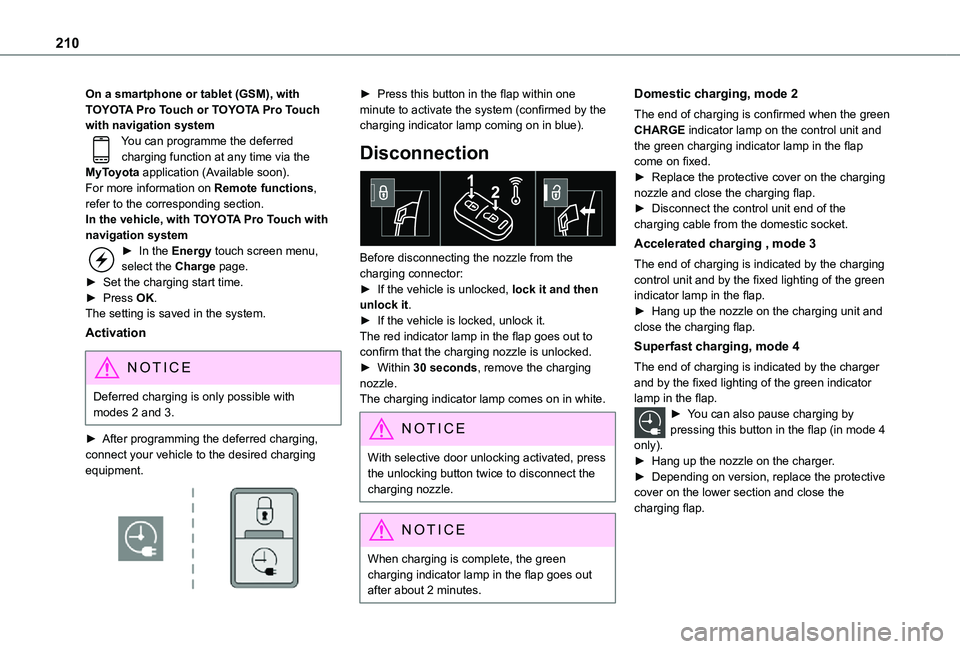
On a smartphone or tablet (GSM), with TOYOTA Pro Touch or TOYOTA Pro Touch with navigation systemYou can programme the deferred charging function at any time via the MyToyota application (Available soon).For more information on Remote functions, refer to the corresponding section.In the vehicle, with TOYOTA Pro Touch with navigation system► In the Energy touch screen menu, select the Charge page.► Set the charging start time.► Press OK.The setting is saved in the system.
Activation
NOTIC E
Deferred charging is only possible with modes 2 and 3.
► After programming the deferred charging, connect your vehicle to the desired charging equipment.
► Press this button in the flap within one minute to activate the system (confirmed by the charging indicator lamp coming on in blue).
Disconnection
Before disconnecting the nozzle from the charging connector:► If the vehicle is unlocked, lock it and then unlock it.► If the vehicle is locked, unlock it.The red indicator lamp in the flap goes out to confirm that the charging nozzle is unlocked.► Within 30 seconds, remove the charging nozzle.The charging indicator lamp comes on in white.
NOTIC E
With selective door unlocking activated, press the unlocking button twice to disconnect the charging nozzle.
NOTIC E
When charging is complete, the green charging indicator lamp in the flap goes out after about 2 minutes.
Domestic charging, mode 2
The end of charging is confirmed when the green CHARGE indicator lamp on the control unit and the green charging indicator lamp in the flap come on fixed.► Replace the protective cover on the charging nozzle and close the charging flap.► Disconnect the control unit end of the charging cable from the domestic socket.
Accelerated charging , mode 3
The end of charging is indicated by the charging control unit and by the fixed lighting of the green indicator lamp in the flap.► Hang up the nozzle on the charging unit and close the charging flap.
Superfast charging, mode 4
The end of charging is indicated by the charger and by the fixed lighting of the green indicator lamp in the flap.► You can also pause charging by pressing this button in the flap (in mode 4
only).► Hang up the nozzle on the charger.► Depending on version, replace the protective cover on the lower section and close the charging flap.
Page 246 of 360
246
Fuse N°Rating(Amps)Functions
F2215Horn.
F2315Right-hand main beam headlamp.
F2415Left-hand main beam headlamp.
12 V battery / Accessory
battery
Procedure for starting the engine using another battery or charging a discharged battery.
Lead-acid starter batteries
ECO
Batteries contain harmful substances such as sulphuric acid and lead.They must be disposed of in accordance with regulations and must not, in any circumstances, be discarded with household waste.Take used remote control batteries and vehicle batteries to a special collection point.
WARNI NG
Protect your eyes and face before handling the battery.All operations on the battery must be carried out in a well ventilated area and away from naked flames and sources of sparks, so as to avoid the risk of explosion or fire.Wash your hands afterwards.
Electric motor
NOTIC E
Flat accessory batteryIt is no longer possible to start the motor or recharge the traction battery.
WARNI NG
Precautions before working on the accessory batterySelect mode P, switch off the ignition, check that the instrument panel is off and that the vehicle is not plugged in.
WARNI NG
Jump-starting another vehicleDo not use the accessory battery to jump-start another vehicle or to charge another vehicle's battery.
WARNI NG
Always replace the battery with one of equivalent specification.
Access to the battery
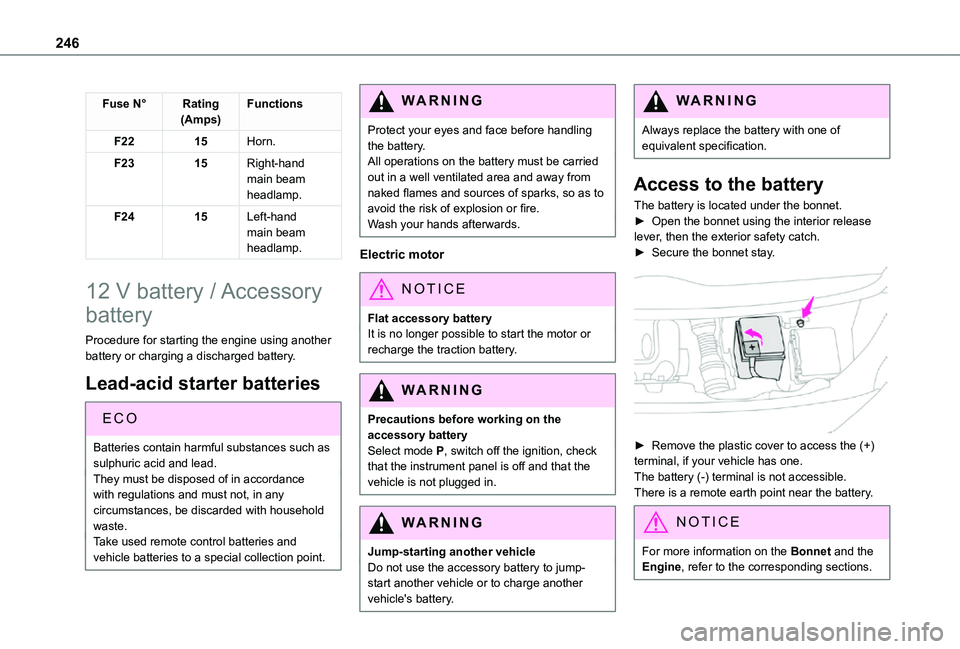
The battery is located under the bonnet.► Open the bonnet using the interior release lever, then the exterior safety catch.► Secure the bonnet stay.
► Remove the plastic cover to access the (+) terminal, if your vehicle has one.The battery (-) terminal is not accessible.There is a remote earth point near the battery.
NOTIC E
For more information on the Bonnet and the Engine, refer to the corresponding sections.
Page 249 of 360
249
In the event of a breakdown
8
► Switch off all electricity-consuming devices (audio system, wipers, lamps, etc.).► Switch off the ignition and wait for 4 minutes.After accessing the battery, it is only necessary to disconnect the (+) terminal.
Quick-release terminal clamp
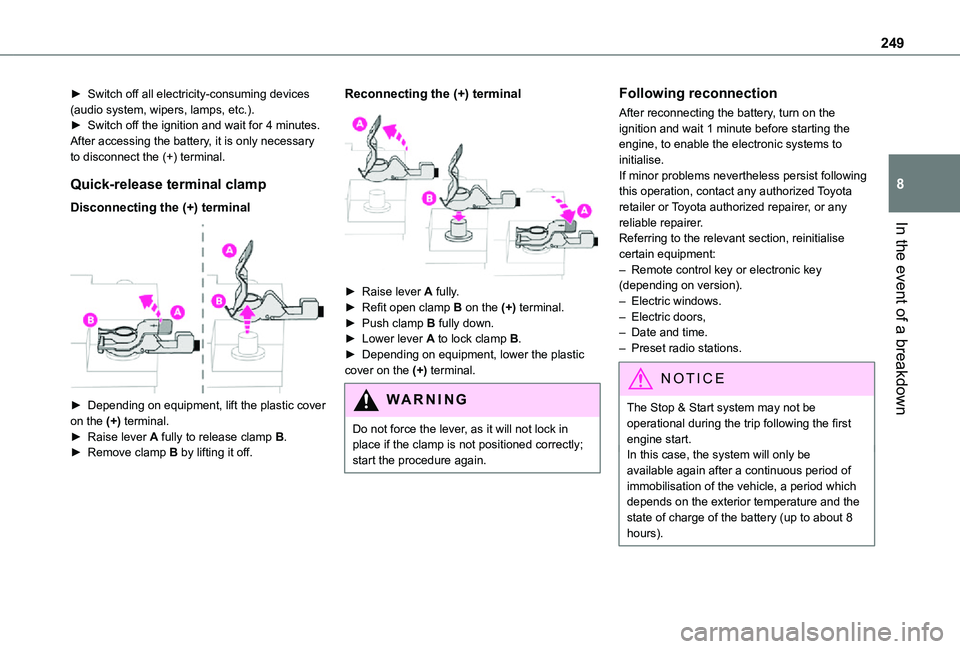
Disconnecting the (+) terminal
► Depending on equipment, lift the plastic cover on the (+) terminal.► Raise lever A fully to release clamp B.
► Remove clamp B by lifting it off.
Reconnecting the (+) terminal
► Raise lever A fully.► Refit open clamp B on the (+) terminal.► Push clamp B fully down.► Lower lever A to lock clamp B.► Depending on equipment, lower the plastic cover on the (+) terminal.
WARNI NG
Do not force the lever, as it will not lock in place if the clamp is not positioned correctly; start the procedure again.
Following reconnection
After reconnecting the battery, turn on the ignition and wait 1 minute before starting the engine, to enable the electronic systems to initialise.If minor problems nevertheless persist following this operation, contact any authorized Toyota retailer or Toyota authorized repairer, or any reliable repairer.Referring to the relevant section, reinitialise certain equipment:– Remote control key or electronic key (depending on version).– Electric windows.– Electric doors,– Date and time.– Preset radio stations.
NOTIC E
The Stop & Start system may not be operational during the trip following the first engine start.
In this case, the system will only be available again after a continuous period of immobilisation of the vehicle, a period which depends on the exterior temperature and the state of charge of the battery (up to about 8 hours).
Page 321 of 360
321
Alphabetical index
Histogramme, fuel consumption 27–28Horn 111
I
Ignition 153–154, 312Ignition on 154Immobiliser, electronic 150Indicator, AdBlue® range 19Indicator, coolant temperature 18–19Indicator, engine oil level 19Indicator lamps, operation 99Indicators, direction 100Inflating tyres 220, 262Inflating tyres and accessories (using the kit) 229–232Infrared camera 171Instrument panel 10, 171Intelligent Traction Control 11 4Internet browser 301, 304ISOFIX 140, 142, 143, 143–144
J
Jack 233Jump starting 247
K
Key 30–31, 33–35, 37Key, electronic 30, 154Keyless Entry and Starting 30–36, 151, 153–154Key not recognised 154Key with remote control 35Kit, hands-free 271, 285–286, 310Kit, puncture repair 230–232Kit, temporary puncture repair 229–232
L
Labels 6, 63Labels, identification 262Lams with Full LED technology 102Lane Departure Warning System (LDWS) 187–188Leather (care) 226Level, AdBlue® 218
Level, brake fluid 217Level, Diesel additive 218–219Level, engine coolant 18–19, 217Level, engine oil 19, 216Level, headlamp wash 106Level, power steering fluid 217Levels and checks 215–217Level, screenwash fluid 106, 217Lighting 99Lighting, cornering 102
Lighting dimmer 23Lighting, exterior 99Lighting, guide-me home 101Lighting, interior 97, 104Lighting, mood 104Lighting, welcome 101–102Loading 80, 213Loading area fittings 79Load reduction mode 2 11Load restraint 79Locating your vehicle 31Locking 30–31, 35Locking from the inside 39–41Locking the doors 39–40Low fuel level 197, 199Lumbar 52, 56–57
M
Mains socket (domestic network) 202Maintenance (advice) 200, 225
Maintenance, routine 171, 218, 220Manoeuvring aids (recommendations) 170Map reading lamps 97Markings, identification 262Massage function 56Mat 75, 171Memorising a speed 173Menu 284Menu, main 26, 265Menus (audio) 278–279, 293–294
Page 323 of 360
323
Alphabetical index
Remote control 30–35, 37, 150Remote functions 209Remotely operable functions (Electric) 28, 96Removing a wheel 235–237Removing the mat 75Replacing bulbs 237–238, 241, 243Replacing fuses 243–245Replacing the air filter 219Replacing the oil filter 219Replacing the passenger compartment filter 218Reservoir, screenwash 217Resetting the trip recorder 23Reversing camera 171, 193–194, 196Reversing lamp 241, 243Roof bars 213Running out of fuel (Diesel) 227
S
Safety, children 121, 124–125, 127–128, 134–136, 142, 143, 143–144, 144
Saturation of the particle filter (Diesel) 219Screen, instrument panel 24Screen menu map 284Screen, multifunction (with audio system) 265Screenwash, front 106Screenwash, rear 107SCR (Selective Catalytic Reduction) 21, 221Seat and bench seat, rear, fixed 63, 66–67Seat and bench seat, rear, on rails 63, 68–70Seat angle 52
Seat belts 11 6–11 9, 127Seat belts, rear 11 8Seat, bench front, 2-seat 55, 11 8Seat, rear bench 63Seats, electric 53–54Seats, front 52–54Seats, heated 55–56Seat(s), individual, rear, on rails 70–72, 11 8Seats, rear 64–70, 125Selector, gear 160Sensors (warnings) 171Serial number, vehicle 262Service indicator 18Servicing 18, 218, 220Settings, equipment 26–27Settings, system 287, 314Sidelamps 99, 238, 240–241, 243Side repeater 240Silent vehicle warning sound (Electric) 111, 149Sliding side door, electric 35–36, 41–42, 44Sliding side door, hands-free 45–46Sliding side window 82
Smart Cargo 59–61Smart Entry & Start 30–31, 151, 153–154Smartphone 28Snow chains 168, 2 11–212, 234Snow chains, link 2 11, 234Socket, 12 V accessory 75, 77Socket, 220 V 78Speed limiter 173, 175–178Speed limit recognition 174–175, 177, 180, 183–185
Speedometer 171Sport mode 165Stability control (ESC) 11 2, 11 4–11 6Starting a Diesel engine 197Starting the engine 150, 153Starting the vehicle 151, 154, 159–163Starting using another battery 154, 247Station, radio 265, 280, 306–307Stay, bonnet 215–216Steering mounted controls, audio 264, 277–278, 292Steering wheel, adjustment 57Stickers, customising ~ Stickers, expressive 226Stopping the vehicle 153–154, 160–163Stop & Start 25, 88, 166–167, 197, 214, 218, 249Storage 55, 62, 73–74, 76Storage compartments 76Storage wells 73–74, 76Stowing rings 79Sunshine sensor 87Super-fast charging (Electric) 208, 210, 257Suspension 220
Switching off the engine 150, 152–153Synchronising the remote control 39
T
Table of weights 253Table position 53Table, retractable sliding 83–85Tables, aircraft 76