radio controls TOYOTA PROACE VERSO 2017 User Guide
[x] Cancel search | Manufacturer: TOYOTA, Model Year: 2017, Model line: PROACE VERSO, Model: TOYOTA PROACE VERSO 2017Pages: 504, PDF Size: 81.64 MB
Page 444 of 504
444
Media
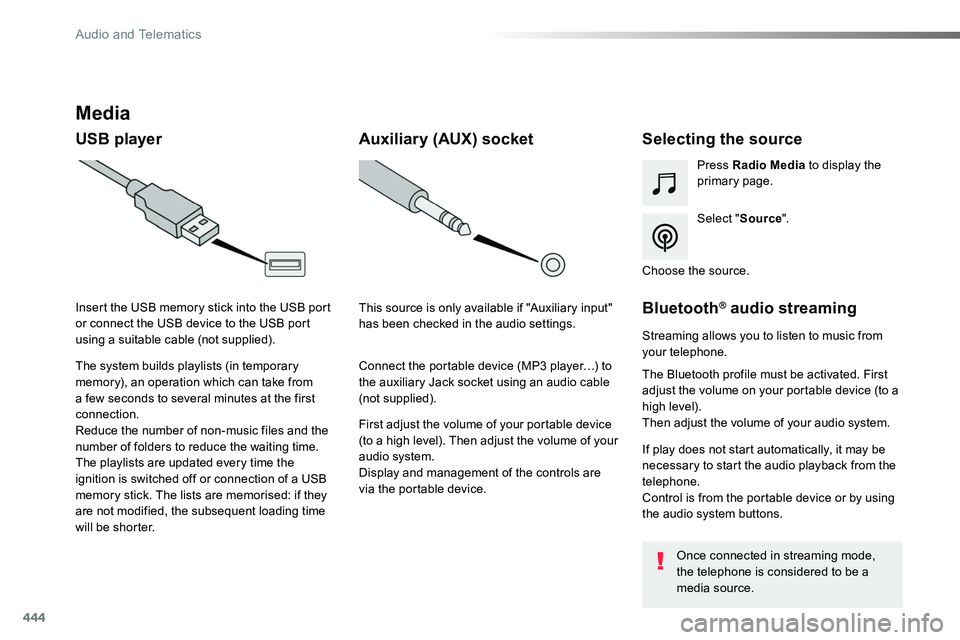
USB playerSelecting the source
Select "Source".
Press Radio Media to display the primary page.
The system builds playlists (in temporary memory), an operation which can take from a few seconds to several minutes at the first connection.
Reduce the number of non-music files and the number of folders to reduce the waiting time.The playlists are updated every time the ignition is switched off or connection of a USB memory stick. The lists are memorised: if they are not modified, the subsequent loading time will be shorter.
Insert the USB memory stick into the USB port or connect the USB device to the USB port using a suitable cable (not supplied).
Auxiliary (AUX) socket
First adjust the volume of your portable device (to a high level). Then adjust the volume of your audio system.Display and management of the controls are via the portable device.
This source is only available if "Auxiliary input" has been checked in the audio settings.
Connect the portable device (MP3 player…) to the auxiliary Jack socket using an audio cable (not supplied).
Choose the source.
Bluetooth® audio streaming
Streaming allows you to listen to music from your telephone.
The Bluetooth profile must be activated. First adjust the volume on your portable device (to a high level).Then adjust the volume of your audio system.
If play does not start automatically, it may be necessary to start the audio playback from the telephone.Control is from the portable device or by using the audio system buttons.
Once connected in streaming mode, the telephone is considered to be a media source.
Audio and Telematics
Page 473 of 504
473
Toyota Radio Bluetooth
ContentsFirst steps 474
Steering mounted controls - Type 1 475
Steering mounted controls - Type 2 476
Menus 477
Radio 478
DAB (Digital Audio Broadcasting) radio 480
Media 482
Telephone 487
Frequently asked questions 492
Your audio system is coded in such a way that it will only operate in your vehicle.
The different functions and adjustments described vary according to the version and configuration of your vehicle.
As a safety measure and because it requires the sustained attention of the driver, the pairing of your Bluetooth telephone to the Bluetooth hands-free audio system must only be carried out with the vehicle stationary and the ignition on.To avoid discharging the battery, the audio system may switch off after a few minutes if the engine is not running.
.
Audio and Telematics
Page 475 of 504
475
Steering mounted controls - Type 1
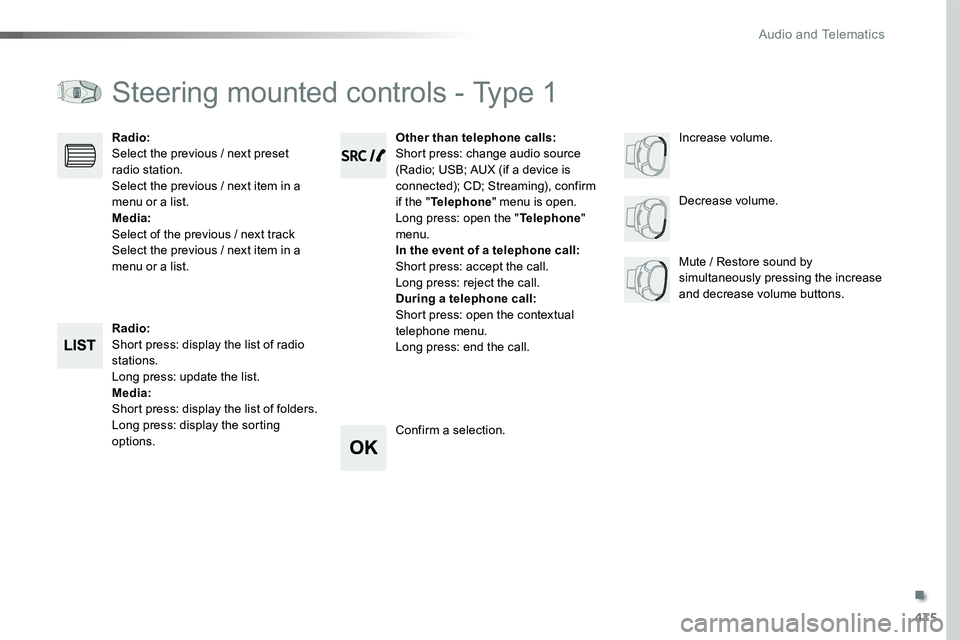
Radio:Short press: display the list of radio stations.Long press: update the list.Media:Short press: display the list of folders.Long press: display the sorting options.
Decrease volume.
Radio:Select the previous / next preset radio station.Select the previous / next item in a menu or a list.Media:Select of the previous / next trackSelect the previous / next item in a menu or a list.Mute / Restore sound by simultaneously pressing the increase and decrease volume buttons.
Other than telephone calls:Short press: change audio source (Radio; USB; AUX (if a device is connected); CD; Streaming), confirm if the "Telephone" menu is open.Long press: open the "Telephone" menu.In the event of a telephone call:Short press: accept the call.Long press: reject the call.During a telephone call:Short press: open the contextual telephone menu.Long press: end the call.
Confirm a selection.
Increase volume.
.
Audio and Telematics
Page 476 of 504
476
Steering mounted controls - Type 2
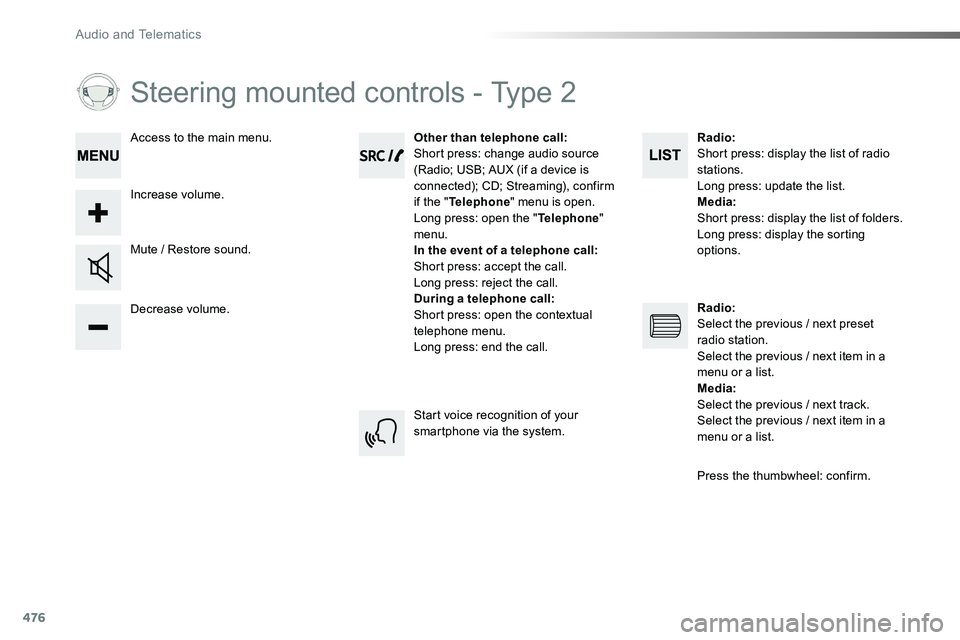
Decrease volume.
Mute / Restore sound.
Other than telephone call:Short press: change audio source (Radio; USB; AUX (if a device is connected); CD; Streaming), confirm if the "Telephone" menu is open.Long press: open the "Telephone" menu.In the event of a telephone call:Short press: accept the call.Long press: reject the call.During a telephone call:Short press: open the contextual telephone menu.Long press: end the call.
Increase volume.
Access to the main menu.
Start voice recognition of your smartphone via the system.
Radio:Short press: display the list of radio stations.Long press: update the list.Media:Short press: display the list of folders.Long press: display the sorting options.
Radio:Select the previous / next preset radio station.Select the previous / next item in a menu or a list.Media:Select the previous / next track.Select the previous / next item in a
menu or a list.
Press the thumbwheel: confirm.
Audio and Telematics
Page 501 of 504
501
Stop & Start .........20, 27, 40, 131, 13 4, 214, 216, 261, 271, 276, 316, 319Stop (warning lamp) ........................................16Storage .............................................94, 111, 112Stowing rings ................................................11 6Sun visor .......................................................111Switching off the engine ...................................................195Synchronising the remote control .....................................................51, 62
Table, folding sliding ..........................................................121Table of weights ....................................325, 326Table position ..................................................89Tables, aircraft ..............................................112Tables of fuses ..............................................311Ta n k , f u e l .......................................................261Technical data .......................................325, 326Telephone .............................................396, 452Telephone, Bluetooth with voice recognition ........................................491Temperature, coolant ................................17, 29Third brake lamp ..................................306, 309Three flashes (direction indicators) ...................................146Time (setting) ..................................44, 411, 467
Under-inflation (detection) ............................258Unlocking .................................... 46, 52, 54, 55Unlocking from the inside ...................64, 69, 71
T
U
Seats, front ................................................87, 90Seats, front bench ...........................................94Seats, heated ............................................91, 94Seat(s), captain, rear, on rails ................................................105, 166Seats, rear .........................................95, 98, 101Selector, gear ................................................210Serial number, vehicle ..................................327Service indicator .......................................29, 31Service (warning lamp) ...................................26Servicing .........................................................11Settings ................402, 404, 406, 458, 460, 462Settings, system ....................................410, 466Sidelamps .....................14 4, 299-301, 305, 308Side repeater ................................................300Skyview® .......................................................120Sliding side door, electric ............................46, 52, 56, 58, 68-72Sliding side door, hands-free ..............................................75-78Sliding side door, manual ....................................................66, 67Sliding side window ......................................118Smart Entry & Start System ......................52-59Snow chains .........................................258, 264Socket, 12 V accessory ................................113Socket, 230 V ................................................114Sockets, audio ...........................113, 114, 388, 444, 484Speed limiter .........................................220, 225Speedometer ............................................13, 14Stability control (ESC).............................23, 159Starting the engine .......................................195Station, radio ................................384, 440, 478Stay, bonnet ..................................................271Steering mounted controls, audio ...................................334, 422, 475, 476Steering wheel, adjustment ....................................................87
TMC (Traffic info) ..........................................357Tool box ........................................282, 285, 291Topping-up the AdBlue® additive .......................................................280To r c h .............................................................11 9Total distance recorder ...................................36Touch screen.................................37, 41, 42, 77, 148-150, 152, 153, 15 6, 216, 222, 232, 2 41, 243, 246, 247, 2 51, 253, 260, 331, 419Toyota Pro Touch with navigation system ....331To y o t a P r o To u c h ..........................................419Toyota Traction Select ..................................162To w b a r ...................................................19 4, 265Towed loads ..........................................325, 326Towing another vehicle .........................320, 321Towing eye ....................................................320Traction control (ASR) ............................23, 159Traffic information (TA) .................385, 479, 481Traffic information (TMC) ..............................357Tr a i l e r ....................................................19 4, 265Triangle, warning...........................................282Trip computer ............................................38-40Trip distance recorder .....................................36Type of bulbs .................................................298Ty r e s ........................................................11, 327Tyre Pressure Warning System (TPWS) ................................20, 258, 290, 297
.
Alphabetical index