cam TOYOTA PROACE VERSO 2018 User Guide
[x] Cancel search | Manufacturer: TOYOTA, Model Year: 2018, Model line: PROACE VERSO, Model: TOYOTA PROACE VERSO 2018Pages: 504, PDF Size: 80.57 MB
Page 241 of 504
241
This level of alert is based on the time before collision. It takes account of the vehicle dynamics, the speed of your vehicle and the
one in front, the environmental conditions, the operation of the vehicle (cornering, pedals pressed, etc.) to trigger the alert at the best moment.
Level 2: visual and audible alert, warning you that a collision is imminent.A message indicating that you should brake is displayed.
Where the speed of your vehicle is too high approaching another vehicle, the first level of alert may not be displayed: the level 2 alert may be displayed di r e c t l y.Furthermore, the level 1 alert is never displayed with the "Close" threshold.Poor weather conditions (very heavy rain, accumulation of snow in front of the radar and the camera) may hinder the operation of the system, with the display of an operating fault message. The system remains out of service until the message disappears.
Programming the alert thresholds
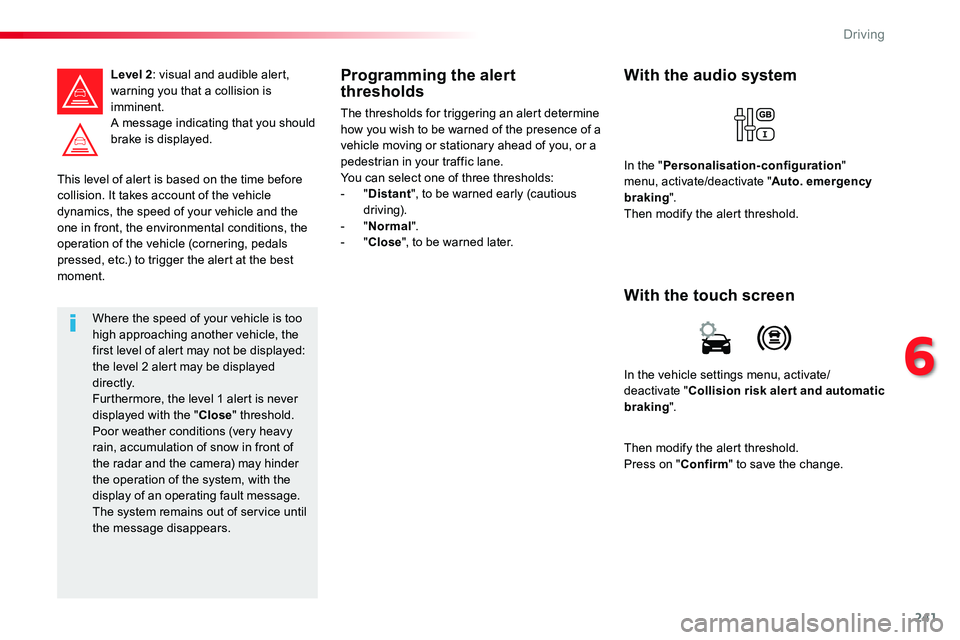
The thresholds for triggering an alert determine how you wish to be warned of the presence of a vehicle moving or stationary ahead of you, or a pedestrian in your traffic lane.You can select one of three thresholds:- "Distant", to be warned early (cautious driving).- "Normal".- "Close", to be warned later.
In the vehicle settings menu, activate/deactivate "Collision risk alert and automatic braking".
With the touch screen
With the audio system
In the "Personalisation-configuration" menu, activate/deactivate "Auto. emergency braking".Then modify the alert threshold.
Then modify the alert threshold.Press on "Confirm" to save the change.
6
Driving
Page 242 of 504
242
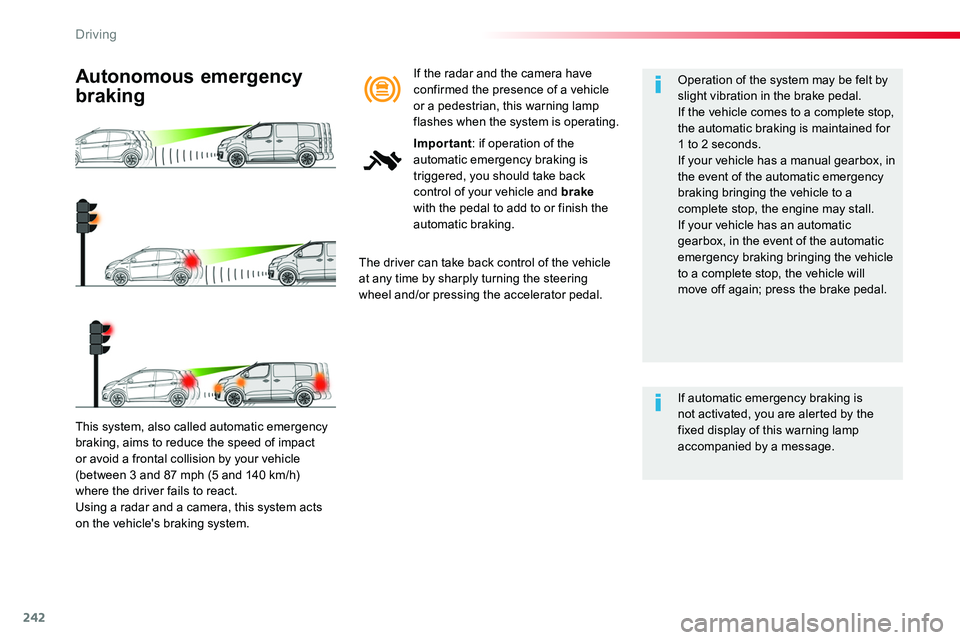
This system, also called automatic emergency
braking, aims to reduce the speed of impact or avoid a frontal collision by your vehicle (between 3 and 87 mph (5 and 140 km/h) where the driver fails to react.Using a radar and a camera, this system acts on the vehicle's braking system.
Autonomous emergency
braking
The driver can take back control of the vehicle at any time by sharply turning the steering wheel and/or pressing the accelerator pedal.
Operation of the system may be felt by slight vibration in the brake pedal.If the vehicle comes to a complete stop, the automatic braking is maintained for 1 to 2 seconds.If your vehicle has a manual gearbox, in the event of the automatic emergency braking bringing the vehicle to a complete stop, the engine may stall.
If your vehicle has an automatic gearbox, in the event of the automatic emergency braking bringing the vehicle to a complete stop, the vehicle will move off again; press the brake pedal.
If automatic emergency braking is not activated, you are alerted by the fixed display of this warning lamp accompanied by a message.
If the radar and the camera have confirmed the presence of a vehicle or a pedestrian, this warning lamp flashes when the system is operating.
Important: if operation of the automatic emergency braking is triggered, you should take back control of your vehicle and brake with the pedal to add to or finish the automatic braking.
Driving
Page 243 of 504
243
Deactivation / Activation of
the alert and the braking
By default, the function is automatically activated at every engine start.The deactivation or activation of the function is done in the vehicle configuration menu.
With the audio system
In the "Personalisation-configuration" menu, activate/deactivate "Auto. emergency braking".
Autonomous emergency braking system with Pedestrian Detection
If the driver does not brake sufficiently to avoid an accident, this system will complete the braking.This emergency braking system will not act if you press the brake pedal.
With the touch screen
In the vehicle settings menu, activate/deactivate "Collision risk alert and automatic
braking".
In the event of a fault, you are alerted by the illumination of this warning lamp, accompanied by an audible signal and a message.Contact an authorized Toyota dealer or repairer, or another duly qualified and equipped professional.
Operating fault
There may be inter ference in the operation of the camera or it not work at all in the following situations:- poor visibility (inadequate street lighting, falling snow or rain, fog, ...),- dazzle (headlamps of an approaching vehicle on the other side of the road, low sun, reflection on a wet road, leaving a tunnel, alternating between light and shade, ...),- the area in front of the windscreen: dirty, misty, frosty, snow-covered,
damaged or covered by a sticker.The operation of the radar, located in the front bumper, may be disturbed in certain weather conditions: with accumulations of snow, ice, mud, ...
6
Driving
Page 244 of 504
244
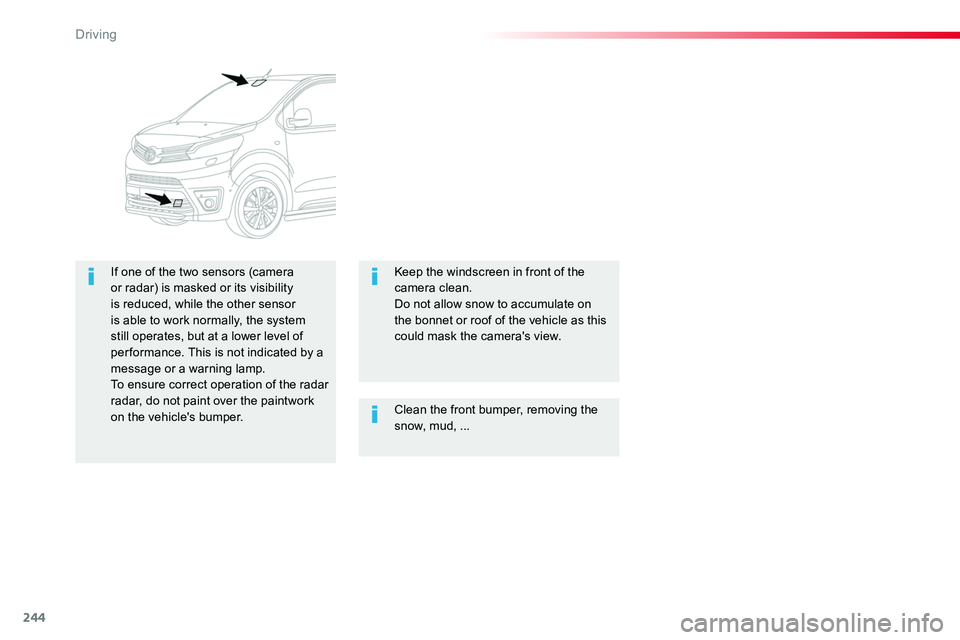
Clean the front bumper, removing the snow, mud, ...
If one of the two sensors (camera or radar) is masked or its visibility is reduced, while the other sensor is able to work normally, the system still operates, but at a lower level of per formance. This is not indicated by a message or a warning lamp.To ensure correct operation of the radar radar, do not paint over the paintwork on the vehicle's bumper.
Keep the windscreen in front of the camera clean.Do not allow snow to accumulate on the bonnet or roof of the vehicle as this could mask the camera's view.
Driving
Page 245 of 504
245
Lane Departure Alert
With the audio system
Activation / Deactivation
F Press on this buttton, its indicator lamp comes on, the system is activated.
F Press on this buttton, its indicator lamp goes off, the system is deactivated.
To activate the system:
To deactivate the system:
The system is activated or deactivated via the vehicle configuration menu.
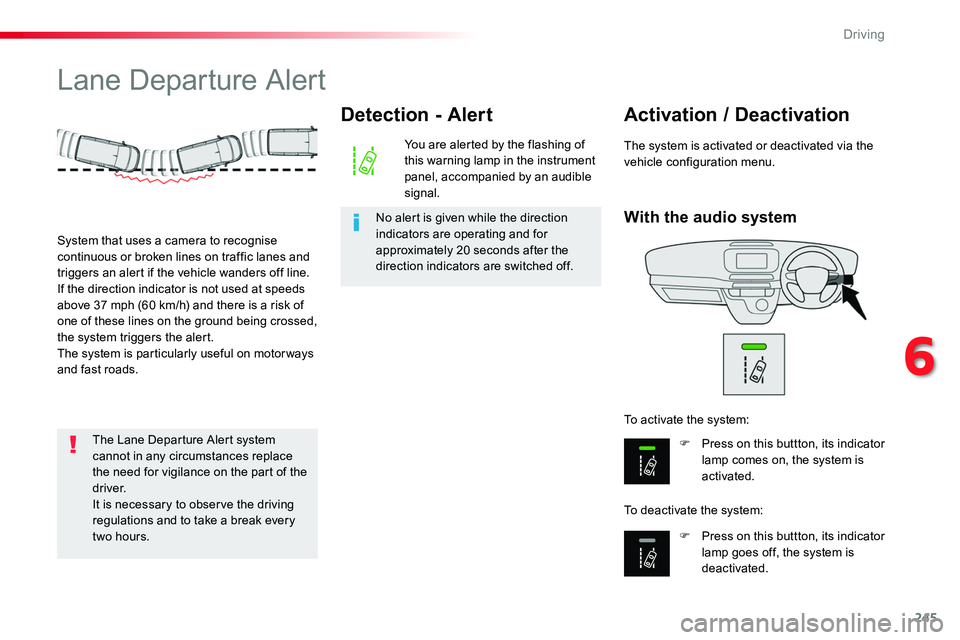
System that uses a camera to recognise continuous or broken lines on traffic lanes and triggers an alert if the vehicle wanders off line.If the direction indicator is not used at speeds above 37 mph (60 km/h) and there is a risk of one of these lines on the ground being crossed, the system triggers the alert.The system is particularly useful on motor ways and fast roads.
Detection - Alert
You are alerted by the flashing of this warning lamp in the instrument panel, accompanied by an audible signal.
No alert is given while the direction indicators are operating and for approximately 20 seconds after the direction indicators are switched off.
The Lane Departure Alert system cannot in any circumstances replace the need for vigilance on the part of the driver.It is necessary to observe the driving regulations and to take a break every
two hours.
6
Driving
Page 248 of 504
248
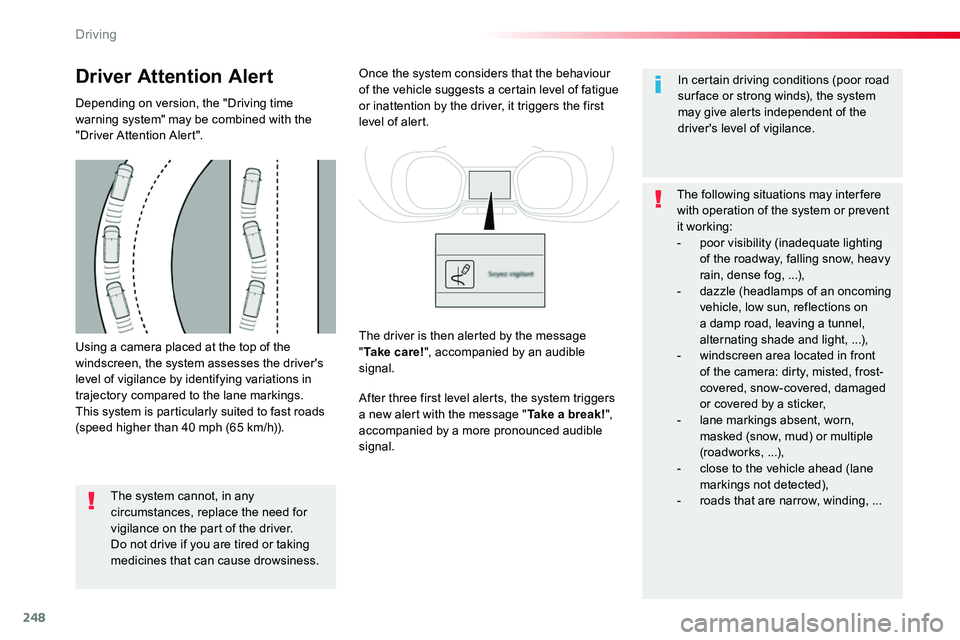
Using a camera placed at the top of the windscreen, the system assesses the driver's level of vigilance by identifying variations in trajectory compared to the lane markings.This system is particularly suited to fast roads (speed higher than 40 mph (65 km/h)).
Driver Attention Alert
Depending on version, the "Driving time warning system" may be combined with the "Driver Attention Alert".
The system cannot, in any circumstances, replace the need for vigilance on the part of the driver.Do not drive if you are tired or taking medicines that can cause drowsiness.
Once the system considers that the behaviour of the vehicle suggests a certain level of fatigue or inattention by the driver, it triggers the first level of alert.
After three first level alerts, the system triggers a new alert with the message "Take a break!", accompanied by a more pronounced audible signal.
In certain driving conditions (poor road sur face or strong winds), the system may give alerts independent of the driver's level of vigilance.
The following situations may inter fere with operation of the system or prevent
it working:- poor visibility (inadequate lighting of the roadway, falling snow, heavy rain, dense fog, ...),- dazzle (headlamps of an oncoming vehicle, low sun, reflections on a damp road, leaving a tunnel, alternating shade and light, ...),- windscreen area located in front of the camera: dirty, misted, frost-covered, snow-covered, damaged or covered by a sticker,- lane markings absent, worn, masked (snow, mud) or multiple (roadworks, ...),- close to the vehicle ahead (lane markings not detected),- roads that are narrow, winding, ...
The driver is then alerted by the message "Ta k e c a r e !", accompanied by an audible signal.
Driving
Page 254 of 504
254
Reversing camera with display in the interior mirror
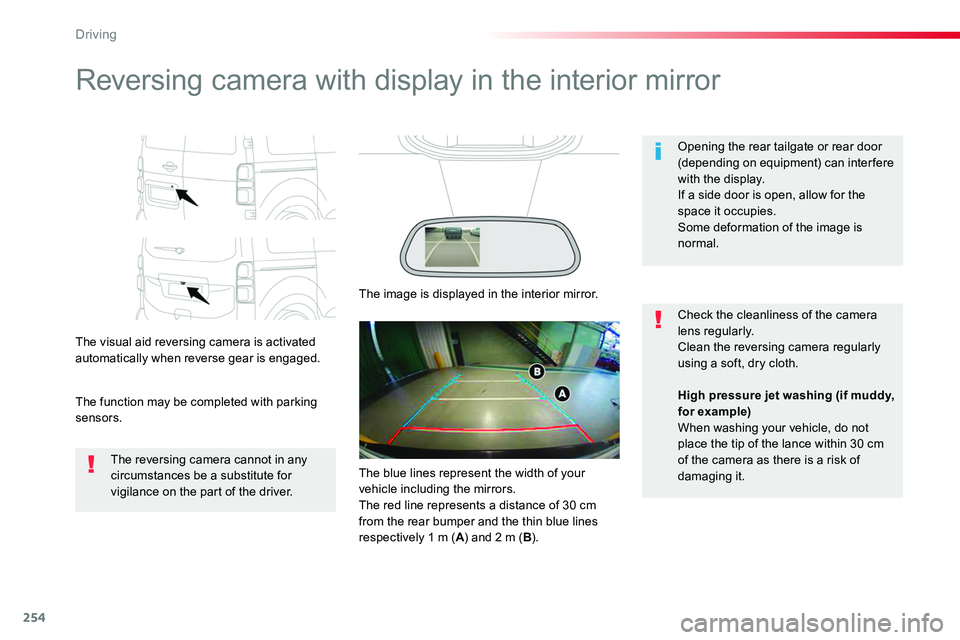
The visual aid reversing camera is activated automatically when reverse gear is engaged.
The function may be completed with parking sensors.
Opening the rear tailgate or rear door (depending on equipment) can inter fere with the display.If a side door is open, allow for the space it occupies.
Some deformation of the image is normal.
The reversing camera cannot in any circumstances be a substitute for vigilance on the part of the driver.
Check the cleanliness of the camera lens regularly.Clean the reversing camera regularly using a soft, dry cloth.
The image is displayed in the interior mirror.
High pressure jet washing (if muddy, for example)When washing your vehicle, do not place the tip of the lance within 30 cm of the camera as there is a risk of damaging it.The blue lines represent the width of your vehicle including the mirrors.The red line represents a distance of 30 cm from the rear bumper and the thin blue lines respectively 1 m (A) and 2 m (B).
Driving
Page 255 of 504
255
180° rear vision
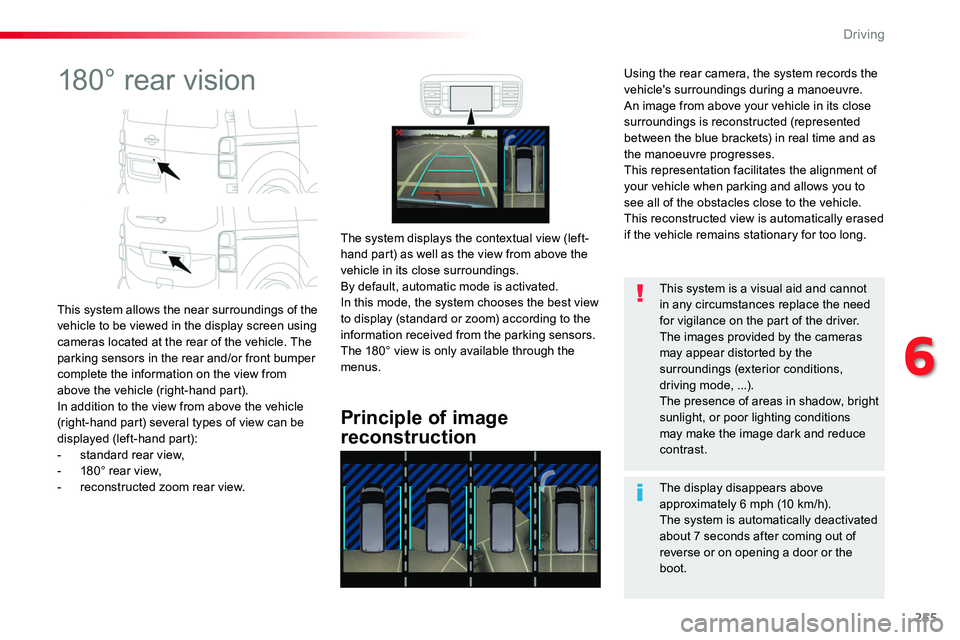
This system allows the near surroundings of the vehicle to be viewed in the display screen using cameras located at the rear of the vehicle. The parking sensors in the rear and/or front bumper complete the information on the view from above the vehicle (right-hand part).In addition to the view from above the vehicle (right-hand part) several types of view can be displayed (left-hand part):- standard rear view,- 180° rear view,- reconstructed zoom rear view.
Principle of image
reconstruction
The system displays the contextual view (left-hand part) as well as the view from above the vehicle in its close surroundings.By default, automatic mode is activated.In this mode, the system chooses the best view to display (standard or zoom) according to the information received from the parking sensors.The 180° view is only available through the menus.
The display disappears above approximately 6 mph (10 km/h).The system is automatically deactivated
about 7 seconds after coming out of reverse or on opening a door or the boot.
This system is a visual aid and cannot in any circumstances replace the need for vigilance on the part of the driver.The images provided by the cameras may appear distorted by the surroundings (exterior conditions, driving mode, ...).The presence of areas in shadow, bright sunlight, or poor lighting conditions may make the image dark and reduce contrast.
Using the rear camera, the system records the vehicle's surroundings during a manoeuvre. An image from above your vehicle in its close surroundings is reconstructed (represented between the blue brackets) in real time and as the manoeuvre progresses.This representation facilitates the alignment of your vehicle when parking and allows you to see all of the obstacles close to the vehicle.This reconstructed view is automatically erased if the vehicle remains stationary for too long.
6
Driving
Page 256 of 504
256
"Standard view"
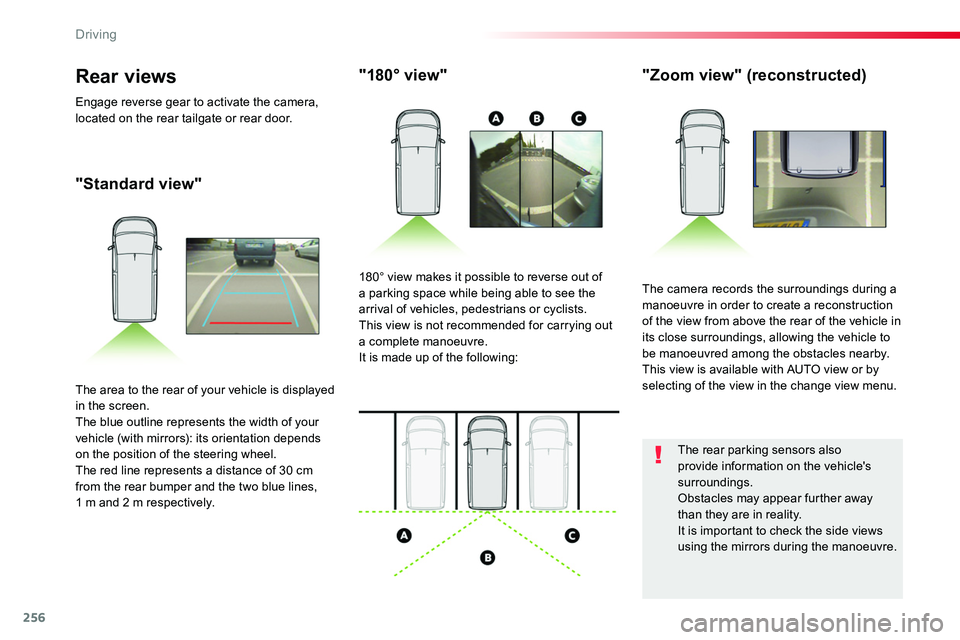
"180° view""Zoom view" (reconstructed)
The camera records the surroundings during a manoeuvre in order to create a reconstruction of the view from above the rear of the vehicle in its close surroundings, allowing the vehicle to be manoeuvred among the obstacles nearby.This view is available with AUTO view or by selecting of the view in the change view menu.
180° view makes it possible to reverse out of a parking space while being able to see the arrival of vehicles, pedestrians or cyclists.This view is not recommended for carrying out a complete manoeuvre.It is made up of the following:
The area to the rear of your vehicle is displayed in the screen.The blue outline represents the width of your vehicle (with mirrors): its orientation depends on the position of the steering wheel.The red line represents a distance of 30 cm from the rear bumper and the two blue lines, 1 m and 2 m respectively.
Rear views
Engage reverse gear to activate the camera, located on the rear tailgate or rear door.
The rear parking sensors also provide information on the vehicle's surroundings.Obstacles may appear further away than they are in reality.It is important to check the side views using the mirrors during the manoeuvre.
Driving
Page 257 of 504
257
Activation
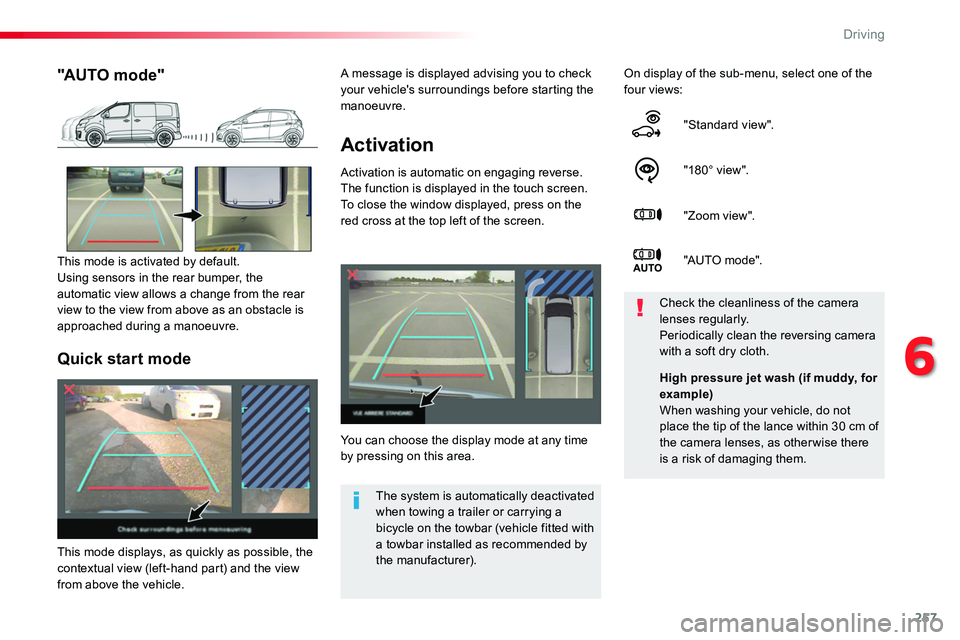
Activation is automatic on engaging reverse.The function is displayed in the touch screen. To close the window displayed, press on the red cross at the top left of the screen.
On display of the sub-menu, select one of the four views:
"Standard view".
"180° view".
"Zoom view".
"AUTO mo de".
You can choose the display mode at any time by pressing on this area.
Check the cleanliness of the camera lenses regularly.Periodically clean the reversing camera with a soft dry cloth.
"AUTO mode"
This mode is activated by default.Using sensors in the rear bumper, the automatic view allows a change from the rear view to the view from above as an obstacle is approached during a manoeuvre.
The system is automatically deactivated when towing a trailer or carrying a bicycle on the towbar (vehicle fitted with a towbar installed as recommended by the manufacturer).
Quick start mode
This mode displays, as quickly as possible, the contextual view (left-hand part) and the view from above the vehicle.
High pressure jet wash (if muddy, for example)When washing your vehicle, do not place the tip of the lance within 30 cm of the camera lenses, as otherwise there is a risk of damaging them.
A message is displayed advising you to check your vehicle's surroundings before starting the manoeuvre.
6
Driving