reset TOYOTA PROACE VERSO 2018 Owners Manual
[x] Cancel search | Manufacturer: TOYOTA, Model Year: 2018, Model line: PROACE VERSO, Model: TOYOTA PROACE VERSO 2018Pages: 504, PDF Size: 80.57 MB
Page 13 of 504
13
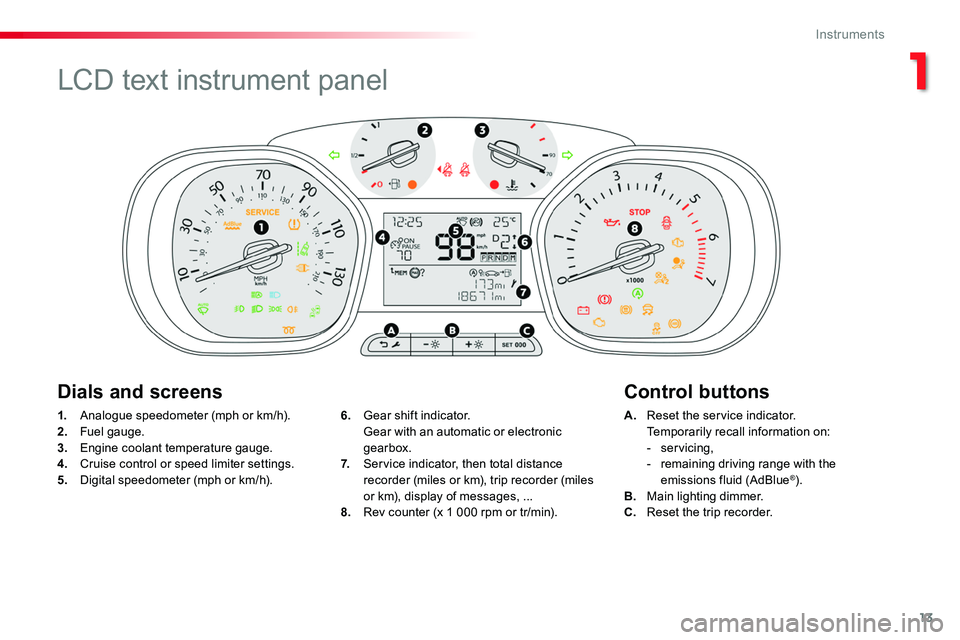
1. Analogue speedometer (mph or km/h).
2. Fuel gauge.3. Engine coolant temperature gauge.4. Cruise control or speed limiter settings.5. Digital speedometer (mph or km/h).
A. Reset the service indicator.
Temporarily recall information on:- servicing,- remaining driving range with the emissions fluid (AdBlue®).B. Main lighting dimmer.C. Reset the trip recorder.
6. Gear shift indicator.
Gear with an automatic or electronic gearbox.7. Service indicator, then total distance recorder (miles or km), trip recorder (miles or km), display of messages, ...8. Rev counter (x 1 000 rpm or tr/min).
Dials and screensControl buttons
LCD text instrument panel
1
Instruments
Page 14 of 504
14
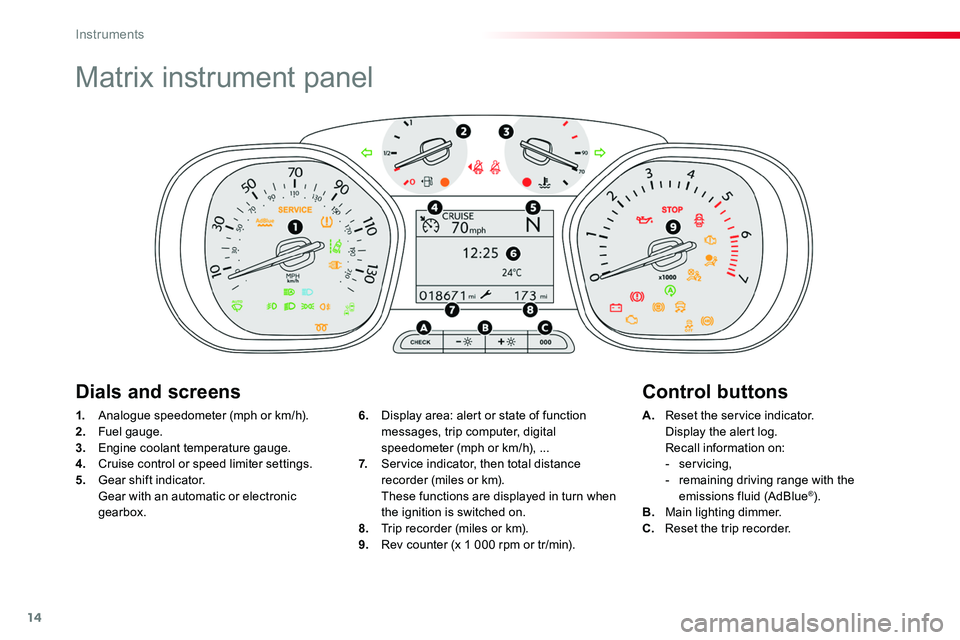
Matrix instrument panel
1. Analogue speedometer (mph or km/h).
2. Fuel gauge.3. Engine coolant temperature gauge.4. Cruise control or speed limiter settings.5. Gear shift indicator. Gear with an automatic or electronic gearbox.
A. Reset the service indicator.
Display the alert log. Recall information on:- servicing,- remaining driving range with the emissions fluid (AdBlue®).B. Main lighting dimmer.C. Reset the trip recorder.
6. Display area: alert or state of function
messages, trip computer, digital speedometer (mph or km/h), ...7. Service indicator, then total distance recorder (miles or km). These functions are displayed in turn when the ignition is switched on.8. Trip recorder (miles or km).9. Rev counter (x 1 000 rpm or tr/min).
Dials and screensControl buttons
Instruments
Page 29 of 504
29
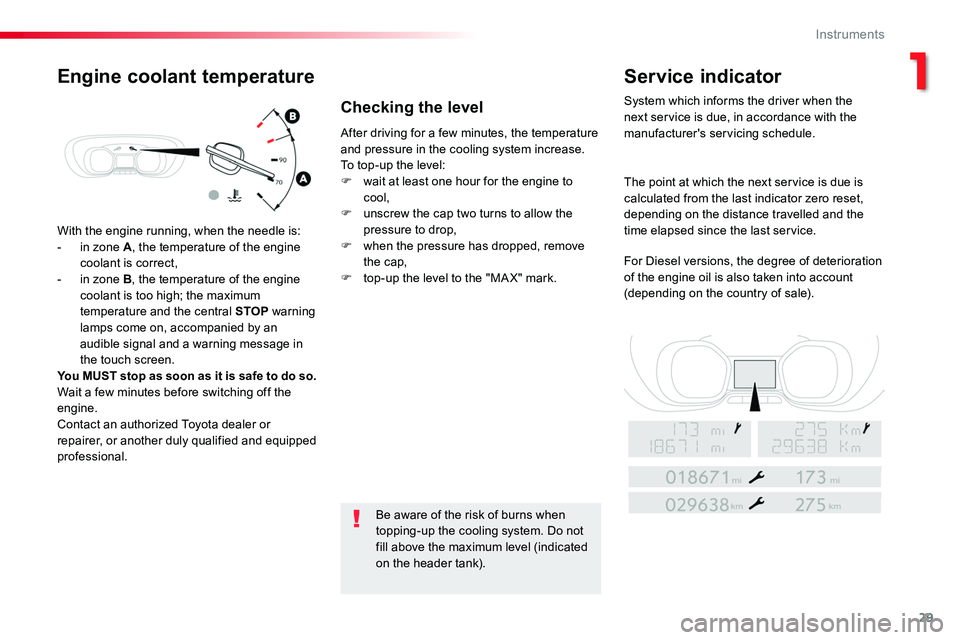
With the engine running, when the needle is:- in zone A, the temperature of the engine coolant is correct,- in zone B, the temperature of the engine coolant is too high; the maximum temperature and the central STOP warning lamps come on, accompanied by an audible signal and a warning message in the touch screen.You MUST stop as soon as it is safe to do so.Wait a few minutes before switching off the engine.Contact an authorized Toyota dealer or repairer, or another duly qualified and equipped professional.
After driving for a few minutes, the temperature and pressure in the cooling system increase.To top-up the level:F wait at least one hour for the engine to cool,F unscrew the cap two turns to allow the pressure to drop,F when the pressure has dropped, remove the cap,F top-up the level to the "MA X" mark.
Be aware of the risk of burns when topping-up the cooling system. Do not
fill above the maximum level (indicated on the header tank).
Engine coolant temperatureService indicator
System which informs the driver when the next service is due, in accordance with the manufacturer's servicing schedule.
The point at which the next service is due is calculated from the last indicator zero reset, depending on the distance travelled and the time elapsed since the last service.
For Diesel versions, the degree of deterioration of the engine oil is also taken into account (depending on the country of sale).
Checking the level
1
Instruments
Page 31 of 504
31
The distance remaining may be weighted by the time factor, depending on the driving conditions.Therefore, the spanner may also come on if you have exceeded the period since the last service, indicated in the manufacturer's service schedule.For Diesel versions, the spanner may also be brought on earlier than
expected, depending on the degree of deterioration of the engine oil (depending on the country of sale).The rate of deterioration of the engine oil depends on the driving conditions in which the vehicle is used.
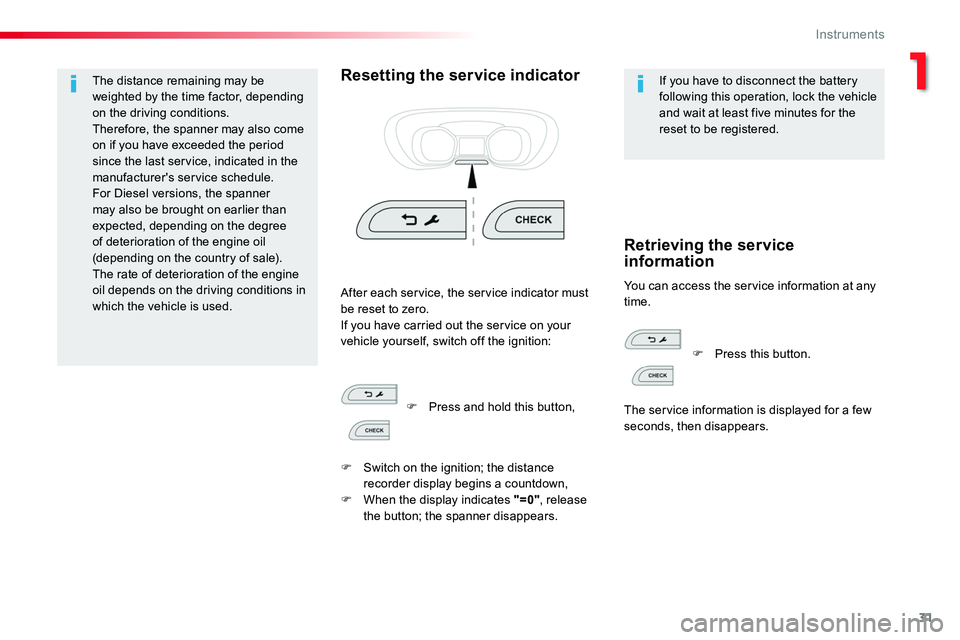
Resetting the service indicatorIf you have to disconnect the battery following this operation, lock the vehicle and wait at least five minutes for the reset to be registered.
You can access the service information at any time.After each service, the service indicator must be reset to zero.If you have carried out the service on your vehicle yourself, switch off the ignition:
Retrieving the service information
F Press and hold this button,
F Switch on the ignition; the distance recorder display begins a countdown,F When the display indicates "=0", release the button; the spanner disappears.
F Press this button.
The service information is displayed for a few seconds, then disappears.
1
Instruments
Page 36 of 504
36
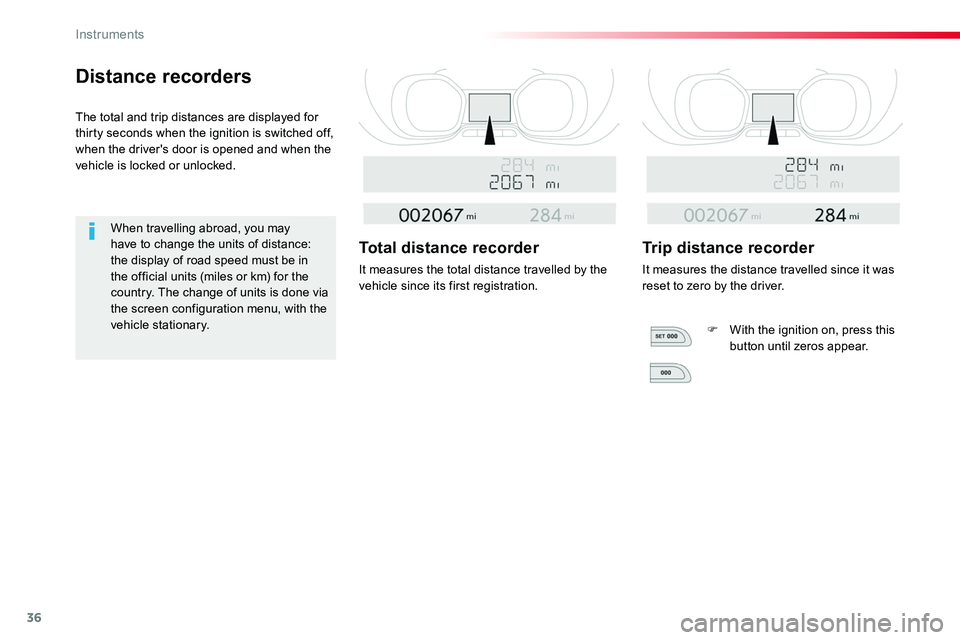
Distance recorders
The total and trip distances are displayed for thirty seconds when the ignition is switched off, when the driver's door is opened and when the vehicle is locked or unlocked.
When travelling abroad, you may have to change the units of distance: the display of road speed must be in the official units (miles or km) for the country. The change of units is done via the screen configuration menu, with the vehicle stationary.
Total distance recorder
It measures the total distance travelled by the vehicle since its first registration.
Trip distance recorder
It measures the distance travelled since it was reset to zero by the driver.
F With the ignition on, press this button until zeros appear.
Instruments
Page 39 of 504
39
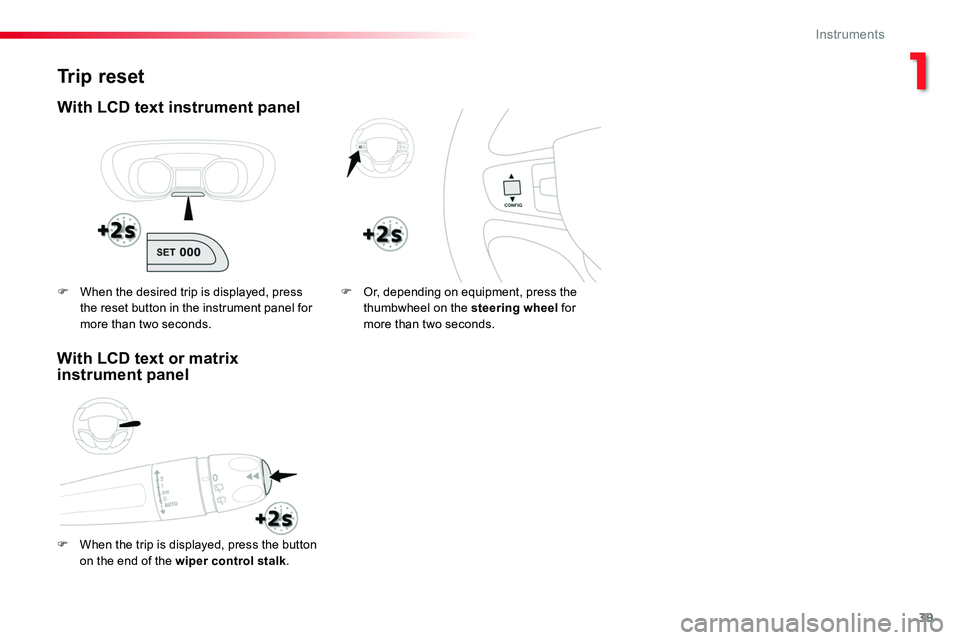
Trip reset
With LCD text instrument panel
F When the trip is displayed, press the button on the end of the wiper control stalk.
F Or, depending on equipment, press the thumbwheel on the steering wheel for more than two seconds.
F When the desired trip is displayed, press the reset button in the instrument panel for more than two seconds.
With LCD text or matrix instrument panel
1
Instruments
Page 40 of 504
40
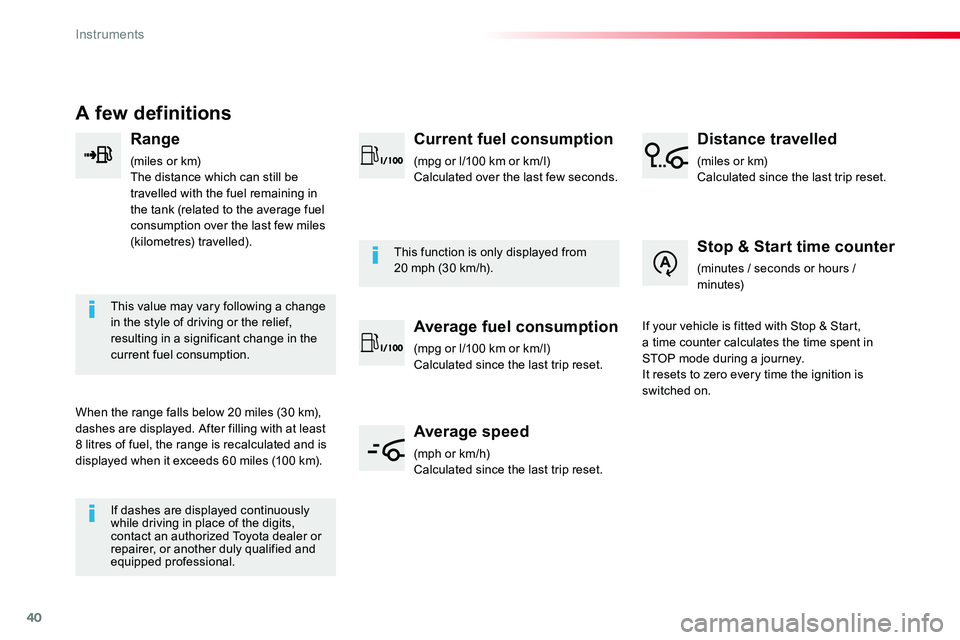
A few definitions
Range
(miles or km)The distance which can still be travelled with the fuel remaining in the tank (related to the average fuel consumption over the last few miles (kilometres) travelled).
This value may vary following a change in the style of driving or the relief, resulting in a significant change in the current fuel consumption.
When the range falls below 20 miles (30 km), dashes are displayed. After filling with at least 8 litres of fuel, the range is recalculated and is displayed when it exceeds 60 miles (100 km).
If dashes are displayed continuously while driving in place of the digits, contact an authorized Toyota dealer or repairer, or another duly qualified and equipped professional.
This function is only displayed from 20 mph (30 km/h).
Current fuel consumption
(mpg or l/100 km or km/l)Calculated over the last few seconds.
Average fuel consumption
(mpg or l/100 km or km/l)Calculated since the last trip reset.
Average speed
(mph or km/h)Calculated since the last trip reset.
Distance travelled
(miles or km)Calculated since the last trip reset.
Stop & Start time counter
(minutes / seconds or hours / minutes)
If your vehicle is fitted with Stop & Start, a time counter calculates the time spent in STOP mode during a journey.It resets to zero every time the ignition is switched on.
Instruments
Page 162 of 504
162
To y o t a Tr a c t i o n
Select
Special patented traction control system which improves traction on snow, mud and sand.This system, the operation of which has been optimised for each situation, allows you to manoeuvre in most conditions of poor grip (encountered during touring use).
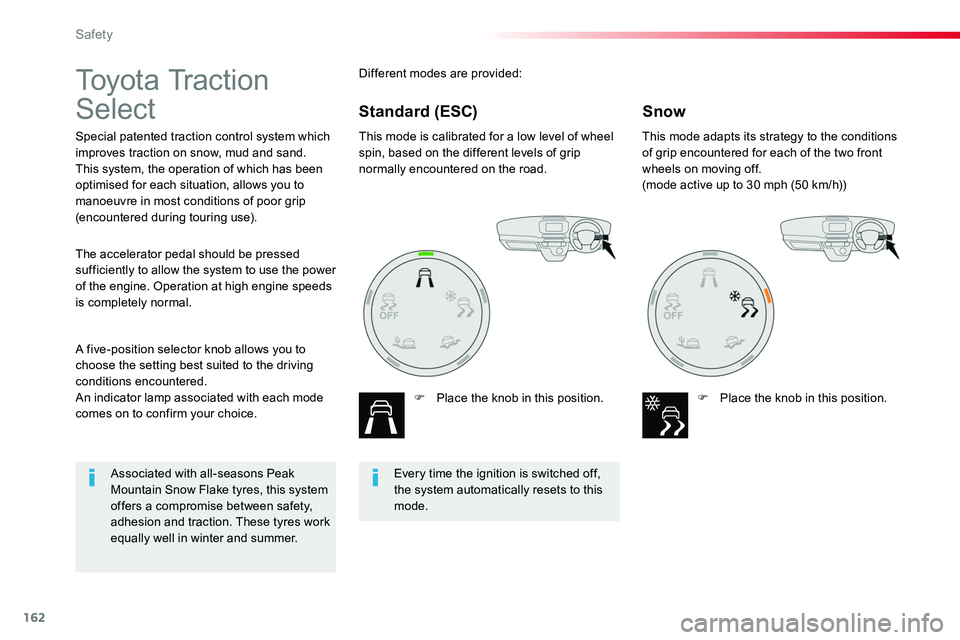
This mode is calibrated for a low level of wheel spin, based on the different levels of grip normally encountered on the road.
F Place the knob in this position.
This mode adapts its strategy to the conditions of grip encountered for each of the two front wheels on moving off.(mode active up to 30 mph (50 km/h))
F Place the knob in this position.
A five-position selector knob allows you to choose the setting best suited to the driving conditions encountered.An indicator lamp associated with each mode comes on to confirm your choice.
The accelerator pedal should be pressed sufficiently to allow the system to use the power of the engine. Operation at high engine speeds is completely normal.
Different modes are provided:
SnowStandard (ESC)
Every time the ignition is switched off, the system automatically resets to this mode.
Associated with all-seasons Peak Mountain Snow Flake tyres, this system offers a compromise between safety, adhesion and traction. These tyres work equally well in winter and summer.
Safety
Page 214 of 504

214
Stop & StartGoing into engine
STOP mode
If your vehicle has a manual gearbox, its speed must be below 12 mph (20 km/h) or stationary (depending on engine); the "ECO" indicator lamp comes on in the instrument panel and the engine goes into standby automatically when you place the gear lever in
neutral and you release the clutch pedal.
For your comfort, during parking manoeuvres, STOP mode is not available for a few seconds after coming out of reverse gear.Stop & Start does not affect the functionality of the vehicle, such as for example, braking, power steering...A slight delay between the vehicle stopping and the engine cutting out may be noticed.
If your vehicle is fitted with Stop & Start, a time counter calculates the time spent in
STOP mode during a journey.It resets to zero every time the ignition is switched on.
Stop & Start time counter
The Stop & Start system puts the engine temporarily into standby - STOP mode - during stops in the traffic (red lights, traffic jams, or other...). The engine restarts automatically - START mode - as soon as you want to move off. The restart takes place instantly, quickly and silently.Per fect for urban use, the Stop & Start system reduces fuel consumption and exhaust emissions as well as the noise level when stationary.
If your vehicle has an automatic gearbox and the vehicle is stationary, the "ECO" indicator lamp comes on and the engine goes into standby automatically when you press the brake pedal or place the gear selector in position N.
If your vehicle has an electronic gearbox and the vehicle's speed is below 5 mph (8 km/h), the "ECO" indicator lamp comes on and the engine goes into standby automatically when you press the brake pedal or place the gear selector in position N.
(minutes / seconds or hours / minutes)
Never refuel with the engine in STOP mode; you must switch off the ignition with the button.
Driving
Page 221 of 504
221
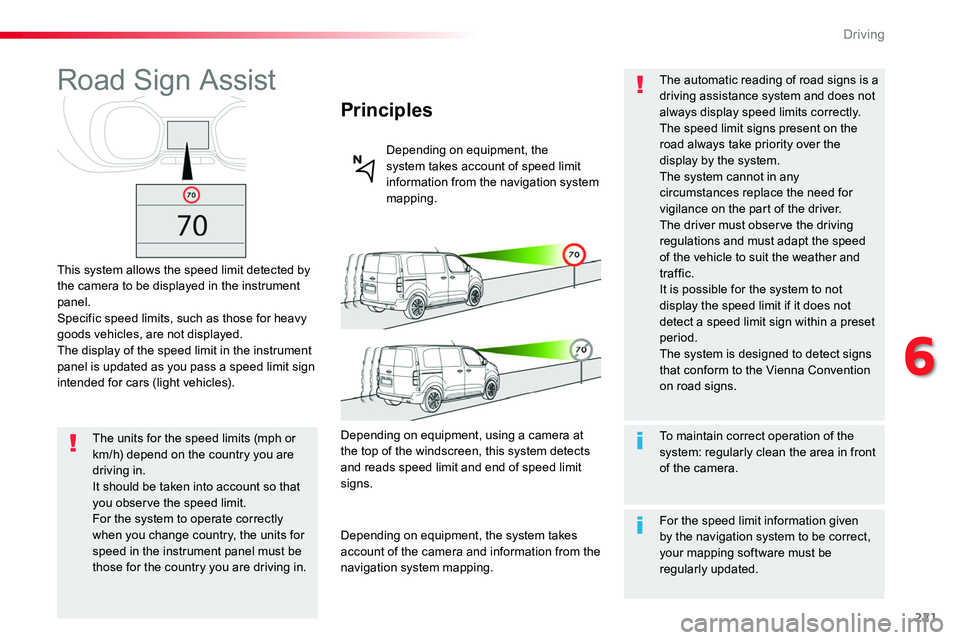
Road Sign Assist
This system allows the speed limit detected by the camera to be displayed in the instrument panel.Specific speed limits, such as those for heavy goods vehicles, are not displayed.The display of the speed limit in the instrument panel is updated as you pass a speed limit sign intended for cars (light vehicles).
Principles
Depending on equipment, the system takes account of speed limit information from the navigation system mapping.
The units for the speed limits (mph or km/h) depend on the country you are driving in.It should be taken into account so that you observe the speed limit.For the system to operate correctly when you change country, the units for speed in the instrument panel must be those for the country you are driving in.
Depending on equipment, using a camera at the top of the windscreen, this system detects and reads speed limit and end of speed limit signs.
Depending on equipment, the system takes account of the camera and information from the navigation system mapping.
To maintain correct operation of the system: regularly clean the area in front of the camera.
The automatic reading of road signs is a driving assistance system and does not always display speed limits correctly.The speed limit signs present on the road always take priority over the display by the system.The system cannot in any circumstances replace the need for vigilance on the part of the driver.
The driver must observe the driving regulations and must adapt the speed of the vehicle to suit the weather and traffic.It is possible for the system to not display the speed limit if it does not detect a speed limit sign within a preset period.The system is designed to detect signs that conform to the Vienna Convention on road signs.
For the speed limit information given by the navigation system to be correct, your mapping software must be regularly updated.
6
Driving