ECU TOYOTA PROACE VERSO EV 2021 Owner's Guide
[x] Cancel search | Manufacturer: TOYOTA, Model Year: 2021, Model line: PROACE VERSO EV, Model: TOYOTA PROACE VERSO EV 2021Pages: 360, PDF Size: 68.91 MB
Page 214 of 360
214
Roof racks
NOTIC E
Max. authorised load weight:– Compact: 140 kg,– Medium and Long: 170 kg.
To fit a roof rack, use the fixing points provided for this purpose:
► Place the roof rack on the roof aligned with the fixing points and secure each one to the roof in turn.► Ensure that the roof rack is correctly fitted (by shaking it).
Bonnet
WARNI NG
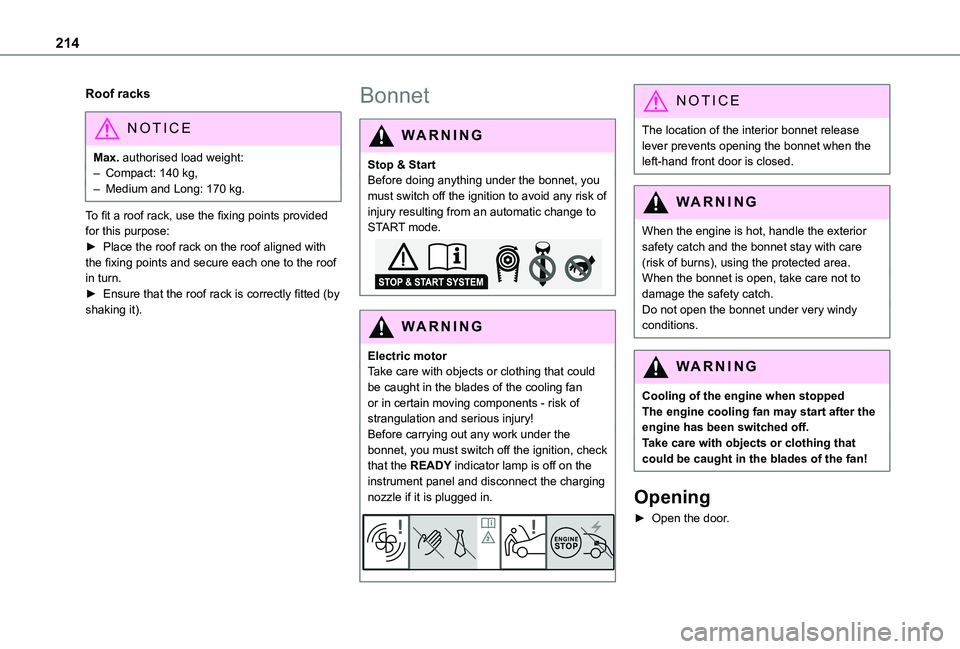
Stop & StartBefore doing anything under the bonnet, you must switch off the ignition to avoid any risk of injury resulting from an automatic change to START mode.
WARNI NG
Electric motorTake care with objects or clothing that could be caught in the blades of the cooling fan or in certain moving components - risk of strangulation and serious injury!Before carrying out any work under the
bonnet, you must switch off the ignition, check that the READY indicator lamp is off on the instrument panel and disconnect the charging nozzle if it is plugged in.
NOTIC E
The location of the interior bonnet release lever prevents opening the bonnet when the left-hand front door is closed.
WARNI NG
When the engine is hot, handle the exterior
safety catch and the bonnet stay with care (risk of burns), using the protected area.When the bonnet is open, take care not to damage the safety catch.Do not open the bonnet under very windy conditions.
WARNI NG
Cooling of the engine when stoppedThe engine cooling fan may start after the engine has been switched off.Take care with objects or clothing that could be caught in the blades of the fan!
Opening
► Open the door.
Page 228 of 360
228
Tool box
Access
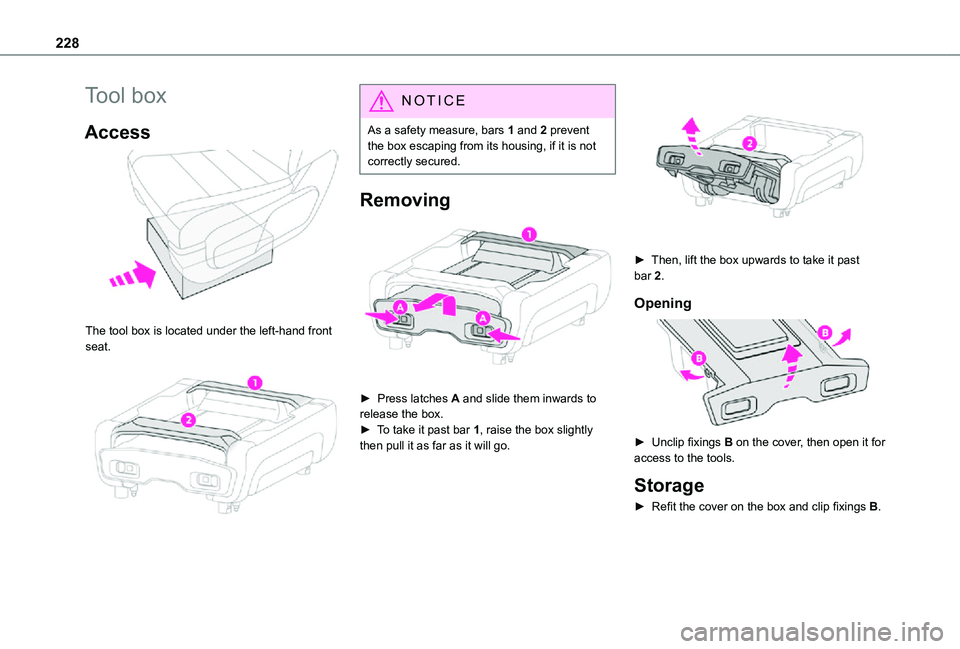
The tool box is located under the left-hand front seat.
NOTIC E
As a safety measure, bars 1 and 2 prevent the box escaping from its housing, if it is not correctly secured.
Removing
► Press latches A and slide them inwards to release the box.► To take it past bar 1, raise the box slightly
then pull it as far as it will go.
► Then, lift the box upwards to take it past bar 2.
Opening
► Unclip fixings B on the cover, then open it for
access to the tools.
Storage
► Refit the cover on the box and clip fixings B.
Page 229 of 360
229
In the event of a breakdown
8
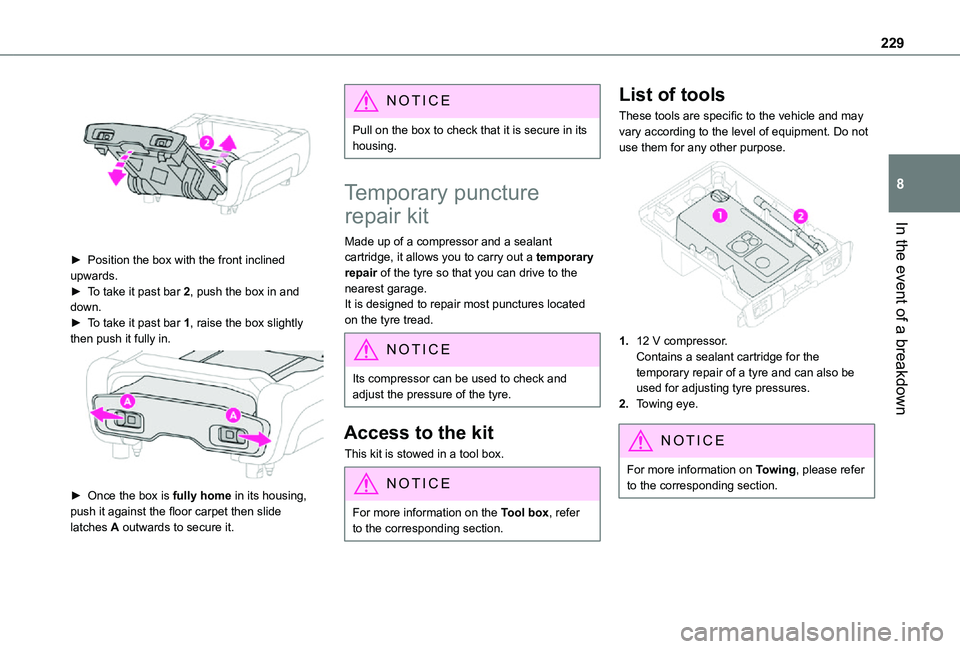
► Position the box with the front inclined upwards.► To take it past bar 2, push the box in and down.► To take it past bar 1, raise the box slightly then push it fully in.
► Once the box is fully home in its housing, push it against the floor carpet then slide latches A outwards to secure it.
NOTIC E
Pull on the box to check that it is secure in its housing.
Temporary puncture
repair kit
Made up of a compressor and a sealant cartridge, it allows you to carry out a temporary repair of the tyre so that you can drive to the nearest garage.It is designed to repair most punctures located on the tyre tread.
NOTIC E
Its compressor can be used to check and adjust the pressure of the tyre.
Access to the kit
This kit is stowed in a tool box.
NOTIC E
For more information on the Tool box, refer to the corresponding section.
List of tools
These tools are specific to the vehicle and may vary according to the level of equipment. Do not use them for any other purpose.
1.12 V compressor.Contains a sealant cartridge for the temporary repair of a tyre and can also be used for adjusting tyre pressures.
2.Towing eye.
NOTIC E
For more information on Towing, please refer to the corresponding section.
Page 231 of 360
231
In the event of a breakdown
8
WARNI NG
The speed limit sticker must be secured to the interior of the vehicle in the driver's field of vision, to remind you that a wheel is in temporary use.
► Start the vehicle and leave the engine running.
NOTIC E
Do not start the compressor before connecting the white pipe to the tyre valve: the sealant product would be expelled through the pipe.
► Switch on the compressor by moving switch B to position I until the tyre pressure reaches 2.0 bars. The sealant product is injected under pressure into the tyre; do not disconnect the pipe from the valve during this operation (risk of blowback).
NOTIC E
If after approximately seven minutes this pressure is not reached, this indicates that the tyre is not repairable; contact any authorized Toyota retailer or Toyota authorized repairer,
or any reliable repairer for assistance.
► Remove the kit and screw the cap back on the white pipe. Take care to avoid contaminating
the vehicle with traces of fluid. Keep the kit to hand.
WARNI NG
Take care, the sealant product is harmful if swallowed and causes irritation to the eyes.Keep this product out of the reach of children.The use-by date of the fluid is marked on the bottle.
After use, do not discard the bottle in standard waste, take it to any authorized Toyota retailer or Toyota authorized repairer, or any reliable repairer waste disposal site.Do not forget to obtain a new bottle of sealant, available from any authorized Toyota retailer or Toyota authorized repairer, or any reliable repairer.
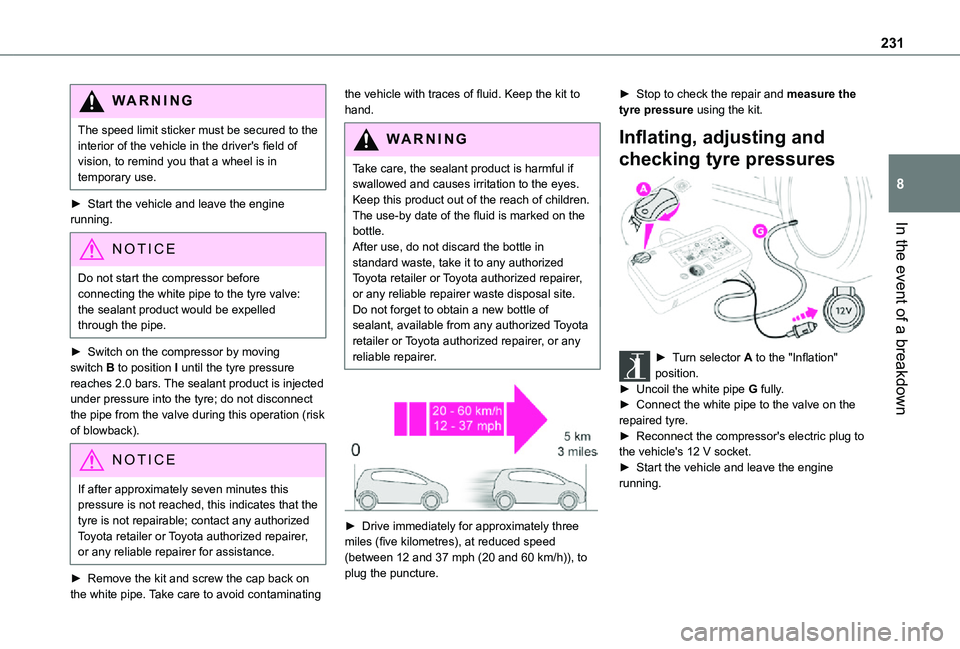
► Drive immediately for approximately three miles (five kilometres), at reduced speed
(between 12 and 37 mph (20 and 60 km/h)), to plug the puncture.
► Stop to check the repair and measure the tyre pressure using the kit.
Inflating, adjusting and
checking tyre pressures
► Turn selector A to the "Inflation" position.► Uncoil the white pipe G fully.► Connect the white pipe to the valve on the repaired tyre.► Reconnect the compressor's electric plug to
the vehicle's 12 V socket.► Start the vehicle and leave the engine running.
Page 235 of 360
235
In the event of a breakdown
8
Original tyre sizeCompact-MediumLong
215/65 R16Placing a 225 wheel in the carrier is prohibited.
There is no restriction.215/60 R17
215/60 R17 M&S
225/55 R17Placing a 215 wheel in the carrier is not recommended (risk of noise).
NOTIC E
A punctured tyre of size 215 or 225 can be placed in the carrier.
Removing a wheel
WARNI NG
Parking the vehicleImmobilise the vehicle where it does not obstruct traffic: the ground must be level, stable and non-slippery.With a manual gearbox, engage first gear then switch off the ignition to block the wheels.With an automatic gearbox, place the gear selector in position P then switch off the ignition to block the wheels. With a drive selector, place the gear selector in position P then switch off the ignition to block the wheels.Apply the parking brake, unless it is programmed to automatic mode (for an electric parking brake), and check that the indicator lamp lights up on the instrument panel.Ensure that the occupants have left the
vehicle and are located in a safe place.Never go underneath a vehicle raised using a jack; use an axle stand.With an electric parking brake, place a chock against the wheel diagonally opposite to the one being replaced.
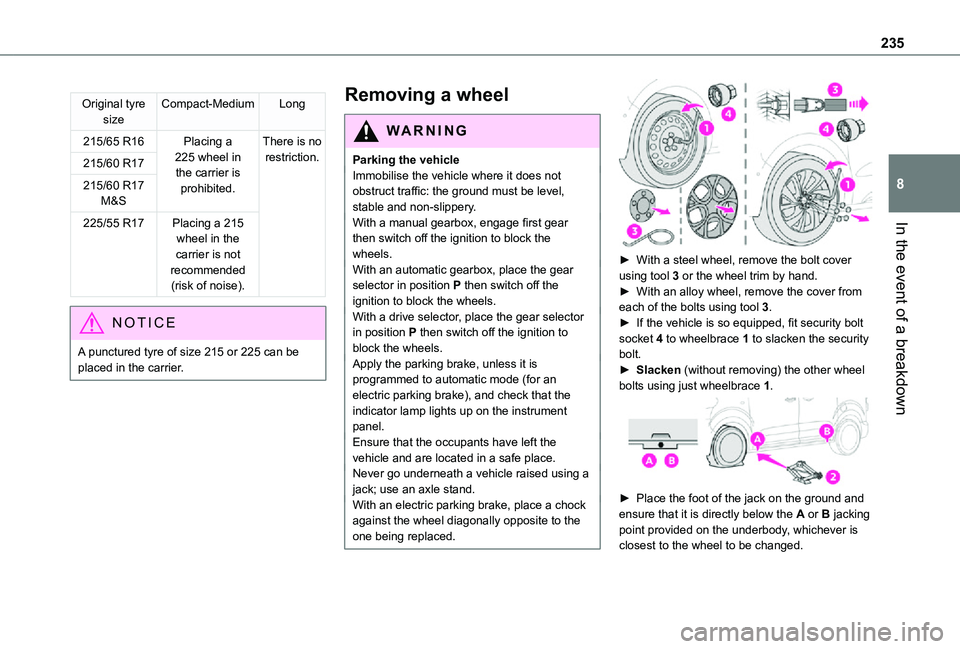
► With a steel wheel, remove the bolt cover using tool 3 or the wheel trim by hand.► With an alloy wheel, remove the cover from each of the bolts using tool 3.► If the vehicle is so equipped, fit security bolt socket 4 to wheelbrace 1 to slacken the security bolt.► Slacken (without removing) the other wheel bolts using just wheelbrace 1.
► Place the foot of the jack on the ground and ensure that it is directly below the A or B jacking point provided on the underbody, whichever is
closest to the wheel to be changed.
Page 242 of 360
242
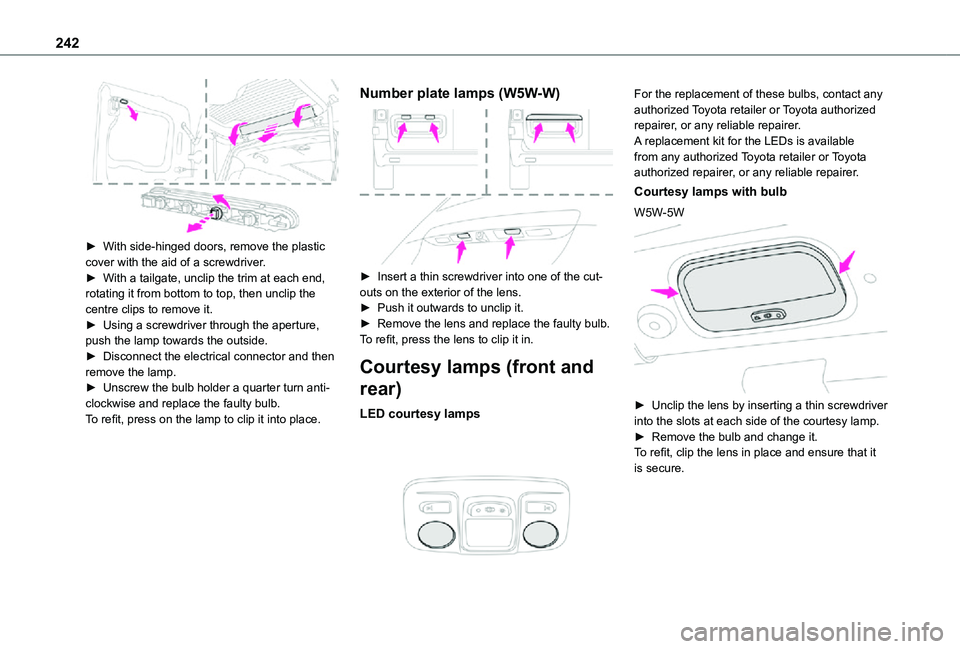
► With side-hinged doors, remove the plastic cover with the aid of a screwdriver.► With a tailgate, unclip the trim at each end, rotating it from bottom to top, then unclip the centre clips to remove it.► Using a screwdriver through the aperture, push the lamp towards the outside.► Disconnect the electrical connector and then remove the lamp.► Unscrew the bulb holder a quarter turn anti-clockwise and replace the faulty bulb.To refit, press on the lamp to clip it into place.
Number plate lamps (W5W-W)
► Insert a thin screwdriver into one of the cut-outs on the exterior of the lens.► Push it outwards to unclip it.► Remove the lens and replace the faulty bulb.To refit, press the lens to clip it in.
Courtesy lamps (front and
rear)
LED courtesy lamps
For the replacement of these bulbs, contact any authorized Toyota retailer or Toyota authorized repairer, or any reliable repairer.A replacement kit for the LEDs is available from any authorized Toyota retailer or Toyota authorized repairer, or any reliable repairer.
Courtesy lamps with bulb
W5W-5W
► Unclip the lens by inserting a thin screwdriver into the slots at each side of the courtesy lamp.► Remove the bulb and change it.
To refit, clip the lens in place and ensure that it is secure.
Page 243 of 360
243
In the event of a breakdown
8
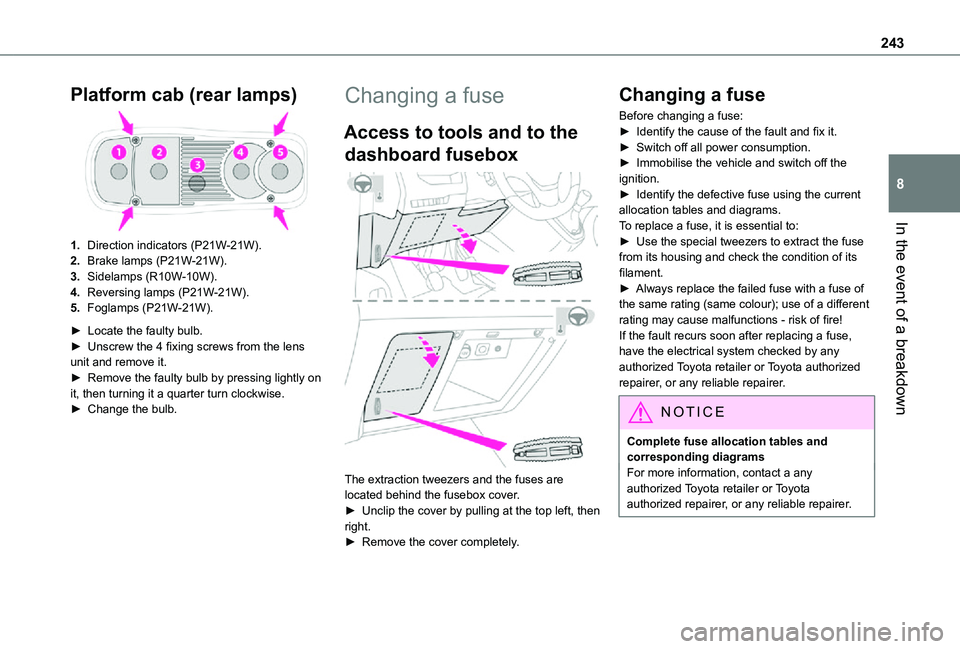
Platform cab (rear lamps)
1.Direction indicators (P21W-21W).
2.Brake lamps (P21W-21W).
3.Sidelamps (R10W-10W).
4.Reversing lamps (P21W-21W).
5.Foglamps (P21W-21W).
► Locate the faulty bulb.► Unscrew the 4 fixing screws from the lens unit and remove it.► Remove the faulty bulb by pressing lightly on it, then turning it a quarter turn clockwise.► Change the bulb.
Changing a fuse
Access to tools and to the
dashboard fusebox
The extraction tweezers and the fuses are located behind the fusebox cover.► Unclip the cover by pulling at the top left, then right.► Remove the cover completely.
Changing a fuse
Before changing a fuse:► Identify the cause of the fault and fix it.► Switch off all power consumption.► Immobilise the vehicle and switch off the ignition.► Identify the defective fuse using the current allocation tables and diagrams.To replace a fuse, it is essential to:► Use the special tweezers to extract the fuse from its housing and check the condition of its filament.► Always replace the failed fuse with a fuse of the same rating (same colour); use of a different rating may cause malfunctions - risk of fire!If the fault recurs soon after replacing a fuse, have the electrical system checked by any authorized Toyota retailer or Toyota authorized repairer, or any reliable repairer.
NOTIC E
Complete fuse allocation tables and corresponding diagramsFor more information, contact a any authorized Toyota retailer or Toyota authorized repairer, or any reliable repairer.
Page 246 of 360
246
Fuse N°Rating(Amps)Functions
F2215Horn.
F2315Right-hand main beam headlamp.
F2415Left-hand main beam headlamp.
12 V battery / Accessory
battery
Procedure for starting the engine using another battery or charging a discharged battery.
Lead-acid starter batteries
ECO
Batteries contain harmful substances such as sulphuric acid and lead.They must be disposed of in accordance with regulations and must not, in any circumstances, be discarded with household waste.Take used remote control batteries and vehicle batteries to a special collection point.
WARNI NG
Protect your eyes and face before handling the battery.All operations on the battery must be carried out in a well ventilated area and away from naked flames and sources of sparks, so as to avoid the risk of explosion or fire.Wash your hands afterwards.
Electric motor
NOTIC E
Flat accessory batteryIt is no longer possible to start the motor or recharge the traction battery.
WARNI NG
Precautions before working on the accessory batterySelect mode P, switch off the ignition, check that the instrument panel is off and that the vehicle is not plugged in.
WARNI NG
Jump-starting another vehicleDo not use the accessory battery to jump-start another vehicle or to charge another vehicle's battery.
WARNI NG
Always replace the battery with one of equivalent specification.
Access to the battery
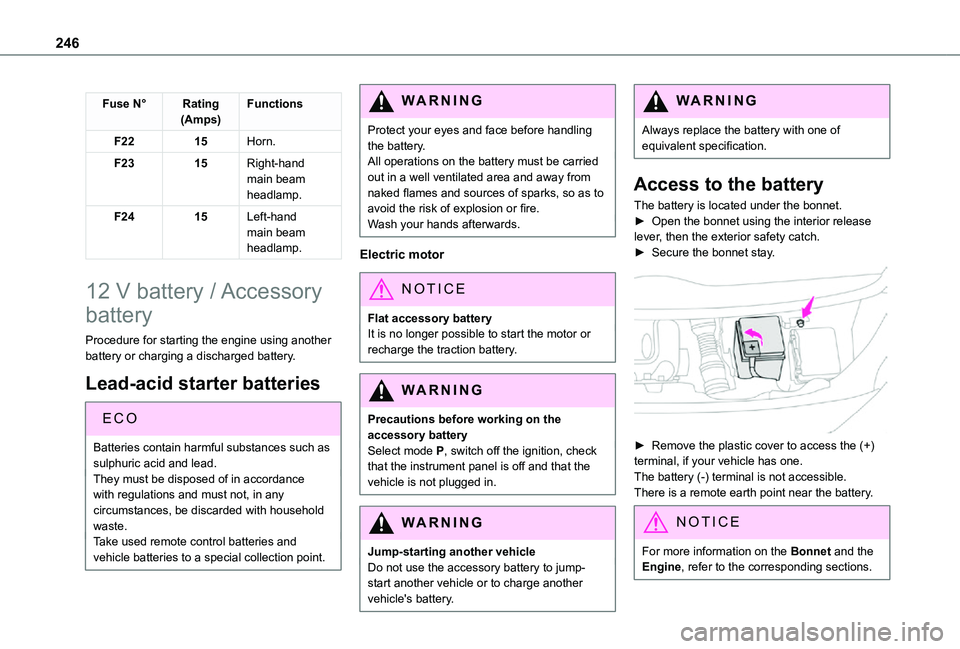
The battery is located under the bonnet.► Open the bonnet using the interior release lever, then the exterior safety catch.► Secure the bonnet stay.
► Remove the plastic cover to access the (+) terminal, if your vehicle has one.The battery (-) terminal is not accessible.There is a remote earth point near the battery.
NOTIC E
For more information on the Bonnet and the Engine, refer to the corresponding sections.
Page 301 of 360
301
TOYOTA Pro Touch with navigation system
12
Connected navigation
Connected navigation
connection
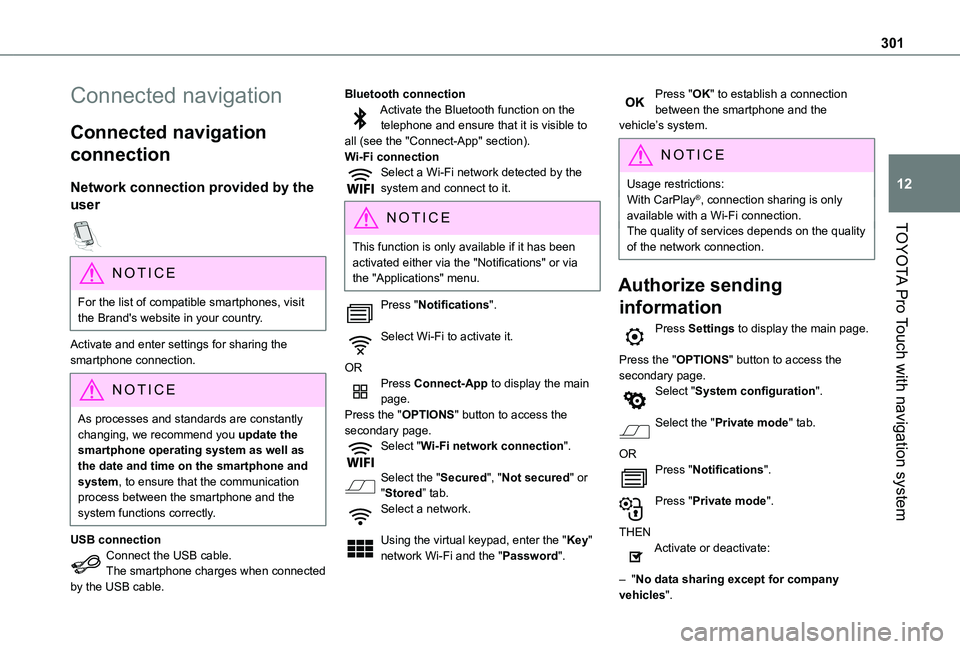
Network connection provided by the
user
NOTIC E
For the list of compatible smartphones, visit the Brand's website in your country.
Activate and enter settings for sharing the smartphone connection.
NOTIC E
As processes and standards are constantly changing, we recommend you update the smartphone operating system as well as the date and time on the smartphone and system, to ensure that the communication process between the smartphone and the system functions correctly.
USB connection
Connect the USB cable.The smartphone charges when connected by the USB cable.
Bluetooth connectionActivate the Bluetooth function on the telephone and ensure that it is visible to all (see the "Connect-App" section).Wi-Fi connectionSelect a Wi-Fi network detected by the system and connect to it.
NOTIC E
This function is only available if it has been activated either via the "Notifications" or via the "Applications" menu.
Press "Notifications".
Select Wi-Fi to activate it.
ORPress Connect-App to display the main page.Press the "OPTIONS" button to access the secondary page.Select "Wi-Fi network connection".
Select the "Secured", "Not secured" or "Stored” tab.Select a network.
Using the virtual keypad, enter the "Key" network Wi-Fi and the "Password".
Press "OK" to establish a connection between the smartphone and the vehicle’s system.
NOTIC E
Usage restrictions:With CarPlay®, connection sharing is only available with a Wi-Fi connection.The quality of services depends on the quality
of the network connection.
Authorize sending
information
Press Settings to display the main page.
Press the "OPTIONS" button to access the secondary page.Select "System configuration".
Select the "Private mode" tab.
ORPress "Notifications".
Press "Private mode".
THENActivate or deactivate:
– "No data sharing except for company vehicles".
Page 306 of 360
306
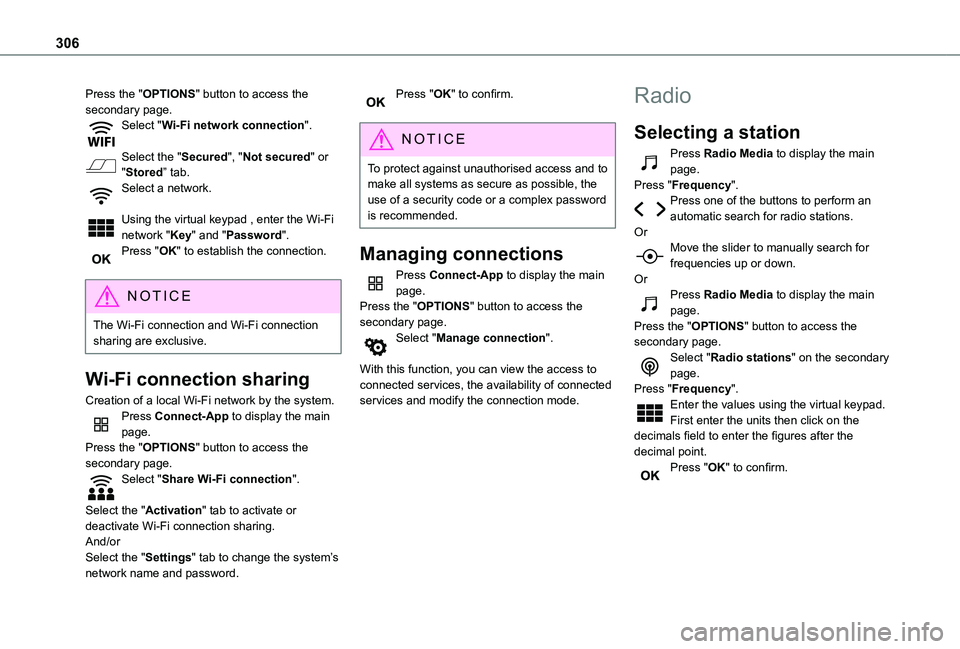
Press the "OPTIONS" button to access the secondary page.Select "Wi-Fi network connection".
Select the "Secured", "Not secured" or "Stored” tab.Select a network.
Using the virtual keypad , enter the Wi-Fi network "Key" and "Password".Press "OK" to establish the connection.
NOTIC E
The Wi-Fi connection and Wi-Fi connection sharing are exclusive.
Wi-Fi connection sharing
Creation of a local Wi-Fi network by the system.Press Connect-App to display the main page.Press the "OPTIONS" button to access the secondary page.Select "Share Wi-Fi connection".
Select the "Activation" tab to activate or deactivate Wi-Fi connection sharing.And/orSelect the "Settings" tab to change the system’s network name and password.
Press "OK" to confirm.
NOTIC E
To protect against unauthorised access and to make all systems as secure as possible, the use of a security code or a complex password is recommended.
Managing connections
Press Connect-App to display the main page.Press the "OPTIONS" button to access the secondary page.Select "Manage connection".
With this function, you can view the access to connected services, the availability of connected services and modify the connection mode.
Radio
Selecting a station
Press Radio Media to display the main page.Press "Frequency".Press one of the buttons to perform an automatic search for radio stations.OrMove the slider to manually search for frequencies up or down.OrPress Radio Media to display the main page.Press the "OPTIONS" button to access the secondary page.Select "Radio stations" on the secondary page.Press "Frequency".Enter the values using the virtual keypad.First enter the units then click on the decimals field to enter the figures after the
decimal point.Press "OK" to confirm.