Start TOYOTA RAIZE 2023 User Guide
[x] Cancel search | Manufacturer: TOYOTA, Model Year: 2023, Model line: RAIZE, Model: TOYOTA RAIZE 2023Pages: 516, PDF Size: 44.62 MB
Page 96 of 516
942-1. Instrument cluster
RAIZE_OM_General_BZ358E✽
: If equipped
⬛How to initialize settings
a Press and hold the switch while Odometer is displayed to switch to the
user customization screen
b Press the switch until appears
c While is displayed, press and hold the switch. After
appears, press and hold the switch again
After starts flashing, go back to the odometer display to see the fol-
lowing items are initialized.
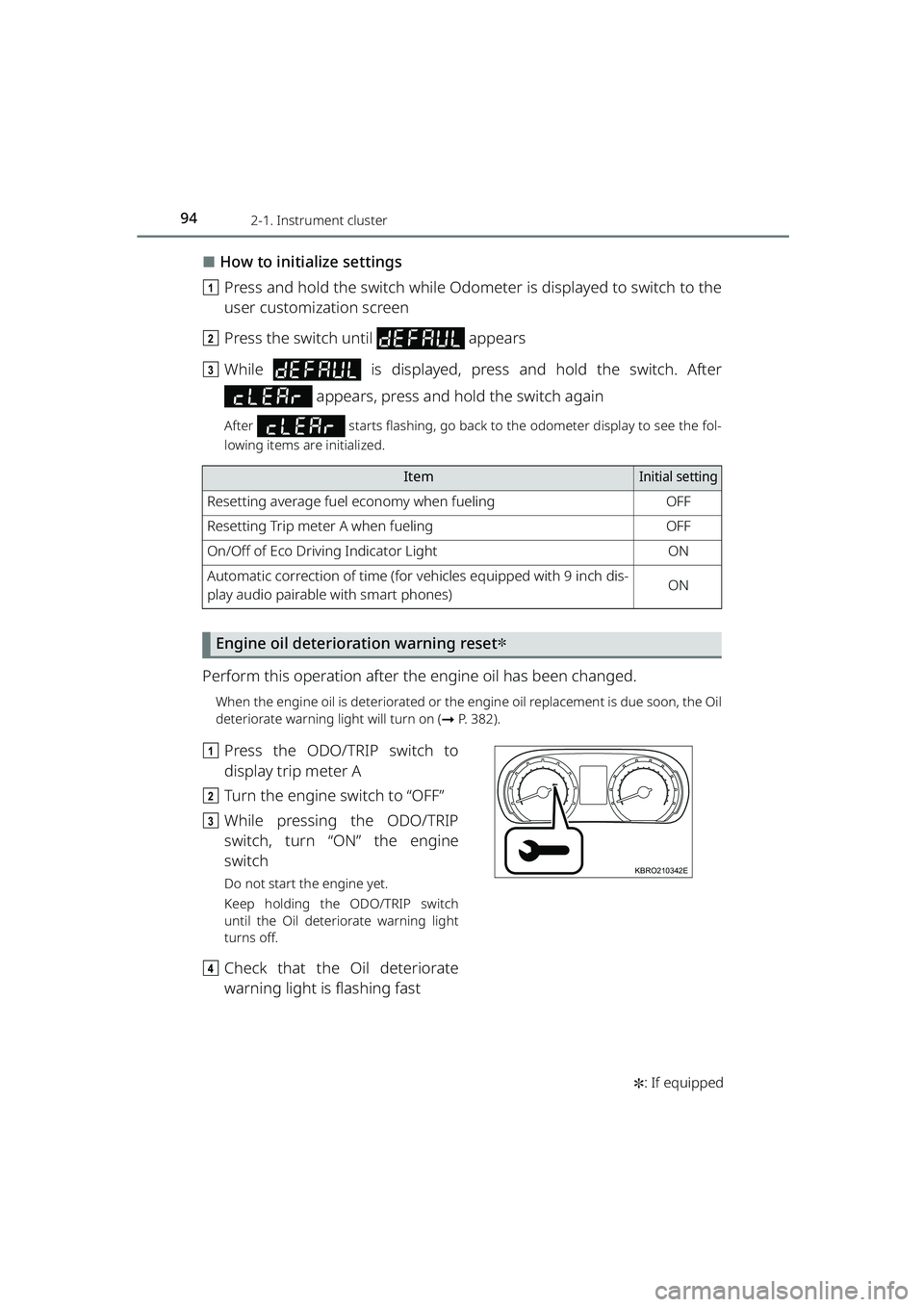
Engine oil deterioration warning reset✽
Perform this operation after th e engine oil has been changed.
When the engine oil is deteriorated or the engine oil replacement is due soon, the Oil
deteriorate warning light will turn on ( ➞P. 382).
a Press the ODO/TRIP switch to
display trip meter A
b Turn the engine switch to “OFF”
c While pressing the ODO/TRIP
switch, turn “ON” the engine
switch
Do not start the engine yet.
Keep holding the ODO/TRIP switch
until the Oil deteriorate warning light
turns off.
dCheck that the Oil deteriorate
warning light is flashing fast
ItemInitial setting
Resetting average fuel economy when fuelingOFF
Resetting Trip meter A when fuelingOFF
On/Off of Eco Driving Indicator LightON
Automatic correction of time (for vehicles equipped with 9 inch dis-
play audio pairable with smart phones)ON
KBRO210342E
RAIZE_OM_General_BZ358E.book 94 ページ 2022年5月17日 火曜日 午後1時59分
Page 107 of 516
1052-1. Instrument cluster
RAIZE_OM_General_BZ358E
Instrument cluster
2
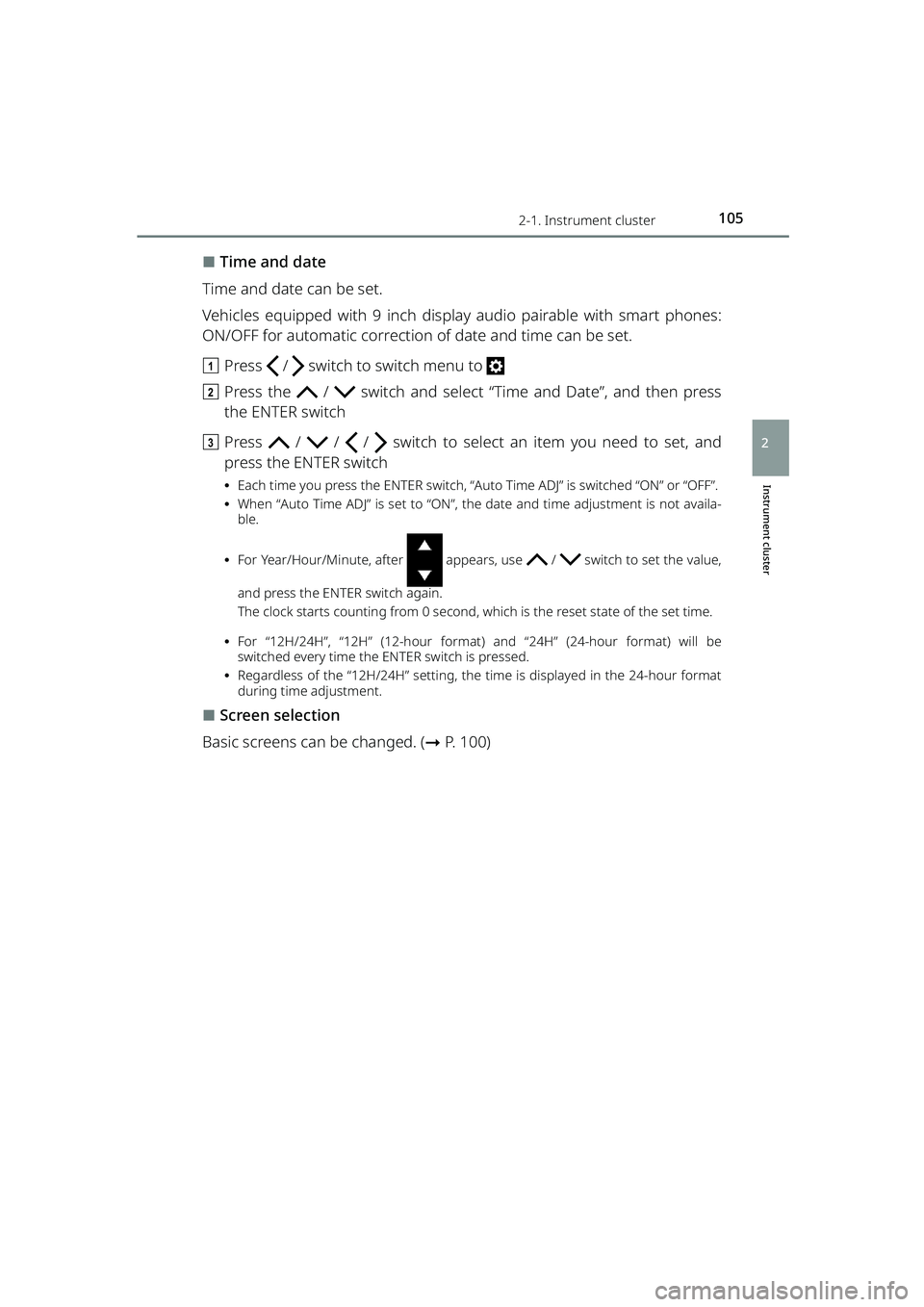
⬛Time and date
Time and date can be set.
Vehicles equipped with 9 inch display audio pairable with smart phones:
ON/OFF for automatic correction of date and time can be set.
a Press / switch to switch menu to
b Press the / switch and select “Time and Date”, and then press
the ENTER switch
c Press / / / switch to select an item you need to set, and
press the ENTER switch
⦁ Each time you press the ENTER switch, “Auto Time ADJ” is switched “ON” or “OFF”.
⦁ When “Auto Time ADJ” is set to “ON”, the date and time adjustment is not availa-
ble.
⦁ For Year/Hour/Minute, after appears, use / switch to set the value,
and press the ENTER switch again.
The clock starts counting from 0 second, which is the reset state of the set time.
⦁ For “12H/24H”, “12H” (12-hour format) and “24H” (24-hour format) will be
switched every time the ENTER switch is pressed.
⦁ Regardless of the “12H/24H” setting, the time is displayed in the 24-hour format
during time adjustment.
⬛Screen selection
Basic screens can be changed. ( ➞P. 100)
RAIZE_OM_General_BZ358E.book 105 ページ 2022年5月17日 火曜日 午後1時59分
Page 117 of 516
1152-1. Instrument cluster
RAIZE_OM_General_BZ358E
Instrument cluster
2
⬛“Settings” operation
⚫The operation will be temporarily suspended if any of the following condi-
tions occur during the “Settings” operation.
⦁When warning messages are displayed
⦁ When the vehicle starts driving
⚫If the settings cannot be changed even after performing the operation, the
“Settings Failed” message will appear.
⬛When battery terminals are connected/disconnected
Clock data is reset when battery terminals are connected or disconnected.
⬛Liquid crystal display
➞ P. 8 5
⬛About notification screen
⚫Notification screen is displayed once a day.
⚫Birthday, and Anniversary day set to Fe bruary 29 are displayed on March 1,
except the leap year.
WARNING
⬛Caution while driving
For safety reasons, do not use the oper ation button while driving. Doing so is
dangerous and may lead to an accident such as incorrect operation of the
steering wheel.
Stop the vehicle to operate it. While drivin g, keep the time that you look at the
display to the minimum necessary.
⬛When changing settings
➞ P. 9 7
NOTICE
⬛Screen display at low temperatures
➞P. 9 7
⬛When changing display settings
➞P. 9 7
⬛About cruising distance
➞P. 9 7
RAIZE_OM_General_BZ358E.book 115 ページ 2022年5月17日 火曜日 午後1時59分
Page 123 of 516
121
RAIZE_OM_General_BZ358E✽
: If equipped
Operation of each component
3
3-2. Opening, closing and locking the doors
Key-free system✽
Function overview
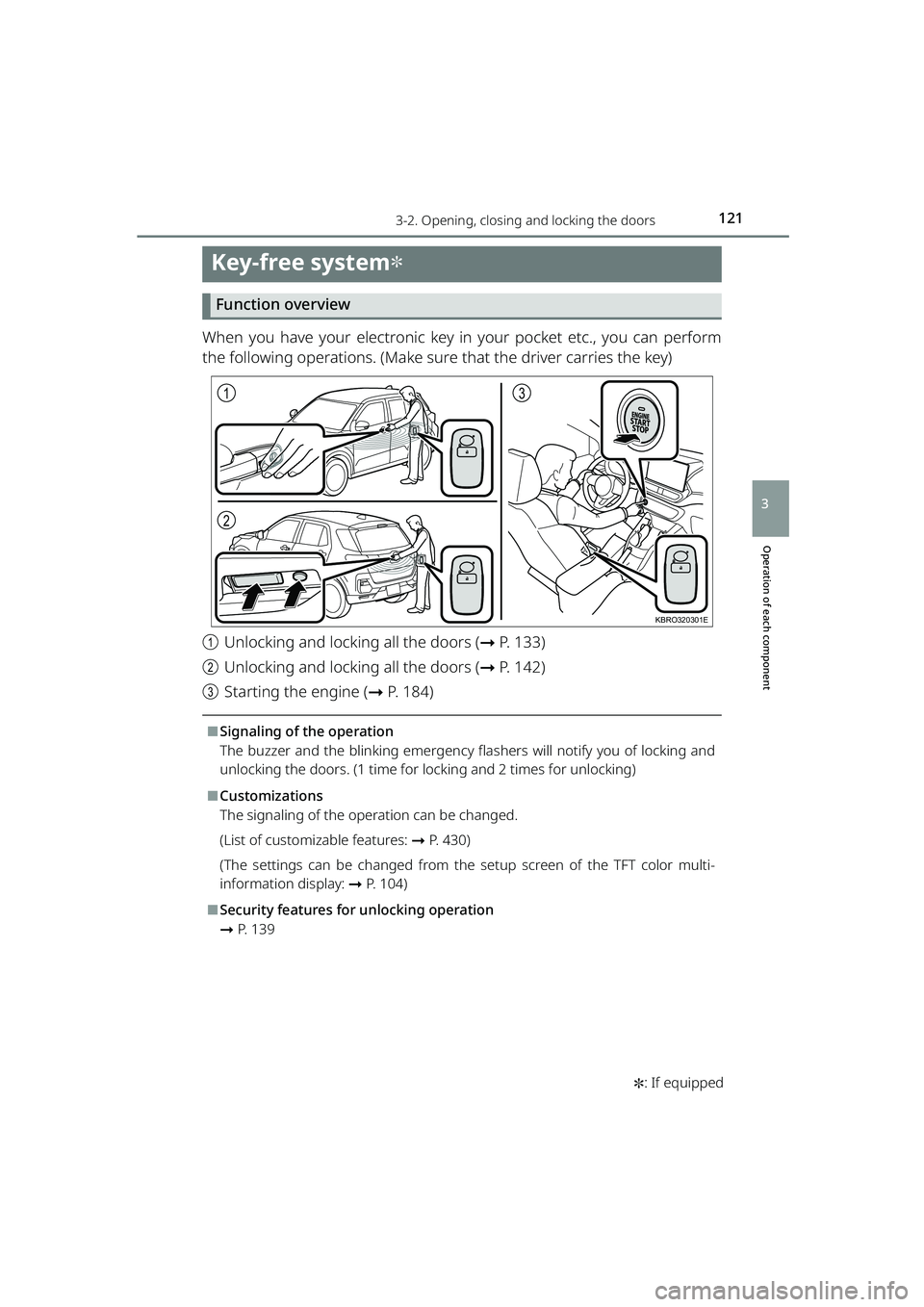
When you have your electronic key in your pocket etc., you can perform
the following operations. (Make sure that the driver carries the key)
aUnlocking and locking all the doors ( ➞P. 133)
b Unlocking and locking all the doors ( ➞P. 142)
c Starting the engine ( ➞P. 184)
⬛Signaling of the operation
The buzzer and the blinking emergency flas hers will notify you of locking and
unlocking the doors. (1 time for locking and 2 times for unlocking)
⬛Customizations
The signaling of the operation can be changed.
(List of customizable features: ➞ P. 430)
(The settings can be changed from the setup screen of the TFT color multi-
information display: ➞ P. 104)
⬛Security features for unlocking operation
➞P. 1 3 9
1
2
3
KBRO320301E
RAIZE_OM_General_BZ358E.book 121 ページ 2022年5月17日 火曜日 午後1時59分
Page 124 of 516
1223-2. Opening, closing and locking the doors
RAIZE_OM_General_BZ358E
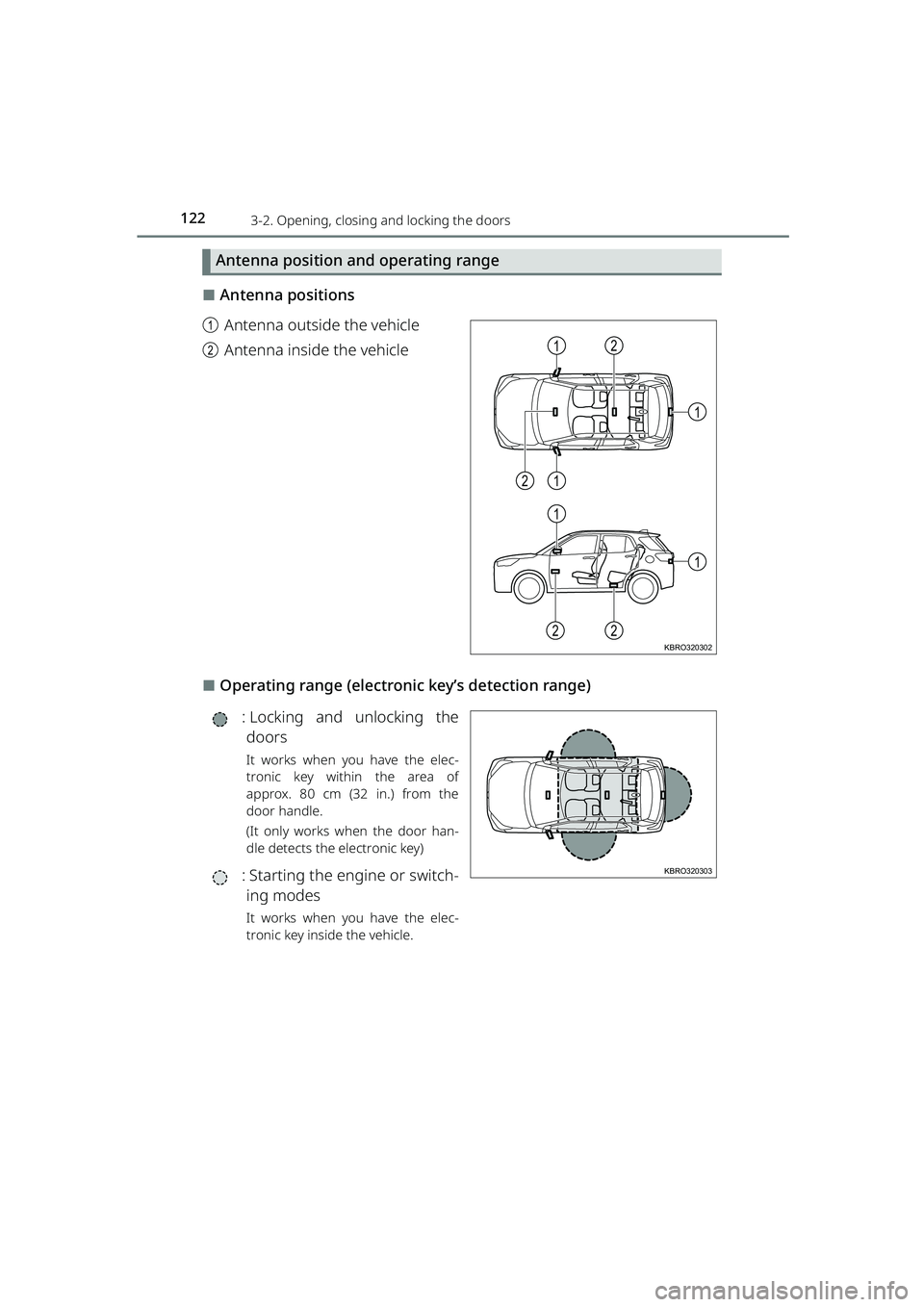
Antenna position and operating range
⬛Antenna positions
a Antenna outside the vehicle
b Antenna inside the vehicle
⬛Operating range (electronic key’s detection range)
: Locking and unlocking thedoors
It works when you have the elec-
tronic key within the area of
approx. 80 cm (32 in.) from the
door handle.
(It only works when the door han-
dle detects the electronic key)
: Starting the en gine or switch-
ing modes
It works when you have the elec-
tronic key inside the vehicle.
1
1
1
21
2
1
22KBRO320302
KBRO320303
RAIZE_OM_General_BZ358E.book 122 ページ 2022年5月17日 火曜日 午後1時59分
Page 128 of 516
1263-2. Opening, closing and locking the doors
RAIZE_OM_General_BZ358E
⚫When the electronic key is carried with products that transmit radio waves as
follows
⦁ Wireless communication devices such as radios, mobile phones, and cord-
less telephones
⦁ Electronic keys or wireless keys (that emit radio waves) of other vehicles
⦁ Computers or portable information terminals (electronic organizers)
⦁ Digital audio players
⦁ Portable gaming devices
⚫When a metal-containing film is pasted on the rear window glass
⚫When the electronic key is placed near electronic devices such as a charger
⬛Important information
⚫Even when the electronic key is placed in the operating (detection) range, it
may not work properly in the following situations.
⦁ The electronic key is located too close to the door windows or door han-
dles when you lock or unlock the doors or located near the ground or at a
high place
⦁ The electronic key is placed on the instrument panel or the floor, placed
inside the door pockets or in the gl ove box when you start the engine or
switch the modes
⚫Even when you have the electronic key in your pocket, the key may not work
properly depending on the position or shape of your pocket. (Operating
range: ➞P. 122)
⚫Depending on the signal conditions, the electronic key could be trapped
inside the vehicle if you step outside of your vehicle by leaving the electronic
key on the instrument panel or near the door pockets since the external
antenna could detect the signal and lock the doors.
⚫As long as the electronic key is located within the operating range, the doors
can be locked and unlocked by anyone besides the person who is carrying
the key. Note that the doors other th an those detect the electronic key can-
not be unlocked in this case.
Even when the electronic key is located near the door that is opposite from
the unlocked door, the opposite door can detect the electronic key and get
unlocked.
⚫If the electronic key is located near th e door window outside the vehicle, the
key could start the engine sometimes.
RAIZE_OM_General_BZ358E.book 126 ページ 2022年5月17日 火曜日 午後1時59分
Page 130 of 516
1283-2. Opening, closing and locking the doors
RAIZE_OM_General_BZ358E
⬛Important points when locking the doors
During an automatic car wash, the vehicl e’s internal buzzer may sound if water
splashes on the door handle while the electronic key is left inside the vehicle.
⬛Important points when unlocking the doors
⚫When you pull the door handle while operating the door handle switch, the
door may not get unlocked. In that case, restore the door handle to the orig-
inal position and operate the switch again (except for the back door). When
you verify that the door has been unlocked, pull the door handle.
⚫When another electronic key is placed within the operating range, it may
take longer to unlock the door from the time when you operate the switch
on the door handle.
⬛Leaving the vehicle unused for a long period
⚫To prevent theft, keep the electronic key away from the vehicle for approx. 3
m (9.8 ft.).
⚫You can also disable the key-free system beforehand.
Contact your Toyota dealer for further information.
⬛Starting the system normally
Make sure to carry the electronic ke y with you when you start the system.
When you start the system from outside the vehicle, be careful not to keep the
electronic key too close to the vehicle.
Depending on the electronic key’s position or how you hold it when starting
the system, the key may not be detected correctly, preventing the system from
starting normally. (It could cause the al arm to go off unexpectedly or the door
lock prevention func tion may not work. : ➞P. 139)
⬛When the key-free system does not work properly
⚫Locking and unlocking doors: ➞ P. 4 0 6
⚫Starting the engine: ➞P. 4 0 6
⬛Low battery
⚫The standard battery life is between 1 and 2 years.
⚫The battery still depletes without usin g the wireless remote control. Since
the electronic key is constantly receiving radio waves, the battery depletes
even when it is not in use. If you encounter any of the following situations,
the key may be running out of battery. Replace it with a new battery.
⦁ The key-free system or wireless remote control will not start
⦁ The operating range has become narrower
⦁ The LED of the electronic key will not light
RAIZE_OM_General_BZ358E.book 128 ページ 2022年5月17日 火曜日 午後1時59分
Page 131 of 516
1293-2. Opening, closing and locking the doors
RAIZE_OM_General_BZ358E
Operation of each component
3
⚫When the remaining battery becomes lo w, a warning buzzer will sound from
inside the vehicle when the engine is stopped. ( ➞P. 394)
⚫To prevent significant battery drainage, do not store the electronic key within
1 m (3.3 ft.) from the following electr onic devices that are known to emit a
magnetic field.
⦁ TV
⦁ Audio system
⦁ Personal computers
⦁ AC adapters
⦁ Mobile phones, cordless phones, and chargers
⦁ Desk lamps
⦁ Medical electronic devices such as lo w-frequency electric therapy equip-
ment
⦁ Liquid crystal display
⦁ Motors
⦁ Induction cookers
⚫Do not leave electronic keys inside or near the vehicle. Since the electronic
key and the vehicle are constantly communicating with one another, it
speeds up the battery draining. When they enter in the constant communi-
cation state, the indicator of the electro nic key starts blinking. Keep the elec-
tronic key away from the vehic le until the indicator turns off.
⚫If you do not plan on using the electr onic key for a long time, set the key to
the battery-saving mode to mini mize battery consumption. (➞P. 125)
⬛Running out of the battery
➞P. 3 4 4
⬛Functions configurable by Toyota dealers
Toyota dealers can deactivate the key-free system.
(List of customizable features: ➞ P. 430)
⬛When the key-free system was deactivated by a Toyota dealer
⚫Locking and unlocking doors: The doors can be locked and unlocked using
the wireless function or the emergency key. ( ➞P. 133, 406)
⚫Starting the engine and swit ching the engine switch mode: ➞ P. 4 0 6
⚫Stopping the engine: ➞P. 1 8 5
RAIZE_OM_General_BZ358E.book 129 ページ 2022年5月17日 火曜日 午後1時59分
Page 163 of 516
1613-5. Opening and closing the windows
RAIZE_OM_General_BZ358E
Operation of each component
3
⬛Overheat protection function of the power window motor
The power window motor has a built-in overheat protection function. If the
power window motor continues to run at a high load, the overheat protection
function may get activated and temporarily stops the power window opera-
tion. After a dozen seconds, it starts working normally again.
⬛When the driver’s door window will not close
When the driver’s door window will not close all the way due to the jam protec-
tion function being activated abnormall y, perform the following operations
using the window switch on the driver’s door.
a Stop the vehicle and turn the engine switch to “ON”
b Pull the window switch on the driver’s door until it reaches the “automatic
full close” position, close the door wind ow all the way, and keep holding the
switch for 6 seconds
If you release your hand from the swit ch while the door window is moving, you
need to start over from the beginning.
If these operations do not close the door window all the way and the window
still moves in a reverse direction, bring your vehicle to a Toyota dealer for
inspection.
⬛Reconnecting the battery
Follow the steps described below and configure the initial settings to ensure
proper operation of the power windows.
a Turn the engine switch to “ON”
b Hold down the window switch of the driver’s door to open the window all
the way
c Pull the window switch on the driver’s door until it reaches the “automatic
full close” position, close the door wind ow all the way, and keep holding the
switch for 2 seconds
If you release your hands from the switch while the door window is moving,
you need to start over from the step b.
RAIZE_OM_General_BZ358E.book 161 ページ 2022年5月17日 火曜日 午後1時59分
Page 168 of 516
166
RAIZE_OM_General_BZ358E
4-1. Driving the vehicle
Driving the vehicle
The following procedures should be observed to ensure safe driving:
Starting the engine
➞ P. 180, 184
Starting the vehicle
▶Continuously variable transmission vehicles
a With the brake pedal depressed, set the shift lever to D ( ➞P. 189)
b Release the parking brake ( ➞P. 197)
c Gradually release the brake pedal and gently depress the accelerator
pedal to start off the vehicle
▶Manual transmission vehicles
a With the clutch pedal depressed, set the shift lever to the gear 1
(➞ P. 194)
b Release the parking brake ( ➞P. 197)
c Gradually release your foot from the clutch pedal and gently depress
the accelerator pedal to start moving the vehicle
Stopping the vehicle
▶Continuously variable transmission vehicles
a With the shift lever in D, depress the brake pedal
b If necessary, apply the parking brake
If the vehicle is to be stopped for an extended period of time, set the shift lever to P
or N. ( ➞P. 189)
▶Manual transmission vehicles
a Depress the brake pedal while stepping on the clutch pedal
b If necessary, apply the parking brake
If you plan to stop the vehicle for an extended period, set the shift lever to N.
(➞ P. 194)
RAIZE_OM_General_BZ358E.book 166 ページ 2022年5月17日 火曜日 午後1時59分