buzzer TOYOTA RAIZE 2023 Owner's Manual
[x] Cancel search | Manufacturer: TOYOTA, Model Year: 2023, Model line: RAIZE, Model: TOYOTA RAIZE 2023Pages: 516, PDF Size: 44.62 MB
Page 215 of 516
2134-5. Using the driving support systems
RAIZE_OM_General_BZ358E
Driving
4
How to set up
Go to the “Settings” menu on the TFT color multi-information display, you
can change the settings of BSM function/RCTA function ON (enabled)/OFF
(disabled). (➞P. 109)
⬛Visibility of the outside rear view mirror indicators
⚫It may be difficult to see if the outsid e rear view mirror indicators are lit or
flashing in the following cases:
⦁ Under strong sunlight
⦁ The outside rear view mirrors are covered with ice or snow
⬛Buzzers
⚫It may be difficult to hear the buzzers if there is a loud noise around, such as
high volume audio.
⬛When the TFT color multi-information display shows “BSM Radar Blocked
Temporarily Unavailable”
It is possible that the rear bumper near the sensors is covered with ice, snow,
or mud. If you remove the ice, snow, or mud covering the rear bumper near
the sensors, the function will start working normally again.
⬛When the TFT color multi-information display shows “BSM Temporary
Unavailable”
If you use the function in an extremely hot or cold environment or if the bat-
tery voltage is lower or higher than th e specified level, the system operation
will be temporarily stopped. If the BSM OFF indicator or the RCTA OFF indicator
remains lit for a long time, have the vehi cle inspected at your Toyota dealer.
⬛When the TFT color multi-information display shows “BSM Malfunction
Visit Your Dealer”
It is possible that the sensors have failed or their positions or orientations are
off. Have the vehicle inspec ted at your Toyota dealer.
⬛Customizations
The BSM and RCTA settings can be changed.
(List of customizable features: ➞ P. 430)
(The settings can be changed from the setup screen of the TFT color multi-
information display: ➞ P. 104)
RAIZE_OM_General_BZ358E.book 213 ページ 2022年5月17日 火曜日 午後1時59分
Page 217 of 516
2154-5. Using the driving support systems
RAIZE_OM_General_BZ358E
Driving
4
BSM function
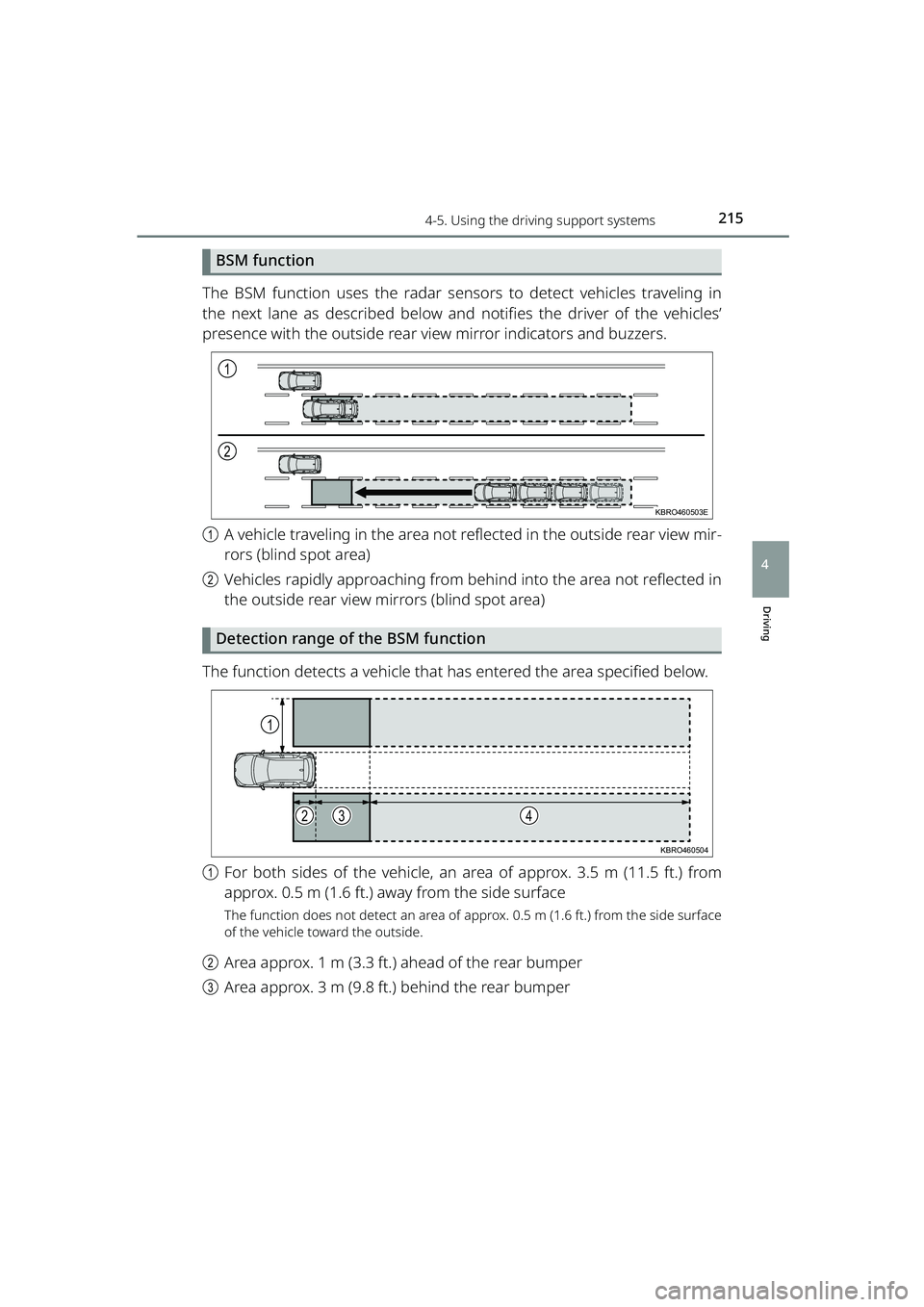
The BSM function uses the radar sensors to detect vehicles traveling in
the next lane as described below and notifies the driver of the vehicles’
presence with the outside rear view mirror indicators and buzzers.
a A vehicle traveling in the area not re flected in the outside rear view mir-
rors (blind spot area)
b Vehicles rapidly approaching from behind into the area not reflected in
the outside rear view mirrors (blind spot area)
Detection range of the BSM function
The function detects a vehicle that has entered the area specified below.
a For both sides of the vehicle, an ar ea of approx. 3.5 m (11.5 ft.) from
approx. 0.5 m (1.6 ft.) away from the side surface
The function does not detect an area of a pprox. 0.5 m (1.6 ft.) from the side surface
of the vehicle toward the outside.
b Area approx. 1 m (3.3 ft.) ahead of the rear bumper
c Area approx. 3 m (9.8 ft.) behind the rear bumper
1
2
KBRO460503E
1
234
KBRO460504
RAIZE_OM_General_BZ358E.book 215 ページ 2022年5月17日 火曜日 午後1時59分
Page 220 of 516
2184-5. Using the driving support systems
RAIZE_OM_General_BZ358E
⦁When driving up and down on a series of steep slopes or driving on
dented areas of a road
⦁ When driving through a sharp curve or continuous curves, or driving in an
area with ups and downs
⦁ While the tires are slipping (spinning)
⦁ When there is not enough distance between your vehicle and the follow-
ing vehicle
⦁ When the vehicle has accessories such as a bicycle carrier installed in the
rear side
⦁ When the vehicle is causing rain or snow to whirl up behind
RCTA function
⬛Activation of the RCTA function
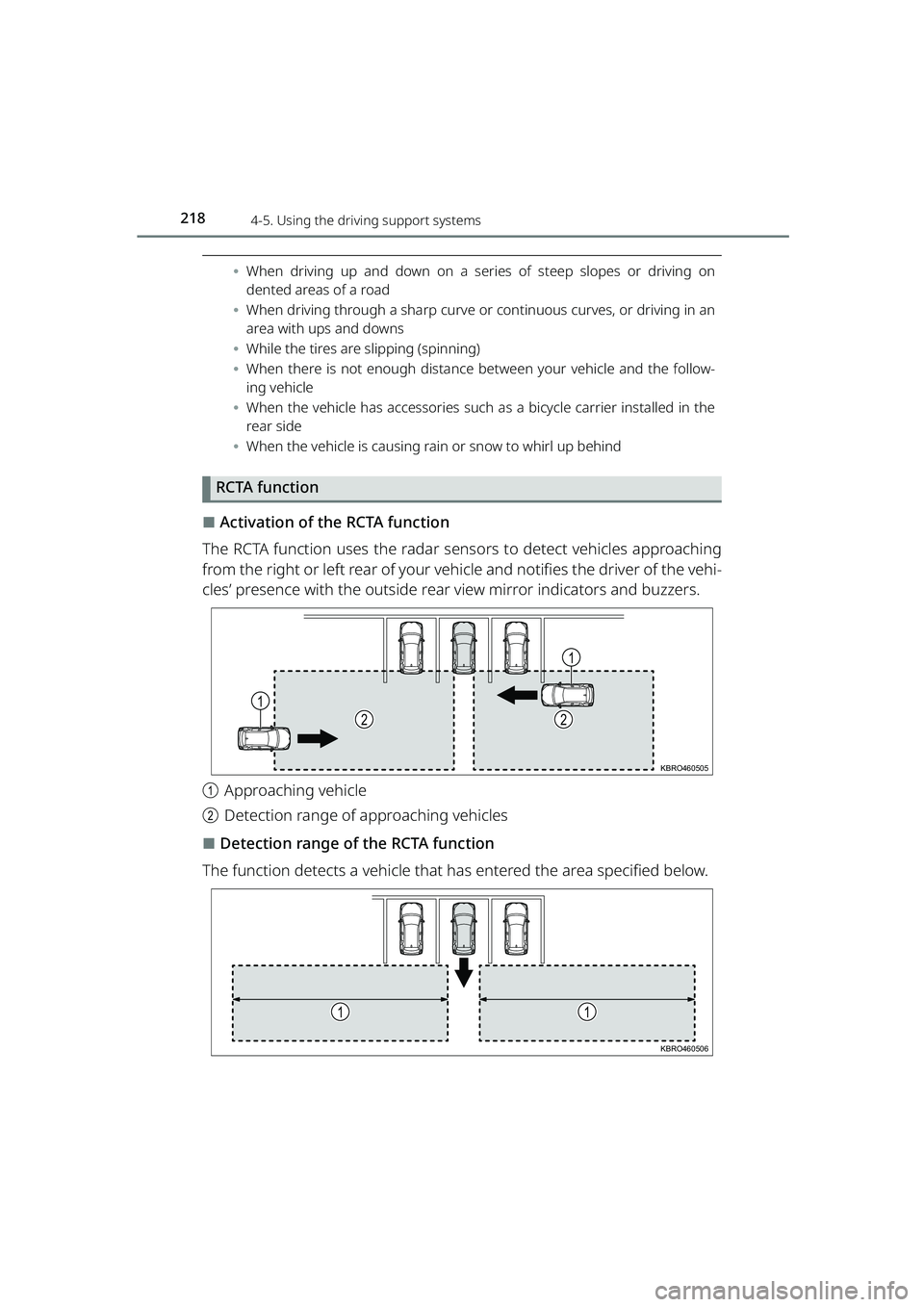
The RCTA function uses the radar sens ors to detect vehicles approaching
from the right or left rear of your ve hicle and notifies the driver of the vehi-
cles’ presence with the outside rear view mirror indicators and buzzers.
a Approaching vehicle
b Detection range of approaching vehicles
⬛Detection range of the RCTA function
The function detects a vehicle that has entered the area specified below.
1
22
1
KBRO460505
11
KBRO460506
RAIZE_OM_General_BZ358E.book 218 ページ 2022年5月17日 火曜日 午後1時59分
Page 221 of 516
2194-5. Using the driving support systems
RAIZE_OM_General_BZ358E
Driving
4
For the vehicle traveling fast, the warning buzzer will sound at a position
further away from the vehicle.
⬛Activation conditions of the RCTA function
The RCTA function will be activated when all of the following conditions are sat-
isfied:
⚫In the TFT color multi-info rmation display settings (➞P. 109), “RCTA” is set to
“ON”
⚫When the shift lever is set to R
⚫When the RCTA OFF indicator is off
⚫When your vehicle’s speed is approx. 8 km/h (5 mph) or less
⚫When the approaching vehicle’s speed is approx. between 8 and 28 km/h (5
and 18 mph)
⬛Situations where the RCTA function may not work properly
The RCTA function may not detect vehicles that fit the following description or
non-vehicle objects:
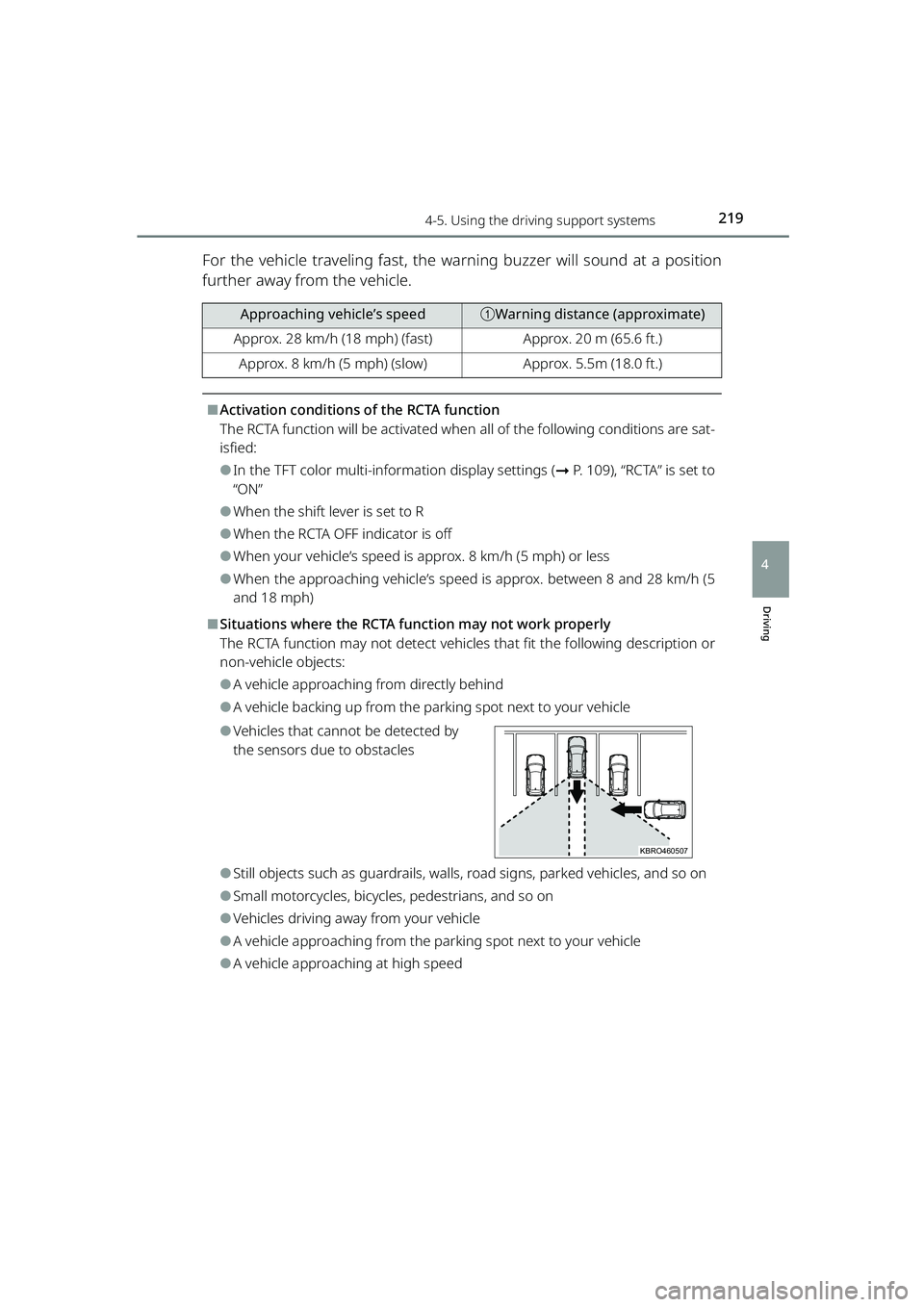
⚫A vehicle approaching from directly behind
⚫A vehicle backing up from the parking spot next to your vehicle
⚫Vehicles that cannot be detected by
the sensors due to obstacles
⚫Still objects such as guardrails, walls, road signs, parked vehicles, and so on
⚫Small motorcycles, bicycles, pedestrians, and so on
⚫Vehicles driving away from your vehicle
⚫A vehicle approaching from the parki ng spot next to your vehicle
⚫A vehicle approaching at high speed
Approaching vehicle’s speedaWarning distance (approximate)
Approx. 28 km/h (18 mph) (fast)Approx. 20 m (65.6 ft.)
Approx. 8 km/h (5 mph) (slow)Approx. 5.5m (18.0 ft.)
KBRO460507
RAIZE_OM_General_BZ358E.book 219 ページ 2022年5月17日 火曜日 午後1時59分
Page 223 of 516
2214-5. Using the driving support systems
RAIZE_OM_General_BZ358E✽
: If equipped
Driving
4
Front corner sensors✽/Reverse sensors✽
The front corner sensors and reverse sensors are the system that
uses the sonar to recognize the approximate distance between the
vehicle and the obstacle, and that notifies the driver of its presence
by the buzzer and display indica tors when the vehicle speed is
approx. 10 km/h (6 mph) or less.
Sonar positions and types
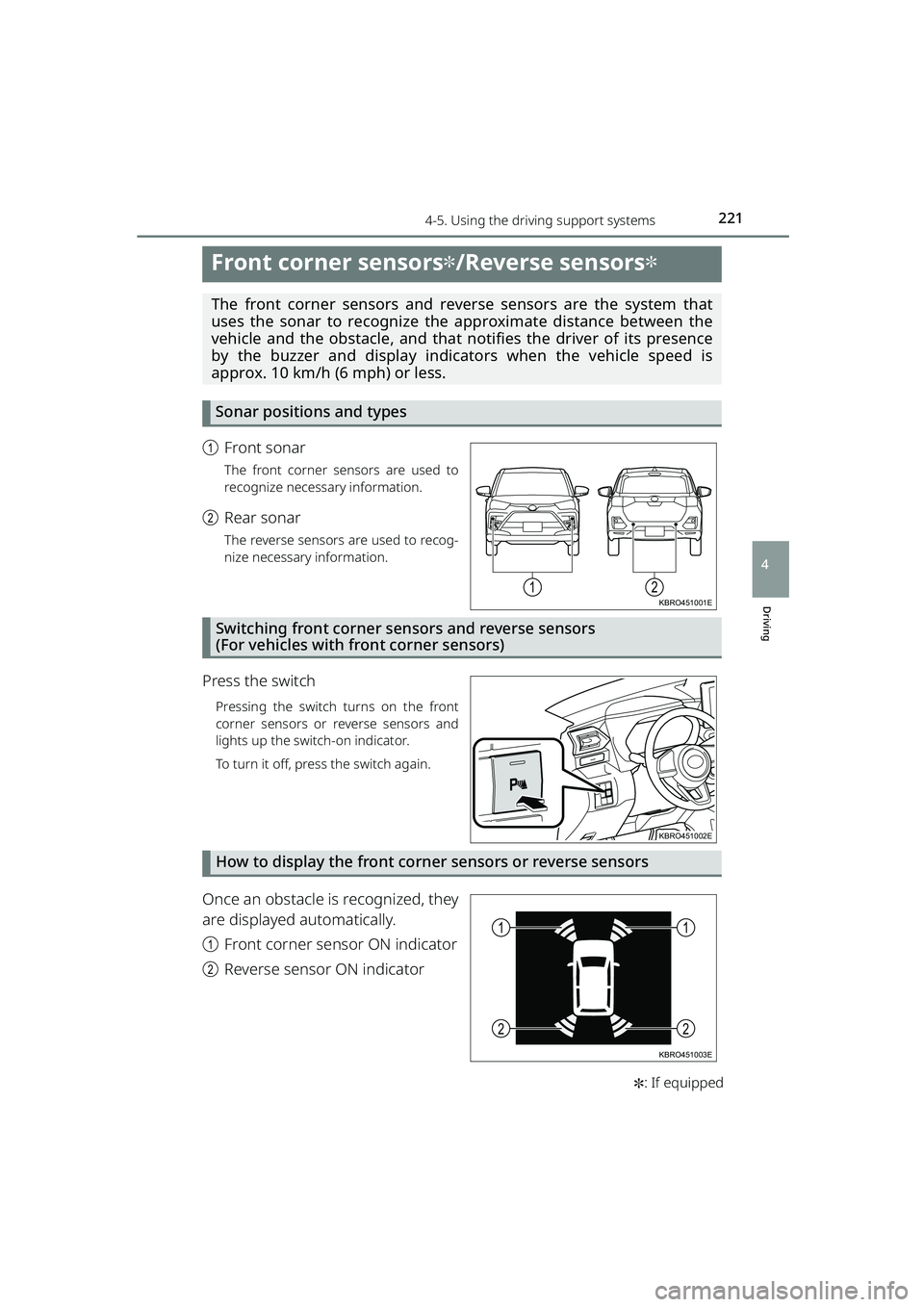
a Front sonar
The front corner sensors are used to
recognize necessary information.
bRear sonar
The reverse sensors are used to recog-
nize necessary information.
Switching front corner sensors and reverse sensors
(For vehicles with front corner sensors)
Press the switch
Pressing the switch turns on the front
corner sensors or reverse sensors and
lights up the switch-on indicator.
To turn it off, press the switch again.
How to display the front corner sensors or reverse sensors
Once an obstacle is recognized, they
are displayed automatically.
aFront corner sensor ON indicator
b Reverse sensor ON indicator
12KBRO451001E
KBRO451002E
11
22
KBRO451003E
RAIZE_OM_General_BZ358E.book 221 ページ 2022年5月17日 火曜日 午後1時59分
Page 224 of 516
2224-5. Using the driving support systems
RAIZE_OM_General_BZ358E
How to read the distance display
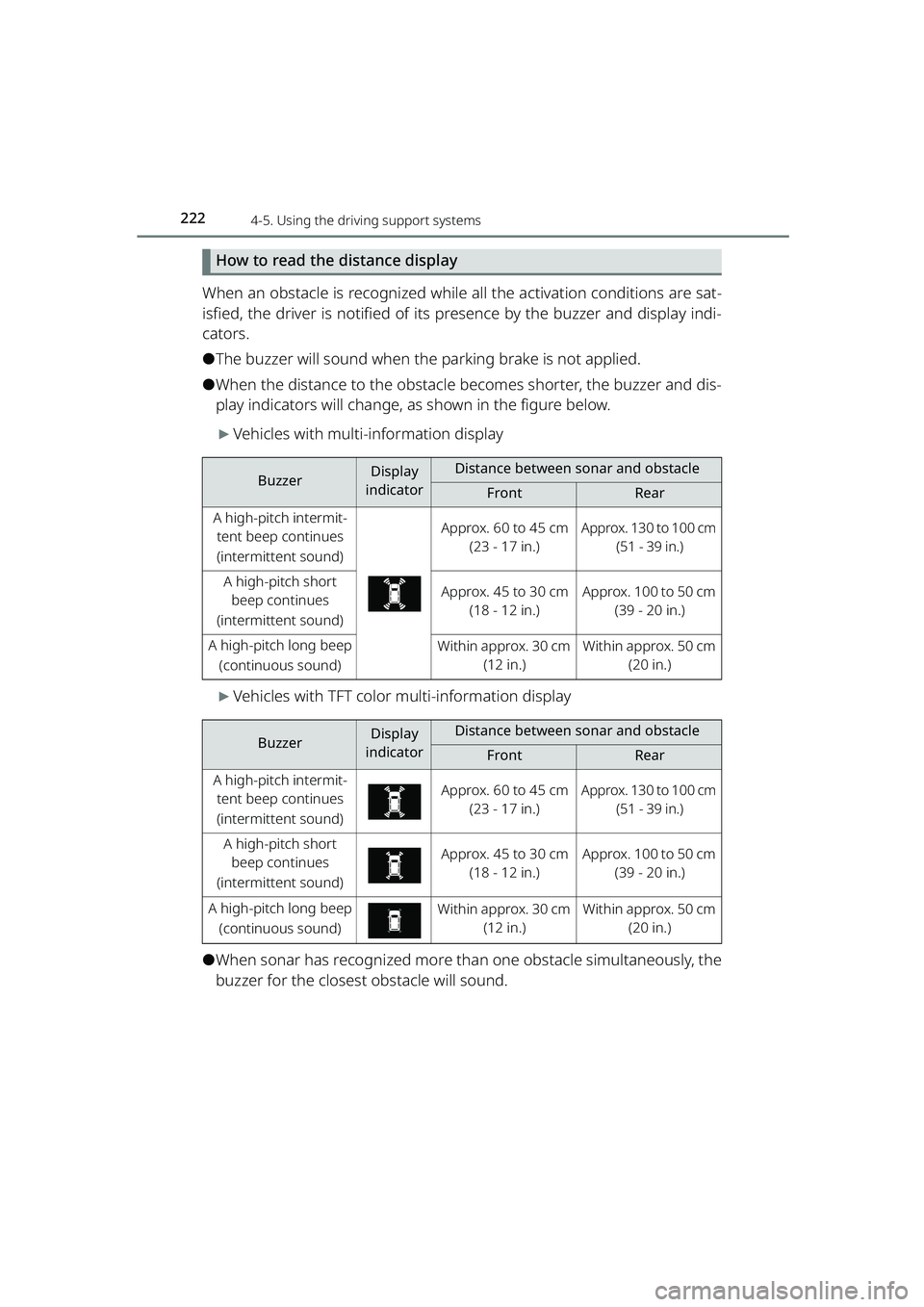
When an obstacle is recognized while all the activation conditions are sat-
isfied, the driver is notified of its presence by the buzzer and display indi-
cators.
⚫The buzzer will sound when the parking brake is not applied.
⚫When the distance to the obstacle becomes shorter, the buzzer and dis-
play indicators will change, as shown in the figure below.
▶Vehicles with multi-information display
▶Vehicles with TFT color multi-information display
⚫When sonar has recognized more than one obstacle simultaneously, the
buzzer for the closest obstacle will sound.
BuzzerDisplay
indicatorDistance between sonar and obstacle
FrontRear
A high-pitch intermit- tent beep continues
(intermittent sound)Approx. 60 to 45 cm (23 - 17 in.)Approx. 130 to 100 cm (51 - 39 in.)
A high-pitch short beep continues
(intermittent sound)Approx. 45 to 30 cm (18 - 12 in.)Approx. 100 to 50 cm (39 - 20 in.)
A high-pitch long beep
(continuous sound)Within approx. 30 cm (12 in.)Within approx. 50 cm (20 in.)
BuzzerDisplay
indicatorDistance between sonar and obstacle
FrontRear
A high-pitch intermit- tent beep continues
(intermittent sound)Approx. 60 to 45 cm (23 - 17 in.)Approx. 130 to 100 cm (51 - 39 in.)
A high-pitch short beep continues
(intermittent sound)Approx. 45 to 30 cm (18 - 12 in.)Approx. 100 to 50 cm (39 - 20 in.)
A high-pitch long beep
(continuous sound)Within approx. 30 cm (12 in.)Within approx. 50 cm (20 in.)
RAIZE_OM_General_BZ358E.book 222 ページ 2022年5月17日 火曜日 午後1時59分
Page 225 of 516
2234-5. Using the driving support systems
RAIZE_OM_General_BZ358E
Driving
4
Sonar’s obstacle recognition range
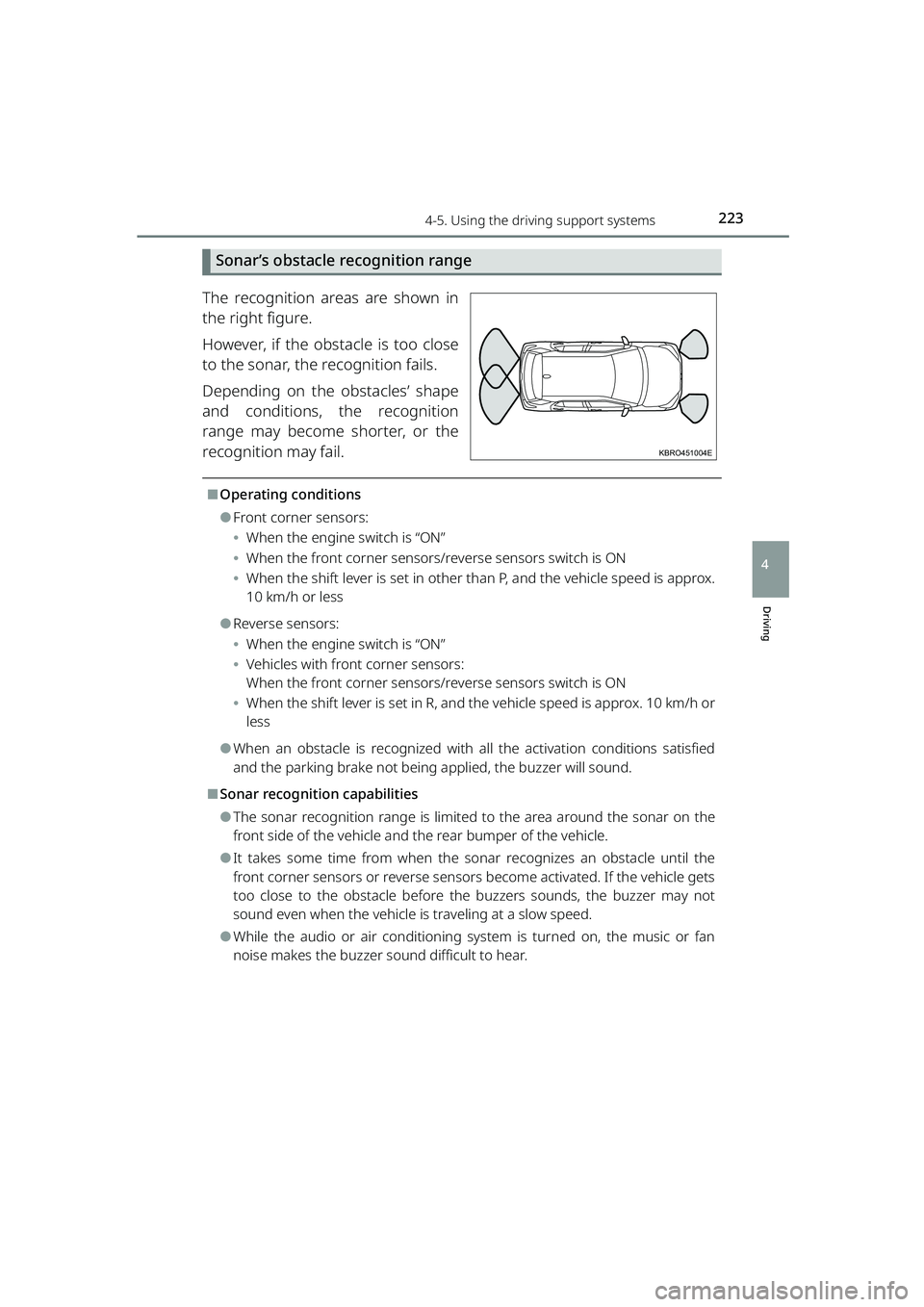
The recognition areas are shown in
the right figure.
However, if the obstacle is too close
to the sonar, the recognition fails.
Depending on the obstacles’ shape
and conditions, the recognition
range may become shorter, or the
recognition may fail.
⬛Operating conditions
⚫Front corner sensors:
⦁When the engine switch is “ON”
⦁ When the front corner sensors/reverse sensors switch is ON
⦁ When the shift lever is set in other than P, and the vehicle speed is approx.
10 km/h or less
⚫Reverse sensors:
⦁When the engine switch is “ON”
⦁ Vehicles with front corner sensors:
When the front corner sensors/reverse sensors switch is ON
⦁ When the shift lever is set in R, and the vehicle speed is approx. 10 km/h or
less
⚫When an obstacle is recognized with all the activation conditions satisfied
and the parking brake not being applied, the buzzer will sound.
⬛Sonar recognition capabilities
⚫The sonar recognition range is limited to the area around the sonar on the
front side of the vehicle and th e rear bumper of the vehicle.
⚫It takes some time from when the sonar recognizes an obstacle until the
front corner sensors or reverse sensors become activated. If the vehicle gets
too close to the obstacle before the buzzers sounds, the buzzer may not
sound even when the vehicle is traveling at a slow speed.
⚫While the audio or air conditioning system is turned on, the music or fan
noise makes the buzzer sound difficult to hear.
KBRO451004E
RAIZE_OM_General_BZ358E.book 223 ページ 2022年5月17日 火曜日 午後1時59分
Page 227 of 516
2254-5. Using the driving support systems
RAIZE_OM_General_BZ358E
Driving
4
WARNING
⬛Before using the front corner sensors or reverse sensors
Make sure to observe the following precautions.
Failure to do so is dangerous, as it may lead to an unforeseen accident.
⚫Do not let the vehicle speed exceed approx. 10 km/h (6 mph).
⚫There is a limit to the sonar’s recognition range and activation speed. When
you move your vehicle forward or backward, make sure to check the safety
around the vehicle, which is outside the sonar’s recognition range (especially
the sides of the vehicle), use the brak e pedal to control the speed adequately
and drive slowly.
⚫Do not paste stickers or install accesso ries on the sonar sensors or their sur-
rounding areas.
⚫Vehicles with TFT color multi-informa tion display: If the warning message
“Sonar Sensor Function Stop” appears, check the sonar conditions. If the
warning message appears even when the sonar is not covered with rain,
snow, ice, or dirt, it could be due to a malfunction of the front corner sensors
or reverse sensors. Have the vehicl e inspected at your Toyota dealer.
⬛Front corner sensors and reverse sensors
In the following situations, the front corner sensors or reverse sensors may
not work normally and could lead to an unforeseen accident. Make sure to
drive carefully.
⚫Road conditions (slopes, unevenness, etc.)
⚫Vehicle’s maintenance conditions (brake-r elated issues, worn out tires, infla-
tion pressure, driving on a spare tire, etc.)
⚫Bad weather (heavy rain, snowstorm, fog, etc.)
⚫When the vehicle is signif icantly tilted by carrying a heavy load or being on
the surface with different height, or when the vehicle height has significantly
changed
⚫Distance from the obstacle, orientatio n or position (the obstacle is located
near the center of the vehicle)
⚫When driving on a steep slope
⚫When the sonar system cannot recognize the obstacle correctly (the follow-
ing cases in particular)
⦁ When an obstacle is extremely clos e to the sonar (when approaching too
close to the obstacle, the buzzer may change from continuous sound to
intermittent sound)
⦁ When an obstacle is located at a high position from the ground
⦁ Short obstacles
⦁ Small obstacles (such as small animals and infants), narrow obstacles
RAIZE_OM_General_BZ358E.book 225 ページ 2022年5月17日 火曜日 午後1時59分
Page 309 of 516
3076-2. Maintenance
RAIZE_OM_General_BZ358E
Maintenance and care
6
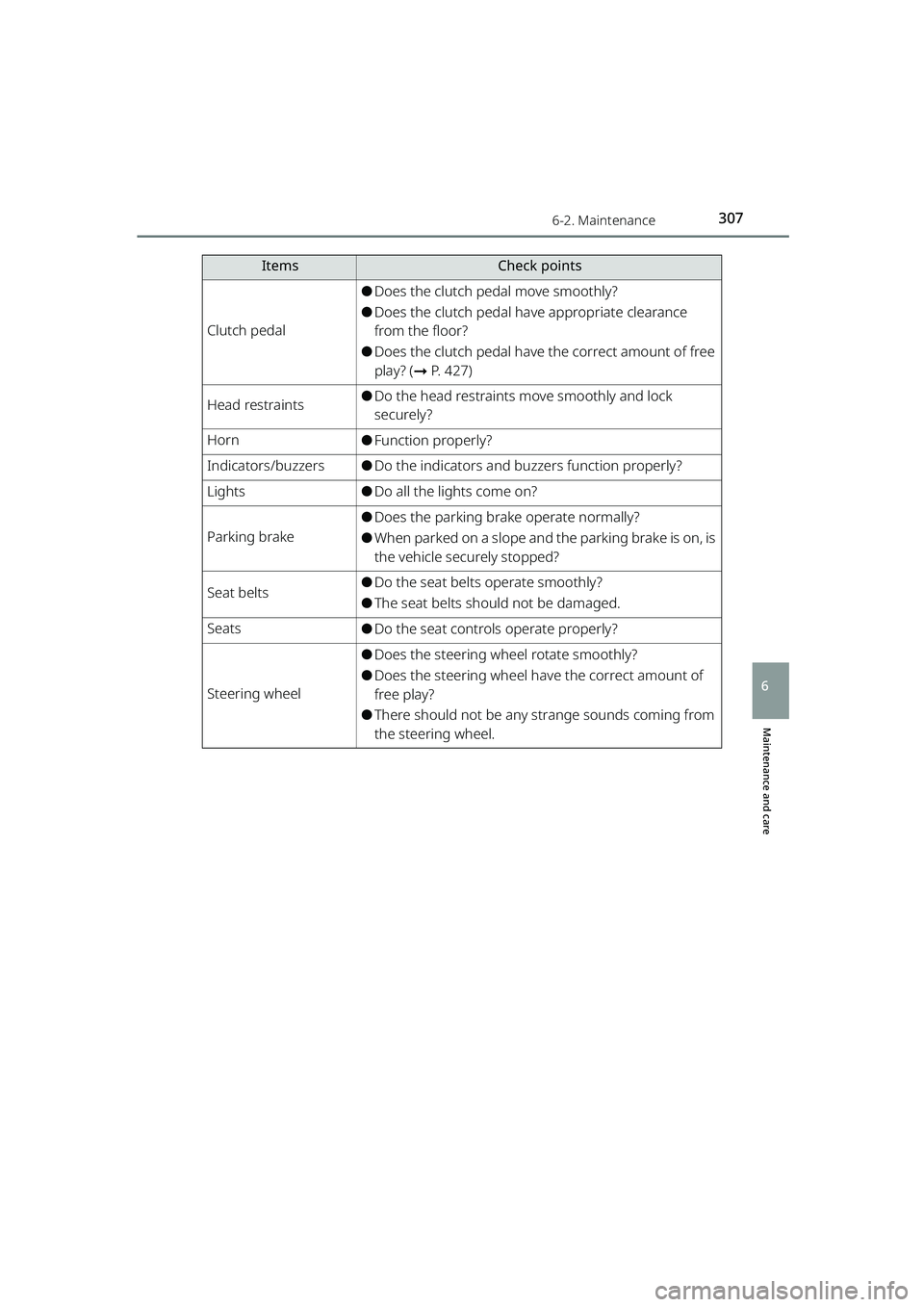
Clutch pedal
⚫Does the clutch pedal move smoothly?
⚫Does the clutch pedal have appropriate clearance
from the floor?
⚫Does the clutch pedal have the correct amount of free
play? (➞P. 427)
Head restraints⚫Do the head restraints move smoothly and lock
securely?
Horn⚫Function properly?
Indicators/buzzers⚫Do the indicators and bu zzers function properly?
Lights⚫Do all the lights come on?
Parking brake
⚫Does the parking brake operate normally?
⚫When parked on a slope and the parking brake is on, is
the vehicle securely stopped?
Seat belts⚫Do the seat belts operate smoothly?
⚫The seat belts should not be damaged.
Seats⚫Do the seat controls operate properly?
Steering wheel
⚫Does the steering wheel rotate smoothly?
⚫Does the steering wheel have the correct amount of
free play?
⚫There should not be any st range sounds coming from
the steering wheel.
ItemsCheck points
RAIZE_OM_General_BZ358E.book 307 ページ 2022年5月17日 火曜日 午後1時59分
Page 381 of 516
3797-2. Steps to take in an emergency
RAIZE_OM_General_BZ358E ✽
: If equipped
When trouble arises
7
If a warning light turns on
If a warning light remains on or flashes, remain calm and take the
following actions. Even if the warn ing light lights up or flashes then
goes out, it is not a malfunction. However, if the same phenomenon
occurs again, have the vehicle inspected at your Toyota dealer.
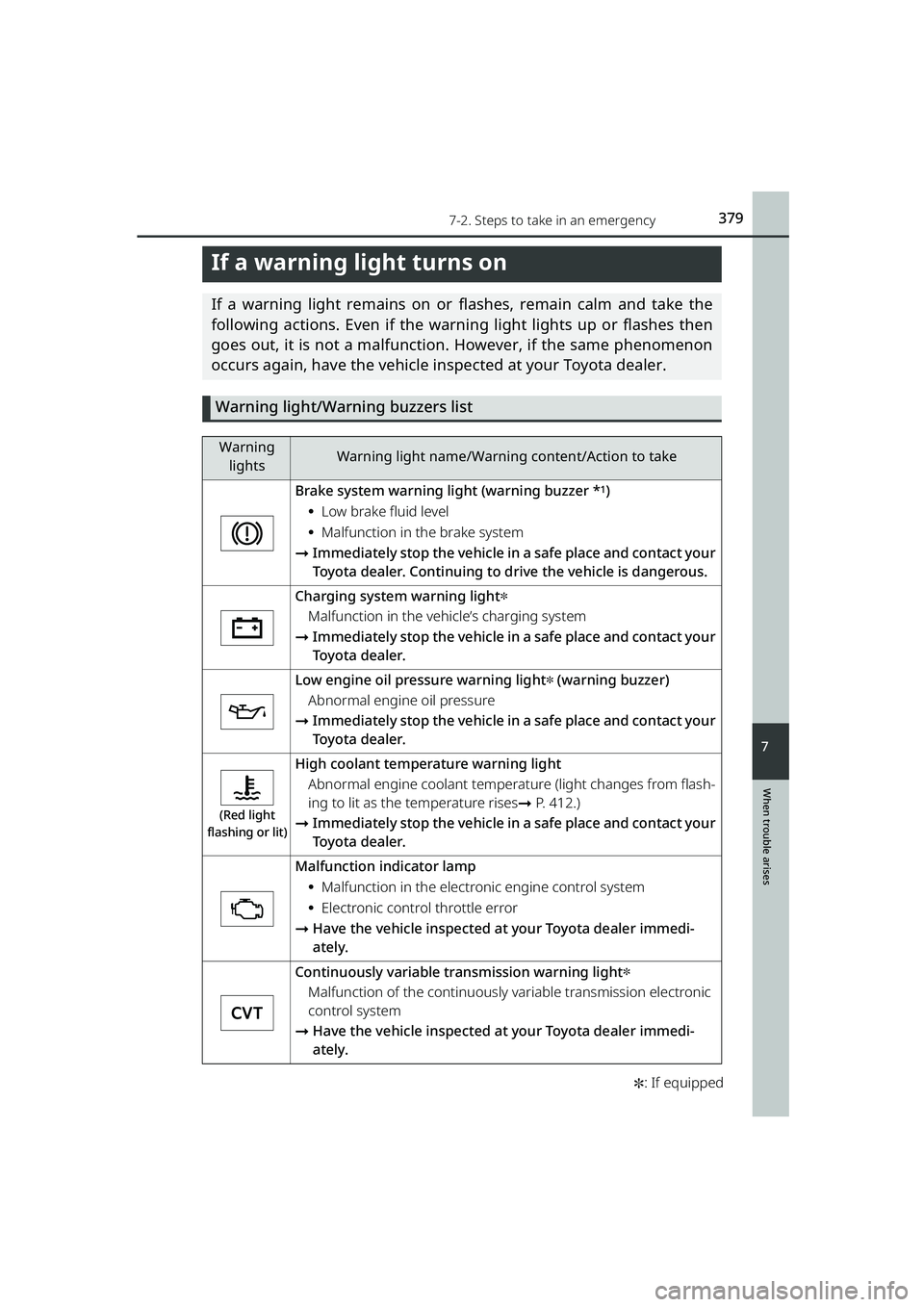
Warning light/Warning buzzers list
Warning lightsWarning light name/Warning content/Action to take
Brake system warning light (warning buzzer *1)
⦁Low brake fluid level
⦁Malfunction in the brake system
➞ Immediately stop the vehicle in a safe place and contact your
Toyota dealer. Continuing to drive the vehicle is dangerous.
Charging system warning light✽
Malfunction in the vehicle’s charging system
➞ Immediately stop the vehicle in a safe place and contact your
Toyota dealer.
Low engine oil pressure warning light✽ (warning buzzer)
Abnormal engine oil pressure
➞ Immediately stop the vehicle in a safe place and contact your
Toyota dealer.
(Red light
flashing or lit)
High coolant temperature warning light
Abnormal engine coolant temperat ure (light changes from flash-
ing to lit as the temperature rises ➞P. 412.)
➞ Immediately stop the vehicle in a safe place and contact your
Toyota dealer.
Malfunction indicator lamp
⦁Malfunction in the electron ic engine control system
⦁Electronic control throttle error
➞ Have the vehicle inspected at your Toyota dealer immedi-
ately.
Continuously variable transmission warning light✽
Malfunction of the continuously variable transmission electronic
control system
➞ Have the vehicle inspected at your Toyota dealer immedi-
ately.
RAIZE_OM_General_BZ358E.book 379 ページ 2022年5月17日 火曜日 午後1時59分