buzzer TOYOTA RAIZE 2023 User Guide
[x] Cancel search | Manufacturer: TOYOTA, Model Year: 2023, Model line: RAIZE, Model: TOYOTA RAIZE 2023Pages: 516, PDF Size: 44.62 MB
Page 131 of 516
1293-2. Opening, closing and locking the doors
RAIZE_OM_General_BZ358E
Operation of each component
3
⚫When the remaining battery becomes lo w, a warning buzzer will sound from
inside the vehicle when the engine is stopped. ( ➞P. 394)
⚫To prevent significant battery drainage, do not store the electronic key within
1 m (3.3 ft.) from the following electr onic devices that are known to emit a
magnetic field.
⦁ TV
⦁ Audio system
⦁ Personal computers
⦁ AC adapters
⦁ Mobile phones, cordless phones, and chargers
⦁ Desk lamps
⦁ Medical electronic devices such as lo w-frequency electric therapy equip-
ment
⦁ Liquid crystal display
⦁ Motors
⦁ Induction cookers
⚫Do not leave electronic keys inside or near the vehicle. Since the electronic
key and the vehicle are constantly communicating with one another, it
speeds up the battery draining. When they enter in the constant communi-
cation state, the indicator of the electro nic key starts blinking. Keep the elec-
tronic key away from the vehic le until the indicator turns off.
⚫If you do not plan on using the electr onic key for a long time, set the key to
the battery-saving mode to mini mize battery consumption. (➞P. 125)
⬛Running out of the battery
➞P. 3 4 4
⬛Functions configurable by Toyota dealers
Toyota dealers can deactivate the key-free system.
(List of customizable features: ➞ P. 430)
⬛When the key-free system was deactivated by a Toyota dealer
⚫Locking and unlocking doors: The doors can be locked and unlocked using
the wireless function or the emergency key. ( ➞P. 133, 406)
⚫Starting the engine and swit ching the engine switch mode: ➞ P. 4 0 6
⚫Stopping the engine: ➞P. 1 8 5
RAIZE_OM_General_BZ358E.book 129 ページ 2022年5月17日 火曜日 午後1時59分
Page 133 of 516
1313-2. Opening, closing and locking the doors
RAIZE_OM_General_BZ358E ✽
: If equipped
Operation of each component
3
Wireless remote control
Function overview
You can lock and unlock the doors.
▶Vehicles without key-free system
➞ P. 1 3 3
▶Vehicles with key-free system
➞ P. 1 3 3
⬛Signaling of the operation
The buzzer and the blinking emergency flashers will notify you of the opera-
tion. (1 time for locking and 2 times for unlocking)
⬛Customizations
The signaling of the operation can be changed.
(List of customizable features: ➞ P. 430)
(The settings can be changed from the setup screen of the multi-information
display
✽: ➞ P. 9 1 )
(The settings can be changed from the setup screen of the TFT color multi-
information display
✽: ➞ P. 104)
⬛Security features for unlocking operation
➞ P. 1 3 9
⬛Situations where the function may not work properly
▶Vehicles without key-free system
In the following cases, the wireless remote control may not work as intended.
⚫When the wireless key’s battery is low
⚫When you are in an area with strong radio waves or noise present, such as
near TV towers, power plants, gas stat ions, broadcast stations, large display,
airports, and so on
⚫When you have a wireless communication device such as a radio, mobile
phone, and cordless telephone with you
⚫If the wireless remote control touches or is covered by a metal object
⚫When a wireless key (that emits radio waves) is in use near by
⚫When a metal-containing film is pasted on the rear window
▶Vehicles with key-free system
➞ P. 1 2 5
RAIZE_OM_General_BZ358E.book 131 ページ 2022年5月17日 火曜日 午後1時59分
Page 142 of 516
1403-2. Opening, closing and locking the doors
RAIZE_OM_General_BZ358E
✽: If equipped
⚫When the engine switch is “OFF” and the electronic key is left inside the vehi-
cle, performing the following operations will activate the door lock preven-
tion function, unlocking all the doors.
⦁ Closing the door while pulling the driv er’s door handle with the inside lock
button on the driver’s door inside th e vehicle being set to the locked side
⦁ Unlocking any of the inside lock bu ttons except the driver’s seat from
inside the vehicle with all the doors locked, and opening the door and then
closing it
⬛Open door warning buzzer
➞ P. 381, 390
⬛Situations where the function may not work properly
➞P. 1 2 5
⬛Customizations
You can customize some of the key-free system
✽ functions and some of the
auto lock and unlock functions
(List of customizable features: ➞ P. 430)
(For some of the features, the settings can be changed from the setup screen
of the multi-info rmation display
✽: ➞ P. 9 1 )
(The settings can be changed from the setup screen of the TFT color multi-
information display
✽: ➞ P. 104)
⬛Auto lock and unlock function
If you unlock the door after it was lock ed by the auto lock function, the door
will not be locked again. However, the func tion will be reactivated in any of the
following conditions:
⚫One of the doors is opened while the vehicle is stopped
⚫The engine switch is turned to “ACC” or “OFF”
⚫The doors are unlocked by the auto unlock function
⬛How to open doors when the child-protector lock is used
Unlock the door and pull the door handle outside the vehicle to open the door.
If you need to open the door from in side the vehicle, pull down the window
and put your hand out, and pull th e door handle outside the vehicle.
RAIZE_OM_General_BZ358E.book 140 ページ 2022年5月17日 火曜日 午後1時59分
Page 145 of 516
1433-2. Opening, closing and locking the doors
RAIZE_OM_General_BZ358E
Operation of each component
3
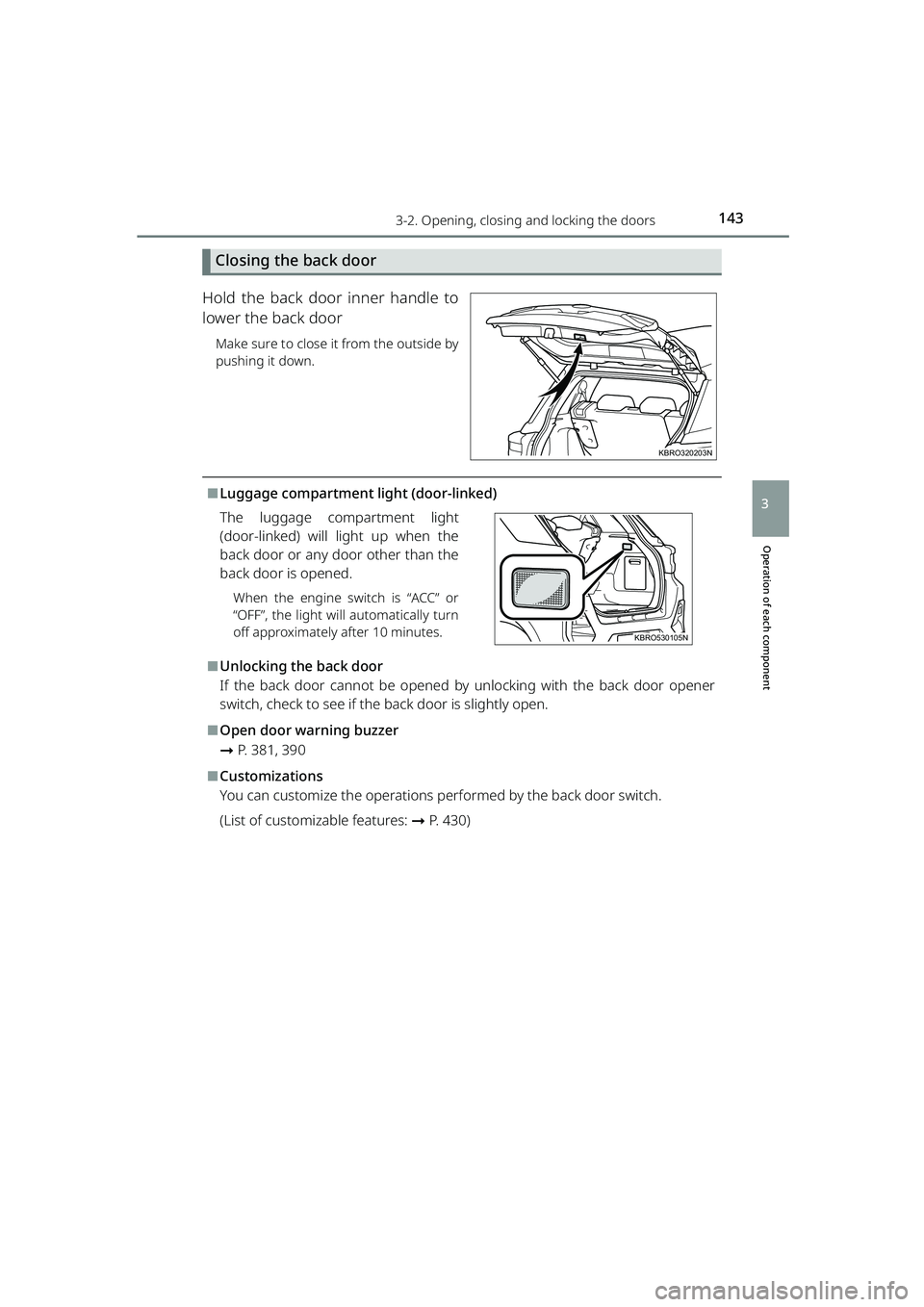
Closing the back door
Hold the back door inner handle to
lower the back door
Make sure to close it from the outside by
pushing it down.
⬛Luggage compartment light (door-linked) The luggage compartment light
(door-linked) will light up when the
back door or any door other than the
back door is opened.
When the engine switch is “ACC” or
“OFF”, the light will automatically turn
off approximately after 10 minutes.
⬛Unlocking the back door
If the back door cannot be opened by unlocking with the back door opener
switch, check to see if the b ack door is slightly open.
⬛Open door warning buzzer
➞P. 381, 390
⬛Customizations
You can customize the operations performed by the back door switch.
(List of customizable features: ➞ P. 430)
KBRO320203N
KBRO530105N
Parts.fm 143 ページ 2022年6月17日 金曜日 午前9時2分
Page 184 of 516
1824-2. Driving procedures
RAIZE_OM_General_BZ358E
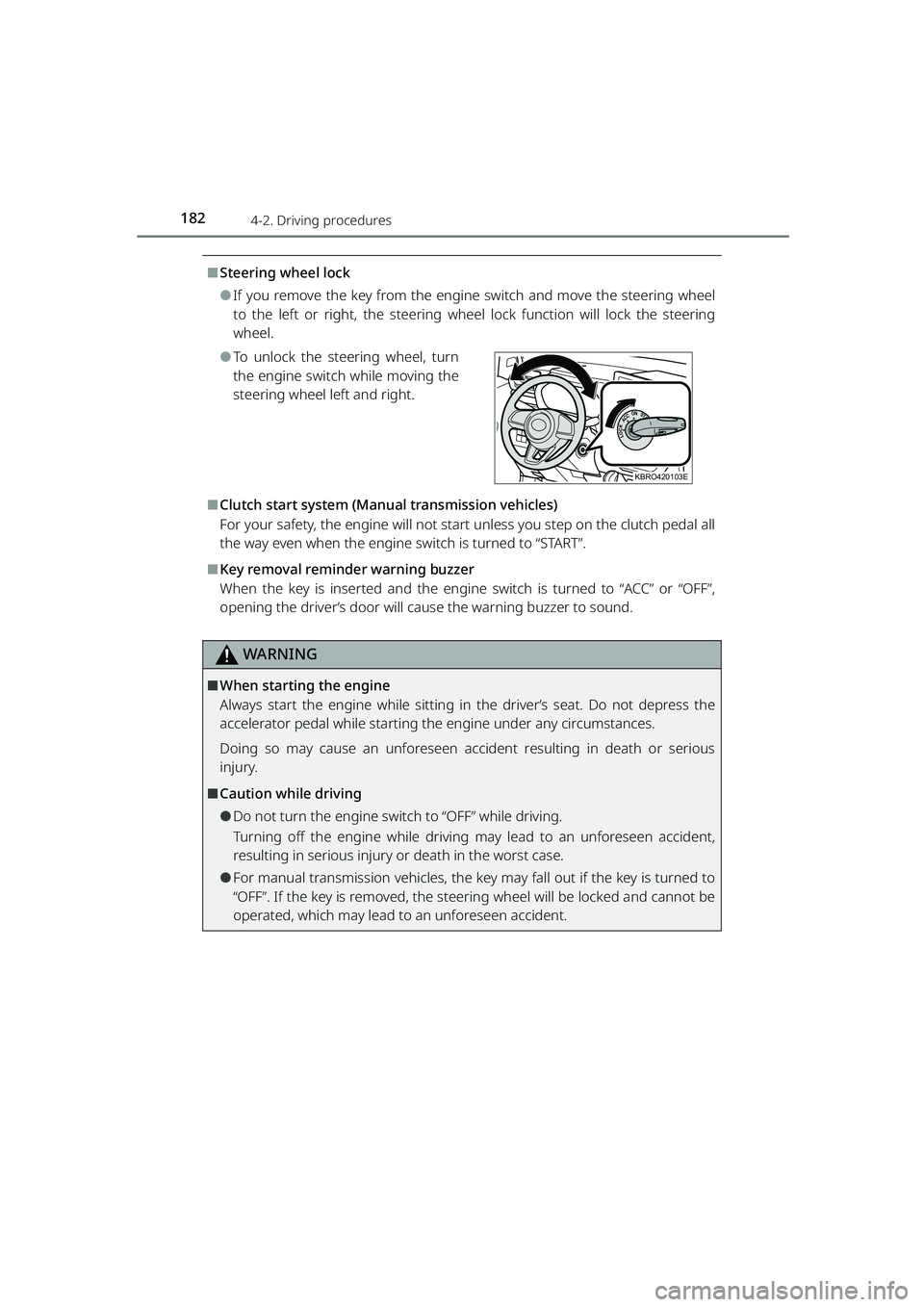
⬛Steering wheel lock
⚫If you remove the key from the engine switch and move the steering wheel
to the left or right, the steering wheel lock function will lock the steering
wheel.
⚫To unlock the steering wheel, turn
the engine switch while moving the
steering wheel left and right.
⬛Clutch start system (Manual transmission vehicles)
For your safety, the engine will not start unless you step on the clutch pedal all
the way even when the engine switch is turned to “START”.
⬛Key removal reminder warning buzzer
When the key is inserted and the engine switch is turned to “ACC” or “OFF”,
opening the driver’s door will cause the warning buzzer to sound.
WARNING
⬛When starting the engine
Always start the engine while sitting in the driver’s seat. Do not depress the
accelerator pedal while starting th e engine under any circumstances.
Doing so may cause an unforeseen accident resulting in death or serious
injury.
⬛Caution while driving
⚫Do not turn the engine swit ch to “OFF” while driving.
Turning off the engine while driving ma y lead to an unforeseen accident,
resulting in serious injury or death in the worst case.
⚫For manual transmission vehicles, the key may fall out if the key is turned to
“OFF”. If the key is removed, the steering wheel will be locked and cannot be
operated, which may lead to an unforeseen accident.
KBRO420103E
RAIZE_OM_General_BZ358E.book 182 ページ 2022年5月17日 火曜日 午後1時59分
Page 194 of 516
1924-2. Driving procedures
RAIZE_OM_General_BZ358E
✽: If equipped
d
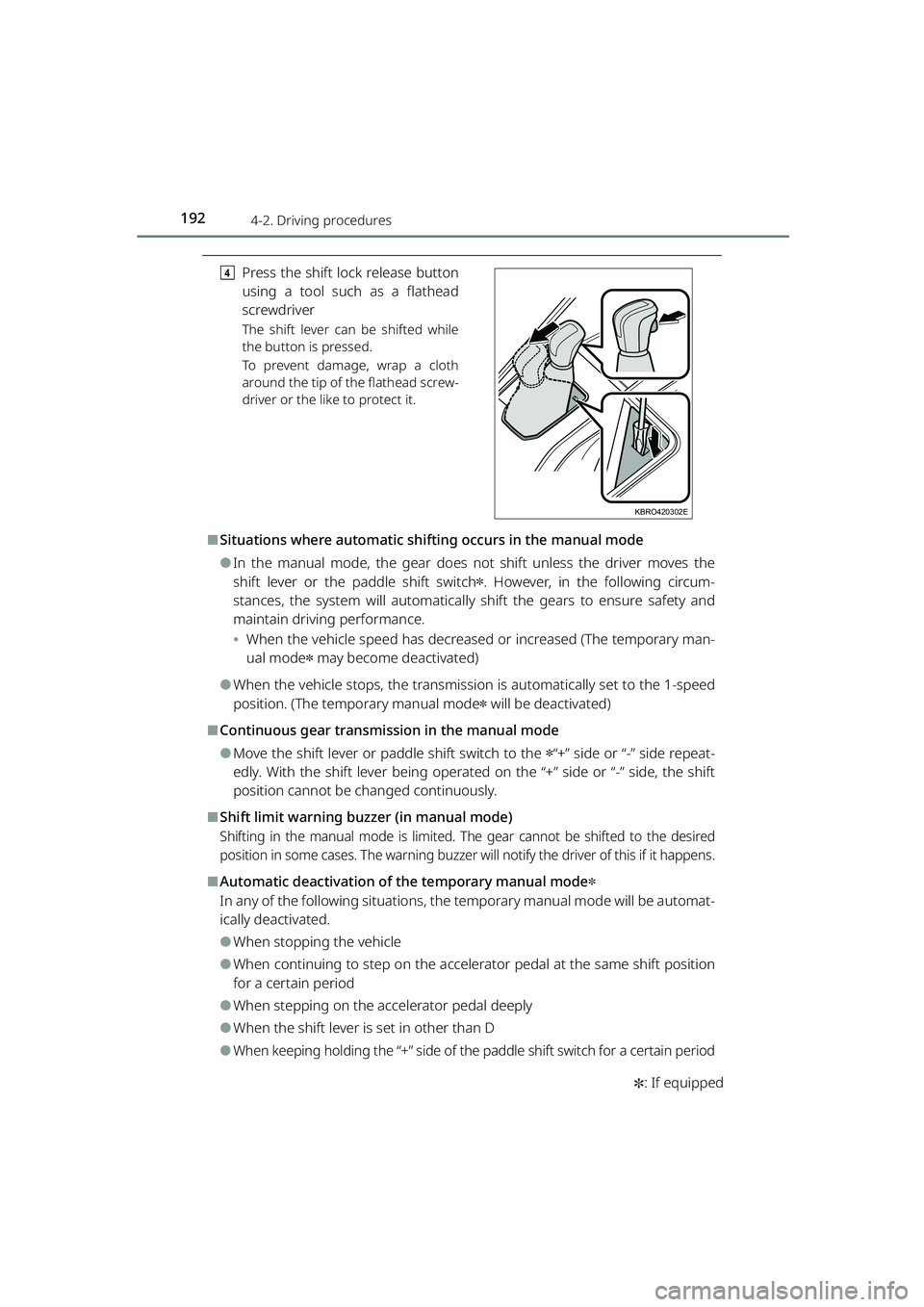
Press the shift lock release button
using a tool such as a flathead
screwdriver
The shift lever can be shifted while
the button is pressed.
To prevent damage, wrap a cloth
around the tip of the flathead screw-
driver or the like to protect it.
⬛Situations where automatic shif ting occurs in the manual mode
⚫In the manual mode, the gear does not shift unless the driver moves the
shift lever or the paddle shift switch
✽. However, in the following circum-
stances, the system will automatically shift the gears to ensure safety and
maintain driving performance.
⦁ When the vehicle speed has decrease d or increased (The temporary man-
ual mode
✽ may become deactivated)
⚫When the vehicle stops, the transmission is automatically set to the 1-speed
position. (The temporary manual mode
✽ will be deactivated)
⬛Continuous gear transmis sion in the manual mode
⚫Move the shift lever or paddle shift switch to the ✽“+” side or “-” side repeat-
edly. With the shift lever being operated on the “+” side or “-” side, the shift
position cannot be changed continuously.
⬛Shift limit warning buzzer (in manual mode)
Shifting in the manual mode is limited. Th e gear cannot be shifted to the desired
position in some cases. The warning buzzer w ill notify the driver of this if it happens.
⬛Automatic deactivation of the temporary manual mode✽
In any of the following situations, the temporary manual mode will be automat-
ically deactivated.
⚫When stopping the vehicle
⚫When continuing to step on the accelerator pedal at the same shift position
for a certain period
⚫When stepping on the accelerator pedal deeply
⚫When the shift lever is set in other than D
⚫When keeping holding the “+” side of the paddle shift switch for a certain period
KBRO420302E
RAIZE_OM_General_BZ358E.book 192 ページ 2022年5月17日 火曜日 午後1時59分
Page 195 of 516
1934-2. Driving procedures
RAIZE_OM_General_BZ358E
✽: If equipped
Driving
4
⬛Power mode✽
⚫The power mode control will not be acti vated in any of the following situa-
tions:
⦁ When the shift lever is set to R
⚫Even when you have set the D assist switching steering switch to “ON”, turn-
ing the engine switch “OFF ” and turning it “ON” will automatically restore the
D assist switching steering switch to “OFF”.
⚫When the malfunction indicator lamp or the continuously variable transmis-
sion warning light
✽ is lit or flashing, or when the TFT color multi-information
display
✽ shows “Transmission System Malfun ction”, the vehicle will not enter
the power mode.
⬛Reverse warning buzzer
When shifting into R, a buzzer will so und to inform the driver that the shift
lever is in R.
WARNING
⬛When driving on slippery road surfaces
Do not accelerate or shift gears sudde nly. Sudden changes in engine braking
may cause the vehicle to spin or skid.
⬛To prevent an accident when releasing the shift lock
Before pressing the shift lock override button, make sure to set the parking
brake and depress the brake pedal.
If the accelerator pedal is accidentally depressed instead of the brake pedal
when the shift lock override button is pr essed and the shift lever is shifted out
of P, the vehicle may suddenly start, po ssibly leading to an accident resulting in
death or serious injury.
RAIZE_OM_General_BZ358E.book 193 ページ 2022年5月17日 火曜日 午後1時59分
Page 199 of 516
1974-2. Driving procedures
RAIZE_OM_General_BZ358E
Driving
4
Parking brake
Operation instructions
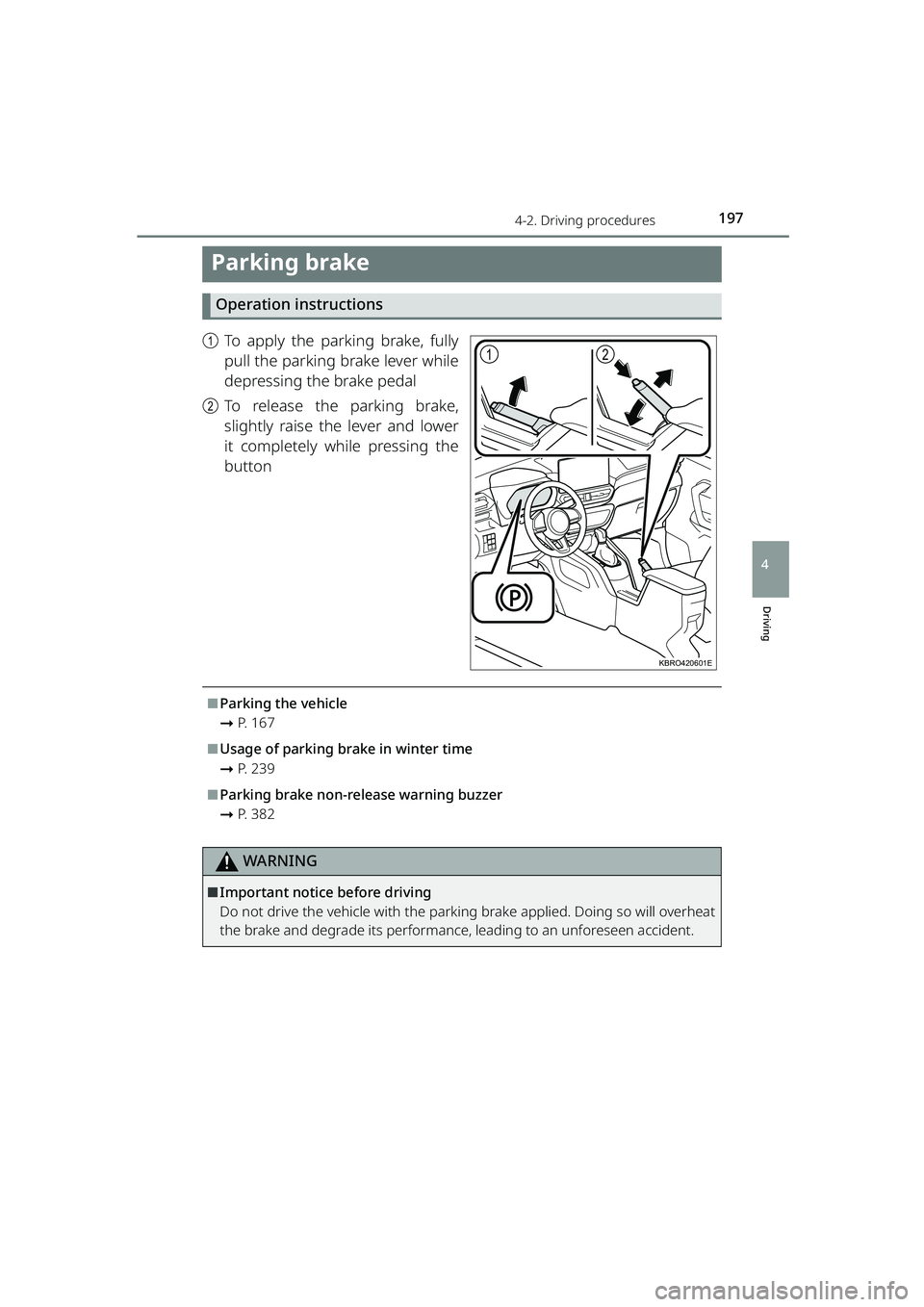
aTo apply the parking brake, fully
pull the parking brake lever while
depressing the brake pedal
b To release the parking brake,
slightly raise the lever and lower
it completely while pressing the
button
⬛Parking the vehicle
➞P. 1 6 7
⬛Usage of parking brake in winter time
➞P. 2 3 9
⬛Parking brake non-release warning buzzer
➞P. 3 8 2
WARNING
⬛Important notice before driving
Do not drive the vehicle with the parking brake applied. Doing so will overheat
the brake and degrade its performance, leading to an unforeseen accident.
12
KBRO420601E
RAIZE_OM_General_BZ358E.book 197 ページ 2022年5月17日 火曜日 午後1時59分
Page 202 of 516
2004-3. Operating the lights and windshield wipers
RAIZE_OM_General_BZ358E
✽: If equipped
⬛Automatic light off system
⚫While the lights are turned on, changi ng the engine switch from “ON” to
“ACC” or “OFF” will automatically turn off the lit lights.
⚫To turn the lights on again, turn “ON” the engine switch or move the head-
light switch to the position, and then move it to the or
position.
⬛Automatic light-off warning buzzer
When the headlights and tail lights are tu rned on with the engine switch set to
“ACC” or “OFF”, opening the driver’s door will cause the warning buzzer to
sound, letting the driver know that the lights have not been turned off.
⚫When the buzzer sounds , the warning message also appears for vehicles
with TFT color multi-information display. ( ➞P. 391)
⬛Power saving function
To prevent the battery from discharging, when the engine switch is set in “ACC”
or “OFF” and the headlights or tail lig hts are on, the power saving function is
activated and all lights are automatically turned off after about 10 minutes.
After light has been automatically turn ed off, perform any of the following
operations to cancel the power saving state and turn the lights back on.
⚫
When the engine switch is set to “ON”
⚫When the headlight switch is operated (However, the lights will turn off again
automatically after about 10 minutes)
⚫When one of the doors is opened or cl osed (However, the lights will automati-
cally turn off again after about 10 minutes)
⬛Customizations✽
You can change the timing of the headlight switch turning on and off automat-
ically at the position, etc.
(List of customizable features: ➞ P. 430)
NOTICE
⬛To prevent battery discharge
Do not leave the lights on for a long ti me with the engine stopped. Also, be
sure to turn off the lights when you leave the vehicle.
RAIZE_OM_General_BZ358E.book 200 ページ 2022年5月17日 火曜日 午後1時59分
Page 214 of 516
2124-5. Using the driving support systems
RAIZE_OM_General_BZ358E
dBuzzer
BSM buzzer: When you have moved the turn signal lever to the side where the vehi-
cle is detected, the buzzer will sound.
RCTA Buzzer: When a vehicle approaching from the right or left rear end of your
vehicle is detected, the buzzer will sound.
WARNING
⬛To use the BSM function safely
The driver is responsible for driving the vehicle safely. It is th e driver’s responsi-
bility to be aware of the situations around the vehicle and drive safely.
The BSM function is an auxilia ry system designed to let the driver know of the
presence of a vehicle that has entere d or is rapidly approaching toward the
blind spot area of the outside rear view mirrors. Since this system alone is not
sufficient for determining the feasibility of changing lanes, overly relying on the
system could lead to an unforeseen accid ent, resulting in serious injury or
death.
This system does not work effectively depending on the circumstances. The
driver is responsible for checking the safety around the vehicle by using his/
her own eyes and the mirrors.
⬛To use the RCTA function safely
The driver is responsible for driving the vehicle safely. It is th e driver’s responsi-
bility to be aware of the situations around the vehicle and drive safely.
The RCTA function is an auxiliary system designed to let the driver know of the
presence of a vehicle that is approaching from the right or left rear of the vehi-
cle.
Even with the RCTA function enabled, this system does not work effectively
depending on the circumstances. The dr iver is responsible for checking the
safety around the vehicle by using his/her own eyes.
Overly relying on the system could lead to an unforeseen accident, resulting in
serious injury or death.
RAIZE_OM_General_BZ358E.book 212 ページ 2022年5月17日 火曜日 午後1時59分