time TOYOTA RAIZE 2023 Workshop Manual
[x] Cancel search | Manufacturer: TOYOTA, Model Year: 2023, Model line: RAIZE, Model: TOYOTA RAIZE 2023Pages: 516, PDF Size: 44.62 MB
Page 190 of 516
1884-2. Driving procedures
RAIZE_OM_General_BZ358E
WARNING
⬛When starting the engine
Always start the engine while sitting in the driver’s seat. Do not depress the
accelerator pedal while starting th e engine under any circumstances.
Doing so may cause an unforeseen accident re sulting in death or serious injury.
⬛Caution while driving
If the vehicle starts sliding when the engine stops, do not open, lock or unlock
the doors until the vehicle stops safely . Doing so may activate the steering wheel
lock and lead to an unforeseen accident, resulting in serious injury or death.
⬛Stopping the engine in an emergency
If you want to stop the engine in an em ergency while driving the vehicle, press
and hold the engine switch for more than 3 seconds, or press it briefly 3 times
or more in succession. ( ➞P. 367)
However, do not touch the engine switch while driving except in an emer-
gency. Turning the engine off while driving will not cause loss of steering or
braking control, but the power assist to these systems will be lost. This will
make it more difficult to steer and brake, so you should pull over and stop the
vehicle as soon as it is safe to do so.
NOTICE
⬛To prevent battery discharge
⚫Do not leave the engine switch “ACC” or “ON” for long peri ods of time with-
out the engine running.
⚫When the engine switch indi cator is not turned off, the engine switch is not
“OFF”. Before you leave the vehicle, turn “OFF” the engine switch.
⚫For the continuously variable transmission vehicles, do not stop the engine
with the shift lever placed in other t han P. When you stop the engine with
the shift lever placed in other than P and leave it as is, it could cause the bat-
tery to die since the engine switch will be set to “ACC”.
⬛When starting the engine
⚫Do not race a cold engine.
⚫If you have trouble starting the engine or experience frequent stalling, have
the vehicle inspected at your Toyota dealer immediately.
⬛Engine switch operation
If you experience unusual symptoms such as the switch being stuck when
pushing the engine switch, the switch may be broken. Contact your Toyota
dealer immediately.
RAIZE_OM_General_BZ358E.book 188 ページ 2022年5月17日 火曜日 午後1時59分
Page 192 of 516
1904-2. Driving procedures
RAIZE_OM_General_BZ358E✽
: If equipped
Driving mode selection✽
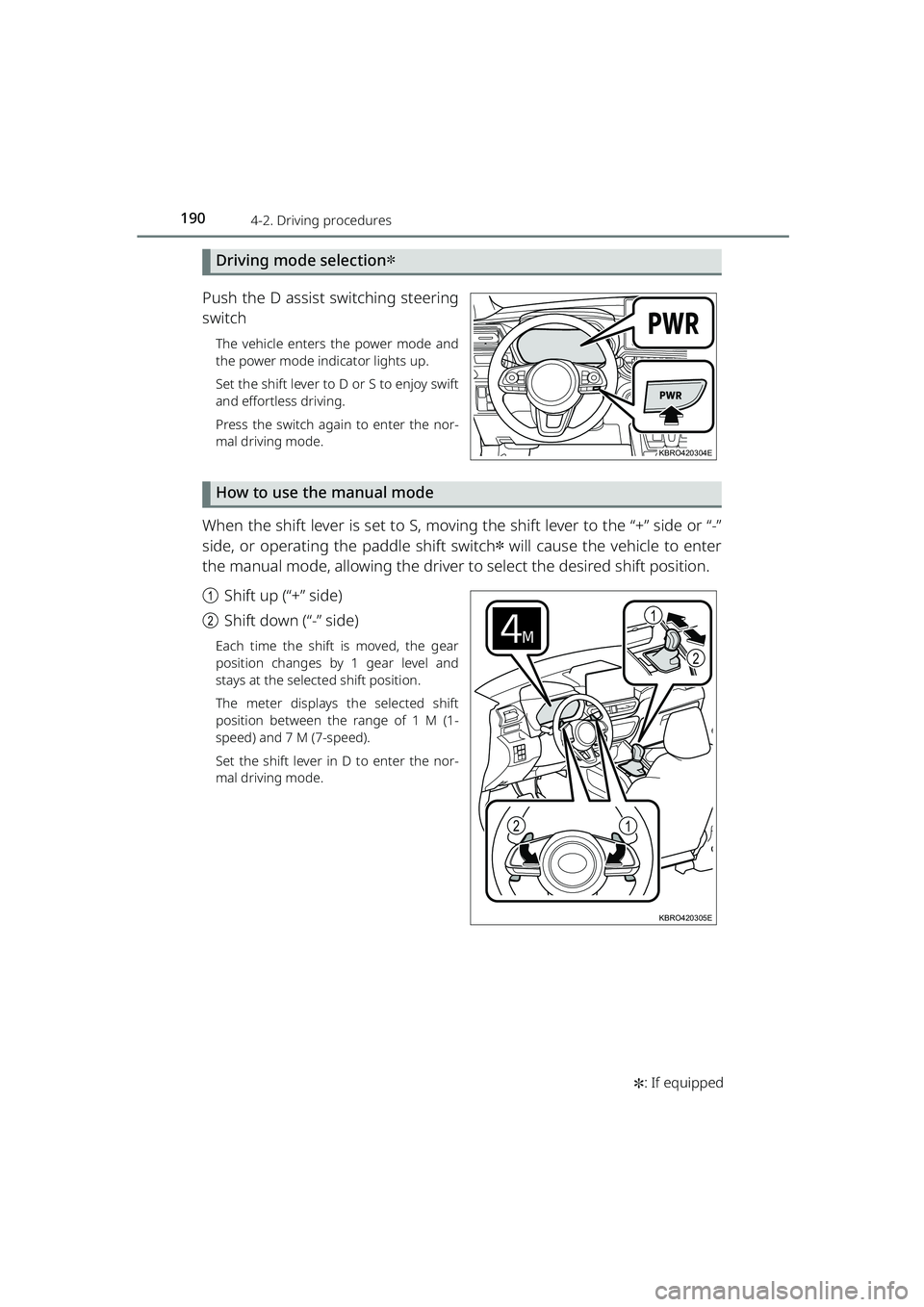
Push the D assist switching steering
switch
The vehicle enters the power mode and
the power mode indicator lights up.
Set the shift lever to D or S to enjoy swift
and effortless driving.
Press the switch again to enter the nor-
mal driving mode.
How to use the manual mode
When the shift lever is set to S, moving the shift lever to the “+” side or “-”
side, or operating the paddle shift switch
✽ will cause the vehicle to enter
the manual mode, allowing the driver to select the desired shift position.
a Shift up (“+” side)
b Shift down (“-” side)
Each time the shift is moved, the gear
position changes by 1 gear level and
stays at the selected shift position.
The meter displays the selected shift
position between the range of 1 M (1-
speed) and 7 M (7-speed).
Set the shift lever in D to enter the nor-
mal driving mode.
KBRO420304E
1
2
12
KBRO420305E
RAIZE_OM_General_BZ358E.book 190 ページ 2022年5月17日 火曜日 午後1時59分
Page 198 of 516
1964-2. Driving procedures
RAIZE_OM_General_BZ358E✽
: If equipped
Turn signal lever
Operation instructions
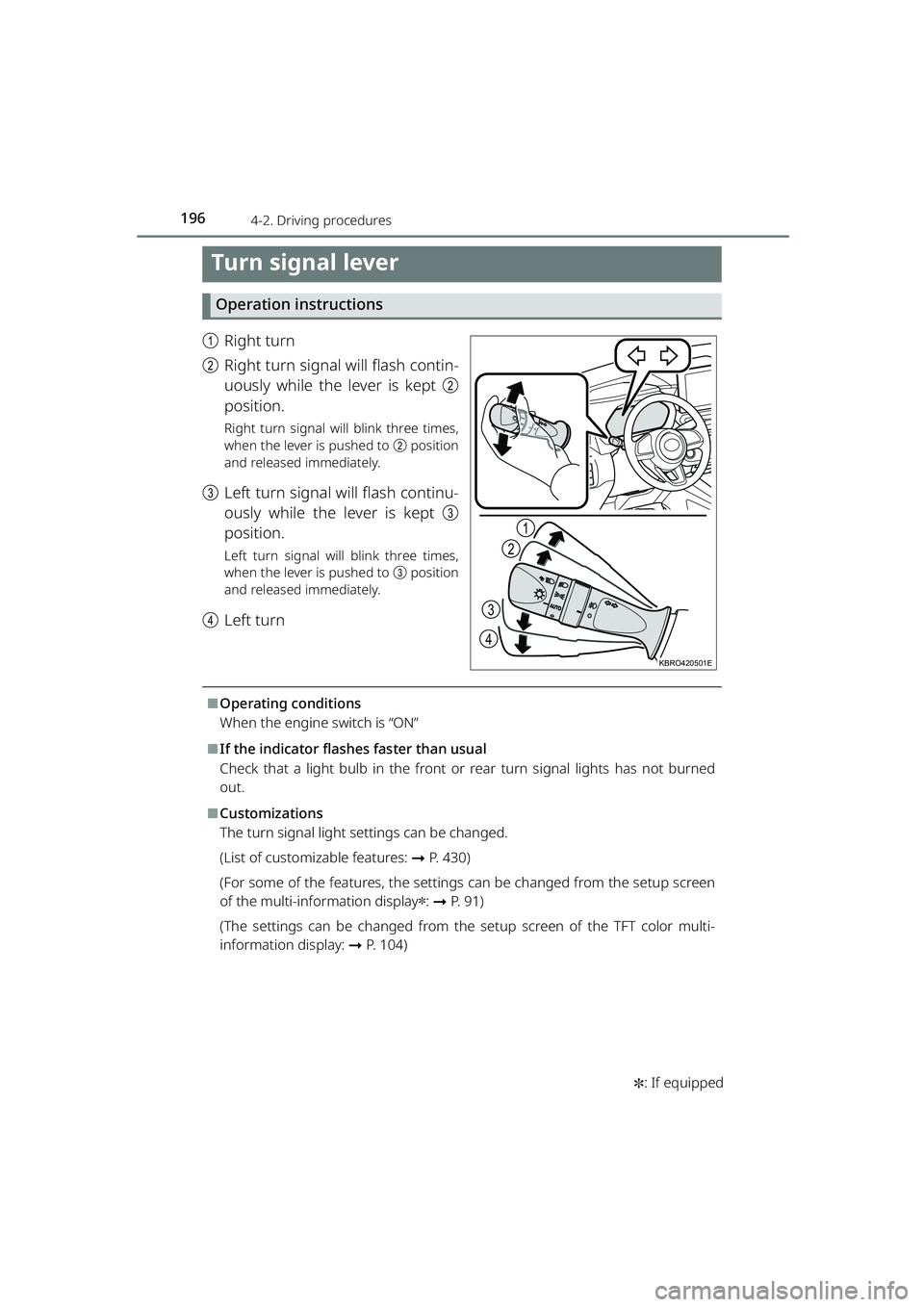
a Right turn
b Right turn signal will flash contin-
uously while the lever is kept b
position.
Right turn signal will blink three times,
when the lever is pushed to b position
and released immediately.
c Left turn signal will flash continu-
ously while the lever is kept c
position.
Left turn signal will blink three times,
when the lever is pushed to c position
and released immediately.
d Left turn
⬛Operating conditions
When the engine switch is “ON”
⬛If the indicator flashe s faster than usual
Check that a light bulb in the front or rear turn signal lights has not burned
out.
⬛Customizations
The turn signal light settings can be changed.
(List of customizable features: ➞P. 430)
(For some of the features, the settings can be changed from the setup screen
of the multi-info rmation display
✽: ➞ P. 9 1 )
(The settings can be changed from the setup screen of the TFT color multi-
information display: ➞ P. 104)
1
2
3
4
KBRO420501E
RAIZE_OM_General_BZ358E.book 196 ページ 2022年5月17日 火曜日 午後1時59分
Page 199 of 516
1974-2. Driving procedures
RAIZE_OM_General_BZ358E
Driving
4
Parking brake
Operation instructions
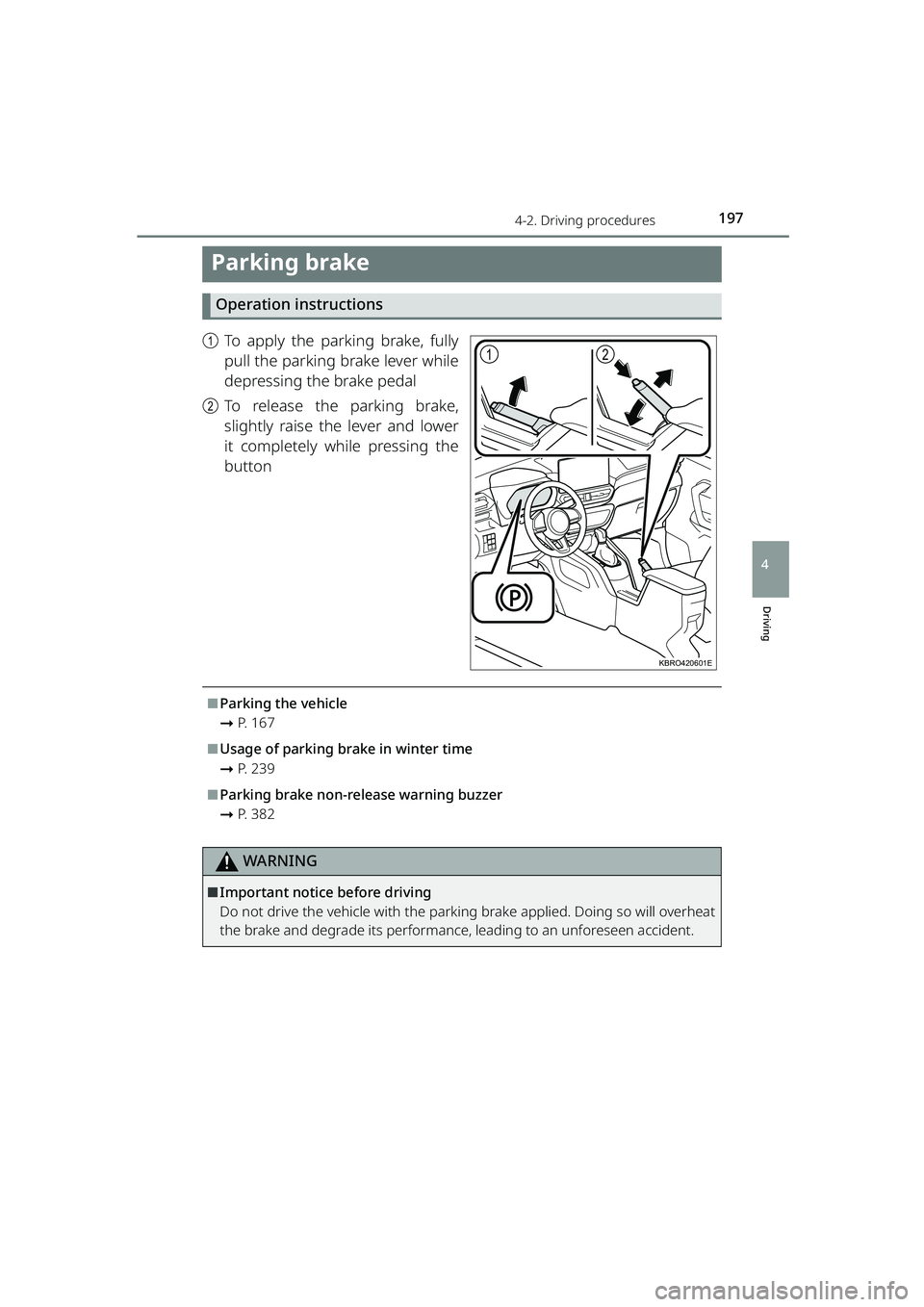
aTo apply the parking brake, fully
pull the parking brake lever while
depressing the brake pedal
b To release the parking brake,
slightly raise the lever and lower
it completely while pressing the
button
⬛Parking the vehicle
➞P. 1 6 7
⬛Usage of parking brake in winter time
➞P. 2 3 9
⬛Parking brake non-release warning buzzer
➞P. 3 8 2
WARNING
⬛Important notice before driving
Do not drive the vehicle with the parking brake applied. Doing so will overheat
the brake and degrade its performance, leading to an unforeseen accident.
12
KBRO420601E
RAIZE_OM_General_BZ358E.book 197 ページ 2022年5月17日 火曜日 午後1時59分
Page 200 of 516
198
RAIZE_OM_General_BZ358E✽
: If equipped
4-3. Operating the lights and windshield wipers
Headlight switch
The headlights can be turned on automatically or manually.
Operation instructions
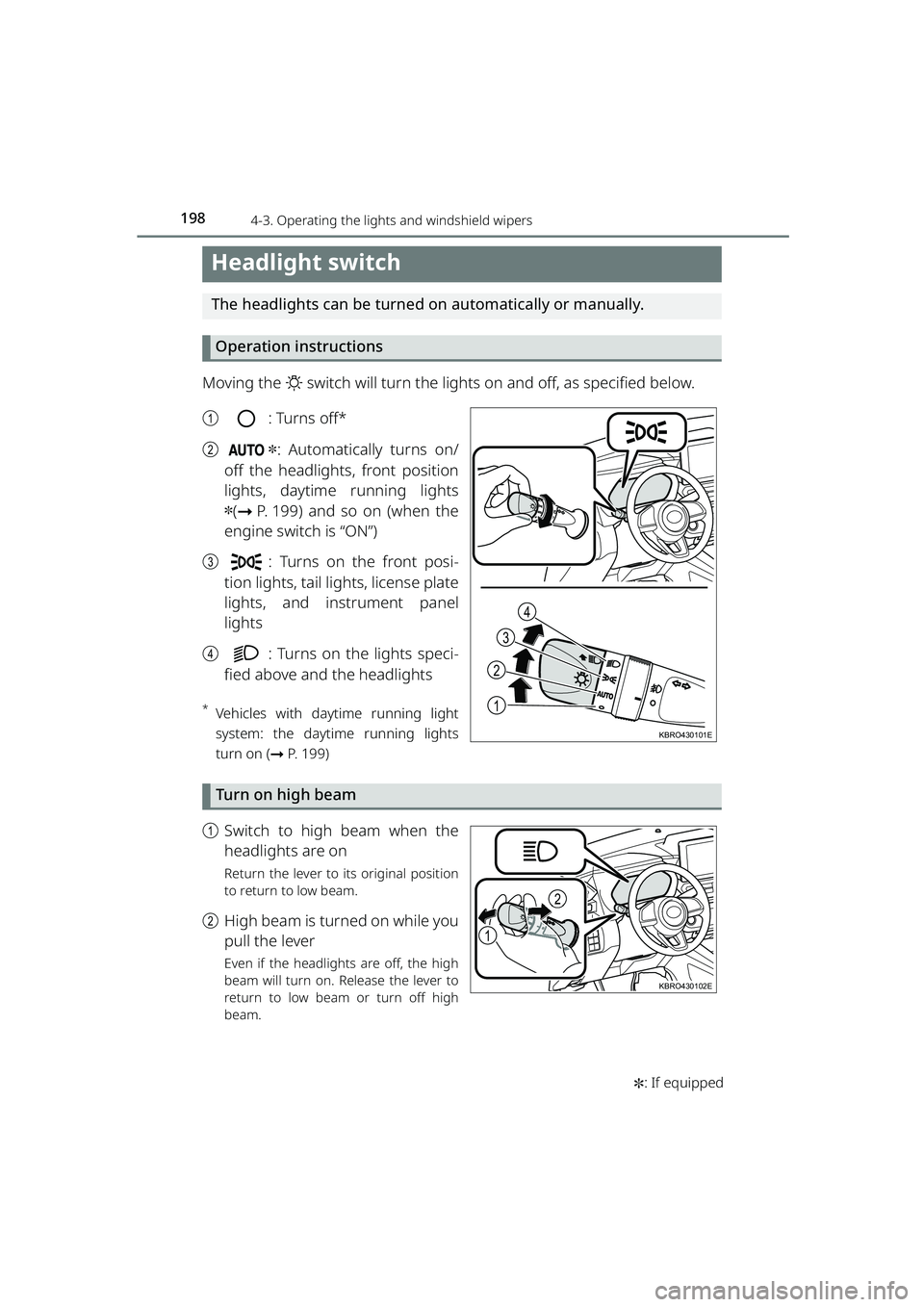
Moving the switch will turn the lights on and off, as specified below.
a : Turns off*
b
✽: Automatically turns on/
off the headlights, front position
lights, daytime running lights
✽( ➞ P. 199) and so on (when the
engine switch is “ON”)
c : Turns on the front posi-
tion lights, tail lights, license plate
lights, and instrument panel
lights
d : Turns on the lights speci-
fied above and the headlights
*Vehicles with daytime running light
system: the daytime running lights
turn on ( ➞P. 199)
Turn on high beam
a Switch to high beam when the
headlights are on
Return the lever to its original position
to return to low beam.
bHigh beam is turned on while you
pull the lever
Even if the headlights are off, the high
beam will turn on. Release the lever to
return to low beam or turn off high
beam.
1
2
4
3
KBRO430101E
1
2
KBRO430102E
RAIZE_OM_General_BZ358E.book 198 ページ 2022年5月17日 火曜日 午後1時59分
Page 201 of 516
1994-3. Operating the lights and windshield wipers
RAIZE_OM_General_BZ358E✽
: If equipped
Driving
4
Follow me home system✽
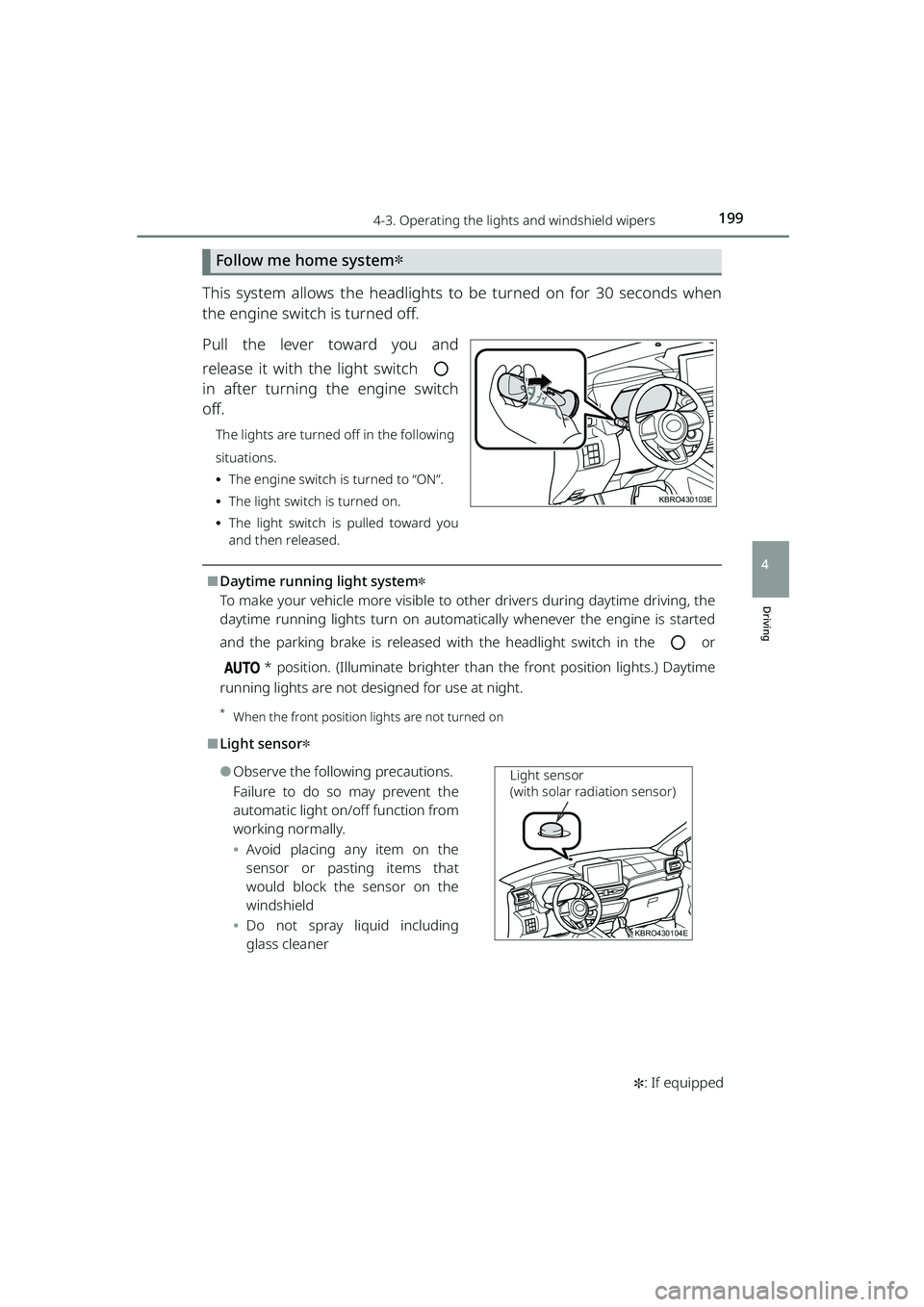
This system allows the headlights to be turned on for 30 seconds when
the engine switch is turned off.
Pull the lever toward you and
release it with the light switch
in after turning the engine switch
off.
The lights are turned off in the following
situations.
⦁ The engine switch is turned to “ON”.
⦁ The light switch is turned on.
⦁ The light switch is pulled toward you
and then released.
⬛Daytime running light system✽
To make your vehicle more visible to ot her drivers during daytime driving, the
daytime running lights turn on automatically whenever the engine is started
and the parking brake is released wi th the headlight switch in the or
* position. (Illuminate brighter than the front position lights.) Daytime
running lights are not designed for use at night.
*When the front position lights are not turned on
⬛Light sensor✽
⚫Observe the following precautions.
Failure to do so may prevent the
automatic light on/off function from
working normally.
⦁ Avoid placing any item on the
sensor or pasting items that
would block the sensor on the
windshield
⦁ Do not spray liquid including
glass cleaner
KBRO430103E
KBRO430104E
Light sensor
(with solar radiation sensor)
RAIZE_OM_General_BZ358E.book 199 ページ 2022年5月17日 火曜日 午後1時59分
Page 205 of 516
2034-3. Operating the lights and windshield wipers
RAIZE_OM_General_BZ358E
Driving
4
Windshield wipers and washer (front)
Operation instructions
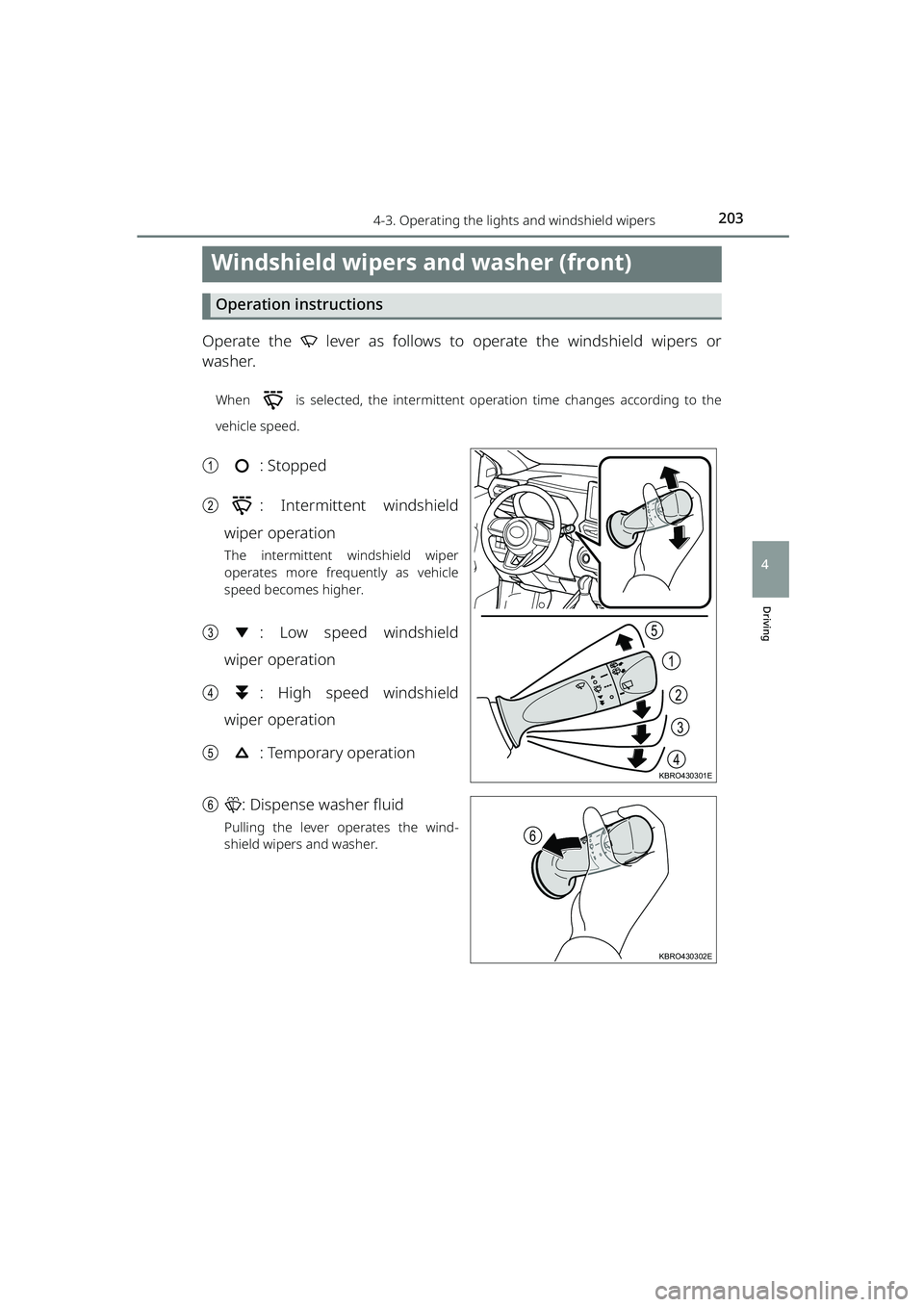
Operate the lever as follows to operate the windshield wipers or
washer.
When is selected, the intermittent operation time changes according to the
vehicle speed.
a: Stopped
b : Intermittent windshield
wiper operation
The intermittent windshield wiper
operates more frequently as vehicle
speed becomes higher.
c : Low speed windshield
wiper operation
d : High speed windshield
wiper operation
e : Temporary operation
f : Dispense washer fluid
Pulling the lever operates the wind-
shield wipers and washer.
2
1
3
4
5
KBRO430301E
6
KBRO430302E
RAIZE_OM_General_BZ358E.book 203 ページ 2022年5月17日 火曜日 午後1時59分
Page 208 of 516
2064-3. Operating the lights and windshield wipers
RAIZE_OM_General_BZ358E✽
: If equipped
⬛Operating conditions
When the engine switch is “ON”
⬛When the washer flui d does not come out
If the washer fluid does not come out even though the washer fluid tank level
is not low, check the nozzles for clogging.
⬛Reverse wiper function
While the windshield wiper is operating, setting the shift lever to R will move
the rear wiper several times. After the windshield wiper is stopped, setting the
shift lever to R within approximately 10 seconds will also move the rear wiper
several times.
⬛Customizations
The settings such as operation intervals can be modified.
(List of customizable features: ➞ P. 430)
(For some of the features, the settings can be changed from the setup screen
of the multi-info rmation display
✽: ➞ P. 9 1 )
(For some of the features, the settings can be changed from the setup screen
of the TFT color multi-information display
✽: ➞ P. 104)
NOTICE
⬛When the rear window is dry
Do not use the windshield wipers,
as they may damage the windshield.
⬛When the washer flui d does not come out
Do not operate the switch continually
as you may damage th e washer fluid pump.
⬛When a nozzle becomes clogged
When a nozzle becomes clogged, contact your Toyota dealer.
Do not try to clear it with a pin or other object.
The nozzle will be damaged.
⬛To prevent battery discharge
Do not leave the windshield wipers on longer than necessary when the engine
is not running.
RAIZE_OM_General_BZ358E.book 206 ページ 2022年5月17日 火曜日 午後1時59分
Page 215 of 516
2134-5. Using the driving support systems
RAIZE_OM_General_BZ358E
Driving
4
How to set up
Go to the “Settings” menu on the TFT color multi-information display, you
can change the settings of BSM function/RCTA function ON (enabled)/OFF
(disabled). (➞P. 109)
⬛Visibility of the outside rear view mirror indicators
⚫It may be difficult to see if the outsid e rear view mirror indicators are lit or
flashing in the following cases:
⦁ Under strong sunlight
⦁ The outside rear view mirrors are covered with ice or snow
⬛Buzzers
⚫It may be difficult to hear the buzzers if there is a loud noise around, such as
high volume audio.
⬛When the TFT color multi-information display shows “BSM Radar Blocked
Temporarily Unavailable”
It is possible that the rear bumper near the sensors is covered with ice, snow,
or mud. If you remove the ice, snow, or mud covering the rear bumper near
the sensors, the function will start working normally again.
⬛When the TFT color multi-information display shows “BSM Temporary
Unavailable”
If you use the function in an extremely hot or cold environment or if the bat-
tery voltage is lower or higher than th e specified level, the system operation
will be temporarily stopped. If the BSM OFF indicator or the RCTA OFF indicator
remains lit for a long time, have the vehi cle inspected at your Toyota dealer.
⬛When the TFT color multi-information display shows “BSM Malfunction
Visit Your Dealer”
It is possible that the sensors have failed or their positions or orientations are
off. Have the vehicle inspec ted at your Toyota dealer.
⬛Customizations
The BSM and RCTA settings can be changed.
(List of customizable features: ➞ P. 430)
(The settings can be changed from the setup screen of the TFT color multi-
information display: ➞ P. 104)
RAIZE_OM_General_BZ358E.book 213 ページ 2022年5月17日 火曜日 午後1時59分
Page 216 of 516
2144-5. Using the driving support systems
RAIZE_OM_General_BZ358E
WARNING
⬛Handling of the radar sensors
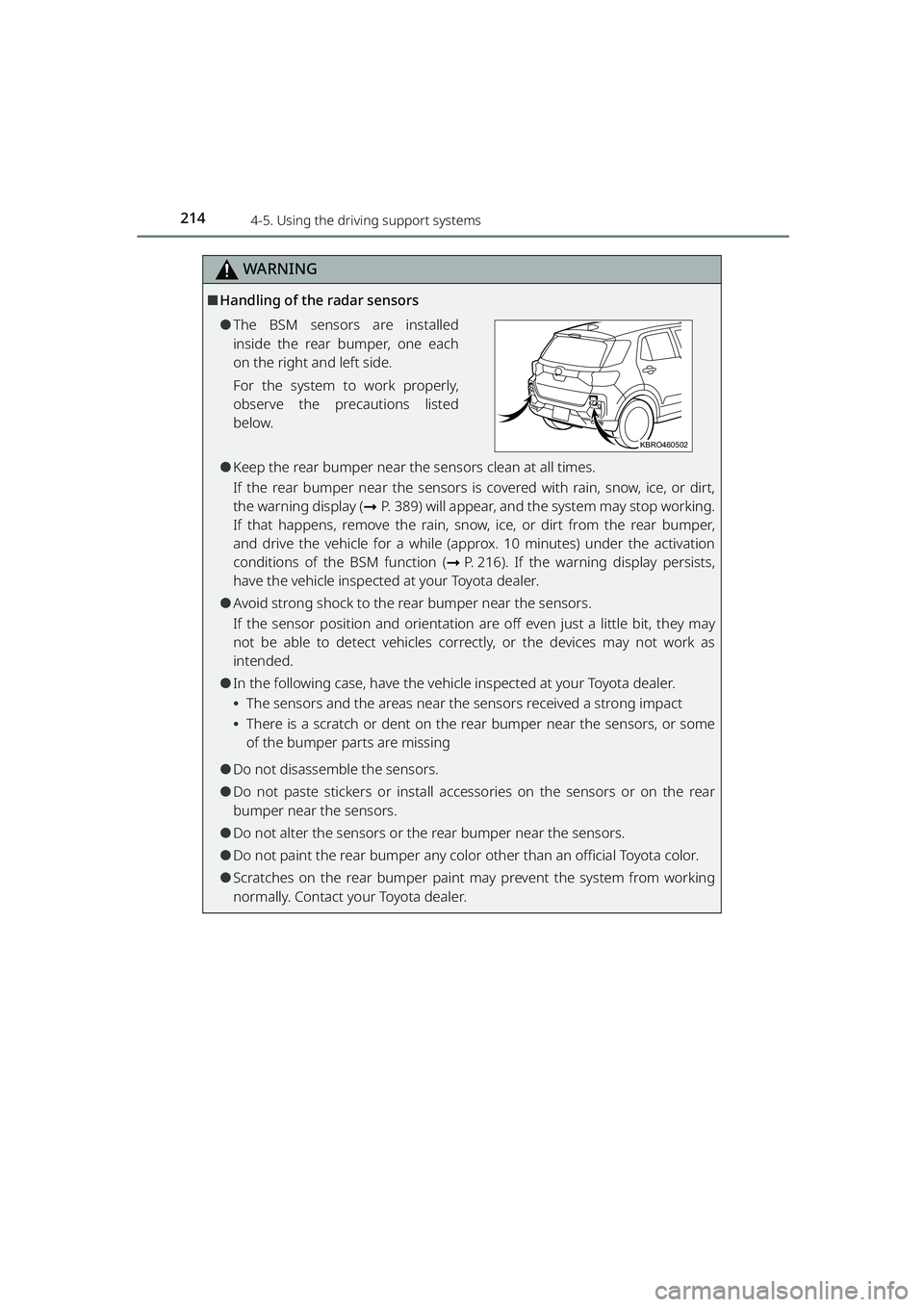
⚫The BSM sensors are installed
inside the rear bumper, one each
on the right and left side.
For the system to work properly,
observe the precautions listed
below.
⚫Keep the rear bumper near the sensors clean at all times.
If the rear bumper near the sensors is covered with rain, snow, ice, or dirt,
the warning display ( ➞P. 389) will appear, and the system may stop working.
If that happens, remove the rain, snow, ice, or dirt from the rear bumper,
and drive the vehicle for a while (appro x. 10 minutes) under the activation
conditions of the BSM function ( ➞P. 216). If the warning display persists,
have the vehicle inspected at your Toyota dealer.
⚫Avoid strong shock to the rear bumper near the sensors.
If the sensor position and orientation ar e off even just a little bit, they may
not be able to detect vehicles correctly, or the devices may not work as
intended.
⚫In the following case, have the vehicle inspected at your Toyota dealer.
⦁ The sensors and the areas near the sensors received a strong impact
⦁ There is a scratch or dent on the rear bumper near the sensors, or some
of the bumper parts are missing
⚫Do not disassemble the sensors.
⚫Do not paste stickers or install accessories on the sensors or on the rear
bumper near the sensors.
⚫Do not alter the sensors or the rear bumper near the sensors.
⚫Do not paint the rear bumper any color other than an official Toyota color.
⚫Scratches on the rear bumper paint may prevent the system from working
normally. Contact your Toyota dealer.
KBRO460502
RAIZE_OM_General_BZ358E.book 214 ページ 2022年5月17日 火曜日 午後1時59分