time TOYOTA RAIZE 2023 Owner's Guide
[x] Cancel search | Manufacturer: TOYOTA, Model Year: 2023, Model line: RAIZE, Model: TOYOTA RAIZE 2023Pages: 516, PDF Size: 44.62 MB
Page 122 of 516
1203-1. Keys
RAIZE_OM_General_BZ358E✽
: If equipped
NOTICE
⬛To prevent damage to the keys
⚫Do not leave the keys in direct sunlight or expose them to high temperatures
⚫Do not put the electronic key✽ in the back pockets of your pants or clothes
⚫Do not drop the keys, subject them to strong shocks or bend them
⚫Do not expose the keys to high humidity for long periods of time
⚫Do not wet the keys or wash them in an ultrasonic washer or the like
⚫Do not attach metallic or magnetic materials to th e keys or place the keys
close to such materials
⚫Do not disassemble the keys
⚫Do not put stickers or the like on the surface of the keys
⚫Do not place the keys near magnetic products such as TVs, audio devices,
electromagnetic cookers, or electro- medical devices such as low-frequency
therapy devices
⬛When carrying the keys
Keep the key at least 10 cm (3.9 in.) away from any electrical equipment with its
power turned on. When the key is placed wi thin 10 cm (3.9 in.) from such elec-
trical equipment, it may interfere wi th its radio waves and may not function
properly.
⬛When bringing your vehicle to a Toyo ta dealer due to malfunction of the
key-free system
✽
Bring all the electronic keys that came with your vehicle.
⬛If you have lost your electronic key✽
If you do nothing after losing your electronic key, you will face a greater risk of
theft. Bring all other electronic keys that came with your vehicle and visit a Toy-
ota dealer immediately.
RAIZE_OM_General_BZ358E.book 120 ページ 2022年5月17日 火曜日 午後1時59分
Page 123 of 516
121
RAIZE_OM_General_BZ358E✽
: If equipped
Operation of each component
3
3-2. Opening, closing and locking the doors
Key-free system✽
Function overview
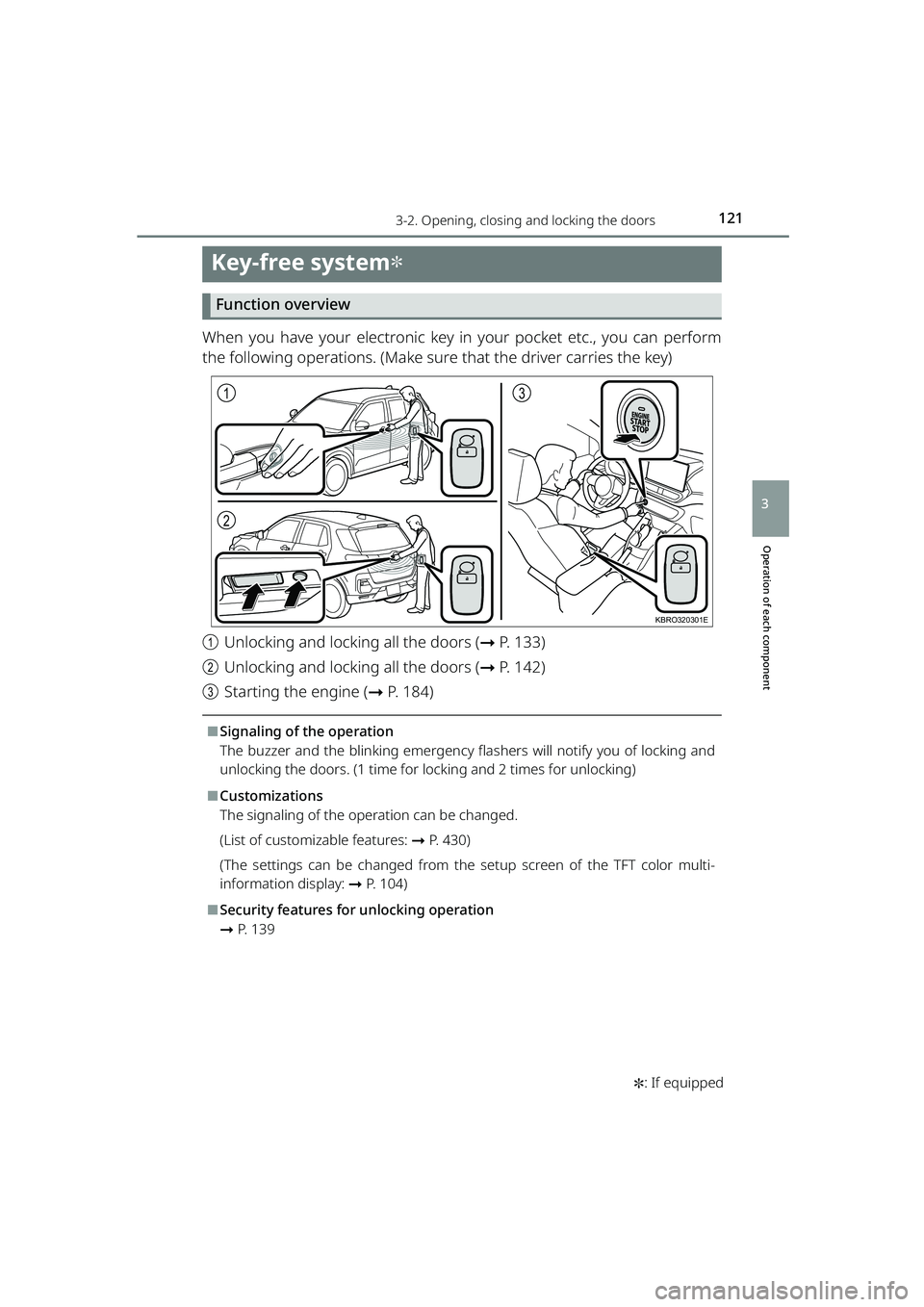
When you have your electronic key in your pocket etc., you can perform
the following operations. (Make sure that the driver carries the key)
aUnlocking and locking all the doors ( ➞P. 133)
b Unlocking and locking all the doors ( ➞P. 142)
c Starting the engine ( ➞P. 184)
⬛Signaling of the operation
The buzzer and the blinking emergency flas hers will notify you of locking and
unlocking the doors. (1 time for locking and 2 times for unlocking)
⬛Customizations
The signaling of the operation can be changed.
(List of customizable features: ➞ P. 430)
(The settings can be changed from the setup screen of the TFT color multi-
information display: ➞ P. 104)
⬛Security features for unlocking operation
➞P. 1 3 9
1
2
3
KBRO320301E
RAIZE_OM_General_BZ358E.book 121 ページ 2022年5月17日 火曜日 午後1時59分
Page 125 of 516
1233-2. Opening, closing and locking the doors
RAIZE_OM_General_BZ358E
Operation of each component
3
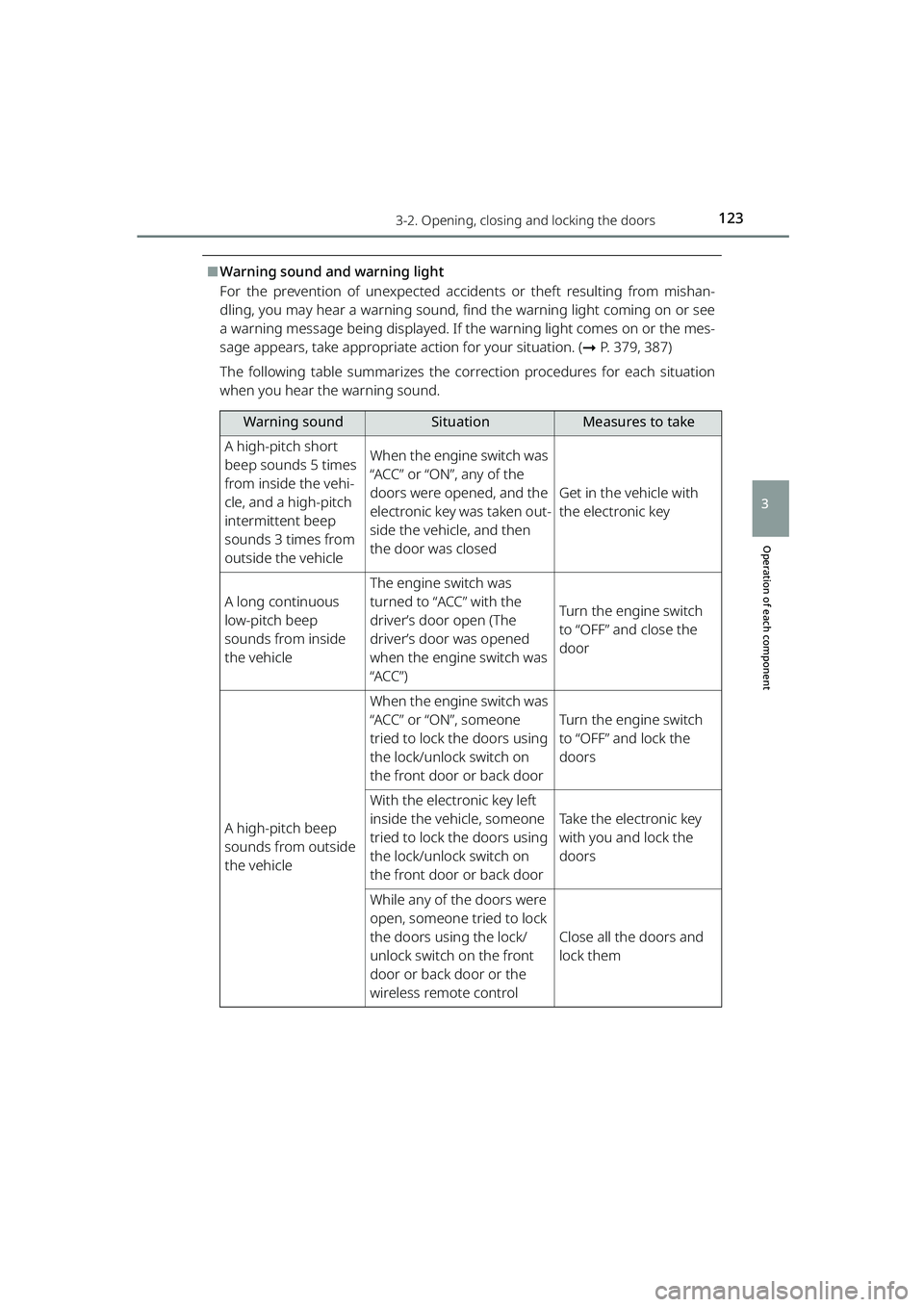
⬛Warning sound and warning light
For the prevention of unexpected accidents or theft resulting from mishan-
dling, you may hear a warning sound, find the warning light coming on or see
a warning message being displayed. If the warning light comes on or the mes-
sage appears, take appropriate action for your situation. ( ➞P. 379, 387)
The following table summarizes the corr ection procedures for each situation
when you hear the warning sound.
Warning soundSituationMeasures to take
A high-pitch short
beep sounds 5 times
from inside the vehi-
cle, and a high-pitch
intermittent beep
sounds 3 times from
outside the vehicleWhen the engine switch was
“ACC” or “ON”, any of the
doors were opened, and the
electronic key was taken out-
side the vehicle, and then
the door was closed
Get in the vehicle with
the electronic key
A long continuous
low-pitch beep
sounds from inside
the vehicle
The engine switch was
turned to “ACC” with the
driver’s door open (The
driver’s door was opened
when the engine switch was
“ACC”)
Turn the engine switch
to “OFF” and close the
door
A high-pitch beep
sounds from outside
the vehicle
When the engine switch was
“ACC” or “ON”, someone
tried to lock the doors using
the lock/unlock switch on
the front door or back door
Turn the engine switch
to “OFF” and lock the
doors
With the electronic key left
inside the vehicle, someone
tried to lock the doors using
the lock/unlock switch on
the front door or back door
Take the electronic key
with you and lock the
doors
While any of the doors were
open, someone tried to lock
the doors using the lock/
unlock switch on the front
door or back door or the
wireless remote control
Close all the doors and
lock them
RAIZE_OM_General_BZ358E.book 123 ページ 2022年5月17日 火曜日 午後1時59分
Page 126 of 516
1243-2. Opening, closing and locking the doors
RAIZE_OM_General_BZ358E
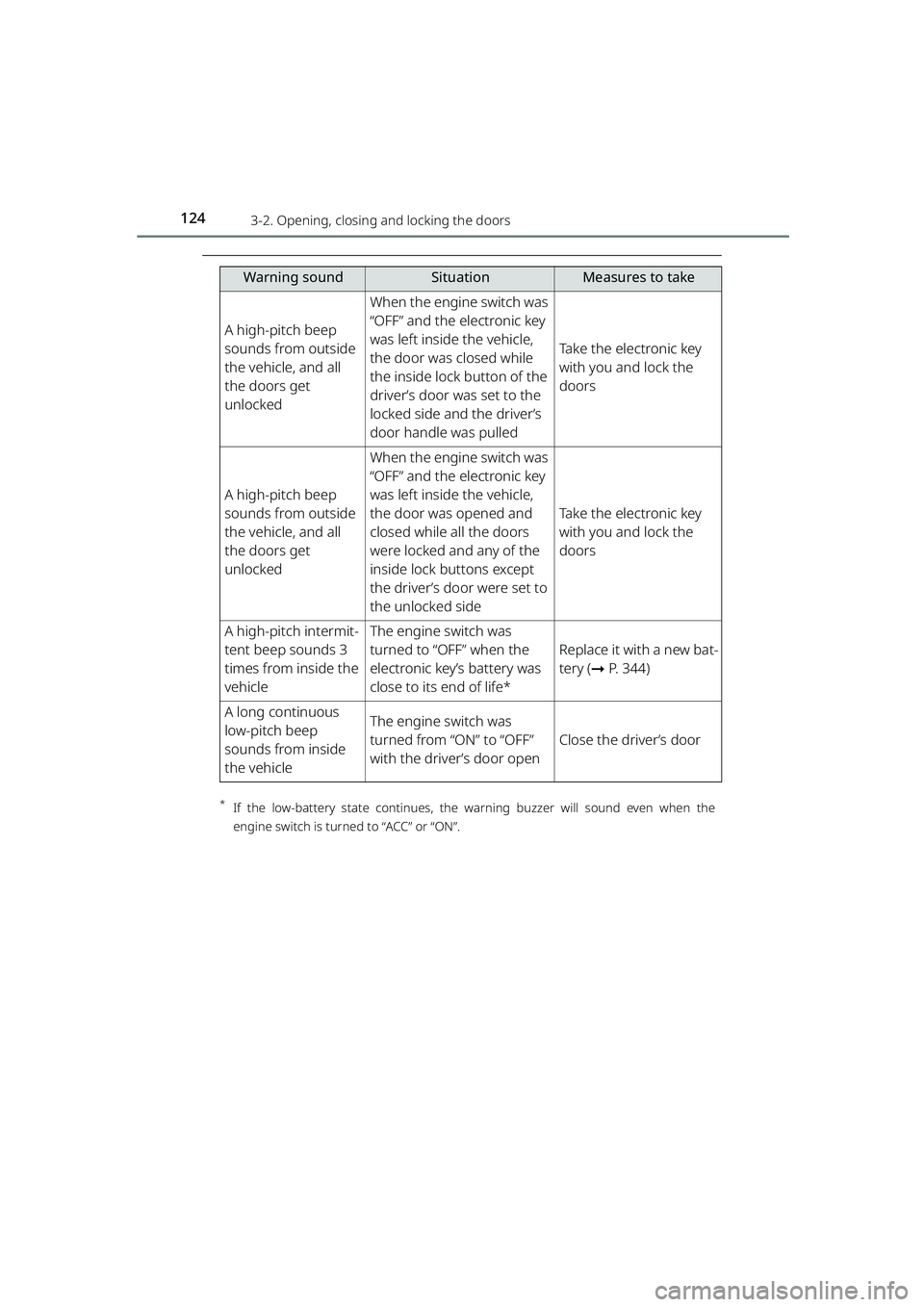
*If the low-battery state co ntinues, the warning buzzer will soun d even when the
engine switch is turned to “ACC” or “ON”.
A high-pitch beep
sounds from outside
the vehicle, and all
the doors get
unlocked
When the engine switch was
“OFF” and the electronic key
was left inside the vehicle,
the door was closed while
the inside lock button of the
driver’s door was set to the
locked side and the driver’s
door handle was pulled
Take the electronic key
with you and lock the
doors
A high-pitch beep
sounds from outside
the vehicle, and all
the doors get
unlocked
When the engine switch was
“OFF” and the electronic key
was left inside the vehicle,
the door was opened and
closed while all the doors
were locked and any of the
inside lock buttons except
the driver’s door were set to
the unlocked side
Take the electronic key
with you and lock the
doors
A high-pitch intermit-
tent beep sounds 3
times from inside the
vehicleThe engine switch was
turned to “OFF” when the
electronic key’s battery was
close to its end of life*
Replace it with a new bat-
tery ( ➞P. 344)
A long continuous
low-pitch beep
sounds from inside
the vehicleThe engine switch was
turned from “ON” to “OFF”
with the driver’s door open
Close the driver’s door
Warning soundSituationMeasures to take
RAIZE_OM_General_BZ358E.book 124 ページ 2022年5月17日 火曜日 午後1時59分
Page 127 of 516
1253-2. Opening, closing and locking the doors
RAIZE_OM_General_BZ358E
Operation of each component
3
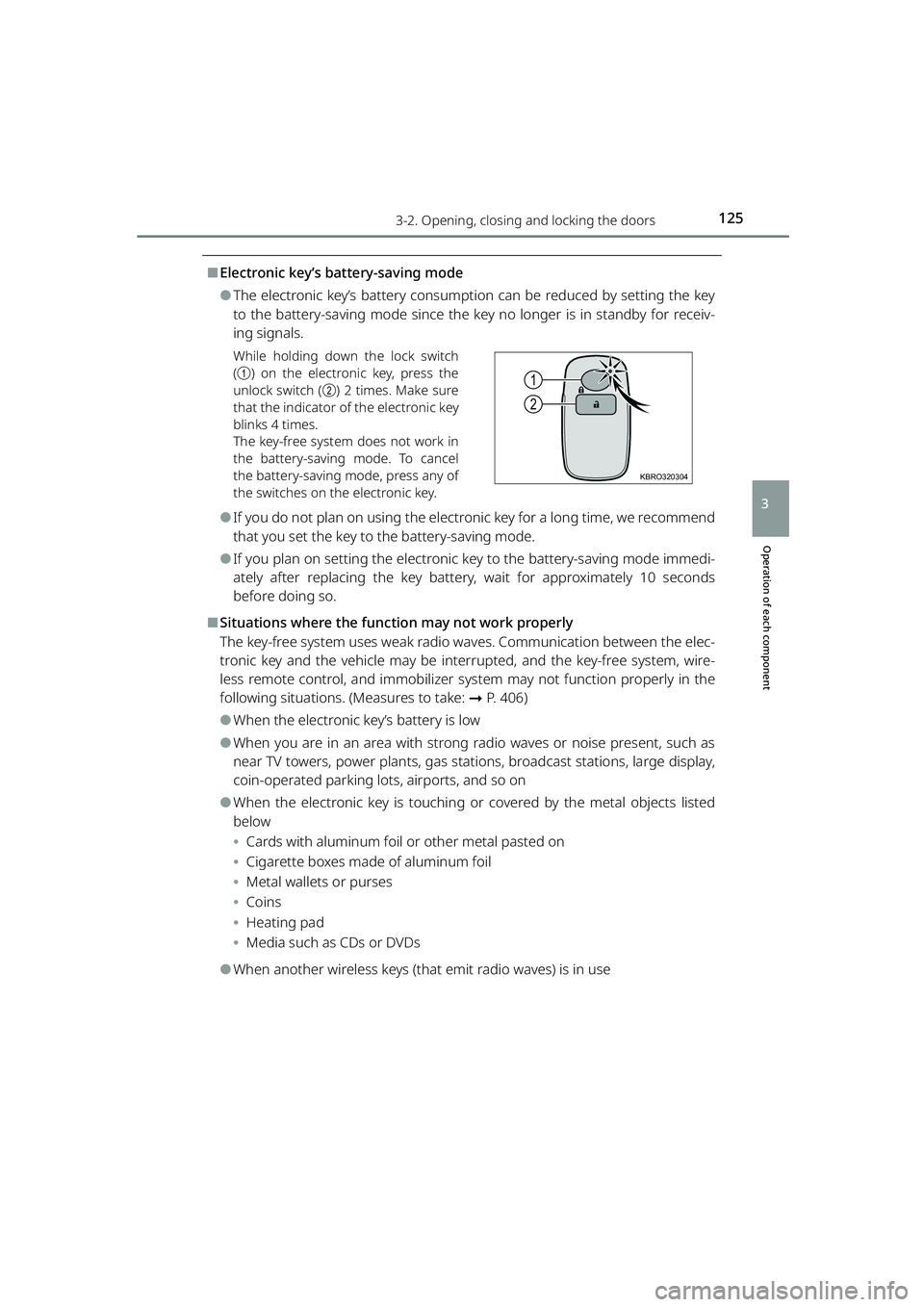
⬛Electronic key’s battery-saving mode
⚫The electronic key’s battery consumption can be reduced by setting the key
to the battery-saving mode since the key no longer is in standby for receiv-
ing signals.
While holding down the lock switch
(a ) on the electronic key, press the
unlock switch ( b) 2 times. Make sure
that the indicator of the electronic key
blinks 4 times.
The key-free system does not work in
the battery-saving mode. To cancel
the battery-saving mode, press any of
the switches on the electronic key.
⚫If you do not plan on using the electronic key for a long time, we recommend
that you set the key to the battery-saving mode.
⚫If you plan on setting the electronic key to the battery-saving mode immedi-
ately after replacing the key battery, wait for approximately 10 seconds
before doing so.
⬛Situations where the function may not work properly
The key-free system uses weak radio wa ves. Communication between the elec-
tronic key and the vehicle may be interrupted, and the key-free system, wire-
less remote control, and i mmobilizer system may not function properly in the
following situations. (Measures to take: ➞P. 406)
⚫When the electronic key’s battery is low
⚫When you are in an area with strong radio waves or noise present, such as
near TV towers, power plants, gas stat ions, broadcast stations, large display,
coin-operated parking lots, airports, and so on
⚫When the electronic key is touching or covered by the metal objects listed
below
⦁ Cards with aluminum foil or other metal pasted on
⦁ Cigarette boxes made of aluminum foil
⦁ Metal wallets or purses
⦁ Coins
⦁ Heating pad
⦁ Media such as CDs or DVDs
⚫When another wireless keys (that emit radio waves) is in use
1
2
KBRO320304
RAIZE_OM_General_BZ358E.book 125 ページ 2022年5月17日 火曜日 午後1時59分
Page 128 of 516
1263-2. Opening, closing and locking the doors
RAIZE_OM_General_BZ358E
⚫When the electronic key is carried with products that transmit radio waves as
follows
⦁ Wireless communication devices such as radios, mobile phones, and cord-
less telephones
⦁ Electronic keys or wireless keys (that emit radio waves) of other vehicles
⦁ Computers or portable information terminals (electronic organizers)
⦁ Digital audio players
⦁ Portable gaming devices
⚫When a metal-containing film is pasted on the rear window glass
⚫When the electronic key is placed near electronic devices such as a charger
⬛Important information
⚫Even when the electronic key is placed in the operating (detection) range, it
may not work properly in the following situations.
⦁ The electronic key is located too close to the door windows or door han-
dles when you lock or unlock the doors or located near the ground or at a
high place
⦁ The electronic key is placed on the instrument panel or the floor, placed
inside the door pockets or in the gl ove box when you start the engine or
switch the modes
⚫Even when you have the electronic key in your pocket, the key may not work
properly depending on the position or shape of your pocket. (Operating
range: ➞P. 122)
⚫Depending on the signal conditions, the electronic key could be trapped
inside the vehicle if you step outside of your vehicle by leaving the electronic
key on the instrument panel or near the door pockets since the external
antenna could detect the signal and lock the doors.
⚫As long as the electronic key is located within the operating range, the doors
can be locked and unlocked by anyone besides the person who is carrying
the key. Note that the doors other th an those detect the electronic key can-
not be unlocked in this case.
Even when the electronic key is located near the door that is opposite from
the unlocked door, the opposite door can detect the electronic key and get
unlocked.
⚫If the electronic key is located near th e door window outside the vehicle, the
key could start the engine sometimes.
RAIZE_OM_General_BZ358E.book 126 ページ 2022年5月17日 火曜日 午後1時59分
Page 130 of 516
1283-2. Opening, closing and locking the doors
RAIZE_OM_General_BZ358E
⬛Important points when locking the doors
During an automatic car wash, the vehicl e’s internal buzzer may sound if water
splashes on the door handle while the electronic key is left inside the vehicle.
⬛Important points when unlocking the doors
⚫When you pull the door handle while operating the door handle switch, the
door may not get unlocked. In that case, restore the door handle to the orig-
inal position and operate the switch again (except for the back door). When
you verify that the door has been unlocked, pull the door handle.
⚫When another electronic key is placed within the operating range, it may
take longer to unlock the door from the time when you operate the switch
on the door handle.
⬛Leaving the vehicle unused for a long period
⚫To prevent theft, keep the electronic key away from the vehicle for approx. 3
m (9.8 ft.).
⚫You can also disable the key-free system beforehand.
Contact your Toyota dealer for further information.
⬛Starting the system normally
Make sure to carry the electronic ke y with you when you start the system.
When you start the system from outside the vehicle, be careful not to keep the
electronic key too close to the vehicle.
Depending on the electronic key’s position or how you hold it when starting
the system, the key may not be detected correctly, preventing the system from
starting normally. (It could cause the al arm to go off unexpectedly or the door
lock prevention func tion may not work. : ➞P. 139)
⬛When the key-free system does not work properly
⚫Locking and unlocking doors: ➞ P. 4 0 6
⚫Starting the engine: ➞P. 4 0 6
⬛Low battery
⚫The standard battery life is between 1 and 2 years.
⚫The battery still depletes without usin g the wireless remote control. Since
the electronic key is constantly receiving radio waves, the battery depletes
even when it is not in use. If you encounter any of the following situations,
the key may be running out of battery. Replace it with a new battery.
⦁ The key-free system or wireless remote control will not start
⦁ The operating range has become narrower
⦁ The LED of the electronic key will not light
RAIZE_OM_General_BZ358E.book 128 ページ 2022年5月17日 火曜日 午後1時59分
Page 131 of 516
1293-2. Opening, closing and locking the doors
RAIZE_OM_General_BZ358E
Operation of each component
3
⚫When the remaining battery becomes lo w, a warning buzzer will sound from
inside the vehicle when the engine is stopped. ( ➞P. 394)
⚫To prevent significant battery drainage, do not store the electronic key within
1 m (3.3 ft.) from the following electr onic devices that are known to emit a
magnetic field.
⦁ TV
⦁ Audio system
⦁ Personal computers
⦁ AC adapters
⦁ Mobile phones, cordless phones, and chargers
⦁ Desk lamps
⦁ Medical electronic devices such as lo w-frequency electric therapy equip-
ment
⦁ Liquid crystal display
⦁ Motors
⦁ Induction cookers
⚫Do not leave electronic keys inside or near the vehicle. Since the electronic
key and the vehicle are constantly communicating with one another, it
speeds up the battery draining. When they enter in the constant communi-
cation state, the indicator of the electro nic key starts blinking. Keep the elec-
tronic key away from the vehic le until the indicator turns off.
⚫If you do not plan on using the electr onic key for a long time, set the key to
the battery-saving mode to mini mize battery consumption. (➞P. 125)
⬛Running out of the battery
➞P. 3 4 4
⬛Functions configurable by Toyota dealers
Toyota dealers can deactivate the key-free system.
(List of customizable features: ➞ P. 430)
⬛When the key-free system was deactivated by a Toyota dealer
⚫Locking and unlocking doors: The doors can be locked and unlocked using
the wireless function or the emergency key. ( ➞P. 133, 406)
⚫Starting the engine and swit ching the engine switch mode: ➞ P. 4 0 6
⚫Stopping the engine: ➞P. 1 8 5
RAIZE_OM_General_BZ358E.book 129 ページ 2022年5月17日 火曜日 午後1時59分
Page 133 of 516
1313-2. Opening, closing and locking the doors
RAIZE_OM_General_BZ358E ✽
: If equipped
Operation of each component
3
Wireless remote control
Function overview
You can lock and unlock the doors.
▶Vehicles without key-free system
➞ P. 1 3 3
▶Vehicles with key-free system
➞ P. 1 3 3
⬛Signaling of the operation
The buzzer and the blinking emergency flashers will notify you of the opera-
tion. (1 time for locking and 2 times for unlocking)
⬛Customizations
The signaling of the operation can be changed.
(List of customizable features: ➞ P. 430)
(The settings can be changed from the setup screen of the multi-information
display
✽: ➞ P. 9 1 )
(The settings can be changed from the setup screen of the TFT color multi-
information display
✽: ➞ P. 104)
⬛Security features for unlocking operation
➞ P. 1 3 9
⬛Situations where the function may not work properly
▶Vehicles without key-free system
In the following cases, the wireless remote control may not work as intended.
⚫When the wireless key’s battery is low
⚫When you are in an area with strong radio waves or noise present, such as
near TV towers, power plants, gas stat ions, broadcast stations, large display,
airports, and so on
⚫When you have a wireless communication device such as a radio, mobile
phone, and cordless telephone with you
⚫If the wireless remote control touches or is covered by a metal object
⚫When a wireless key (that emits radio waves) is in use near by
⚫When a metal-containing film is pasted on the rear window
▶Vehicles with key-free system
➞ P. 1 2 5
RAIZE_OM_General_BZ358E.book 131 ページ 2022年5月17日 火曜日 午後1時59分
Page 155 of 516
1533-3. Adjusting the seats
RAIZE_OM_General_BZ358E
Operation of each component
3
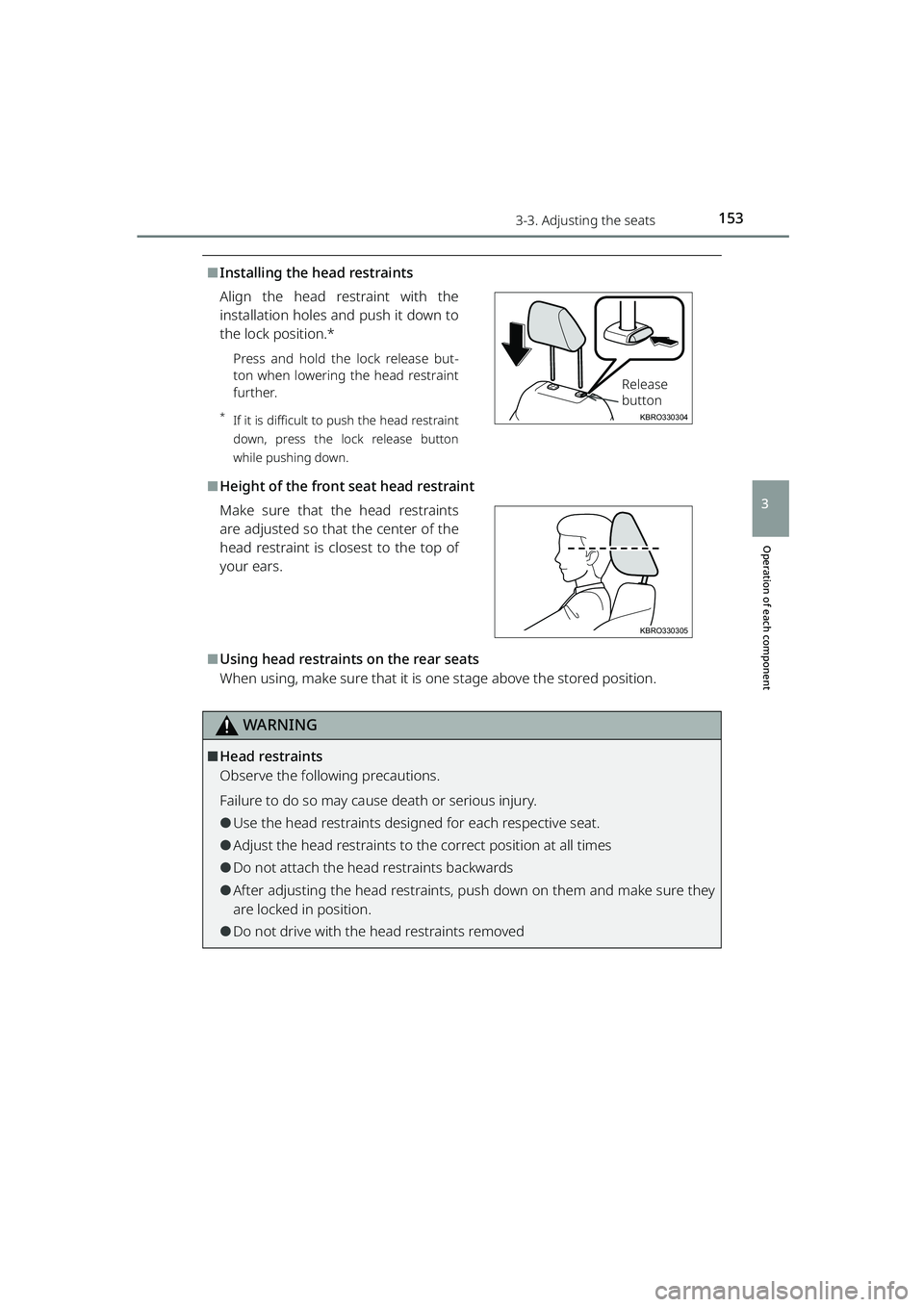
⬛Installing the head restraints
Align the head restraint with the
installation holes and push it down to
the lock position.*
Press and hold the lock release but-
ton when lowering the head restraint
further.
*If it is difficult to push the head restraint
down, press the lock release button
while pushing down.
⬛Height of the front seat head restraint
Make sure that the head restraints
are adjusted so that the center of the
head restraint is closest to the top of
your ears.
⬛Using head restraints on the rear seats
When using, make sure that it is one stage above the stored position.
WARNING
⬛Head restraints
Observe the following precautions.
Failure to do so may cause death or serious injury.
⚫Use the head restraints designed for each respective seat.
⚫Adjust the head restraints to the correct position at all times
⚫Do not attach the head restraints backwards
⚫After adjusting the head restraints, pu sh down on them and make sure they
are locked in position.
⚫Do not drive with the head restraints removed
KBRO330304
Release
button
KBRO330305
RAIZE_OM_General_BZ358E.book 153 ページ 2022年5月17日 火曜日 午後1時59分