instrument panel TOYOTA RAV4 2006 Service User Guide
[x] Cancel search | Manufacturer: TOYOTA, Model Year: 2006, Model line: RAV4, Model: TOYOTA RAV4 2006Pages: 2000, PDF Size: 45.84 MB
Page 1257 of 2000
U241E AUTOMATIC TRANSAXLE – AUTOMATIC TRANSAXLE SYSTEMAX–33
AX
DIAGNOSIS SYSTEM
1. DESCRIPTION
(a) When troubleshooting On-Board Diagnostic (OBD
II) vehicles, the vehicle must be connected to the
OBD II scan tool (complying with SAE J1987).
Various data output from the vehicle's ECM can
then be read.
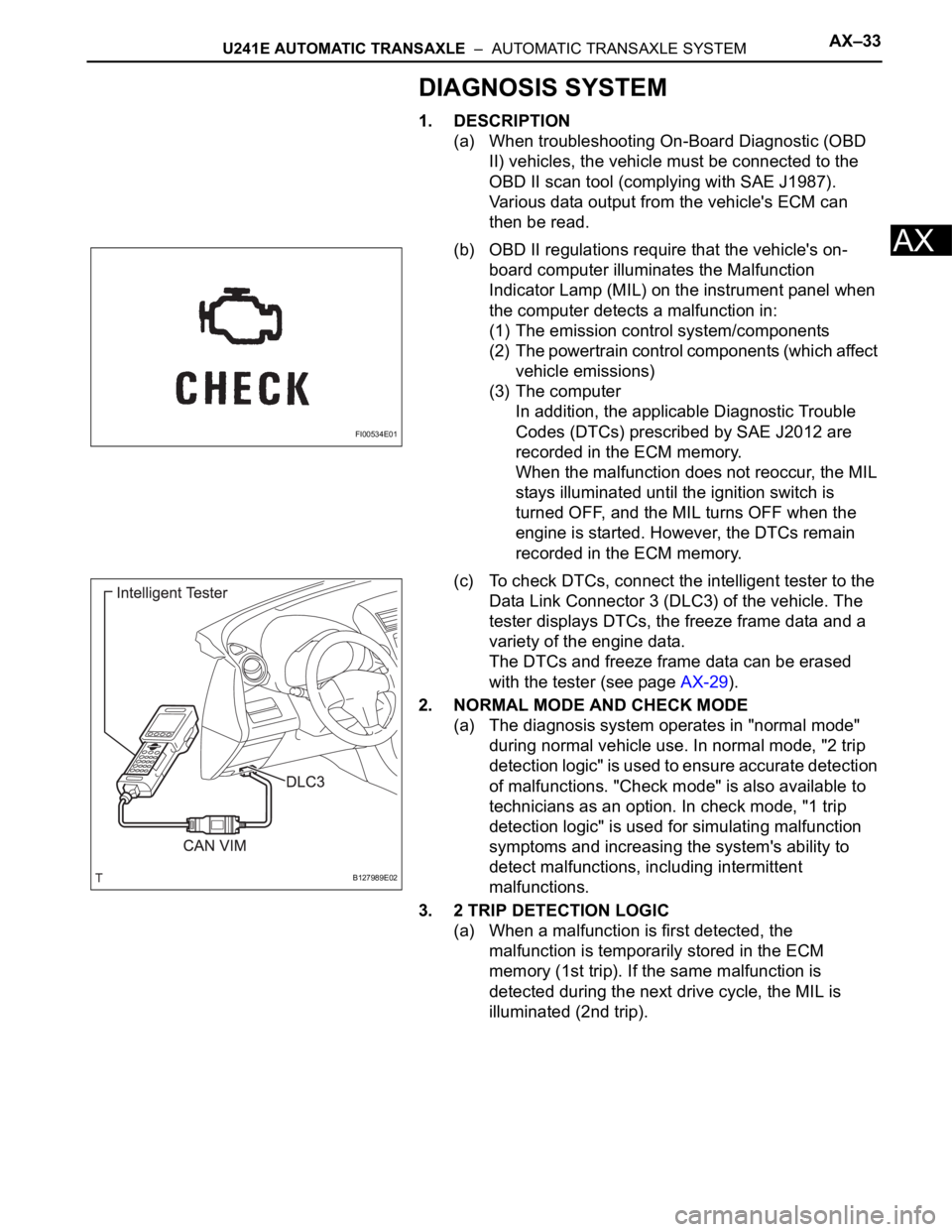
(b) OBD II regulations require that the vehicle's on-
board computer illuminates the Malfunction
Indicator Lamp (MIL) on the instrument panel when
the computer detects a malfunction in:
(1) The emission control system/components
(2) The powertrain control components (which affect
vehicle emissions)
(3) The computer
In addition, the applicable Diagnostic Trouble
Codes (DTCs) prescribed by SAE J2012 are
recorded in the ECM memory.
When the malfunction does not reoccur, the MIL
stays illuminated until the ignition switch is
turned OFF, and the MIL turns OFF when the
engine is started. However, the DTCs remain
recorded in the ECM memory.
(c) To check DTCs, connect the intelligent tester to the
Data Link Connector 3 (DLC3) of the vehicle. The
tester displays DTCs, the freeze frame data and a
variety of the engine data.
The DTCs and freeze frame data can be erased
with the tester (see page AX-29).
2. NORMAL MODE AND CHECK MODE
(a) The diagnosis system operates in "normal mode"
during normal vehicle use. In normal mode, "2 trip
detection logic" is used to ensure accurate detection
of malfunctions. "Check mode" is also available to
technicians as an option. In check mode, "1 trip
detection logic" is used for simulating malfunction
symptoms and increasing the system's ability to
detect malfunctions, including intermittent
malfunctions.
3. 2 TRIP DETECTION LOGIC
(a) When a malfunction is first detected, the
malfunction is temporarily stored in the ECM
memory (1st trip). If the same malfunction is
detected during the next drive cycle, the MIL is
illuminated (2nd trip).
FI00534E01
B127989E02
Page 1549 of 2000
BC–46BRAKE CONTROL – VEHICLE STABILITY CONTROL SYSTEM
BC
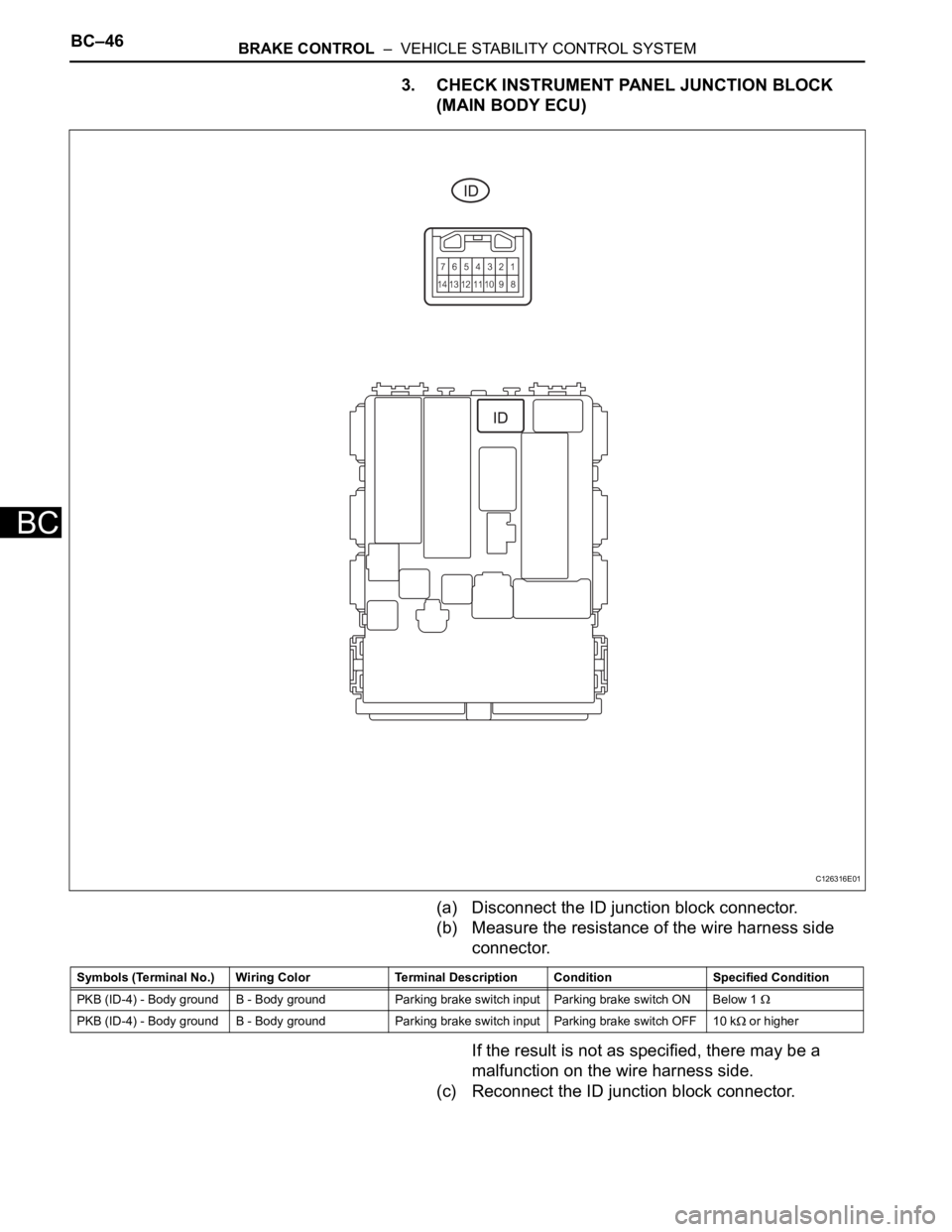
3. CHECK INSTRUMENT PANEL JUNCTION BLOCK
(MAIN BODY ECU)
(a) Disconnect the ID junction block connector.
(b) Measure the resistance of the wire harness side
connector.
If the result is not as specified, there may be a
malfunction on the wire harness side.
(c) Reconnect the ID junction block connector.
C126316E01
Symbols (Terminal No.) Wiring Color Terminal Description ConditionSpecified Condition
PKB (ID-4) - Body ground B - Body ground Parking brake switch input Parking brake switch ON Below 1
PKB (ID-4) - Body ground B - Body ground Parking brake switch input Parking brake switch OFF 10 k or higher
Page 1567 of 2000
BR–12BRAKE – BRAKE PEDAL
BR
REMOVAL
1. DISCONNECT CABLE FROM NEGATIVE BATTERY
TERMINAL
CAUTION:
Wait at least 90 seconds after disconnecting the
cable from the negative (-) battery terminal to
prevent airbag and seat belt pretensioner activation.
2. REMOVE INSTRUMENT PANEL SUB-ASSEMBLY
(a) Remove the instrument panel (see page IP-4).
3. DISCONNECT CONNECTORS
(a) Disconnect the stop light switch connector.
(b) w/
296 disc brake:
Disconnect the brake pedal load sensing switch
connector.
4. REMOVE STOP LIGHT SWITCH ASSEMBLY
(a) Turn the switch counterclockwise and remove it.
5. REMOVE PUSH ROD PIN
(a) Remove the clip from the push rod pin.
(b) Remove the push rod pin from the push rod clevis.
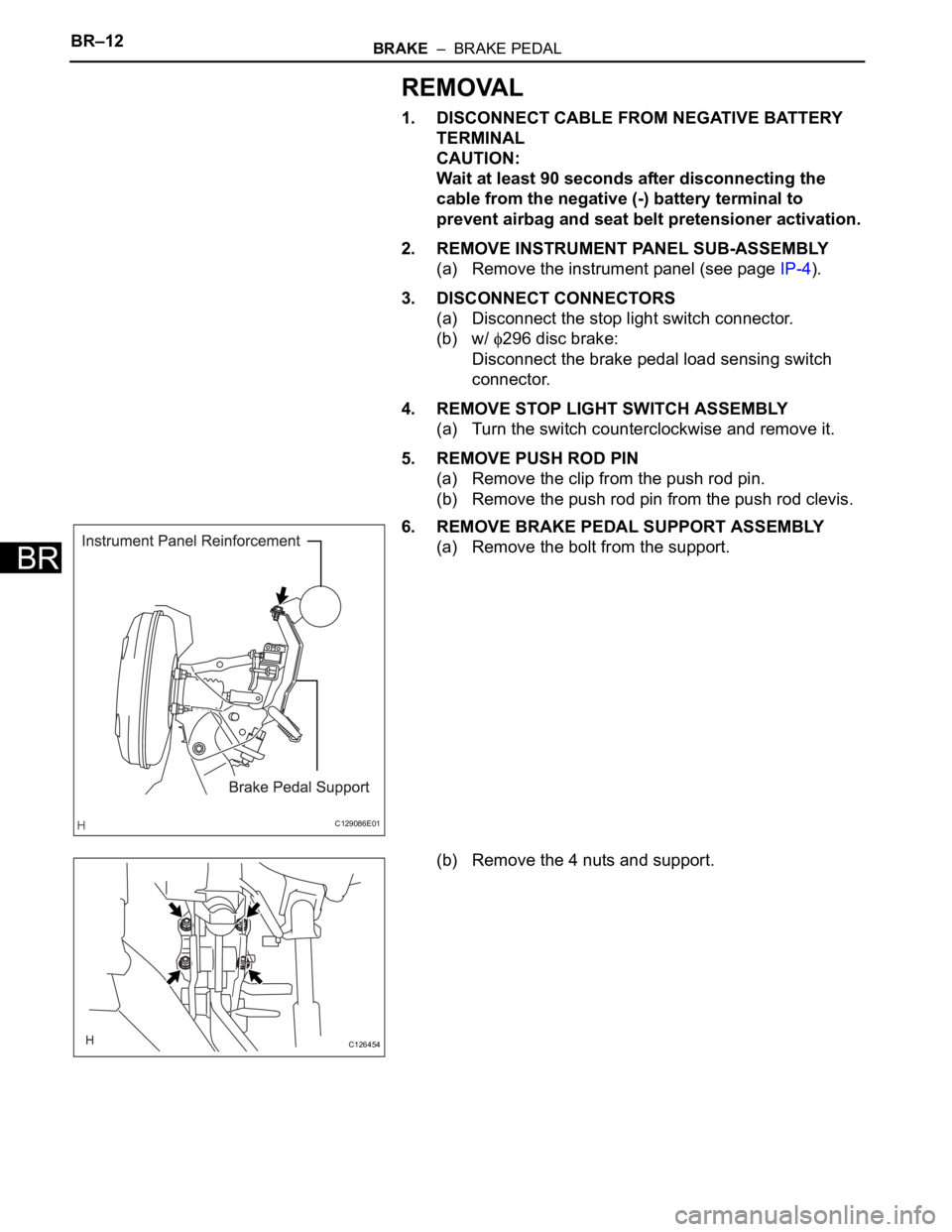
6. REMOVE BRAKE PEDAL SUPPORT ASSEMBLY
(a) Remove the bolt from the support.
(b) Remove the 4 nuts and support.
C129086E01
C126454
Page 1573 of 2000
BR–18BRAKE – BRAKE PEDAL
BR
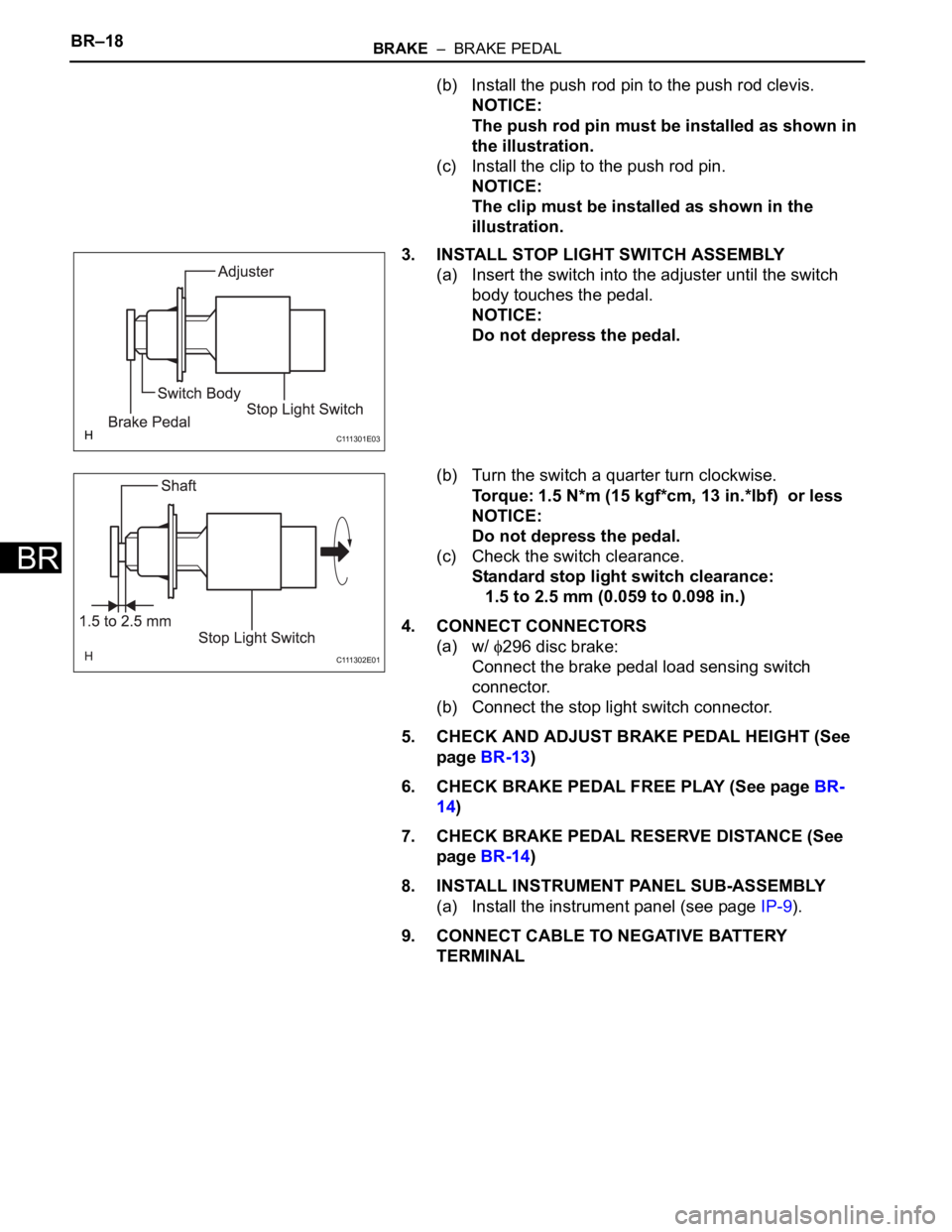
(b) Install the push rod pin to the push rod clevis.
NOTICE:
The push rod pin must be installed as shown in
the illustration.
(c) Install the clip to the push rod pin.
NOTICE:
The clip must be installed as shown in the
illustration.
3. INSTALL STOP LIGHT SWITCH ASSEMBLY
(a) Insert the switch into the adjuster until the switch
body touches the pedal.
NOTICE:
Do not depress the pedal.
(b) Turn the switch a quarter turn clockwise.
Torque: 1.5 N*m (15 kgf*cm, 13 in.*lbf) or less
NOTICE:
Do not depress the pedal.
(c) Check the switch clearance.
Standard stop light switch clearance:
1.5 to 2.5 mm (0.059 to 0.098 in.)
4. CONNECT CONNECTORS
(a) w/
296 disc brake:
Connect the brake pedal load sensing switch
connector.
(b) Connect the stop light switch connector.
5. CHECK AND ADJUST BRAKE PEDAL HEIGHT (See
page BR-13)
6. CHECK BRAKE PEDAL FREE PLAY (See page BR-
14)
7. CHECK BRAKE PEDAL RESERVE DISTANCE (See
page BR-14)
8. INSTALL INSTRUMENT PANEL SUB-ASSEMBLY
(a) Install the instrument panel (see page IP-9).
9. CONNECT CABLE TO NEGATIVE BATTERY
TERMINAL
C 111 3 0 1 E 0 3
C 111 3 0 2 E 0 1
Page 1597 of 2000
STEERING COLUMN – STEERING COLUMN ASSEMBLYSR–13
SR
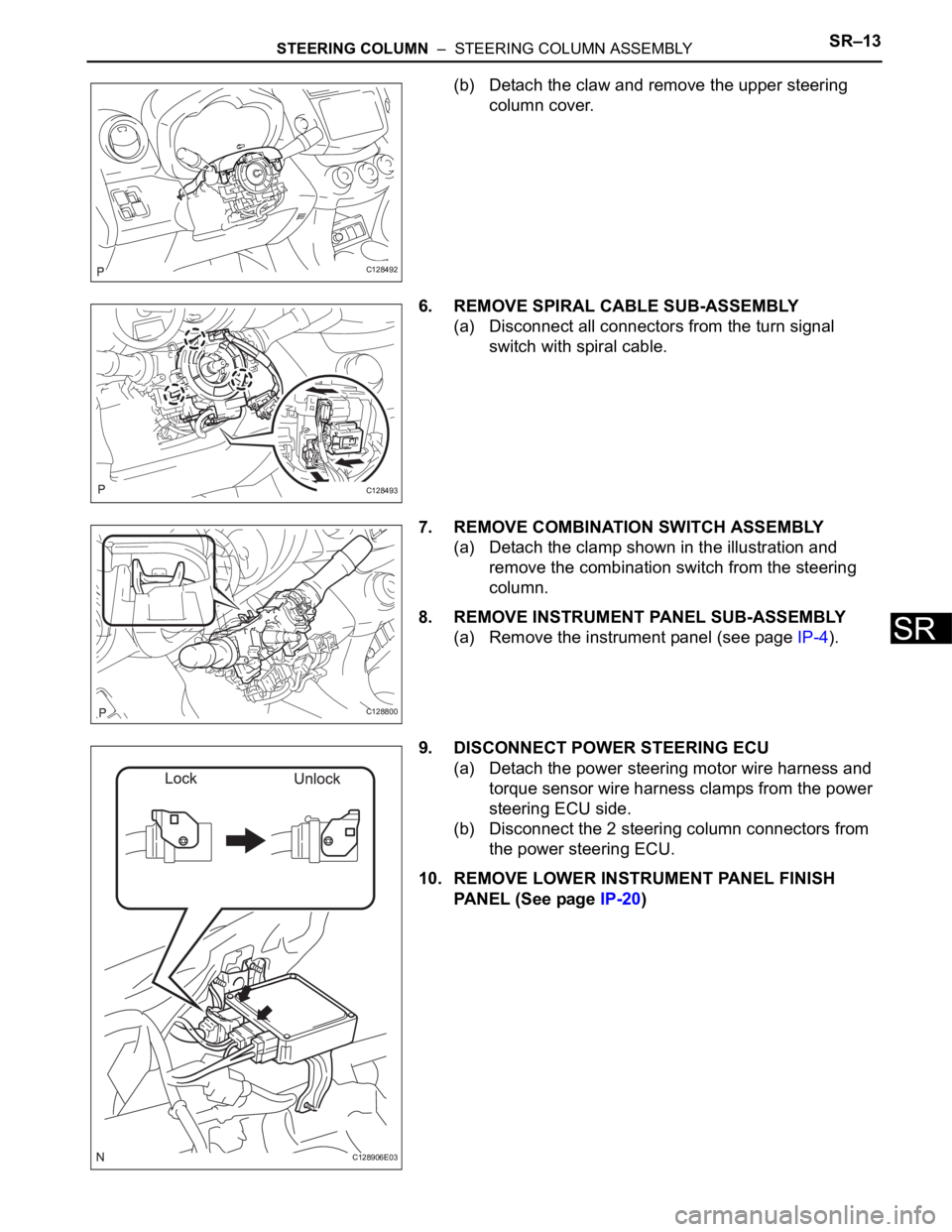
(b) Detach the claw and remove the upper steering
column cover.
6. REMOVE SPIRAL CABLE SUB-ASSEMBLY
(a) Disconnect all connectors from the turn signal
switch with spiral cable.
7. REMOVE COMBINATION SWITCH ASSEMBLY
(a) Detach the clamp shown in the illustration and
remove the combination switch from the steering
column.
8. REMOVE INSTRUMENT PANEL SUB-ASSEMBLY
(a) Remove the instrument panel (see page IP-4).
9. DISCONNECT POWER STEERING ECU
(a) Detach the power steering motor wire harness and
torque sensor wire harness clamps from the power
steering ECU side.
(b) Disconnect the 2 steering column connectors from
the power steering ECU.
10. REMOVE LOWER INSTRUMENT PANEL FINISH
PANEL (See page IP-20)
C128492
C128493
C128800
C128906E03
Page 1598 of 2000
SR–14STEERING COLUMN – STEERING COLUMN ASSEMBLY
SR
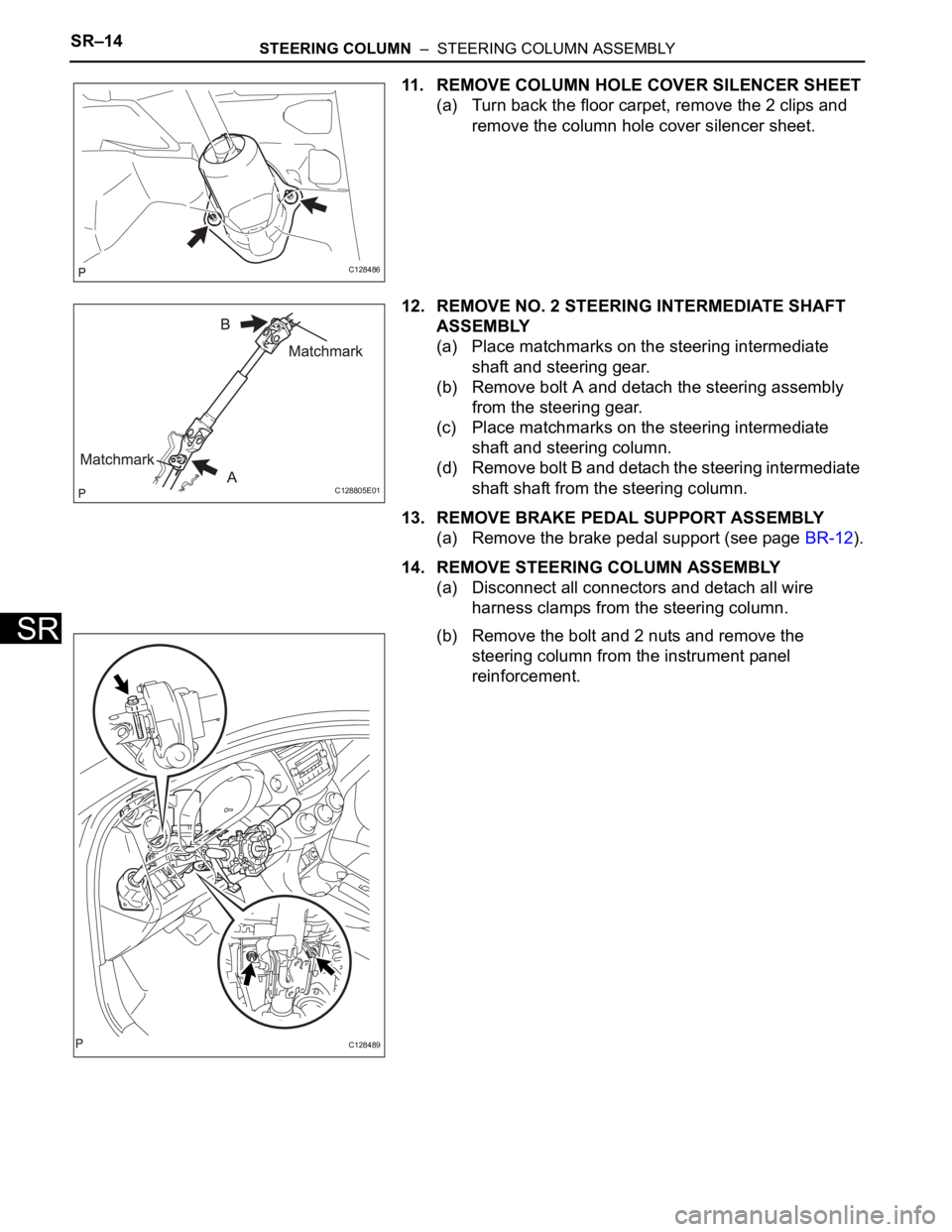
11. REMOVE COLUMN HOLE COVER SILENCER SHEET
(a) Turn back the floor carpet, remove the 2 clips and
remove the column hole cover silencer sheet.
12. REMOVE NO. 2 STEERING INTERMEDIATE SHAFT
ASSEMBLY
(a) Place matchmarks on the steering intermediate
shaft and steering gear.
(b) Remove bolt A and detach the steering assembly
from the steering gear.
(c) Place matchmarks on the steering intermediate
shaft and steering column.
(d) Remove bolt B and detach the steering intermediate
shaft shaft from the steering column.
13. REMOVE BRAKE PEDAL SUPPORT ASSEMBLY
(a) Remove the brake pedal support (see page BR-12).
14. REMOVE STEERING COLUMN ASSEMBLY
(a) Disconnect all connectors and detach all wire
harness clamps from the steering column.
(b) Remove the bolt and 2 nuts and remove the
steering column from the instrument panel
reinforcement.
C128486
C128805E01
C128489
Page 1603 of 2000
STEERING COLUMN – STEERING COLUMN ASSEMBLYSR–19
SR
INSTALLATION
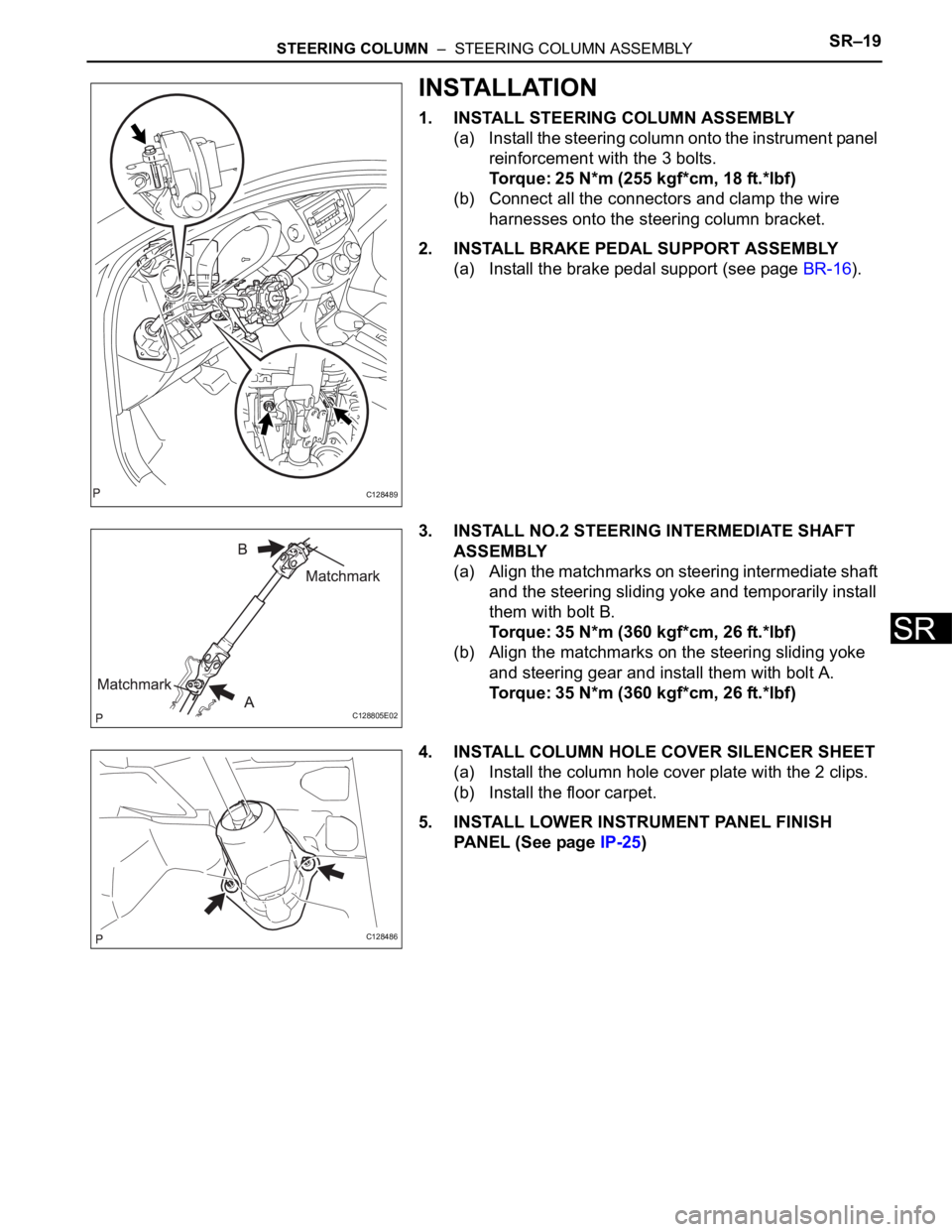
1. INSTALL STEERING COLUMN ASSEMBLY
(a) Install the steering column onto the instrument panel
reinforcement with the 3 bolts.
Torque: 25 N*m (255 kgf*cm, 18 ft.*lbf)
(b) Connect all the connectors and clamp the wire
harnesses onto the steering column bracket.
2. INSTALL BRAKE PEDAL SUPPORT ASSEMBLY
(a) Install the brake pedal support (see page BR-16).
3. INSTALL NO.2 STEERING INTERMEDIATE SHAFT
ASSEMBLY
(a) Align the matchmarks on steering intermediate shaft
and the steering sliding yoke and temporarily install
them with bolt B.
Torque: 35 N*m (360 kgf*cm, 26 ft.*lbf)
(b) Align the matchmarks on the steering sliding yoke
and steering gear and install them with bolt A.
Torque: 35 N*m (360 kgf*cm, 26 ft.*lbf)
4. INSTALL COLUMN HOLE COVER SILENCER SHEET
(a) Install the column hole cover plate with the 2 clips.
(b) Install the floor carpet.
5. INSTALL LOWER INSTRUMENT PANEL FINISH
PANEL (See page IP-25)
C128489
C128805E02
C128486
Page 1604 of 2000
SR–20STEERING COLUMN – STEERING COLUMN ASSEMBLY
SR
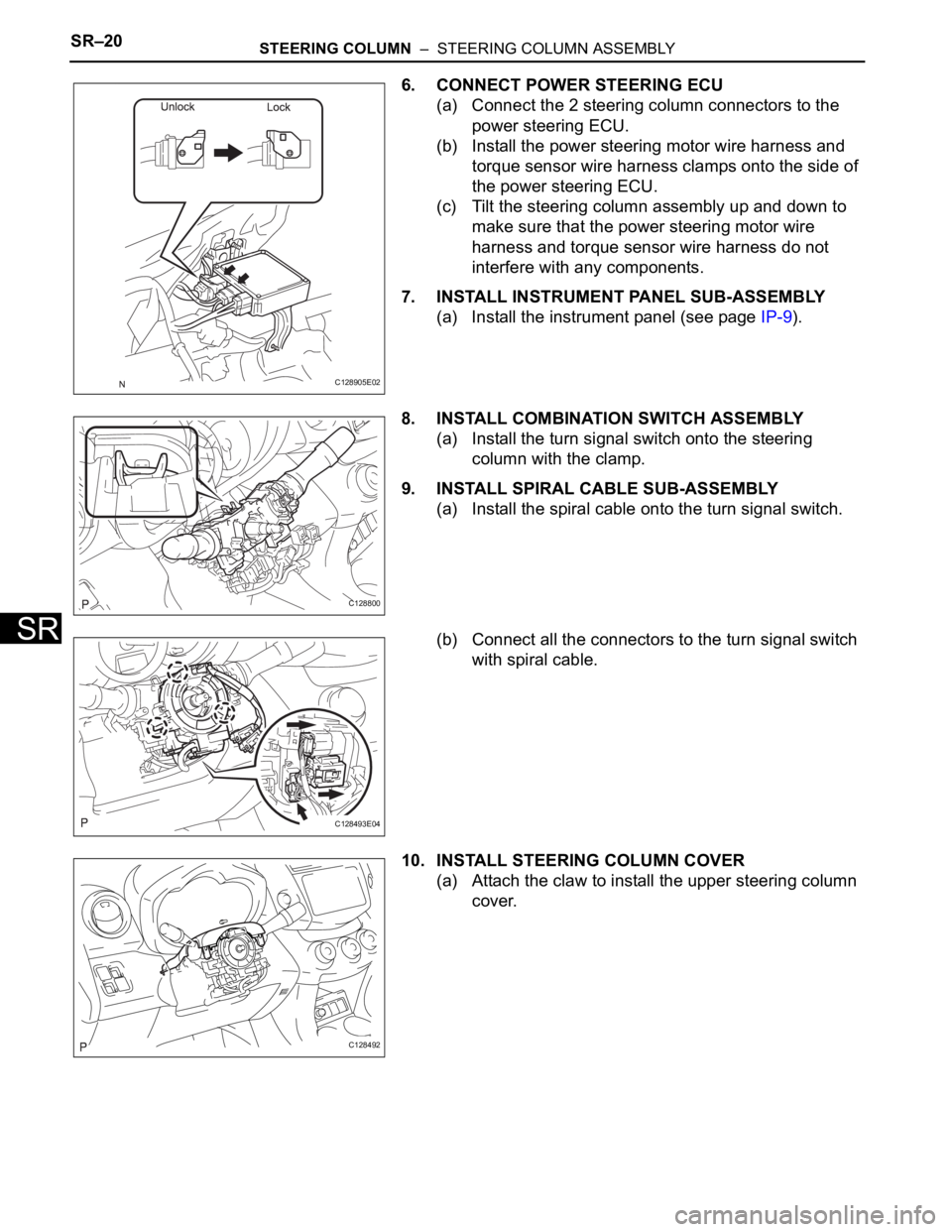
6. CONNECT POWER STEERING ECU
(a) Connect the 2 steering column connectors to the
power steering ECU.
(b) Install the power steering motor wire harness and
torque sensor wire harness clamps onto the side of
the power steering ECU.
(c) Tilt the steering column assembly up and down to
make sure that the power steering motor wire
harness and torque sensor wire harness do not
interfere with any components.
7. INSTALL INSTRUMENT PANEL SUB-ASSEMBLY
(a) Install the instrument panel (see page IP-9).
8. INSTALL COMBINATION SWITCH ASSEMBLY
(a) Install the turn signal switch onto the steering
column with the clamp.
9. INSTALL SPIRAL CABLE SUB-ASSEMBLY
(a) Install the spiral cable onto the turn signal switch.
(b) Connect all the connectors to the turn signal switch
with spiral cable.
10. INSTALL STEERING COLUMN COVER
(a) Attach the claw to install the upper steering column
cover.
C128905E02
C128800
C128493E04
C128492
Page 1631 of 2000
POWER STEERING – ELECTRONIC POWER STEERING SYSTEMPS–31
PS
(a) Remove the ECU-IG1 fuse from the instrument panel
junction block.
(b) Measure the resistance of the fuse.
OK:
Below 1
NG
OK
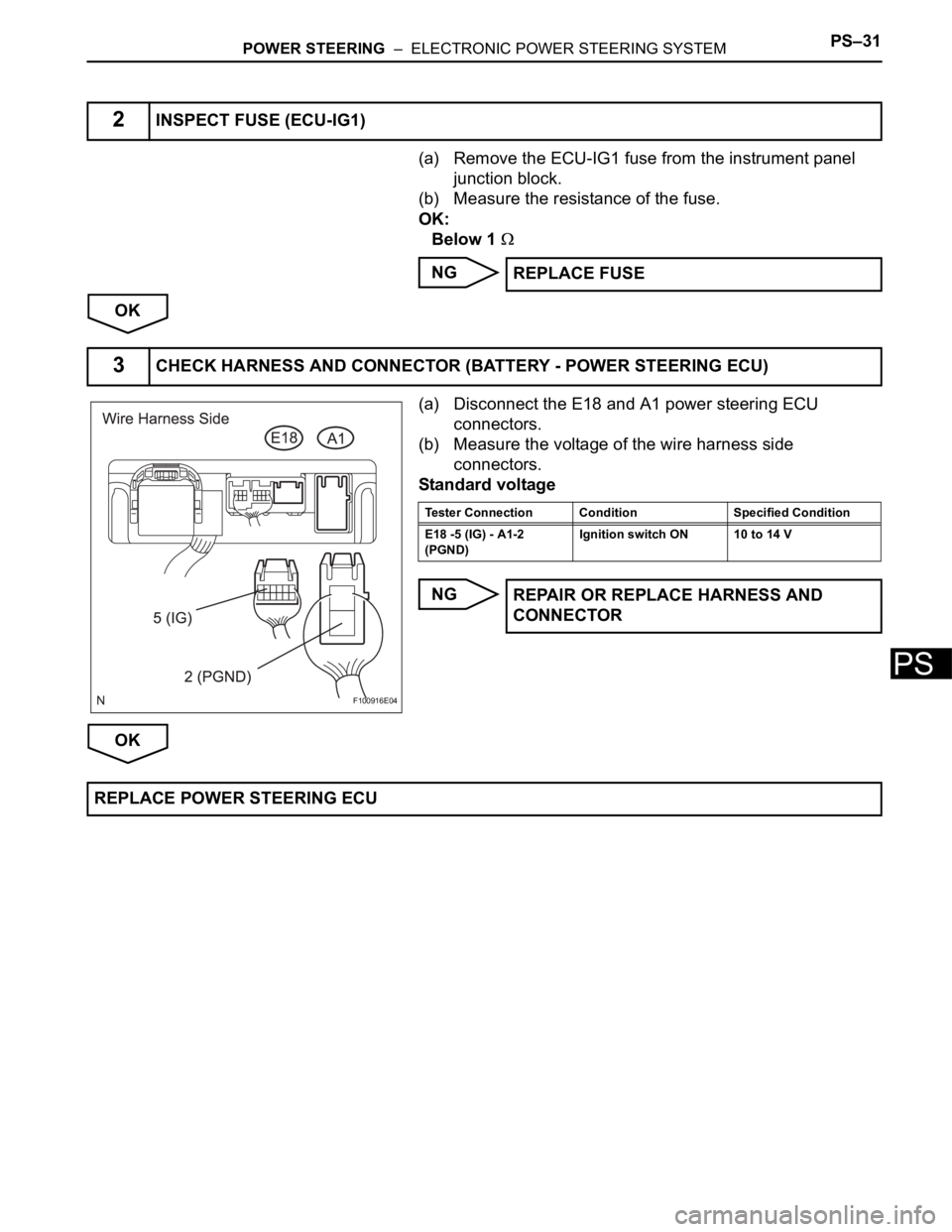
(a) Disconnect the E18 and A1 power steering ECU
connectors.
(b) Measure the voltage of the wire harness side
connectors.
Standard voltage
NG
OK
2INSPECT FUSE (ECU-IG1)
REPLACE FUSE
3CHECK HARNESS AND CONNECTOR (BATTERY - POWER STEERING ECU)
F100916E04
Tester Connection Condition Specified Condition
E18 -5 (IG) - A1-2
(PGND)Ignition switch ON 10 to 14 V
REPAIR OR REPLACE HARNESS AND
CONNECTOR
REPLACE POWER STEERING ECU
Page 1670 of 2000
AIR CONDITIONING – ROOM TEMPERATURE SENSOR (for Automatic Air Conditioning
System)AC–231
AC
INSTALLATION
1. INSTALL ROOM TEMPERATURE SENSOR
(a) Attach the claws to install the sensor.
(b) Connect the connector.
(c) Connect the duct.
2. INSTALL LOWER INSTRUMENT PANEL
(a) Install the lower instrument panel (see page IP-23).