instrument panel TOYOTA RAV4 2006 Service Repair Manual
[x] Cancel search | Manufacturer: TOYOTA, Model Year: 2006, Model line: RAV4, Model: TOYOTA RAV4 2006Pages: 2000, PDF Size: 45.84 MB
Page 395 of 2000

SERVICE SPECIFICATIONS – BRAKESS–83
SS
TORQUE SPECIFICATIONS
Brake Pedal
Brake Master Cylinder
Brake Booster
Front Brake
Front Brake Flexible Hose
Rear Brake
Rear Brake Flexible Hose
Part tightened N*m kgf*cm ft.*lbf
Brake pedal support x Body 12.7 130 9
Brake pedal support x Instrument
panel reinforcement25 255 18
Stop light switch 1.5 or less 15 or less 13 in.*lbf or less
Part tightened N*m kgf*cm ft.*lbf
Brake master cylinder x Brake
booster12.5 127 9
Brake master cylinder x Brake
tube (without SST)15.2 155 11
Brake master cylinder x Brake
tube (with SST)14 144 10
Part tightened N*m kgf*cm ft.*lbf
Brake booster x Brake pedal
support12.7 130 9
Push rod clevis lock nut 26 265 19
Part tightened N*m kgf*cm ft.*lbf
Bleeder plug 8.3 85 73 in.*lbf
Cylinder mounting x Knuckle 98 999 72
Cylinder x Cylinder mounting 34.3 350 25
Flexible hose x Cylinder 29.4 300 22
Part tightened N*m kgf*cm ft.*lbf
Flexible hose x Brake cylinder 29.4 300 22
Flexible hose clamp bolt 18.5 189 14
Flexible hose x Brake tube
(without SST)15.2 155 11
Flexible hose x Brake tube (with
SST)14 144 10
Part tightened N*m kgf*cm ft.*lbf
Bleeder plug 8.3 85 73 in.*lbf
Cylinder mounting x Carrier 88 897 65
Cylinder x Cylinder mounting 26.5 270 20
Flexible hose x Cylinder 30.4 310 22
Part tightened N*m kgf*cm ft.*lbf
Flexible hose x Brake cylinder 30.4 310 22
Flexible hose x Brake tube
(without SST)15.2 155 11
Flexible hose x Brake tube (with
SST)14 144 10
Page 430 of 2000
AIR CONDITIONING – AIR CONDITIONING CONTROL ASSEMBLY (for Manual Air Condi-
tioning System)AC–245
AC
INSTALLATION
1. INSTALL AIR VENT MODE CONTROL SWITCH
(a) Attach the 2 claws to install the mode control switch.
2. INSTALL BLOWER CONTROL SWITCH
(a) Attach the 2 claws to install the blower control
switch.
3. INSTALL AIR MIX CONTROL SWITCH
(a) Attach the 2 claws to install the air mix control
switch.
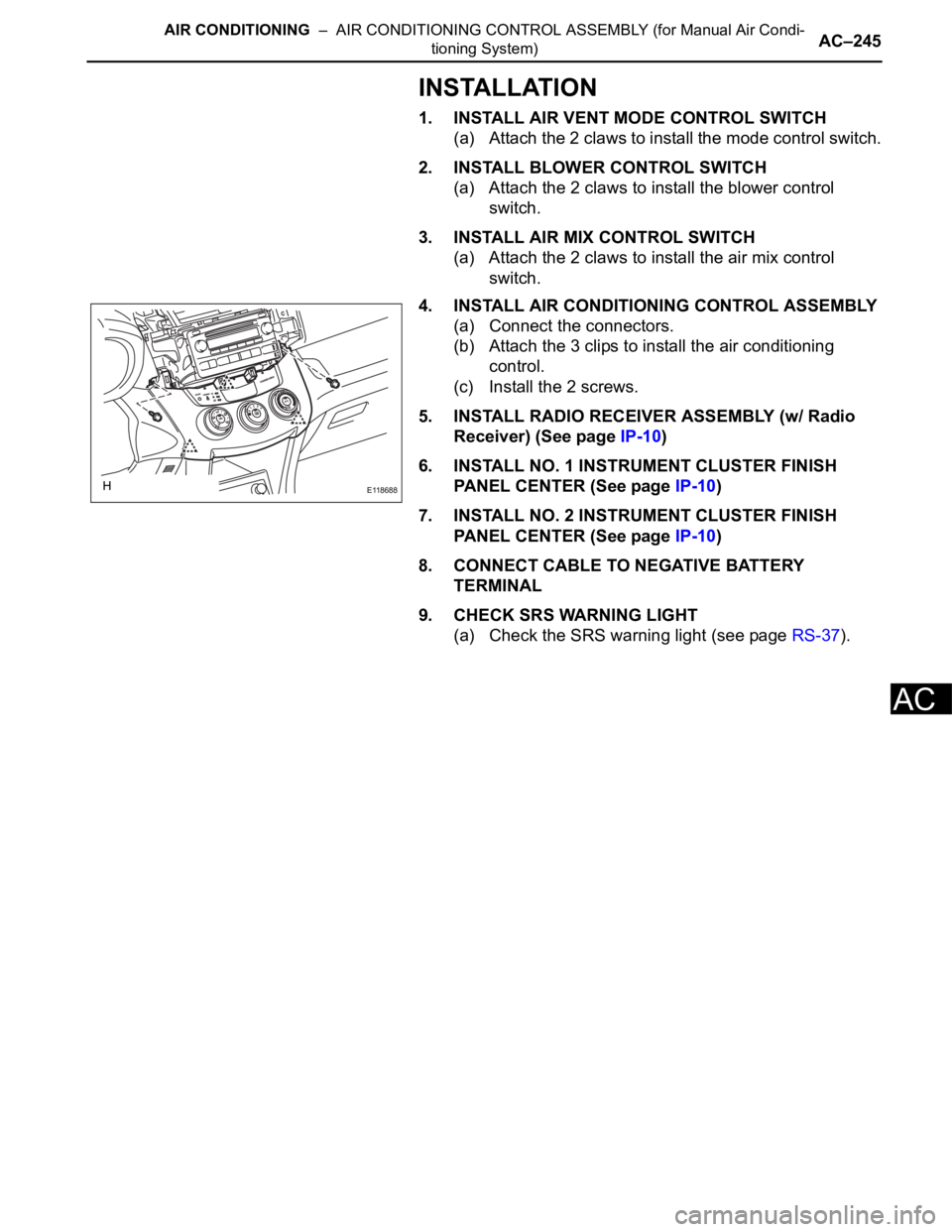
4. INSTALL AIR CONDITIONING CONTROL ASSEMBLY
(a) Connect the connectors.
(b) Attach the 3 clips to install the air conditioning
control.
(c) Install the 2 screws.
5. INSTALL RADIO RECEIVER ASSEMBLY (w/ Radio
Receiver) (See page IP-10)
6. INSTALL NO. 1 INSTRUMENT CLUSTER FINISH
PANEL CENTER (See page IP-10)
7. INSTALL NO. 2 INSTRUMENT CLUSTER FINISH
PANEL CENTER (See page IP-10)
8. CONNECT CABLE TO NEGATIVE BATTERY
TERMINAL
9. CHECK SRS WARNING LIGHT
(a) Check the SRS warning light (see page RS-37).
E118688
Page 492 of 2000
ES–382AZ-FE ENGINE CONTROL SYSTEM – SFI SYSTEM
ES
DIAGNOSIS SYSTEM
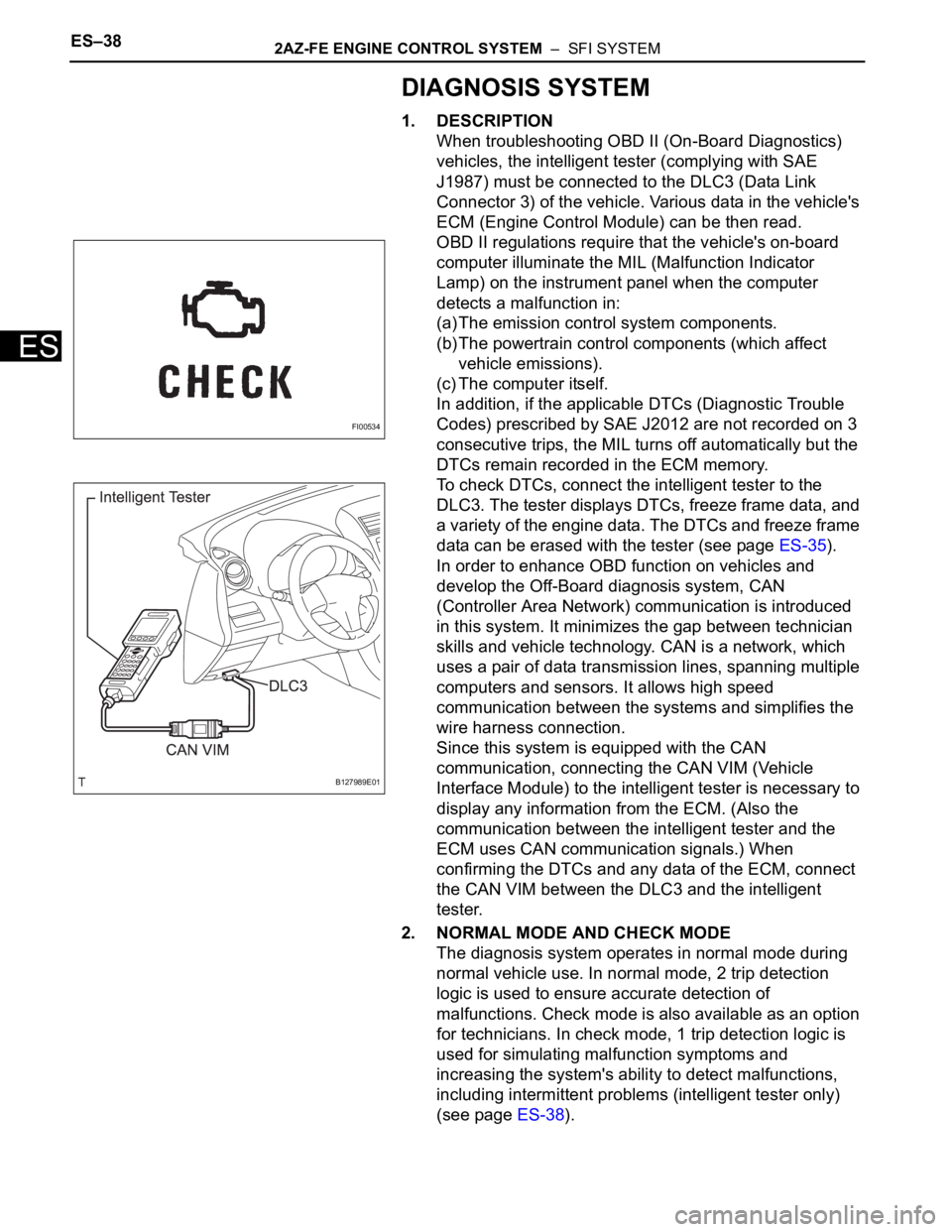
1. DESCRIPTION
When troubleshooting OBD II (On-Board Diagnostics)
vehicles, the intelligent tester (complying with SAE
J1987) must be connected to the DLC3 (Data Link
Connector 3) of the vehicle. Various data in the vehicle's
ECM (Engine Control Module) can be then read.
OBD II regulations require that the vehicle's on-board
computer illuminate the MIL (Malfunction Indicator
Lamp) on the instrument panel when the computer
detects a malfunction in:
(a) The emission control system components.
(b) The powertrain control components (which affect
vehicle emissions).
(c) The computer itself.
In addition, if the applicable DTCs (Diagnostic Trouble
Codes) prescribed by SAE J2012 are not recorded on 3
consecutive trips, the MIL turns off automatically but the
DTCs remain recorded in the ECM memory.
To check DTCs, connect the intelligent tester to the
DLC3. The tester displays DTCs, freeze frame data, and
a variety of the engine data. The DTCs and freeze frame
data can be erased with the tester (see page ES-35).
In order to enhance OBD function on vehicles and
develop the Off-Board diagnosis system, CAN
(Controller Area Network) communication is introduced
in this system. It minimizes the gap between technician
skills and vehicle technology. CAN is a network, which
uses a pair of data transmission lines, spanning multiple
computers and sensors. It allows high speed
communication between the systems and simplifies the
wire harness connection.
Since this system is equipped with the CAN
communication, connecting the CAN VIM (Vehicle
Interface Module) to the intelligent tester is necessary to
display any information from the ECM. (Also the
communication between the intelligent tester and the
ECM uses CAN communication signals.) When
confirming the DTCs and any data of the ECM, connect
the CAN VIM between the DLC3 and the intelligent
tester.
2. NORMAL MODE AND CHECK MODE
The diagnosis system operates in normal mode during
normal vehicle use. In normal mode, 2 trip detection
logic is used to ensure accurate detection of
malfunctions. Check mode is also available as an option
for technicians. In check mode, 1 trip detection logic is
used for simulating malfunction symptoms and
increasing the system's ability to detect malfunctions,
including intermittent problems (intelligent tester only)
(see page ES-38).
FI00534
B127989E01
Page 505 of 2000
IP–4INSTRUMENT PANEL – UPPER INSTRUMENT PANEL
IP
REMOVAL
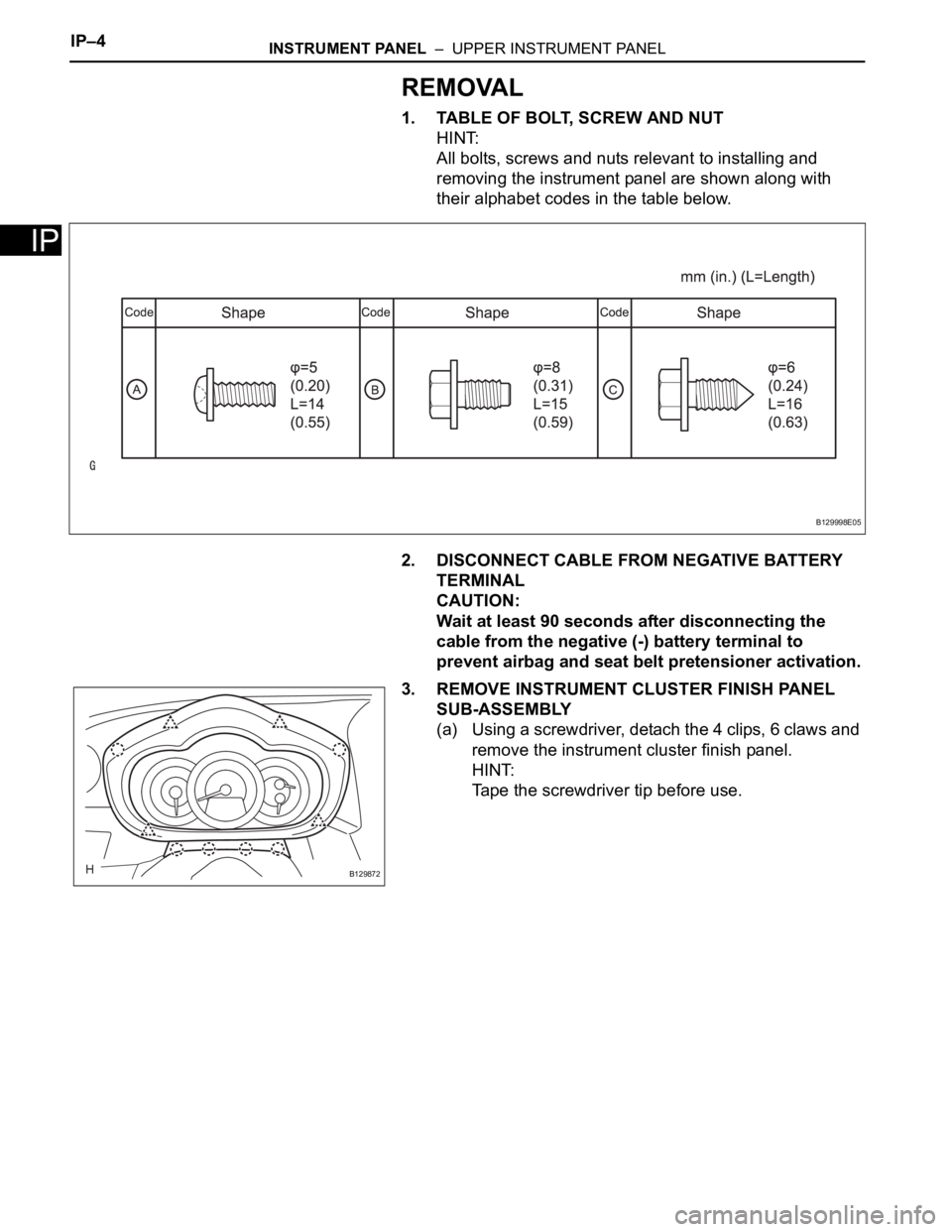
1. TABLE OF BOLT, SCREW AND NUT
HINT:
All bolts, screws and nuts relevant to installing and
removing the instrument panel are shown along with
their alphabet codes in the table below.
2. DISCONNECT CABLE FROM NEGATIVE BATTERY
TERMINAL
CAUTION:
Wait at least 90 seconds after disconnecting the
cable from the negative (-) battery terminal to
prevent airbag and seat belt pretensioner activation.
3. REMOVE INSTRUMENT CLUSTER FINISH PANEL
SUB-ASSEMBLY
(a) Using a screwdriver, detach the 4 clips, 6 claws and
remove the instrument cluster finish panel.
HINT:
Tape the screwdriver tip before use.
B129998E05
B129872
Page 506 of 2000
INSTRUMENT PANEL – UPPER INSTRUMENT PANELIP–5
IP
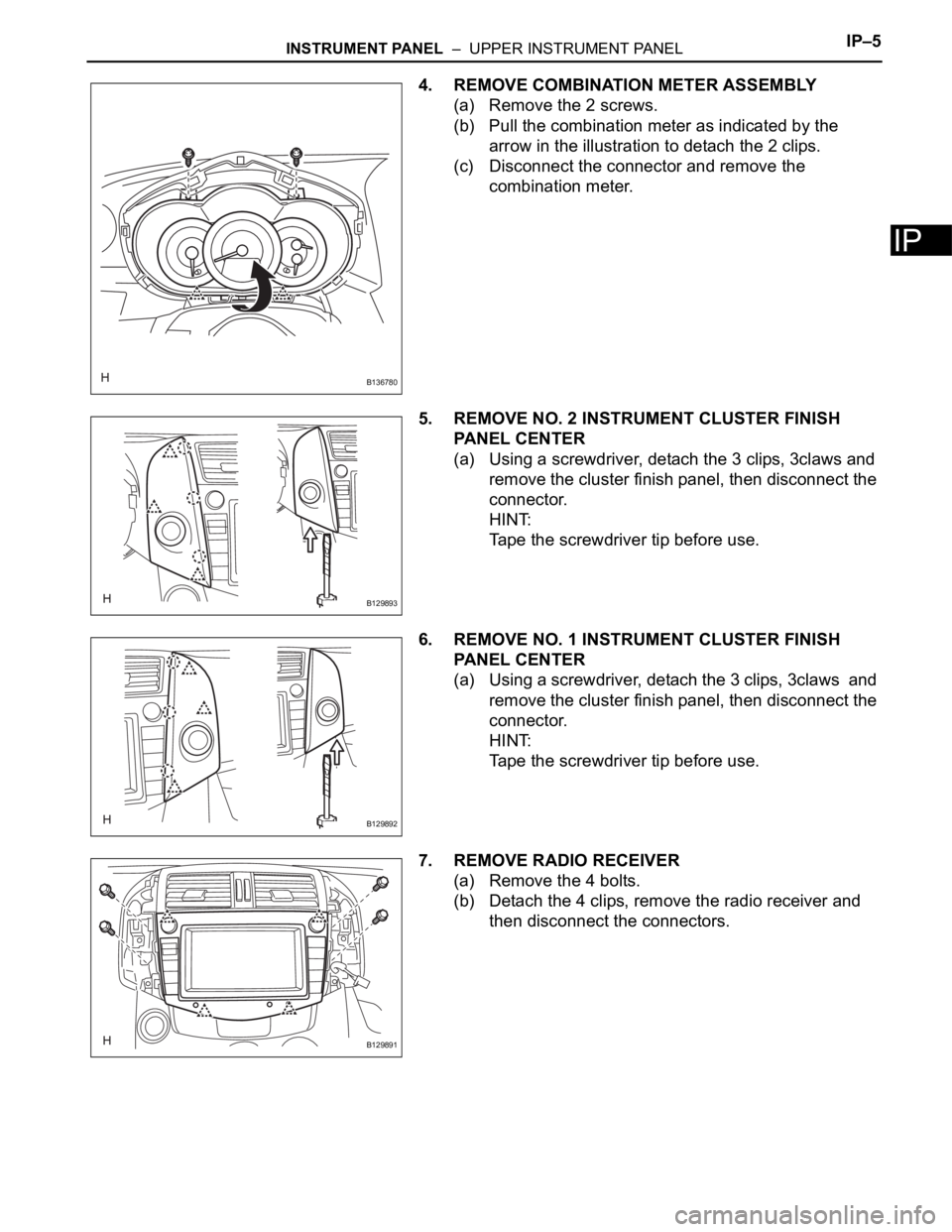
4. REMOVE COMBINATION METER ASSEMBLY
(a) Remove the 2 screws.
(b) Pull the combination meter as indicated by the
arrow in the illustration to detach the 2 clips.
(c) Disconnect the connector and remove the
combination meter.
5. REMOVE NO. 2 INSTRUMENT CLUSTER FINISH
PANEL CENTER
(a) Using a screwdriver, detach the 3 clips, 3claws and
remove the cluster finish panel, then disconnect the
connector.
HINT:
Tape the screwdriver tip before use.
6. REMOVE NO. 1 INSTRUMENT CLUSTER FINISH
PANEL CENTER
(a) Using a screwdriver, detach the 3 clips, 3claws and
remove the cluster finish panel, then disconnect the
connector.
HINT:
Tape the screwdriver tip before use.
7. REMOVE RADIO RECEIVER
(a) Remove the 4 bolts.
(b) Detach the 4 clips, remove the radio receiver and
then disconnect the connectors.
B136780
B129893
B129892
B129891
Page 507 of 2000
IP–6INSTRUMENT PANEL – UPPER INSTRUMENT PANEL
IP
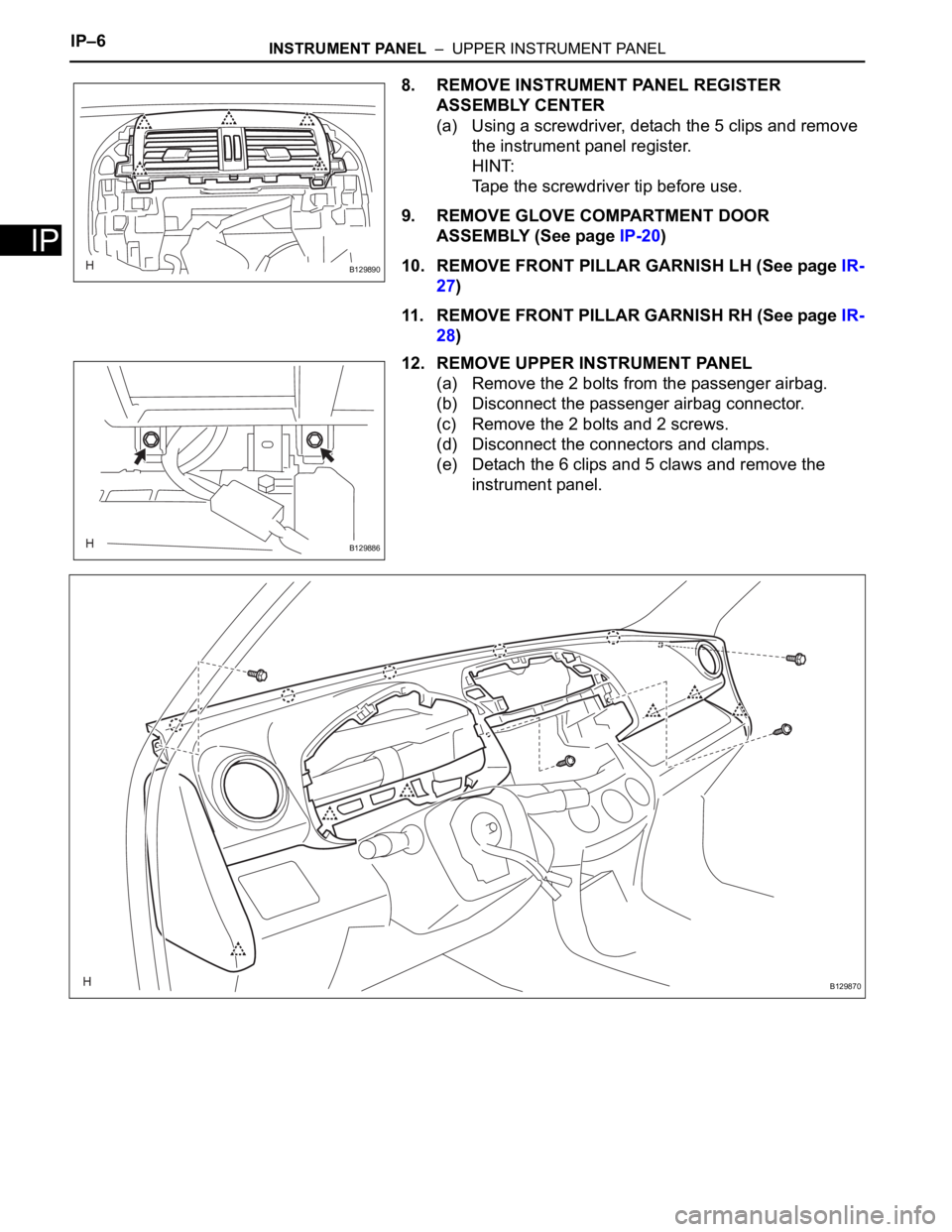
8. REMOVE INSTRUMENT PANEL REGISTER
ASSEMBLY CENTER
(a) Using a screwdriver, detach the 5 clips and remove
the instrument panel register.
HINT:
Tape the screwdriver tip before use.
9. REMOVE GLOVE COMPARTMENT DOOR
ASSEMBLY (See page IP-20)
10. REMOVE FRONT PILLAR GARNISH LH (See page IR-
27)
11. REMOVE FRONT PILLAR GARNISH RH (See page IR-
28)
12. REMOVE UPPER INSTRUMENT PANEL
(a) Remove the 2 bolts from the passenger airbag.
(b) Disconnect the passenger airbag connector.
(c) Remove the 2 bolts and 2 screws.
(d) Disconnect the connectors and clamps.
(e) Detach the 6 clips and 5 claws and remove the
instrument panel.
B129890
B129886
B129870
Page 566 of 2000
ES–422GR-FE ENGINE CONTROL SYSTEM – SFI SYSTEM
ES
DIAGNOSIS SYSTEM
1. DESCRIPTION
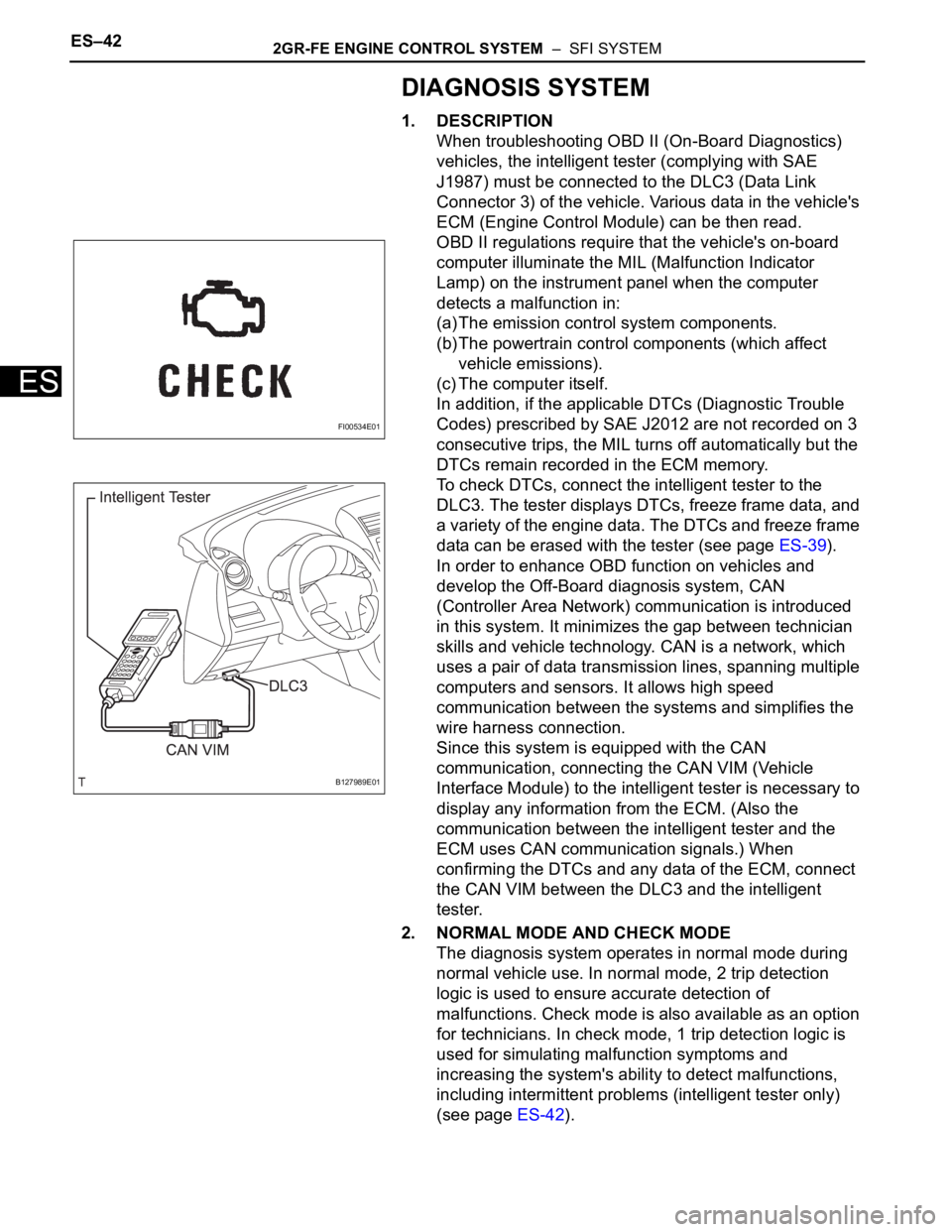
When troubleshooting OBD II (On-Board Diagnostics)
vehicles, the intelligent tester (complying with SAE
J1987) must be connected to the DLC3 (Data Link
Connector 3) of the vehicle. Various data in the vehicle's
ECM (Engine Control Module) can be then read.
OBD II regulations require that the vehicle's on-board
computer illuminate the MIL (Malfunction Indicator
Lamp) on the instrument panel when the computer
detects a malfunction in:
(a) The emission control system components.
(b) The powertrain control components (which affect
vehicle emissions).
(c) The computer itself.
In addition, if the applicable DTCs (Diagnostic Trouble
Codes) prescribed by SAE J2012 are not recorded on 3
consecutive trips, the MIL turns off automatically but the
DTCs remain recorded in the ECM memory.
To check DTCs, connect the intelligent tester to the
DLC3. The tester displays DTCs, freeze frame data, and
a variety of the engine data. The DTCs and freeze frame
data can be erased with the tester (see page ES-39).
In order to enhance OBD function on vehicles and
develop the Off-Board diagnosis system, CAN
(Controller Area Network) communication is introduced
in this system. It minimizes the gap between technician
skills and vehicle technology. CAN is a network, which
uses a pair of data transmission lines, spanning multiple
computers and sensors. It allows high speed
communication between the systems and simplifies the
wire harness connection.
Since this system is equipped with the CAN
communication, connecting the CAN VIM (Vehicle
Interface Module) to the intelligent tester is necessary to
display any information from the ECM. (Also the
communication between the intelligent tester and the
ECM uses CAN communication signals.) When
confirming the DTCs and any data of the ECM, connect
the CAN VIM between the DLC3 and the intelligent
tester.
2. NORMAL MODE AND CHECK MODE
The diagnosis system operates in normal mode during
normal vehicle use. In normal mode, 2 trip detection
logic is used to ensure accurate detection of
malfunctions. Check mode is also available as an option
for technicians. In check mode, 1 trip detection logic is
used for simulating malfunction symptoms and
increasing the system's ability to detect malfunctions,
including intermittent problems (intelligent tester only)
(see page ES-42).
FI00534E01
B127989E01
Page 967 of 2000
U140F AUTOMATIC TRANSAXLE – AUTOMATIC TRANSAXLE SYSTEMAX–33
AX
DIAGNOSIS SYSTEM
1. DESCRIPTION
(a) When troubleshooting On-Board Diagnostic (OBD
II) vehicles, the vehicle must be connected to the
OBD II scan tool (complying with SAE J1987).
Various data output from the vehicle's ECM can
then be read.
(b) OBD II regulations require that the vehicle's on-
board computer illuminates the Malfunction
Indicator Lamp (MIL) on the instrument panel when
the computer detects a malfunction in:
(1) The emission control system/components
(2) The powertrain control components (which affect
vehicle emissions)
(3) The computer
In addition, the applicable Diagnostic Trouble
Codes (DTCs) prescribed by SAE J2012 are
recorded in the ECM memory.
When the malfunction does not reoccur, the MIL
stays illuminated until the ignition switch is
turned OFF, and the MIL turns OFF when the
engine is started. However, the DTCs remain
recorded in the ECM memory.
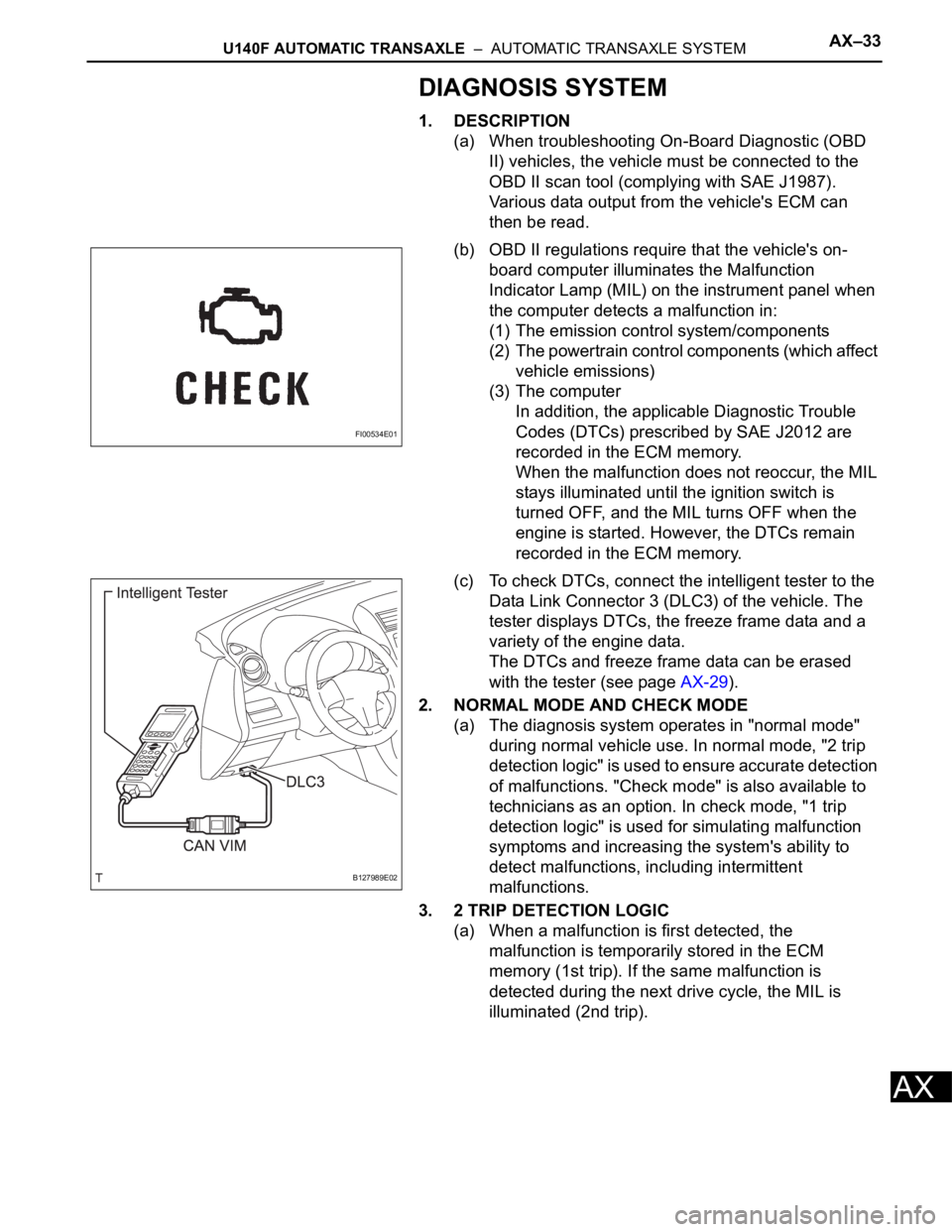
(c) To check DTCs, connect the intelligent tester to the
Data Link Connector 3 (DLC3) of the vehicle. The
tester displays DTCs, the freeze frame data and a
variety of the engine data.
The DTCs and freeze frame data can be erased
with the tester (see page AX-29).
2. NORMAL MODE AND CHECK MODE
(a) The diagnosis system operates in "normal mode"
during normal vehicle use. In normal mode, "2 trip
detection logic" is used to ensure accurate detection
of malfunctions. "Check mode" is also available to
technicians as an option. In check mode, "1 trip
detection logic" is used for simulating malfunction
symptoms and increasing the system's ability to
detect malfunctions, including intermittent
malfunctions.
3. 2 TRIP DETECTION LOGIC
(a) When a malfunction is first detected, the
malfunction is temporarily stored in the ECM
memory (1st trip). If the same malfunction is
detected during the next drive cycle, the MIL is
illuminated (2nd trip).
FI00534E01
B127989E02
Page 1050 of 2000
AX–34U151E AUTOMATIC TRANSAXLE – AUTOMATIC TRANSAXLE SYSTEM
AX
DIAGNOSIS SYSTEM
1. DESCRIPTION
(a) When troubleshooting On-Board Diagnostic (OBD
II) vehicles, the vehicle must be connected to the
OBD II scan tool (complying with SAE J1987).
Various data output from the vehicle's ECM can
then be read.
(b) OBD II regulations require that the vehicle's on-
board computer illuminates the Malfunction
Indicator Lamp (MIL) on the instrument panel when
the computer detects a malfunction in:
(1) The emission control system/components
(2) The powertrain control components (which affect
vehicle emissions)
(3) The computer
In addition, the applicable Diagnostic Trouble
Codes (DTCs) prescribed by SAE J2012 are
recorded in the ECM memory.
When the malfunction does not reoccur, the MIL
stays illuminated until the ignition switch is
turned OFF, and the MIL turns OFF when the
engine is started. However, the DTCs remain
recorded in the ECM memory.
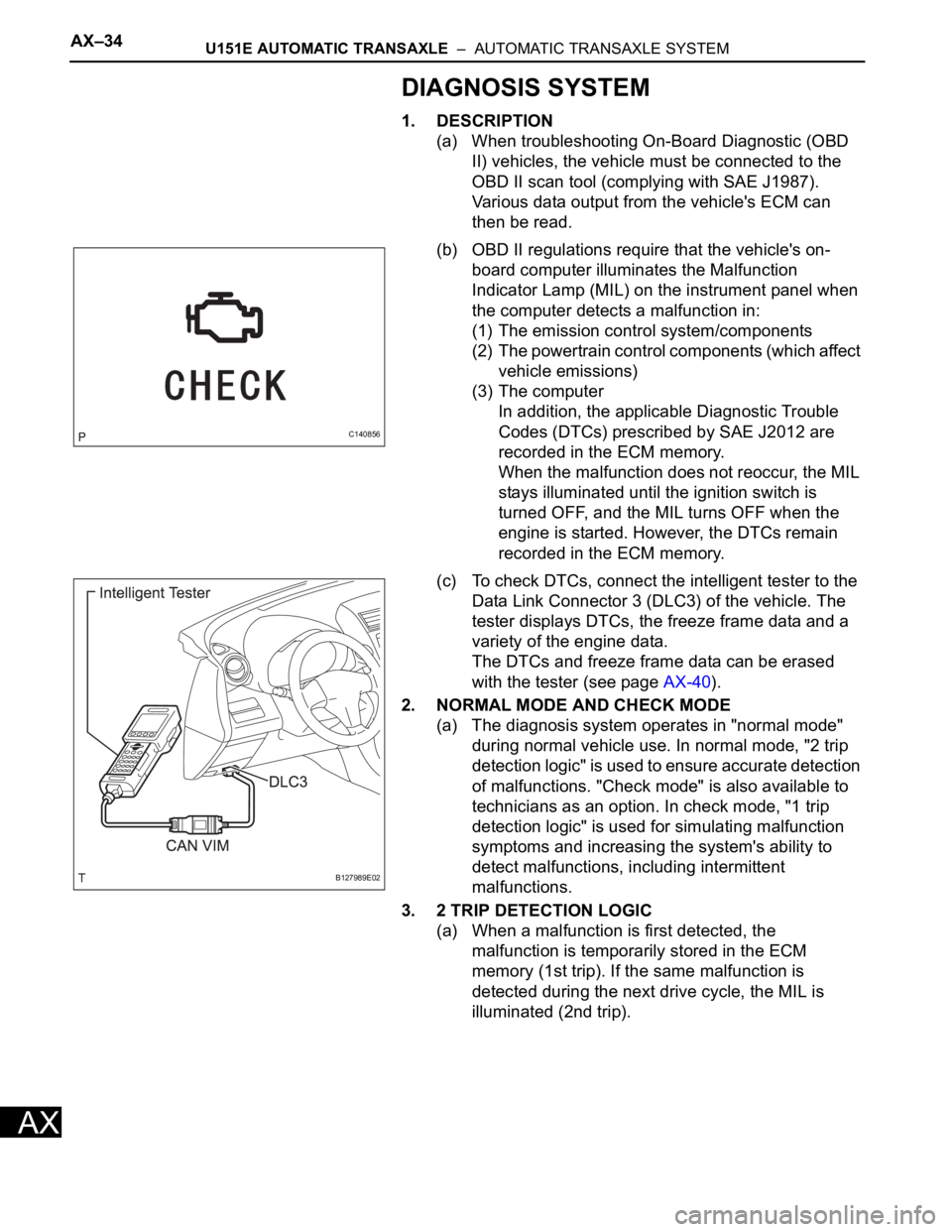
(c) To check DTCs, connect the intelligent tester to the
Data Link Connector 3 (DLC3) of the vehicle. The
tester displays DTCs, the freeze frame data and a
variety of the engine data.
The DTCs and freeze frame data can be erased
with the tester (see page AX-40).
2. NORMAL MODE AND CHECK MODE
(a) The diagnosis system operates in "normal mode"
during normal vehicle use. In normal mode, "2 trip
detection logic" is used to ensure accurate detection
of malfunctions. "Check mode" is also available to
technicians as an option. In check mode, "1 trip
detection logic" is used for simulating malfunction
symptoms and increasing the system's ability to
detect malfunctions, including intermittent
malfunctions.
3. 2 TRIP DETECTION LOGIC
(a) When a malfunction is first detected, the
malfunction is temporarily stored in the ECM
memory (1st trip). If the same malfunction is
detected during the next drive cycle, the MIL is
illuminated (2nd trip).
C140856
B127989E02
Page 1153 of 2000
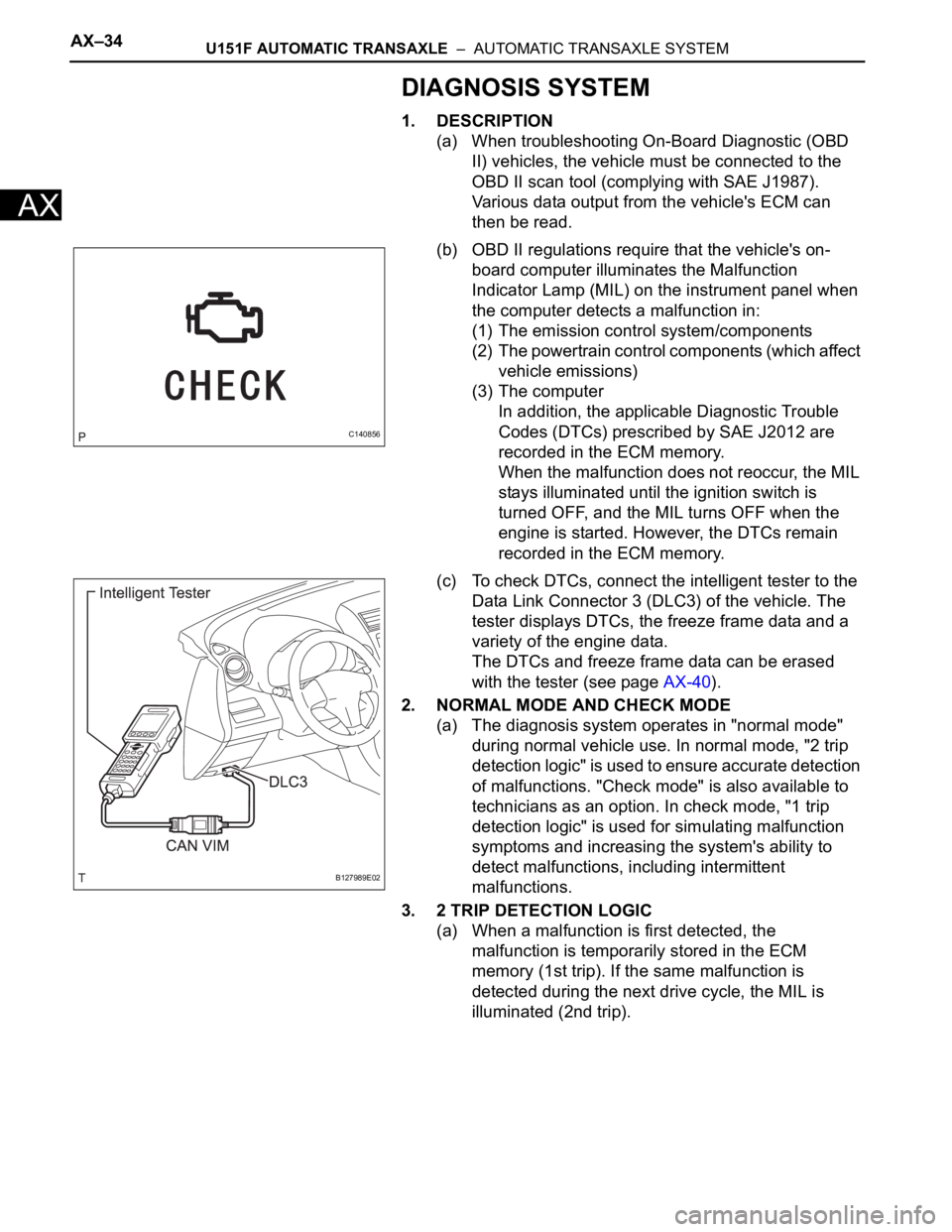
AX–34U151F AUTOMATIC TRANSAXLE – AUTOMATIC TRANSAXLE SYSTEM
AX
DIAGNOSIS SYSTEM
1. DESCRIPTION
(a) When troubleshooting On-Board Diagnostic (OBD
II) vehicles, the vehicle must be connected to the
OBD II scan tool (complying with SAE J1987).
Various data output from the vehicle's ECM can
then be read.
(b) OBD II regulations require that the vehicle's on-
board computer illuminates the Malfunction
Indicator Lamp (MIL) on the instrument panel when
the computer detects a malfunction in:
(1) The emission control system/components
(2) The powertrain control components (which affect
vehicle emissions)
(3) The computer
In addition, the applicable Diagnostic Trouble
Codes (DTCs) prescribed by SAE J2012 are
recorded in the ECM memory.
When the malfunction does not reoccur, the MIL
stays illuminated until the ignition switch is
turned OFF, and the MIL turns OFF when the
engine is started. However, the DTCs remain
recorded in the ECM memory.
(c) To check DTCs, connect the intelligent tester to the
Data Link Connector 3 (DLC3) of the vehicle. The
tester displays DTCs, the freeze frame data and a
variety of the engine data.
The DTCs and freeze frame data can be erased
with the tester (see page AX-40).
2. NORMAL MODE AND CHECK MODE
(a) The diagnosis system operates in "normal mode"
during normal vehicle use. In normal mode, "2 trip
detection logic" is used to ensure accurate detection
of malfunctions. "Check mode" is also available to
technicians as an option. In check mode, "1 trip
detection logic" is used for simulating malfunction
symptoms and increasing the system's ability to
detect malfunctions, including intermittent
malfunctions.
3. 2 TRIP DETECTION LOGIC
(a) When a malfunction is first detected, the
malfunction is temporarily stored in the ECM
memory (1st trip). If the same malfunction is
detected during the next drive cycle, the MIL is
illuminated (2nd trip).
C140856
B127989E02