key TOYOTA RAV4 2013 XA40 / 4.G Repair Manual
[x] Cancel search | Manufacturer: TOYOTA, Model Year: 2013, Model line: RAV4, Model: TOYOTA RAV4 2013 XA40 / 4.GPages: 624, PDF Size: 9.82 MB
Page 207 of 624
207
RAV4_OM_OM42809U_(U)
4-2. Driving procedures
4
Driving
Automatic transmission
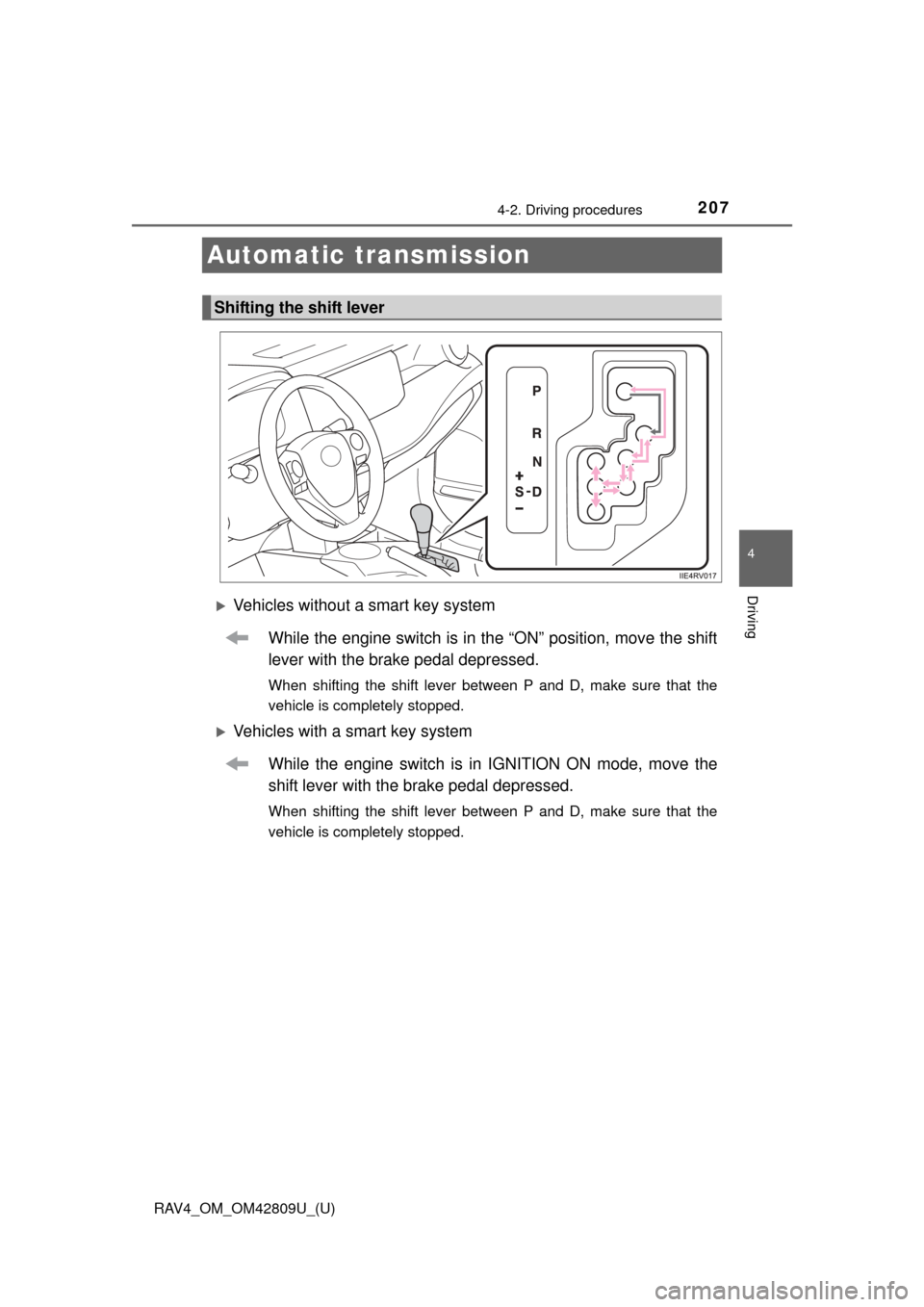
Vehicles without a smart key systemWhile the engine switch is in the “ON” position, move the shift
lever with the brake pedal depressed.
When shifting the shift lever between P and D, make sure that the
vehicle is completely stopped.
Vehicles with a smart key systemWhile the engine switch is in IGNITION ON mode, move the
shift lever with the brake pedal depressed.
When shifting the shift lever between P and D, make sure that the
vehicle is completely stopped.
Shifting the shift lever
Page 214 of 624
214
RAV4_OM_OM42809U_(U)
4-2. Driving procedures
Tur n signal lever
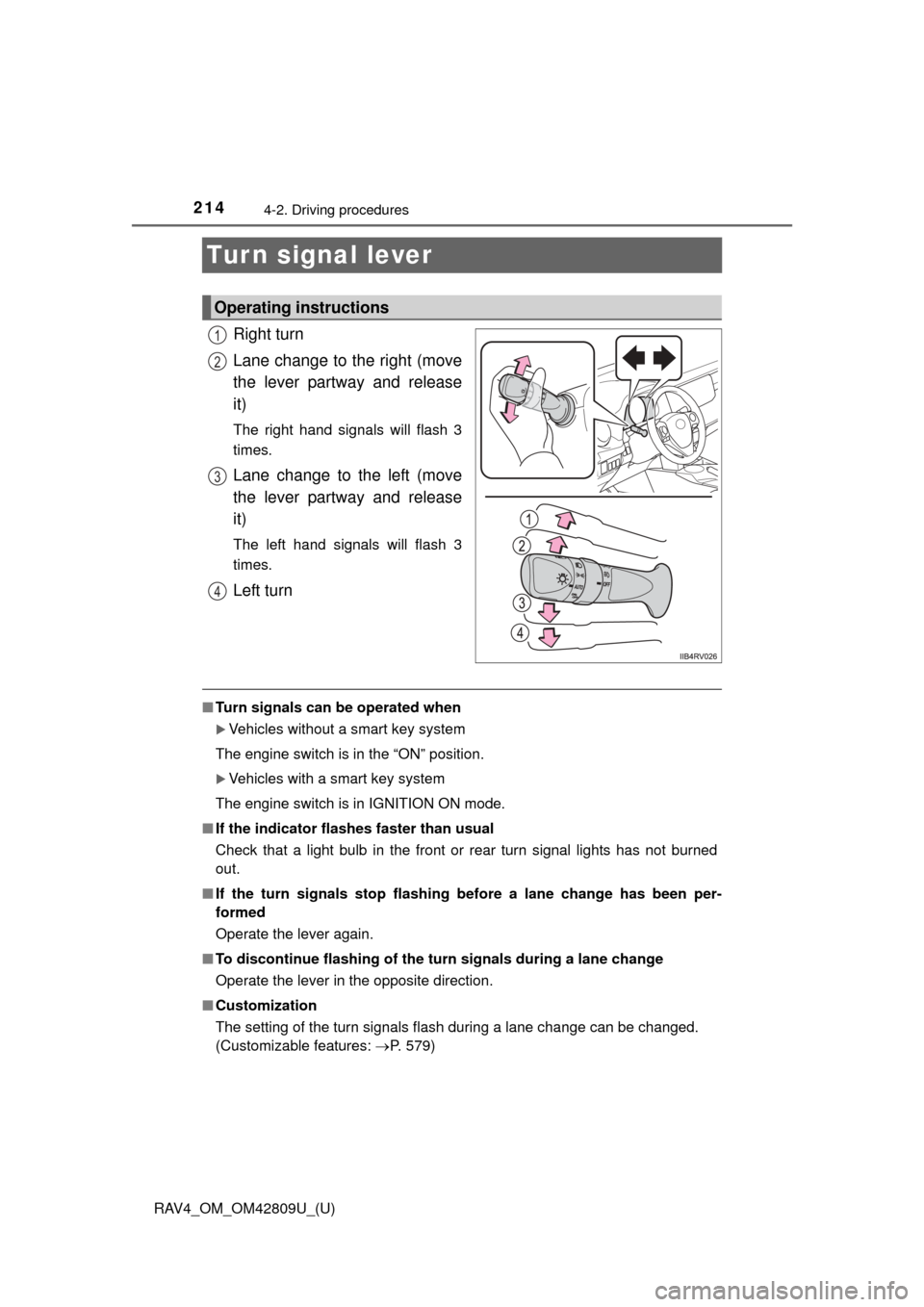
Right turn
Lane change to the right (move
the lever partway and release
it)
The right hand signals will flash 3
times.
Lane change to the left (move
the lever partway and release
it)
The left hand signals will flash 3
times.
Left turn
■Turn signals can be operated when
Vehicles without a smart key system
The engine switch is in the “ON” position.
Vehicles with a smart key system
The engine switch is in IGNITION ON mode.
■ If the indicator flashes faster than usual
Check that a light bulb in the front or rear turn signal lights has not burned
out.
■ If the turn signals stop flashing before a lane change has been per-
formed
Operate the lever again.
■ To discontinue flashing of the turn signals during a lane change
Operate the lever in the opposite direction.
■ Customization
The setting of the turn signals flash during a lane change can be changed.
(Customizable features: P. 579)
Operating instructions
1
2
3
4
Page 217 of 624
217
RAV4_OM_OM42809U_(U)
4-3. Operating the lights and wipers
4
Driving
Headlight switch
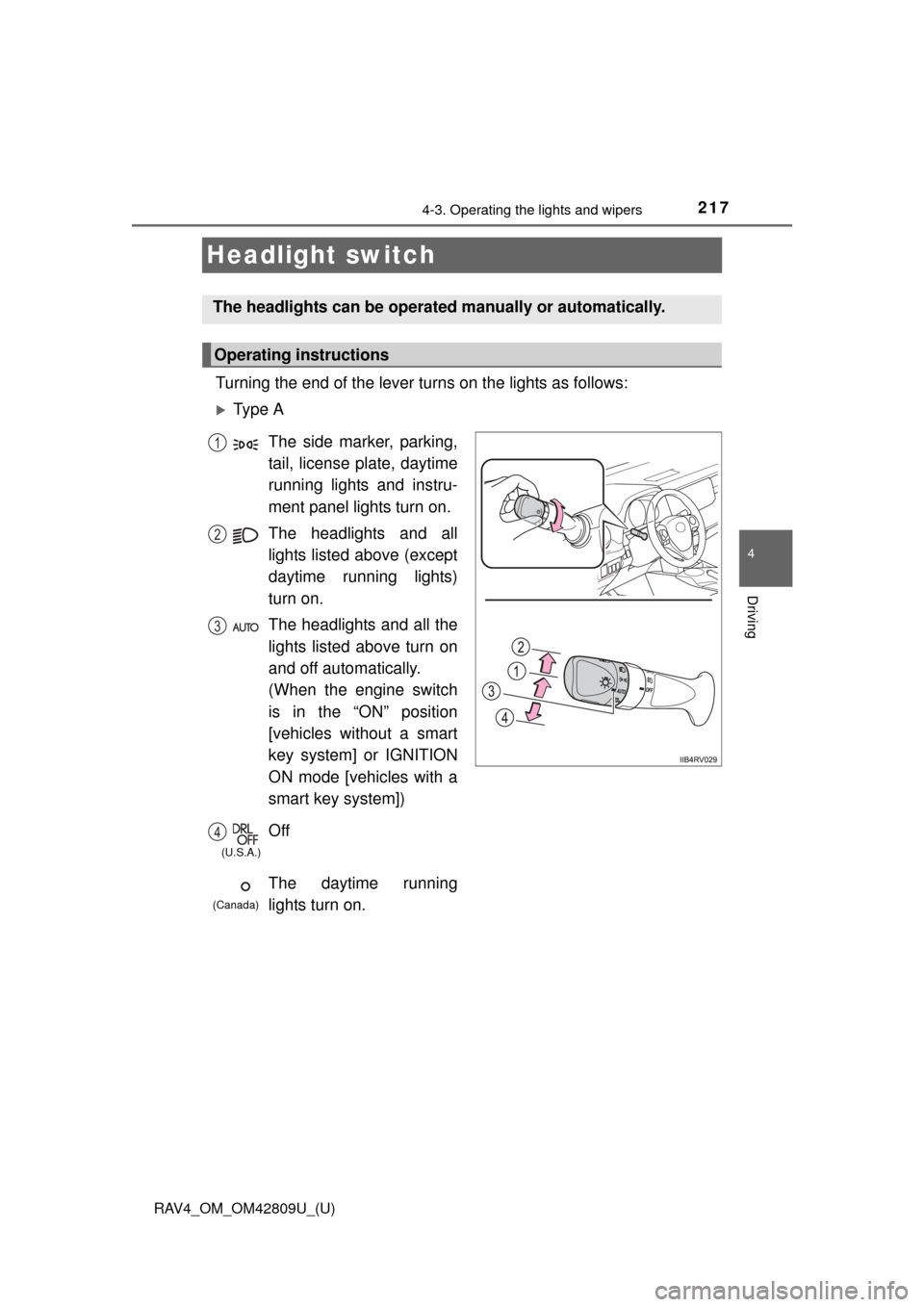
Turning the end of the lever turns on the lights as follows:
Ty p e A
The headlights can be operated manually or automatically.
Operating instructions
The side marker, parking,
tail, license plate, daytime
running lights and instru-
ment panel lights turn on.
The headlights and all
lights listed above (except
daytime running lights)
turn on.
The headlights and all the
lights listed above turn on
and off automatically.
(When the engine switch
is in the “ON” position
[vehicles without a smart
key system] or IGNITION
ON mode [vehicles with a
smart key system])
Off
The daytime running
lights turn on.1
2
3
4
(U.S.A.)
(Canada)
Page 220 of 624
220
RAV4_OM_OM42809U_(U)
4-3. Operating the lights and wipers
■Automatic light off system
When the light switch is in AUTO: The lights turn off 30 seconds after the
engine switch is turned to the “LOCK” position (vehicles without a smart key
system) or off (vehicles with a smart key system) and a door is opened and all
of the doors are closed. (The lights turn off immediately if on the key is
pressed while all the doors are locked.)
To turn the lights on again, turn the engine switch to the “ON” position (vehi-
cles without a smart key system) or to IGNITION ON mode (vehicles with a
smart key system), or turn the light switch off, then turn it to or to .
When the light switch is in the position other than AUTO: If any of the doors is
kept open and the engine switch is in the “LOCK” position (vehicles without a
smart key system) or off (vehicles with a smart key system), the lights auto-
matically turn off after 20 minutes.
■ Light reminder buzzer
Vehicles without a smart key system
A buzzer sounds when the engine switch is turned to the “LOCK” position, the
key is removed and the driver’s door is opened while the lights are turned on.
Vehicles with a smart key system
A buzzer sounds when the engine switch is turned off and the driver’s door is
opened while the lights are turned on.
■ Customization
Settings (e.g. light sensor sensitivity) can be changed.
(Customizable features: P. 579)
NOTICE
■To prevent battery discharge
Do not leave the lights on longer than necessary when the engine is not
running.
Page 224 of 624

224
RAV4_OM_OM42809U_(U)
4-3. Operating the lights and wipers
■The Automatic High Beam can be operated when
Vehicles without a smart key system
The engine switch is in the “ON” position.
Vehicles with a smart key system
The engine switch is in IGNITION ON mode.
■ Camera sensor detection information
●High beam may not be automatically turned off in the following situations:
• When oncoming vehicles suddenly appear from a curve
• When the vehicle is cut in front of by another
• When oncoming or preceding vehicles are hidden from sight due to
repeated curves, road dividers or roadside trees
• When oncoming vehicles appear from the faraway lane on wide road
• When oncoming or preceding vehicles have no lights
● High beam may be turned off if an oncoming vehicle that is using fog lights
without using the headlights is detected.
● House lights, street lights, red traffic signals, and illuminated billboards or
signs may cause the high beam to turn off.
● The following factors may affect the amount of time taken to turn high beam
on or off:
• The brightness of headlights, fog lights, and tail lights of oncoming and
preceding vehicles
• The movement and direction of oncoming and preceding vehicles
• When a oncoming or preceding vehicle only has operational lights on one side
• When a oncoming or preceding vehicle is a two-wheeled vehicle
• The condition of the road (gradient, curve, condition of the road surface etc.)
• The number of passengers and amount of luggage
● High beam may be turned on or off when unexpected by the driver.
Page 226 of 624

226
RAV4_OM_OM42809U_(U)
4-3. Operating the lights and wipers
■Temporarily lowering sensor sensitivity
The sensitivity of the sensor can be temporarily lowered.
Vehicles without a smart key system: Turn the engine switch to the
“LOCK” position while the following conditions are met.
Vehicles with a smart key system: Turn the engine switch off while the fol-
lowing conditions are met.
• The headlight switch is in .
• The headlight switch lever is in high beam position. Vehicles without a smart key system: Turn the engine switch to the “ON”
position.
Vehicles with a smart key system: Turn the engine switch to IGNITION
ON mode.
Within 5 seconds after , repeat pulling the headlight switch lever to the
original position then pushing it to the high beam position quickly 9 times,
then leave the lever in high beam position.
Automatic High Beam (headlights) may turn on even the vehicle is stopped.
■ If the Automatic High Beam indicator turns to yellow...
It may indicate a malfunction in the system. Contact your Toyota dealer.
■ Customization
The Automatic High Beam can be turned off.
(Customizable features: P. 579)
CAUTION
■Limitations of the Automatic High Beam
Do not rely on the Automatic High Beam. Always drive safely, taking care to
observe your surroundings and turning high beam on or off manually if nec-
essary.
1
2
32
Page 232 of 624
232
RAV4_OM_OM42809U_(U)
4-3. Operating the lights and wipers
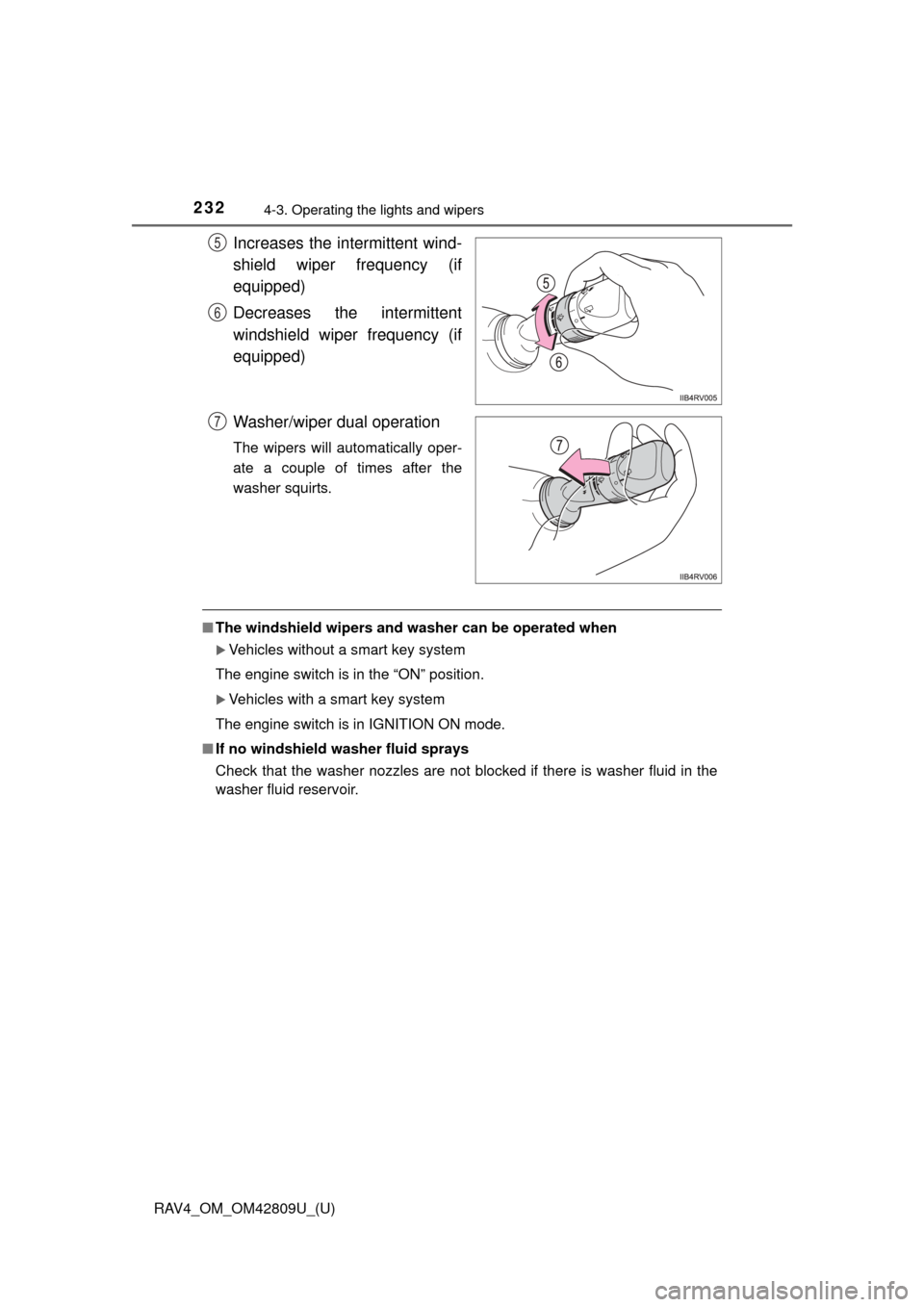
Increases the intermittent wind-
shield wiper frequency (if
equipped)
Decreases the intermittent
windshield wiper frequency (if
equipped)
Washer/wiper dual operation
The wipers will automatically oper-
ate a couple of times after the
washer squirts.
■The windshield wipers and washer can be operated when
Vehicles without a smart key system
The engine switch is in the “ON” position.
Vehicles with a smart key system
The engine switch is in IGNITION ON mode.
■ If no windshield washer fluid sprays
Check that the washer nozzles are not blocked if there is washer fluid in the
washer fluid reservoir.
5
6
7
Page 236 of 624
236
RAV4_OM_OM42809U_(U)
4-3. Operating the lights and wipers
■The rear window wiper and w asher can be operated when
Vehicles without a smart key system
The engine switch is in the “ON” position.
Vehicles with a smart key system
The engine switch is in IGNITION ON mode.
■ If no washer fluid sprays
Check that the washer nozzle is not blocked if there is washer fluid in the
washer fluid reservoir.
NOTICE
■When the rear window is dry
Do not use the wiper, as it may damage the rear window.
■ When the washer fluid tank is empty
Do not operate the switch continually as the washer fluid pump may over-
heat.
Page 237 of 624

237
RAV4_OM_OM42809U_(U)
4-4. Refueling
4
Driving
Opening the fuel tank cap
●Close all the doors and windows, and turn the engine switch to the
“LOCK” position (vehicles without a smart key system) or off (vehi-
cles with a smart key system).
● Confirm the type of fuel.
■Fuel type
Unleaded gasoline (Octane rating 87 [Research Octane Number 91] or
higher)
Perform the following steps to open the fuel tank cap:
Before refueling the vehicle
Page 246 of 624
246
RAV4_OM_OM42809U_(U)
4-5. Using the driving support systems
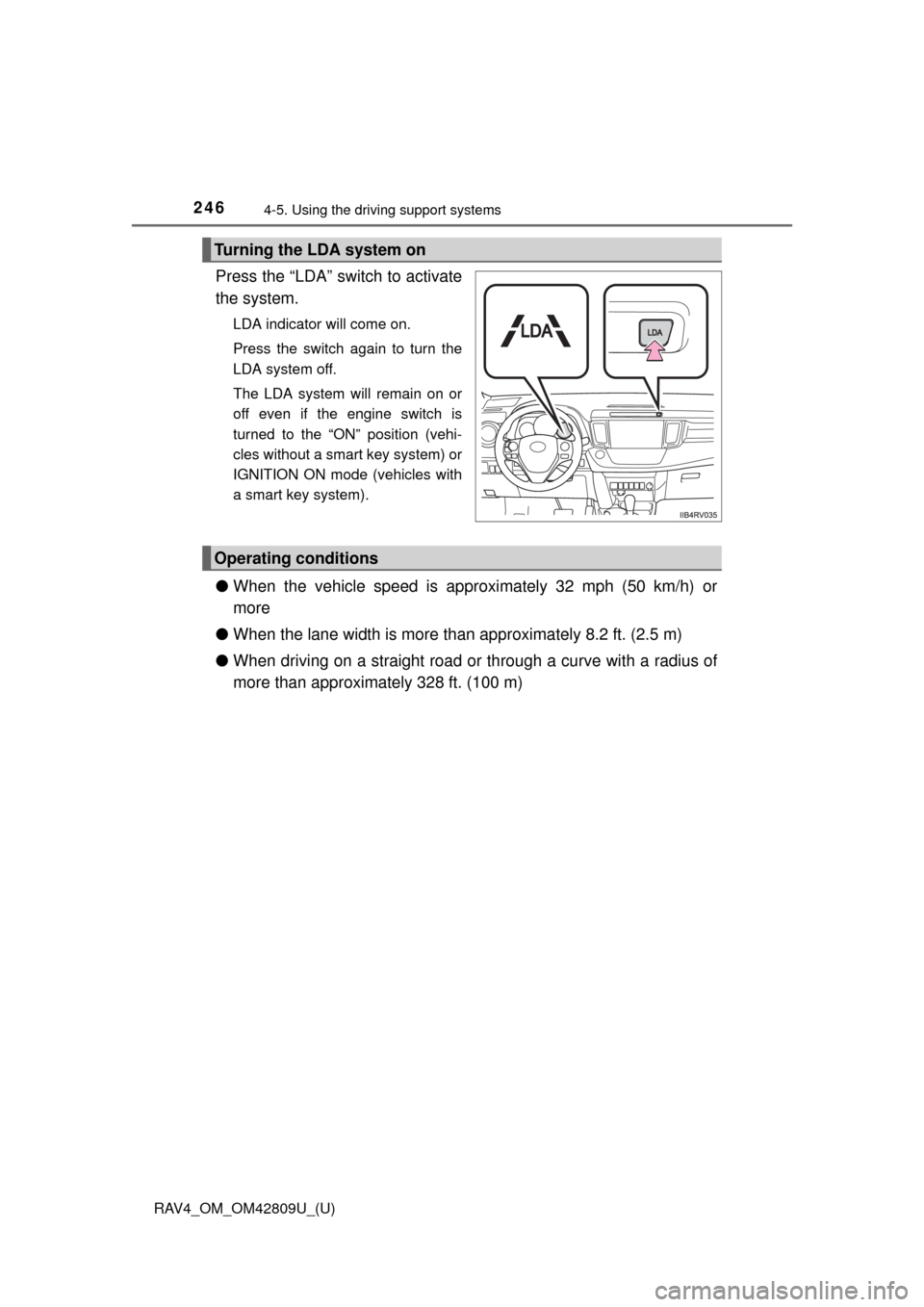
Press the “LDA” switch to activate
the system.
LDA indicator will come on.
Press the switch again to turn the
LDA system off.
The LDA system will remain on or
off even if the engine switch is
turned to the “ON” position (vehi-
cles without a smart key system) or
IGNITION ON mode (vehicles with
a smart key system).
●When the vehicle speed is approximately 32 mph (50 km/h) or
more
● When the lane width is more than approximately 8.2 ft. (2.5 m)
● When driving on a straight road or through a curve with a radius of
more than approximately 328 ft. (100 m)
Turning the LDA system on
Operating conditions