display TOYOTA RAV4 2018 Owners Manual (in English)
[x] Cancel search | Manufacturer: TOYOTA, Model Year: 2018, Model line: RAV4, Model: TOYOTA RAV4 2018Pages: 744, PDF Size: 13.78 MB
Page 2 of 744
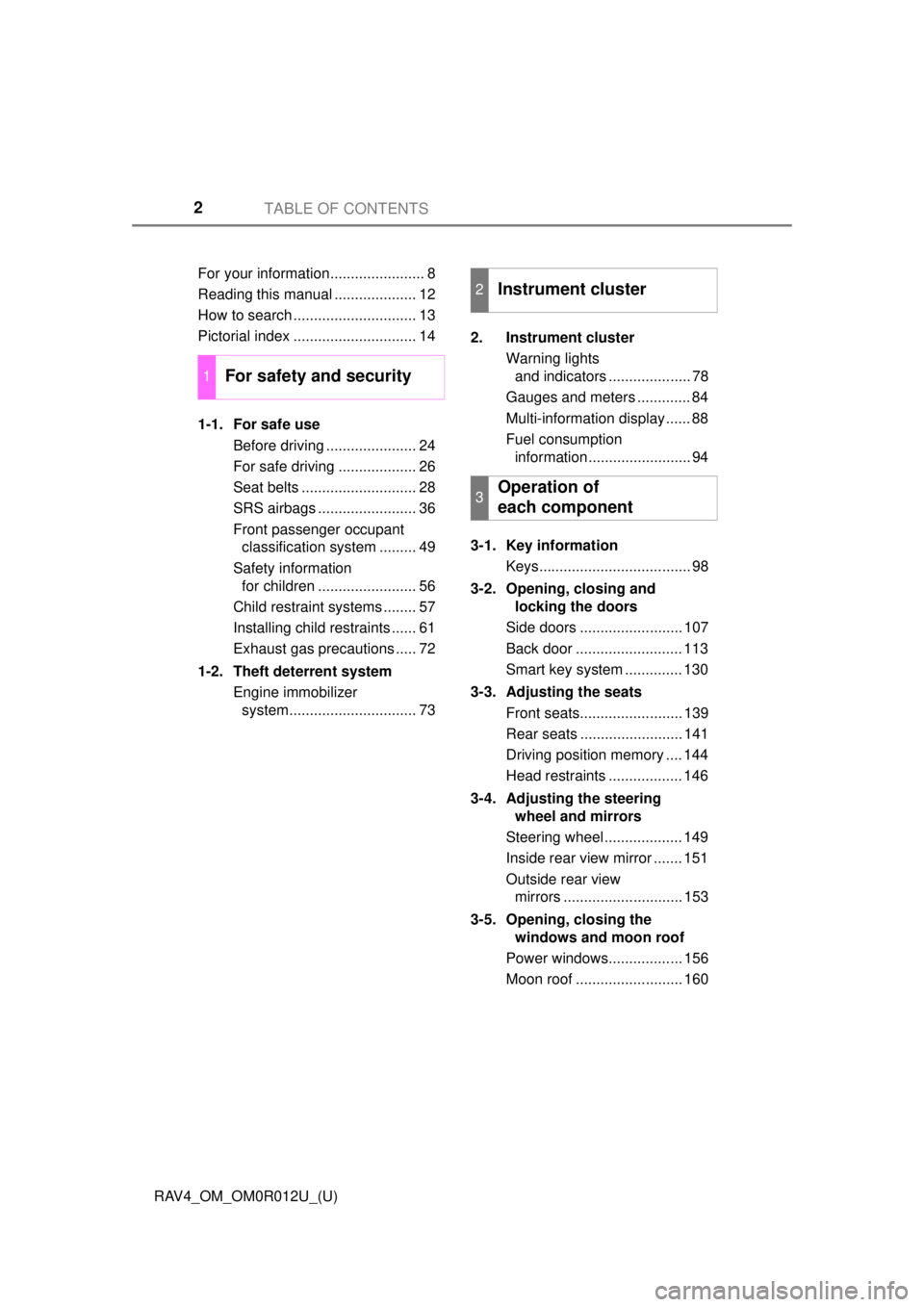
TABLE OF CONTENTS2
RAV4_OM_OM0R012U_(U)For your information....................... 8
Reading this manual .................... 12
How to search .............................. 13
Pictorial index .............................. 14
1-1. For safe use
Before driving ...................... 24
For safe driving ................... 26
Seat belts ............................ 28
SRS airbags ........................ 36
Front passenger occupant classification system ......... 49
Safety information for children ........................ 56
Child restraint systems ........ 57
Installing child restraints ...... 61
Exhaust gas precautions ..... 72
1-2. Theft deterrent system Engine immobilizer system............................... 73 2. Instrument cluster
Warning lights and indicators .................... 78
Gauges and meters ............. 84
Multi-information display ...... 88
Fuel consumption information......................... 94
3-1. Key information Keys..................................... 98
3-2. Opening, closing and locking the doors
Side doors ......................... 107
Back door .......................... 113
Smart key system .............. 130
3-3. Adjusting the seats Front seats......................... 139
Rear seats ......................... 141
Driving position memory .... 144
Head restraints .................. 146
3-4. Adjusting the steering wheel and mirrors
Steering wheel ................... 149
Inside rear view mirror ....... 151
Outside rear view mirrors ............................. 153
3-5. Opening, closing the windows and moon roof
Power windows.................. 156
Moon roof .......................... 160
1For safety and security
2Instrument cluster
3Operation of
each component
Page 4 of 744

TABLE OF CONTENTS4
RAV4_OM_OM0R012U_(U)5-1. Basic Operations
Audio system types ........... 328
Using the steering wheel audio switches ................ 331
AUX port/USB port ............ 334
5-2. Using the audio system Optimal use of the audio system ................... 336
5-3. Using the radio Radio operation ................. 338
5-4. Playing an audio CD and MP3/WMA discs
CD player operation .......... 340
5-5. Using an external device Listening to an iPod........... 350
Listening to USB memory device................ 356
Using the AUX port ........... 362
5-6. Using Bluetooth
® devices
Bluetooth® audio/
phone .............................. 363
Using the steering wheel switches ................ 368
Register a Bluetooth
®
device.............................. 369
5-7. “SETUP” menu Using the “SETUP” menu (“Bluetooth
*” menu) ........ 370
Using the “SETUP” menu (“PHONE” menu) ............ 375
5-8. Bluetooth
® Audio
Operating a Bluetooth®
enabled portable
player .............................. 380 5-9. Bluetooth
® Phone
Making a phone call........... 383
When receiving a phone call ........................ 385
Speaking on the phone...... 386
5-10. Bluetooth
®
Bluetooth®......................... 388
5-11. Using the audio system (Entune Audio)
Audio system (Entune Audio) ................ 392
5-12. Basic Operations Audio system operations (Entune Audio) ................ 394
Steering wheel audio switches........................... 396
AUX port/USB port ............ 397
Basic audio operations ...... 398
5-13. Setup Setup menu ....................... 400
General settings ................ 401
Audio settings .................... 403
Display settings ................. 404
Voice settings .................... 406
5-14. Using the audio system Selecting the audio source.............................. 407
List screen operation ......... 408
Optimal use of the audio system ............................. 410
5-15. Using the radio Radio operation ................. 411
5-16. Playing an audio CD and MP3/WMA/AAC discs
CD player operation........... 413
CD player and disc information....................... 414
5Audio system
*: Bluetooth is a registered trademark of Bluetooth SIG, Inc.
Page 5 of 744
5
RAV4_OM_OM0R012U_(U)
1
9 8
7
6 4 3
2
10
5
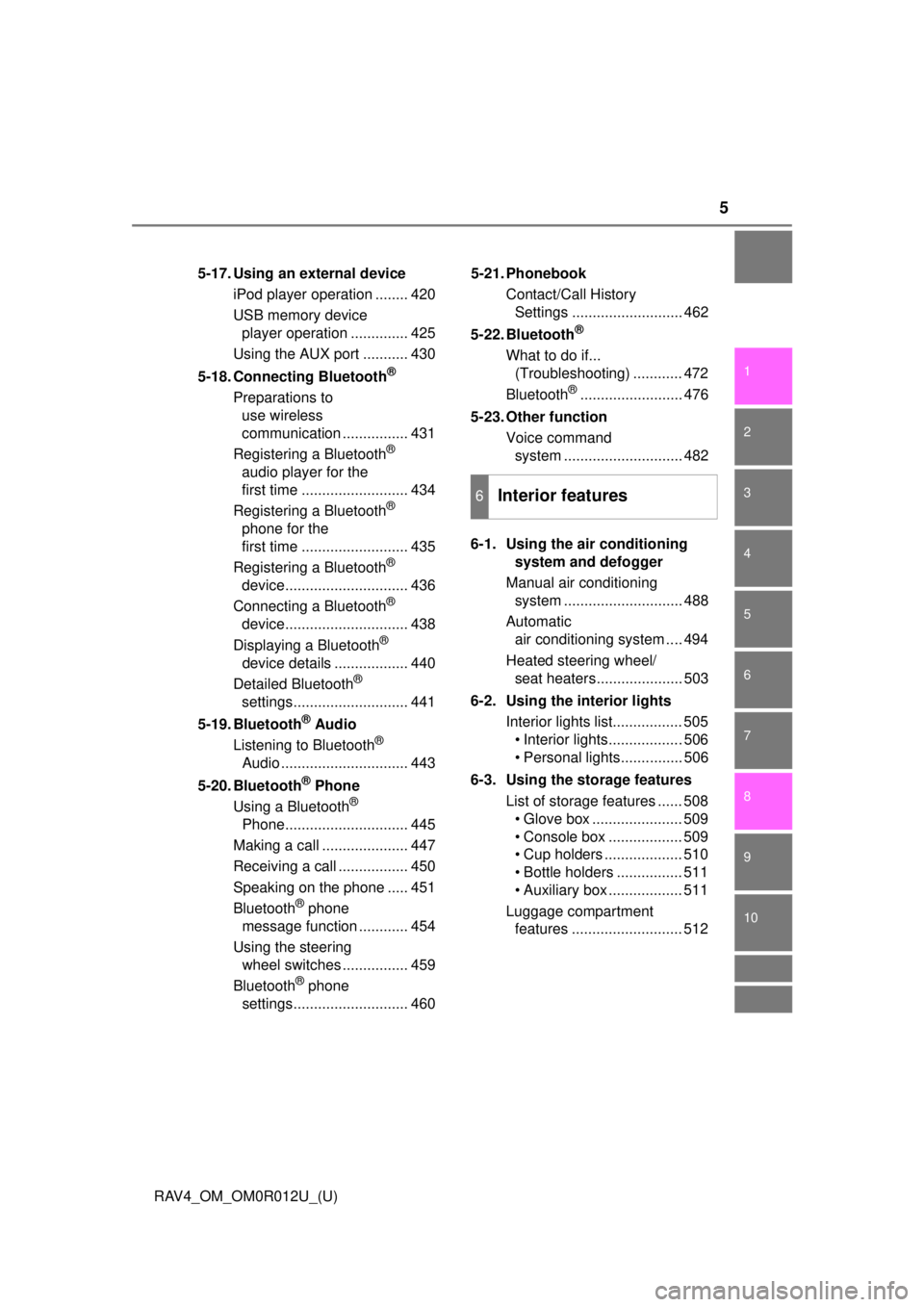
5-17. Using an external deviceiPod player operation ........ 420
USB memory device player operation .............. 425
Using the AUX port ........... 430
5-18. Connecting Bluetooth
®
Preparations to use wireless
communication ................ 431
Registering a Bluetooth
®
audio player for the
first time .......................... 434
Registering a Bluetooth
®
phone for the
first time .......................... 435
Registering a Bluetooth
®
device.............................. 436
Connecting a Bluetooth
®
device.............................. 438
Displaying a Bluetooth
®
device details .................. 440
Detailed Bluetooth
®
settings............................ 441
5-19. Bluetooth
® Audio
Listening to Bluetooth®
Audio ............................... 443
5-20. Bluetooth
® Phone
Using a Bluetooth®
Phone.............................. 445
Making a call ..................... 447
Receiving a call ................. 450
Speaking on the phone ..... 451
Bluetooth
® phone
message function ............ 454
Using the steering wheel switches ................ 459
Bluetooth
® phone
settings............................ 460 5-21. Phonebook
Contact/Call History Settings ........................... 462
5-22. Bluetooth
®
What to do if... (Troubleshooting) ............ 472
Bluetooth
®......................... 476
5-23. Other function Voice command system ............................. 482
6-1. Using the air conditioning system and defogger
Manual air conditioning system ............................. 488
Automatic air conditioning system .... 494
Heated steering wheel/ seat heaters..................... 503
6-2. Using the interior lights Interior lights list................. 505• Interior lights.................. 506
• Personal lights............... 506
6-3. Using the storage features List of storage features ...... 508• Glove box ...................... 509
• Console box .................. 509
• Cup holders ................... 510
• Bottle holders ................ 511
• Auxiliary box .................. 511
Luggage compartment features ........................... 512
6Interior features
Page 7 of 744
7
RAV4_OM_OM0R012U_(U)
1
9 8
7
6 4 3
2
10
5
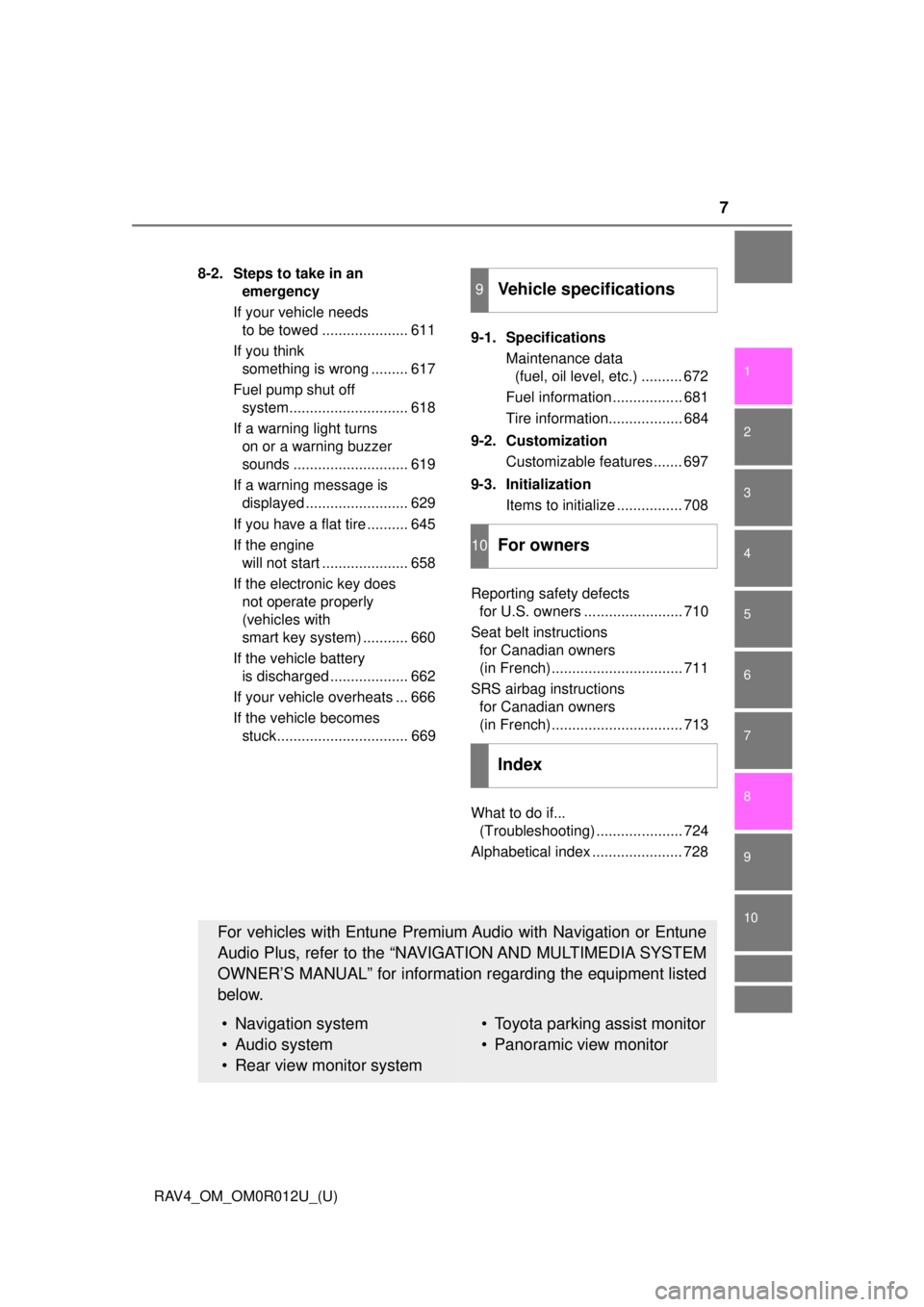
8-2. Steps to take in an emergency
If your vehicle needs to be towed ..................... 611
If you think something is wrong ......... 617
Fuel pump shut off system............................. 618
If a warning light turns on or a warning buzzer
sounds ............................ 619
If a warning message is displayed ......................... 629
If you have a flat tire .......... 645
If the engine will not start ..................... 658
If the electronic key does not operate properly
(vehicles with
smart key system) ........... 660
If the vehicle battery is discharged ................... 662
If your vehicle overheats ... 666
If the vehicle becomes stuck................................ 669 9-1. Specifications
Maintenance data (fuel, oil level, etc.) .......... 672
Fuel information ................. 681
Tire information.................. 684
9-2. Customization Customizable features ....... 697
9-3. Initialization Items to initialize ................ 708
Reporting safety defects for U.S. owners ........................ 710
Seat belt instructions for Canadian owners
(in French)................................ 711
SRS airbag instructions for Canadian owners
(in French)................................ 713
What to do if... (Troubleshooting) ..................... 724
Alphabetical index ...................... 728
9Vehicle specifications
10For owners
Index
For vehicles with Entune Premium Audio with Navigation or Entune
Audio Plus, refer to the “NAVIGATION AND MULTIMEDIA SYSTEM
OWNER’S MANUAL” for informati on regarding the equipment listed
below.
• Navigation system
• Audio system
• Rear view monitor system• Toyota parking assist monitor
• Panoramic view monitor
Page 16 of 744
16Pictorial index
RAV4_OM_OM0R012U_(U)
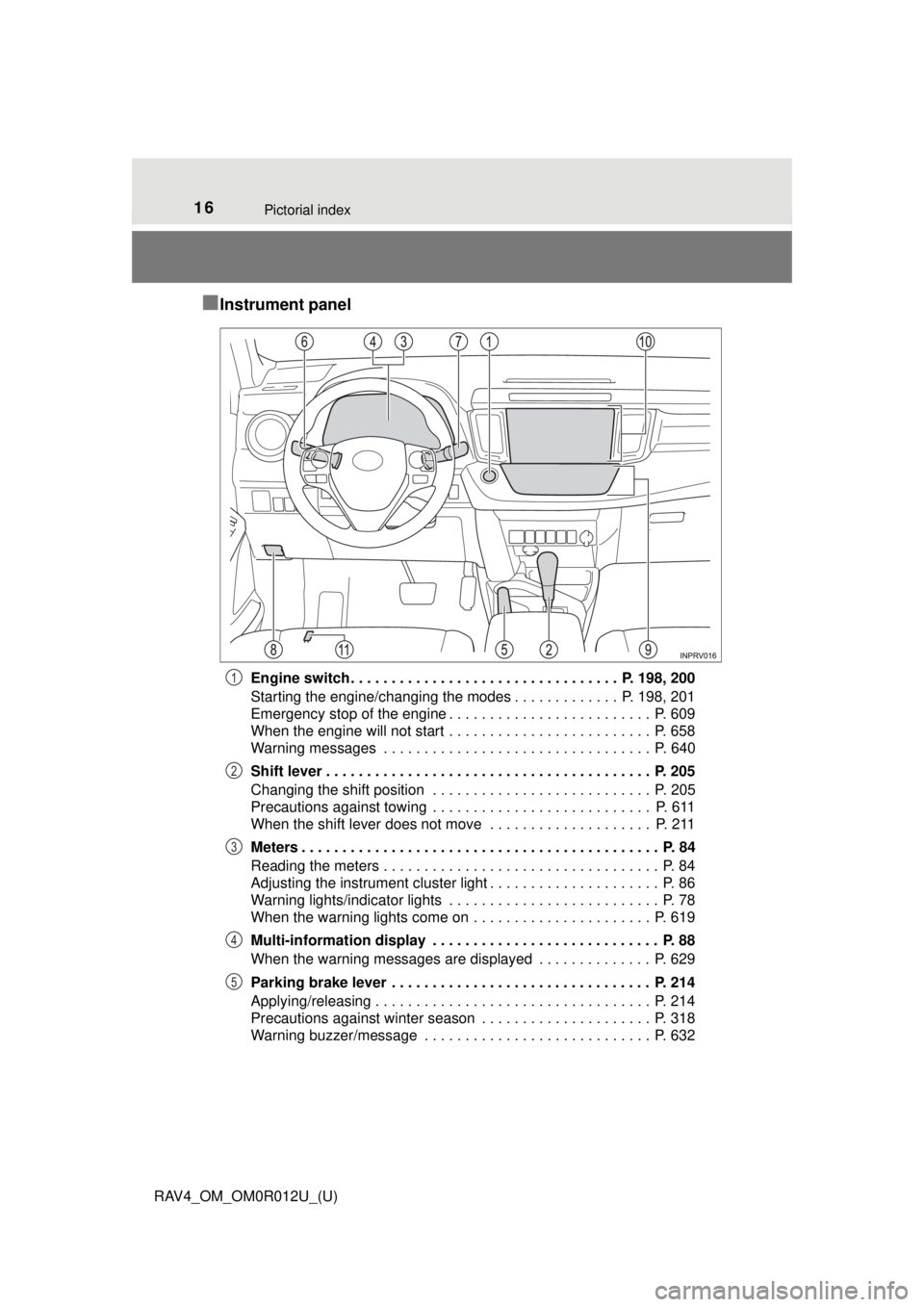
■Instrument panel
Engine switch . . . . . . . . . . . . . . . . . . . . . . . . . . . . . . . . . P. 198, 200
Starting the engine/changing the modes . . . . . . . . . . . . . P. 198, 201
Emergency stop of the engine . . . . . . . . . . . . . . . . . . . . . . . . . P. 609
When the engine will not start . . . . . . . . . . . . . . . . . . . . . . . . . P. 658
Warning messages . . . . . . . . . . . . . . . . . . . . . . . . . . . . . . . . . P. 640
Shift lever . . . . . . . . . . . . . . . . . . . . . . . . . . . . . . . . . . . . . . . . P. 205
Changing the shift position . . . . . . . . . . . . . . . . . . . . . . . . . . . P. 205
Precautions against towing . . . . . . . . . . . . . . . . . . . . . . . . . . . P. 611
When the shift lever does not move . . . . . . . . . . . . . . . . . . . . P. 211
Meters . . . . . . . . . . . . . . . . . . . . . . . . . . . . . . . . . . . . . . . . . . . . P. 84
Reading the meters . . . . . . . . . . . . . . . . . . . . . . . . . . . . . . . . . . P. 84
Adjusting the instrument cluster light . . . . . . . . . . . . . . . . . . . . . P. 86
Warning lights/indicator lights . . . . . . . . . . . . . . . . . . . . . . . . . . P. 78
When the warning lights come on . . . . . . . . . . . . . . . . . . . . . . P. 619
Multi-information display . . . . . . . . . . . . . . . . . . . . . . . . . . . . P. 88
When the warning messages are displayed . . . . . . . . . . . . . . P. 629
Parking brake lever . . . . . . . . . . . . . . . . . . . . . . . . . . . . . . . . P. 214
Applying/releasing . . . . . . . . . . . . . . . . . . . . . . . . . . . . . . . . . . P. 214
Precautions against winter season . . . . . . . . . . . . . . . . . . . . . P. 318
Warning buzzer/message . . . . . . . . . . . . . . . . . . . . . . . . . . . . P. 6321
2
3
4
5
Page 61 of 744
611-1. For safe use
RAV4_OM_OM0R012U_(U)
1
For safety and security
Installing child restraints
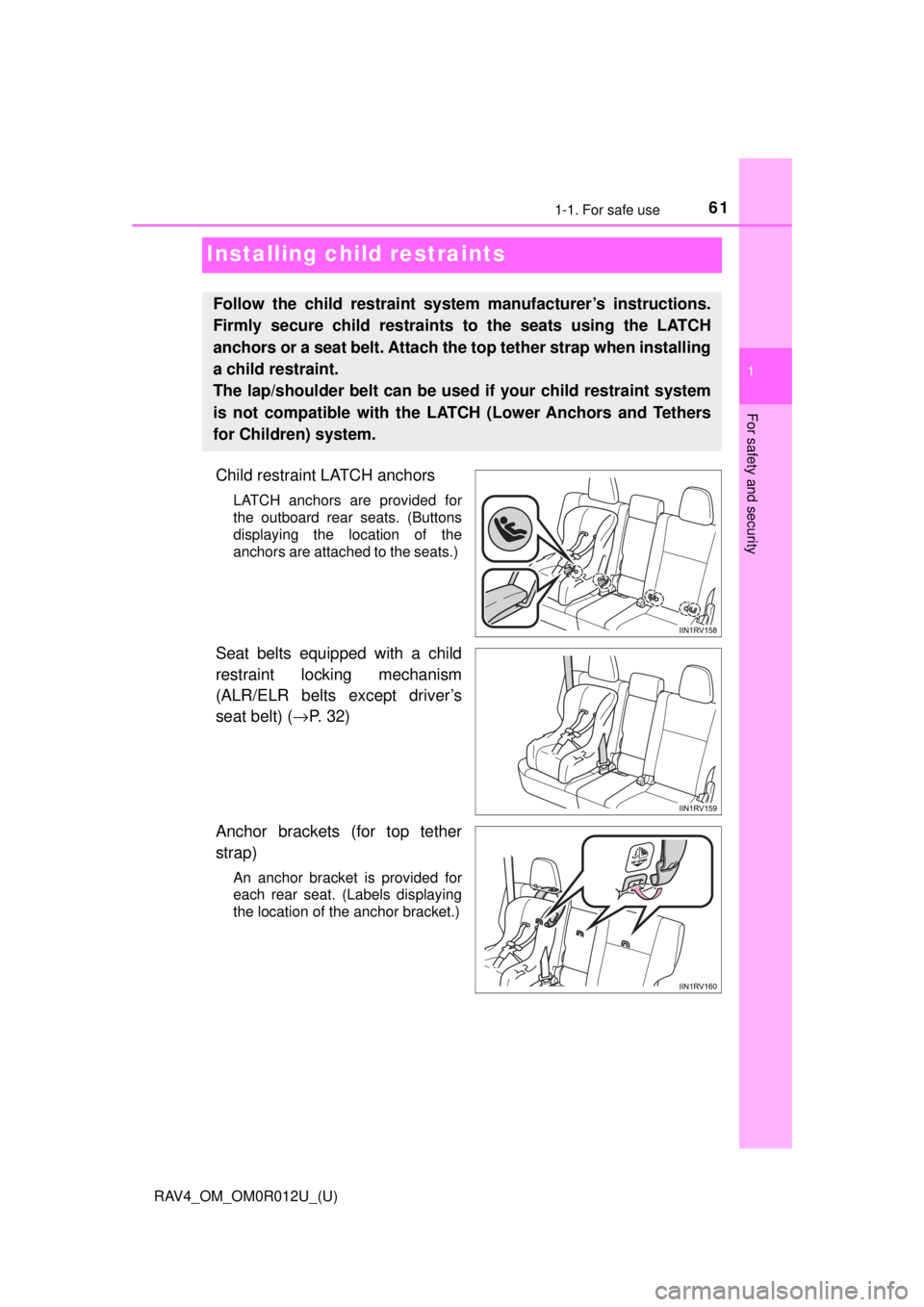
Child restraint LATCH anchors
LATCH anchors are provided for
the outboard rear seats. (Buttons
displaying the location of the
anchors are attached to the seats.)
Seat belts equipped with a child
restraint locking mechanism
(ALR/ELR belts except driver’s
seat belt) (→P. 32)
Anchor brackets (for top tether
strap)
An anchor bracket is provided for
each rear seat. (Labels displaying
the location of the anchor bracket.)
Follow the child restraint system manufacturer’s instructions.
Firmly secure child restraints to the seats using the LATCH
anchors or a seat belt. Attach the top tether strap when installing
a child restraint.
The lap/shoulder belt can be used if your child restraint system
is not compatible with the LATCH (Lower Anchors and Tethers
for Children) system.
Page 77 of 744
77
RAV4_OM_OM0R012U_(U)
Instrument cluster2
2. Instrument clusterWarning lights and indicators ................... 78
Gauges and meters ............ 84
Multi-information display ..... 88
Fuel consumption information ........................ 94
Page 83 of 744
RAV4_OM_OM0R012U_(U)
832. Instrument cluster
2
Instrument cluster
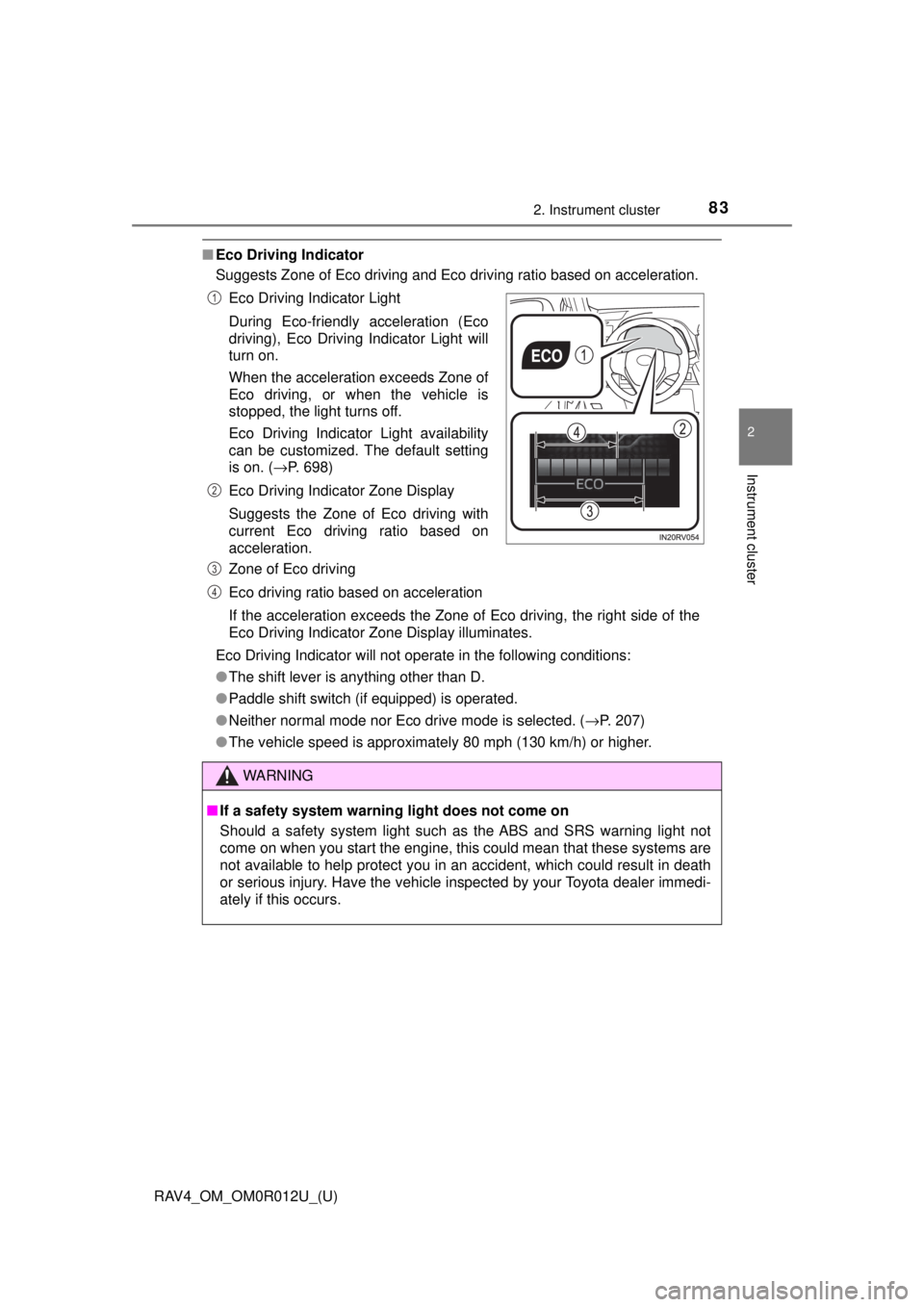
■Eco Driving Indicator
Suggests Zone of Eco driving and Eco driving ratio based on acceleration.
Eco Driving Indicator will not operate in the following conditions:
● The shift lever is anything other than D.
● Paddle shift switch (if equipped) is operated.
● Neither normal mode nor Eco drive mode is selected. ( →P. 207)
● The vehicle speed is approximately 80 mph (130 km/h) or higher. Eco Driving Indicator Light
During Eco-friendly acceleration (Eco
driving), Eco Driving Indicator Light will
turn on.
When the acceleration exceeds Zone of
Eco driving, or when the vehicle is
stopped, the light turns off.
Eco Driving Indicator Light availability
can be customized. The default setting
is on. ( →P. 698)
Eco Driving Indicator Zone Display
Suggests the Zone of Eco driving with
current Eco driving ratio based on
acceleration.
Zone of Eco driving
Eco driving ratio based on acceleration
If the acceleration exceeds the Zone of Eco driving, the right side of the
Eco Driving Indicator Zone Display illuminates.
WARNING
■ If a safety system warning light does not come on
Should a safety system light such as the ABS and SRS warning light not
come on when you start the engine, this could mean that these systems are
not available to help protect you in an accident, which could result in death
or serious injury. Have the vehicle inspected by your Toyota dealer immedi-
ately if this occurs.
1
2
3
4
Page 84 of 744
84
RAV4_OM_OM0R012U_(U)
2. Instrument cluster
Gauges and meters
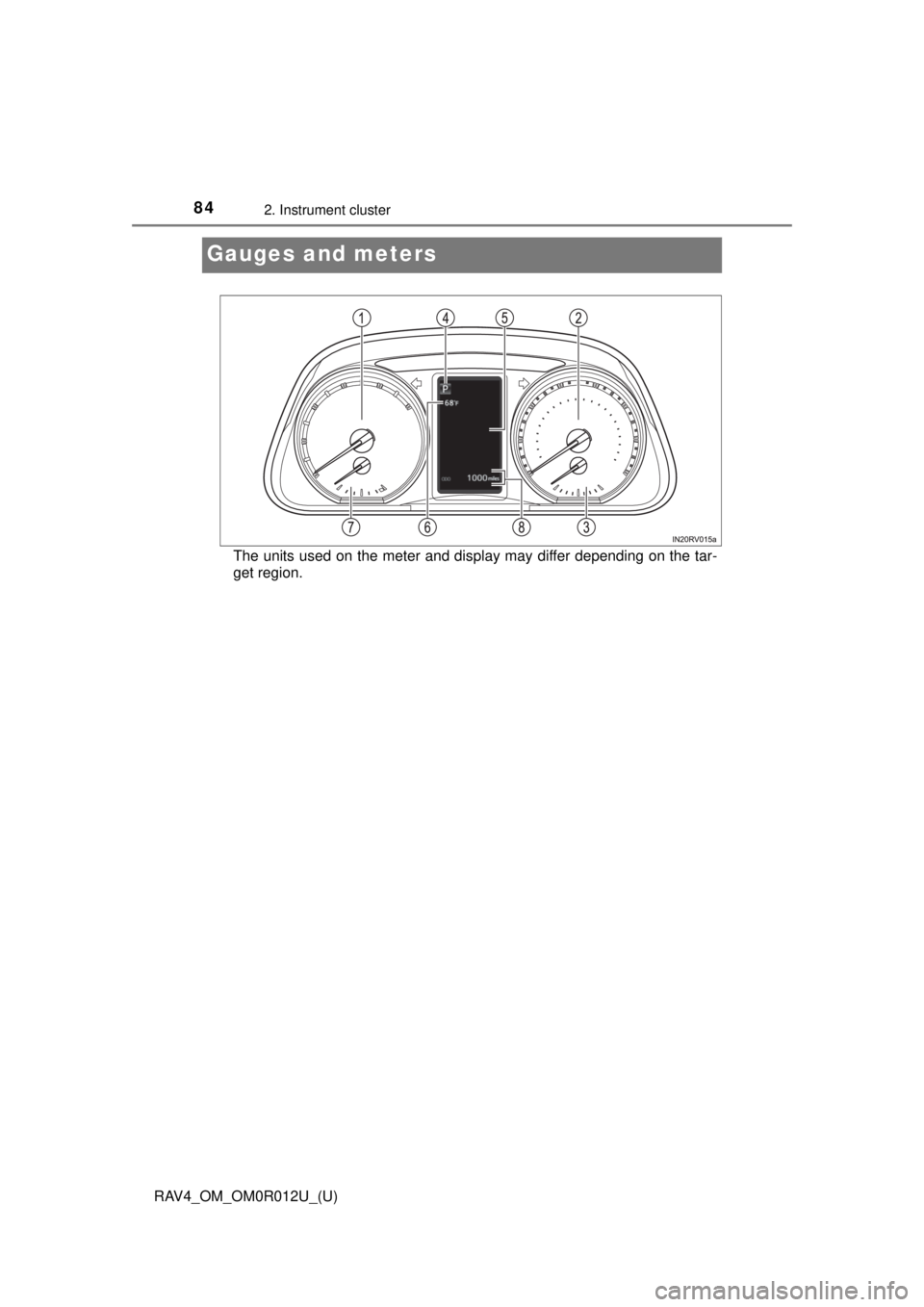
The units used on the meter and display may differ depending on the tar-
get region.
Page 85 of 744

RAV4_OM_OM0R012U_(U)
852. Instrument cluster
2
Instrument cluster
Tachometer
Displays the engine speed in revolutions per minute
Speedometer
Displays the vehicle speed
Fuel gauge
Displays the quantity of fuel remaining in the tank
Shift position and shift range
Displays the selected shift position or selected shift range (→P. 205)
Multi-information display
Presents the driver with a variety of driving-related data (→P. 88)
Outside temperature display
→P. 8 7
Engine coolant temperature gauge
Displays the engine coolant temperature
Odometer and trip meter
Odometer:
Displays the total distance that the vehicle has been driven
Trip meter:
Displays the distance the vehicle has been driven since the meter was last
reset. Trip meters “A” and “B” can be used to record and display different
distances independently.
1
2
3
4
5
6
7
8