tire pressure reset TOYOTA RAV4 2020 Owners Manual (in English)
[x] Cancel search | Manufacturer: TOYOTA, Model Year: 2020, Model line: RAV4, Model: TOYOTA RAV4 2020Pages: 736, PDF Size: 30.79 MB
Page 96 of 736

962-1. Instrument cluster
Select to change each notification
method used to warn the driver
when the system recognizes
excess speed, no overtaking and
no-entry sign.
“Notification Level”
Select to change e ach notification
level used to warn the driver when
the system recognizes a speed limit
sign.
■ Vehicle Settings
PBD (Power Back Door)
(if equipped) ( P.118)
Select to set up the following items.
• System settings
Select to enable/disable the power
back door system.
• “Kick Sensor”
*
Select to enable/disable the kick
sensor.
• “Opening Adjustment”
Select the open position when
power back door is fully open.
•“Volume”
Select to set the volume of the
buzzer which sounds when the
power back door system operates.
*: Vehicles with hands free power
back door
(Stop & Start system) (if
equipped) ( P.345)
Select to set the length of time the
Stop & Start system will operate
when the “A/C” switch of the air
conditioning system is on.
“TPWS” (Tire Pressure Warn-
ing System) (if equipped) (
P.584)
• “Set Pressure”
Select to initialize the tire pressure
warning system.
• “Change Wheel” (except for mod-
els made in Japan
* without tire
inflation pressure display func-
tion)
Select to register the ID codes of
the tire pressure se nsors to the tire
pressure warning system.
• “Change Wheel” (for models
made in Japan
* without tire infla-
tion pressure display function)
Select to change the tire pressure
warning system sen sor ID code set.
To enable this function, a second
set of tire pressure warning system
sensor ID codes must be registered
by a Toyota dealer. For information
regarding changing the registered
ID code set, contact your Toyota
dealer.
*: The country of production is writ- ten on the Certification Regula-
tion label. ( P.665)
“Scheduled Maintenance”
( P.565)
Select to reset the scheduled main-
tenance information (message indi-
cating maintenance is required and
distance until the next mainte-
nance) after all ma intenance is per-
formed.
■ Settings
“Language”
Select to change the language on
the multi-information display.
“Units”
Page 592 of 736

5927-3. Do-it-yourself maintenance
cally when the engine switch has
been turned to ON for the next
time.
●If you accidentally perform the ini-
tialization when ini tialization is not
necessary, adjust the tire inflation
pressure to the specified level
when the tires are cold, and con-
duct initialization again.
●Vehicles with tire inflation pres-
sure display function only: While
the position of each tire is being
determined and the inflation pres-
sures are not being displayed on
the multi-informatio n display, if the
inflation pressure of a tire drops,
the tire pressure warning light will
come on.
■When initialization of the tire
pressure warning system has
failed (vehicles without tire
inflation pressure display func-
tion)
Initialization can be completed in a
few minutes. However, in the follow-
ing cases, the set tings have not
been recorded an d the system will
not operate properly. If repeated
attempts to record tire inflation pres-
sure settings are unsuccessful,
have the vehicle inspected by your
Toyota dealer.
●When operating the tire pressure
warning reset swit ch, the tire pres-
sure warning light does not blink 3
times.
●After driving for a certain period of
time since the initialization has
been completed, the warning light
comes on after blin king for 1 min-
ute.
■If the tire pressure warning sys-
tem is not initialized properly
(vehicles with tire inflation pres-
sure display function)
In the following sit uations, initializa-
tion may take longer than usual to
be completed or may not be possi-
ble. Normally, in itialization com-
pletes within app roximately 30
minutes. • Vehicle is not dr
iven at approxi-
mately 25 mph (40 km/h) or more
• Vehicle is driven on unpaved roads
• Vehicle is driven near other vehi-
cles and system cannot recog-
nize tire pressure warning valve
and transmitters o f your vehicle
over those of other vehicles.
If initialization does not complete
after driving for 1 hour or more, park
the vehicle in a safe place for
approximately 20 minutes and then
drive the vehicle again.
●If the vehicle is reversed during
initialization, the data up to that
point is reset, so p erform the ini-
tialization procedure again from
the beginning.
●In the following situations, initial-
ization will not be started or was
not completed properly and the
system will not oper ate properly.
Perform the initialization proce-
dure again.
• If, when attempting to start initial- ization, the tire pressure warning
light does not blink 3 times.
• If, when the veh icle has been
driven for about 20 minutes after
performing initialization, the tire
pressure warning light blinks for
approximately 1 minute and then
illuminates.
If the inflation pressure of each tire
is still not display ed, have the vehi-
cle inspected by your Toyota dealer.
Page 595 of 736
5957-3. Do-it-yourself maintenance
7
Maintenance and care
• Vehicle is driven near other vehi-cles and system cannot recog-
nize tire pressure warning valve
and transmitters of your vehicle
over those of other vehicles
• Wheel with tire p ressure warning
valve and transmitter installed is
inside or near the vehicle
If registration does not complete
after driving for 1 hour or more, per-
form the ID code registration proce-
dure again from the beginning.
●If the vehicle is reversed during
registration, the data up to that
point is reset, so perform the reg-
istration procedure again from the
beginning.
●In the following situations, ID code
registration will not be started or
was not completed properly and
the system will no t operate prop-
erly. Perform the ID code registra-
tion procedure again.
• If, when attempting to start ID code registration, the tire pressure
warning light does not blink slowly
3 times.
• If, when the vehicle has been driven for about 20 minutes after
performing ID co de registration,
the tire pressur e warning light
blinks for approxi mately 1 minute
and then illu minates.
If the ID codes cannot be registered
even when performing the above
procedure, contact your Toyota
dealer.
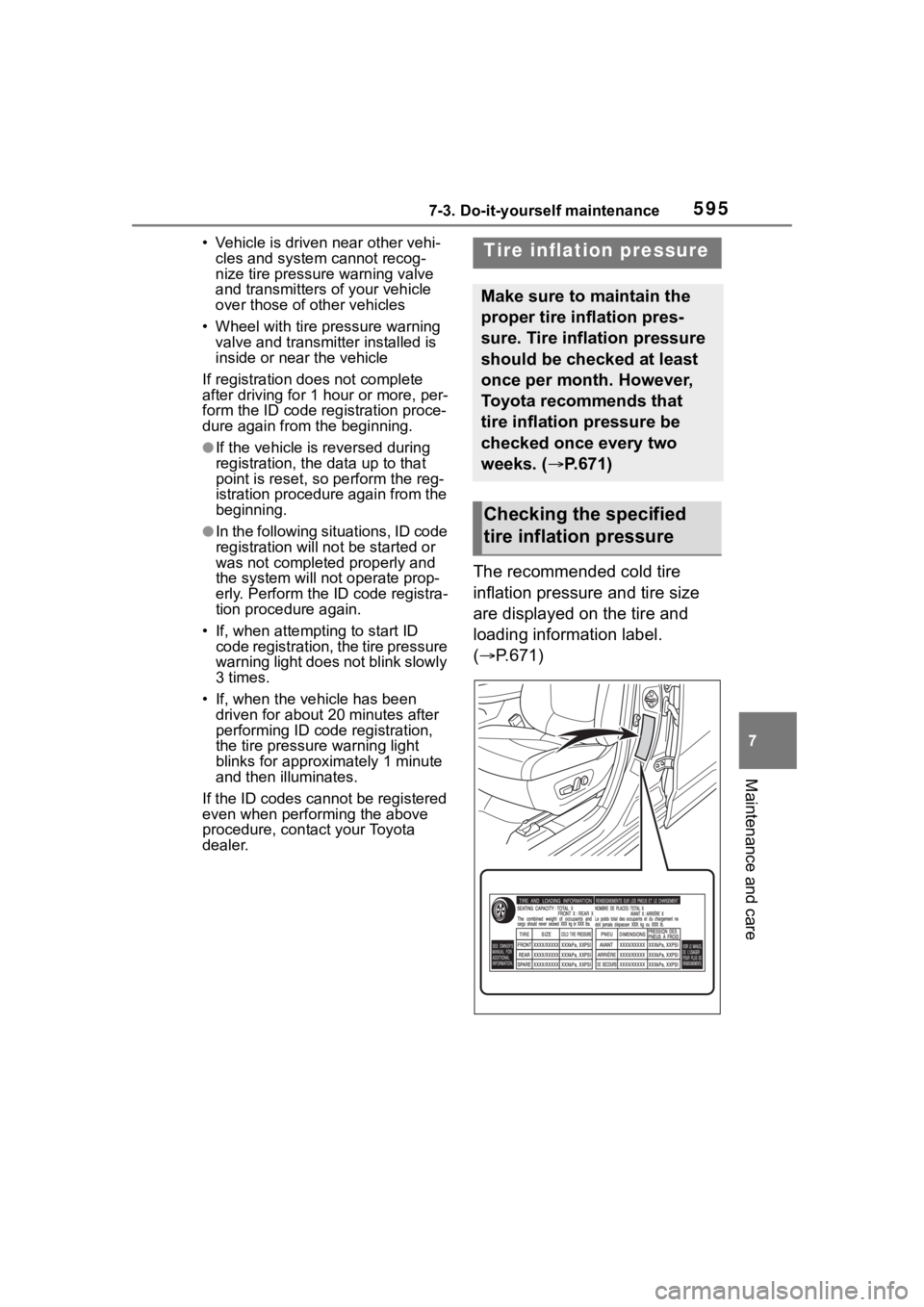
The recommended cold tire
inflation pressure and tire size
are displayed on the tire and
loading information label.
( P.671)
Tire inflation pressure
Make sure to maintain the
proper tire inflation pres-
sure. Tire inflation pressure
should be checked at least
once per month. However,
Toyota recommends that
tire inflation pressure be
checked once every two
weeks. ( P.671)
Checking the specified
tire inflation pressure
Page 729 of 736

Alphabetical Index729
Snow mode switch ................. 357
Snow tires ............................... 367
Spare tireStorage location ................... 643
Spark plug ............................... 668
Specifications ......................... 664
Speedometer ...................... 82, 85
Sport mode ............................. 351
Status icon .............................. 378 Status icon explanation ........ 378
Steering lock Column lock release..... 193, 195
Steering lock system warning message............................. 195
Steering switch ............... 442, 458 Audio switch ......................... 442
Steering wheel Adjustment ........................... 142
Heated steering wheel ......... 522
Meter control switches ........... 90
Stop lights Replacing light bulbs ............ 609
Stop & Start system Function ............................... 345
Replacing the battery ........... 657
Storage feature ....................... 528
Storage precautions .............. 528
Stuck If the vehicle becomes stuck 661
Suggestion function................. 98
Sunglass holder ..................... 530
Sunshade ........................ 159, 162
Sun visors ............................... 537
Switches “ODO TRIP”switch ........... 84, 88
“SOS” button .......................... 65
Automatic High Beam switch 212
Brake hold switch ................. 206
BSM (Blind Spot Monitor)..... 262
Digital Rear-view Mirror control switches ............................. 145
Door lock switch ................... 112 Driving mode select switch ...351
Driving position memory
switches..............................137
Dynamic radar cruise control with full-speed range ..........250
Electronic sunshade switch ..162
Emergency flashers switch...618
Engine switch ...............193, 194
Fog light switch .....................215
Garage door opener switches ...........................................548
Heated steering wheel..........522
Ignition switch (Engine switch) ...................................193, 194
Intuitive parking assist ..........271
Light switch...........................209
LTA switch.............................242
Meter control switches............90
Moon roof switches ..............159
Outside rear v iew mirror
switches..............................154
Panoramic moon roof switches ...........................................162
Parking brake switch ............203
PCS (Pre-Collisio n System) .231
PKSB (Parking Support Brake) ...........................................278
Power back door switch 118, 119
Power door lock switch......... 112
Power window switch ...........156
RCTA ....................................262
Rear window and outside rear view mirror defoggers switch................................... 511, 517
Rear window wiper and washer switch .................................218
Seat heater switches ....522, 523
Seat ventilator switches........523
Snow mode switch ...............357
Tire pressure warning reset switch .................................590
Vehicle-to-vehicle distance