towing TOYOTA RAV4 2021 (in English) Owner's Manual
[x] Cancel search | Manufacturer: TOYOTA, Model Year: 2021, Model line: RAV4, Model: TOYOTA RAV4 2021Pages: 748, PDF Size: 30.79 MB
Page 256 of 748
2564-5. Using the driving support systems
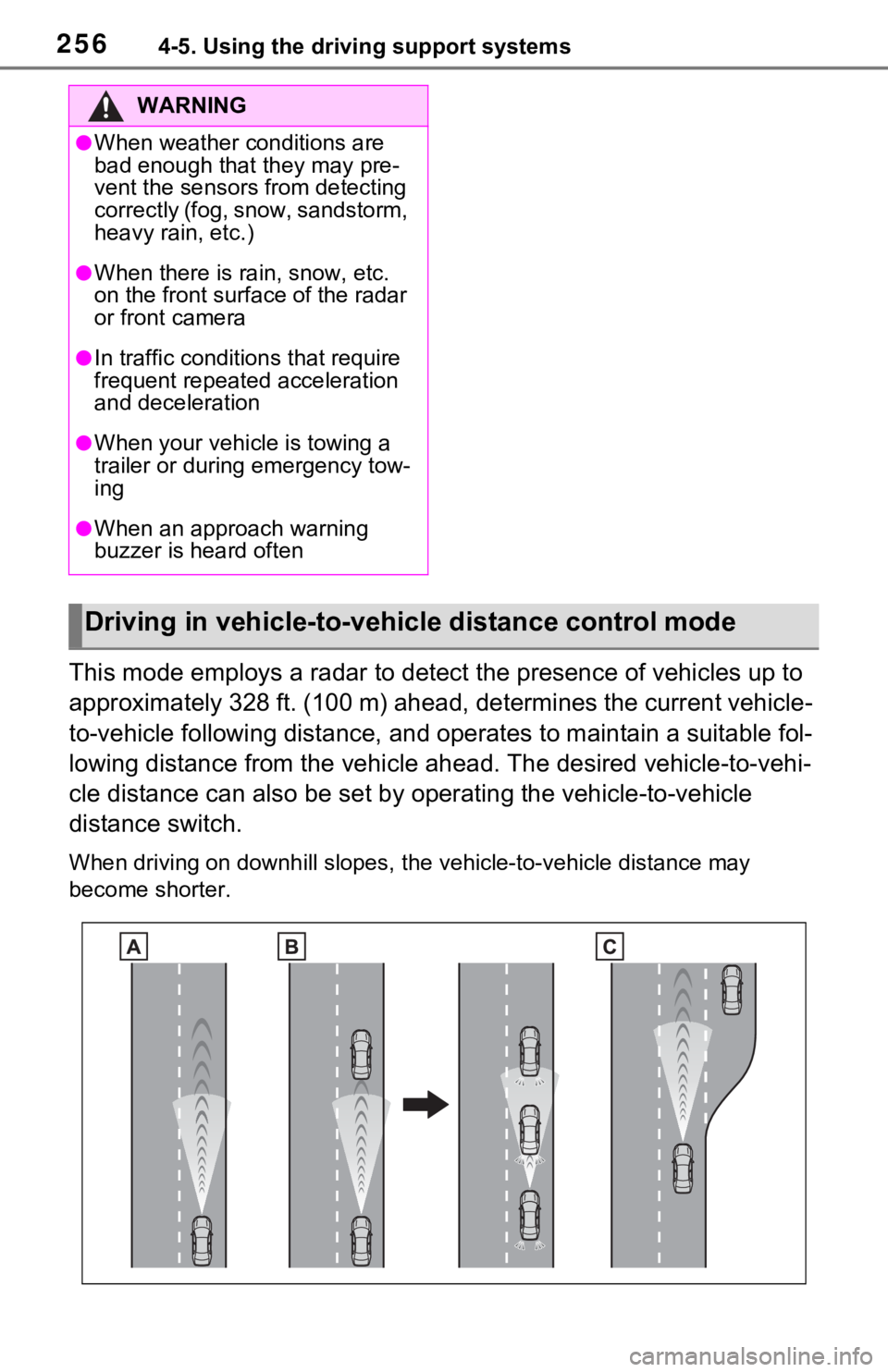
This mode employs a radar to detect the presence of vehicles up to
approximately 328 ft. (100 m) ahead, determines the current vehicle-
to-vehicle following distance, and operates to maintain a suitable fol-
lowing distance from the vehicle ahead. The desired vehicle-to- vehi-
cle distance can also be set by operating the vehicle-to-vehicl e
distance switch.
When driving on downhill slopes, t he vehicle-to-vehicle distance may
become shorter.
WARNING
●When weather conditions are
bad enough that they may pre-
vent the sensors from detecting
correctly (fog, snow, sandstorm,
heavy rain, etc.)
●When there is rain, snow, etc.
on the front surface of the radar
or front camera
●In traffic conditions that require
frequent repeated acceleration
and deceleration
●When your vehicle is towing a
trailer or during emergency tow-
ing
●When an approach warning
buzzer is heard often
Driving in vehicle-to-vehicle distance control mode
Page 270 of 748
2704-5. Using the driving support systems
■Conditions under which the
BSM function may not function
correctly
●The BSM function may not detect
vehicles correctly in the following
situations:
• When the sensor is misaligned
due to a strong impact to the sen-
sor or its surrounding area
• When mud, snow, ice, a sticker, etc. is covering the sensor or sur-
rounding area on the rear bumper
• When driving on a road surface that is wet with standing water
during bad weather, such as
heavy rain, snow, or fog
• When multiple vehicles are approaching with only a small gap
between each vehicle
• When the distanc e between your
vehicle and a following vehicle is
short
• When there is a significant differ- ence in speed between your vehi-
cle and the vehicle that enters the
detection area
• When the difference in speed between your vehicle and another
vehicle is changing
• When a vehicle enters a detection area traveling at about the same
speed as your vehicle
• As your vehicle starts from a stop, a vehicle remains in the detection
area
• When driving up and down con- secutive steep inclines, such as
hills, dips in the road, etc.
• When driving on roads with sharp bends, consecutive curves, or
uneven surfaces
• When vehicle lanes are wide, or when driving on the edge of a
lane, and the vehicle in an adja-
cent lane is far away from your
vehicle
• When an accessory (such as a bicycle carrier) is installed to the
rear of the vehicle
• When there is a significant differ- ence in height between your vehi-
cle and the vehicle that enters the
detection area
• Immediately after the BSM func- tion/RCTA function are turned on
• When towing a trailer
●Instances of the BSM function
unnecessarily detecting a vehicle
and/or object may increase in the
following situations:
• When the sensor is misaligned due to a strong impact to the sen-
sor or its surrounding area
• When the distance between your vehicle and a guardrail, wall, etc.
that enters the detection area is
short
• When driving up and down con- secutive steep inclines, such as
hills, dips in the road, etc.
• When vehicle lanes are narrow, or when driving on the edge of a
lane, and a vehicle traveling in a
lane other than the adjacent lanes
enters the detection area
• When driving on r oads with sharp
bends, consecutive curves, or
uneven surfaces
• When the tires are slipping or
spinning
• When the distance between your vehicle and a following vehicle is
short
• When an accessory (such as a bicycle carrier) is installed to the
rear of the vehicle
• When the vehicle throws up water or snow behind.
■Operation of the RCTA
function
The RCTA function uses radar
sensors to detect vehicles
approaching from the right or left
at the rear of the vehicle and
alerts the driver of the presence
of such vehicles by flashing the
outside rear view mirror indica-
The Rear Cross Traffic
Alert function (if
equipped)
Page 273 of 748
2734-5. Using the driving support systems
4
Driving
• Immediately after the RCTA func-
tion is turned on
• Immediately after the engine is started with the RCTA function on
• When towing a trailer
• When the sensors cannot detect a vehicle due to obstructions
●Instances of the RCTA function
unnecessary detecting a vehicle
and/or object may increase in the
following situations:
• When a vehicle passes by the side of your vehicle
• When the parking space faces a street and vehicles are being
driven on the street
• When the distanc e between your
vehicle and metal objects, such as
a guardrail, wall, sign, or parked
vehicle, which may reflect electri-
cal waves toward the rear of the
vehicle, is short
• When an accessory (such as a bicycle carrier) is installed to the
rear of the vehicle
*: If equipped
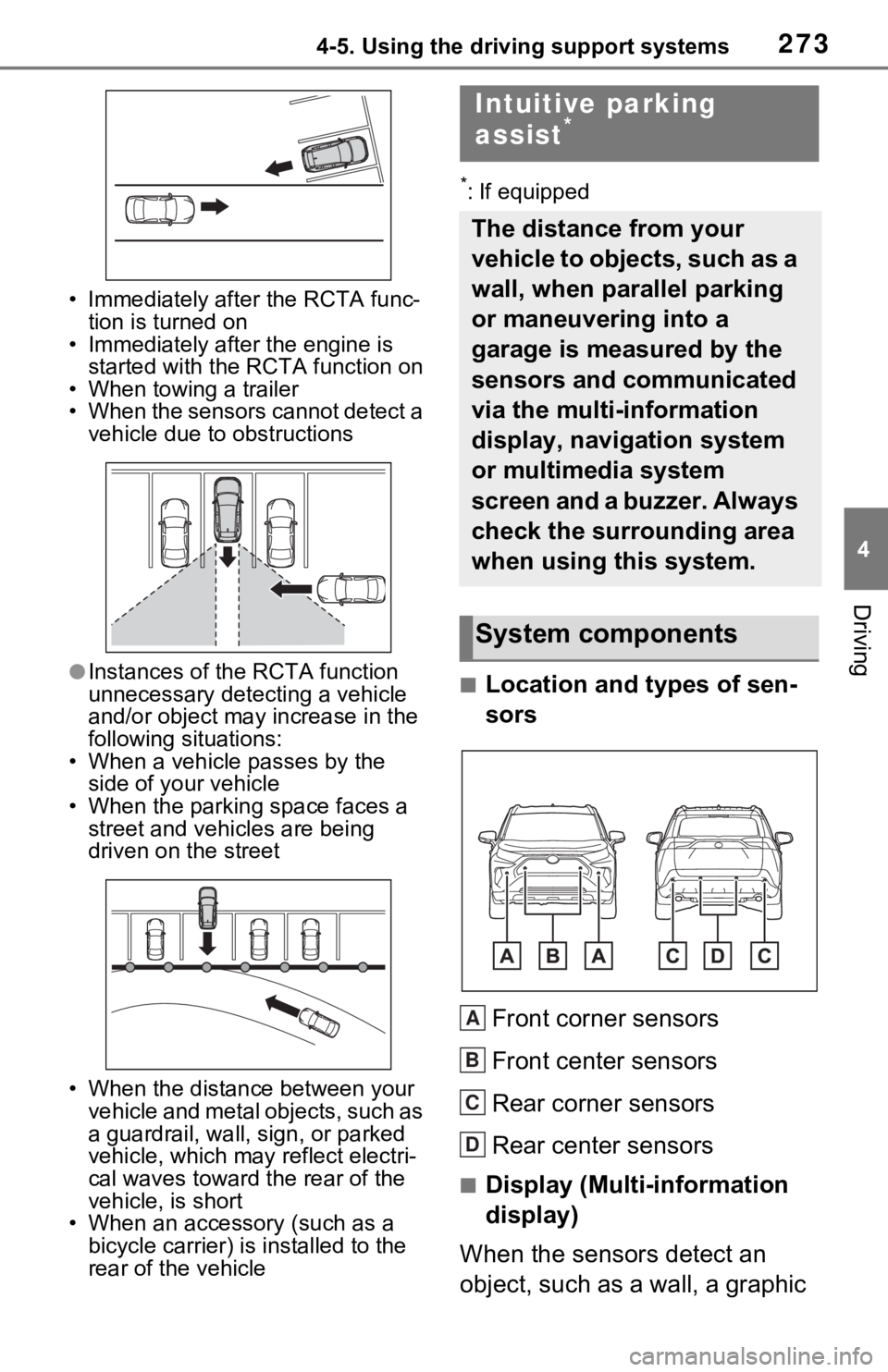
■Location and types of sen-
sors
Front corner sensors
Front center sensors
Rear corner sensors
Rear center sensors
■Display (Multi-information
display)
When the sensors detect an
object, such as a wall, a graphic
Intuitive parking
assist*
The distance from your
vehicle to objects, such as a
wall, when parallel parking
or maneuvering into a
garage is measured by the
sensors and communicated
via the multi-information
display, navigation system
or multimedia system
screen and a buzzer. Always
check the surrounding area
when using this system.
System components
A
B
C
D
Page 276 of 748
2764-5. Using the driving support systems
■The system can be operated
when
●The engine switch is in ON.
●Intuitive parking assist function is
on.
●The vehicle speed is less than
about 6 mph (10 km/h).
●The shift lever is in a position
other than P.
■If “Parking Assist Unavailable
Clean Parking Assist Sensor” is
displayed on the multi-informa-
tion display
A sensor may be co vered with ice,
snow, dirt, etc. Remove the ice,
snow, dirt, etc., from the sensor to
return the system to normal.
Also, due to ice forming on a sensor
at low temperatures, a warning
message may be displayed or the
sensor may not be able to detect an
object. Once the ice melts, the sys-
tem will return to normal.
If a warning message is displayed
even if the sensor is clean, there
may be a sensor malfunction. Have
the vehicle inspected by your
Toyota dealer.
WARNING
■When to disable the function
In the following situations, disable
the function as it may operate
even though there is no possibility
of a collision.
●The vehicle is equipped with a
commercial fender pole, wire-
less antenna or fog lights.
●The front or rear bumper or a
sensor receives a strong
impact.
●A non-genuine Toyota suspen-
sion (lowered suspension, etc.)
is installed.
●Towing eyelets (if equipped) are
installed.
●A backlit license plate is
installed.
■When using the intuitive park-
ing assist
In the following s ituations, the
system may not function correctly
due to a sensor mal function, etc.
Have the vehicle checked by your
Toyota dealer.
●The intuitive parking assist
operation display flashes or
shows continuously, and a
buzzer sounds when no objects
are detected.
●If the area around a sensor col-
lides with something, or is sub-
jected to strong impact.
●If the bumper or grille collides
with something.
●If the display flashes or is dis-
played continuously and a
buzzer does not sound, except
when the mute function has
been turned on.
■Notes when washing the vehi-
cle
Do not apply intensive bursts of
water or steam to the sensor
area.
Doing so may result in the sensor
malfunctioning.
●When using a high pressure
washer to wash the vehicle, do
not spray the sensors directly,
as doing so may cause a sensor
to malfunction.
●When using steam to clean the
vehicle, do not direct steam too
close to the sensors as doing so
may cause a sensor to malfunc-
tion.
Page 288 of 748
2884-5. Using the driving support systems
WARNING
●Do not replace a sensor with a
part other than a genuine part.
●Do not subject a sensor or its
surrounding area to a strong
impact.
●Do not damage the sensors,
and always keep them clean.
●If the area around a radar sen-
sor is subjected to an impact,
the system may not operate
properly due to a sensor mal-
function. Have the vehicle
inspected by your Toyota
dealer.
■Handling the suspension
Do not modify the suspension, as
changes to the height or inclina-
tion of the vehicle may prevent
the sensors from detecting
objects correctly or cause the sys-
tem to not operate or operate
unnecessarily.
■If the Parking Support Brake
function (static objects) oper-
ates unnecessarily, such as
at a railroad crossing
In the event that the Parking Sup-
port Brake function (static objects)
operates unnecessarily, such as
at a railroad cross ing, brake con-
trol will be cancele d after approxi-
mately 2 seconds, allowing you to
proceed forward and leave the
area, brake control can also be
canceled by depressing the brake
pedal. Depressing the accelera-
tor pedal after brake control is
canceled will allow you to proceed
forward and leave the area.
■Notes when washing the vehi-
cle
Do not apply intensive bursts of
water or steam to the sensor
area.
Doing so may result in the sensor
malfunctioning.
●When using a high pressure
washer to wash the vehicle, do
not spray the sensors directly,
as doing so may cause a sensor
to malfunction.
●When using steam to clean the
vehicle, do not direct steam too
close to the sensors as doing so
may cause a sensor to malfunc-
tion.
■When to disable the Parking
Support Brake
In the following situations, disable
the Parking Suppor t Brake as the
system may opera te even though
there is no possibility of a colli-
sion.
●When inspecting the vehicle
using a chassis roller, chassis
dynamo or free roller
●When loading the vehicle onto a
boat, truck or other transport
vessel
●If the suspension has been
modified or tires of a size other
than specified are installed
●If the front of the vehicle is
raised or lowered due to the
carried load
●When equipment that may
obstruct a sensor is installed,
such as a towing eyelet, bumper
protector (an additional trim
strip, etc.), bicycle carrier, or
snow plow
●When using an automatic car
wash
Page 291 of 748
2914-5. Using the driving support systems
4
Driving
fog lights, fender pole or wireless
antenna is installed near a sensor
●Changes in the vehicle posture
• If the vehicle is significantly tilted
• If the front of the vehicle is raised or lowered due to the carried load
• If the orientation of a sensor has been changed due t o a collision or
other impact
■Situations in which the Parking
Support Brake function (static
objects) may not operate prop-
erly
In some situations, such as the fol-
lowing, this function may not oper-
ate properly.
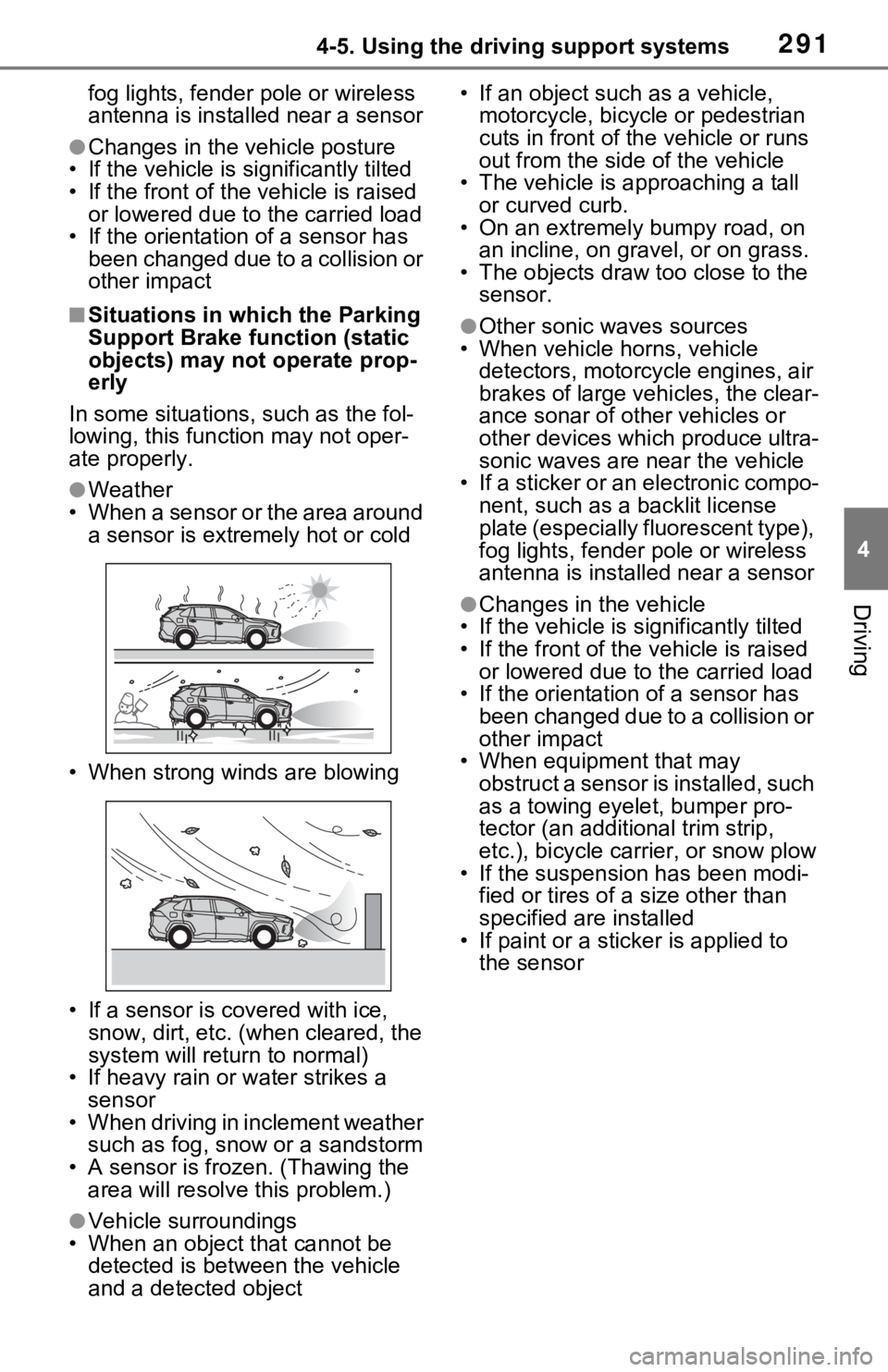
●Weather
• When a sensor or the area around a sensor is extremely hot or cold
• When strong winds are blowing
• If a sensor is covered with ice, snow, dirt, etc. (when cleared, the
system will return to normal)
• If heavy rain or water strikes a sensor
• When driving in inclement weather such as fog, snow or a sandstorm
• A sensor is frozen. (Thawing the
area will resolve this problem.)
●Vehicle surroundings
• When an object that cannot be detected is betw een the vehicle
and a detected object • If an object such as a vehicle,
motorcycle, bicycle or pedestrian
cuts in front of the vehicle or runs
out from the side of the vehicle
• The vehicle is approaching a tall or curved curb.
• On an extremely bumpy road, on
an incline, on gravel, or on grass.
• The objects draw too close to the sensor.
●Other sonic waves sources
• When vehicle horns, vehicle
detectors, motorcycle engines, air
brakes of large vehicles, the clear-
ance sonar of ot her vehicles or
other devices which produce ultra-
sonic waves are near the vehicle
• If a sticker or an electronic compo-
nent, such as a backlit license
plate (especially fluorescent type),
fog lights, fender pole or wireless
antenna is installed near a sensor
●Changes in the vehicle
• If the vehicle is significantly tilted
• If the front of the v ehicle is raised
or lowered due to the carried load
• If the orientation of a sensor has
been changed due to a collision or
other impact
• When equipment that may
obstruct a sensor is installed, such
as a towing eyelet, bumper pro-
tector (an additional trim strip,
etc.), bicycle car rier, or snow plow
• If the suspension has been modi- fied or tires of a size other than
specified are installed
• If paint or a stic ker is applied to
the sensor
Page 295 of 748
2954-5. Using the driving support systems
4
Driving
●When there are spinning objects
near your vehicle such as the fan
of an air conditioning unit
●When water is splashed or
sprayed toward the rear bumper,
such as from a sprinkler
■Situations in which the Parking
Support Brake function (rear-
crossing vehicles) may not
operate properly
In some situations, such as the fol-
lowing, the radar sensors may not
detect an object and this function
may not operate properly
●Stationary objects
●When a sensor or the area around
a sensor is extremely hot or cold
●If the rear bumper is covered with
ice, snow, dirt, etc.
●When it is raining heavily or water
strikes the vehicle
●When the detecti on area of a
radar sensor is obstructed by an
adjacent vehicle
●If the vehicle is s ignificantly tilted
●When equipment that may
obstruct a sensor is installed, such
as a towing eyelet, bumper pro-
tector (an additional trim strip,
etc.), bicycle carrier, or snow plow
●If the suspension has been modi-
fied or tires of a size other than
specified are installed
●If the front of the vehicle is raised
or lowered due to the carried load
●If a sticker or an electronic compo-
nent, such as a backlit license
plate (especially fluorescent type),
fog lights, fender pole or wireless antenna is installed near a radar
sensor
●If the orientation of a radar sensor
has been changed
●When multiple vehicles are
approaching with only a small gap
between each vehicle
●If a vehicle is approaching the rear
of your vehicle rapidly
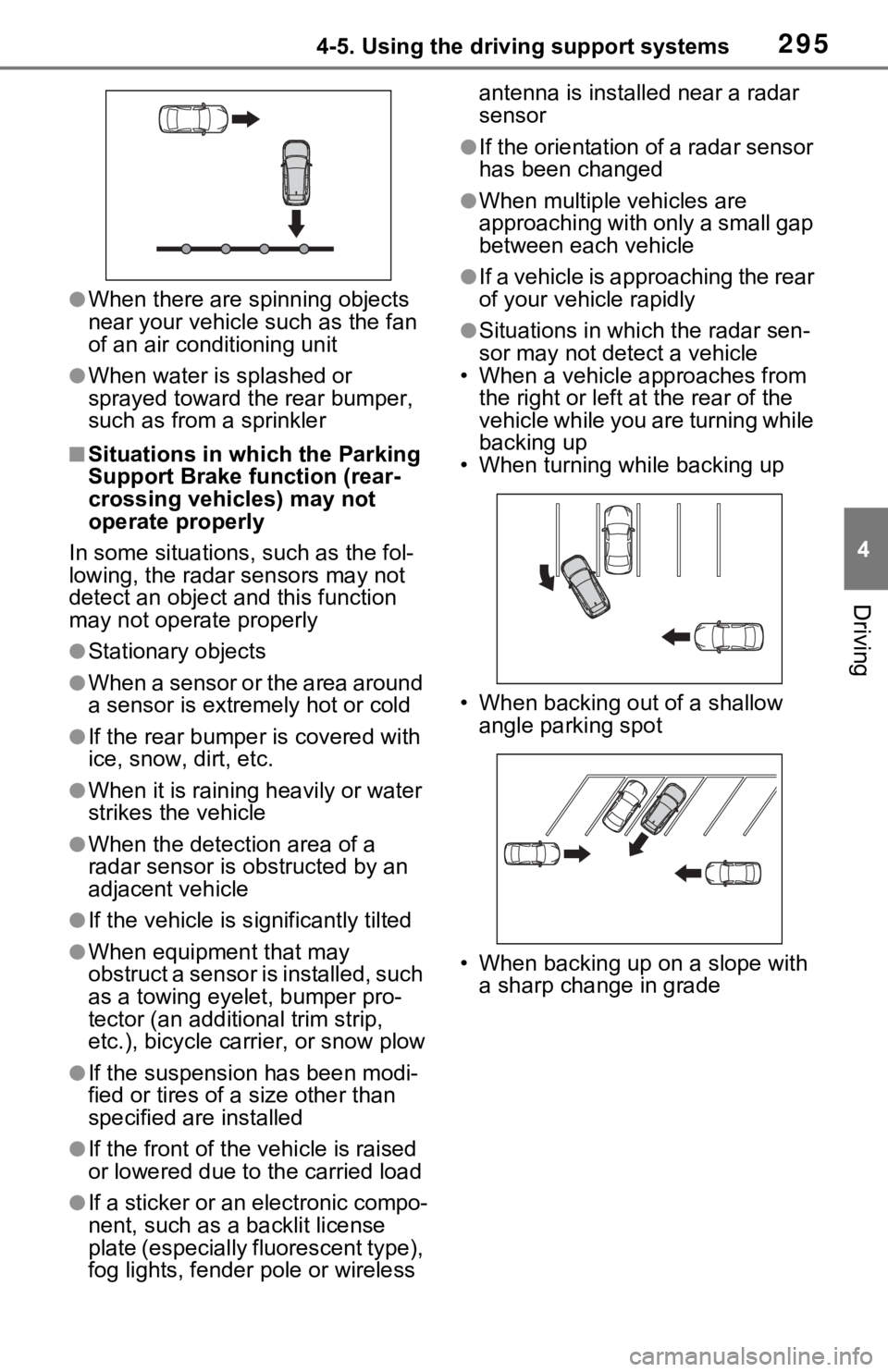
●Situations in which the radar sen-
sor may not detect a vehicle
• When a vehicle approaches from
the right or left at the rear of the
vehicle while you are turning while
backing up
• When turning while backing up
• When backing out of a shallow angle parking spot
• When backing up on a slope with a sharp change in grade
Page 542 of 748
5426-3. Using the storage features
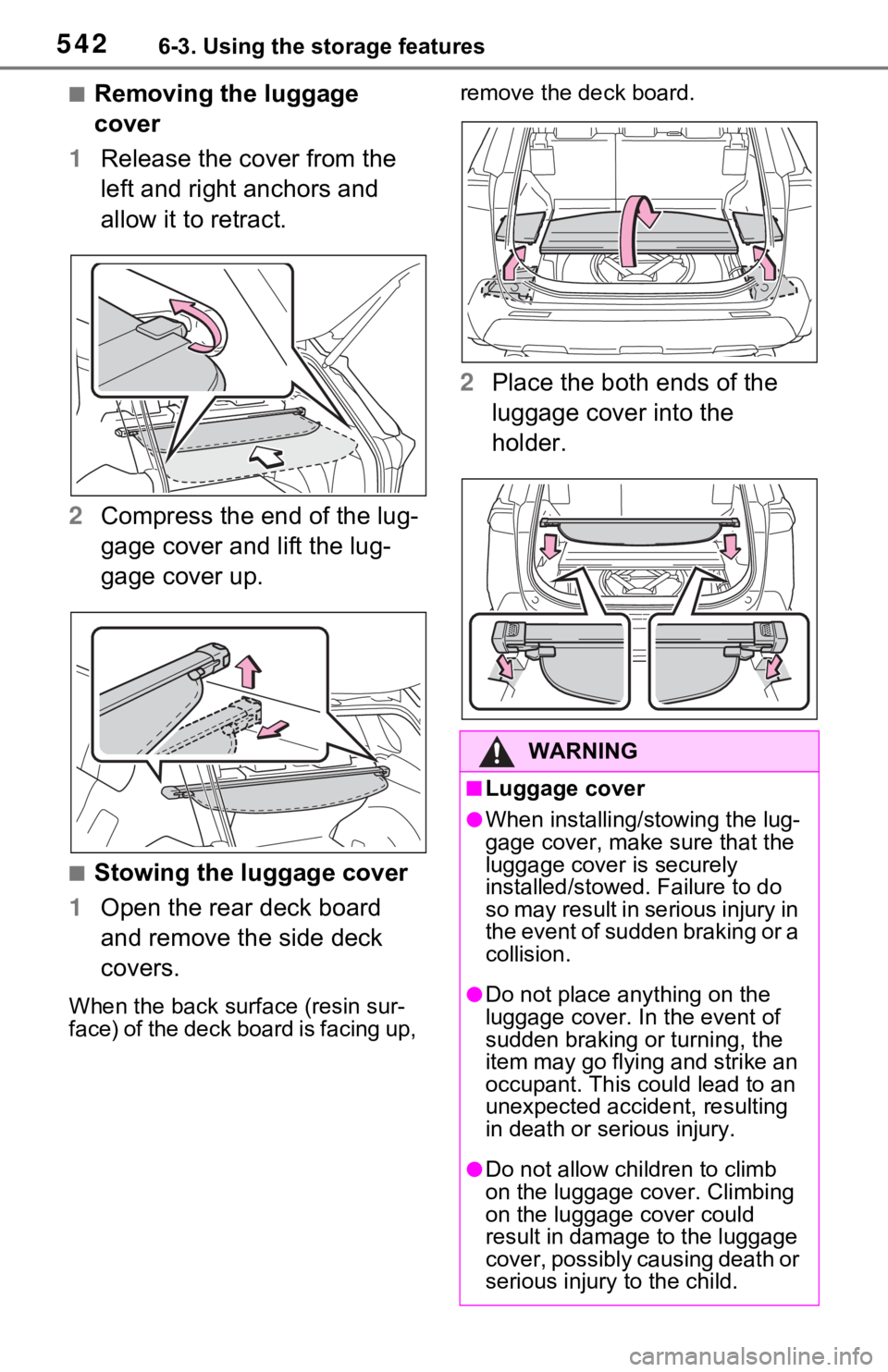
■Removing the luggage
cover
1 Release the cover from the
left and right anchors and
allow it to retract.
2 Compress the end of the lug-
gage cover and lift the lug-
gage cover up.
■Stowing the luggage cover
1 Open the rear deck board
and remove the side deck
covers.
When the back surface (resin sur-
face) of the deck board is facing up, remove the deck board.
2
Place the both ends of the
luggage cover into the
holder.
WARNING
■Luggage cover
●When installing/stowing the lug-
gage cover, make sure that the
luggage cover is securely
installed/stowed. Failure to do
so may result in serious injury in
the event of sudden braking or a
collision.
●Do not place anything on the
luggage cover. In the event of
sudden braking or turning, the
item may go flying and strike an
occupant. This could lead to an
unexpected accident, resulting
in death or se rious injury.
●Do not allow children to climb
on the luggage cover. Climbing
on the luggage cover could
result in damage to the luggage
cover, possibly causing death or
serious injury to the child.
Page 584 of 748
5847-3. Do-it-yourself maintenance
tion may increase, and engine oil
may need to be refilled in between
oil maintenance intervals.
●When the engine is new, for
example directly after purchasing
the vehicle or after replacing the
engine
●If low quality oil or oil of an inap-
propriate viscosity is used
●When driving at high engine
speeds or with a heavy load,
when towing, or when driving
while accelerating o r decelerating
frequently
●When leaving the engine idling for
a long time, or wh en driving fre-
quently through heavy traffic
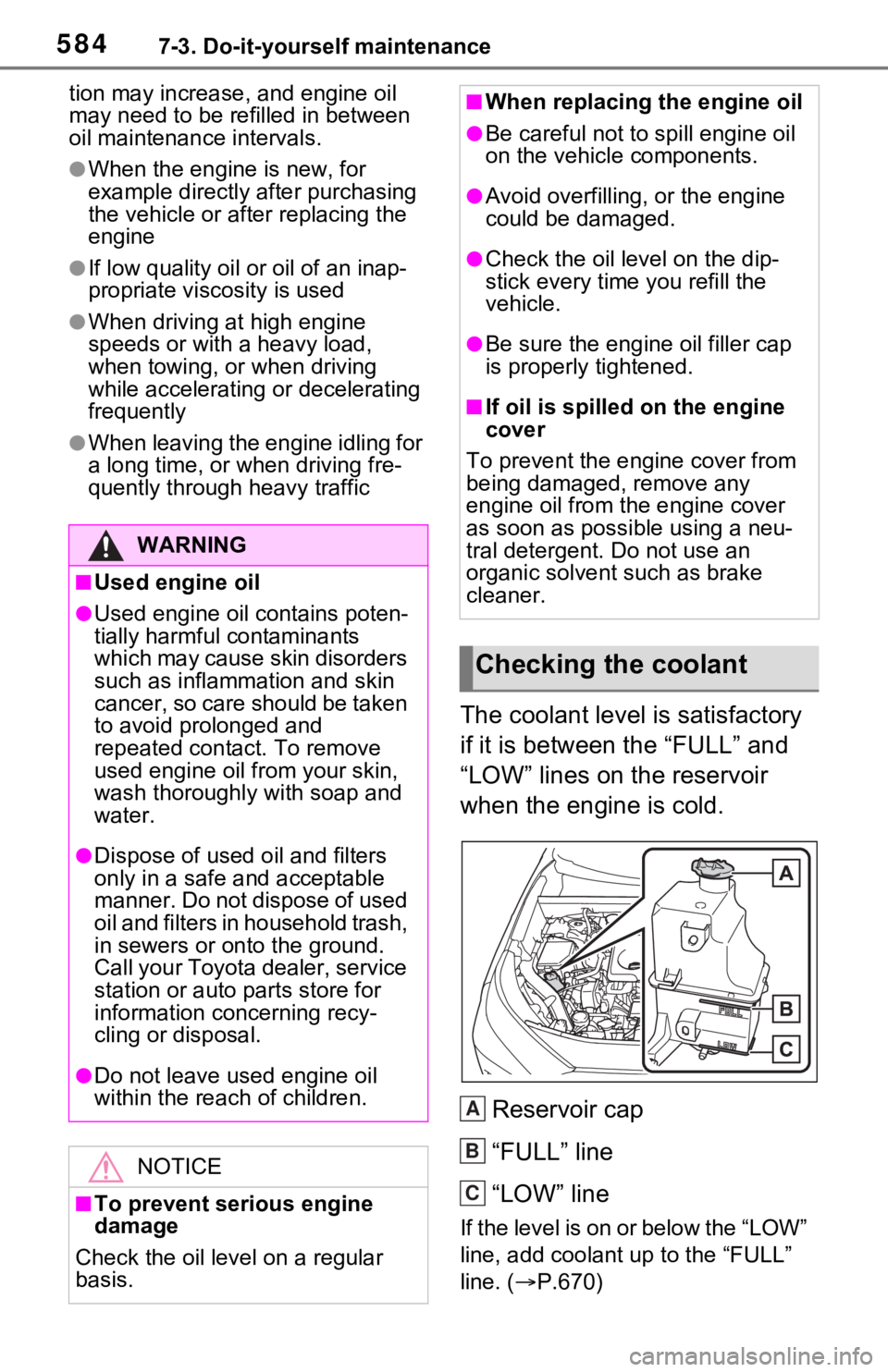
The coolant level is satisfactory
if it is between the “FULL” and
“LOW” lines on the reservoir
when the engine is cold.
Reservoir cap
“FULL” line
“LOW” line
If the level is on or below the “LOW”
line, add coolant up to the “FULL”
line. ( P.670)
WARNING
■Used engine oil
●Used engine oil contains poten-
tially harmful contaminants
which may cause skin disorders
such as inflammation and skin
cancer, so care should be taken
to avoid prolonged and
repeated contact. To remove
used engine oil from your skin,
wash thoroughly with soap and
water.
●Dispose of used oil and filters
only in a safe an d acceptable
manner. Do not dispose of used
oil and filters in household trash,
in sewers or onto the ground.
Call your Toyota dealer, service
station or auto parts store for
information concerning recy-
cling or disposal.
●Do not leave used engine oil
within the rea ch of children.
NOTICE
■To prevent serious engine
damage
Check the oil level on a regular
basis.
■When replacing the engine oil
●Be careful not to spill engine oil
on the vehicle components.
●Avoid overfilling, or the engine
could be damaged.
●Check the oil level on the dip-
stick every time you refill the
vehicle.
●Be sure the engin e oil filler cap
is properly tightened.
■If oil is spilled on the engine
cover
To prevent the engine cover from
being damaged, remove any
engine oil from the engine cover
as soon as possi ble using a neu-
tral detergent. Do not use an
organic solvent such as brake
cleaner.
Checking the coolant
A
B
C
Page 631 of 748
6318-2. Steps to take in an emergency
8
When trouble arises
8-2.Steps to take in an emergency
If your vehicle needs
to be towed
If towing is necessary, we
recommend having your
vehicle towed by your
Toyota dealer or commer-
cial towing service, using a
wheel-lift type truck or flat-
bed truck.
Use a safety chain system
for all towing, and abide by
all state/provincial and local
laws.
2WD models: If towing your
vehicle with a wheel-lift type
truck from the front, the
vehicle’s rear wheels and
axles must be in good con-
ditions. (P.631, 633)
If they are damaged, use a
towing dolly or flatbed
truck.
AWD models: If towing your
vehicle with a wheel-lift type
truck, use a towing dolly.
( P.631, 633)
WARNING
Observe the following precau-
tions. Failure to do so may result
in death or serious injury.
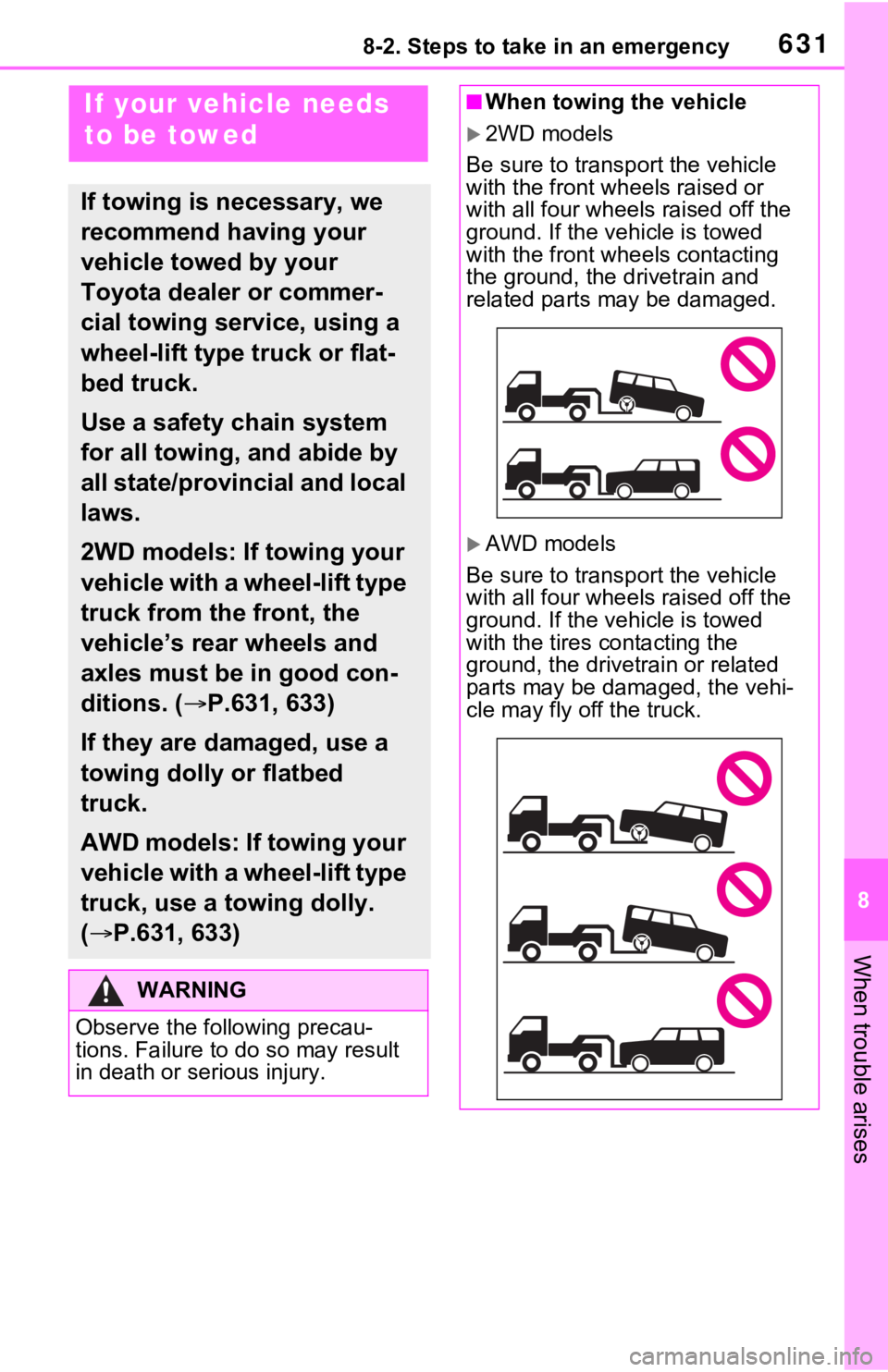
■When towing the vehicle
2WD models
Be sure to transp ort the vehicle
with the front wheels raised or
with all four wheels raised off the
ground. If the vehicle is towed
with the front wheels contacting
the ground, the drivetrain and
related parts may be damaged.
AWD models
Be sure to transp ort the vehicle
with all four wheels raised off the
ground. If the vehicle is towed
with the tires co ntacting the
ground, the drivetrain or related
parts may be damaged, the vehi-
cle may fly off the truck.