Fuel TOYOTA RAV4 2022 Owner's Manual
[x] Cancel search | Manufacturer: TOYOTA, Model Year: 2022, Model line: RAV4, Model: TOYOTA RAV4 2022Pages: 748, PDF Size: 22.93 MB
Page 100 of 748
1002-1. Instrument cluster
■History
Audio or Audio Plus (vehicles
without Data Communication
Module)
1 Press the “MENU” button.
2 Select “Info” on the “Menu”
screen.
If the “Trip Information” screen is
displayed, select “History”.
Audio or Audio Plus (vehicles
with Data Communication
Module)/Premium Audio
1 Press the “MENU” button.
2 Select “Info” on the “Menu”
screen.
3 Select “ECO” on the “Infor-
mation” screen.
If the “Trip Information” screen is
displayed, select “History”.
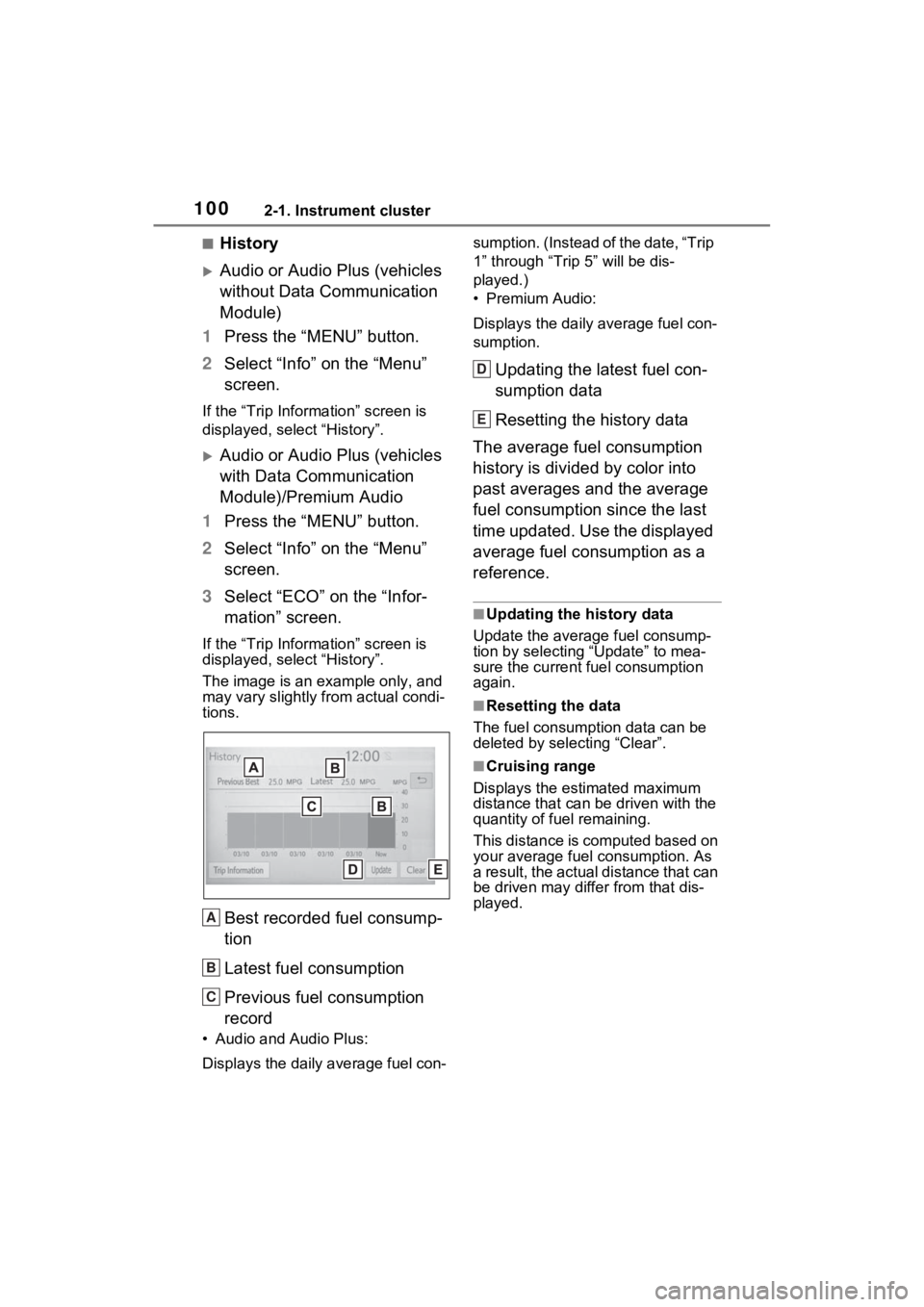
The image is an example only, and
may vary slightly f rom actual condi-
tions.
Best recorded fuel consump-
tion
Latest fuel consumption
Previous fuel consumption
record
• Audio and Audio Plus:
Displays the daily average fuel con- sumption. (Instead of the date, “Trip
1” through “Trip
5” will be dis-
played.)
• Premium Audio:
Displays the daily average fuel con-
sumption.
Updating the latest fuel con-
sumption data
Resetting the history data
The average fuel consumption
history is divided by color into
past averages and the average
fuel consumption since the last
time updated. Use the displayed
average fuel consumption as a
reference.
■Updating the history data
Update the average fuel consump-
tion by selecting “Update” to mea-
sure the current fuel consumption
again.
■Resetting the data
The fuel consumption data can be
deleted by selecting “Clear”.
■Cruising range
Displays the estimated maximum
distance that can be driven with the
quantity of fuel remaining.
This distance is computed based on
your average fuel consumption. As
a result, the actual distance that can
be driven may differ from that dis-
played.
A
B
C
D
E
Page 165 of 748
165
4
4
Driving
Driving
4-1. Before drivingDriving the vehicle....... 167
Cargo and luggage ..... 173
Vehicle load limits ....... 176
Trailer towing .............. 177
Dinghy towing ............. 189
4-2. Driving procedures Engine (ignition) switch (vehicles without smart key
system)...................... 191
Engine (ignition) switch (vehicles with smart key
system)...................... 192
Automatic transmission 197
Turn signal lever ......... 200
Parking brake .............. 201
Brake Hold .................. 204
4-3. Operating the lights and wipers
Headlight switch .......... 207
AHB (Automatic High Beam)........................ 210
Fog light switch ........... 214
Windshield wipers and washer....................... 214
Rear window wiper and washer....................... 217
4-4. Refueling Opening the fuel tank cap.................................. 2194-5. Using the dr
iving support
systems
Toyota Safety Sense 2.0 .................................. 222
PCS (Pre-Collision System) .................................. 227
LTA (Lane Tracing Assist) .................................. 235
RSA (Road Sign Assist) .................................. 245
Dynamic radar cruise con- trol with full-speed range
.................................. 248
BSM (Blind Spot Monitor) .................................. 259
Intuitive parking assist . 270
PKSB (Parking Support Brake) ........................ 278
Parking Support Brake func- tion (static objects) .... 283
Parking Support Brake func- tion (rear-crossing vehi-
cles) ........................... 286
Rear view monitor system .................................. 288
Toyota parking assist moni- tor .............................. 296
Panoramic view monitor .................................. 309
Stop & Start system .... 341
Driving mode select switch .................................. 347
Page 168 of 748
1684-1. Before driving
and the road surface, preventing
the steering and brakes from
operating properly.
■Engine speed while driving
In the following conditions, the
engine speed may become high
while driving. This is due to auto-
matic up-shifting control or down-
shifting implementation to meet driv-
ing conditions. It does not indicate
sudden acceleration.
●The vehicle is judged to be driving
uphill or downhill
●When the accelerator pedal is
released
●When the brake pedal is
depressed while sport mode is
selected
■Restraining the engine output
(Brake Override System)
●When the accelerator and brake
pedals are depressed at the same
time, the engine output may be
restrained.
●A warning message is displayed
on the multi-information display
while the system is operating.
■Breaking in your new Toyota
To extend the life of the vehicle,
observing the following precautions
is recommended:
●For the first 200 miles (300 km):
Avoid sudden stops.
●For the first 500 miles (800 km):
Do not tow a trailer.
●For the first 600 miles (1000 km):
• Do not drive at extremely high speeds.
• Avoid sudden acceleration.
• Do not drive continuously in low gears.
• Do not drive at a constant speed
for extended periods.
■Operating your vehicle in a for-
eign country
Comply with the relevant vehicle
registration laws and confirm the
availability of the correct fuel. (
P.662)
WARNING
Observe the following precau-
tions.
Failure to do so may result in
death or serious injury.
■When starting the vehicle
Always keep your foot on the
brake pedal while stopped with
the engine running. This prevents
the vehicle from creeping.
■When driving the vehicle
●Do not drive if you are unfamil-
iar with the location of the brake
and accelerator pedals to avoid
depressing the wrong pedal.
• Accidentally depressing the accelerator pedal instead of the
brake pedal will result in sudden
acceleration that may lead to an
accident.
• When backing up, you may twist your body around, leading to a
difficulty in operating the pedals.
Make sure to operate the pedals
properly.
• Make sure to keep a correct driving posture even when mov-
ing the vehicle only slightly. This
allows you to depress the brake
and accelerator pedals properly.
• Depress the brake pedal using your right foot. Depressing the
brake pedal using your left foot
may delay response in an emer-
gency, resulting in an accident.
●Do not drive the vehicle over or
stop the vehicle near flammable
materials such as leaves, paper
or rags.
The exhaust system and
exhaust gases can be
extremely hot. These hot parts
may cause a fire i f there is any
flammable material nearby.
Page 177 of 748
1774-1. Before driving
4
Driving
WARNING
■Overloading the vehicle
Do not overload the vehicle. It
may not only cause damage to
the tires, but also degrade steer-
ing and braking ability, resulting in
an accident.
Trailer towing
Your vehicle is designed
primarily as a passenger-
and-load-carrying vehicle.
Towing a trailer can have an
adverse impact on handling,
performance, braking, dura-
bility, and fuel consump-
tion. For your safety and the
safety of others, you must
not overload your vehicle or
trailer. You must also
ensure that you are using
appropriate towing equip-
ment, that the towing equip-
ment has been installed
correctly and used properly,
and that you employ the
requisite driving habits.
Vehicle-trailer stability and
braking performance are
affected by trailer stability,
brake performance and set-
ting, trailer brakes, the hitch
and hitch systems (if
equipped).
To tow a trailer safely, use
extreme care and drive the
vehicle in accordance with
your trailer’s characteris-
tics and operating condi-
tions.
Page 191 of 748
1914-2. Driving procedures
4
Driving
4-2.Driving procedures
1Pull the parking brake switch
to check that the parking
brake is set. ( P.201)
The parking brake indicator will
come on.
2 Check that the shift lever is
set in P.
3 Firmly depress the brake
pedal.
4 Turn the engine switch to
START to start the engine.
■If the engine does not start
The engine immobilizer system may
not have been deactivated. ( P.71)
Contact your Toyota dealer.
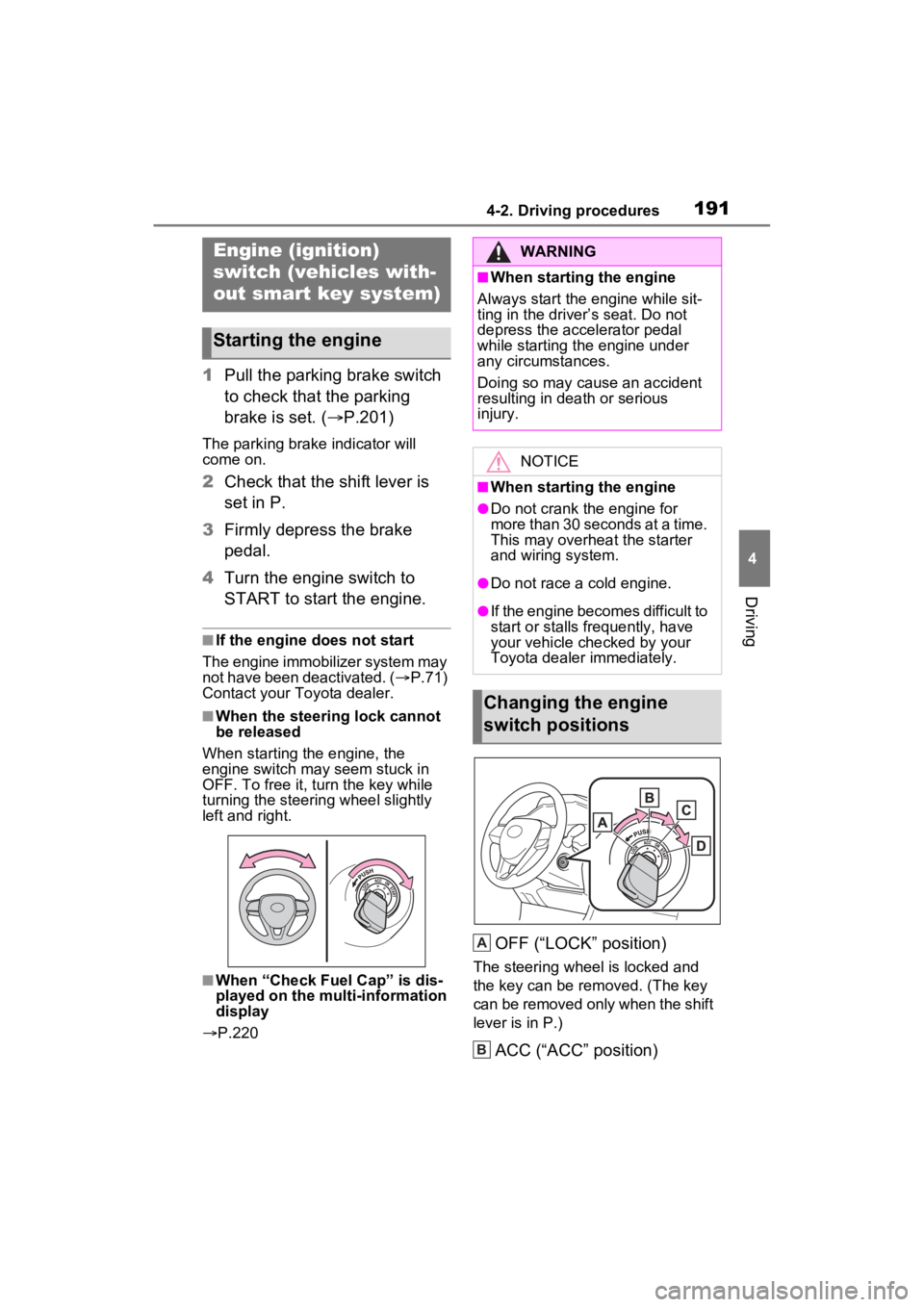
■When the steering lock cannot
be released
When starting the engine, the
engine switch may seem stuck in
OFF. To free it, turn the key while
turning the steerin g wheel slightly
left and right.
■When “Check Fuel Cap” is dis-
played on the multi-information
display
P.220
OFF (“LOCK” position)
The steering wheel is locked and
the key can be re moved. (The key
can be removed only when the shift
lever is in P.)
ACC (“ACC” position)
Engine (ignition)
switch (vehicles with-
out smart key system)
Starting the engine
WARNING
■When starting the engine
Always start the engine while sit-
ting in the driver’s seat. Do not
depress the accelerator pedal
while starting the engine under
any circumstances.
Doing so may cause an accident
resulting in dea th or serious
injury.
NOTICE
■When starting the engine
●Do not crank the engine for
more than 30 seconds at a time.
This may overheat the starter
and wiring system.
●Do not race a cold engine.
●If the engine becomes difficult to
start or stalls frequently, have
your vehicle checked by your
Toyota dealer immediately.
Changing the engine
switch positions
A
B
Page 193 of 748
1934-2. Driving procedures
4
Driving
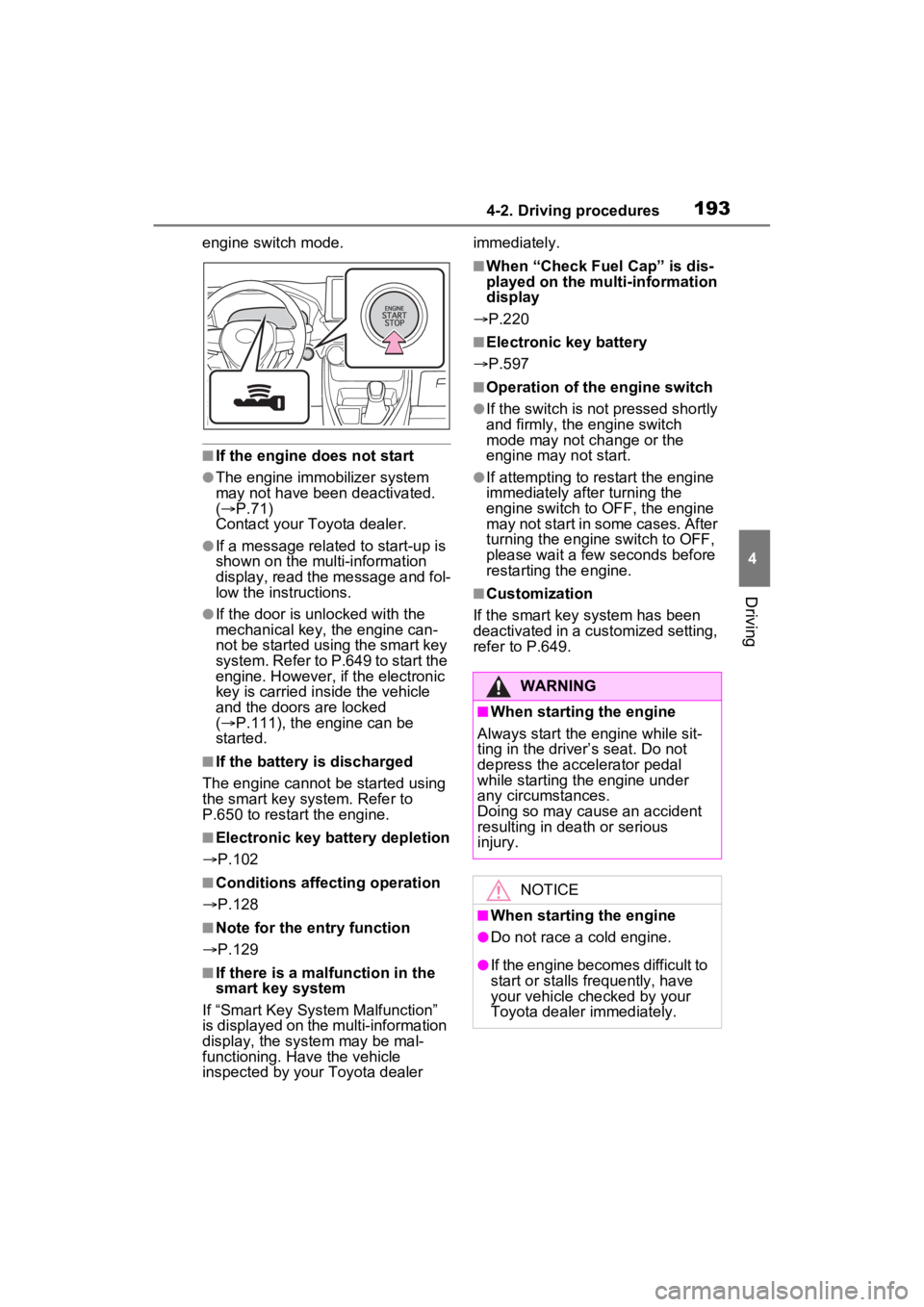
engine switch mode.
■If the engine does not start
●The engine immobilizer system
may not have been deactivated.
( P.71)
Contact your Toyota dealer.
●If a message related to start-up is
shown on the multi-information
display, read the message and fol-
low the instructions.
●If the door is unlocked with the
mechanical key, the engine can-
not be started using the smart key
system. Refer to P.649 to start the
engine. However, if the electronic
key is carried inside the vehicle
and the doors are locked
( P.111), the engine can be
started.
■If the battery is discharged
The engine cannot be started using
the smart key system. Refer to
P.650 to restart the engine.
■Electronic key battery depletion
P.102
■Conditions affecting operation
P.128
■Note for the entry function
P.129
■If there is a mal function in the
smart key system
If “Smart Key System Malfunction”
is displayed on the multi-information
display, the system may be mal-
functioning. Have the vehicle
inspected by your Toyota dealer immediately.
■When “Check Fuel Cap” is dis-
played on the multi-information
display
P.220
■Electronic key battery
P.597
■Operation of the engine switch
●If the switch is not pressed shortly
and firmly, the engine switch
mode may not change or the
engine may not start.
●If attempting to restart the engine
immediately after turning the
engine switch to OFF, the engine
may not start in some cases. After
turning the engine switch to OFF,
please wait a few seconds before
restarting the engine.
■Customization
If the smart key system has been
deactivated in a customized setting,
refer to P.649.
WARNING
■When starting the engine
Always start the engine while sit-
ting in the driver’s seat. Do not
depress the accelerator pedal
while starting the engine under
any circumstances.
Doing so may cause an accident
resulting in dea th or serious
injury.
NOTICE
■When starting the engine
●Do not race a cold engine.
●If the engine becomes difficult to
start or stalls frequently, have
your vehicle checked by your
Toyota dealer immediately.
Page 208 of 748
2084-3. Operating the lights and wipers
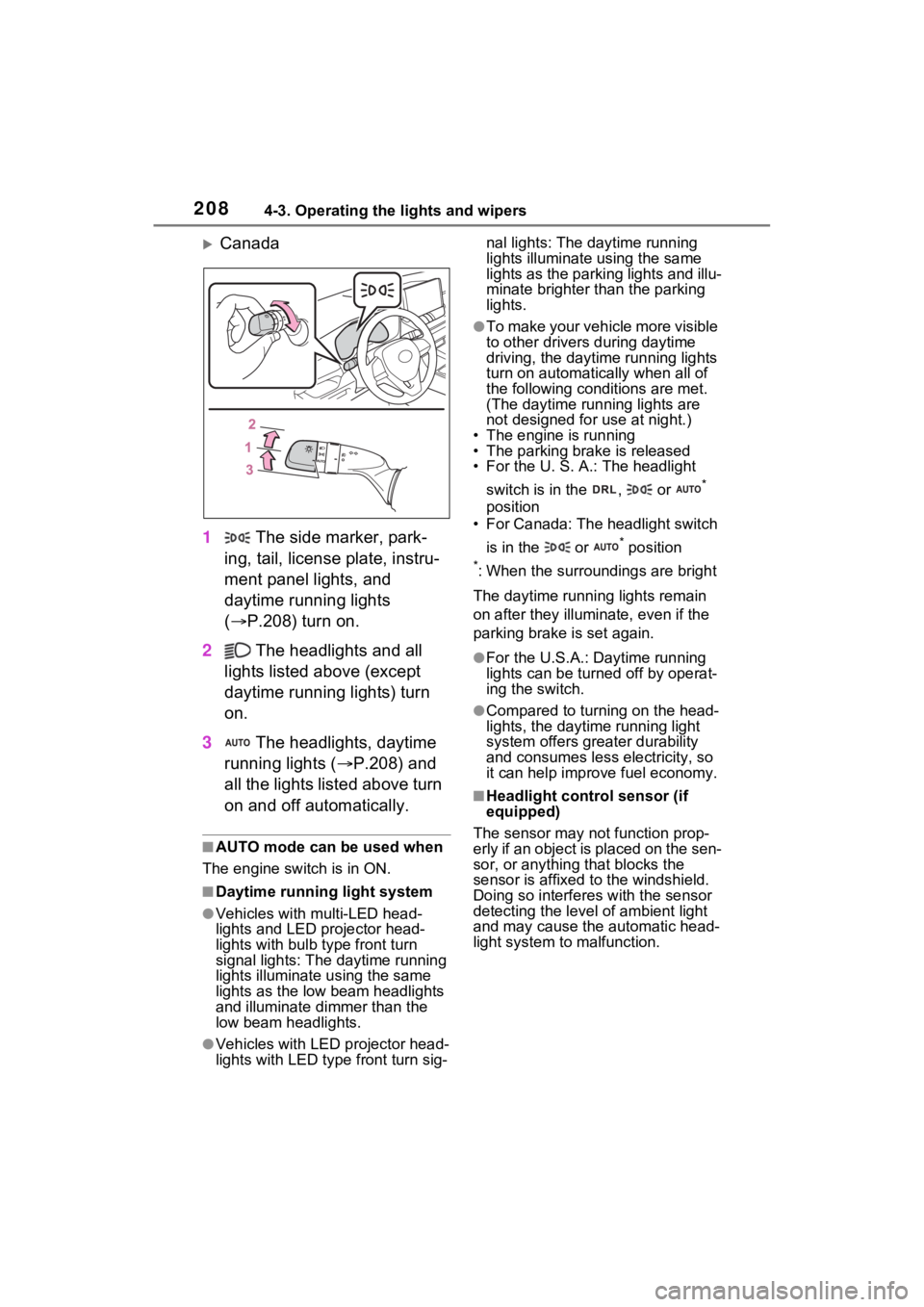
Canada
1 The side marker, park-
ing, tail, license plate, instru-
ment panel lights, and
daytime running lights
( P.208) turn on.
2 The headlights and all
lights listed above (except
daytime running lights) turn
on.
3 The headlights, daytime
running lights ( P.208) and
all the lights listed above turn
on and off automatically.
■AUTO mode can be used when
The engine switch is in ON.
■Daytime runni ng light system
●Vehicles with multi-LED head-
lights and LED projector head-
lights with bulb type front turn
signal lights: The daytime running
lights illuminate u sing the same
lights as the low beam headlights
and illuminate d immer than the
low beam headlights.
●Vehicles with LED projector head-
lights with LED type front turn sig-nal lights: The daytime running
lights illuminate using the same
lights as the parking lights and illu-
minate brighter than the parking
lights.
●To make your vehicle more visible
to other drivers
during daytime
driving, the daytime running lights
turn on automatically when all of
the following conditions are met.
(The daytime running lights are
not designed for use at night.)
• The engine is running
• The parking brake is released
• For the U. S. A.: The headlight
switch is in the , or
*
position
• For Canada: The headlight switch
is in the or
* position
*: When the surroundings are bright
The daytime running lights remain
on after they illumi nate, even if the
parking brake is set again.
●For the U.S.A.: Daytime running
lights can be turned off by operat-
ing the switch.
●Compared to turning on the head-
lights, the daytime running light
system offers greater durability
and consumes less electricity, so
it can help improve fuel economy.
■Headlight control sensor (if
equipped)
The sensor may not function prop-
erly if an object is placed on the sen-
sor, or anything that blocks the
sensor is affixed to the windshield.
Doing so interferes with the sensor
detecting the level of ambient light
and may cause t he automatic head-
light system to malfunction.
Page 219 of 748
2194-4. Refueling
4
Driving
4-4.Refueling
Close all the doors and win-
dows, and turn the engine
switch to OFF.
Confirm the type of fuel.
■Fuel types
P.672
■Fuel tank opening for unleaded
gasoline
To help prevent incorrect fueling,
your vehicle has a fuel tank opening
that only accommodates the spe-
cial nozzle on unle aded fuel pumps.
■If the malfunction indicator
lamp illuminates
The malfunction indicator lamp may
illuminate erroneous ly if refueling is
performed repeatedly when the fuel
tank is nearly full.
Opening the fuel tank
cap
Perform the following steps
to open the fuel tank cap:
Before refueling the vehi-
cle
WARNING
■When refueling the vehicle
Observe the following precautions
while refueling the vehicle. Failure
to do so may result in death or
serious injury.
●After exiting the vehicle and
before opening the fuel door,
touch an unpainted metal sur-
face to discharge any static
electricity. It is important to dis-
charge static electricity before
refueling because sparks result-
ing from static electricity can
cause fuel vapors to ignite while
refueling.
●Always hold the grips on the
fuel tank cap and turn it slowly
to remove it.
A whooshing sound may be
heard when the f uel tank cap is
loosened. Wait until the sound
cannot be heard before fully
removing the cap. In hot
weather, pressurized fuel may
spray out of the filler neck and
cause injury.
●Do not allow anyone that has
not discharged static electricity
from their body to come close to
an open fuel tank.
●Do not inhale vaporized fuel.
Fuel contains substances that
are harmful if inhaled.
●Do not smoke while refueling
the vehicle.
Doing so may cause the fuel to
ignite and cause a fire.
●Do not return to the vehicle or
touch any person or object that
is statically charged. This may
cause static electricity to build
up, resulting in a possible igni-
tion hazard.
Page 220 of 748
2204-4. Refueling
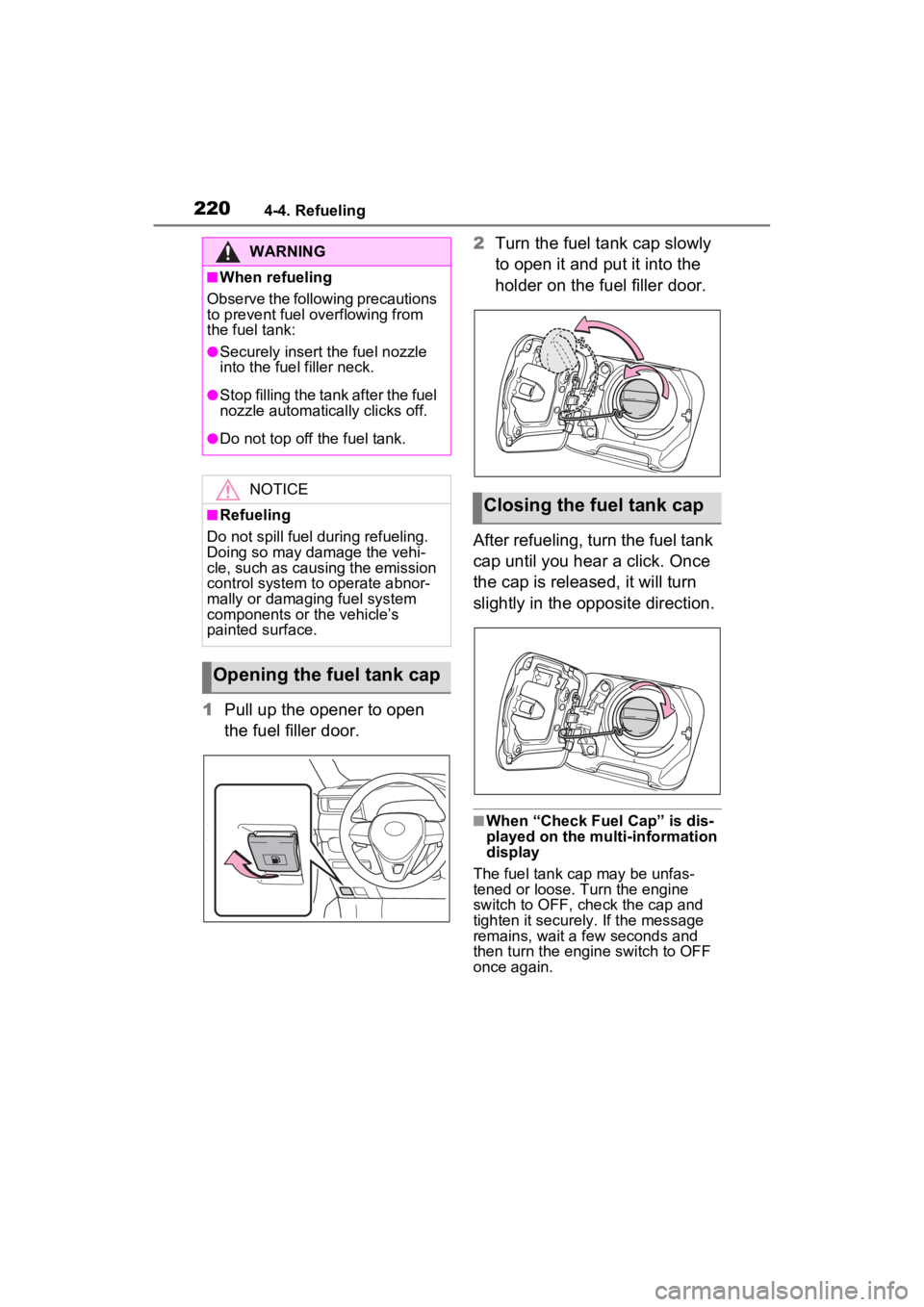
1Pull up the opener to open
the fuel filler door. 2
Turn the fuel tank cap slowly
to open it and put it into the
holder on the fuel filler door.
After refueling, turn the fuel tank
cap until you hear a click. Once
the cap is released, it will turn
slightly in the opposite direction.
■When “Check Fuel Cap” is dis-
played on the multi-information
display
The fuel tank cap may be unfas-
tened or loose. Turn the engine
switch to OFF, check the cap and
tighten it securely. If the message
remains, wait a few seconds and
then turn the engine switch to OFF
once again.
WARNING
■When refueling
Observe the following precautions
to prevent fuel overflowing from
the fuel tank:
●Securely insert the fuel nozzle
into the fuel filler neck.
●Stop filling the tank after the fuel
nozzle automatically clicks off.
●Do not top off the fuel tank.
NOTICE
■Refueling
Do not spill fuel during refueling.
Doing so may damage the vehi-
cle, such as causing the emission
control system to operate abnor-
mally or damaging fuel system
components or the vehicle’s
painted surface.
Opening the fuel tank cap
Closing the fuel tank cap
Page 221 of 748
2214-4. Refueling
4
Driving
WARNING
■When replacing the fuel tank
cap
Do not use anything but a genu-
ine Toyota fuel tank cap designed
for your vehicle. Doing so may
cause a fire or other incident
which may result in death or seri-
ous injury.