Fuel TOYOTA RAV4 2022 User Guide
[x] Cancel search | Manufacturer: TOYOTA, Model Year: 2022, Model line: RAV4, Model: TOYOTA RAV4 2022Pages: 748, PDF Size: 22.93 MB
Page 75 of 748
75
2
2
Vehicle status information and indicators
Vehicle status informa-tion and indicators
2-1. Instrument cluster
Warning lights and indica-tors ............................... 76
Gauges and meters (with 4.2-inch display) ........... 82
Gauges and meters (with 7- inch display) ................. 85
Multi-information display 89
Fuel consumption informa- tion ............................... 99
Page 78 of 748
782-1. Instrument cluster
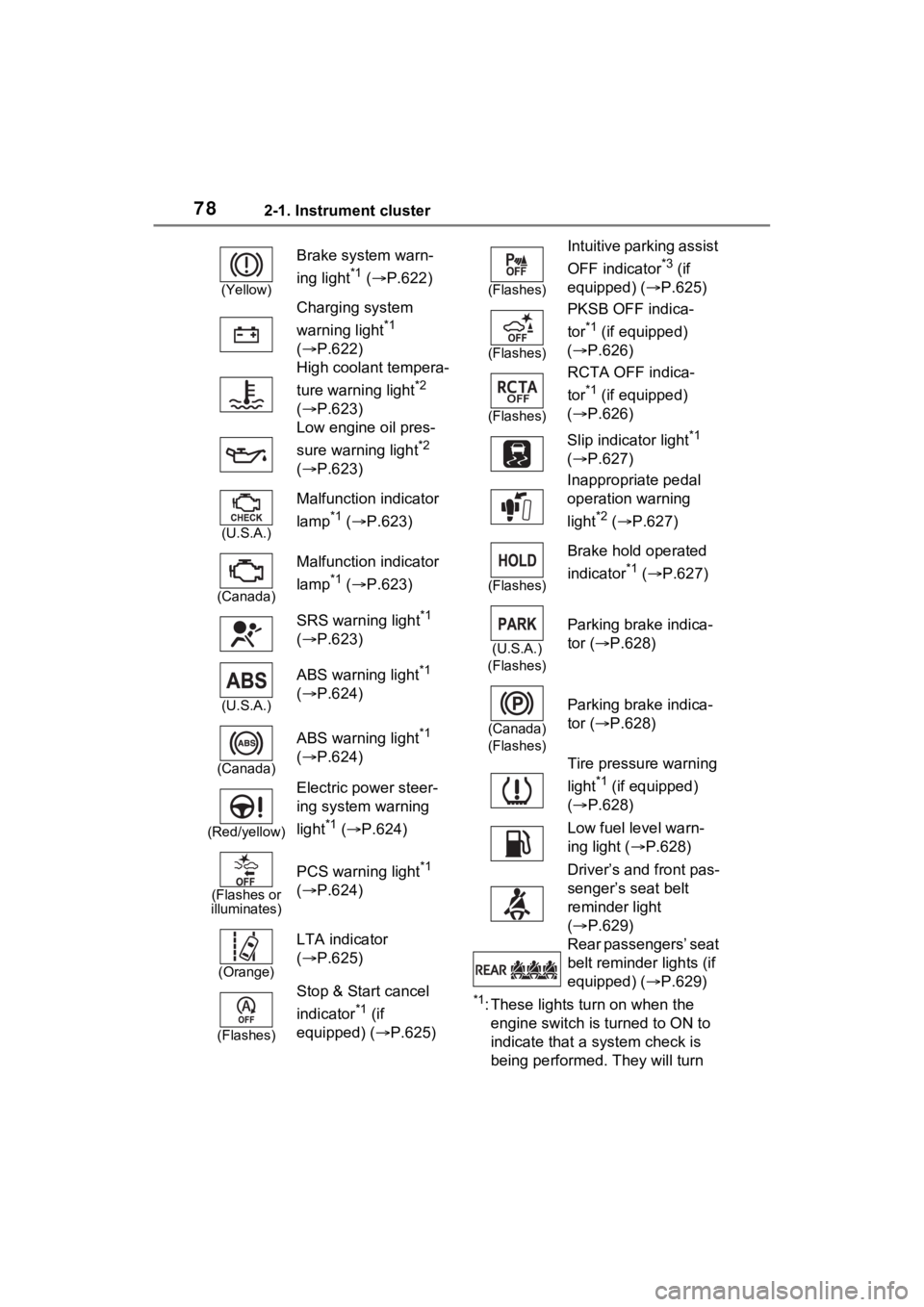
*1: These lights turn on when the
engine switch is turned to ON to
indicate that a system check is
being performed. They will turn
(Yellow)
Brake system warn-
ing light
*1 ( P.622)
Charging system
warning light
*1
( P.622)
High coolant tempera-
ture warning light
*2
( P.623)
Low engine oil pres-
sure warning light
*2
( P.623)
(U.S.A.)
Malfunction indicator
lamp
*1 ( P.623)
(Canada)
Malfunction indicator
lamp
*1 ( P.623)
SRS warning light
*1
( P.623)
(U.S.A.)
ABS warning light*1
( P.624)
(Canada)
ABS warning light*1
( P.624)
(Red/yellow)
Electric power steer-
ing system warning
light
*1 ( P.624)
(Flashes or
illuminates)
PCS warning light*1
( P.624)
(Orange)
LTA indicator
( P.625)
(Flashes)
Stop & Start cancel
indicator
*1 (if
equipped) (P.625)
(Flashes)
Intuitive parking assist
OFF indicator
*3 (if
equipped) ( P.625)
(Flashes)
PKSB OFF indica-
tor
*1 (if equipped)
( P.626)
(Flashes)
RCTA OFF indica-
tor
*1 (if equipped)
( P.626)
Slip indicator light
*1
( P.627)
Inappropriate pedal
operation warning
light
*2 ( P.627)
(Flashes)
Brake hold operated
indicator
*1 ( P.627)
(U.S.A.)
(Flashes)
Parking brake indica-
tor ( P.628)
(Canada)
(Flashes)
Parking brake indica-
tor ( P.628)
Tire pressure warning
light
*1 (if equipped)
( P.628)
Low fuel level warn-
ing light ( P.628)
Driver’s and front pas-
senger’s seat belt
reminder light
( P.629)
Rear passengers’ seat
belt reminder lights (if
equipped) ( P.629)
Page 82 of 748
822-1. Instrument cluster
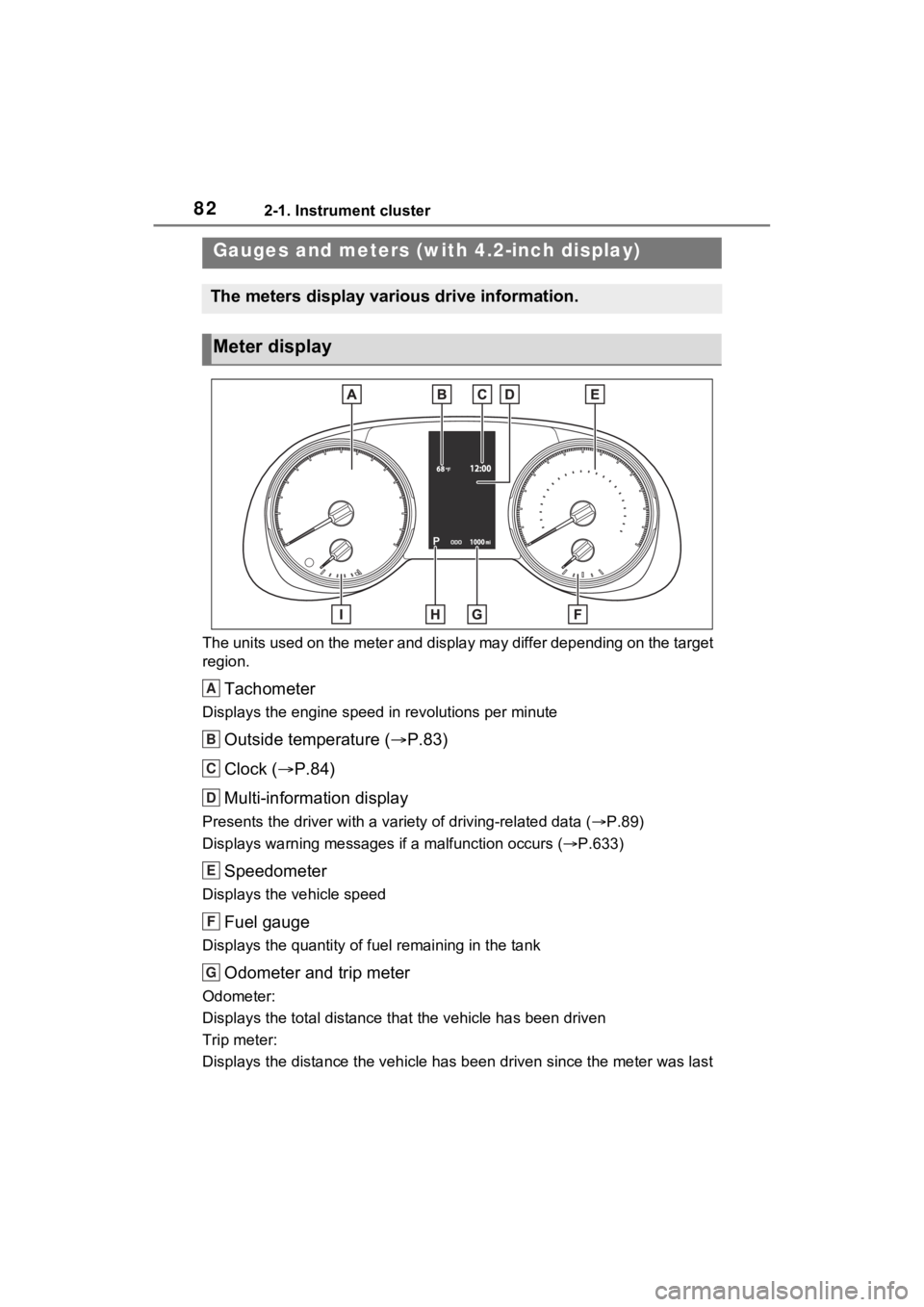
The units used on the meter and display may differ depending on the target
region.
Tachometer
Displays the engine speed in revolutions per minute
Outside temperature ( P.83)
Clock ( P.84)
Multi-information display
Presents the driver with a variety of driving-related data ( P.89)
Displays warning messages if a malfunction occurs (P.633)
Speedometer
Displays the vehicle speed
Fuel gauge
Displays the quantity of fu el remaining in the tank
Odometer and trip meter
Odometer:
Displays the total distance th at the vehicle has been driven
Trip meter:
Displays the distance the vehicle has been driven since the meter was last
Gauges and meters (w ith 4.2-inch display)
The meters display various drive information.
Meter display
A
B
C
D
E
F
G
Page 85 of 748
852-1. Instrument cluster
2
Vehicle status information and indicators
The display of the speedometer can be selected from two types,
analog or digital. (P.94)
Analog speedometer
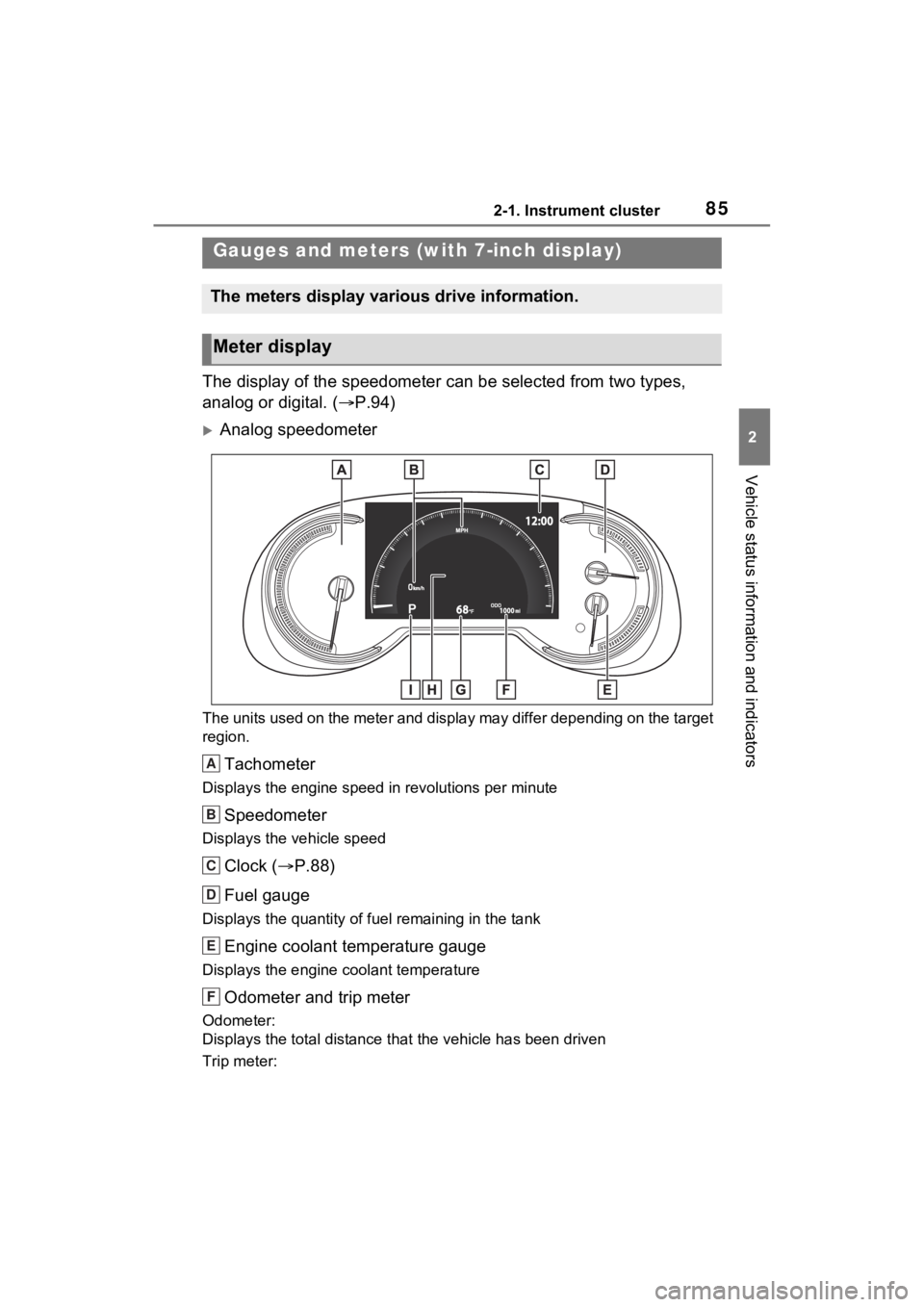
The units used on the meter and display may differ depending on the target
region.
Tachometer
Displays the engine speed in revolutions per minute
Speedometer
Displays the vehicle speed
Clock ( P.88)
Fuel gauge
Displays the quantity of fu el remaining in the tank
Engine coolant temperature gauge
Displays the engine coolant temperature
Odometer and trip meter
Odometer:
Displays the total distance th at the vehicle has been driven
Trip meter:
Gauges and meters (with 7-inch display)
The meters display various drive information.
Meter display
A
B
C
D
E
F
Page 86 of 748
862-1. Instrument cluster
Displays the distance the vehicle has been driven since the meter was last
reset. Trip meters “A” and “B” c an be used to record and display different
distances independently.
Outside temperature ( P.87)
Multi-information display
Presents the driver with a variety of driving-related data ( P.89)
Displays warning messages if a malfunction occurs (P.633)
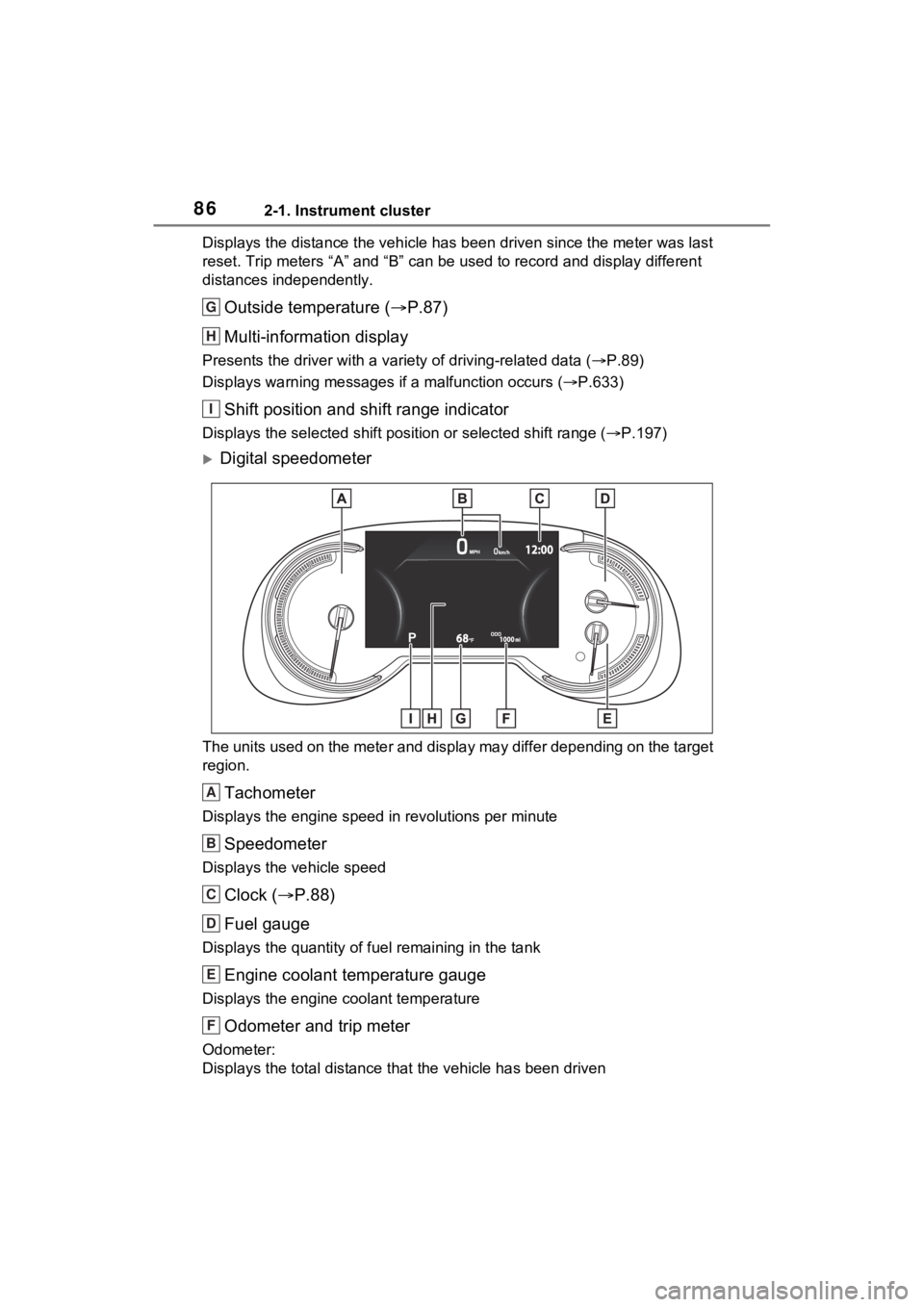
Shift position and shift range indicator
Displays the selected shift posit ion or selected shift range (P.197)
Digital speedometer
The units used on the meter and display may differ depending on the target
region.
Tachometer
Displays the engine speed in revolutions per minute
Speedometer
Displays the vehicle speed
Clock ( P.88)
Fuel gauge
Displays the quantity of fu el remaining in the tank
Engine coolant temperature gauge
Displays the engine coolant temperature
Odometer and trip meter
Odometer:
Displays the total distance th at the vehicle has been driven
G
H
I
A
B
C
D
E
F
Page 89 of 748
892-1. Instrument cluster
2
Vehicle status information and indicators
Following information is dis-
played on the multi-information
display.
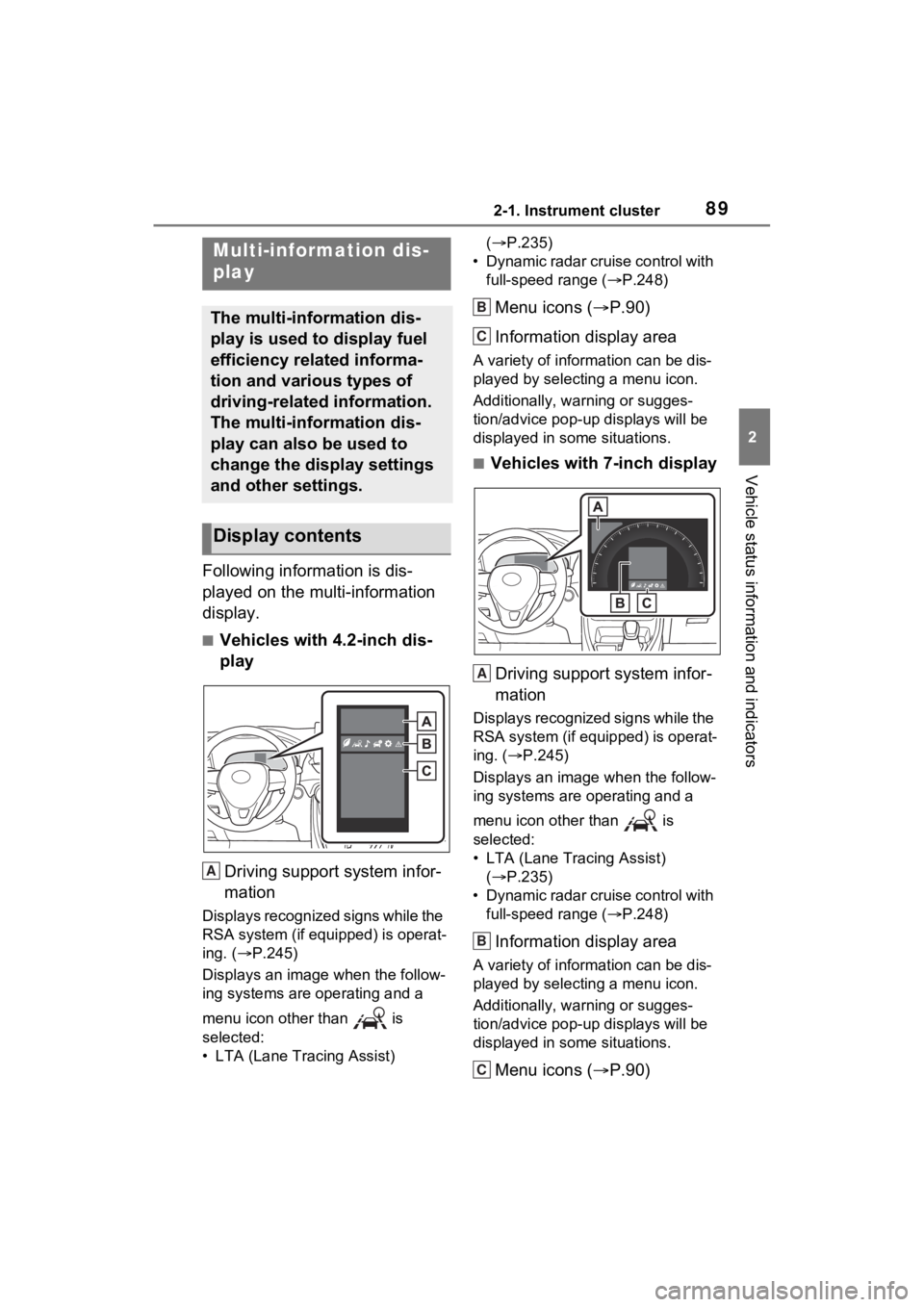
■Vehicles with 4.2-inch dis-
playDriving support system infor-
mation
Displays recognized signs while the
RSA system (if equipped) is operat-
ing. ( P.245)
Displays an image when the follow-
ing systems are operating and a
menu icon other than is
selected:
• LTA (Lane Tracing Assist) (
P.235)
• Dynamic radar cruise control with full-speed range ( P.248)
Menu icons ( P.90)
Information display area
A variety of information can be dis-
played by selecting a menu icon.
Additionally, warning or sugges-
tion/advice pop-up displays will be
displayed in some situations.
■Vehicles with 7-inch display
Driving support system infor-
mation
Displays recognized signs while the
RSA system (if equipped) is operat-
ing. ( P.245)
Displays an image when the follow-
ing systems are operating and a
menu icon other than is
selected:
• LTA (Lane Tracing Assist) ( P.235)
• Dynamic radar cruise control with full-speed range ( P.248)
Information display area
A variety of information can be dis-
played by selecting a menu icon.
Additionally, warning or sugges-
tion/advice pop-up displays will be
displayed in some situations.
Menu icons ( P.90)
Multi-information dis-
play
The multi-information dis-
play is used to display fuel
efficiency related informa-
tion and various types of
driving-related information.
The multi-information dis-
play can also be used to
change the display settings
and other settings.
Display contents
A
B
C
A
B
C
Page 91 of 748
912-1. Instrument cluster
2
Vehicle status information and indicators
Select to display fuel consump-
tion data in various forms.
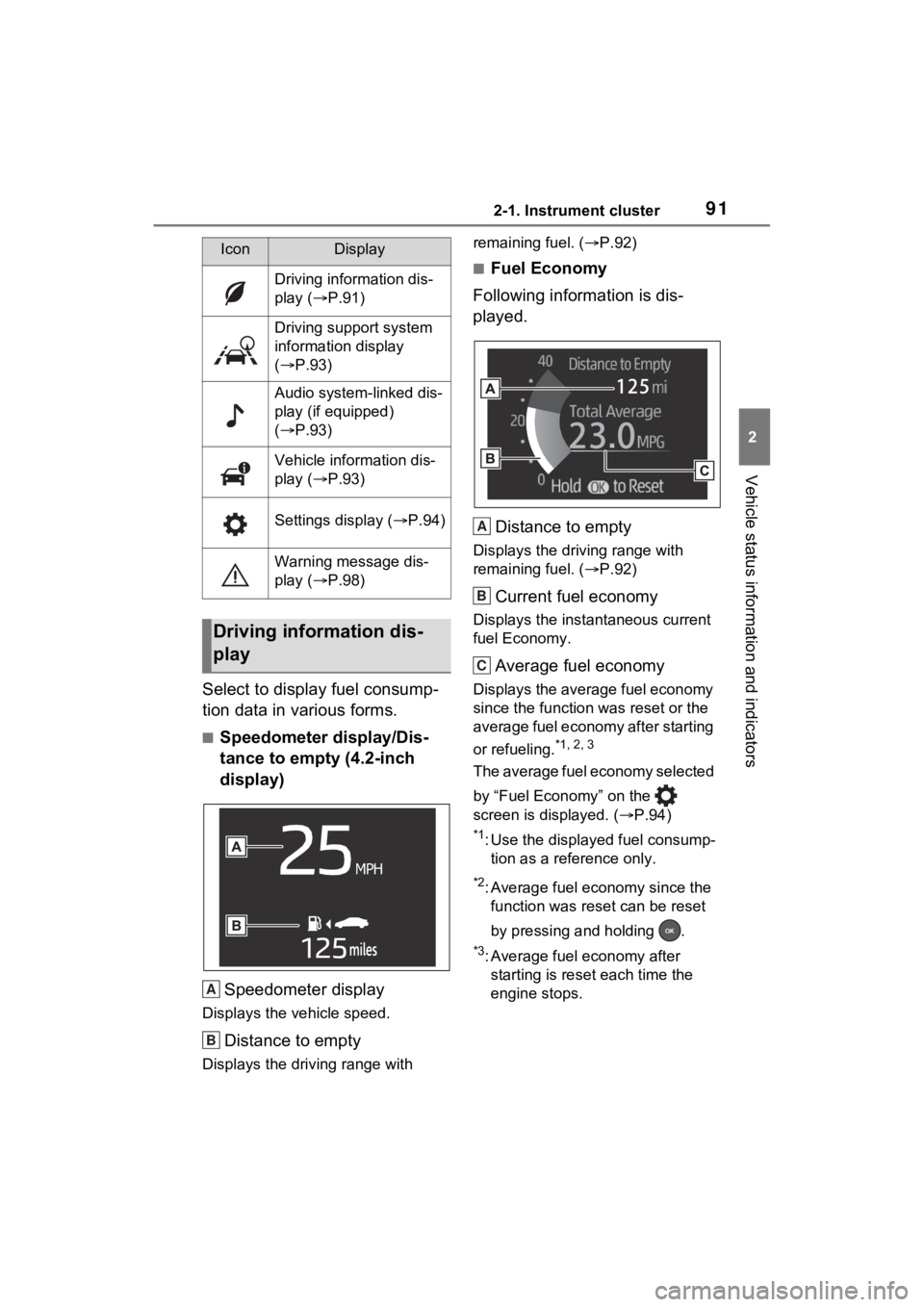
■Speedometer display/Dis-
tance to empty (4.2-inch
display)Speedometer display
Displays the vehicle speed.
Distance to empty
Displays the driving range with remaining fuel. (
P.92)
■Fuel Economy
Following information is dis-
played.
Distance to empty
Displays the driving range with
remaining fuel. ( P.92)
Current fuel economy
Displays the instantaneous current
fuel Economy.
Average fuel economy
Displays the average fuel economy
since the function was reset or the
average fuel economy after starting
or refueling.
*1, 2, 3
The average fuel economy selected
by “Fuel Economy” on the
screen is displayed. ( P.94)
*1: Use the displayed fuel consump-
tion as a reference only.
*2: Average fuel economy since the function was res et can be reset
by pressing and holding .
*3: Average fuel economy after starting is reset each time the
engine stops.
IconDisplay
Driving information dis-
play ( P.91)
Driving support system
information display
( P.93)
Audio system-linked dis-
play (if equipped)
( P.93)
Vehicle information dis-
play ( P.93)
Settings display ( P.94)
Warning message dis-
play ( P.98)
Driving information dis-
play
A
B
A
B
C
Page 92 of 748
922-1. Instrument cluster
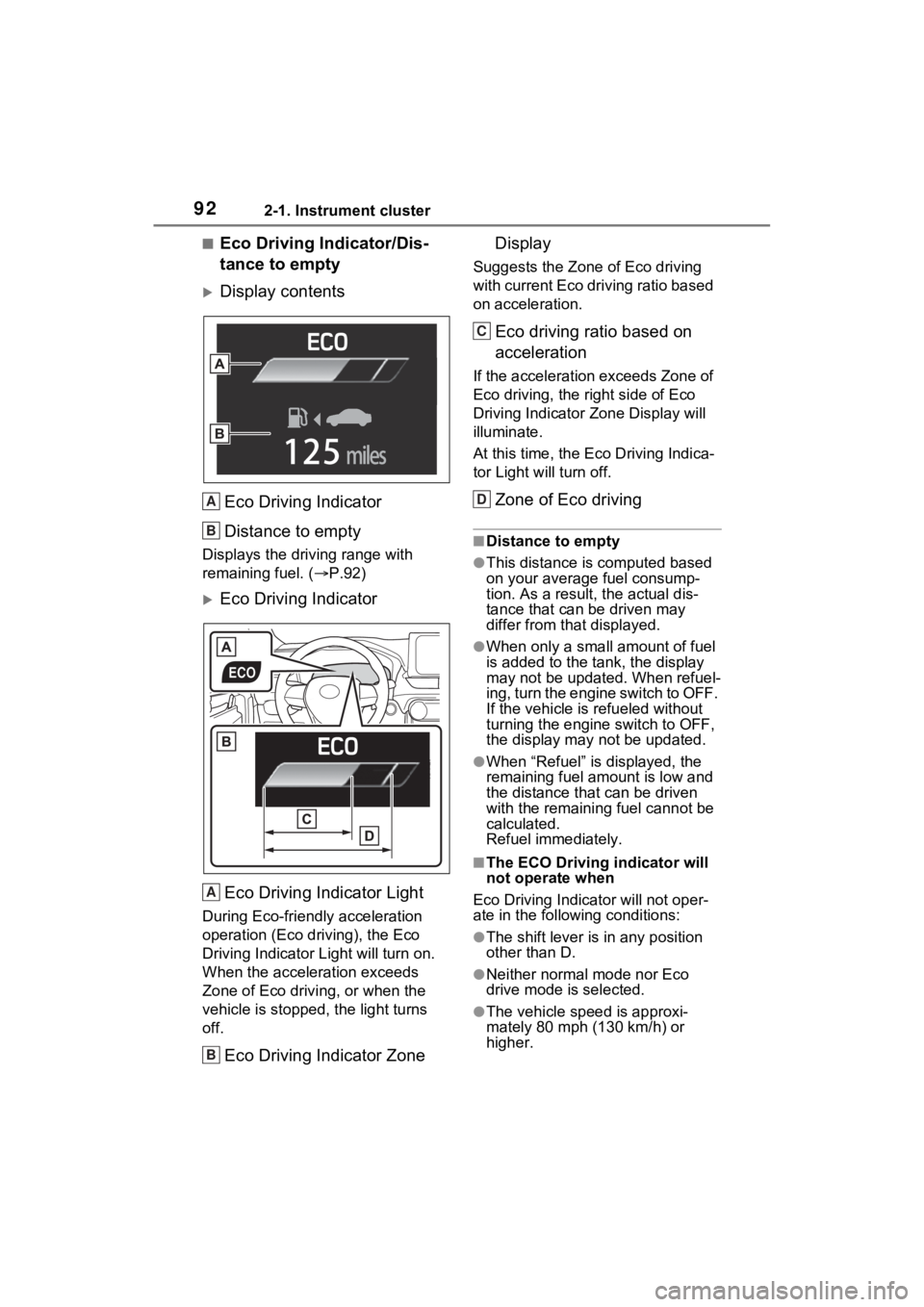
■Eco Driving Indicator/Dis-
tance to empty
Display contentsEco Driving Indicator
Distance to empty
Displays the driving range with
remaining fuel. ( P.92)
Eco Driving Indicator
Eco Driving Indicator Light
During Eco-friendly acceleration
operation (Eco driving), the Eco
Driving Indicator Light will turn on.
When the acceleration exceeds
Zone of Eco driving, or when the
vehicle is stopped , the light turns
off.
Eco Driving Indicator Zone Display
Suggests the Zone of Eco driving
with current Eco driving ratio based
on acceleration.
Eco driving ratio based on
acceleration
If the acceleration exceeds Zone of
Eco driving, the right side of Eco
Driving Indicator
Zone Display will
illuminate.
At this time, the Ec o Driving Indica-
tor Light will turn off.
Zone of Eco driving
■Distance to empty
●This distance is computed based
on your average fuel consump-
tion. As a result, the actual dis-
tance that can be driven may
differ from that displayed.
●When only a small amount of fuel
is added to the tank, the display
may not be updated. When refuel-
ing, turn the engine switch to OFF.
If the vehicle is refueled without
turning the engine switch to OFF,
the display may not be updated.
●When “Refuel” is displayed, the
remaining fuel amount is low and
the distance that can be driven
with the remaining fuel cannot be
calculated.
Refuel immediately.
■The ECO Driving indicator will
not operate when
Eco Driving Indicator will not oper-
ate in the following conditions:
●The shift lever is in any position
other than D.
●Neither normal mode nor Eco
drive mode is selected.
●The vehicle spe ed is approxi-
mately 80 mph (130 km/h) or
higher.
A
B
A
B
C
D
Page 97 of 748
972-1. Instrument cluster
2
Vehicle status information and indicators
play settings)
Select to change the display on
Fuel Economy (P.91).
(Audio settings) (if
equipped)
Select to enable/disable
screen.
(Vehicle information dis-
play settings)
• “Display Contents”
Select to enable/disable the AWD
system display ( P.94). (AWD
models)
• “Drive Info Type”
Select to change the drive informa-
tion type display between trip and
total. ( P.93).
• “Drive Info Items”
Select to set the items on the upper
and lower side of the drive informa-
tion screen from three items, aver-
age speed, distance and total time.
“Pop-Up Display”
Select to enable/d isable the follow-
ing pop-up displays, which may
appear in some situations.
• Intersection guidance display of the navigation system-linked sys-
tem (if equipped)
• Incoming call display of the hands-free phone system (if
equipped)
• Audio operation (if equipped)
• Volume operation (if equipped)
• Voice control (if equipped)
• Stop & Start system duration (if equipped) • Stop & Start system status (if
equipped)
“MID OFF”
A blank screen is displayed
“Default Settings”
Select to reset the meter display
settings.
■Suspension of the settings dis-
play
●In the following situations, opera-
tion of the settings display will be
temporarily suspended.
• When a warning message appears on the multi-information
display
• When the vehicle begins to move
●Settings for functions not
equipped to the vehicle are not
displayed.
●When a function is turned off, the
related settings for that function
are not selectable.
WARNING
■Cautions during setting up
the display
As the engine needs to be run-
ning during setting up the display,
ensure that the vehicle is parked
in a place with adequate ventila-
tion. In a closed area such as a
garage, exhaust gases including
harmful carbon monoxide (CO)
may collect and enter the vehicle.
This may lead to death or a seri-
ous health hazard.
NOTICE
■During setting up the display
To prevent battery discharge,
ensure that the engine is running
while setting up the display fea-
tures.
Page 99 of 748
992-1. Instrument cluster
2
Vehicle status information and indicators
Audio system screen
■Trip information
Audio or Audio Plus (vehicles
without Data Communication
Module)
1 Press the “MENU” button.
2 Select “Info” on the “Menu”
screen.
If the “History” screen is displayed,
select “Trip information”.
Audio or Audio Plus (vehicles
with Data Communication
Module)/Premium Audio
1 Press the “MENU” button.
2 Select “Info” on the “Menu”
screen. 3
Select “ECO” on the “Infor-
mation” screen.
If the “History” screen is displayed,
select “Trip information”.
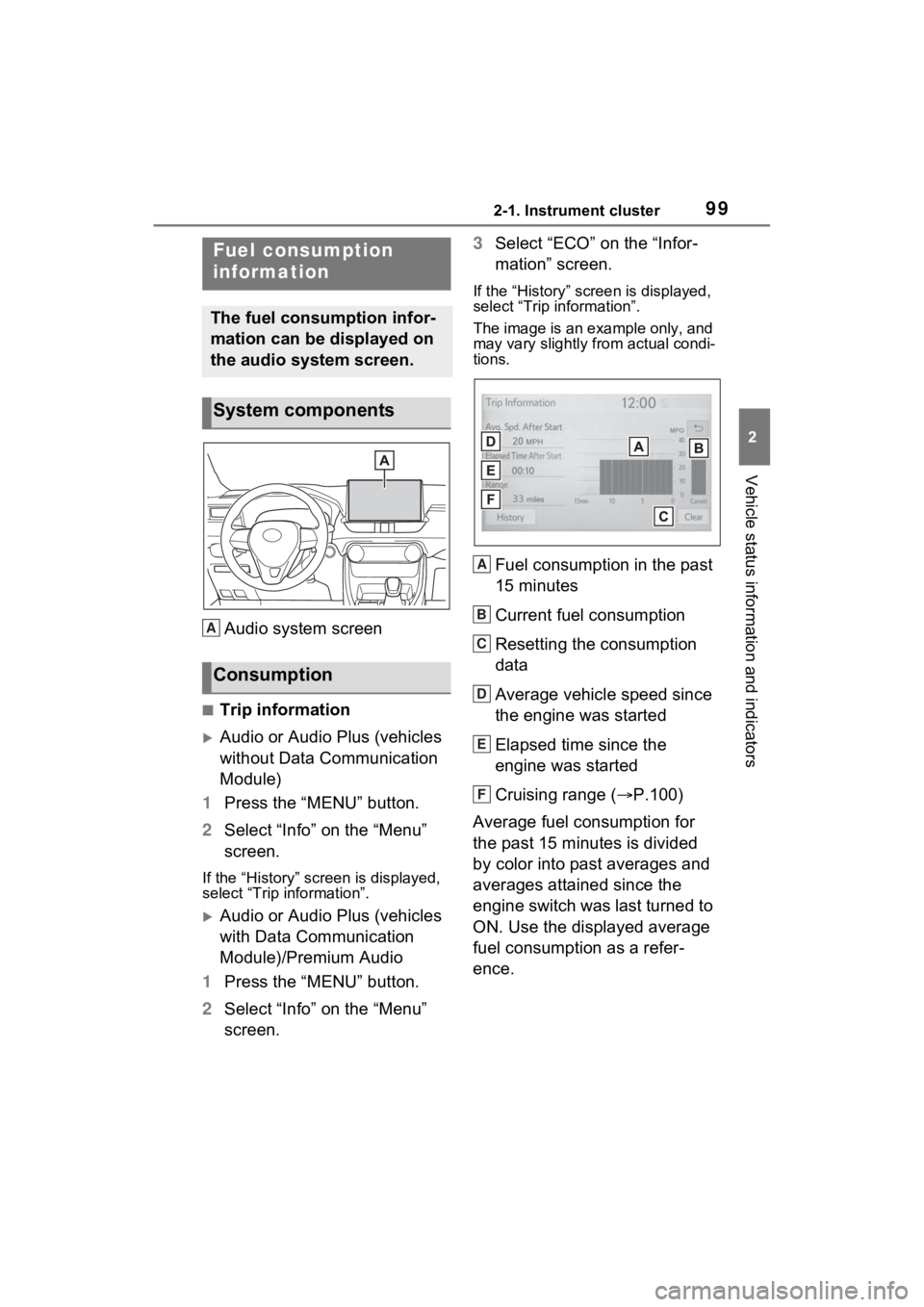
The image is an example only, and
may vary slightly from actual condi-
tions.
Fuel consumption in the past
15 minutes
Current fuel consumption
Resetting the consumption
data
Average vehicle speed since
the engine was started
Elapsed time since the
engine was started
Cruising range ( P.100)
Average fuel consumption for
the past 15 minutes is divided
by color into past averages and
averages attained since the
engine switch was last turned to
ON. Use the displayed average
fuel consumption as a refer-
ence.
Fuel consumption
information
The fuel consumption infor-
mation can be displayed on
the audio system screen.
System components
Consumption
A
A
B
C
D
E
F