steering TOYOTA RAV4 2023 Repair Manual
[x] Cancel search | Manufacturer: TOYOTA, Model Year: 2023, Model line: RAV4, Model: TOYOTA RAV4 2023Pages: 574, PDF Size: 17.31 MB
Page 317 of 574
3174-5. Using the driving support systems
4
Driving
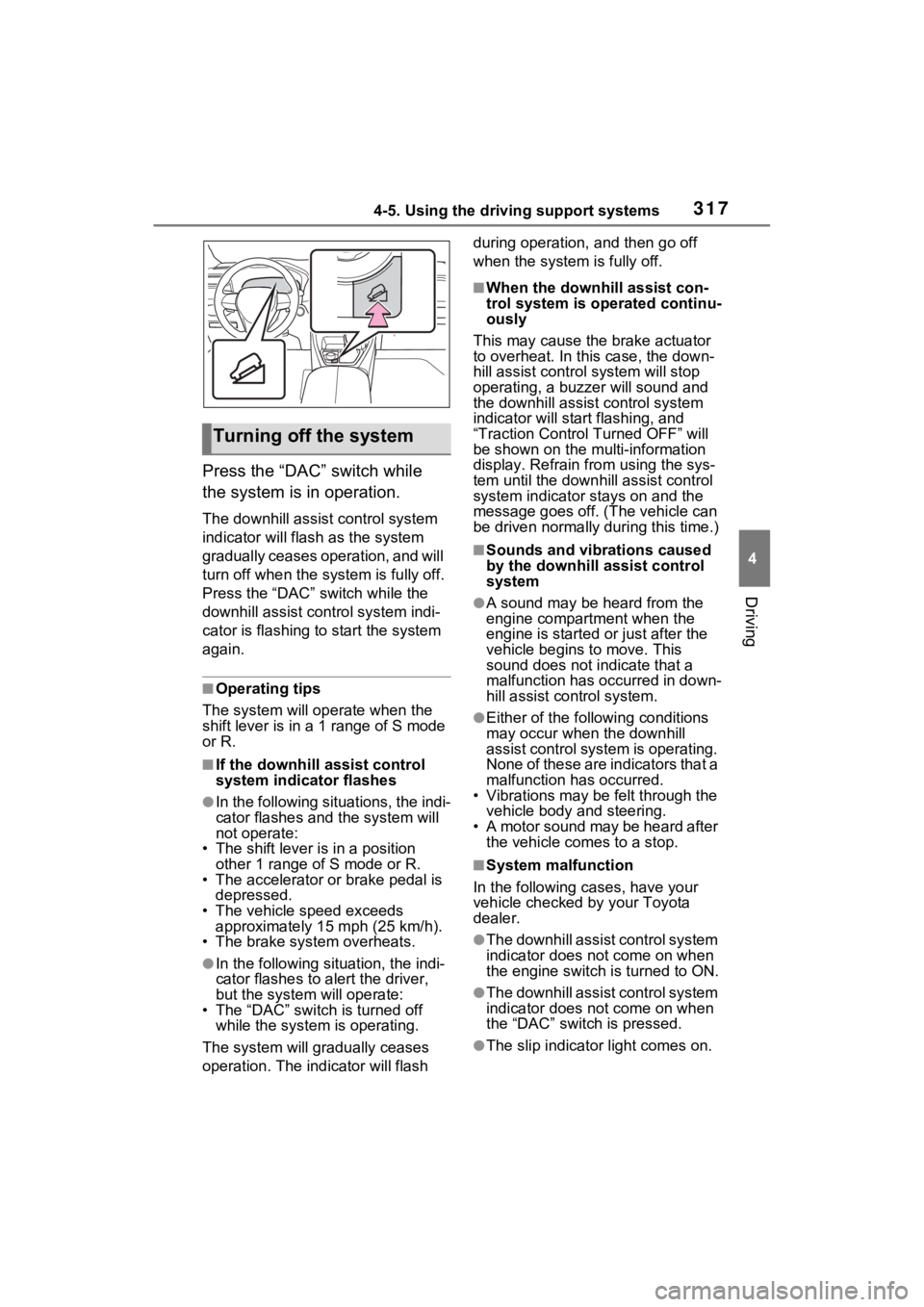
Press the “DAC” switch while
the system is in operation.
The downhill assist control system
indicator will flash as the system
gradually ceases operation, and will
turn off when the system is fully off.
Press the “DAC” switch while the
downhill assist control system indi-
cator is flashing to start the system
again.
■Operating tips
The system will op erate when the
shift lever is in a 1 range of S mode
or R.
■If the downhill assist control
system indicator flashes
●In the following situations, the indi-
cator flashes and the system will
not operate:
• The shift lever is in a position other 1 range of S mode or R.
• The accelerator or brake pedal is depressed.
• The vehicle speed exceeds
approximately 15 mph (25 km/h).
• The brake system overheats.
●In the following si tuation, the indi-
cator flashes to a lert the driver,
but the system will operate:
• The “DAC” switch is turned off
while the system is operating.
The system will gr adually ceases
operation. The indicator will flash during operation,
and then go off
when the system is fully off.
■When the downhill assist con-
trol system is operated continu-
ously
This may cause the brake actuator
to overheat. In thi s case, the down-
hill assist control system will stop
operating, a buzze r will sound and
the downhill assist control system
indicator will start flashing, and
“Traction Contro l Turned OFF” will
be shown on the mu lti-information
display. Refrain from using the sys-
tem until the downhill assist control
system indicator stays on and the
message goes off. (The vehicle can
be driven normally during this time.)
■Sounds and vibrations caused
by the downhill assist control
system
●A sound may be heard from the
engine compartment when the
engine is started or just after the
vehicle begins to move. This
sound does not indicate that a
malfunction has occurred in down-
hill assist control system.
●Either of the following conditions
may occur when the downhill
assist control system is operating.
None of these are indicators that a
malfunction has occurred.
• Vibrations may be felt through the
vehicle body and steering.
• A motor sound may be heard after the vehicle comes to a stop.
■System malfunction
In the following ca ses, have your
vehicle checked by your Toyota
dealer.
●The downhill assist control system
indicator does not come on when
the engine switch is turned to ON.
●The downhill assist control system
indicator does not come on when
the “DAC” switch is pressed.
●The slip indicator light comes on.
Turning off the system
Page 319 of 574

3194-5. Using the driving support systems
4
Driving
■Enhanced VSC (Enhanced
Vehicle Stability Control)
Provides cooperative control of
the ABS, TRAC, VSC and EPS.
Helps to maintai n directional
stability when swerving on slip-
pery road surfaces by con-
trolling steering performance.
■Trailer Sway Control
Helps the driver to control trailer
sway by selectively applying
brake pressure for individual
wheels and reducing driving
torque when trailer sway is
detected.
■TRAC (Traction Control)
Helps to maintain drive power
and prevent the drive wheels
from spinning when starting the
vehicle or accelerating on slip-
pery roads
■Active Cornering Assist
(ACA)
Helps to prevent the vehicle
from drifting to the outer side by
performing inner wheel brake
control when attempting to
accelerate while turning
■Hill-start assist control
Helps to reduce the backward
movement of the vehicle when
starting on an uphill
■EPS (Electric Power Steer-
ing)
Employs an electric motor to
reduce the amount of effort needed to turn the steering
wheel.
■Dynamic Torque Control
AWD system (AWD models)
(if equipped)
Automatically controls the drive
system such as to front-wheel
drive or AWD (all wheel drive)
according to various running
conditions including normal driv-
ing, during cornering, on a
uphill, when starting off, during
acceleration, on a slippery roads
due to snow or rain, thus con-
tributing to stable operability and
driving stability.
■Dynamic Torque Vectoring
AWD system (AWD models)
(if equipped)
Automatically controls the drive
system such as to front-wheel
drive or AWD (all wheel drive)
according to various running
conditions including normal driv-
ing, during cornering, on a
uphill, when starting off, during
acceleration, on a slippery roads
due to snow or rain, thus con-
tributing to stable operability and
driving stability.
Also, drive torque distribution is
precisely controlled during cor-
nering, contributing to improve-
ments in operability and
stability.
■The Secondary Collision
Brake
When the SRS airbag sensor
Page 321 of 574

3214-5. Using the driving support systems
4
Driving
●The parking brake is not engaged
●The engine switch is in ON
■Automatic system cancelation
of hill-start assist control
The hill-start assis t control will turn
off in any of the following situations:
●The shift lever is shifted to P or N
●The accelerator pedal is
depressed
●The parking brake is engaged
●2 seconds at maximum elapsed
after the brake pedal is released
●The engine switch is turned to
OFF
■Sounds and vibrations caused
by the ABS, brake assist, VSC,
TRAC, Trailer Sway Control and
hill-start assist control systems
●A sound may be heard from the
engine compartment when the
brake pedal is dep ressed repeat-
edly, when the engine is started or
just after the vehicle begins to
move. This sound does not indi-
cate that a malfunction has
occurred in any of these systems.
●Any of the following conditions
may occur when t he above sys-
tems are operating. None of these
indicates that a malfunction has
occurred.
• Vibrations may be felt through the
vehicle body and steering.
• A motor sound may be heard also after the vehicle comes to a stop.
• The brake pedal may pulsate slightly after the ABS is activated.
• The brake pedal may move down
slightly after the ABS is activated.
■Active Cornering Assist opera-
tion sounds and vibrations
When the Active Cornering Assist is
operated, operation sounds and
vibrations may b e generated from
the brake system, but this is not a
malfunction.
■AWD system operation sounds
and vibrations when switching
between AWD and front wheel
drive
When the vehicle switches from
AWD to front wheel drive and vice
versa, operation s ounds and vibra-
tions may be generated, but this is
not a malfunction.
■Automatic reactivation of
TRAC, Trailer Sway Control and
VSC systems
After turning the TRAC, Trailer
Sway Control and VSC systems off,
the systems will be a utomatically re-
enabled in the following situations:
●When the engine switch is turned
off
●If only the TRAC sy stem is turned
off, the TRAC will turn on when
vehicle speed increases.
If both the TRAC and VSC sys-
tems are turned of f, automatic re-
enabling will not occur when vehi-
cle speed increases
■Operating conditions of Active
Cornering Assist
The system operates when the fol-
lowing occurs.
●TRAC/VSC can operate
●The driver is attempting to accel-
erate while turning
●The system detects that the vehi-
cle is drifting to the outer side
●The brake pedal is released
■Reduced effectiveness of the
EPS system
The effect iveness of the EPS sys-
tem is reduced to prevent the sys-
tem from overheating when there is
frequent steering input over an
extended period of time. The steer-
ing wheel may feel heavy as a
result. Should this occur, refrain
from excessive steering input or
stop the vehicle and turn the engine
off. The EPS syste m should return
to normal within 10 minutes.
Page 324 of 574

3244-5. Using the driving support systems
WARNING
■Trailer Sway Control precau-
tion
The Trailer Sway Control system
is not able to reduce trailer sway
in all situations . Depending on
many factors such as the condi-
tions of the vehicle, trailer, road
surface and driving environment,
the Trailer Sway Control system
may not be effective. Refer to
your trailer owner’s manual for
information on how to tow your
trailer properly.
■If trailer sway occurs
Observe the following precau-
tions.
Failing to do so may cause death
or serious injury.
●Firmly grip the steering wheel.
Steer straight ahead. Do not try
to control trailer sway by turning
the steering wheel.
●Begin releasing the accelerator
pedal immediately but very
gradually to reduce speed.
Do not increase speed. Do not
apply vehicle brakes.
If you make no extreme correction
with the steering or brakes, your
vehicle and trailer should stabi-
lize. ( P.189)
■Secondary Collision Brake
Do not rely solely upon the Sec-
ondary Collision Brake. This sys-
tem is designed to help reduce
the possibility of further damage
due to a secondary collision, how-
ever, that effect c hanges accord-
ing to various conditions. Overly
relying on the system may result
in death or serious injury.
Page 325 of 574
3254-6. Driving tips
4
Driving
4-6.Driving tips
Use fluids that are appropriate
to the prevailing outside tem-
peratures.
• Engine oil
• Engine coolant
• Washer fluid
Have a service technician
inspect the condition of the
battery.
Have the vehicle fitted with
four snow tires or purchase a
set of tire chains for the front
tires.
*
Ensure that all tires are the same
size and brand, and that chains
match the size of the tires.
*: Tire chains cannot be mounted
on vehicles with 235/55R19 tires.
Winter driving tips
Carry out the necessary
preparations and inspec-
tions before driving the
vehicle in winter. Always
drive the vehicle in a man-
ner appropriate to the pre-
vailing weather conditions.
Pre-winter preparations
WARNING
■Driving with snow tires
Observe the following precautions
to reduce the risk of accidents.
Failure to do so m ay result in a
loss of vehicle control and cause
death or serious injury.
●Use tires of the specified size.
●Maintain the recommended
level of air pressure.
●Do not drive in excess of 75
mph (120 km/h), regardless of
the type of snow tires being
used.
●Use snow tires on all, not just
some wheels.
■Driving with tire chains
(except 235/55R19 tires)
Observe the following precautions
to reduce the risk of accidents.
Failure to do so may result in the
vehicle being unable to be driven
safely, and may cause death or
serious injury.
●Do not drive in excess of the
speed limit specifi ed for the tire
chains being used, or 30 mph
(50 km/h), whichever is lower.
●Avoid driving on bumpy road
surfaces or over potholes.
●Avoid sudden acceleration,
abrupt steering, sudden brak-
ing and shifting operations that
cause sudden engine braking.
●Slow down sufficiently before
entering a curve to ensure that
vehicle control is maintained.
●Do not use LTA (Lane Tracing
Assist) system.
NOTICE
■Repairing or replacing snow
tires (vehicles with tire pres-
sure warning system)
Request repairs or replacement of
snow tires from your Toyota
dealer or legitimate tire retailers.
This is because the removal and
attachment of snow tires affects
the operation of the tire pressure
warning valves and transmitters.
Page 329 of 574
3294-6. Driving tips
4
Driving
road, please observe the follow-
ing precautions to ensure your
driving enjoyment and to help
prevent the closure of areas to
off-road vehicles:
Drive your vehicle only in
areas where off-road vehicles
are permitted to travel.
Respect private property. Get
owner’s permission before
entering private property.
Do not enter areas that are
closed. Honor gates, barriers
and signs that restrict travel.
Stay on established roads.
When conditions are wet,
driving techniques should be
changed or travel delayed to
prevent damage to roads.
■Additional information for off-
road driving
For owners in U.S. mainland,
Hawaii and Puerto Rico:
To obtain additional information per-
taining to driving your vehicle off-
road, consult the following organiza-
tions: • State and Local Parks and Recre-
ation Departments
• State Motor Vehicle Bureau
• Recreational Vehicle Clubs
• U.S. Forest Service and Bureau of Land Management
WARNING
■Off-road driving precautions
Always observe t he following pre-
cautions to minim ize the risk of
death, serious injury or damage to
your vehicle:
●Drive carefully when off the
road. Do not take unnecessary
risks by driving in dangerous
places.
●Do not grip the steering wheel
spokes when driving off-road. A
bad bump could jerk the wheel
and injure your hands. Keep
both hands and especially your
thumbs on the ou tside of the
rim.
●Always check your brakes for
effectiveness immediately after
driving in sand, mud, water or
snow.
●After driving through tall grass,
mud, rock, sand, rivers, etc.,
check that there is no grass,
bush, paper, rags, stone, sand,
etc. adhering or trapped on the
underbody. Clear off any such
matter from the underbody. If
the vehicle is used with these
materials trapped or adhering to
the underbody, a breakdown or
fire could occur.
Page 331 of 574
331
5
5
Interior features
Interior features
5-1. Using the air conditioning system and defogger
Manual air conditioning sys- tem ............................ 332
Automatic air conditioning system ....................... 338
Heated steering wheel/seat heaters/seat ventilators.................................. 345
5-2. Using the interior lights Interior lights list .......... 348
5-3. Using the storage features List of storage features 350
Luggage compartment fea- tures .......................... 354
5-4. Using the other interior features
Other interior features . 359
Garage door opener.... 370
Page 344 of 574
3445-1. Using the air conditioning system and defogger
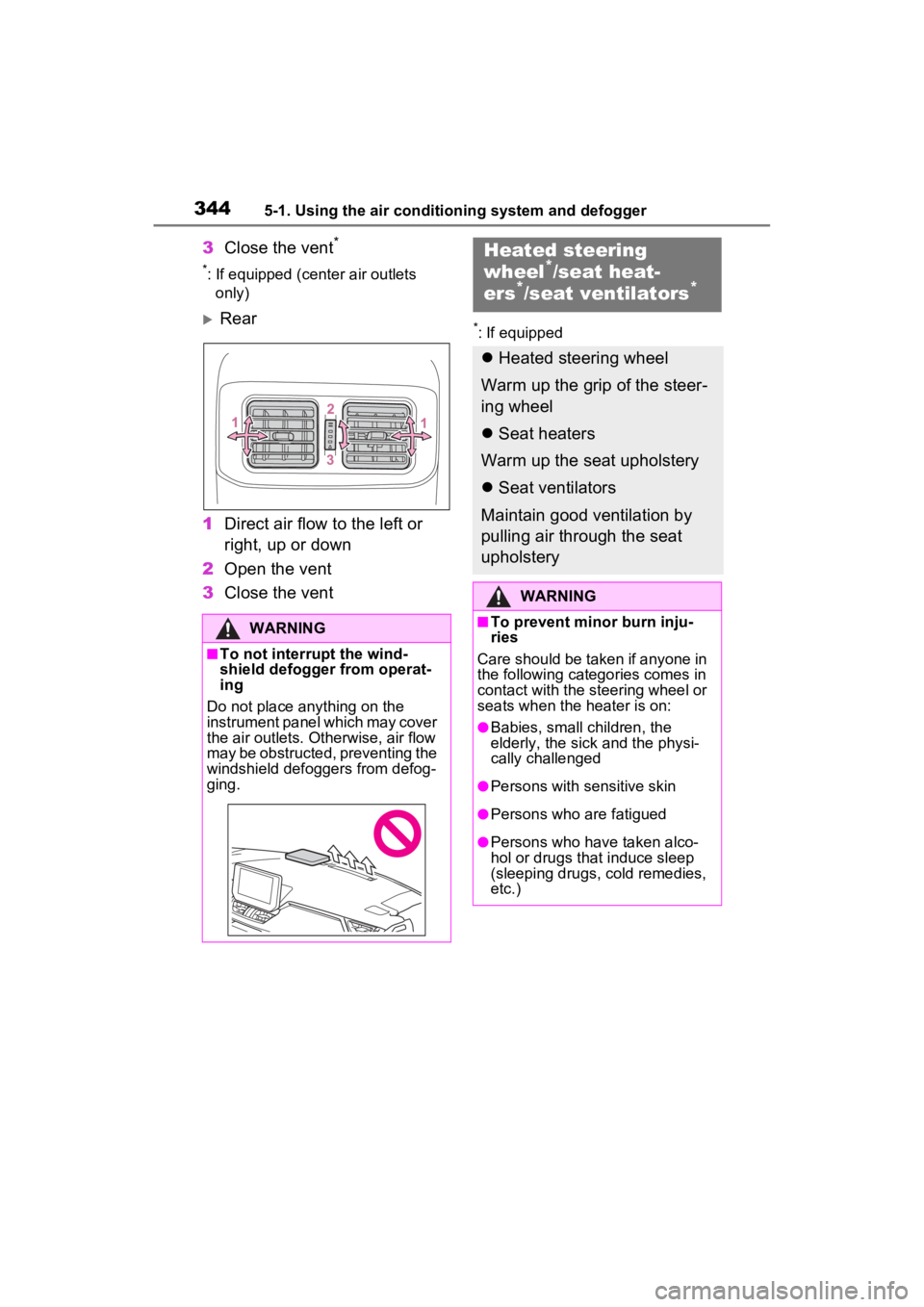
3Close the vent*
*: If equipped (center air outlets
only)
Rear
1 Direct air flow to the left or
right, up or down
2 Open the vent
3 Close the vent*: If equipped
WARNING
■To not interrupt the wind-
shield defogger from operat-
ing
Do not place anything on the
instrument panel which may cover
the air outlets. Otherwise, air flow
may be obstructed, preventing the
windshield defoggers from defog-
ging.
Heated steering
wheel*/seat heat-
ers*/seat ventilators*
Heated steering wheel
Warm up the grip of the steer-
ing wheel
Seat heaters
Warm up the seat upholstery
Seat ventilators
Maintain good ventilation by
pulling air through the seat
upholstery
WARNING
■To prevent minor burn inju-
ries
Care should be taken if anyone in
the following categories comes in
contact with the steering wheel or
seats when the heater is on:
●Babies, small children, the
elderly, the sick and the physi-
cally challenged
●Persons with sensitive skin
●Persons who are fatigued
●Persons who have taken alco-
hol or drugs that induce sleep
(sleeping drugs, cold remedies,
etc.)
Page 345 of 574
3455-1. Using the air conditioning system and defogger
5
Interior features
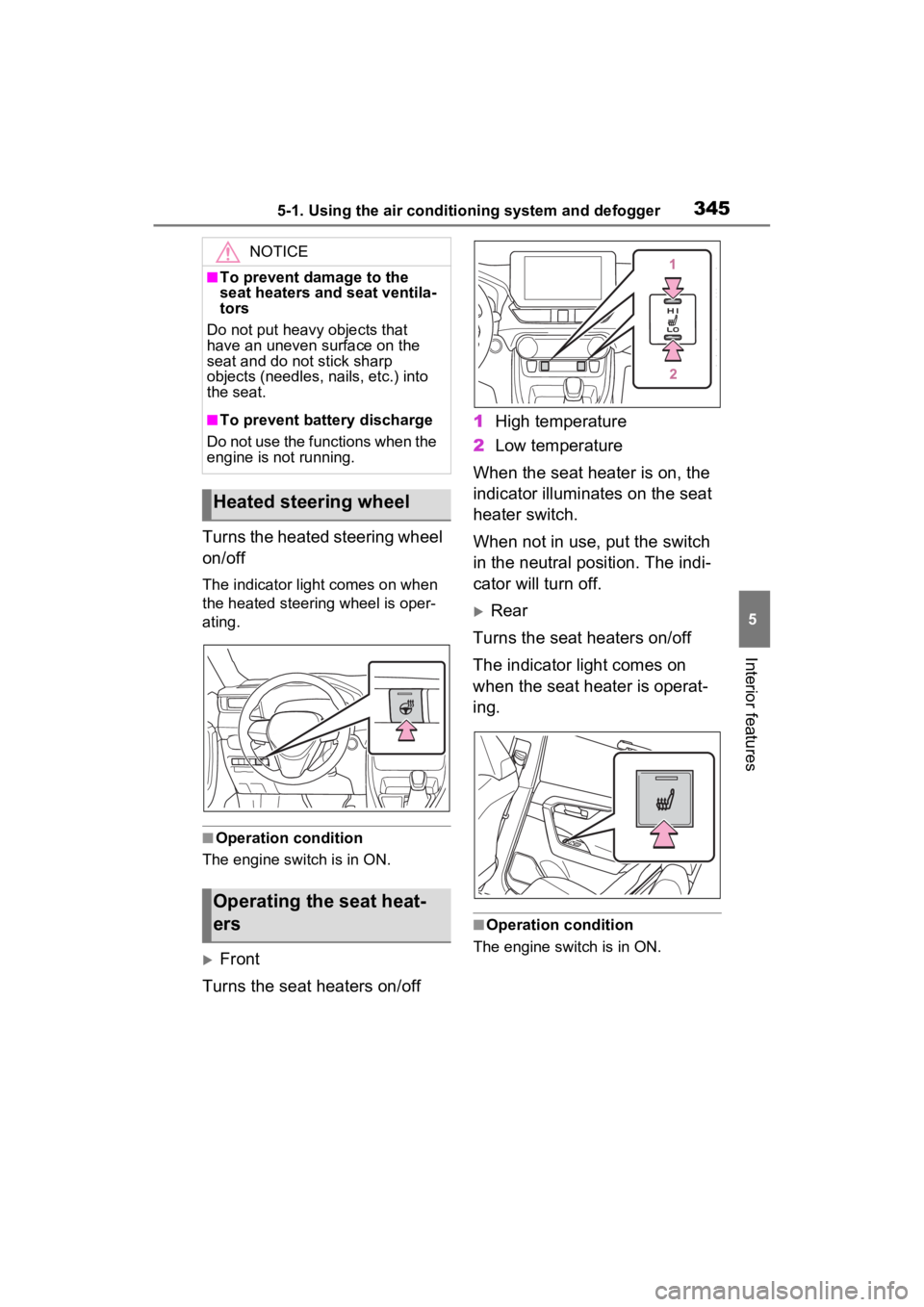
Turns the heated steering wheel
on/off
The indicator light comes on when
the heated steering wheel is oper-
ating.
■Operation condition
The engine switch is in ON.
Front
Turns the seat heaters on/off 1
High temperature
2 Low temperature
When the seat heater is on, the
indicator illuminates on the seat
heater switch.
When not in use, put the switch
in the neutral position. The indi-
cator will turn off.
Rear
Turns the seat heaters on/off
The indicator light comes on
when the seat heater is operat-
ing.
■Operation condition
The engine switch is in ON.
NOTICE
■To prevent damage to the
seat heaters and seat ventila-
tors
Do not put heavy objects that
have an uneven surface on the
seat and do not stick sharp
objects (needles, nails, etc.) into
the seat.
■To prevent battery discharge
Do not use the functions when the
engine is not running.
Heated steering wheel
Operating the seat heat-
ers
Page 352 of 574
3525-3. Using the storage features
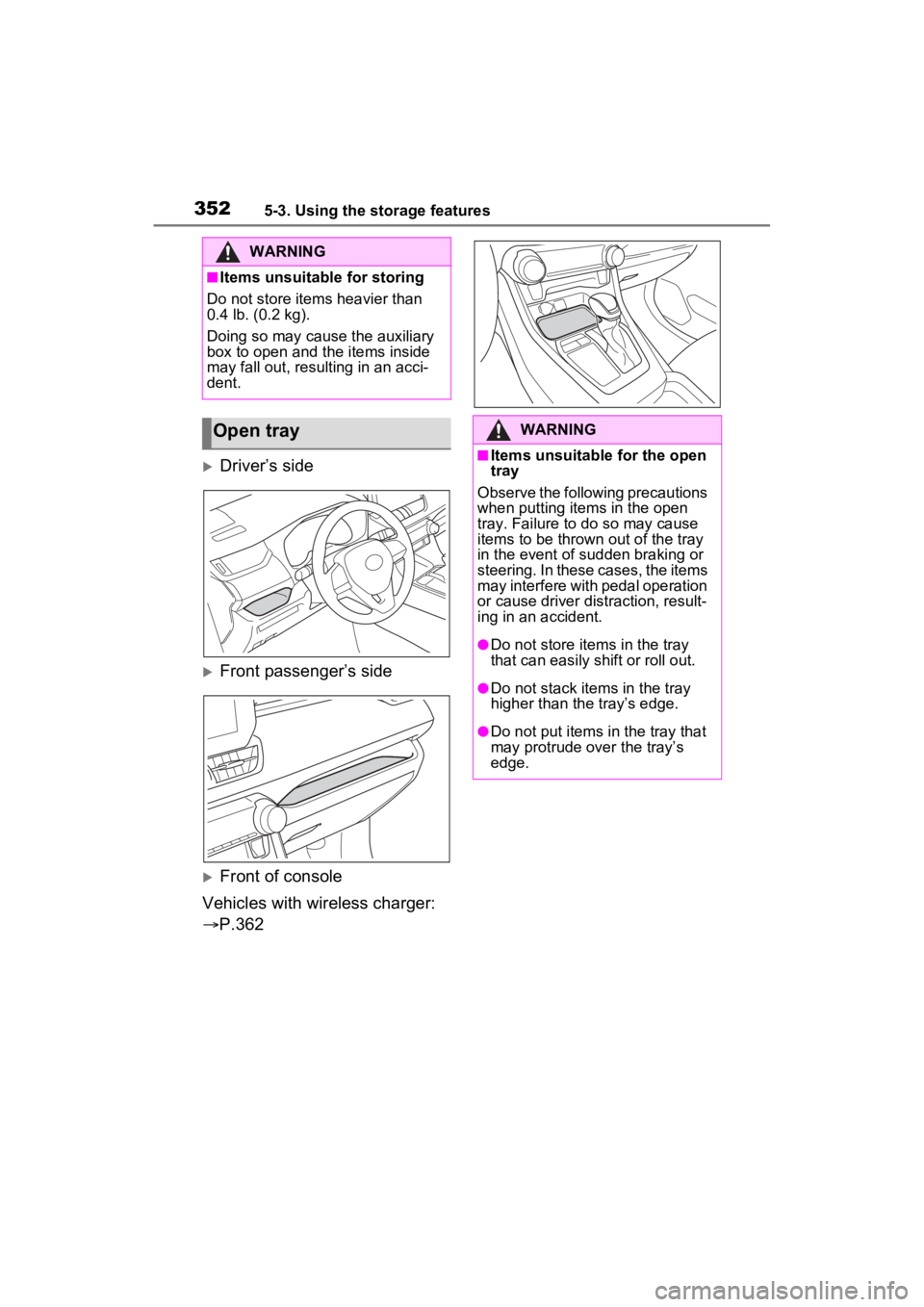
Driver’s side
Front passenger’s side
Front of console
Vehicles with wireless charger:
P.362
WARNING
■Items unsuitable for storing
Do not store items heavier than
0.4 lb. (0.2 kg).
Doing so may cause the auxiliary
box to open and the items inside
may fall out, resulting in an acci-
dent.
Open trayWARNING
■Items unsuitable for the open
tray
Observe the following precautions
when putting items in the open
tray. Failure to d o so may cause
items to be thrown out of the tray
in the event of s udden braking or
steering. In these cases, the items
may interfere with pedal operation
or cause driver distraction, result-
ing in an accident.
●Do not store ite ms in the tray
that can easily shift or roll out.
●Do not stack items in the tray
higher than the tray’s edge.
●Do not put items in the tray that
may protrude over the tray’s
edge.