light TOYOTA RAV4 EV 2012 1.G Repair Manual
[x] Cancel search | Manufacturer: TOYOTA, Model Year: 2012, Model line: RAV4 EV, Model: TOYOTA RAV4 EV 2012 1.GPages: 520, PDF Size: 8.29 MB
Page 215 of 520
215
2-1. Driving procedures
2
When driving
Turn signal lever
■Turn signals can be operated when
The “POWER” switch is in ON mode.
■ If the indicators flash faster than usual
Check that a light bulb in the front or rear turn signal lights has not burned
out.
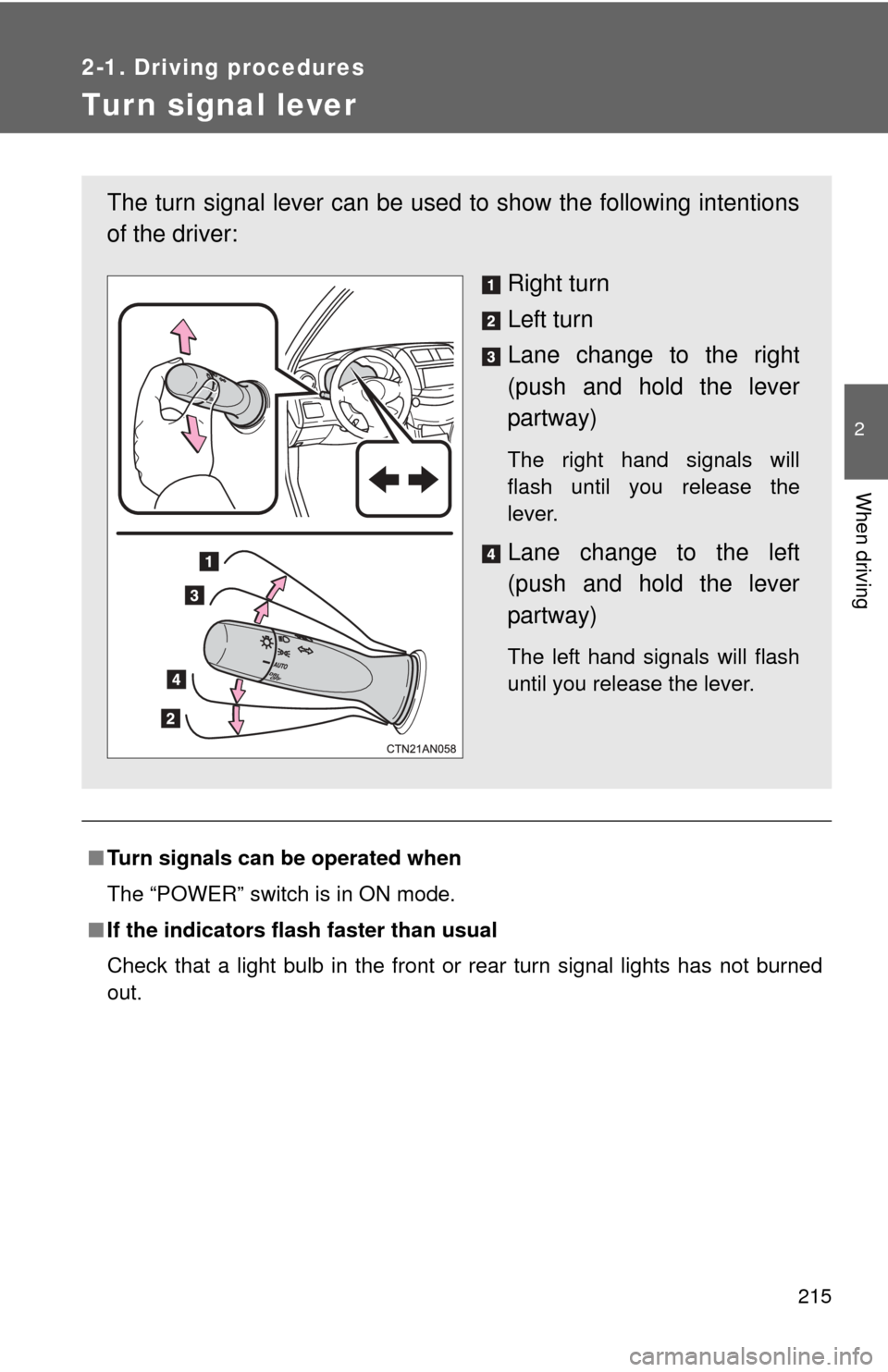
The turn signal lever can be used to show the following intentions
of the driver:
Right turn
Left turn
Lane change to the right
(push and hold the lever
partway)
The right hand signals will
flash until you release the
lever.
Lane change to the left
(push and hold the lever
partway)
The left hand signals will flash
until you release the lever.
Page 219 of 520
219
2-2. Instrument cluster
2
When driving
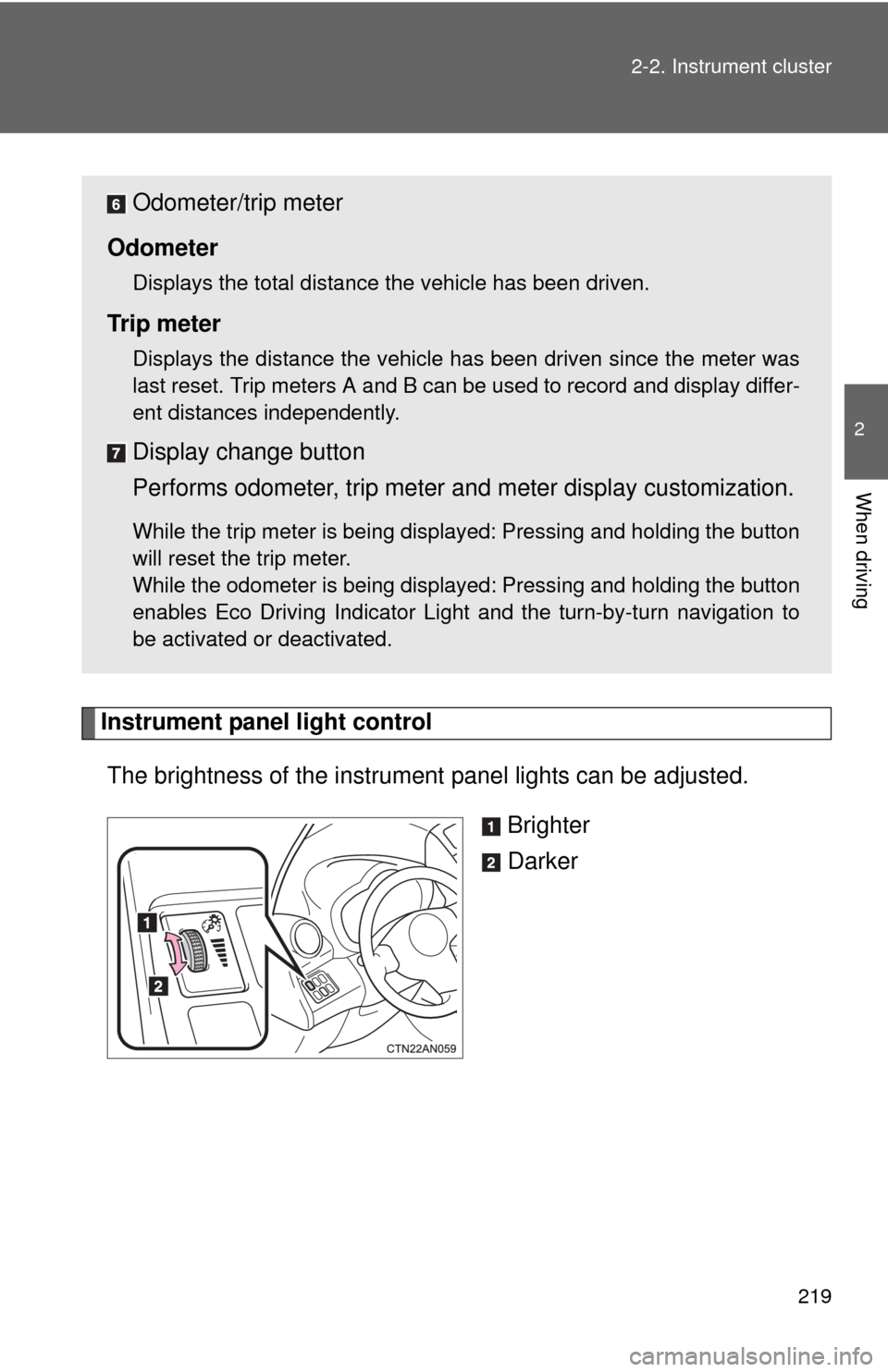
Instrument panel light control
The brightness of the instrument panel lights can be adjusted.
Brighter
Darker
Odometer/trip meter
Odometer
Displays the total distance the vehicle has been driven.
Tr i p m e t e r
Displays the distance the vehicle has been driven since the meter was
last reset. Trip meters A and B can be used to record and display differ-
ent distances independently.
Display change button
Performs odometer, trip meter and meter display customization.
While the trip meter is being displayed: Pressing and holding the button
will reset the trip meter.
While the odometer is being displayed: Pressing and holding the button
enables Eco Driving Indicator Light and the turn-by-turn navigation to
be activated or deactivated.
Page 220 of 520
220 2-2. Instrument cluster
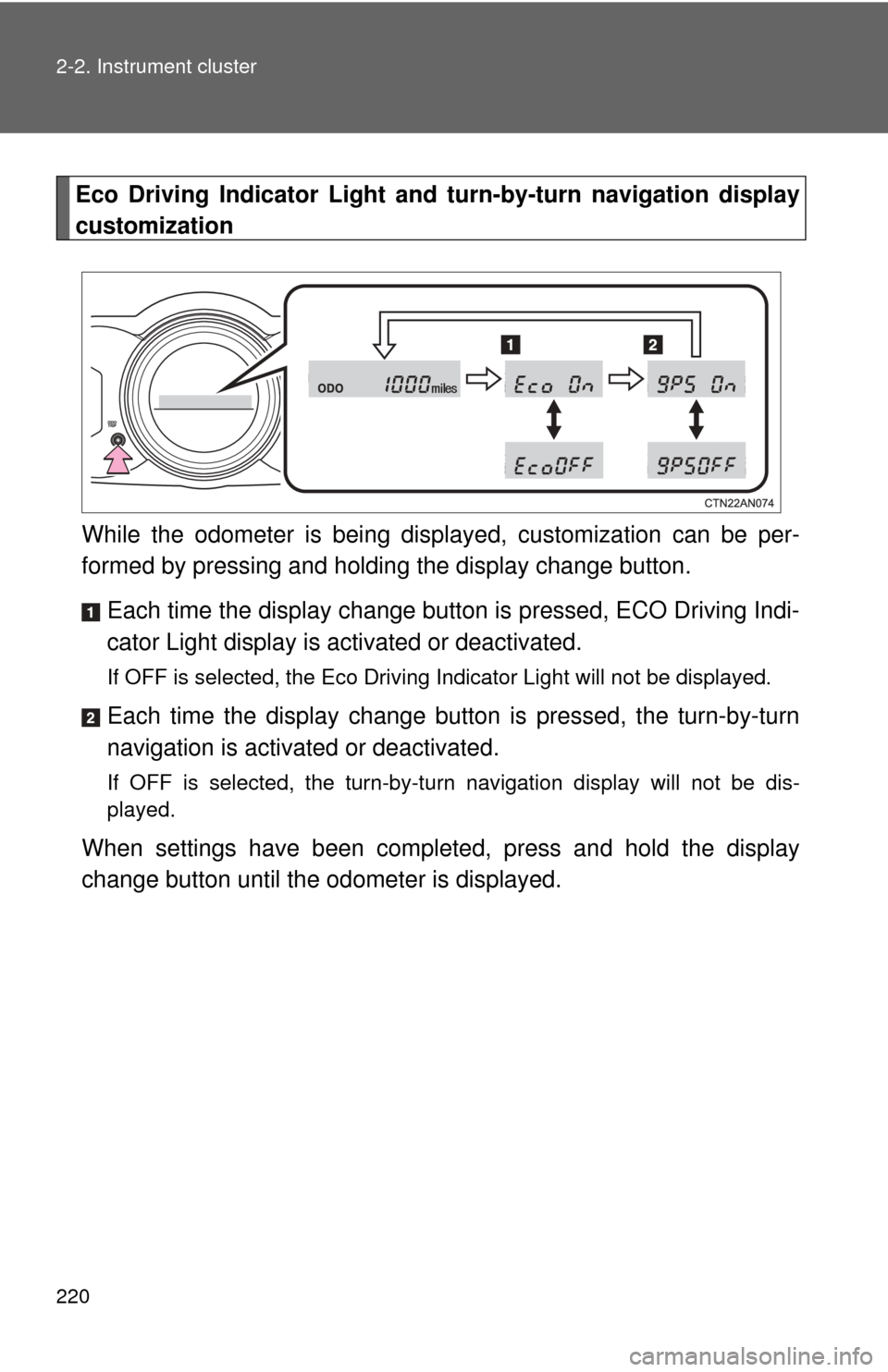
Eco Driving Indicator Light and turn-by-turn navigation display
customization
While the odometer is being displayed, customization can be per-
formed by pressing and holding the display change button.
Each time the display change button is pressed, ECO Driving Indi-
cator Light display is activated or deactivated.
If OFF is selected, the Eco Driving Indicator Light will not be displayed.
Each time the display change button is pressed, the turn-by-turn
navigation is activa ted or deactivated.
If OFF is selected, the turn-by-turn navigation display will not be dis-
played.
When settings have been completed, press and hold the display
change button until the odometer is displayed.
Page 221 of 520
221
2-2. Instrument cluster
2
When driving
■
The meters and display illuminate when
The “POWER” switch is in ON mode.
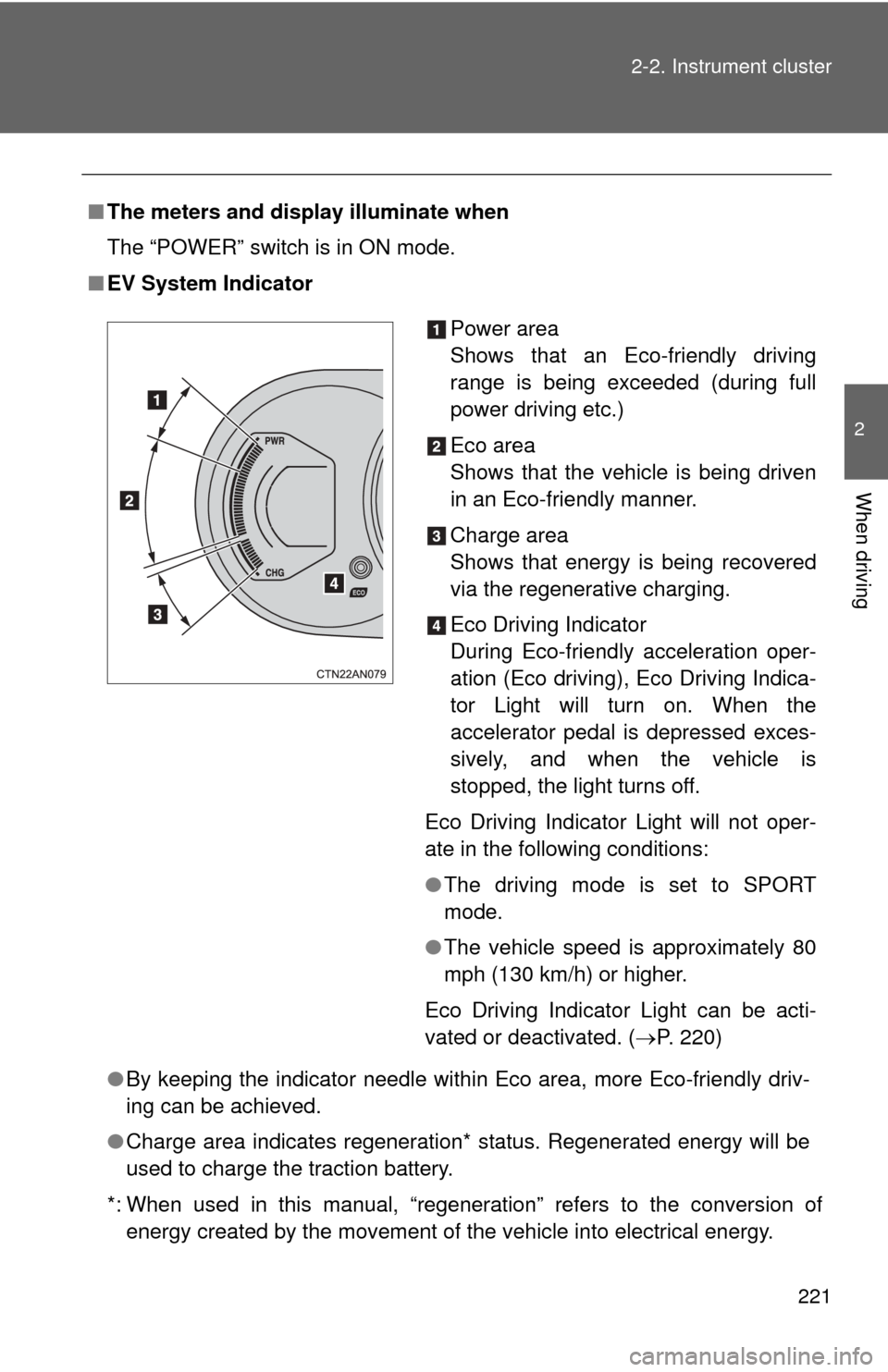
■ EV System Indicator
●By keeping the indicator needle within Eco area, more Eco-friendly driv-
ing can be achieved.
● Charge area indicates regeneration* status. Regenerated energy will be
used to charge the traction battery.
*: When used in this manual, “regeneration” refers to the conversion of energy created by the movement of the vehicle into electrical energy.
Power area
Shows that an Eco-friendly driving
range is being exceeded (during full
power driving etc.)
Eco area
Shows that the vehicle is being driven
in an Eco-friendly manner.
Charge area
Shows that energy is being recovered
via the regenerative charging.
Eco Driving Indicator
During Eco-friendly acceleration oper-
ation (Eco driving), Eco Driving Indica-
tor Light will turn on. When the
accelerator pedal is depressed exces-
sively, and when the vehicle is
stopped, the light turns off.
Eco Driving Indicator Light will not oper-
ate in the following conditions:
● The driving mode is set to SPORT
mode.
● The vehicle speed is approximately 80
mph (130 km/h) or higher.
Eco Driving Indicator Light can be acti-
vated or deactivated. ( P. 220)
Page 222 of 520

222 2-2. Instrument cluster
■The brightness of the instrument panel lights
When the tail lights are turned on, the meter’s brightness will be reduced
slightly unless the meter brightness level adjustment is set to the brightest
setting.
If the tail lights are turned on when the surroundings are dark, the meter’s
brightness will reduce slightly. However, when the surroundings are bright,
such as during the daytime, the meter’s brightness will not be reduced even
if the tail lights are turned on.
Page 223 of 520
223
2-2. Instrument cluster
2
When driving
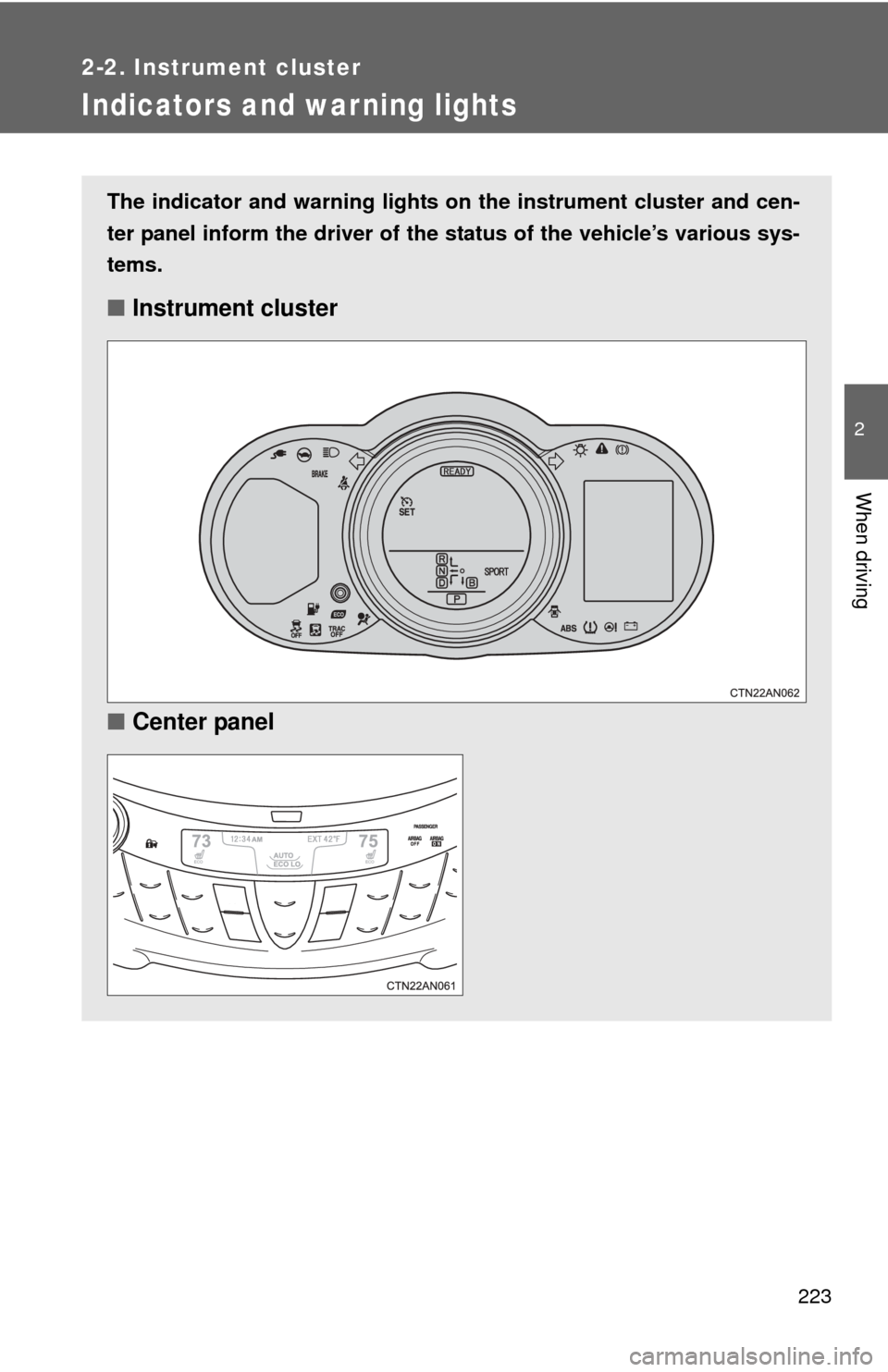
Indicators and war ning lights
The indicator and warning lights on the instrument cluster and cen-
ter panel inform the driver of the status of the vehicle’s various sys-
tems.
■ Instrument cluster
■ Center panel
Page 225 of 520
225
2-2. Instrument cluster
2
When driving
■
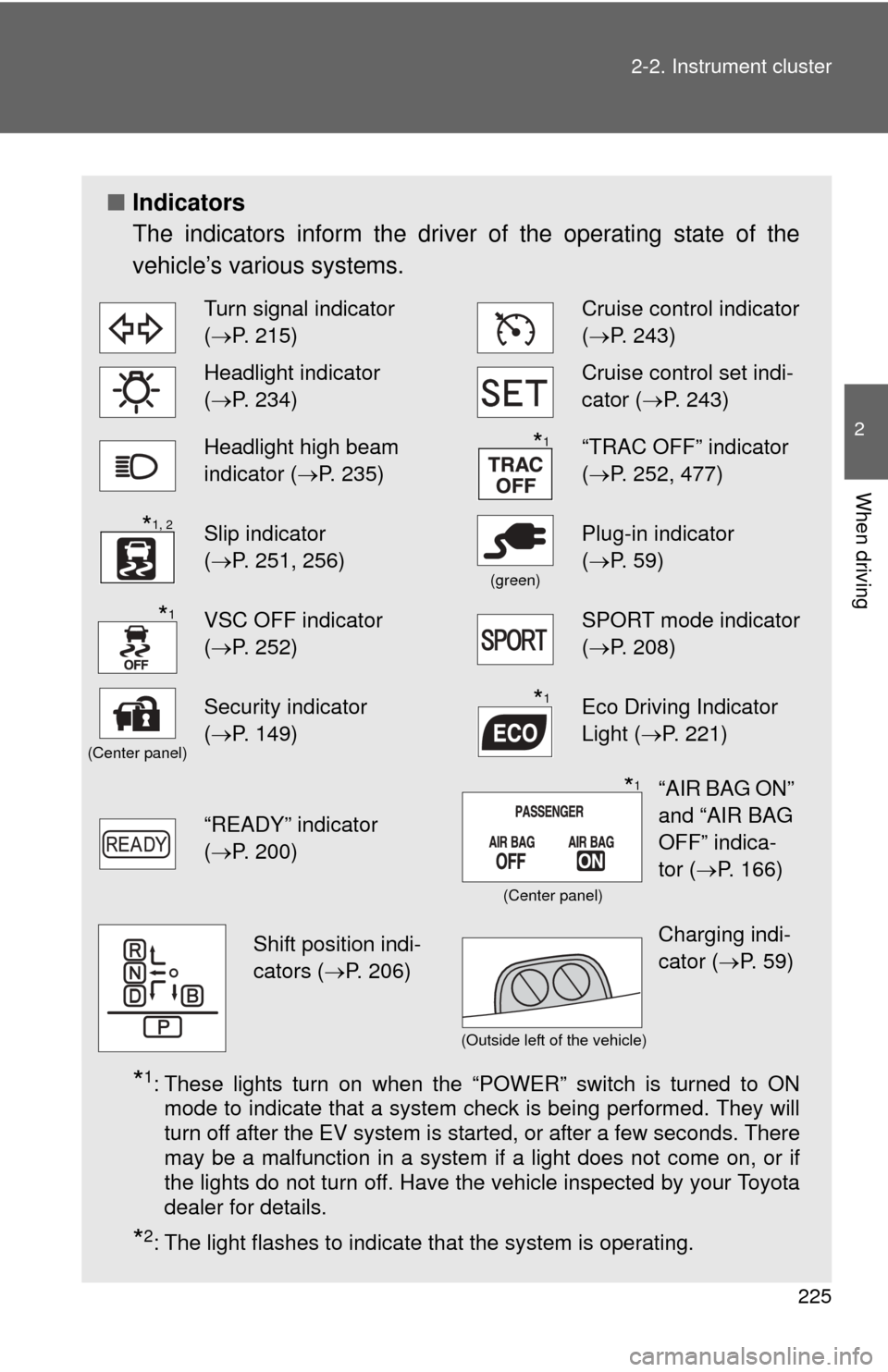
Indicators
The indicators inform the driver of the operating state of the
vehicle’s various systems.
*1: These lights turn on when the “POWER” switch is turned to ON
mode to indicate that a system check is being performed. They will
turn off after the EV system is started, or after a few seconds. There
may be a malfunction in a system if a light does not come on, or if
the lights do not turn off. Have the vehicle inspected by your Toyota
dealer for details.
*2: The light flashes to indicate that the system is operating.
Turn signal indicator
(P. 215)Cruise control indicator
( P. 243)
Headlight indicator
(P. 234)Cruise control set indi-
cator (P. 243)
Headlight high beam
indicator ( P. 235)“TRAC OFF” indicator
(P. 252, 477)
Slip indicator
(P. 251, 256)
(green)
Plug-in indicator
( P. 59)
VSC OFF indicator
(P. 252)SPORT mode indicator
( P. 208)
(Center panel)
Security indicator
(P. 149)Eco Driving Indicator
Light ( P. 221)
“READY” indicator
(P. 200)
*1
*1, 2
*1
*1
“AIR BAG ON”
and “AIR BAG
OFF” indica-
tor ( P. 166)*1
(Center panel)
Shift position indi-
cators ( P. 206)Charging indi-
cator (P. 59)
(Outside left of the vehicle)
Page 226 of 520
226 2-2. Instrument cluster
CAUTION
■If a safety system warning light does not come on
Should a safety system light such as the ABS and SRS airbag warning light
not come on when you start the EV system, this could mean that these sys-
tems are not available to help protect you in an accident, which could result
in death or serious injury. Have the vehicle inspected by your Toyota dealer
immediately if this occurs.
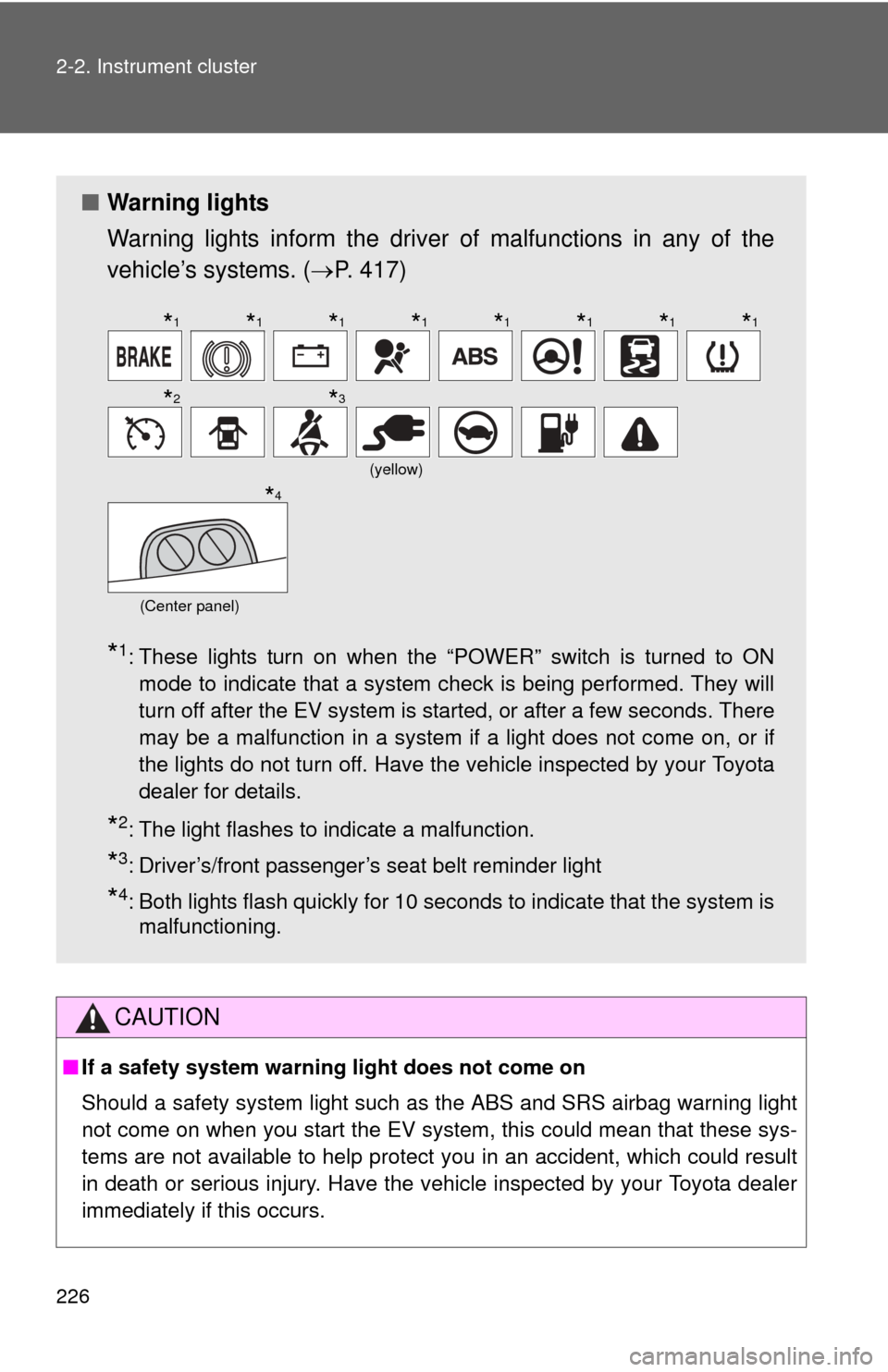
■ Warning lights
Warning lights inform the driver of malfunctions in any of the
vehicle’s systems. ( P. 417)
*1: These lights turn on when the “POWER” switch is turned to ON
mode to indicate that a system check is being performed. They will
turn off after the EV system is started, or after a few seconds. There
may be a malfunction in a system if a light does not come on, or if
the lights do not turn off. Have the vehicle inspected by your Toyota
dealer for details.
*2: The light flashes to indicate a malfunction.
*3: Driver’s/front passenger’s seat belt reminder light
*4: Both lights flash quickly for 10 seconds to indicate that the system ismalfunctioning.
(yellow)
(Center panel)
*1*1*1*1*1*1*1*1
*2*3
*4
Page 232 of 520
232 2-2. Instrument cluster
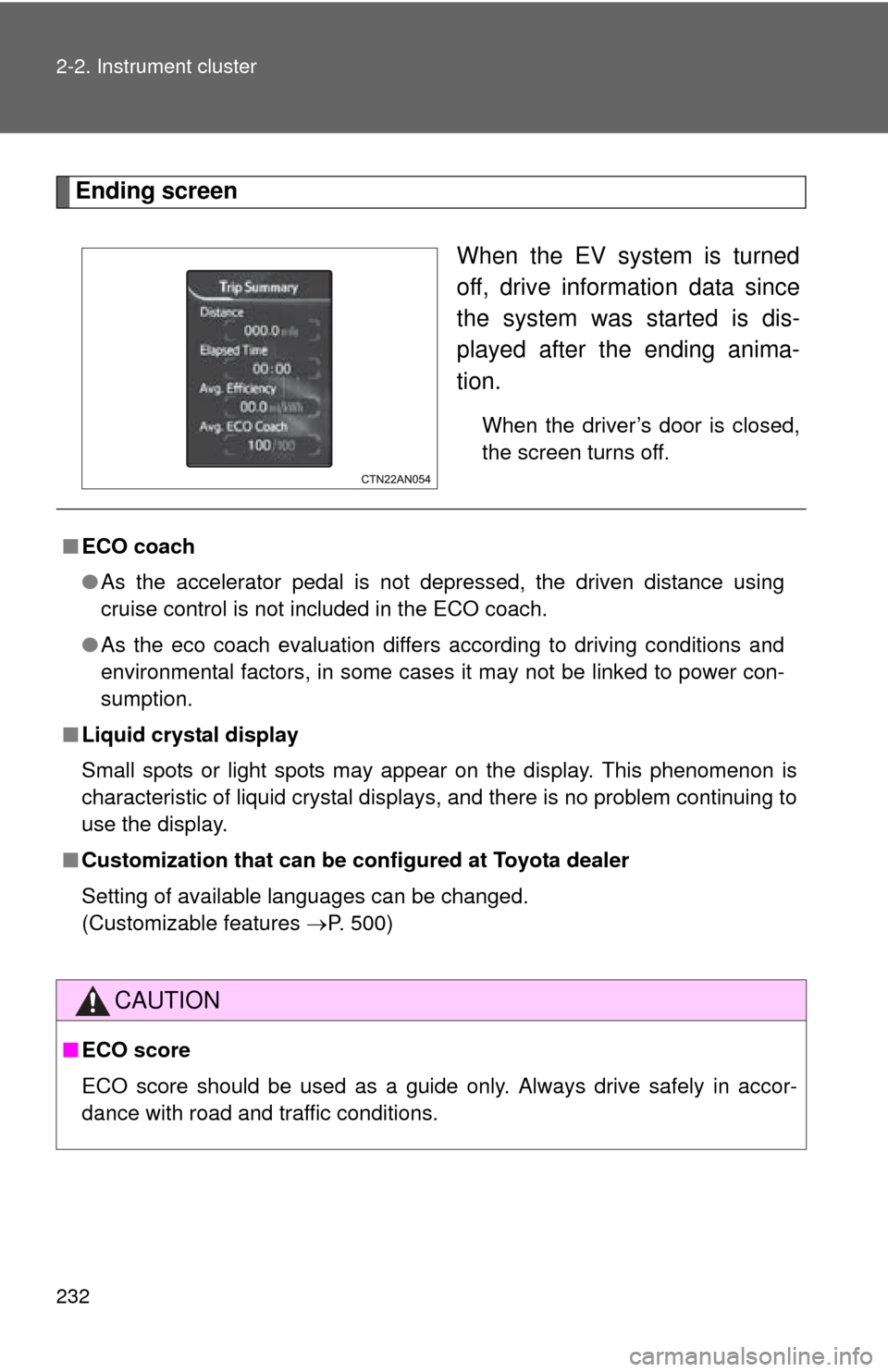
Ending screenWhen the EV system is turned
off, drive information data since
the system was started is dis-
played after the ending anima-
tion.
When the driver’s door is closed,
the screen turns off.
■ECO coach
●As the accelerator pedal is not depressed, the driven distance using
cruise control is not included in the ECO coach.
● As the eco coach evaluation differs according to driving conditions and
environmental factors, in some cases it may not be linked to power con-
sumption.
■ Liquid crystal display
Small spots or light spots may appear on the display. This phenomenon is
characteristic of liquid crystal displays, and there is no problem continuing to
use the display.
■ Customization that can be co nfigured at Toyota dealer
Setting of available languages can be changed.
(Customizable features P. 500)
CAUTION
■ECO score
ECO score should be used as a guide only. Always drive safely in accor-
dance with road and traffic conditions.
Page 234 of 520
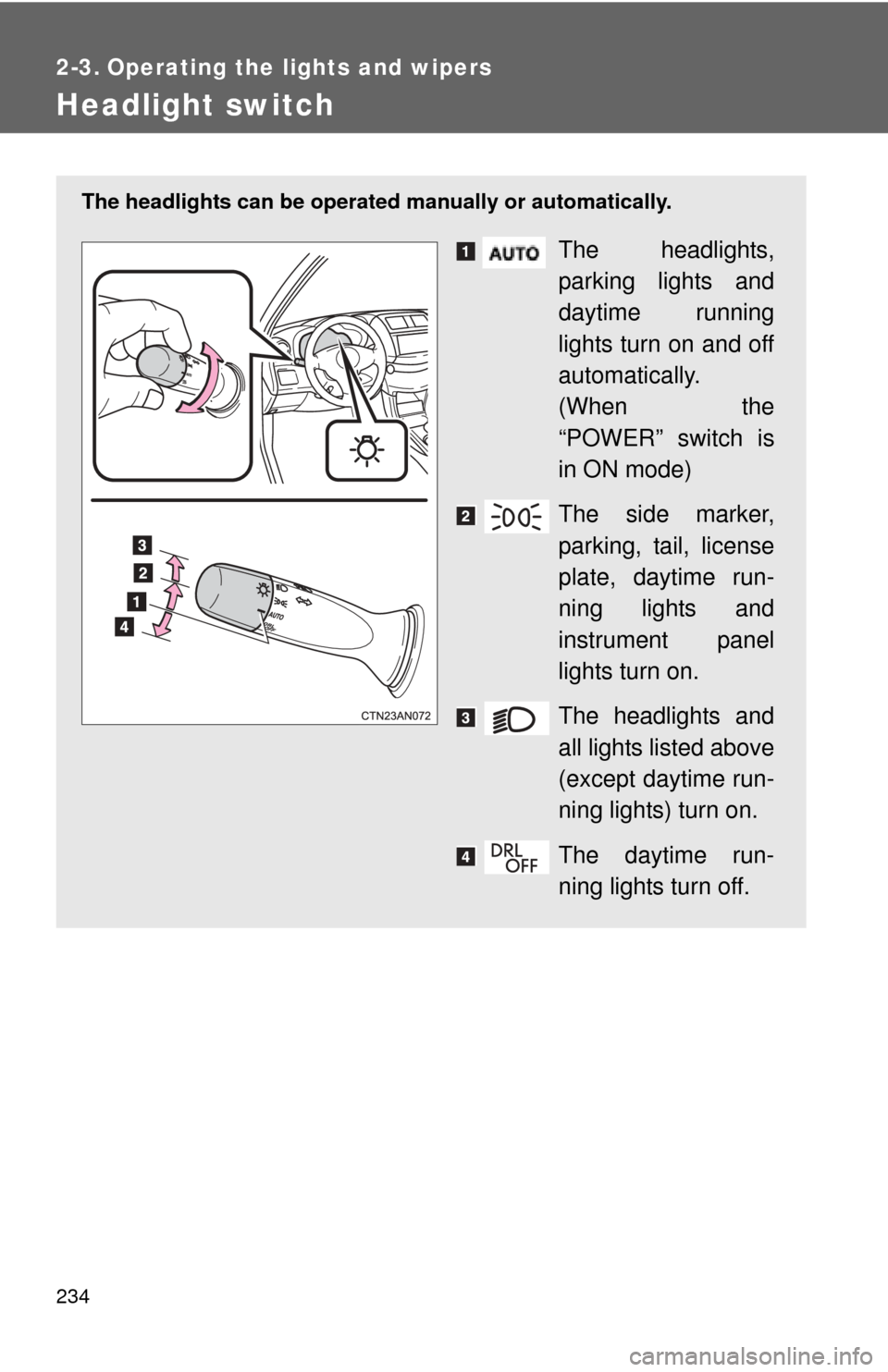
234
2-3. Operating the lights and wipers
Headlight switch
The headlights can be operated manually or automatically.
The headlights,
parking lights and
daytime running
lights turn on and off
automatically.
(When the
“POWER” switch is
in ON mode)
The side marker,
parking, tail, license
plate, daytime run-
ning lights and
instrument panel
lights turn on.
The headlights and
all lights listed above
(except daytime run-
ning lights) turn on.
The daytime run-
ning lights turn off.