fuel TOYOTA RAV4 HYBRID 2020 (in English) User Guide
[x] Cancel search | Manufacturer: TOYOTA, Model Year: 2020, Model line: RAV4 HYBRID, Model: TOYOTA RAV4 HYBRID 2020Pages: 748, PDF Size: 30.6 MB
Page 77 of 748
771-4. Hybrid system
1
For safety and security
■Running out of fuel
When the vehicle has run out of fuel
and the hybrid system cannot be
started, refuel th e vehicle with at
least enough gasoline to make the
low fuel level warning light ( P.644)
go off. If there is only a small
amount of fuel, th e hybrid system
may not be able to start. (The stan-
dard amount of fuel is about 2.3 gal.
[8.8 L, 1.9 Imp.gal.], when the vehi-
cle is on a level surface. This value
may vary when the vehicle is on a
slope. Add extra fuel when the vehi-
cle is inclined.)
■Electromagnetic waves
●High voltage parts and cables on
hybrid vehicles incorporate elec-
tromagnetic shielding, and there-
fore emit approximately the same
amount of electromagnetic waves
as conventional gasoline pow-
ered vehicles or home electronic
appliances.
●Your vehicle may cause sound
interference in so me third party-
produced radio parts.
■Hybrid battery (tr action battery)
The hybrid battery (traction battery)
has a limited service life. The lifes-
pan of the hybrid battery (traction
battery) can change in accordance
with driving style and driving condi-
tions.
■Starting the hybrid system in an
extremely cold environment
When the hybrid battery (traction
battery) is extremely cold (below
approximately -22°F [-30°C]) under
the influence of t he outside tem-
perature, it may no t be possible to
start the hybrid system. In this case,
try to start the hyb rid system again
after the temperature of the hybrid
battery increases due to the outside
temperature increase etc.
WARNING
■High voltage precautions
This vehicle has high voltage DC
and AC systems as well as a 12-
volt system. DC and AC high volt-
age is very dangerous and can
cause severe burns and electric
shock that may result in death or
serious injury.
●Never touch, disassemble,
remove or replace the high volt-
age parts, cables or their con-
nectors.
●The hybrid system will become
hot after starting as the system
uses high voltage. Be careful of
both the high voltage and the
high temperature, and always
obey the warning labels
attached to the vehicle.
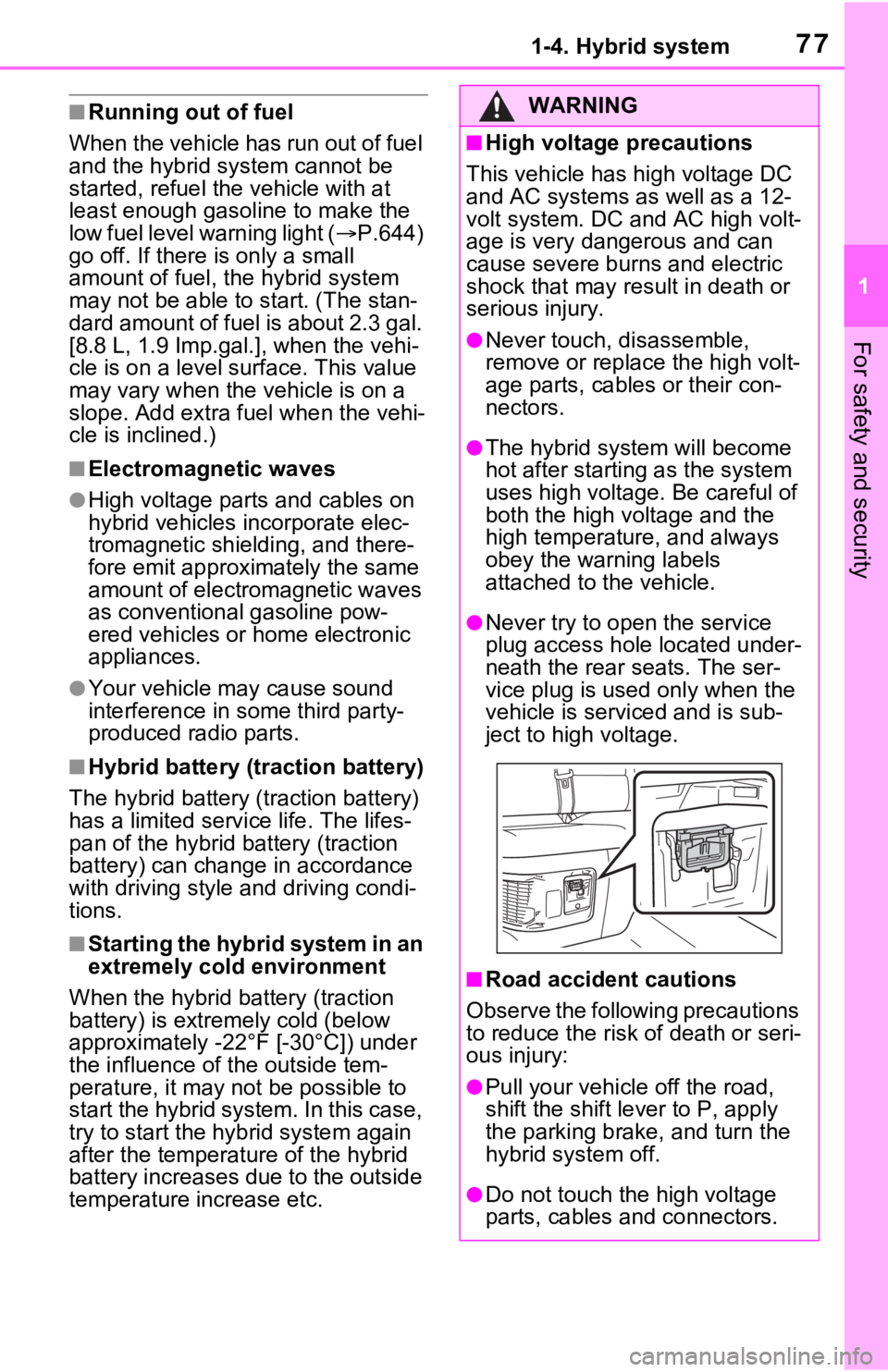
●Never try to open the service
plug access hole located under-
neath the rear seats. The ser-
vice plug is used only when the
vehicle is serviced and is sub-
ject to high voltage.
■Road accident cautions
Observe the following precautions
to reduce the risk of death or seri-
ous injury:
●Pull your vehicle off the road,
shift the shift le ver to P, apply
the parking brake, and turn the
hybrid system off.
●Do not touch the high voltage
parts, cables and connectors.
Page 78 of 748

781-4. Hybrid system
WARNING
●If electric wires are exposed
inside or outside your vehicle,
an electric shock may occur.
Never touch exposed electric
wires.
●If a fire occurs in the hybrid
vehicle, leave the vehicle as
soon as possible. Never use a
fire extinguisher that is not
meant for electric fires. Using
even a small amount of water
may be dangerous.
●If your vehicle needs to be
towed, do so with four wheels
raised. If the wheels connected
to the electric motor (traction
motor) are on the ground when
towing, the motor may continue
to generate electricity. This may
cause a fire. ( P.633)
●Carefully inspect the ground
under the vehicle. If you find
that liquid has leaked onto the
ground, the fuel system may
have been damaged. Leave the
vehicle as soon as possible.
AXAH54L models*
●If a fluid leak occurs, do not
touch the fluid as it may be
strong alkaline electrolyte from
the hybrid battery (traction bat-
tery). If it comes into contact
with your skin or eyes, wash it
off immediately with a large
amount of water or, if possible,
boric acid solution. Seek imme-
diate medical attention.
*: The model code is indicated on
the Certification Regulation
Label. ( P.678)
AXAL54L models*
●Do not touch the battery if liquid
is leaking from or adhering to it.
If electrolyte (carbonic-based
organic electrolyte) from the
hybrid battery (traction battery)
comes into contact with the
eyes or skin, it could cause
blindness or skin wounds. In the
unlikely event that it comes into
contact with the eyes or skin,
wash it off immediately with a
large amount of water, and seek
immediate medical attention.
●If electrolyte is leaking from the
hybrid battery (traction battery),
do not approac h the vehicle.
Even in the unlikely event that
the hybrid battery (traction bat-
tery) is damaged, the internal
construction of the battery will
prevent a large amount of elec-
trolyte from l eaking out. How-
ever, any electrolyte that does
leak out will give off a vapor.
This vapor is an irritant to skin
and eyes and could cause acute
poisoning if inhaled.
●Do not bring burning or high-
temperature items close to the
electrolyte.
The electrolyte may ignite and
cause a fire.
*: The model code is indicated on
the Certificatio n Regulation
Label. ( P.678)
■Hybrid battery (traction bat-
tery)
●AXAL54L models*: Your vehi-
cle contains a sealed lithium-ion
battery.
*: The model code is indicated on
the Certificatio n Regulation
Label. ( P.678)
Page 80 of 748
801-4. Hybrid system
When a certain level of impact is
detected by the impact sensor,
the emergency shut off system
blocks the high voltage current
and stops the fuel pump to mini-
mize the risk of electrocution
and fuel leakage. If the emer-
gency shut off system activates,
your vehicle will not restart. To
restart the hybrid system, con-
tact your Toyota dealer.
A message is automatically dis-played when a malfunction
occurs in the hybrid system or
an improper operation is
attempted.
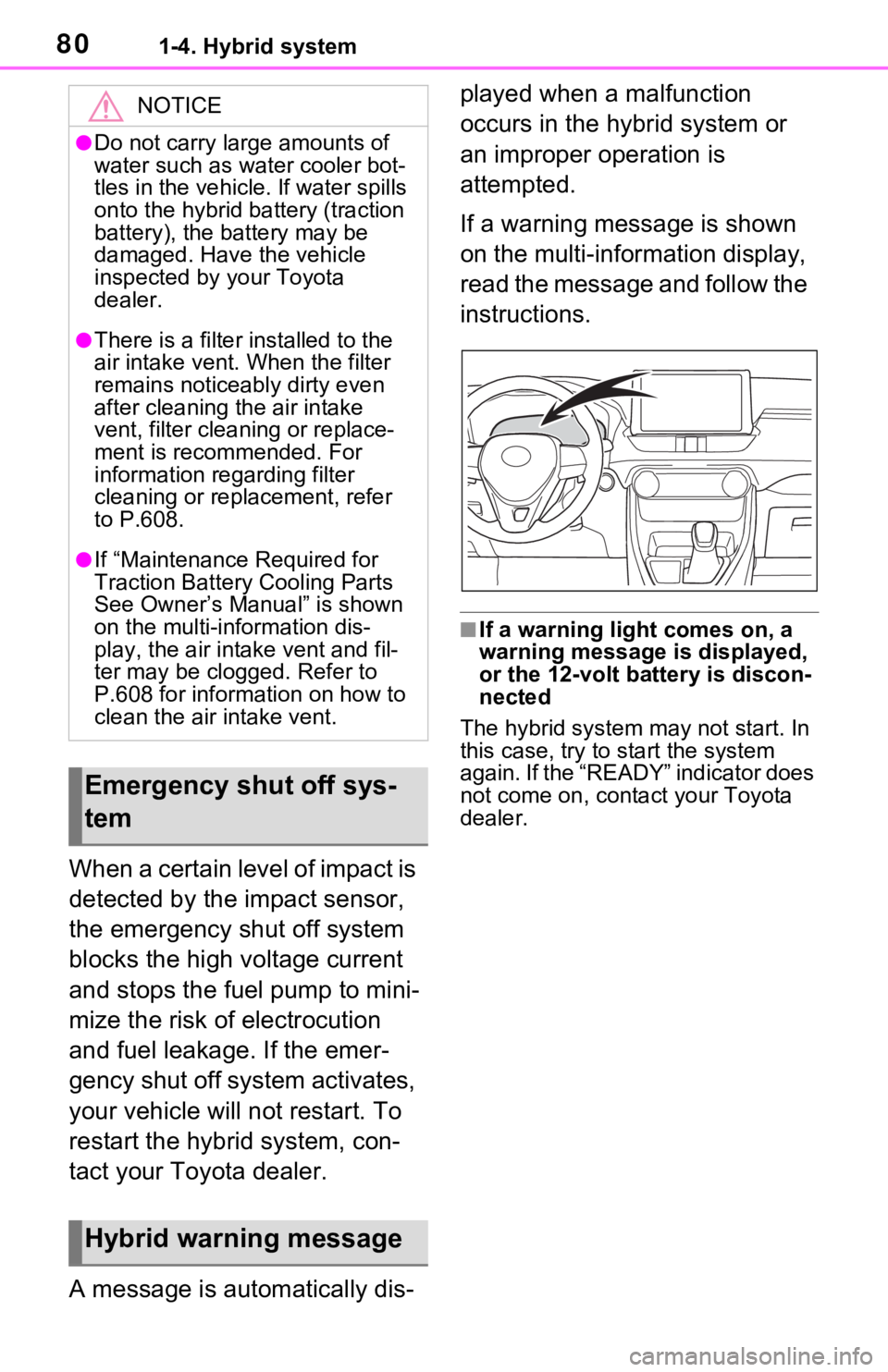
If a warning message is shown
on the multi-information display,
read the message and follow the
instructions.
■If a warning light comes on, a
warning message
is displayed,
or the 12-volt battery is discon-
nected
The hybrid system may not start. In
this case, try to start the system
again. If the “READY” indicator does
not come on, contact your Toyota
dealer.
NOTICE
●Do not carry large amounts of
water such as water cooler bot-
tles in the vehicle. If water spills
onto the hybrid battery (traction
battery), the battery may be
damaged. Have the vehicle
inspected by your Toyota
dealer.
●There is a filter installed to the
air intake vent. When the filter
remains noticeably dirty even
after cleaning the air intake
vent, filter cleaning or replace-
ment is recommended. For
information rega rding filter
cleaning or replacement, refer
to P.608.
●If “Maintenance Required for
Traction Battery Cooling Parts
See Owner’s Manual” is shown
on the multi-information dis-
play, the air intake vent and fil-
ter may be clogged. Refer to
P.608 for information on how to
clean the air intake vent.
Emergency shut off sys-
tem
Hybrid warning message
Page 90 of 748
902-1. Instrument cluster
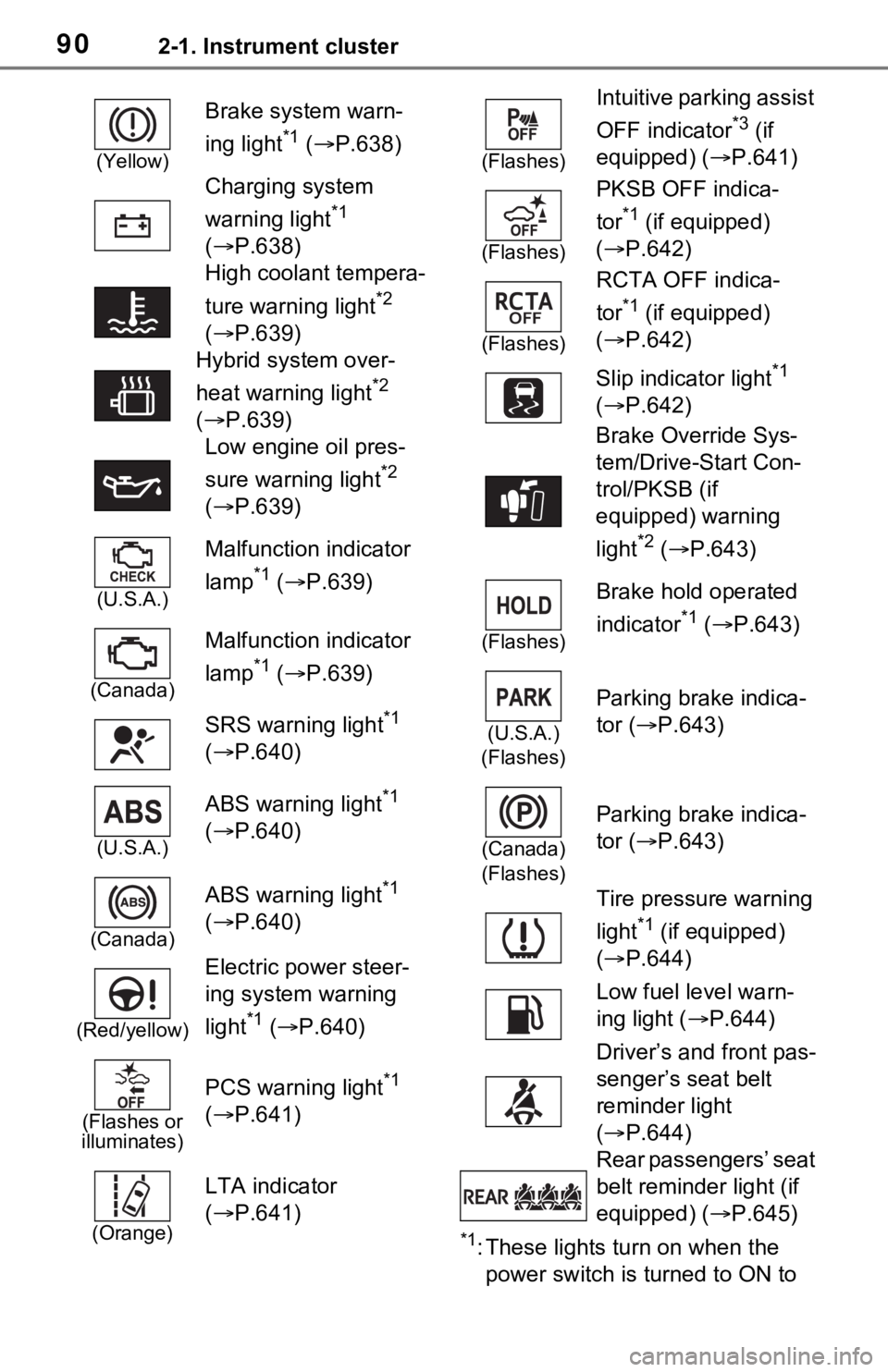
*1: These lights turn on when the
power switch is turned to ON to
(Yellow)
Brake system warn-
ing light
*1 ( P.638)
Charging system
warning light
*1
( P.638)
High coolant tempera-
ture warning light
*2
( P.639)
Hybrid system over-
heat warning light
*2
( P.639)
Low engine oil pres-
sure warning light
*2
( P.639)
(U.S.A.)
Malfunction indicator
lamp
*1 ( P.639)
(Canada)
Malfunction indicator
lamp
*1 ( P.639)
SRS warning light
*1
( P.640)
(U.S.A.)
ABS warning light*1
( P.640)
(Canada)
ABS warning light*1
( P.640)
(Red/yellow)
Electric power steer-
ing system warning
light
*1 ( P.640)
(Flashes or
illuminates)
PCS warning light*1
( P.641)
(Orange)
LTA indicator
( P.641)
(Flashes)
Intuitive parking assist
OFF indicator
*3 (if
equipped) ( P.641)
(Flashes)
PKSB OFF indica-
tor
*1 (if equipped)
( P.642)
(Flashes)
RCTA OFF indica-
tor
*1 (if equipped)
( P.642)
Slip indicator light
*1
( P.642)
Brake Override Sys-
tem/Drive-Start Con-
trol/PKSB (if
equipped) warning
light
*2 ( P.643)
(Flashes)
Brake hold operated
indicator
*1 ( P.643)
(U.S.A.)
(Flashes)
Parking brake indica-
tor ( P.643)
(Canada)
(Flashes)
Parking brake indica-
tor ( P.643)
Tire pressure warning
light
*1 (if equipped)
( P.644)
Low fuel level warn-
ing light ( P.644)
Driver’s and front pas-
senger’s seat belt
reminder light
( P.644)
Rear passengers’ seat
belt reminder light (if
equipped) ( P.645)
Page 94 of 748
942-1. Instrument cluster
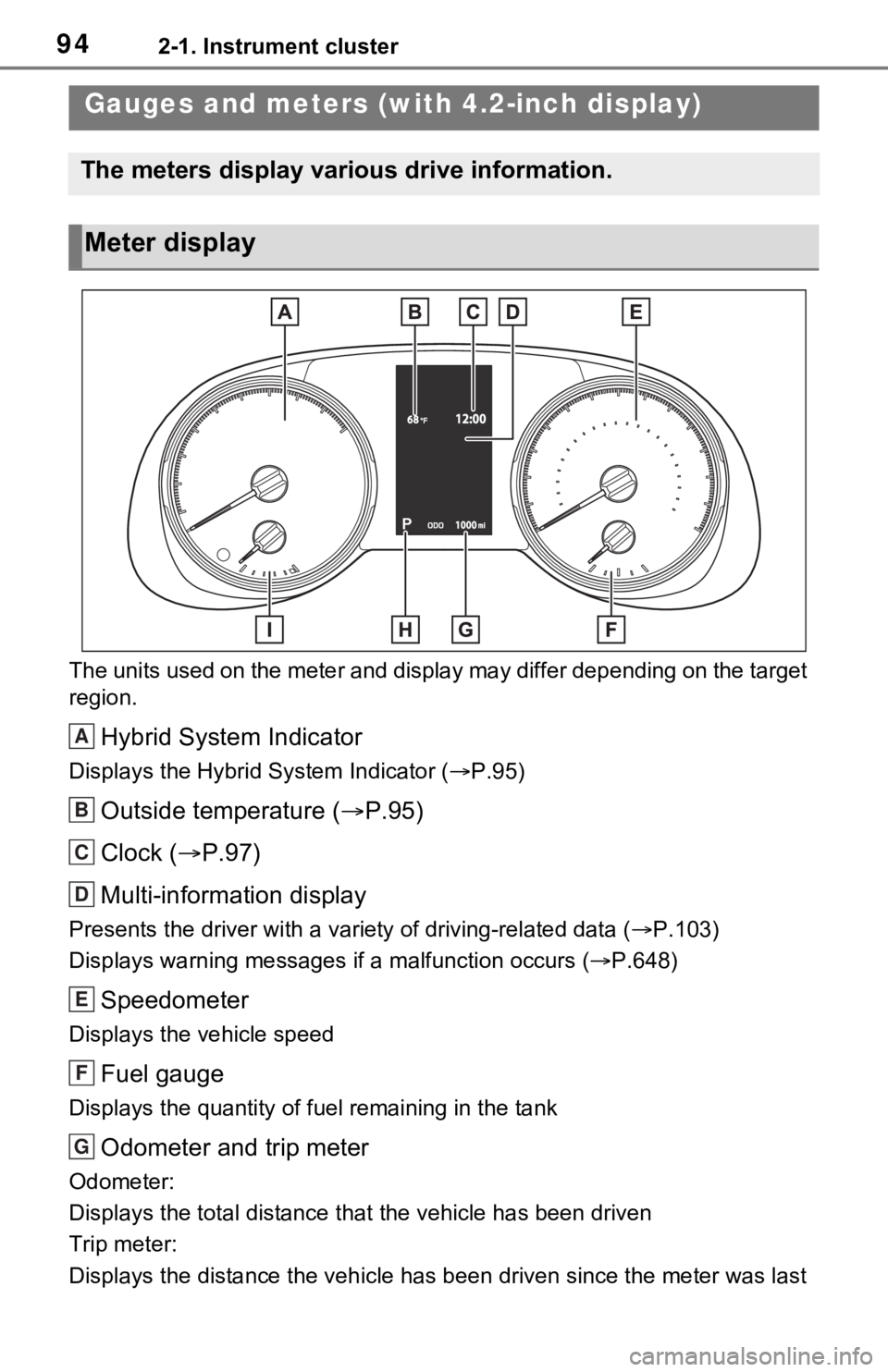
The units used on the meter and display may differ depending on the target
region.
Hybrid System Indicator
Displays the Hybrid System Indicator ( P.95)
Outside temperature ( P.95)
Clock ( P.97)
Multi-information display
Presents the driver with a variety of driving-related data ( P.103)
Displays warning messages if a malfunction occurs (P.648)
Speedometer
Displays the vehicle speed
Fuel gauge
Displays the quantity of fu el remaining in the tank
Odometer and trip meter
Odometer:
Displays the total distance th at the vehicle has been driven
Trip meter:
Displays the distance the vehicle has been driven since the meter was last
Gauges and meters (w ith 4.2-inch display)
The meters display various drive information.
Meter display
A
B
C
D
E
F
G
Page 98 of 748
982-1. Instrument cluster
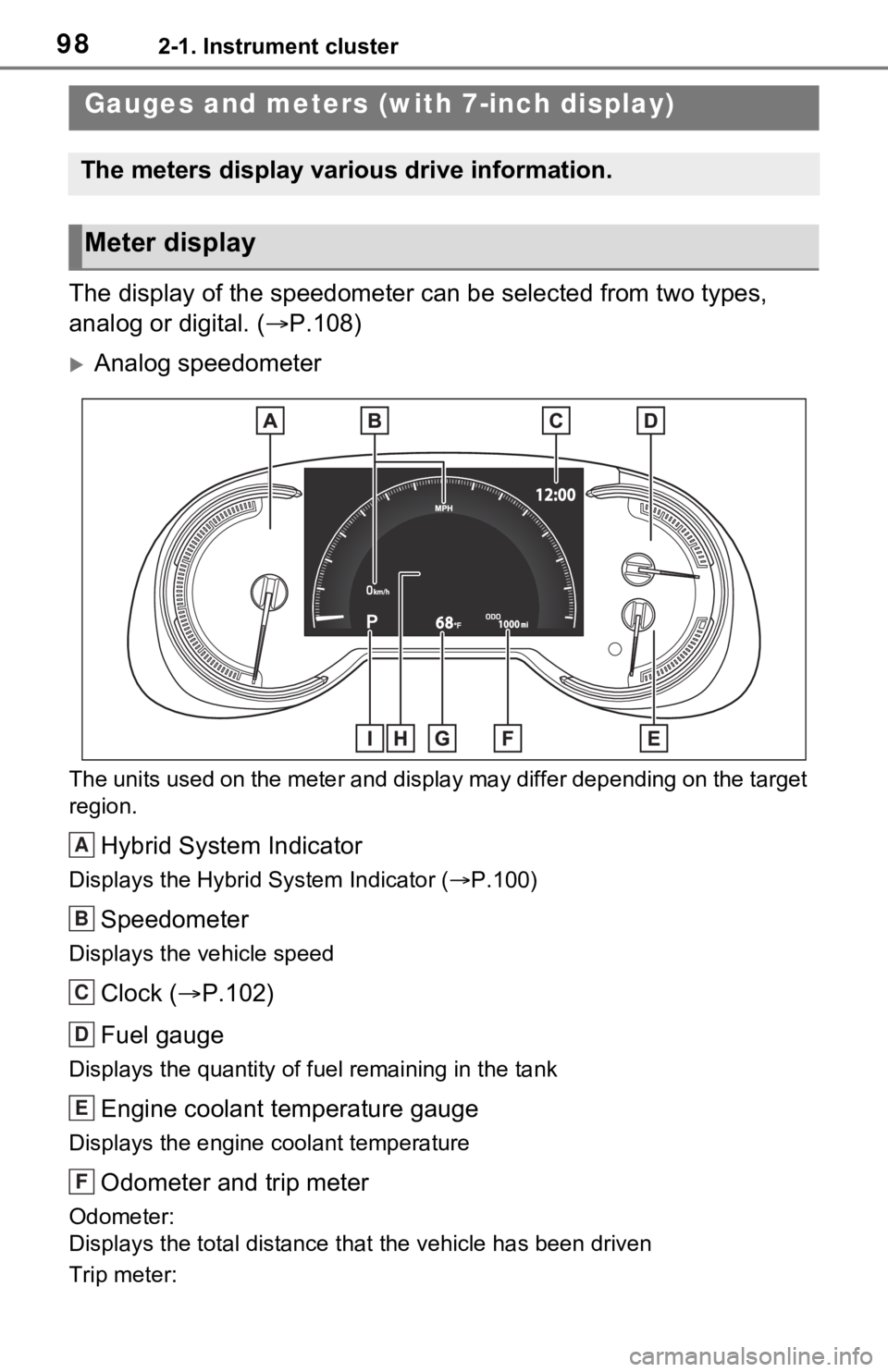
The display of the speedometer can be selected from two types,
analog or digital. (P.108)
Analog speedometer
The units used on the meter and display may differ depending on the target
region.
Hybrid System Indicator
Displays the Hybrid System Indicator ( P.100)
Speedometer
Displays the vehicle speed
Clock ( P.102)
Fuel gauge
Displays the quantity of fu el remaining in the tank
Engine coolant temperature gauge
Displays the engine coolant temperature
Odometer and trip meter
Odometer:
Displays the total distance th at the vehicle has been driven
Trip meter:
Gauges and meters (with 7-inch display)
The meters display various drive information.
Meter display
A
B
C
D
E
F
Page 99 of 748
992-1. Instrument cluster
2
Vehicle status information and indicators
Displays the distance the vehicle has been driven since the meter was last
reset. Trip meters “A” and “B” c an be used to record and display different
distances independently.
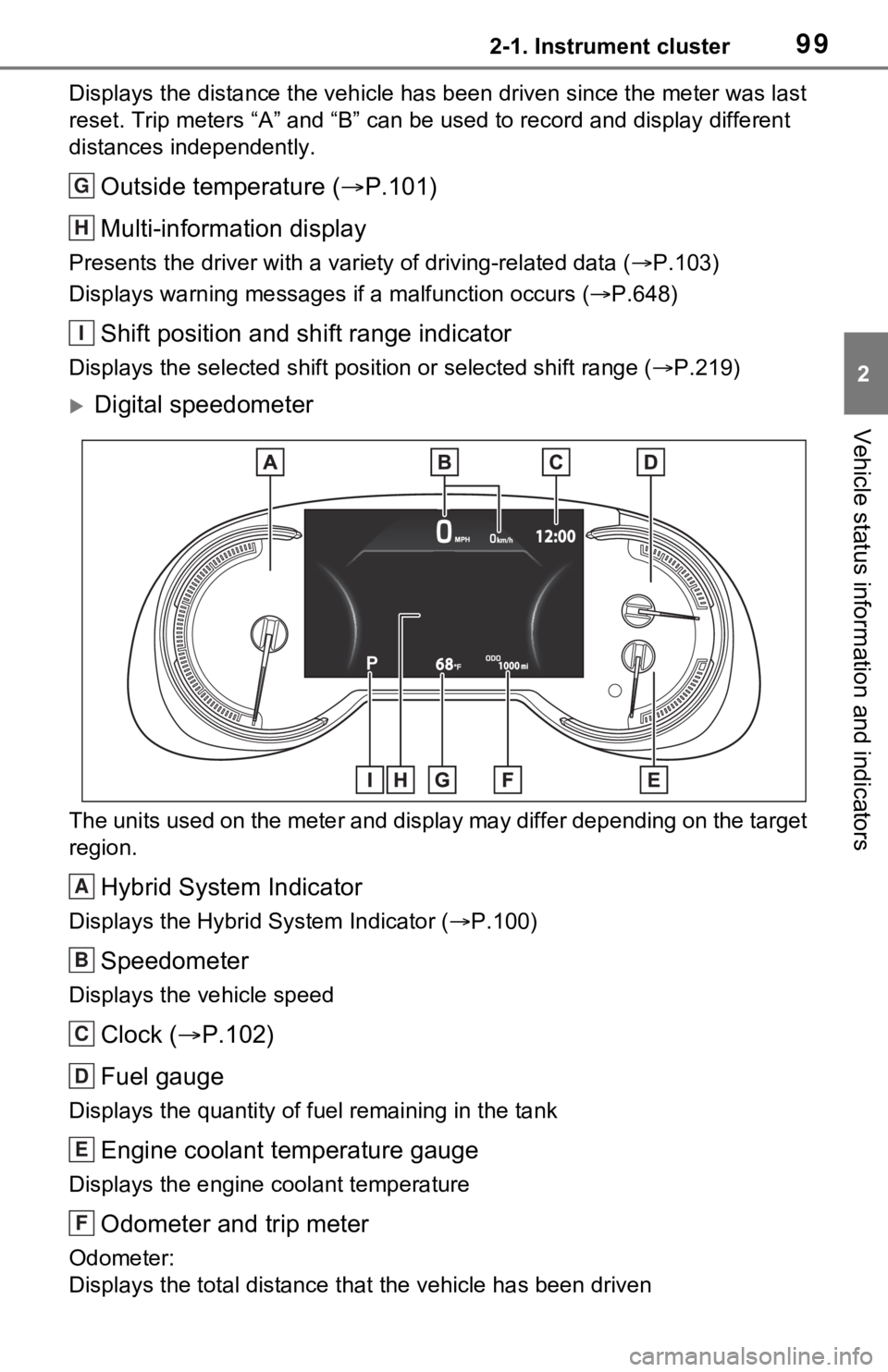
Outside temperature ( P.101)
Multi-information display
Presents the driver with a variety of driving-related data ( P.103)
Displays warning messages if a malfunction occurs (P.648)
Shift position and shift range indicator
Displays the selected shift posit ion or selected shift range (P.219)
Digital speedometer
The units used on the meter and display may differ depending on the target
region.
Hybrid System Indicator
Displays the Hybrid System Indicator ( P.100)
Speedometer
Displays the vehicle speed
Clock ( P.102)
Fuel gauge
Displays the quantity of fu el remaining in the tank
Engine coolant temperature gauge
Displays the engine coolant temperature
Odometer and trip meter
Odometer:
Displays the total distance th at the vehicle has been driven
G
H
I
A
B
C
D
E
F
Page 103 of 748
1032-1. Instrument cluster
2
Vehicle status information and indicators
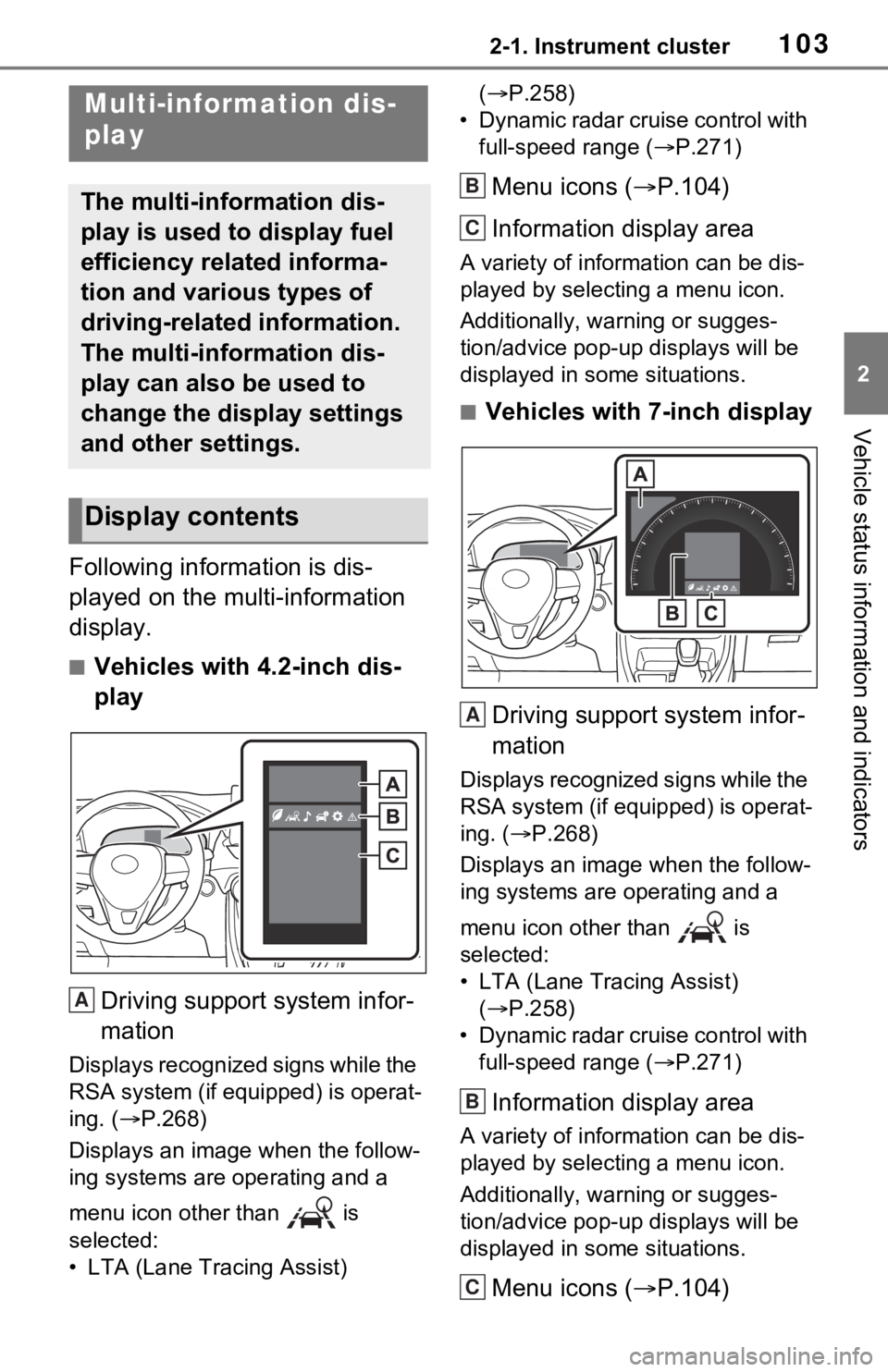
Following information is dis-
played on the multi-information
display.
■Vehicles with 4.2-inch dis-
play
Driving support system infor-
mation
Displays recognized signs while the
RSA system (if equipped) is operat-
ing. ( P.268)
Displays an image when the follow-
ing systems are operating and a
menu icon other than is
selected:
• LTA (Lane Tracing Assist) (
P.258)
• Dynamic radar cruise control with full-speed range ( P.271)
Menu icons ( P.104)
Information display area
A variety of information can be dis-
played by selecting a menu icon.
Additionally, warning or sugges-
tion/advice pop-up displays will be
displayed in some situations.
■Vehicles with 7-inch display
Driving support system infor-
mation
Displays recognized signs while the
RSA system (if equipped) is operat-
ing. ( P.268)
Displays an image when the follow-
ing systems are operating and a
menu icon other than is
selected:
• LTA (Lane Tracing Assist) ( P.258)
• Dynamic radar cruise control with full-speed range ( P.271)
Information display area
A variety of information can be dis-
played by selecting a menu icon.
Additionally, warning or sugges-
tion/advice pop-up displays will be
displayed in some situations.
Menu icons ( P.104)
Multi-information dis-
play
The multi-information dis-
play is used to display fuel
efficiency related informa-
tion and various types of
driving-related information.
The multi-information dis-
play can also be used to
change the display settings
and other settings.
Display contents
A
B
C
A
B
C
Page 105 of 748
1052-1. Instrument cluster
2
Vehicle status information and indicators
Select to display fuel consump-
tion data in various forms.
■Speedometer display/Dis-
tance to empty (4.2-inch
display)
Speedometer display
Displays the vehicle speed.
Distance to empty
Displays the driving range with remaining fuel. (
P.107)
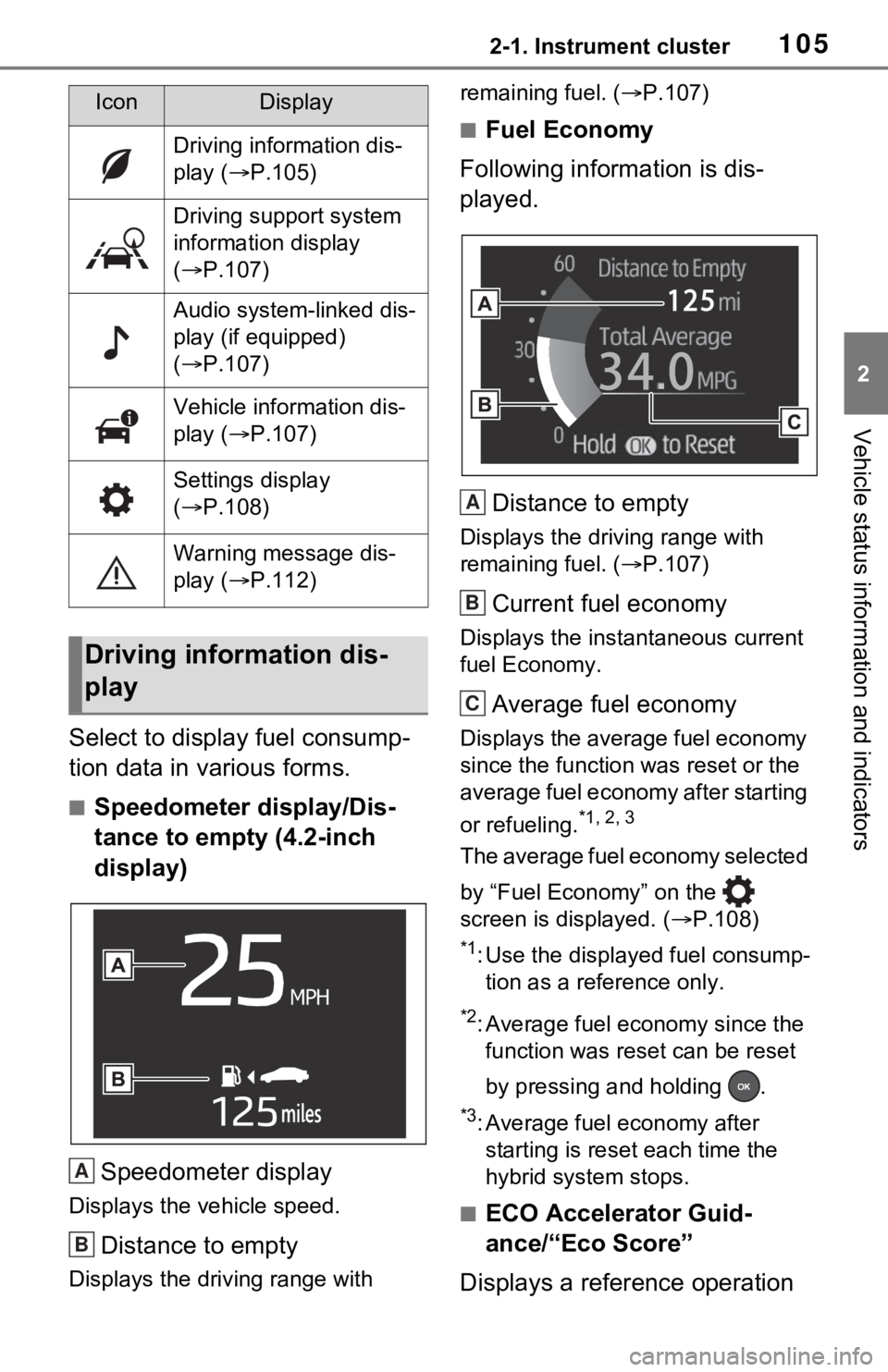
■Fuel Economy
Following information is dis-
played.
Distance to empty
Displays the driving range with
remaining fuel. ( P.107)
Current fuel economy
Displays the instantaneous current
fuel Economy.
Average fuel economy
Displays the average fuel economy
since the function was reset or the
average fuel economy after starting
or refueling.
*1, 2, 3
The average fuel economy selected
by “Fuel Economy” on the
screen is displayed. ( P.108)
*1: Use the displayed fuel consump-
tion as a reference only.
*2: Average fuel economy since the function was res et can be reset
by pressing and holding .
*3: Average fuel economy after starting is reset each time the
hybrid system stops.
■ECO Accelerator Guid-
ance/“Eco Score”
Displays a reference operation
IconDisplay
Driving information dis-
play ( P.105)
Driving support system
information display
( P.107)
Audio system-linked dis-
play (if equipped)
( P.107)
Vehicle information dis-
play ( P.107)
Settings display
( P.108)
Warning message dis-
play ( P.112)
Driving information dis-
play
A
B
A
B
C
Page 107 of 748
1072-1. Instrument cluster
2
Vehicle status information and indicators
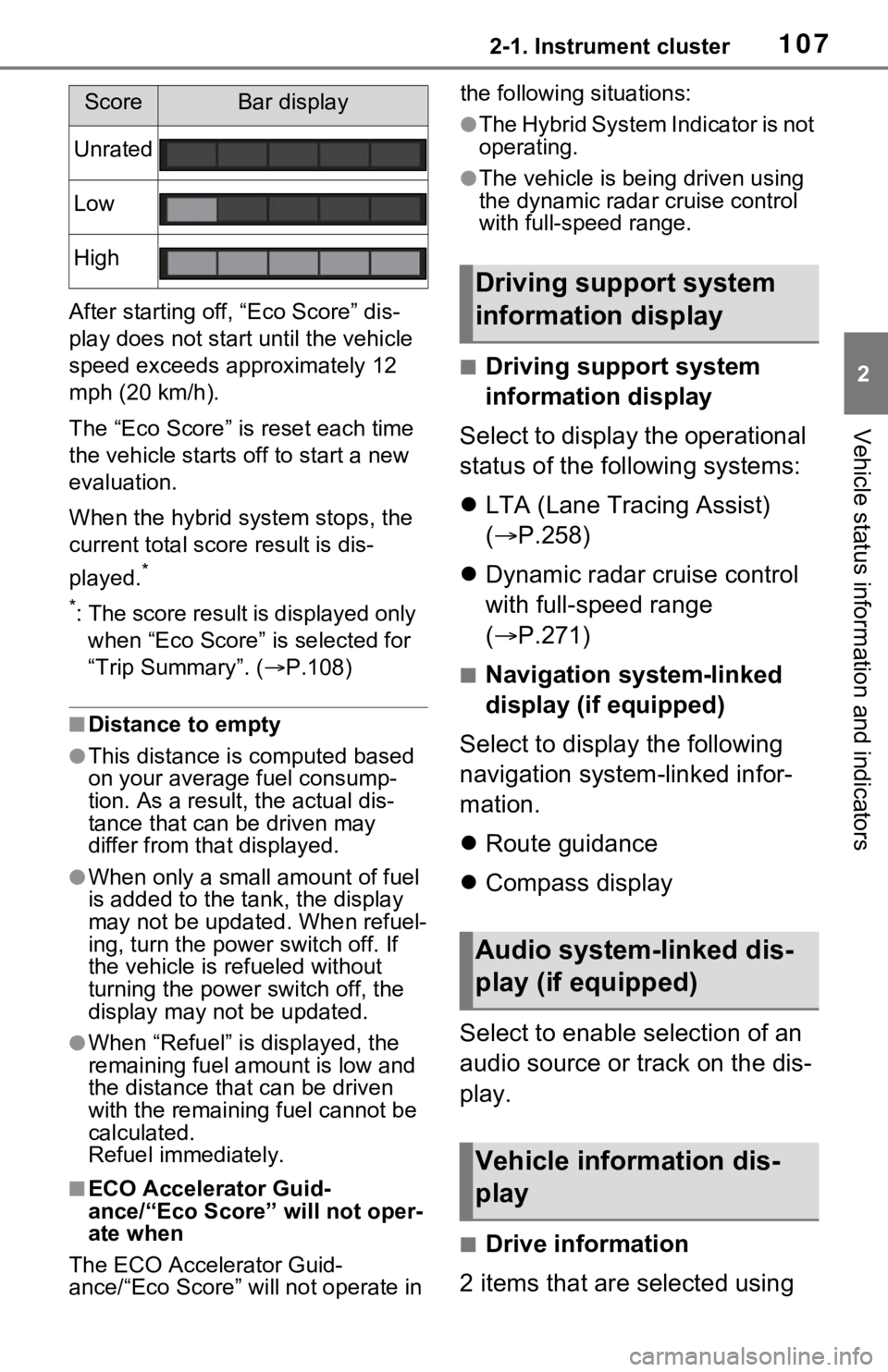
After starting off, “Eco Score” dis-
play does not start until the vehicle
speed exceeds approximately 12
mph (20 km/h).
The “Eco Score” is reset each time
the vehicle starts off to start a new
evaluation.
When the hybrid system stops, the
current total score result is dis-
played.
*
*
: The score result is displayed only when “Eco Score” is selected for
“Trip Summary”. ( P.108)
■Distance to empty
●This distance is computed based
on your averag e fuel consump-
tion. As a result, the actual dis-
tance that can be driven may
differ from tha t displayed.
●When only a small amount of fuel
is added to the tank, the display
may not be updated. When refuel-
ing, turn the power switch off. If
the vehicle is refueled without
turning the power switch off, the
display may not be updated.
●When “Refuel” is displayed, the
remaining fuel amount is low and
the distance that can be driven
with the remaining fuel cannot be
calculated.
Refuel immediately.
■ECO Accelerator Guid-
ance/“Eco Score” will not oper-
ate when
The ECO Accelerator Guid-
ance/“Eco Score” will not operate in the following situations:
●The Hybrid System Indicator is not
operating.
●The vehicle is bei
ng driven using
the dynamic radar cruise control
with full-speed range.
■Driving support system
information display
Select to display the operational
status of the following systems:
LTA (Lane Tracing Assist)
( P.258)
Dynamic radar cruise control
with full-speed range
( P.271)
■Navigation system-linked
display (if equipped)
Select to display the following
navigation system-linked infor-
mation.
Route guidance
Compass display
Select to enable selection of an
audio source or track on the dis-
play.
■Drive information
2 items that are selected using
ScoreBar display
Unrated
Low
High
Driving support system
information display
Audio system-linked dis-
play (if equipped)
Vehicle information dis-
play