warning lights TOYOTA RAV4 HYBRID 2020 (in English) User Guide
[x] Cancel search | Manufacturer: TOYOTA, Model Year: 2020, Model line: RAV4 HYBRID, Model: TOYOTA RAV4 HYBRID 2020Pages: 748, PDF Size: 30.6 MB
Page 88 of 748
882-1. Instrument cluster
2-1.Instrument cluster
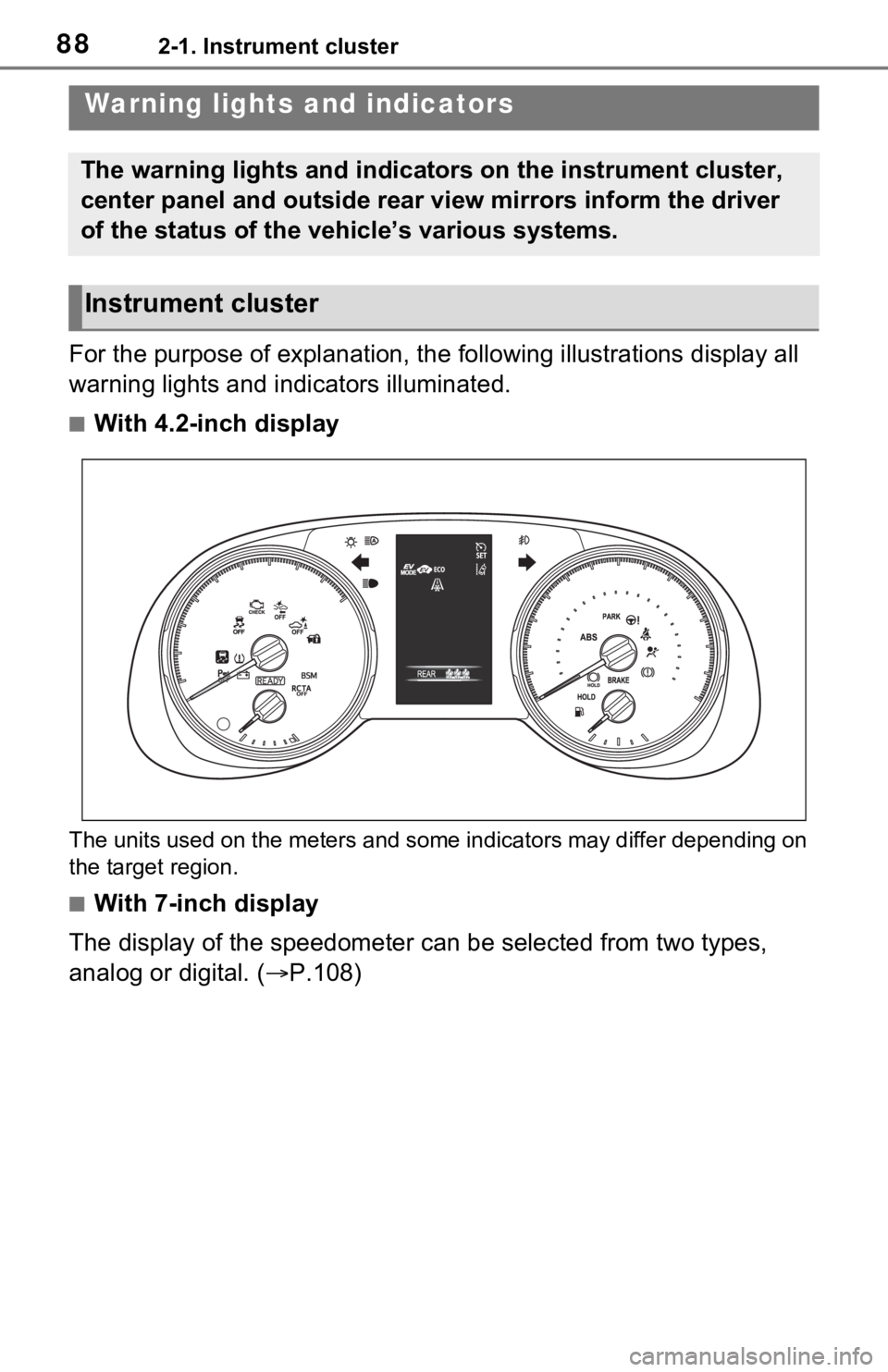
For the purpose of explanation, the following illustrations display all
warning lights and indicators illuminated.
■With 4.2-inch display
The units used on the meters and some indicators may differ dep ending on
the target region.
■With 7-inch display
The display of the speedometer can be selected from two types,
analog or digital. ( P.108)
Warning lights and indicators
The warning lights and indicators on the instrument cluster,
center panel and outside rear view mirrors inform the driver
of the status of the vehicle’s various systems.
Instrument cluster
Page 89 of 748
892-1. Instrument cluster
2
Vehicle status information and indicators
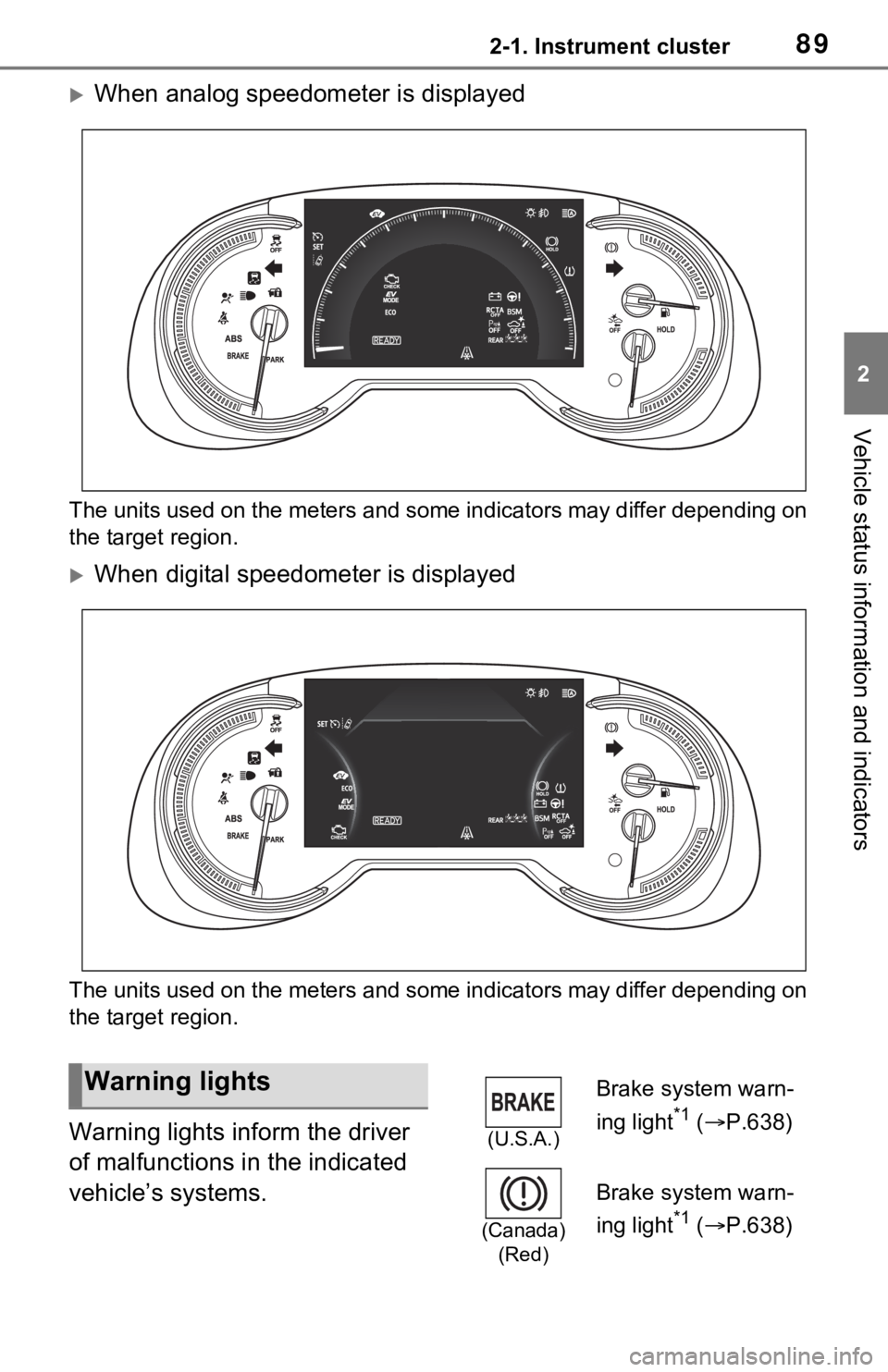
When analog speedometer is displayed
The units used on the meters and some indicators may differ dep ending on
the target region.
When digital speedometer is displayed
The units used on the meters and some indicators may differ dep ending on
the target region.
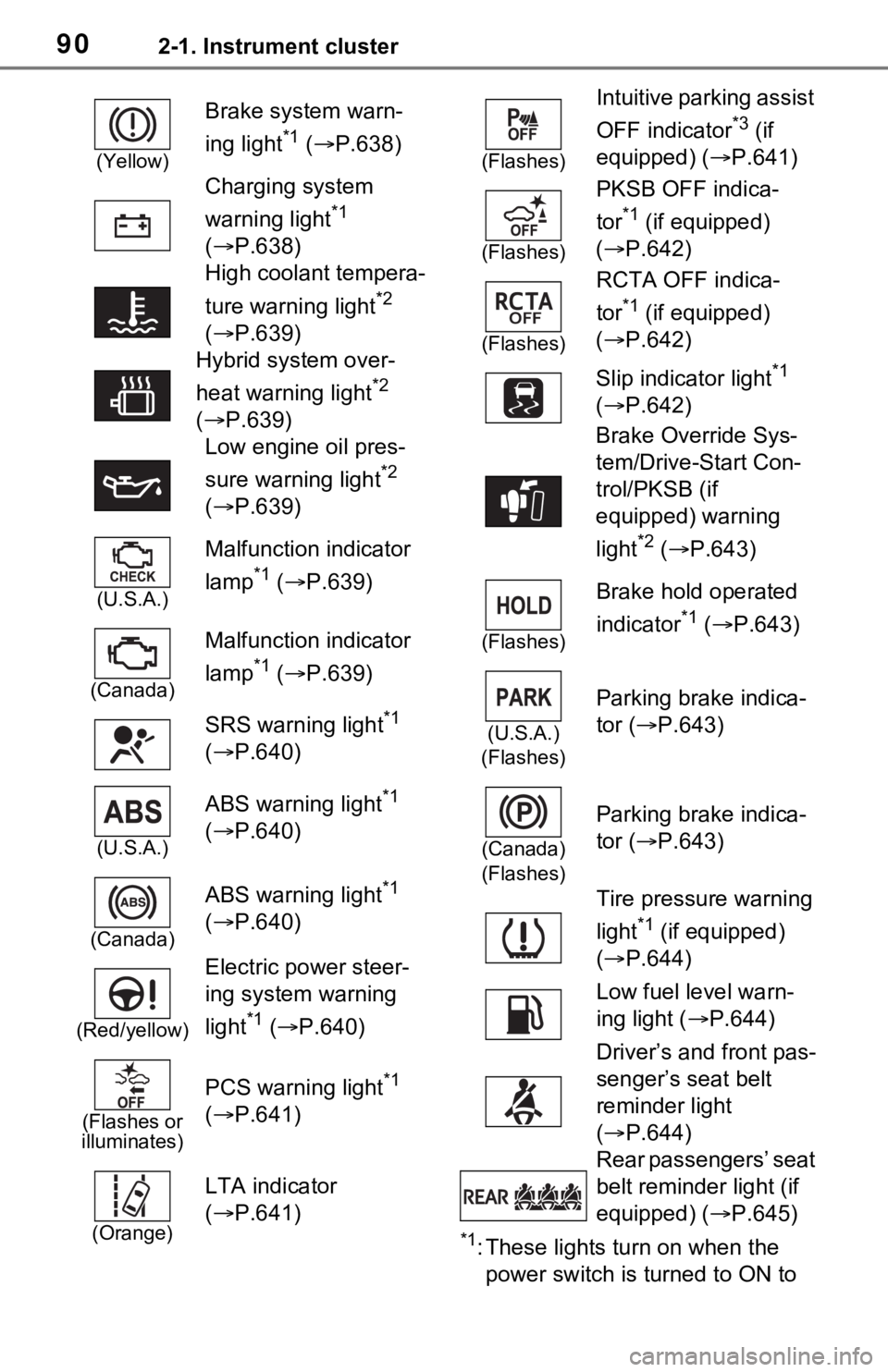
Warning lights inform the driver
of malfunctions in the indicated
vehicle’s systems.
Warning lights
(U.S.A.)
Brake system warn-
ing light
*1 ( P.638)
(Canada)
(Red)
Brake system warn-
ing light
*1 ( P.638)
Page 90 of 748
902-1. Instrument cluster
*1: These lights turn on when the
power switch is turned to ON to
(Yellow)
Brake system warn-
ing light
*1 ( P.638)
Charging system
warning light
*1
( P.638)
High coolant tempera-
ture warning light
*2
( P.639)
Hybrid system over-
heat warning light
*2
( P.639)
Low engine oil pres-
sure warning light
*2
( P.639)
(U.S.A.)
Malfunction indicator
lamp
*1 ( P.639)
(Canada)
Malfunction indicator
lamp
*1 ( P.639)
SRS warning light
*1
( P.640)
(U.S.A.)
ABS warning light*1
( P.640)
(Canada)
ABS warning light*1
( P.640)
(Red/yellow)
Electric power steer-
ing system warning
light
*1 ( P.640)
(Flashes or
illuminates)
PCS warning light*1
( P.641)
(Orange)
LTA indicator
( P.641)
(Flashes)
Intuitive parking assist
OFF indicator
*3 (if
equipped) ( P.641)
(Flashes)
PKSB OFF indica-
tor
*1 (if equipped)
( P.642)
(Flashes)
RCTA OFF indica-
tor
*1 (if equipped)
( P.642)
Slip indicator light
*1
( P.642)
Brake Override Sys-
tem/Drive-Start Con-
trol/PKSB (if
equipped) warning
light
*2 ( P.643)
(Flashes)
Brake hold operated
indicator
*1 ( P.643)
(U.S.A.)
(Flashes)
Parking brake indica-
tor ( P.643)
(Canada)
(Flashes)
Parking brake indica-
tor ( P.643)
Tire pressure warning
light
*1 (if equipped)
( P.644)
Low fuel level warn-
ing light ( P.644)
Driver’s and front pas-
senger’s seat belt
reminder light
( P.644)
Rear passengers’ seat
belt reminder light (if
equipped) ( P.645)
Page 92 of 748
922-1. Instrument cluster
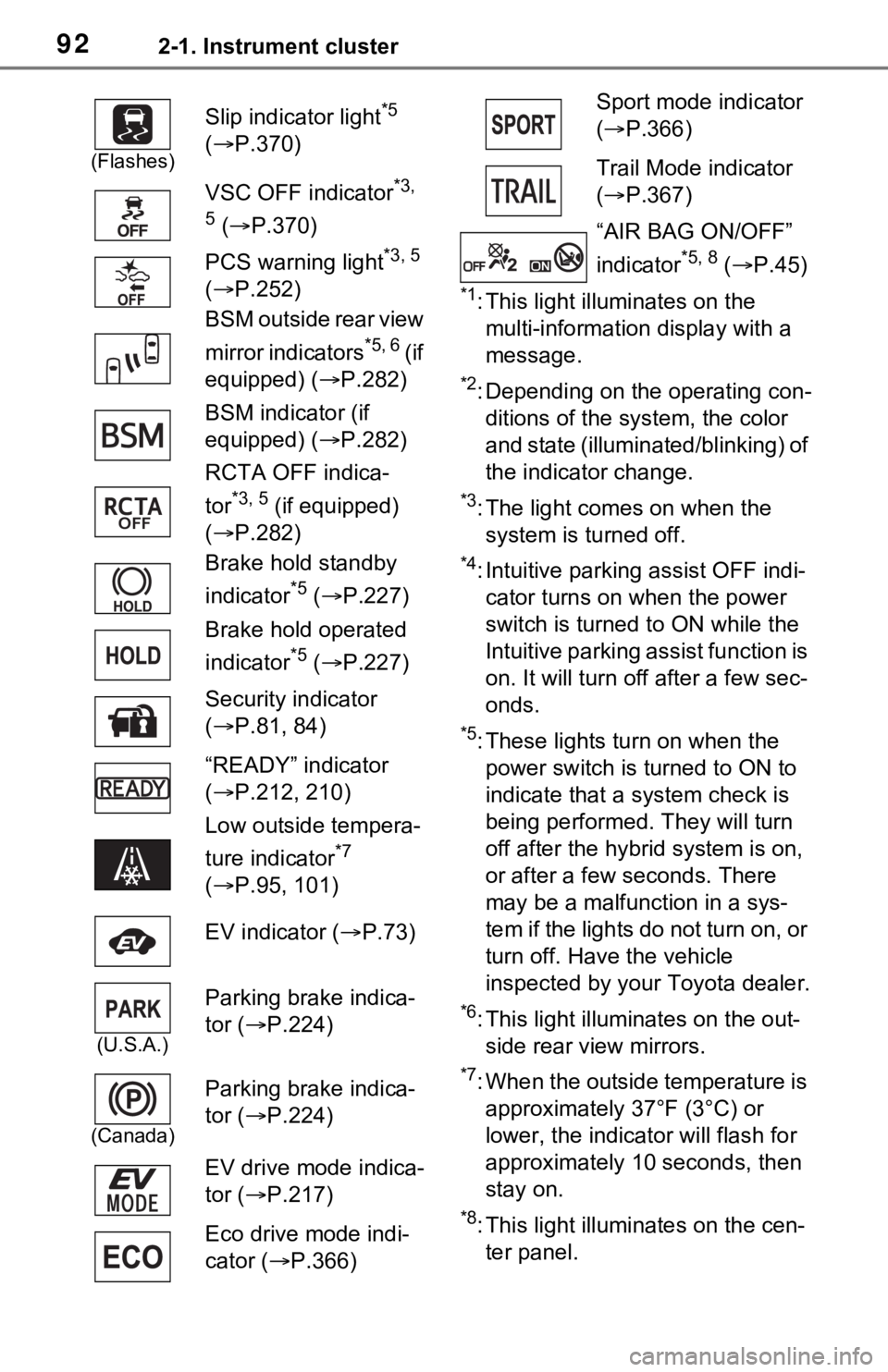
*1: This light illuminates on the multi-information display with a
message.
*2: Depending on the operating con-ditions of the system, the color
and state (illuminat ed/blinking) of
the indicator change.
*3: The light comes on when the system is turned off.
*4: Intuitive parking assist OFF indi-cator turns on wh en the power
switch is turned t o ON while the
Intuitive parking assist function is
on. It will turn off after a few sec-
onds.
*5: These lights tu rn on when the
power switch is turned to ON to
indicate that a system check is
being performed. They will turn
off after the hybrid system is on,
or after a few seconds. There
may be a malfunction in a sys-
tem if the lights do not turn on, or
turn off. Have the vehicle
inspected by your Toyota dealer.
*6: This light illuminates on the out- side rear view mirrors.
*7: When the outside temperature is approximately 37°F (3°C) or
lower, the indicator will flash for
approximately 10 seconds, then
stay on.
*8: This light illuminates on the cen-ter panel.
(Flashes)
Slip indicator light*5
( P.370)
VSC OFF indicator
*3,
5
( P.370)
PCS warning light
*3, 5
( P.252)
BSM outside rear view
mirror indicators
*5, 6 ( i f
equipped) ( P.282)
BSM indicator (if
equipped) ( P.282)
RCTA OFF indica-
tor
*3, 5 (if equipped)
( P.282)
Brake hold standby
indicator
*5 ( P.227)
Brake hold operated
indicator
*5 ( P.227)
Security indicator
( P.81, 84)
“READY” indicator
( P.212, 210)
Low outside tempera-
ture indicator
*7
( P.95, 101)
EV indicator ( P.73)
(U.S.A.)
Parking brake indica-
tor ( P.224)
(Canada)
Parking brake indica-
tor ( P.224)
EV drive mode indica-
tor ( P.217)
Eco drive mode indi-
cator ( P.366)
Sport mode indicator
( P.366)
Trail Mode indicator
( P.367)
“AIR BAG ON/OFF”
indicator
*5, 8 ( P.45)
Page 112 of 748
1122-1. Instrument cluster
Select to set the items displayed
when the power switch is turned off.
“Pop-Up Display”
Select to enable/d isable the follow-
ing pop-up displays, which may
appear in some situations.
• Intersection guidance display of the navigation system-linked sys-
tem (if equipped)
• Incoming call di splay of the
hands-free phone system (if
equipped)
• Audio operation (if equipped)
• Volume operation (if equipped)
• Voice control (if equipped)
“MID OFF”
A blank screen is displayed.
“Default Settings”
Select to reset the meter display
settings.
■Suspension of the settings dis-
play
●In the following si tuations, opera-
tion of the setting s display will be
temporarily suspended.
• When a warning message appears on the multi-information
display
• When the vehicle begins to move
●Settings for functions not
equipped to the vehicle are not
displayed.
●When a function is turned off, the
related settings for that function
are not selectable.
Select to display warning mes-
sages and measures to be
taken if a malfunction is
detected. ( P.648)
Displays suggestions to the
driver in the following situations.
To select a response to a dis-
played suggestion, use the
meter control switches.
■Suggestion to turn on the
headlights
If the headlight switch is in other
than or , and the vehicle
speed is 3 mph (5 km/h) or
higher for a certain amount of
time when the surroundings are
WARNING
■Cautions during setting up
the display
As the hybrid system needs to be
operating during setting up the
display, ensure that the vehicle is
parked in a place with adequate
ventilation. In a closed area such
as a garage, exhaust gases
including harmful carbon monox-
ide (CO) may collect and enter
the vehicle. This may lead to
death or a serious health hazard.
NOTICE
■During setting up the display
To prevent 12-vo lt battery dis-
charge, ensure that the hybrid
system is operating while setting
up the display features.
Warning message display
Suggestion function
Page 163 of 748
1633-4. Adjusting the steering wheel and mirrors
3
Before driving
*: If equipped
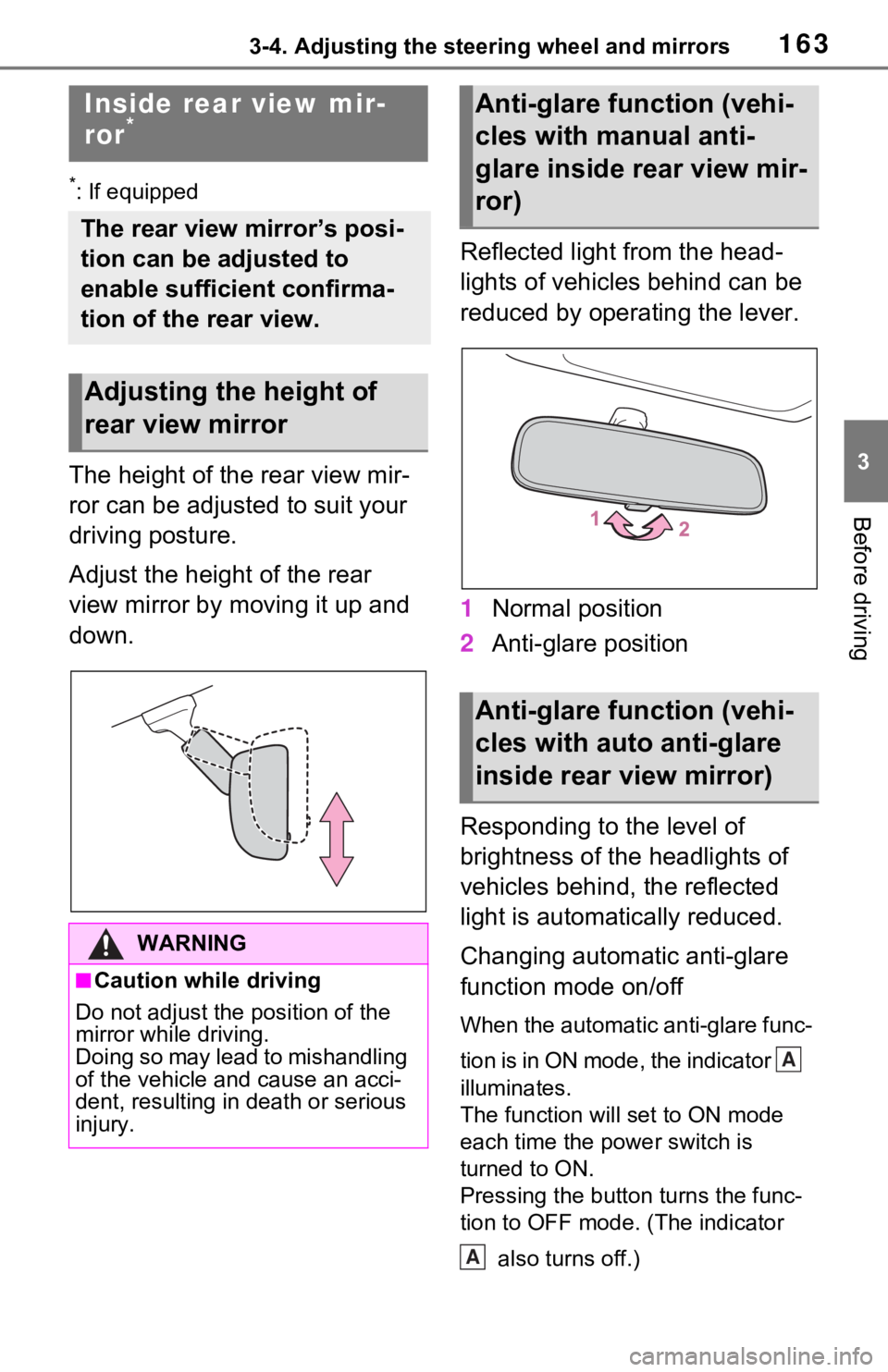
The height of the rear view mir-
ror can be adjusted to suit your
driving posture.
Adjust the height of the rear
view mirror by moving it up and
down.Reflected light from the head-
lights of vehicles behind can be
reduced by operating the lever.
1
Normal position
2 Anti-glare position
Responding to the level of
brightness of the headlights of
vehicles behind, the reflected
light is automatically reduced.
Changing automatic anti-glare
function mode on/off
When the automatic anti-glare func-
tion is in ON mode, the indicator
illuminates.
The function will set to ON mode
each time the power switch is
turned to ON.
Pressing the button turns the func-
tion to OFF mode. (The indicator also turns off.)
Inside rear view mir-
ror*
The rear view mirror’s posi-
tion can be adjusted to
enable sufficient confirma-
tion of the rear view.
Adjusting the height of
rear view mirror
WARNING
■Caution while driving
Do not adjust the position of the
mirror while driving.
Doing so may lead to mishandling
of the vehicle and cause an acci-
dent, resulting in death or serious
injury.
Anti-glare function (vehi-
cles with manual anti-
glare inside rear view mir-
ror)
Anti-glare function (vehi-
cles with auto anti-glare
inside rear view mirror)
A
A
Page 232 of 748
2324-3. Operating the lights and wipers
the tire’s angle as controlled by
steering input.
AFS operates at speeds of
approximately 6 mph (10 km/h)
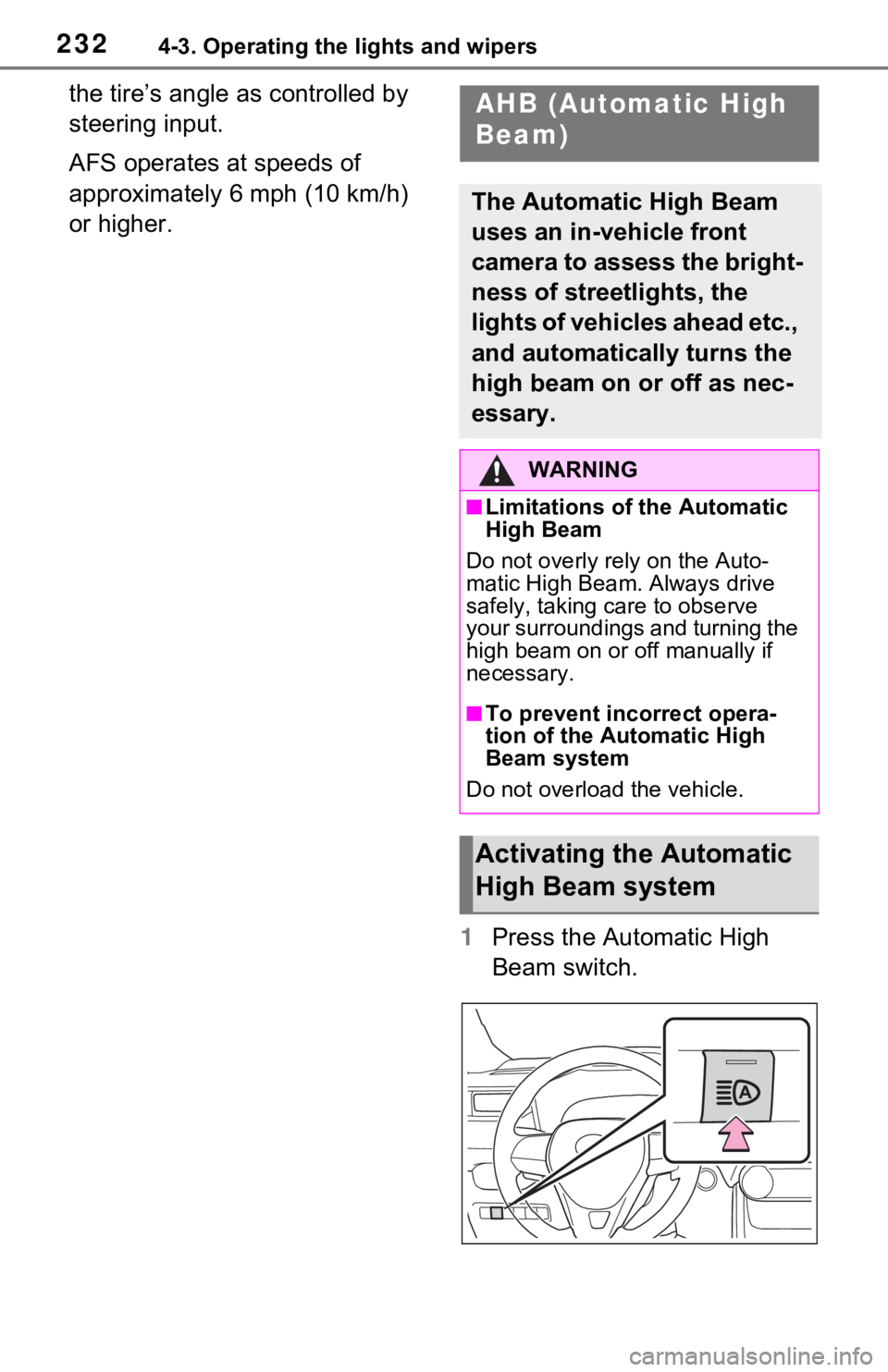
or higher.1Press the Automatic High
Beam switch.AHB (Automatic High
Beam)
The Automatic High Beam
uses an in-vehicle front
camera to assess the bright-
ness of streetlights, the
lights of vehicles ahead etc.,
and automatically turns the
high beam on or off as nec-
essary.
WARNING
■Limitations of the Automatic
High Beam
Do not overly rely on the Auto-
matic High Beam. Always drive
safely, taking care to observe
your surroundings and turning the
high beam on or off manually if
necessary.
■To prevent incorrect opera-
tion of the Automatic High
Beam system
Do not overload the vehicle.
Activating the Automatic
High Beam system
Page 238 of 748
2384-3. Operating the lights and wipers
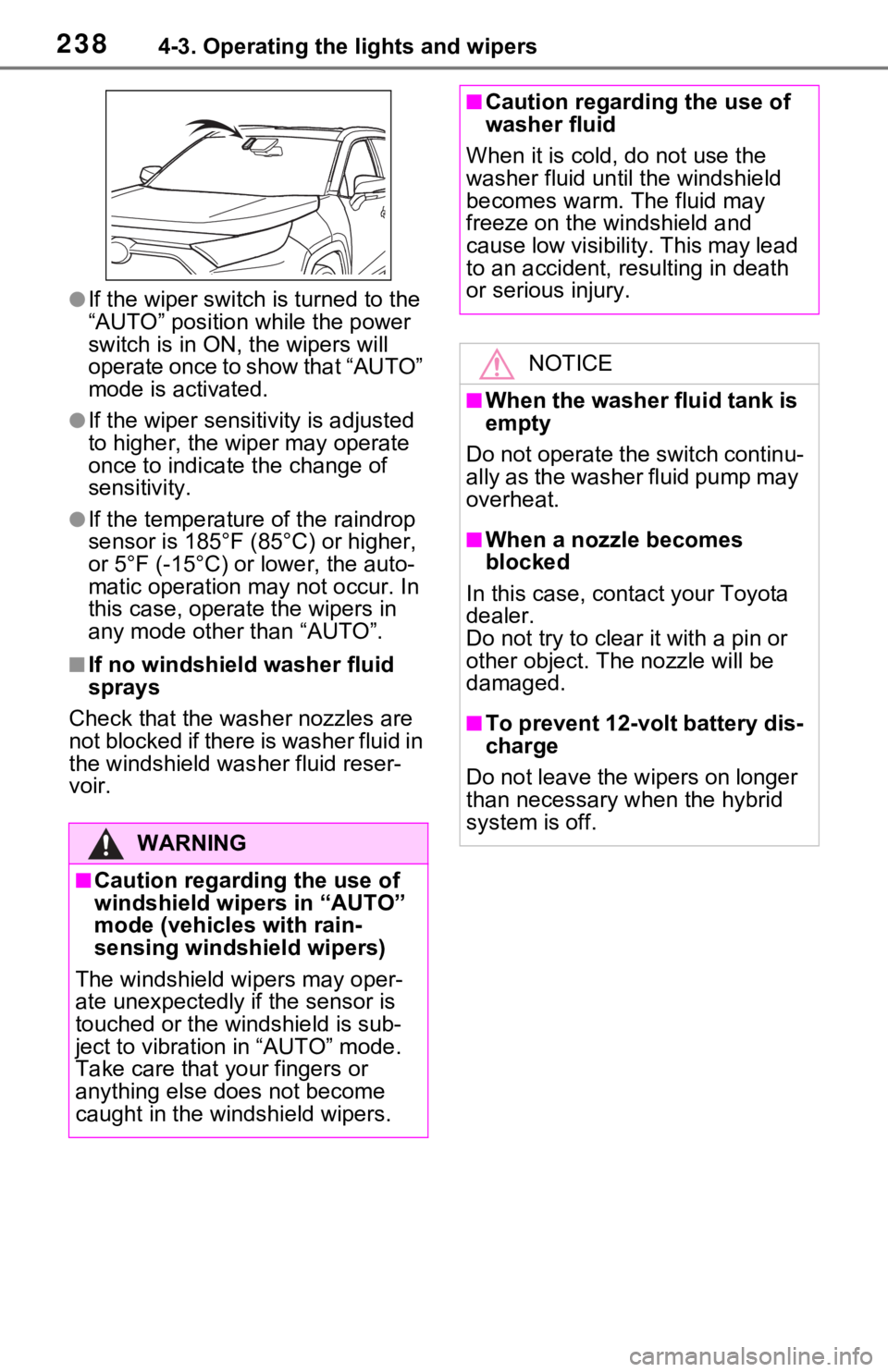
●If the wiper switch is turned to the
“AUTO” position while the power
switch is in ON, the wipers will
operate once to show that “AUTO”
mode is activated.
●If the wiper sensitivity is adjusted
to higher, the wip er may operate
once to indicate the change of
sensitivity.
●If the temperature of the raindrop
sensor is 185°F (85°C) or higher,
or 5°F (-15°C) or lower, the auto-
matic operation m ay not occur. In
this case, operate the wipers in
any mode other than “AUTO”.
■If no windshield washer fluid
sprays
Check that the wash er nozzles are
not blocked if there is washer fluid in
the windshield was her fluid reser-
voir.
WARNING
■Caution regarding the use of
windshield wipers in “AUTO”
mode (vehicles with rain-
sensing windshi eld wipers)
The windshield wipers may oper-
ate unexpectedly if the sensor is
touched or the windshield is sub-
ject to vibration in “AUTO” mode.
Take care that y our fingers or
anything else does not become
caught in the windshield wipers.
■Caution regarding the use of
washer fluid
When it is cold, do not use the
washer fluid unt il the windshield
becomes warm. The fluid may
freeze on the windshield and
cause low visibility. This may lead
to an accident, resulting in death
or serious injury.
NOTICE
■When the washer fluid tank is
empty
Do not operate the switch continu-
ally as the washer fluid pump may
overheat.
■When a nozzle becomes
blocked
In this case, contact your Toyota
dealer.
Do not try to clear it with a pin or
other object. The nozzle will be
damaged.
■To prevent 12-volt battery dis-
charge
Do not leave the wipers on longer
than necessary when the hybrid
system is off.
Page 246 of 748

2464-5. Using the driving support systems
WARNING
●Do not attach objects, such as
stickers, transparent stickers,
etc., to the outer side of the
windshield in fr ont of the front
camera (shaded area in the
illustration).
From the top of the windshield
to approximately 0.4 in. (1 cm)
below the bottom of the front
camera
Approximately 7.9 in. (20 cm)
(Approximately 4.0 in. [10 cm]
to the right and left from the
center of the front camera)
●If the part of the windshield in
front of the front camera is
fogged up or covered with con-
densation, or ice, use the wind-
shield defogger to remove the
fog, condensation, or ice.
( P.524)
●If water droplets cannot be
properly removed from the area
of the windshield in front of the
front camera by the windshield
wipers, replace the wiper insert
or wiper blade.
●Do not attach win dow tint to the
windshield.
●Replace the windshield if it is
damaged or cracked.
After replacing the windshield,
the front camera must be recali-
brated. Contact your Toyota
dealer for details.
A
B
●Do not allow liquids to contact
the front camera.
●Do not allow bright lights to
shine into the front camera.
●Do not dirty or damage the front
camera.
When cleaning the inside of the
windshield, do not allow glass
cleaner to contact the lens of
the front camera . Also, do not
touch the lens.
If the lens is dirty or damaged,
contact your Toyota dealer.
●Do not subject the front camera
to a strong impact.
●Do not change the installation
position or direction of the front
camera or remove it.
●Do not disasse mble the front
camera.
●Do not modify any components
of the vehicle around the front
camera (inside rear view mirror,
etc.) or ceiling.
●Do not attach a ny accessories
to the hood, front grille or front
bumper that may obstruct the
front camera. Contact your
Toyota dealer for details.
●If a surfboard or other long
object is to be mounted on the
roof, make sure that it will not
obstruct the front camera.
●Do not modify the headlights or
other lights.
Page 259 of 748
2594-5. Using the driving support systems
4
Driving
WARNING
●Vehicle is driven in a construc-
tion zone.
●A spare tire, tire chains, etc. are
equipped.
●When the tires have been
excessively worn, or when the
tire inflation pressure is low.
●When tires of a size other than
specified are installed.
●Vehicle is driven in traffic lanes
other than that highways and
freeways.
●When your vehicle is towing a
trailer or during emergency tow-
ing
■Preventing LTA system mal-
functions and operations per-
formed by mistake
●Do not modify the headlights or
place stickers, etc. on the sur-
face of the lights.
●Do not modify the suspension
etc. If the suspension etc. needs
to be replaced, contact your
Toyota dealer.
●Do not install or place anything
on the hood or grille. Also, do
not install a gr ille guard (bull
bars, kangaroo bar, etc.).
●If your windshield needs
repairs, contact your Toyota
dealer.
■Conditions in which functions
may not operate properly
In the following s ituations, the
functions may not operate prop-
erly and the vehicle may depart
from its lane. Drive safely by
always paying careful attention to
your surroundings and operate
the steering wheel to correct the
path of the vehicle without relying
solely on the functions.
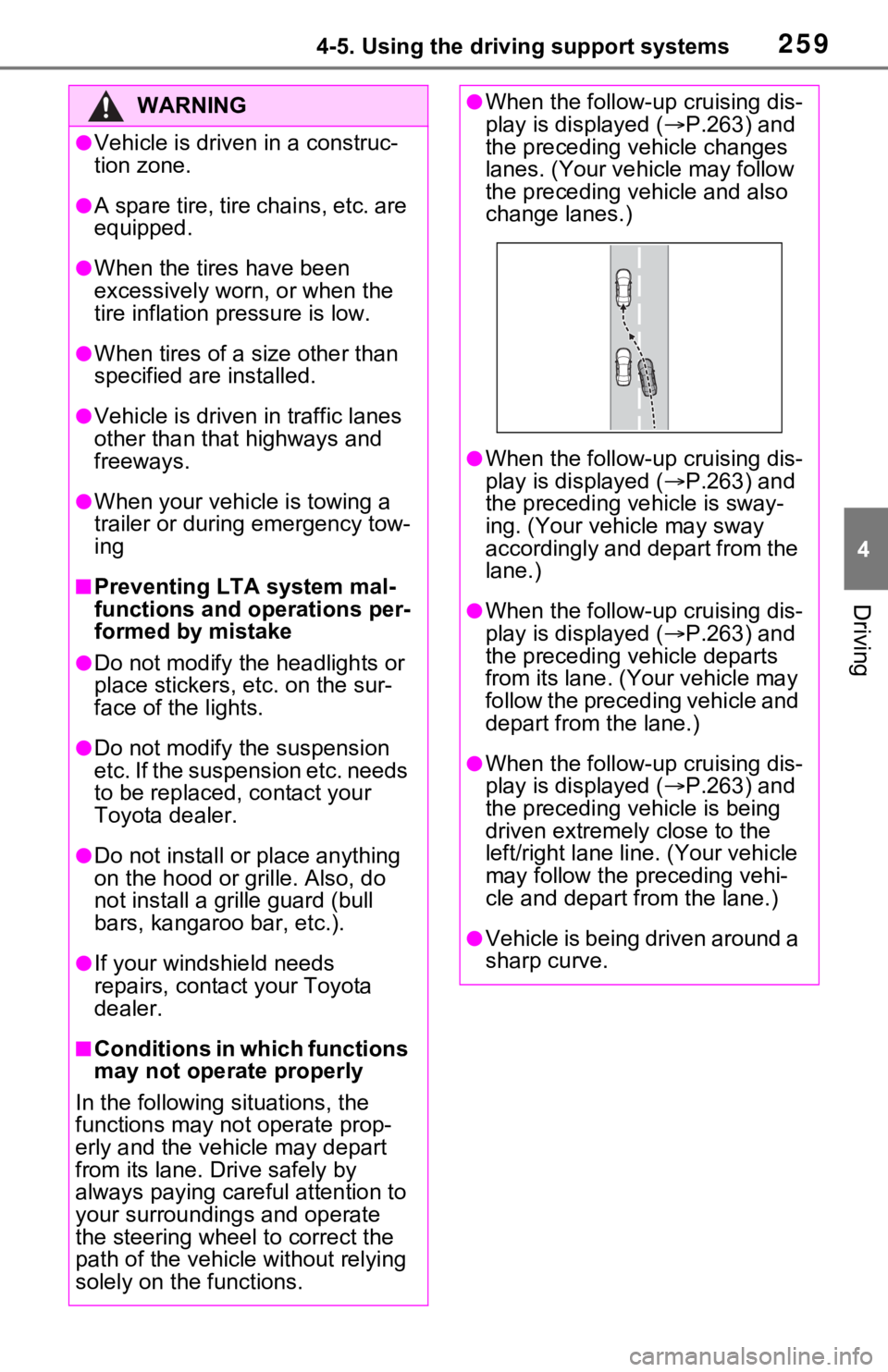
●When the follow- up cruising dis-
play is displayed ( P.263) and
the preceding vehicle changes
lanes. (Your veh icle may follow
the preceding vehicle and also
change lanes.)
●When the follow- up cruising dis-
play is displayed ( P.263) and
the preceding vehicle is sway-
ing. (Your vehicle may sway
accordingly and depart from the
lane.)
●When the follow- up cruising dis-
play is displayed ( P.263) and
the preceding vehicle departs
from its lane. (Your vehicle may
follow the preceding vehicle and
depart from the lane.)
●When the follow- up cruising dis-
play is displayed ( P.263) and
the preceding vehicle is being
driven extremely close to the
left/right lane line. (Your vehicle
may follow the preceding vehi-
cle and depart from the lane.)
●Vehicle is being driven around a
sharp curve.