steering wheel adjustment TOYOTA RAV4 HYBRID 2020 Owners Manual (in English)
[x] Cancel search | Manufacturer: TOYOTA, Model Year: 2020, Model line: RAV4 HYBRID, Model: TOYOTA RAV4 HYBRID 2020Pages: 748, PDF Size: 30.6 MB
Page 158 of 748
1583-3. Adjusting the seats
ten.
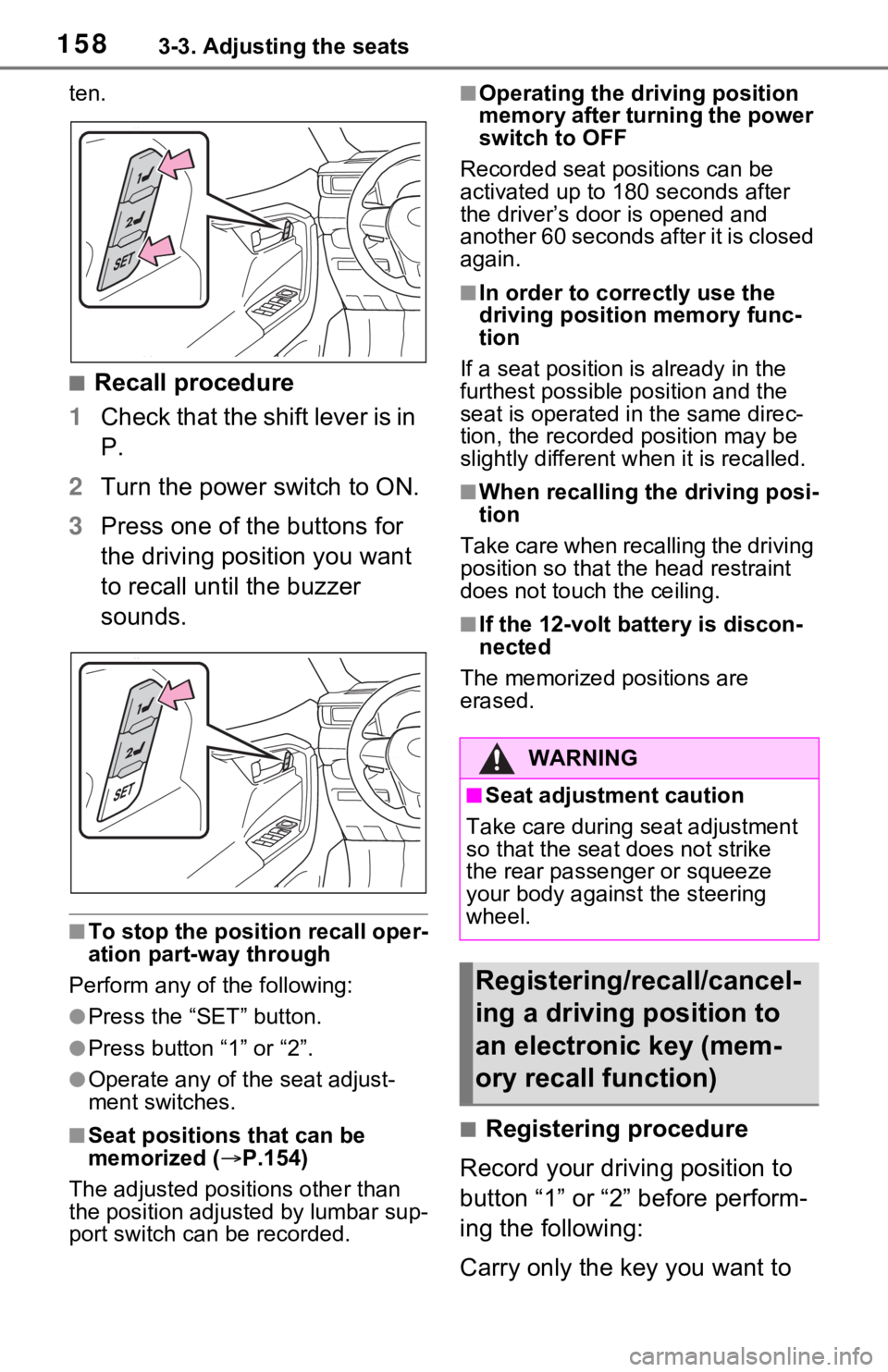
■Recall procedure
1 Check that the shift lever is in
P.
2 Turn the power switch to ON.
3 Press one of the buttons for
the driving position you want
to recall until the buzzer
sounds.
■To stop the position recall oper-
ation part-way through
Perform any of the following:
●Press the “SET” button.
●Press button “1” or “2”.
●Operate any of the seat adjust-
ment switches.
■Seat positions that can be
memorized ( P.154)
The adjusted positions other than
the position adjusted by lumbar sup-
port switch can be recorded.
■Operating the driving position
memory after turning the power
switch to OFF
Recorded seat positions can be
activated up to 180 seconds after
the driver’s door is opened and
another 60 seconds after it is closed
again.
■In order to corre ctly use the
driving position memory func-
tion
If a seat position is already in the
furthest possible position and the
seat is operated in the same direc-
tion, the recorded position may be
slightly different w hen it is recalled.
■When recalling the driving posi-
tion
Take care when recalling the driving
position so that the head restraint
does not touch the ceiling.
■If the 12-volt b attery is discon-
nected
The memorized positions are
erased.
■Registering procedure
Record your driving position to
button “1” or “2” before perform-
ing the following:
Carry only the key you want to
WARNING
■Seat adjustment caution
Take care during seat adjustment
so that the seat does not strike
the rear passenger or squeeze
your body against the steering
wheel.
Registering/recall/cancel-
ing a driving position to
an electronic key (mem-
ory recall function)
Page 162 of 748
1623-4. Adjusting the steering wheel and mirrors
3-4.Adjusting the steering wheel and mirrors
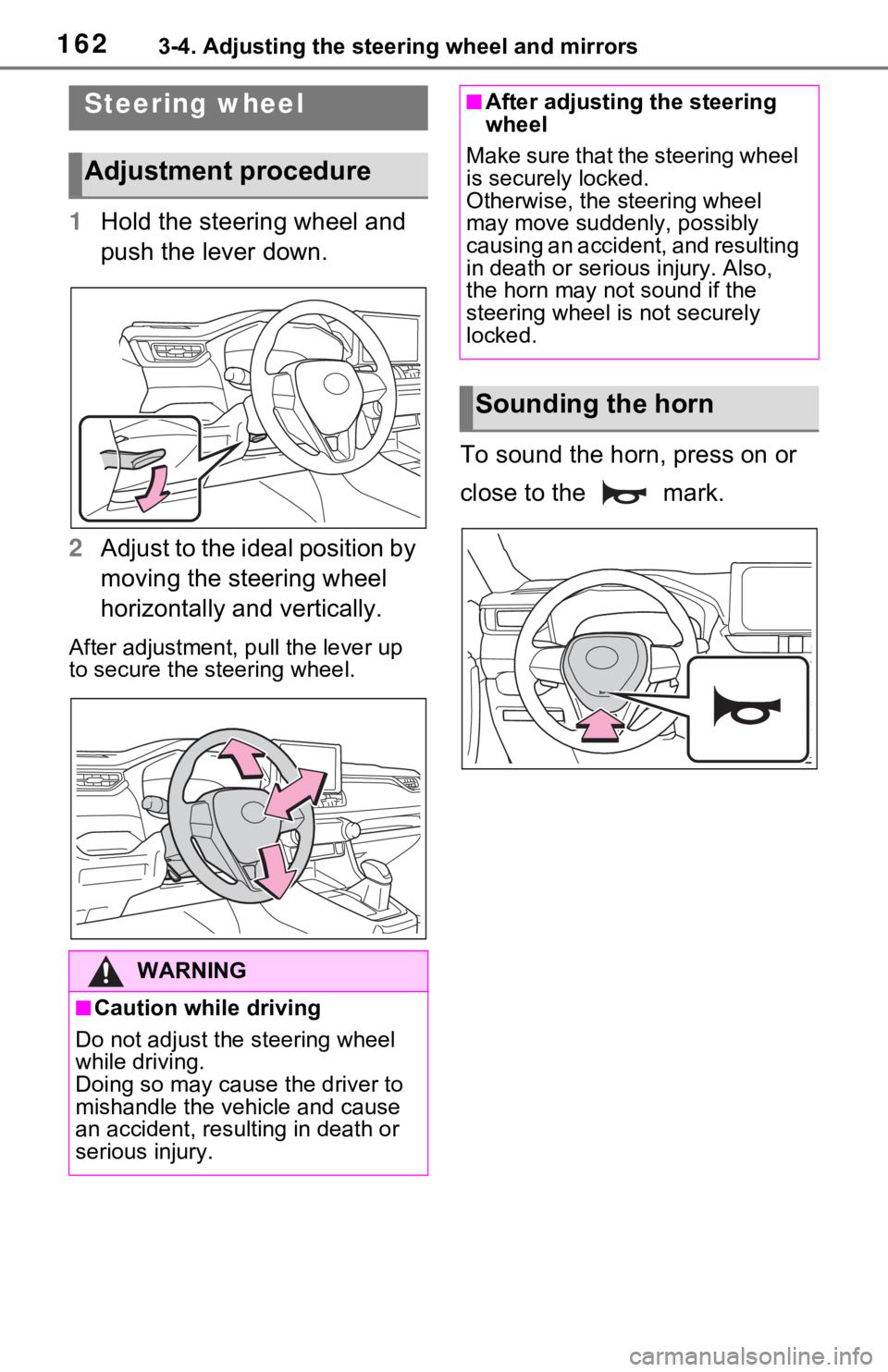
1Hold the steering wheel and
push the lever down.
2 Adjust to the ideal position by
moving the steering wheel
horizontally and vertically.
After adjustment, pull the lever up
to secure the steering wheel.
To sound the horn, press on or
close to the mark.
Steering wheel
Adjustment procedure
WARNING
■Caution while driving
Do not adjust the steering wheel
while driving.
Doing so may cause the driver to
mishandle the vehicle and cause
an accident, resul ting in death or
serious injury.
■After adjusting the steering
wheel
Make sure that the steering wheel
is securely locked.
Otherwise, the steering wheel
may move suddenly, possibly
causing an accident, and resulting
in death or serious injury. Also,
the horn may not sound if the
steering wheel is not securely
locked.
Sounding the horn
Page 166 of 748
1663-4. Adjusting the steering wheel and mirrors
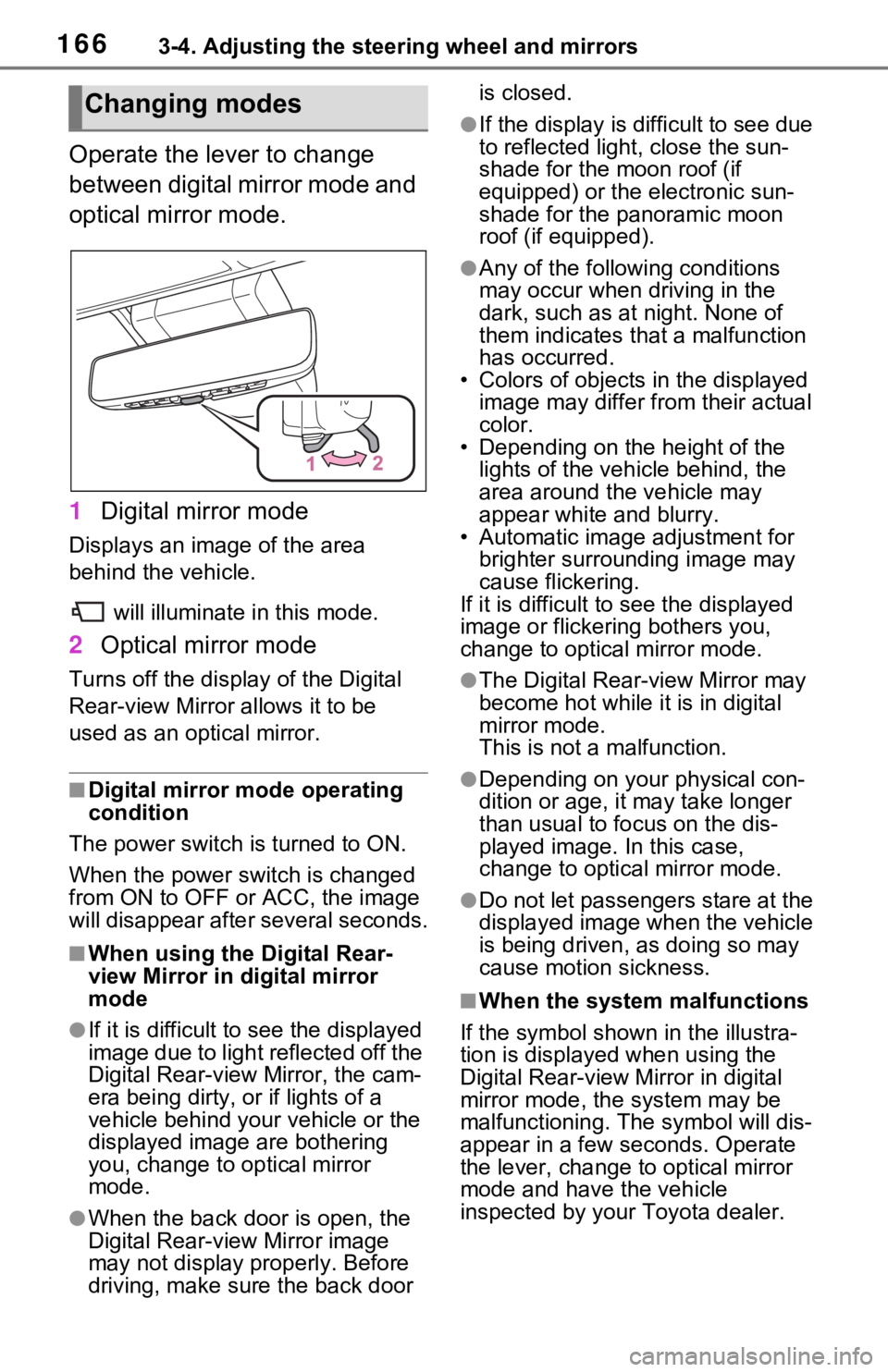
Operate the lever to change
between digital mirror mode and
optical mirror mode.
1Digital mirror mode
Displays an image of the area
behind the vehicle.
will illuminate in this mode.
2Optical mirror mode
Turns off the disp lay of the Digital
Rear-view Mirror allows it to be
used as an optical mirror.
■Digital mirror mode operating
condition
The power switch is turned to ON.
When the power switch is changed
from ON to OFF or ACC, the image
will disappear afte r several seconds.
■When using the Digital Rear-
view Mirror in digital mirror
mode
●If it is difficult to see the displayed
image due to light reflected off the
Digital Rear-view Mirror, the cam-
era being dirty, or if lights of a
vehicle behind your vehicle or the
displayed image are bothering
you, change to optical mirror
mode.
●When the back door is open, the
Digital Rear-view Mirror image
may not display properly. Before
driving, make sure the back door is closed.
●If the display is difficult to see due
to reflected light
, close the sun-
shade for the moon roof (if
equipped) or the electronic sun-
shade for the panoramic moon
roof (if equipped).
●Any of the following conditions
may occur when driving in the
dark, such as at night. None of
them indicates that a malfunction
has occurred.
• Colors of objects in the displayed image may differ from their actual
color.
• Depending on the height of the
lights of the vehicle behind, the
area around the vehicle may
appear white and blurry.
• Automatic image adjustment for brighter surrounding image may
cause flickering.
If it is difficult to see the displayed
image or flickering bothers you,
change to optical mirror mode.
●The Digital Rear-view Mirror may
become hot while it is in digital
mirror mode.
This is not a malfunction.
●Depending on your physical con-
dition or age, it may take longer
than usual to fo cus on the dis-
played image. In this case,
change to optical mirror mode.
●Do not let passengers stare at the
displayed image when the vehicle
is being driven, as doing so may
cause motion sickness.
■When the system malfunctions
If the symbol shown in the illustra-
tion is displayed when using the
Digital Rear-view Mirror in digital
mirror mode, the system may be
malfunctioning. The symbol will dis-
appear in a few seconds. Operate
the lever, change to optical mirror
mode and have the vehicle
inspected by your Toyota dealer.
Changing modes
Page 174 of 748
1743-4. Adjusting the steering wheel and mirrors
■Defogging the mirrors (if
equipped)
The outside rear v iew mirrors can
be cleared using the mirror defog-
gers. Turn on the rear window
defogger to turn on the outside rear
view mirror defoggers.
( P.524)
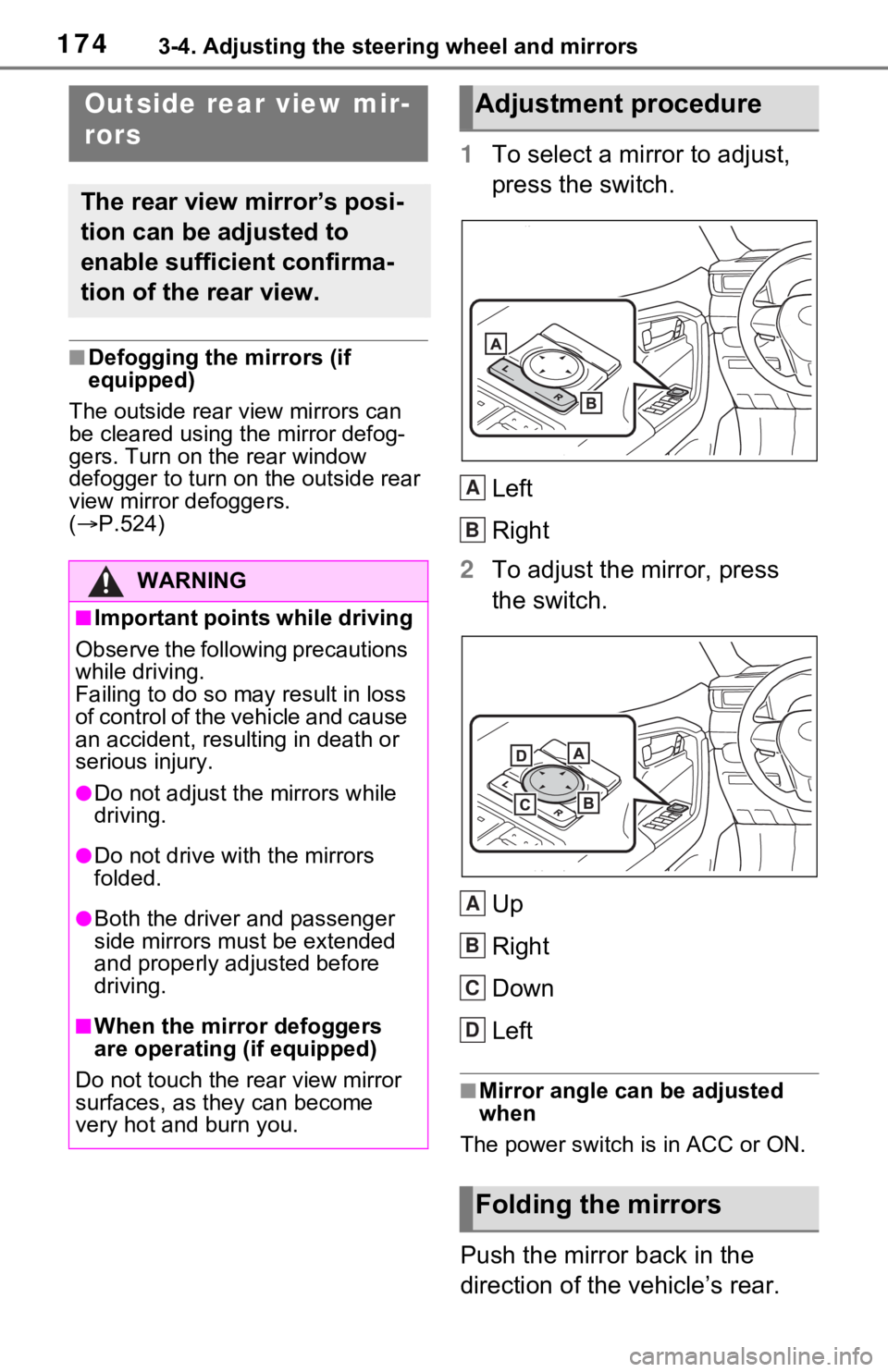
1 To select a mirror to adjust,
press the switch.
Left
Right
2 To adjust the mirror, press
the switch.
Up
Right
Down
Left
■Mirror angle can be adjusted
when
The power switch is in ACC or ON.
Push the mirror back in the
direction of the vehicle’s rear.
Outside rear view mir-
rors
The rear view mirror’s posi-
tion can be adjusted to
enable sufficient confirma-
tion of the rear view.
WARNING
■Important points while driving
Observe the following precautions
while driving.
Failing to do so may result in loss
of control of the vehicle and cause
an accident, resul ting in death or
serious injury.
●Do not adjust the mirrors while
driving.
●Do not drive with the mirrors
folded.
●Both the driver and passenger
side mirrors must be extended
and properly adjusted before
driving.
■When the mirror defoggers
are operating (if equipped)
Do not touch the rear view mirror
surfaces, as they can become
very hot and burn you.
Adjustment procedure
Folding the mirrors
A
B
A
B
C
D
Page 647 of 748

6478-2. Steps to take in an emergency
8
When trouble arises
WARNING
■If the tire pressure warning
light comes on (vehicles with
tire pressure warning system)
Be sure to observe the following
precautions. Failure to do so
could cause a loss of vehicle con-
trol and result in death or serious
injury.
●Stop your vehicle in a safe
place as soon as possible.
Adjust the tire inflation pressure
immediately.
●If the tire pressure warning light
comes on even after tire infla-
tion pressure adjustment, it is
probable that y ou have a flat
tire. Check the ti res. If a tire is
flat, change it with the spare tire
and have the flat tire repaired by
the nearest Toyota dealer.
●Avoid abrupt maneuvering and
braking. If the vehicle tires dete-
riorate, you could lose control of
the steering wheel or the
brakes.
■If a blowout or sudden air
leakage should occur (vehi-
cles with tire pressure warn-
ing system)
The tire pressure warning system
may not activate immediately.
■Maintenance of the tires
(vehicles with tire pressure
warning system)
Each tire, includi ng the spare (if
provided), should be checked
monthly when cold and inflated to
the inflation pressure recom-
mended by the vehicle manufac-
turer on the vehicle placard or tire
inflation pressure label (tire and
load information label). (If your
vehicle has tires of a different size
than the size in dicated on the
vehicle placard or tire inflation
pressure label [tire and load infor-
mation label], you should deter-
mine the proper tire inflation
pressure for those tires.)
As an added safety feature, your
vehicle has been equipped with a
tire pressure monitoring system
(TPMS-tire pressure warning sys-
tem) that illuminates a low tire
pressure telltale (tire pressure
warning light) w hen one or more
of your tires is s ignificantly under-
inflated. Accord ingly, when the
low tire pressure te lltale (tire pres-
sure warning light) illuminates,
you should stop and check your
tires as soon as possible, and
inflate them to the proper pres-
sure. Driving on a significantly
under-inflated tire causes the tire
to overheat and can lead to tire
failure. Under-inflation also
reduces fuel efficiency and tire
tread life, and may affect the vehi-
cle’s handling and stopping abil-
ity.
Please note that the TPMS (tire
pressure warning system) is not a
substitute for proper tire mainte-
nance, and it is the driver’s
responsibility to m aintain correct
tire pressure, even if under-infla-
tion has not reached the level to
trigger illuminati on of the TPMS
low tire pressure te lltale (tire pres-
sure warning light).
Page 734 of 748

734Alphabetical Index
Footwell lights ........................ 532
Front passenger’s seat belt reminder light ....................... 644
Front passenger occupant clas- sification system .................... 45
Front position lights Light switch .......................... 229
Front seat heaters .................. 529
Front seats .............................. 154 Adjustment ........................... 154
Cleaning ............................... 567
Correct driving posture ........... 29
Driving position memory....... 157
Head restraints ..................... 160
Memory recall function ......... 158
Seat heaters ......................... 529
Seat position memory .......... 157
Seat ventilators .................... 529
Front side marker lights ........ 229 Light switch .......................... 229
Replacing light bulbs ............ 620
Wattage ................................ 686
Front turn signal lights
Replacing light bulbs ............ 620
Turn signal lever................... 223
Wattage ................................ 686
Fuel Capacity ............................... 679
Fuel gauge ....................... 94, 98
Gas station information ........ 748
Information ........................... 688
Refueling .............................. 241
Type ............................. 679, 688
Warning light ........................ 644
Fuel consumption information Average fuel consumption.... 119
Current fuel consumption ..... 119
Fuel filler door ..... ................... 242
If the fuel filler door cannot be opened ............................... 663
Refueling .............................. 241
Fuel gauge .......................... 94, 98 Fuses .......................................618
G
Garage door opene
r ...............554
Gas station information .........748
Gauges ................................94, 98
General button (Setup screen) .......................................392, 426
General settings .....................426 Displaying the general settings screen.................................426
General settings screen .......426
Glove box ................................535
H
Hands-free system .................477
Headlights ...............................229 Adaptive Front-lighting System (AFS) ..................................231
Automatic headlight leveling sys- tem .....................................230
Automatic High Beam system ...........................................232
Light switch...........................229
Replacing light bulbs ............620
Wattage ................................686
Head restraints .......................160
Heated steering wheel............529
Heaters Automatic air conditioning sys-tem .....................................522
Heated steering wheel..........529
Outside rear view mirrors .....524
Seat heaters ....... ..................529
High mounted stoplight Replacing light bulbs ............620
Hill-start assist control...........369
HOME button...........................396
Home screen ...........................396
Hood ........................................577
Hooks
Page 741 of 748

Alphabetical Index741
Shift lock system .................... 221
Side airbags .............................. 35
Side auxiliary box ................... 541
Side doors ............................... 128
Side marker lightsLight switch .......................... 229
Replacing light bulbs ............ 620
Wattage ................................ 686
Side mirrors ............................ 174 Adjustment ........................... 174
BSM (Blind Spot Monitor)..... 282
Folding ................................. 174
Heaters................................. 524
Side turn signal lights Replacing light bulbs ............ 620
Turn signal lever................... 223
Side windows ...... ................... 176
Smart key system ................... 148 Antenna location .................. 148
Entry functions ............. 128, 135
Starting the hybrid system.... 212
Warning message ................ 648
Snow tires ............................... 378
Spare tire Storage location ................... 653
Specifications ......................... 678
Speedometer ...................... 94, 98
Sport mode ............................. 366
Status icon .............................. 390 Status icon explanation ........ 390
Steering lock Column lock release..... 210, 213
Steering lock system warning message............................. 213
Steering switch ............... 454, 481 Audio switch ......................... 454
Steering wheel Adjustment ........................... 162
Heated steering wheel ......... 529
Meter control switches ......... 104
Stop lights Replacing light bulbs ............ 620 Storage feature ..
.....................535
Storage precaution s ...............535
Stuck If the vehicle becomes stuck 674
Suggestion functi on ...............112
Sunglass holder.... ..................537
Sunshade ........................179, 182
Sun visors ...............................544
Switches “ODO TRIP”switch ..........96, 101
“SOS” button ..........................67
Automatic High Beam switch 232
Brake hold switch .................227
BSM (Blind Spot M onitor) .....283
Digital Rear-view Mirror control switches..............................165
Door lock switch ...................132
Driving mode select switch ...366
Driving position memory switches..............................157
Dynamic radar cruise control with full-speed range ..........271
Electronic sunshade switch ..182
Emergency flashers switch...630
EV drive mode switch ...........217
Fog light switch .....................235
Garage door opener switches ...........................................554
Heated steering wheel..........530
Ignition switch (power switch) ...................................210, 212
Intuitive parking assist ..........293
Light switch...........................229
LTA switch ............................263
Meter control switches..........104
Moon roof switches ..............179
Outside rear v iew mirror
switches..............................174
Panoramic moon roof switches ...........................................182
Parking brake switch ............224
PCS (Pre-Collisio n System) .252