height adjustment TOYOTA RAV4 HYBRID 2020 Owners Manual (in English)
[x] Cancel search | Manufacturer: TOYOTA, Model Year: 2020, Model line: RAV4 HYBRID, Model: TOYOTA RAV4 HYBRID 2020Pages: 744, PDF Size: 31.43 MB
Page 154 of 744
1543-3. Adjusting the seats
3-3.Adjusting the seats
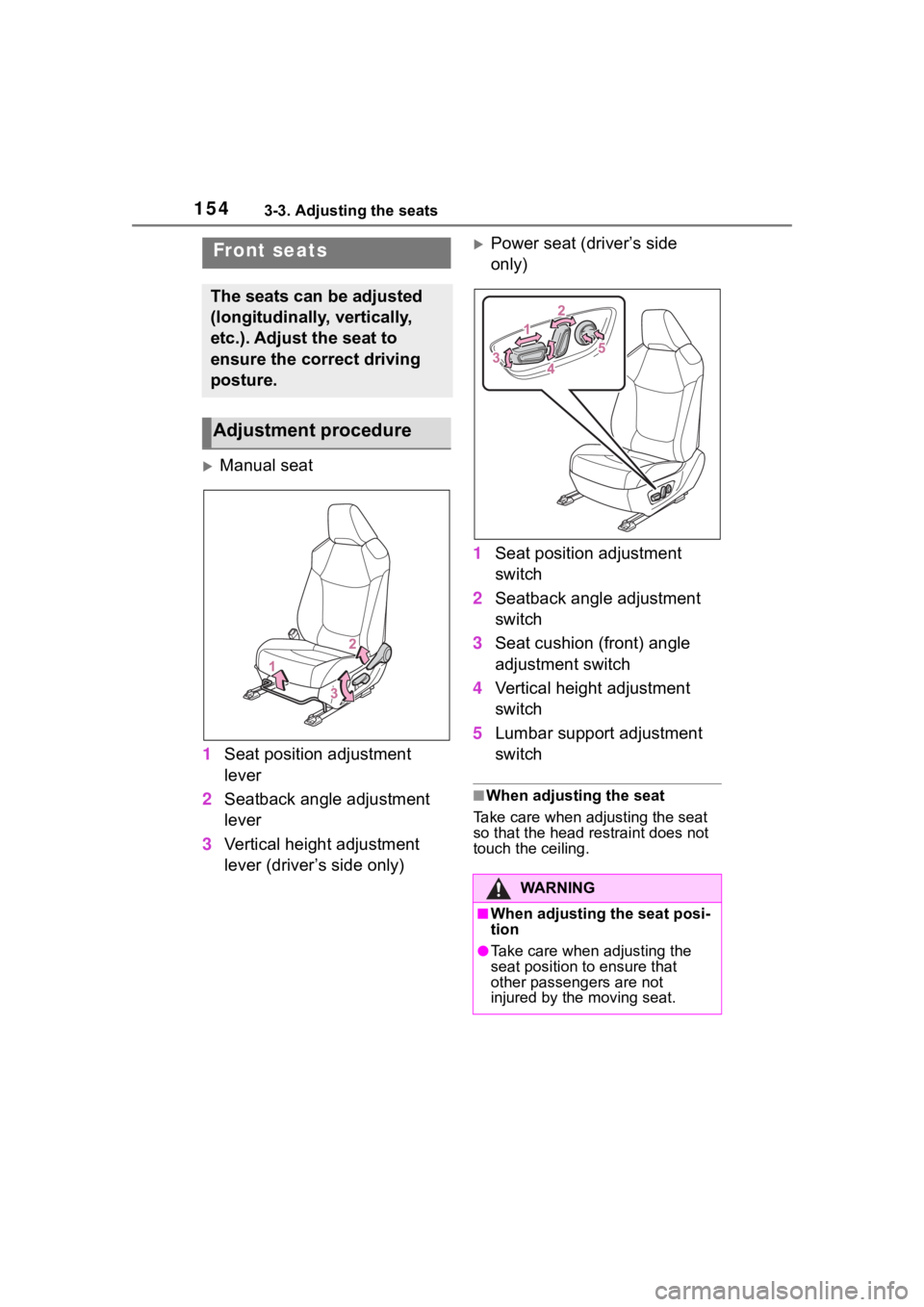
Manual seat
1 Seat position adjustment
lever
2 Seatback angle adjustment
lever
3 Vertical height adjustment
lever (driver’s side only)
Power seat (driver’s side
only)
1 Seat position adjustment
switch
2 Seatback angle adjustment
switch
3 Seat cushion (front) angle
adjustment switch
4 Vertical height adjustment
switch
5 Lumbar support adjustment
switch
■When adjusting the seat
Take care when adjusting the seat
so that the head restraint does not
touch the ceiling.
Front seats
The seats can be adjusted
(longitudinally, vertically,
etc.). Adjust the seat to
ensure the correct driving
posture.
Adjustment procedure
WA R N I N G
■When adjusting the seat posi-
tion
●Take care when adjusting the
seat position to ensure that
other passengers are not
injured by the moving seat.
Page 160 of 744
1603-3. Adjusting the seats
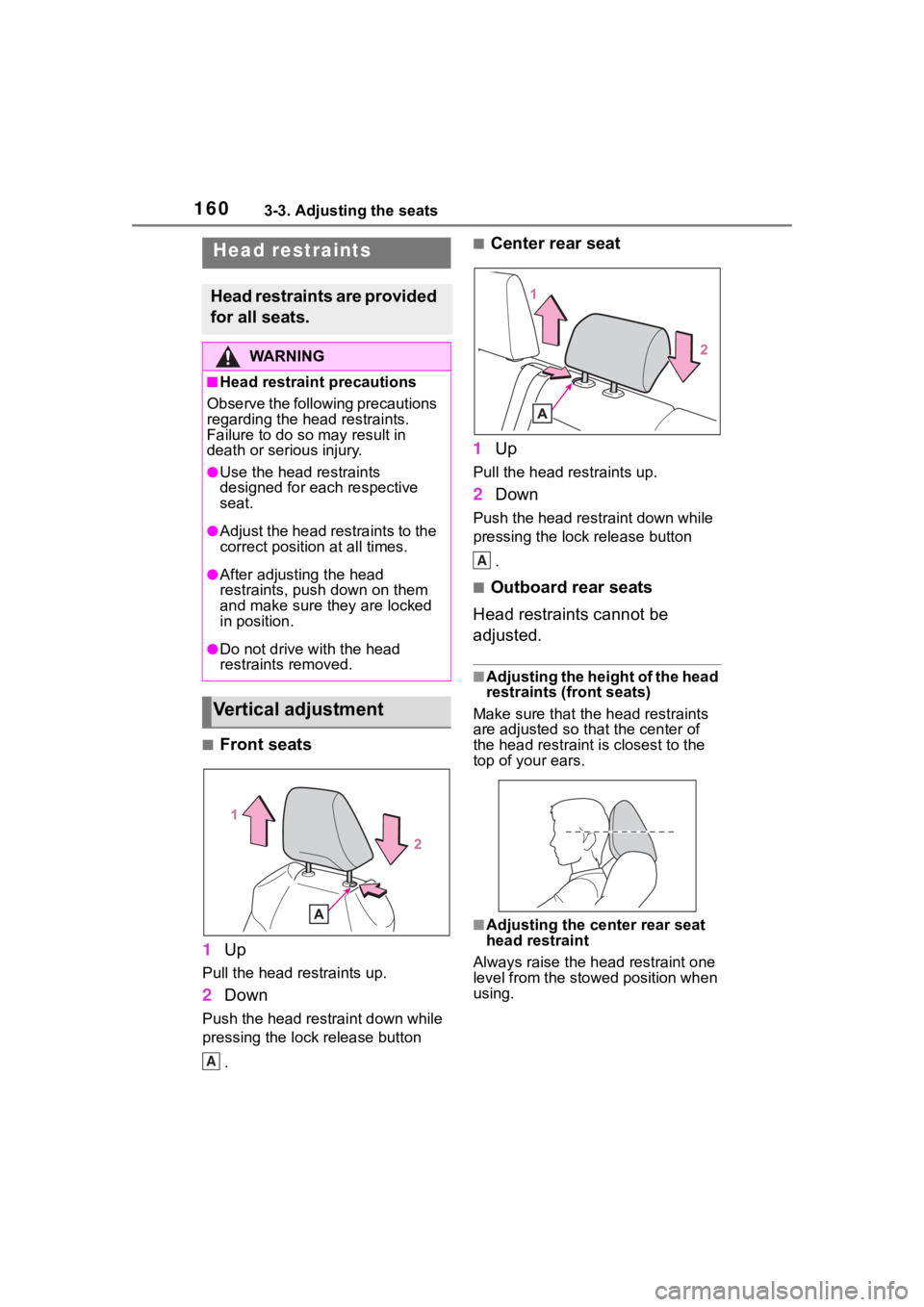
■Front seats
1 Up
Pull the head restraints up.
2Down
Push the head restraint down while
pressing the lock release button
.
■Center rear seat
1 Up
Pull the head restraints up.
2Down
Push the head restraint down while
pressing the lock release button
.
■Outboard rear seats
Head restraints cannot be
adjusted.
■Adjusting the height of the head
restraints (front seats)
Make sure that the head restraints
are adjusted so that the center of
the head restraint i s closest to the
top of your ears.
■Adjusting the center rear seat
head restraint
Always raise the head restraint one
level from the stowed position when
using.
Head restraints
Head restraints are provided
for all seats.
WA R N I N G
■Head restraint precautions
Observe the following precautions
regarding the head restraints.
Failure to do so m ay result in
death or serious injury.
●Use the head restraints
designed for each respective
seat.
●Adjust the head restraints to the
correct position at all times.
●After adjusting the head
restraints, push down on them
and make sure they are locked
in position.
●Do not drive with the head
restraints removed.
Vertical adjustment
A
A
Page 166 of 744
1663-4. Adjusting the steering wheel and mirrors
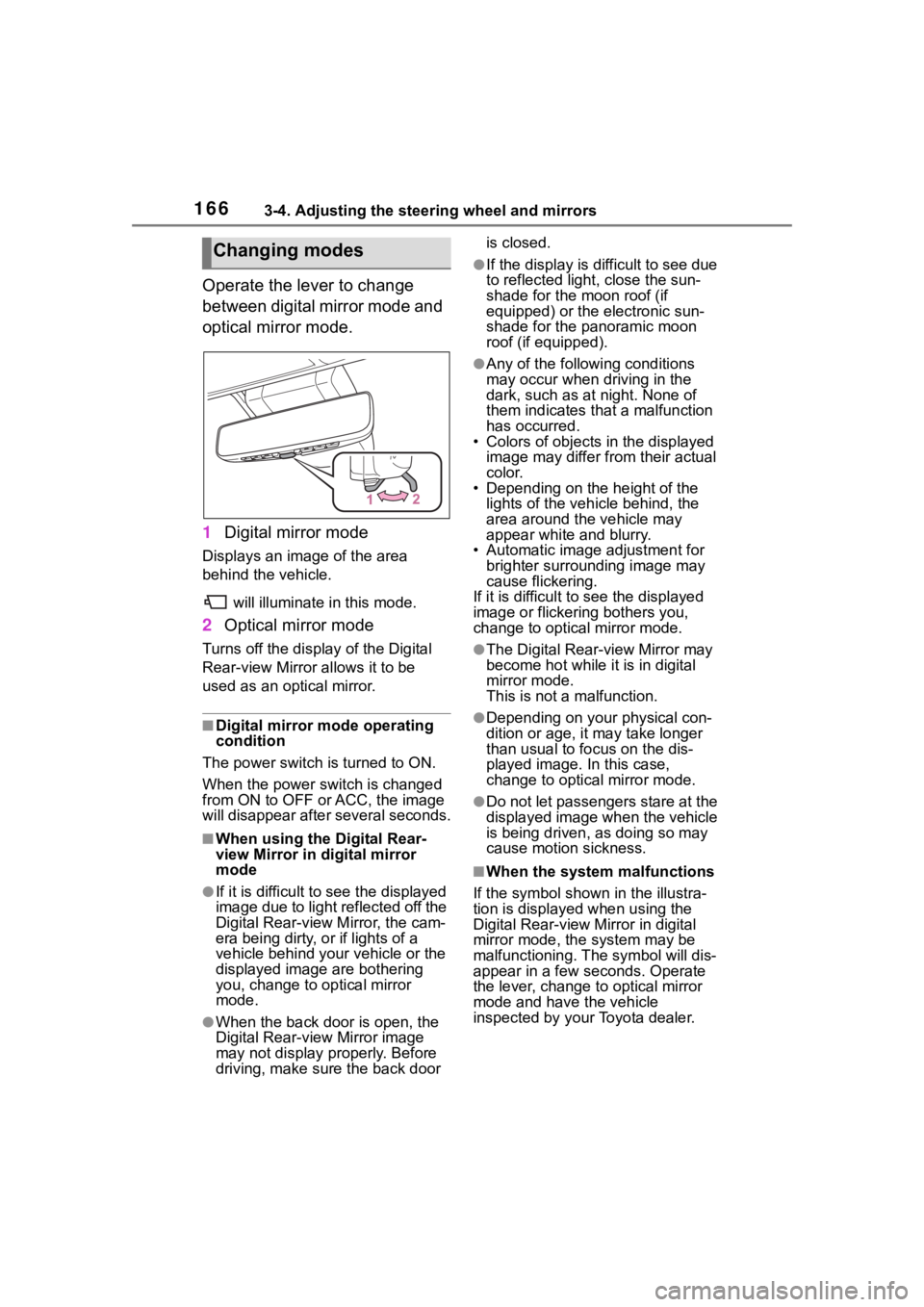
Operate the lever to change
between digital mirror mode and
optical mirror mode.
1Digital mirror mode
Displays an image of the area
behind the vehicle.
will illuminate in this mode.
2Optical mirror mode
Turns off the display of the Digital
Rear-view Mirror allows it to be
used as an optical mirror.
■Digital mirror mode operating
condition
The power switch is turned to ON.
When the power switch is changed
from ON to OFF or ACC, the image
will disappear afte r several seconds.
■When using the Digital Rear-
view Mirror in digital mirror
mode
●If it is difficult to see the displayed
image due to light reflected off the
Digital Rear-view M irror, the cam-
era being dirty, or if lights of a
vehicle behind your vehicle or the
displayed image are bothering
you, change to optical mirror
mode.
●When the back door is open, the
Digital Rear-view Mirror image
may not display properly. Before
driving, make sure the back door is closed.
●If the display is difficult to see due
to reflected light
, close the sun-
shade for the moon roof (if
equipped) or the electronic sun-
shade for the panoramic moon
roof (if equipped).
●Any of the following conditions
may occur when driving in the
dark, such as at night. None of
them indicates that a malfunction
has occurred.
• Colors of objects in the displayed
image may differ from their actual
color.
• Depending on the height of the
lights of the vehicle behind, the
area around the vehicle may
appear white and blurry.
• Automatic image adjustment for brighter surrounding image may
cause flickering.
If it is difficult to see the displayed
image or flickering bothers you,
change to optical mirror mode.
●The Digital Rear-view Mirror may
become hot while it is in digital
mirror mode.
This is not a malfunction.
●Depending on your physical con-
dition or age, it may take longer
than usual to fo cus on the dis-
played image. In this case,
change to optical mirror mode.
●Do not let passengers stare at the
displayed image when the vehicle
is being driven, as doing so may
cause motion sickness.
■When the system malfunctions
If the symbol shown in the illustra-
tion is displayed when using the
Digital Rear-view Mirror in digital
mirror mode, the system may be
malfunctioning. The symbol will dis-
appear in a few seconds. Operate
the lever, change to optical mirror
mode and have the vehicle
inspected by your Toyota dealer.
Changing modes
Page 736 of 744
736Alphabetical Index
Registering/Connecting a Blue-tooth
® device ........................ 400
Profiles ................................. 403
Registering a Bluetooth
® audio
player for the first time........ 402
Registering a Bluetooth
® phone
for the first time .................. 400
Remote Connect ..................... 512
Replacing Electronic key battery ........... 613
Fuses ................................... 616
Light bulbs ............................ 618
Tires ..................................... 651
Wiper insert .......................... 610
Wireless remote control battery........................................... 613
Reporting safety defects for U.S. owners................................... 710
Resetting the message indicat- ing maintenance is required 569
Road accident cautions ........... 78
Road Sign Assist .................... 267
RSA (Road Sign Assist) ......... 267
S
Screen adjustment ................. 398
Seat belt reminder light ......... 643
Seat belts .................................. 31 Adjusting the seat belt shoulder anchor height ....................... 33
Automatic Locking Retractor .. 33
Child restraint system installation ............................................. 56
Cleaning and maintaining the seat belt.............................. 565
Emergency Locking Retractor 33
How to wear your seat belt..... 32
How your child should wear the seat belt................................ 32
Pregnant women, proper seat belt use................................. 31 Reminder light and buzzer ...643
Seat belt extender ..................32
Seat belt pretensioners ..........34
SRS warning light .................638
Seat heaters ............................527
Seating capacity .....................199
Seat position memory ............157
Seats Adjustment precautions 154, 155
Adjustment ...................154, 155
Child seats/child restraint system installation ............................52
Cleaning ...............................565
Driving position memory .......157
Folding down the rear seatbacks ...........................................156
Head restraint .......................160
Properly sitting in the seat ......29
Seat heaters ....... ..................527
Seat position memory...........157
Seat ventilators.....................527
Seat ventilators .. .....................527
Secondary Collision Brake ....369
Sensor Automatic headlight system .230
Automatic High Beam system...........................................232
BSM (Blind Spot M onitor) .....283
Digital Rear-view Mirror ........168
Inside rear view mirror ..........164
Intuitive parking assist ..........290
LTA (Lane Tracing Assist) .....257
Parking Support Brake function (rear-crossing vehicles) ......283
Parking Support Brake function (static objects) ....................290
Rain-sensing windshield wipers ...........................................237
RCTA ....................................283
Toyota Safety Sense 2.0 ......243
Service Connect ... ..................513
Service plug ..............................77