parking sensors TOYOTA RAV4 HYBRID 2020 Owners Manual (in English)
[x] Cancel search | Manufacturer: TOYOTA, Model Year: 2020, Model line: RAV4 HYBRID, Model: TOYOTA RAV4 HYBRID 2020Pages: 744, PDF Size: 31.43 MB
Page 141 of 744
1413-2. Opening, closing and locking the doors
3
Before driving
1On
2 Off
■Back door closer
In the event that the back door is left
slightly open, the back door closer
will automatically close it to the fully
closed position.
Whatever the state of the power
switch, the back door closer oper-
ates.
■Power back door operating con-
ditions
The power back door can automati-
cally open and close under the fol-
lowing conditions:
●When the power back door sys-
tem is enabled. ( P.108)
●When the power switch is in ON,
in addition to the above for the
opening operations, the back door
operates for any of the following
conditions:
• Parking brake is engaged
• The brake pedal is depressed
• The shift lever is in P.
■Operation of the power back
door
●A buzzer sounds and the emer-
gency flashers flash twice to indi-
cate that the back door is
opening/closing.
●When the power back door sys-
tem is disabled, the power back
door does not ope rate but it can
be opened and closed by hand.
●When the power back door auto-
matically opens, if an abnormality
due to people or objects is
detected, oper ation will stop.
■Jam protection function
Sensors are equipped on both sides
of the power back door. If anything
obstructs the power back door while
it is closing, the b ack door will auto-
matically operate in the opposite
direction or stop.
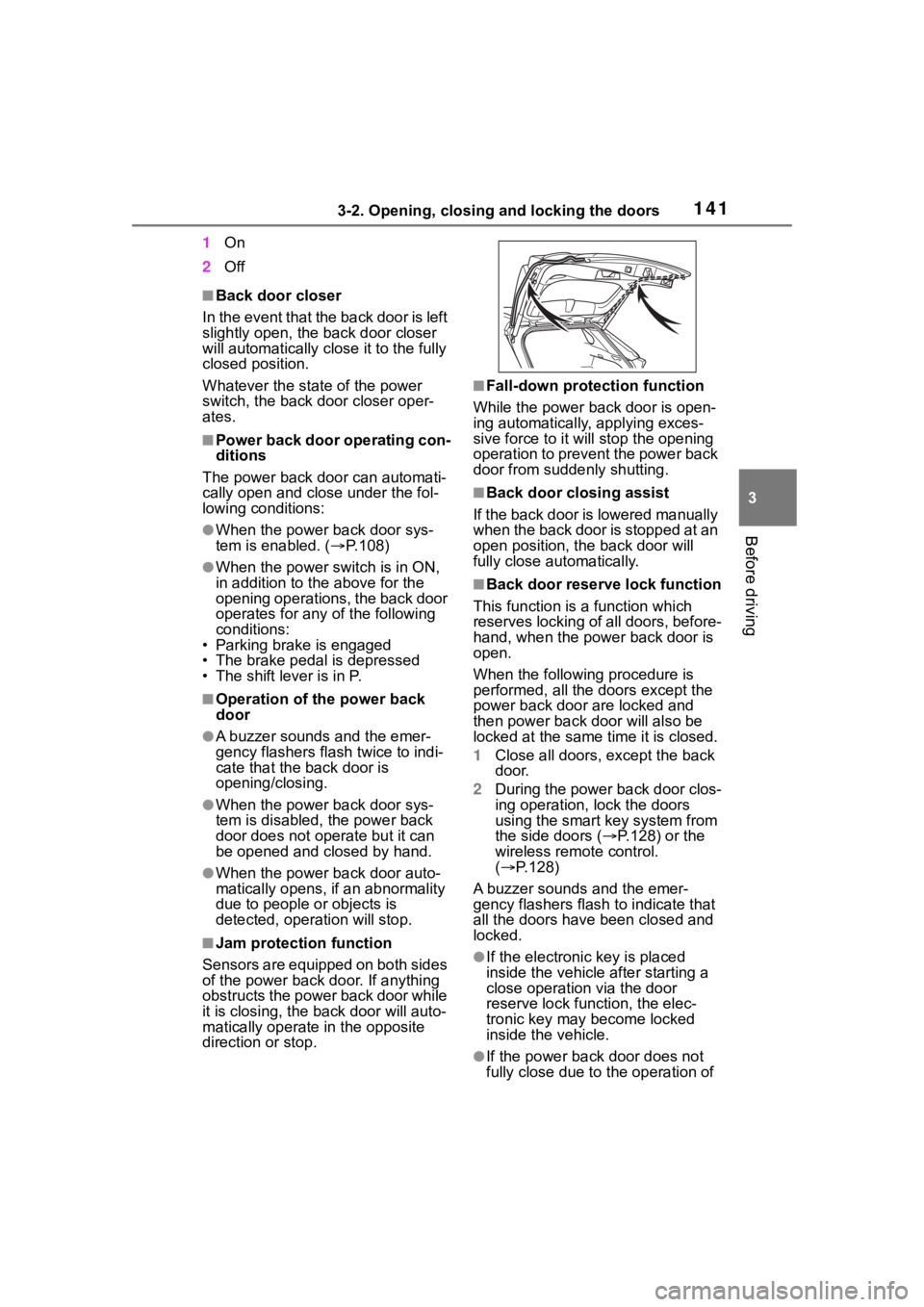
■Fall-down protection function
While the power back door is open-
ing automatically, applying exces-
sive force to it will stop the opening
operation to prevent the power back
door from suddenly shutting.
■Back door closing assist
If the back door is lowered manually
when the back door is stopped at an
open position, the back door will
fully close automatically.
■Back door reserve lock function
This function is a function which
reserves locking of all doors, before-
hand, when the power back door is
open.
When the following procedure is
performed, all the doors except the
power back door are locked and
then power back door will also be
locked at the same time it is closed.
1 Close all doors, except the back
door.
2 During the power back door clos-
ing operation, lock the doors
using the smart key system from
the side doors ( P.128) or the
wireless remote control.
( P.128)
A buzzer sounds and the emer-
gency flashers flash to indicate that
all the doors have been closed and
locked.
●If the electronic key is placed
inside the vehicle after starting a
close operation via the door
reserve lock function, the elec-
tronic key may become locked
inside the vehicle.
●If the power back door does not
fully close due to the operation of
Page 287 of 744
2874-5. Using the driving support systems
4
Driving
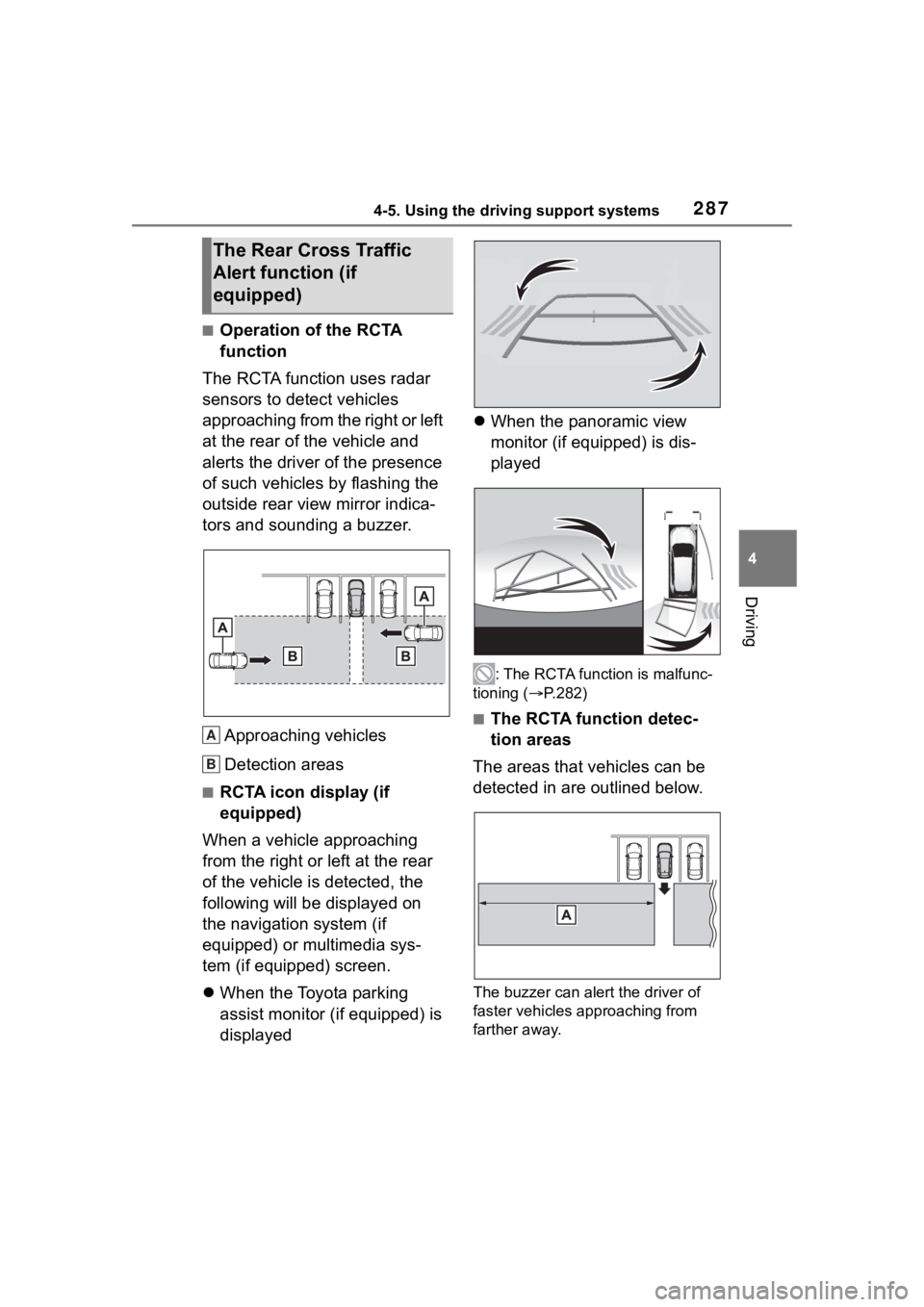
■Operation of the RCTA
function
The RCTA function uses radar
sensors to detect vehicles
approaching from the right or left
at the rear of the vehicle and
alerts the driver of the presence
of such vehicles by flashing the
outside rear view mirror indica-
tors and sounding a buzzer.
Approaching vehicles
Detection areas
■RCTA icon display (if
equipped)
When a vehicle approaching
from the right or left at the rear
of the vehicle is detected, the
following will be displayed on
the navigation system (if
equipped) or multimedia sys-
tem (if equipped) screen.
When the Toyota parking
assist monitor (if equipped) is
displayed
When the panoramic view
monitor (if equipped) is dis-
played
: The RCTA function is malfunc-
tioning ( P.282)
■The RCTA function detec-
tion areas
The areas that vehicles can be
detected in are outlined below.
The buzzer can alert the driver of
faster vehicles approaching from
farther away.
The Rear Cross Traffic
Alert function (if
equipped)
A
B
Page 288 of 744
2884-5. Using the driving support systems
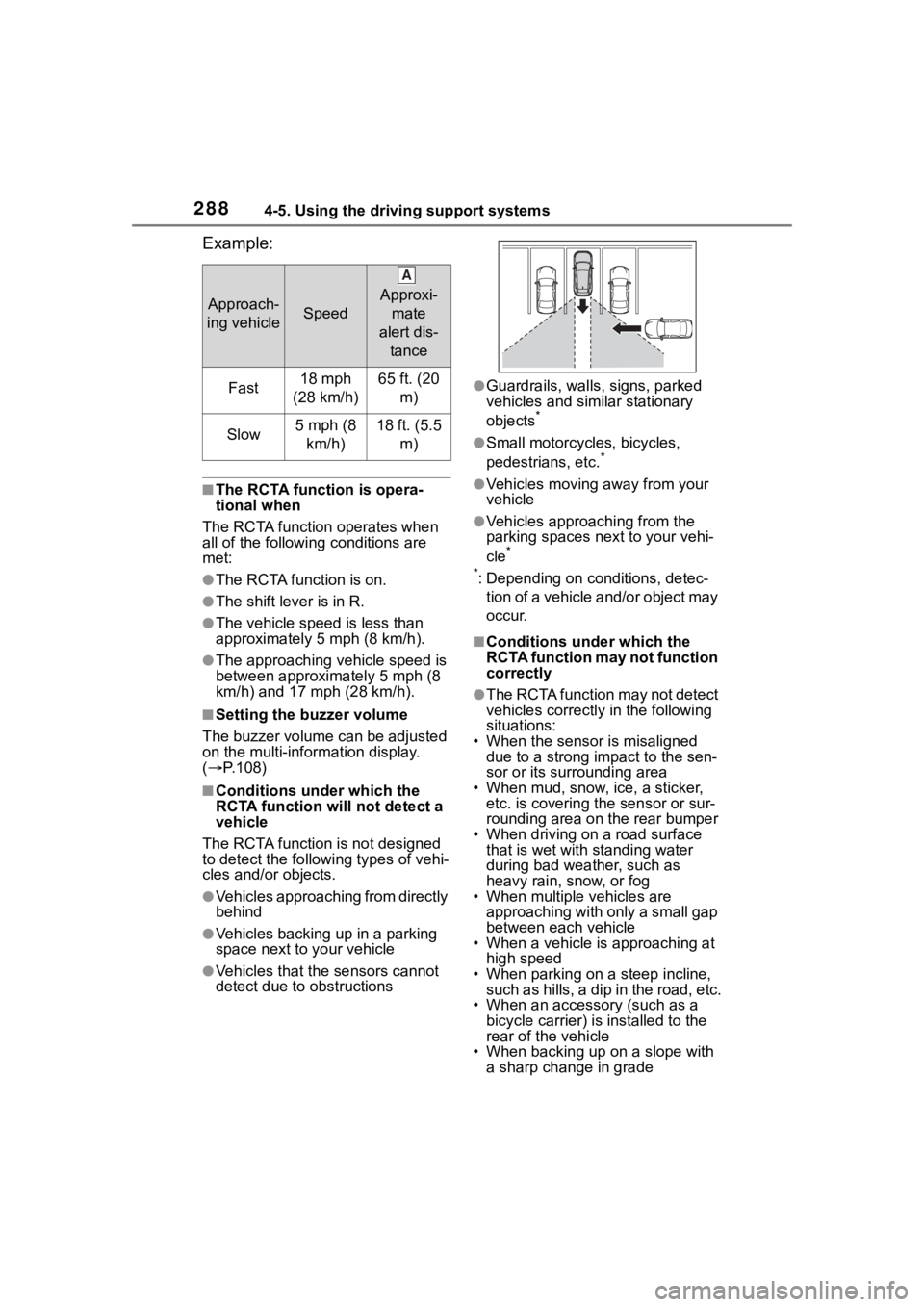
Example:
■The RCTA function is opera-
tional when
The RCTA function operates when
all of the followin g conditions are
met:
●The RCTA function is on.
●The shift lever is in R.
●The vehicle speed is less than
approximately 5 mph (8 km/h).
●The approaching vehicle speed is
between approximately 5 mph (8
km/h) and 17 mph (28 km/h).
■Setting the buzzer volume
The buzzer volume can be adjusted
on the multi-inform ation display.
( P.108)
■Conditions under which the
RCTA function will not detect a
vehicle
The RCTA function is not designed
to detect the following types of vehi-
cles and/or objects.
●Vehicles approaching from directly
behind
●Vehicles backing up in a parking
space next to your vehicle
●Vehicles that the sensors cannot
detect due to obstructions
●Guardrails, walls, signs, parked
vehicles and similar stationary
objects
*
●Small motorcycles, bicycles,
pedestrians, etc.*
●Vehicles moving away from your
vehicle
●Vehicles approaching from the
parking spaces nex t to your vehi-
cle
*
*
: Depending on conditions, detec- tion of a vehicle and/or object may
occur.
■Conditions under which the
RCTA function may not function
correctly
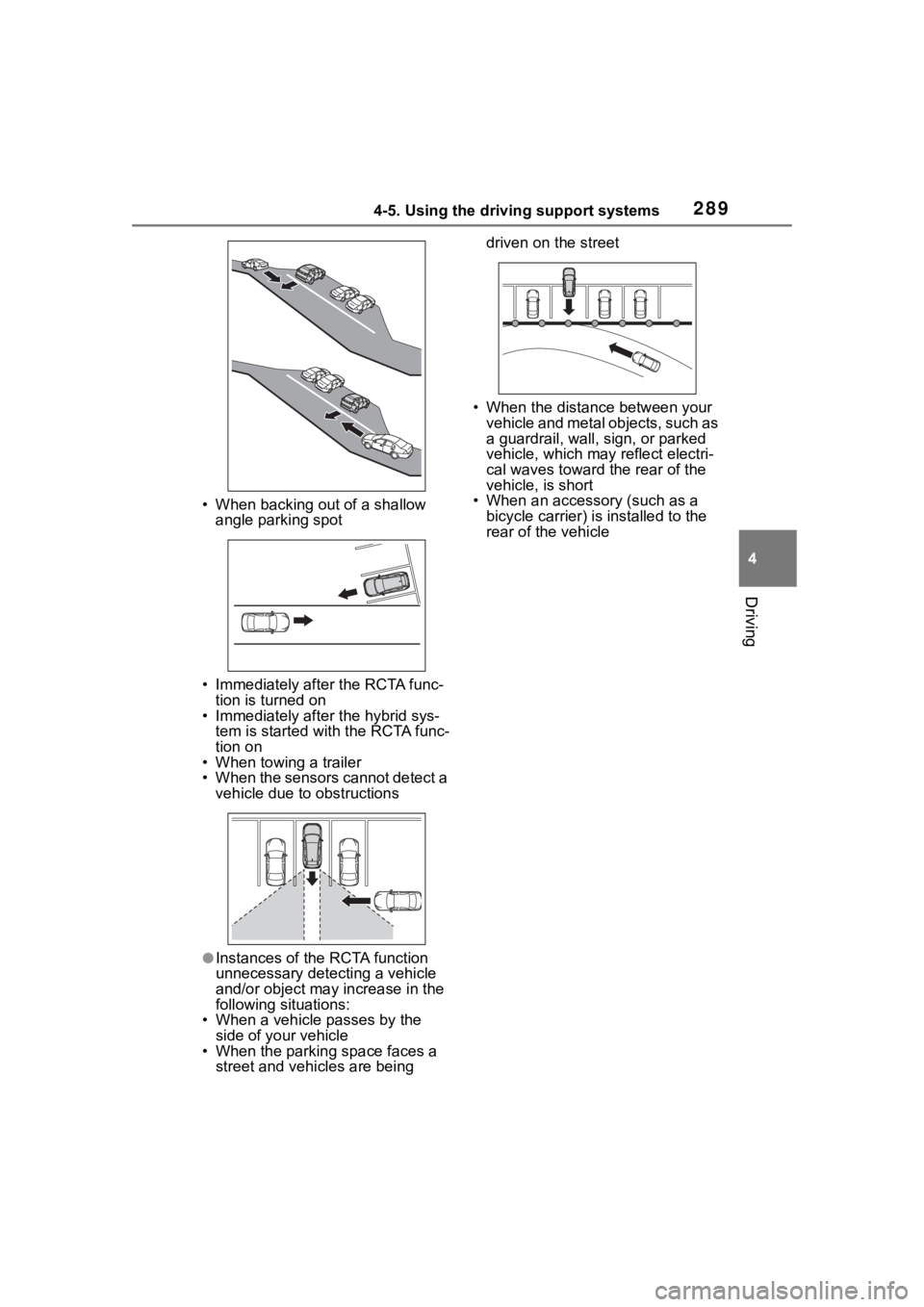
●The RCTA function may not detect
vehicles correctly in the following
situations:
• When the sensor is misaligned due to a strong impact to the sen-
sor or its surrounding area
• When mud, snow, ice, a sticker, etc. is covering the sensor or sur-
rounding area on the rear bumper
• When driving on a road surface that is wet with standing water
during bad weather, such as
heavy rain, snow, or fog
• When multiple vehicles are
approaching with only a small gap
between each vehicle
• When a vehicle is approaching at
high speed
• When parking on a steep incline, such as hills, a dip in the road, etc.
• When an accessory (such as a
bicycle carrier) is installed to the
rear of the vehicle
• When backing up on a slope with
a sharp change in grade
Approach-
ing vehicleSpeed
Approxi- mate
alert dis- tance
Fast18 mph
(28 km/h)65 ft. (20 m)
Slow5 mph (8 km/h)18 ft. (5.5 m)
A
Page 289 of 744
2894-5. Using the driving support systems
4
Driving
• When backing out of a shallow angle parking spot
• Immediately after the RCTA func- tion is turned on
• Immediately after the hybrid sys-
tem is started with the RCTA func-
tion on
• When towing a trailer
• When the sensors cannot detect a vehicle due to obstructions
●Instances of the RCTA function
unnecessary detecting a vehicle
and/or object may increase in the
following situations:
• When a vehicle passes by the
side of your vehicle
• When the parking space faces a street and vehicles are being driven on the street
• When the distance between your vehicle and metal objects, such as
a guardrail, wall, sign, or parked
vehicle, which may reflect electri-
cal waves toward the rear of the
vehicle, is short
• When an accessory (such as a
bicycle carrier) is installed to the
rear of the vehicle
Page 290 of 744
2904-5. Using the driving support systems
*: If equipped
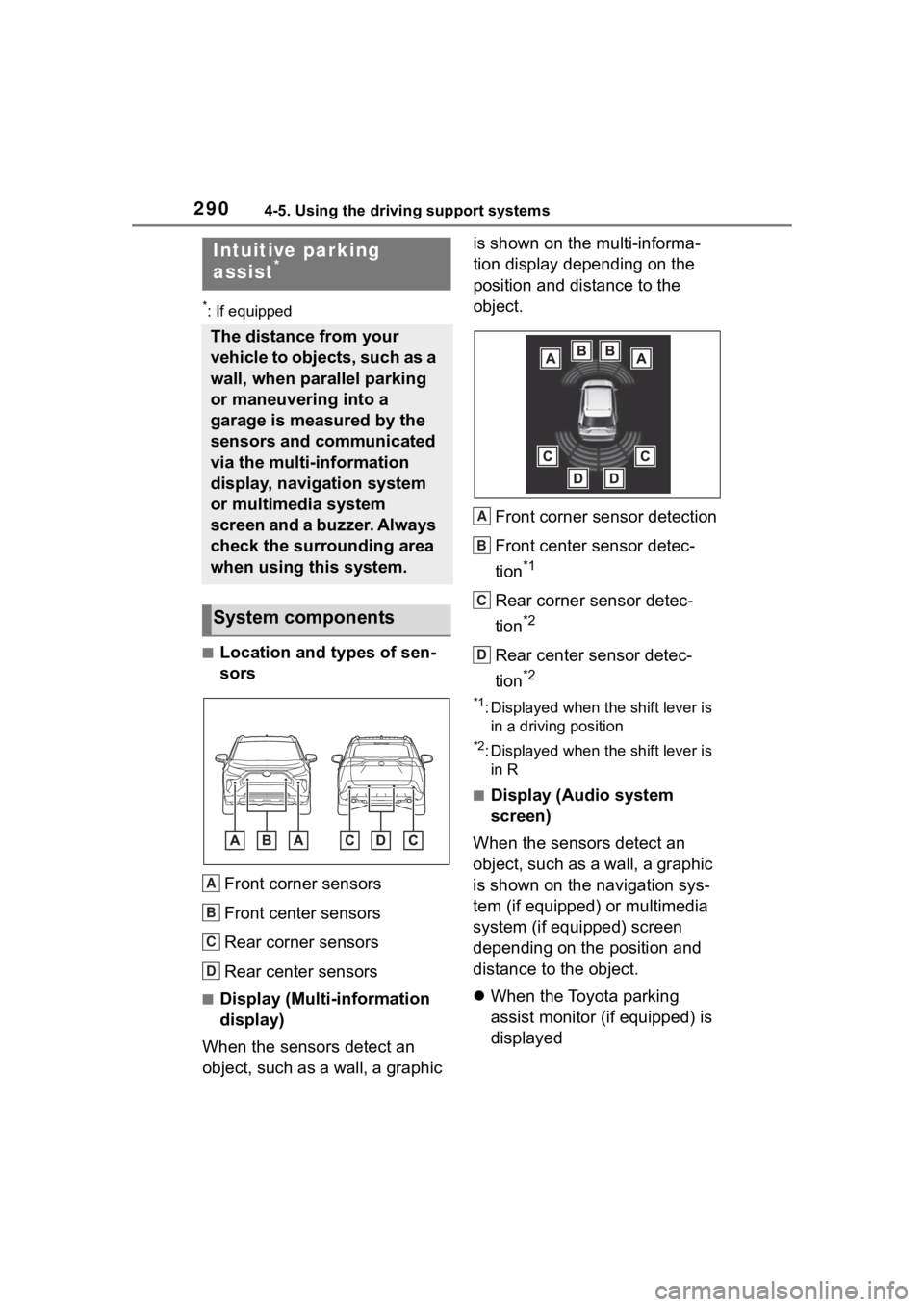
■Location and types of sen-
sorsFront corner sensors
Front center sensors
Rear corner sensors
Rear center sensors
■Display (Multi-information
display)
When the sensors detect an
object, such as a wall, a graphic is shown on the multi-informa-
tion display depending on the
position and distance to the
object.
Front corner sensor detection
Front center sensor detec-
tion
*1
Rear corner sensor detec-
tion
*2
Rear center sensor detec-
tion
*2
*1: Displayed when the shift lever is in a driving position
*2: Displayed when the shift lever is in R
■Display (Audio system
screen)
When the sensors detect an
object, such as a wall, a graphic
is shown on the navigation sys-
tem (if equipped) or multimedia
system (if equipped) screen
depending on the position and
distance to the object.
When the Toyota parking
assist monitor (if equipped) is
displayed
Intuitive parking
assist*
The distance from your
vehicle to objects, such as a
wall, when parallel parking
or maneuvering into a
garage is measured by the
sensors and communicated
via the multi-information
display, navigation system
or multimedia system
screen and a buzzer. Always
check the surrounding area
when using this system.
System components
A
B
C
D
A
B
C
D
Page 292 of 744
2924-5. Using the driving support systems
WA R N I N G
■Intuitive parking assist pre-
cautions
Observe the following precau-
tions.
Failing to do so may result in the
vehicle being unable to be driven
safely and possibly cause an acci-
dent.
●Do not use the sensor at
speeds in excess of 6 mph (10
km/h).
●The sensors’ detection areas
and reaction times are limited.
When moving forward or revers-
ing, check the areas surround-
ing the vehicle (especially the
sides of the vehicle) for safety,
and drive slowly, using the
brake to control the vehicle’s
speed.
●Do not install accessories near
the bumpers as those areas are
within the sensors’ detection
areas.
●The area directly under the
bumpers is not detected.
Thin posts or objects lower than
the sensor may not be detected
when approached, even if they
have been det ected once.
■When to disable the function
In the following situations, disable
the function as it may operate
even though there is no possibility
of a collision.
●The vehicle is equipped with a
commercial fender pole, wire-
less antenna or fog lights.
●The front or rear bumper or a
sensor receives a strong
impact.
●A non-genuine Toyota suspen-
sion (lowered suspension, etc.)
is installed.
●Towing eyelets (if equipped) are
installed.
●A backlit license plate is
installed.
■When using the intuitive park-
ing assist
In the following situations, the
system may not function correctly
due to a sensor malfunction, etc.
Have the vehicle checked by your
Toyota dealer.
●The intuitive parking assist
operation display flashes or
shows continuously, and a
buzzer sounds when no objects
are detected.
●If the area around a sensor col-
lides with something, or is sub-
jected to strong impact.
●If the bumper or grille collides
with something.
●If the display flashes or is dis-
played continuously and a
buzzer does not sound, except
when the mute function has
been turned on.
■Notes when washing the vehi-
cle
Do not apply intensive bursts of
water or steam to the sensor
area.
Doing so may result in the sensor
malfunctioning.
●When using a high pressure
washer to wash the vehicle, do
not spray the sensors directly,
as doing so may cause a sensor
to malfunction.
●When using steam to clean the
vehicle, do not direct steam too
close to the sensors as doing so
may cause a sensor to malfunc-
tion.
Page 293 of 744
2934-5. Using the driving support systems
4
Driving
■The system can be operated
when
●The power switch is in ON.
●Intuitive parking assist function is
on.
●The vehicle speed is less than
about 6 mph (10 km/h).
●The shift lever is in a position
other than P.
■If “Parking Assist Unavailable
Clean Parking Assist Sensor” is
displayed on the multi-informa-
tion display
A sensor may be covered with ice,
snow, dirt, etc. Remove the ice,
snow, dirt, etc., from the sensor to
return the syste m to normal.
Also, due to ice forming on a sensor
at low temperatures, a warning
message may be displayed or the
sensor may not be able to detect an
object. Once the ice melts, the sys-
tem will return to normal.
If a warning message is displayed
even if the sensor is clean, there
may be a sensor malfunction. Have
the vehicle inspected by your Toyota
dealer.
■If “Parking Assist Unavailable”
is displayed on the multi-infor-
mation display
●Water may be continuously flow-
ing over the sensor surface, such
as in a heavy rain. When the sys-
tem determines that it is normal,
the system will re turn to normal.
●Initialization may not have been
performed after a 12-volt battery
terminal was dis connected and
reconnected. Initialize the sys-
tem. ( P.293) If this message
continues to be displayed even
after initialization, have the vehicle
inspected by you r Toyota dealer.
■If a 12-volt batte ry terminal has
been disconnected and recon-
nected
The system needs to be initialized. To initialize the system, drive the
vehicle straight ahead for 5 seconds
or more at a speed of approximately
22 mph (35 km/h) or more.
■Sensor detection information
●The sensor’s det
ection areas are
limited to the areas around the
vehicle’s front and rear bumpers.
●The following situations may occur
during use.
• Depending on the shape of the
object and other factors, the
detection distance may shorten, or
detection may be impossible.
• Detection may be impossible if static objects draw too close to the
sensor.
• There will be a short delay between static object detection
and display (warning buzzer
sounds). Even at low speeds,
there is a possibility that the object
will come within 11.9 in. (30 cm)
before the display is shown and
the warning buzzer sounds.
• It might be diffic ult to hear the
buzzer due to the volume of the
audio system or air flow noise of
the air conditioning system.
• It may be diffi cult to hear the
sound of this sys tem due to the
buzzers of other systems.
■Conditions under which the
function may not function cor-
rectly
Certain vehicle conditions and the
surrounding environment may affect
the ability of a sensor to correctly
detect objects. Part icular instances
where this may occur are listed
below.
●There is dirt, snow or ice on a sen-
sor. (Cleaning the sensors will
resolve this problem.)
●A sensor is froz en. (Thawing the
area will resolve this problem.)
In especially cold weather, if a
sensor is frozen the sensor dis-
play may be displayed abnormally,
or objects, such as a wall, may not
be detected.
Page 294 of 744
2944-5. Using the driving support systems
●A sensor is covered in any way.
●When a sensor or the area around
a sensor is extremely hot or cold.
●On an extremely bumpy road, on
an incline, on gravel, or on grass.
●The vicinity of the vehicle is noisy
due to vehicle horns, motorcycle
engines, air brakes of large vehi-
cles, or other loud noises produc-
ing ultrasonic waves.
●There is another vehicle equipped
with parking assist sensors in the
vicinity.
●A sensor is coated with a sheet of
spray or heavy rain.
●If a sensor is hit by a large amount
of water, such as when driving on
a flooded road.
●If the vehicle is sig nificantly tilted.
●The vehicle is approaching a tall
or curved curb.
●If objects draw too close to the
sensor.
■Objects which may not be prop-
erly detected
The shape of the object may pre-
vent the sensor from detecting it.
Pay particular attention to the follow-
ing objects:
●Wires, fences, ropes, etc.
●Cotton, snow and other materials
that absorb sound waves
●Sharply-angled objects
●Low objects
●Tall objects with upper sections
projecting outwards in the direc-
tion of your vehicle
People may not be detected if they
are wearing certain types of cloth-
ing.
■Certification (Canada only)
This ISM device complies with
Canadian ICES-001.
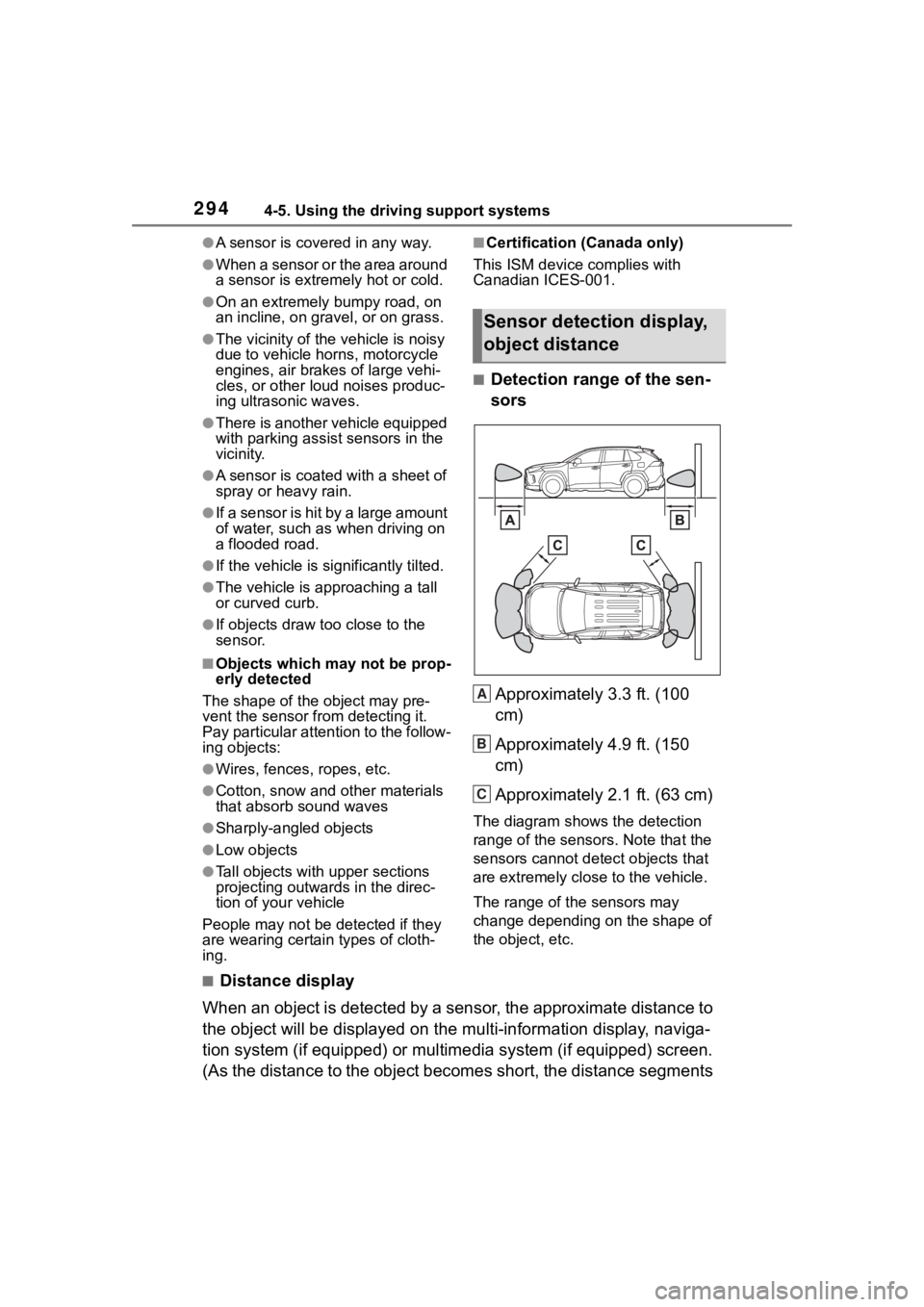
■Detection range of the sen-
sors
Approximately 3.3 ft. (100
cm)
Approximately 4.9 ft. (150
cm)
Approximately 2.1 ft. (63 cm)
The diagram shows the detection
range of the sensors. Note that the
sensors cannot detect objects that
are extremely clos e to the vehicle.
The range of the sensors may
change depending on the shape of
the object, etc.
■Distance display
When an object is detected by a sensor, the approximate distanc e to
the object will be displayed on th e multi-information display, naviga-
tion system (if equipped) or multimedia system (if equipped) sc reen.
(As the distance to the object becomes short, the distance segm ents
Sensor detection display,
object distance
A
B
C
Page 296 of 744
2964-5. Using the driving support systems
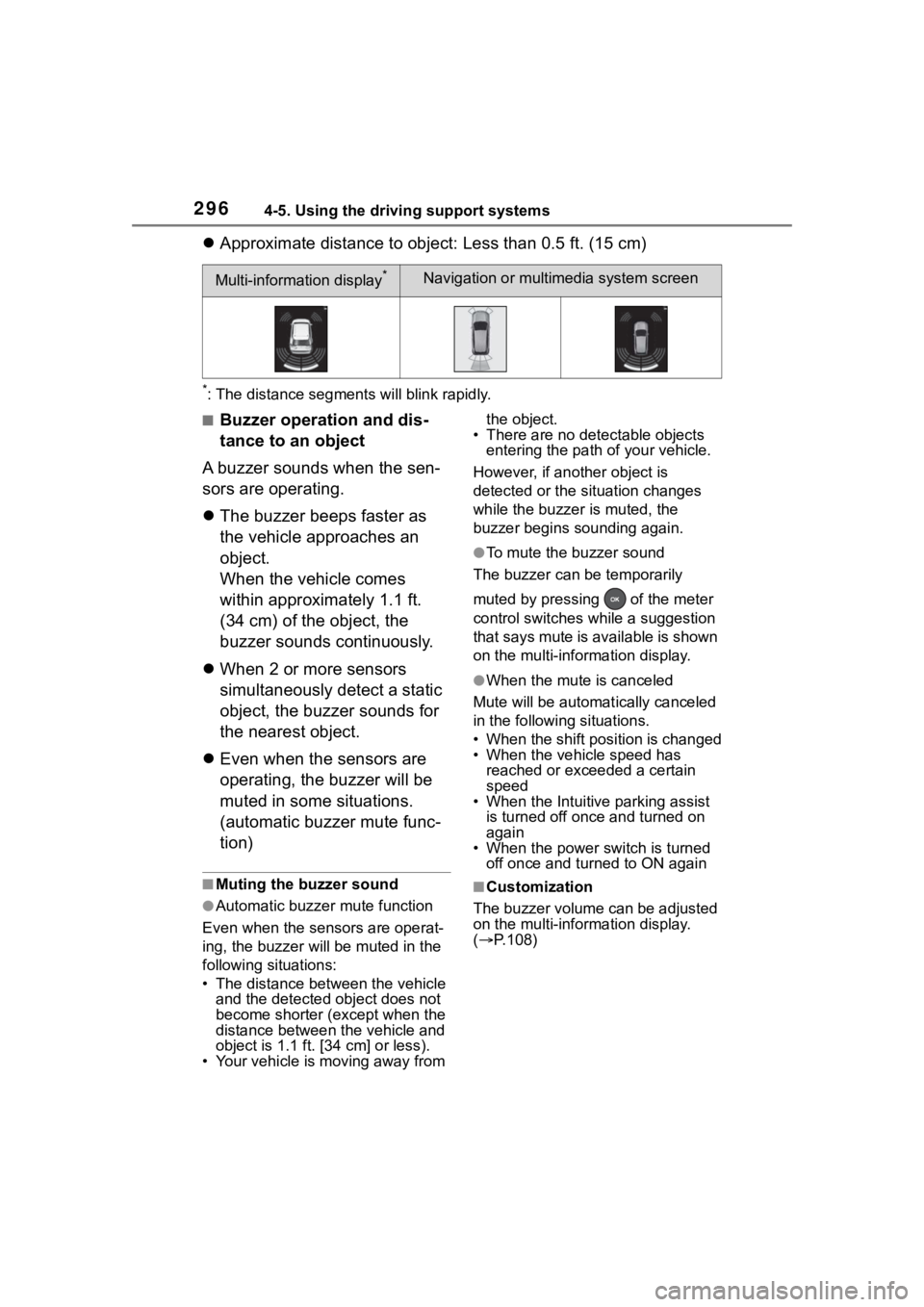
Approximate distance to object: Less than 0.5 ft. (15 cm)
*: The distance segments will blink rapidly.
■Buzzer operation and dis-
tance to an object
A buzzer sounds when the sen-
sors are operating.
The buzzer beeps faster as
the vehicle approaches an
object.
When the vehicle comes
within approximately 1.1 ft.
(34 cm) of the object, the
buzzer sounds continuously.
When 2 or more sensors
simultaneously detect a static
object, the buzzer sounds for
the nearest object.
Even when the sensors are
operating, the buzzer will be
muted in some situations.
(automatic buzzer mute func-
tion)
■Muting the buzzer sound
●Automatic buzzer mute function
Even when the sensors are operat-
ing, the buzzer will be muted in the
following situations:
• The distance betw een the vehicle
and the detected object does not
become shorter (except when the
distance between the vehicle and
object is 1.1 ft. [34 cm] or less).
• Your vehicle is moving away from the object.
• There are no detectable objects
entering the path o f your vehicle.
However, if another object is
detected or the situation changes
while the buzzer is muted, the
buzzer begins sounding again.
●To mute the buzzer sound
The buzzer can be temporarily
muted by pressing of the meter
control switches while a suggestion
that says mute is available is shown
on the multi-information display.
●When the mute is canceled
Mute will be automat ically canceled
in the following situations.
• When the shift position is changed
• When the vehicle speed has reached or exceeded a certain
speed
• When the Intuitive parking assist is turned off once and turned on
again
• When the power switch is turned off once and turned to ON again
■Customization
The buzzer volume can be adjusted
on the multi-information display.
( P.108)
Multi-information display*Navigation or multimedia system screen
Page 298 of 744
2984-5. Using the driving support systems
The Parking Support Brake can
be enabled/disabled on the
screen of the multi-information
display. All of the Parking Sup-
port Brake functions (static
objects and rear-crossing vehi-
cles) are enabled/disabled
simultaneously. (P.108)
When the Parking Support Brake is
disabled, the PKSB OFF indicator
( P.91) illuminates on the multi-
information display.
To re-enable the system, select
on the multi-inform ation display,
select and turn it on.
If the system is disabled, it will
remain off even if the power switch
is turned to ON a fter the power
switch has been turned off.
If the hybrid system output
restriction control or brake con-
trol operates, a buzzer will
sound and a message will be
displayed on the multi-informa-
tion display, navigation system
(if equipped) or multimedia sys-
tem (if equipped) screen, to alert
the driver.
Depending on the situation, hybrid
system output restriction control will
operate to either limit acceleration
or restrict output as much as possi-
ble.
Hybrid system output restric-
tion control is operating
(acceleration restriction)
Acceleration greater than a certain
amount is restric ted by the system.
Navigation system (if equipped) or
multimedia system (if equipped)
screen: No warning displayed
Multi-information display: “Object
Detected Acceleration Reduced”
PKSB OFF indicator: Not illumi-
nated
Buzzer: Does not sound
Hybrid system output restric-
tion control is operating (out-
put restricted as much as
possible)
The system has determined that
stronger-than-normal brake opera-
tion is necessary.
NOTICE
■If “Parking Support Brake
Unavailable” is displayed on
the multi-information display
and the PKSB OFF indicator
is flashing
If this message is displayed
immediately after the power
switch is changed to ON, operate
the vehicle carefully, paying atten-
tion to your surroundings. It may
be necessary to drive the vehicle
for a certain amount of time
before the system returns to nor-
mal. (If the system does not return
to normal after dr iving for a while,
clean the sensors and their sur-
rounding area on the bumpers.)
Enabling/Disabling the
Parking Support Brake
Display and buzzer for
hybrid system output
restriction control and
brake control