lane assist TOYOTA RAV4 HYBRID 2021 User Guide
[x] Cancel search | Manufacturer: TOYOTA, Model Year: 2021, Model line: RAV4 HYBRID, Model: TOYOTA RAV4 HYBRID 2021Pages: 752, PDF Size: 31.25 MB
Page 263 of 752
2634-5. Using the driving support systems
4
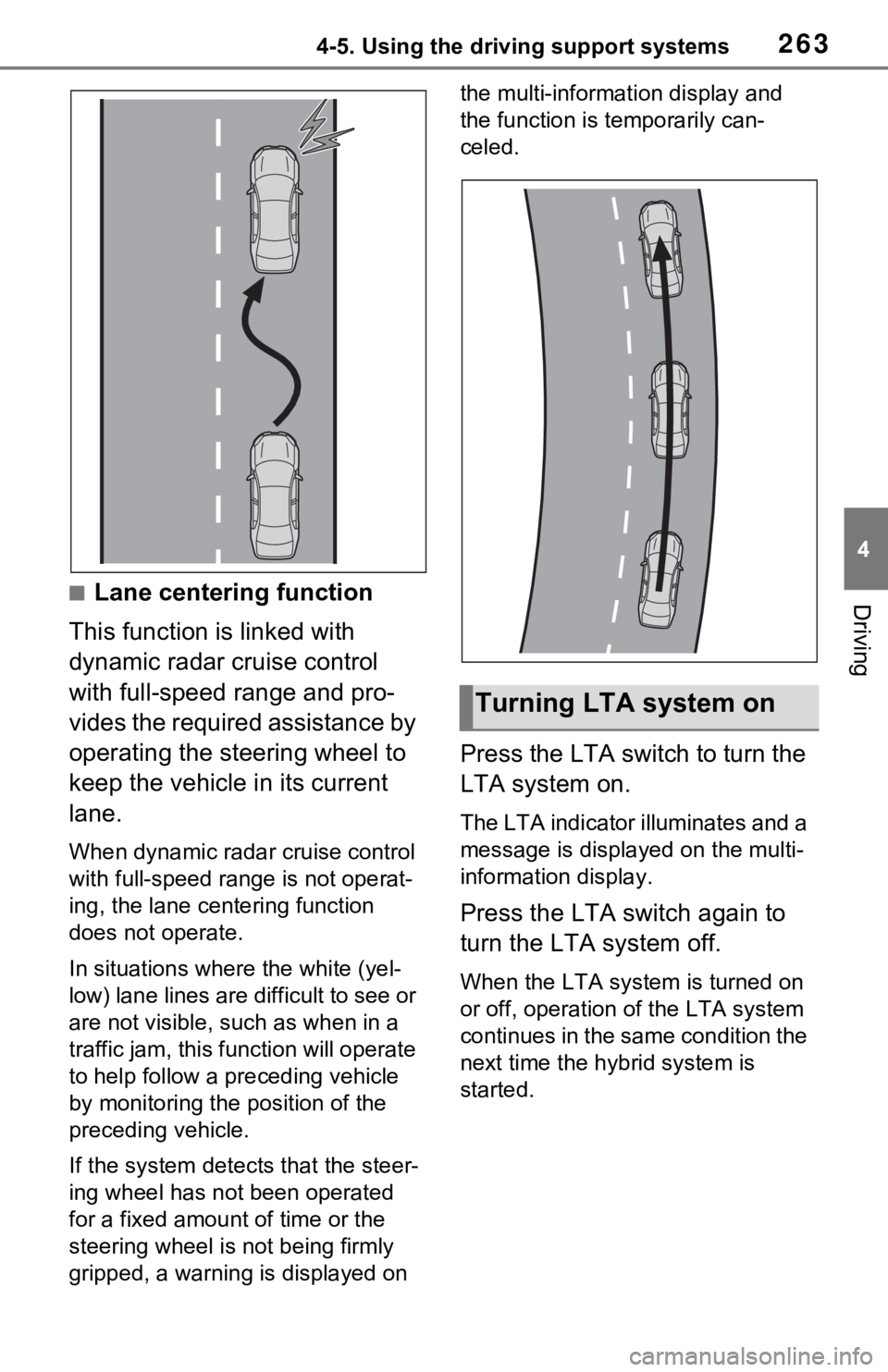
Driving■Lane centering function
This function is linked with
dynamic radar cruise control
with full-speed range and pro-
vides the required assistance by
operating the steering wheel to
keep the vehicle in its current
lane.
When dynamic radar cruise control
with full-speed range is not operat-
ing, the lane centering function
does not operate.
In situations where the white (yel-
low) lane lines are difficult to see or
are not visible, such as when in a
traffic jam, this fu nction will operate
to help follow a preceding vehicle
by monitoring the position of the
preceding vehicle.
If the system detects that the steer-
ing wheel has not been operated
for a fixed amount of time or the
steering wheel is not being firmly
gripped, a warning is displayed on the multi-information display and
the function is temporarily can-
celed.
Press the LTA switch to turn the
LTA system on.
The LTA indicator illuminates and a
message is display
ed on the multi-
information display.
Press the LTA switch again to
turn the LTA system off.
When the LTA syste m is turned on
or off, operation of the LTA system
continues in the same condition the
next time the hybrid system is
started.
Turning LTA system on
Page 264 of 752
2644-5. Using the driving support systems
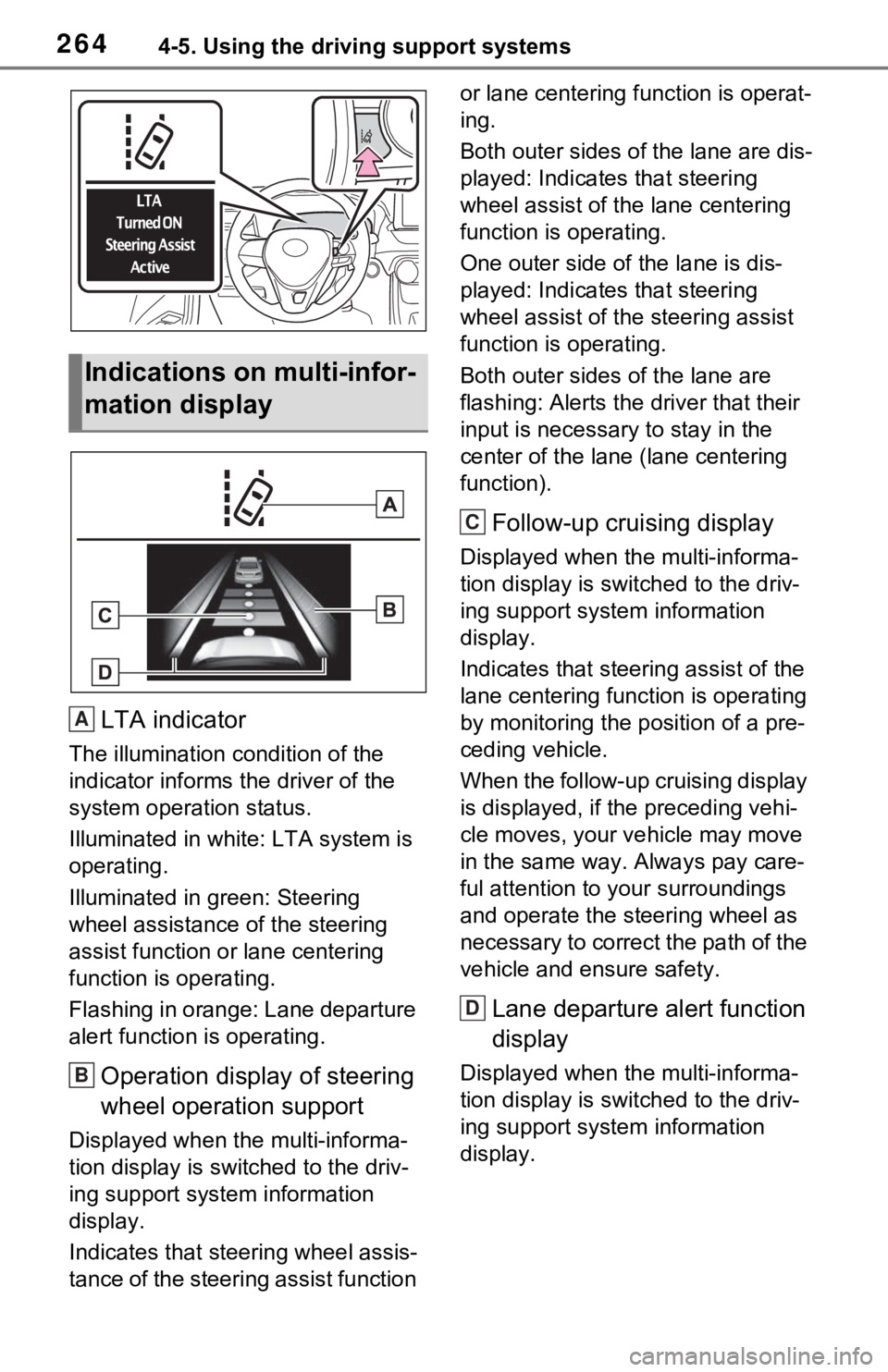
LTA indicator
The illumination condition of the
indicator informs the driver of the
system operation status.
Illuminated in white: LTA system is
operating.
Illuminated in green: Steering
wheel assistance of the steering
assist function or lane centering
function is operating.
Flashing in orange: Lane departure
alert function is operating.
Operation display of steering
wheel operation support
Displayed when the multi-informa-
tion display is switched to the driv-
ing support system information
display.
Indicates that steering wheel assis-
tance of the steering assist function or lane centering f
unction is operat-
ing.
Both outer sides of the lane are dis-
played: Indicates that steering
wheel assist of the lane centering
function is operating.
One outer side of the lane is dis-
played: Indicates that steering
wheel assist of the steering assist
function is operating.
Both outer sides of the lane are
flashing: Alerts the driver that their
input is necessary to stay in the
center of the lane (lane centering
function).
Follow-up cruising display
Displayed when the multi-informa-
tion display is swit ched to the driv-
ing support system information
display.
Indicates that steering assist of the
lane centering function is operating
by monitoring the position of a pre-
ceding vehicle.
When the follow-up cruising display
is displayed, if t he preceding vehi-
cle moves, your ve hicle may move
in the same way. Always pay care-
ful attention to your surroundings
and operate the steering wheel as
necessary to correct the path of the
vehicle and ensure safety.
Lane departure alert function
display
Displayed when the multi-informa-
tion display is swit ched to the driv-
ing support system information
display.
Indications on multi-infor-
mation display
A
B
C
D
Page 265 of 752
2654-5. Using the driving support systems
4
Driving
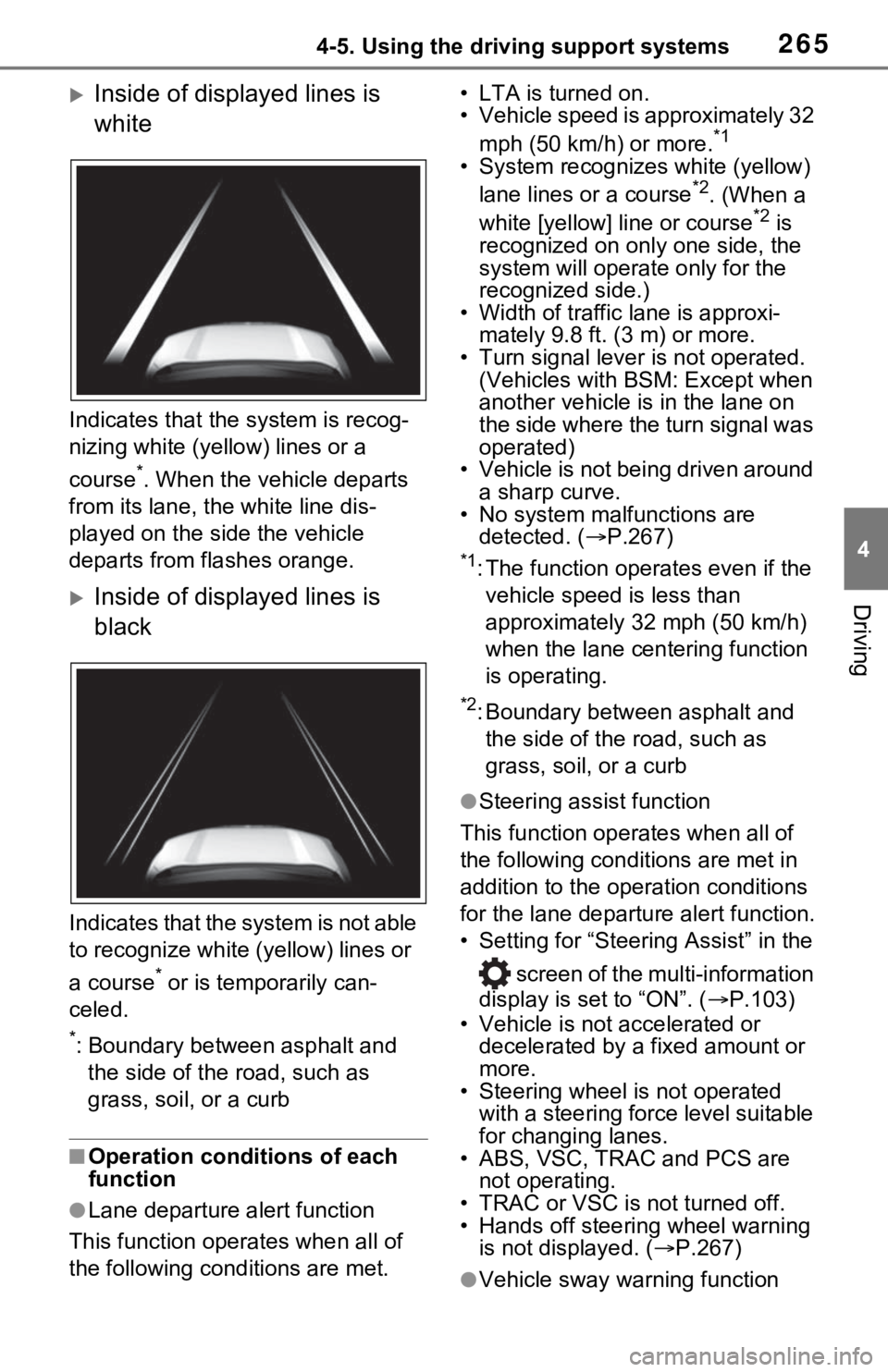
Inside of displayed lines is
white
Indicates that the system is recog-
nizing white (yellow) lines or a
course
*. When the vehicle departs
from its lane, the white line dis-
played on the si de the vehicle
departs from flashes orange.
Inside of displayed lines is
black
Indicates that the system is not able
to recognize white (yellow) lines or
a course
* or is temporarily can-
celed.
*: Boundary between asphalt and the side of the road, such as
grass, soil, or a curb
■Operation conditions of each
function
●Lane departure alert function
This function oper ates when all of
the following cond itions are met. • LTA is turned on.
• Vehicle speed is approximately 32
mph (50 km/h) or more.
*1
• System recognizes white (yellow) lane lines or a course*2. (When a
white [yellow] line or course*2 is
recognized on only one side, the
system will operate only for the
recognized side.)
• Width of traffic lane is approxi- mately 9.8 ft. (3 m) or more.
• Turn signal lever is not operated. (Vehicles with BSM: Except when
another vehicle is in the lane on
the side where the turn signal was
operated)
• Vehicle is not being driven around
a sharp curve.
• No system malfunctions are detected. ( P.267)
*1: The function oper ates even if the
vehicle speed is less than
approximately 32 mph (50 km/h)
when the lane centering function
is operating.
*2: Boundary between asphalt and the side of the road, such as
grass, soil, or a curb
●Steering assist function
This function operates when all of
the following conditions are met in
addition to the operation conditions
for the lane departure alert function.
• Setting for “Steering Assist” in the
screen of the multi-information
display is set to “ON”. ( P.103)
• Vehicle is not accelerated or decelerated by a fixed amount or
more.
• Steering wheel is not operated
with a steering force level suitable
for changing lanes.
• ABS, VSC, TRAC and PCS are
not operating.
• TRAC or VSC is not turned off.
• Hands off steering wheel warning is not displayed. ( P.267)
●Vehicle sway warning function
Page 266 of 752
2664-5. Using the driving support systems
This function operates when all of
the following cond itions are met.
• Setting for “Sway Warning” in the
screen of the mu lti-information
display is set to “ON”. ( P.103)
• Vehicle speed is approximately 32 mph (50 km/h) or more.
• Width of traffic lane is approxi-
mately 9.8 ft. ( 3 m) or more.
• No system malfunctions are detected. ( P.267)
●Lane centering function
This function oper ates when all of
the following cond itions are met.
• LTA is turned on.
• Setting for “Steering Assist” and
“Lane Center” in the screen of
the multi-information display are
set to “ON”. ( P.103)
• This function recognizes white (yellow) lane lines or the position
of a preceding vehicle (except
when the preceding vehicle is
small, such as a motorcycle).
• The dynamic radar cruise control with full-speed range is operating
in vehicle-to-vehic le distance con-
trol mode.
• Width of traffic lane is approxi- mately 10 to 13 ft. (3 to 4 m).
• Turn signal lever is not operated.
• Vehicle is not being driven around a sharp curve.
• No system malfunctions are detected. ( P.267)
• Vehicle does not accelerate or
decelerate by a fixed amount or
more.
• Steering wheel is not operated
with a steering force level suitable
for changing lanes.
• ABS, VSC, TRAC and PCS are
not operating.
• TRAC or VSC is not turned off.
• Hands off steering wheel warning is not displayed. ( P.267)
• The vehicle is being driven in the center of a lane.
• Steering assist function is not operating.
■Temporary cancelation of func-
tions
●When operation conditions are no
longer met, a function may be
temporarily canceled. However,
when the operation conditions are
met again, operation of the func-
tion is automatically restored.
( P.265)
●If the operation conditions
( P.265) are no longer met while
the lane centering function is
operating, the buzzer may sound
to indicate that the function has
been temporarily canceled.
■Steering assist function/lane
centering function
●Depending on the vehicle speed,
lane departure situation, road con-
ditions, etc., the driver may not
feel the function is operating or
the function may not operate at
all.
●The steering control of the func-
tion is overridden by the driver’s
steering wheel operation.
●Do not attempt to test the opera-
tion of the steering assist function.
■Lane departure alert function
●The warning buzzer may be diffi-
cult to hear due to external noise,
audio playback, etc.
●If the edge of the course* is not
clear or straight, the lane depar-
ture alert function may not oper-
ate.
●Vehicles with BSM: It may not be
possible for the system to deter-
mine if there is a danger of a colli-
sion with a vehicl e in an adjacent
lane.
●Do not attempt to test the opera-
tion of the lane departure alert
function.
*: Boundary between asphalt and
the side of the road, such as
grass, soil, or a curb
Page 267 of 752
2674-5. Using the driving support systems
4
Driving
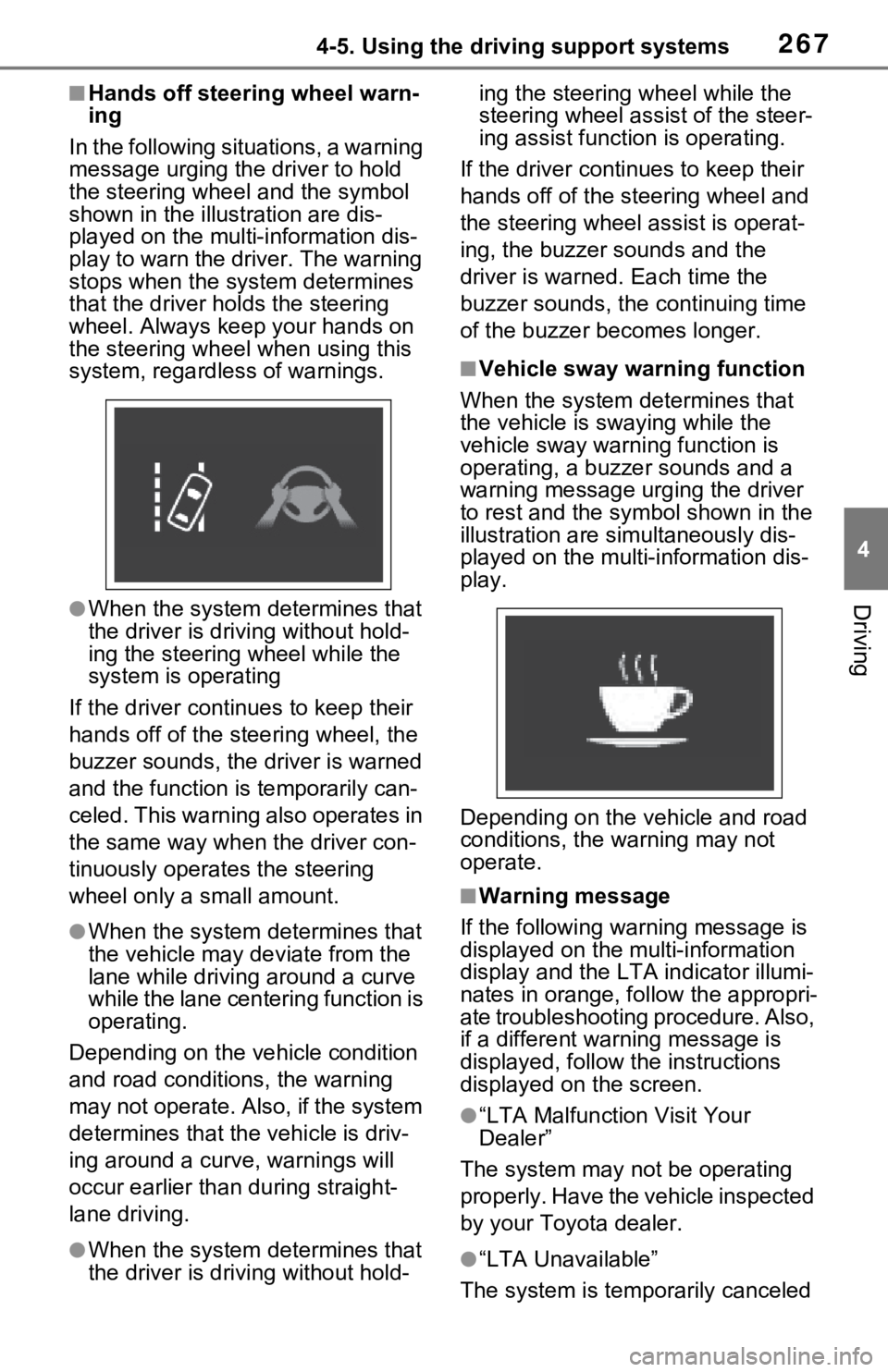
■Hands off steering wheel warn-
ing
In the following situations, a warning
message urging the driver to hold
the steering wheel and the symbol
shown in the illustration are dis-
played on the multi-information dis-
play to warn the driver. The warning
stops when the sys tem determines
that the driver holds the steering
wheel. Always keep your hands on
the steering wheel when using this
system, regardless of warnings.
●When the system determines that
the driver is driving without hold-
ing the steering wheel while the
system is operating
If the driver continues to keep their
hands off of the steering wheel, the
buzzer sounds, the driver is warned
and the function is temporarily can-
celed. This warning also operates in
the same way when the driver con-
tinuously operates the steering
wheel only a small amount.
●When the system determines that
the vehicle may deviate from the
lane while driving around a curve
while the lane centering function is
operating.
Depending on the vehicle condition
and road conditions, the warning
may not operate. Also, if the system
determines that the vehicle is driv-
ing around a curv e, warnings will
occur earlier than during straight-
lane driving.
●When the system determines that
the driver is driving without hold- ing the steering wheel while the
steering wheel assi
st of the steer-
ing assist function is operating.
If the driver continues to keep their
hands off of the steering wheel and
the steering wheel assist is operat-
ing, the buzzer sounds and the
driver is warned. Each time the
buzzer sounds, the continuing time
of the buzzer becomes longer.
■Vehicle sway warning function
When the system determines that
the vehicle is swaying while the
vehicle sway warning function is
operating, a buzzer sounds and a
warning message urging the driver
to rest and the sym bol shown in the
illustration are simultaneously dis-
played on the multi-information dis-
play.
Depending on the vehicle and road
conditions, the warning may not
operate.
■Warning message
If the following warning message is
displayed on the multi-information
display and the LT A indicator illumi-
nates in orange, follow the appropri-
ate troubleshooting procedure. Also,
if a different warning message is
displayed, follow the instructions
displayed on the screen.
●“LTA Malfunction Visit Your
Dealer”
The system may not be operating
properly. Have the vehicle inspected
by your Toyo ta dealer.
●“LTA Unavailable”
The system is temporarily canceled
Page 282 of 752
2824-5. Using the driving support systems
decreasing to the set speed after
the vehicle accelerates by
depressing the accelerator pedal
*: If equipped
BSM (Blind Spot Moni-
tor)*
The Blind Spot Monitor is a
system that has 2 functions:
The BSM (Blind Spot Moni-
tor) function
Assists the driver in making a
decision when changing lanes
The RCTA (Rear Cross
Traffic Alert) function
Assists the driver when back-
ing up
These functions use the
same sensors.
WARNING
■Cautions regarding the use of
the BSM function
The driver is solely responsible for
safe driving. Always drive safely,
taking care to observe your sur-
roundings.
The BSM function is a supple-
mentary function which alerts the
driver that a vehicle is in a blind
spot of the outside rear view mir-
rors or is approaching rapidly from
behind into a blin d spot. Do not
overly rely on the BSM function.
A s th e f un ctio n ca nn ot jud g e if it is
safe to change lanes, over reli-
ance could lead to an accident
resulting in dea th or serious
injury.
As the system may not function
correctly under certain condi-
tions, the driver’s own visual con-
firmation of safety is necessary.
Page 378 of 752
3784-6. Driving tips
Use fluids that are appropriate
to the prevailing outside tem-
peratures.
• Engine oil
• Engine coolant
• Power control unit coolant
• Washer fluid
Have a service technician
inspect the condition of the
12-volt battery.
Have the vehicle fitted with
four snow tires or purchase a
set of tire chains for the front
tires.
Ensure that all tires are the same
size and brand, and that chains
match the size of the tires.
Winter driving tips
Carry out the necessary
preparations and inspec-
tions before driving the
vehicle in winter. Always
drive the vehicle in a man-
ner appropriate to the pre-
vailing weather conditions.
Pre-winter preparations
WARNING
■Driving with snow tires
Observe the following precautions
to reduce the risk of accidents.
Failure to do so m ay result in a
loss of vehicle control and cause
death or serious injury.
●Use tires of the specified size.
●Maintain the recommended
level of air pressure.
●Do not drive in excess of 75
mph (120 km/h), regardless of
the type of snow tires being
used.
●Use snow tires on all, not just
some wheels.
■Driving with tire chains
Observe the following precautions
to reduce the risk of accidents.
Failure to do so may result in the
vehicle being unable to be driven
safely, and may cause death or
serious injury.
●Do not drive in excess of the
speed limit specifi ed for the tire
chains being used, or 30 mph
(50 km/h), whichever is lower.
●Avoid driving on bumpy road
surfaces or over potholes.
●Avoid sudden acceleration,
abrupt steering, sudden brak-
ing and shifting operations that
cause sudden engine braking.
●Slow down sufficiently before
entering a curve to ensure that
vehicle control is maintained.
●Do not use LTA (Lane Tracing
Assist) system.
NOTICE
■Repairing or replacing snow
tires (vehicles with tire pres-
sure warning system)
Request repairs or replacement of
snow tires from your Toyota
dealer or legitimate tire retailers.
This is because the removal and
attachment of snow tires affects
the operation of the tire pressure
warning valves and transmitters.
Page 645 of 752
6458-2. Steps to take in an emergency
8
When trouble arises
■PCS warning light (warning buzzer)
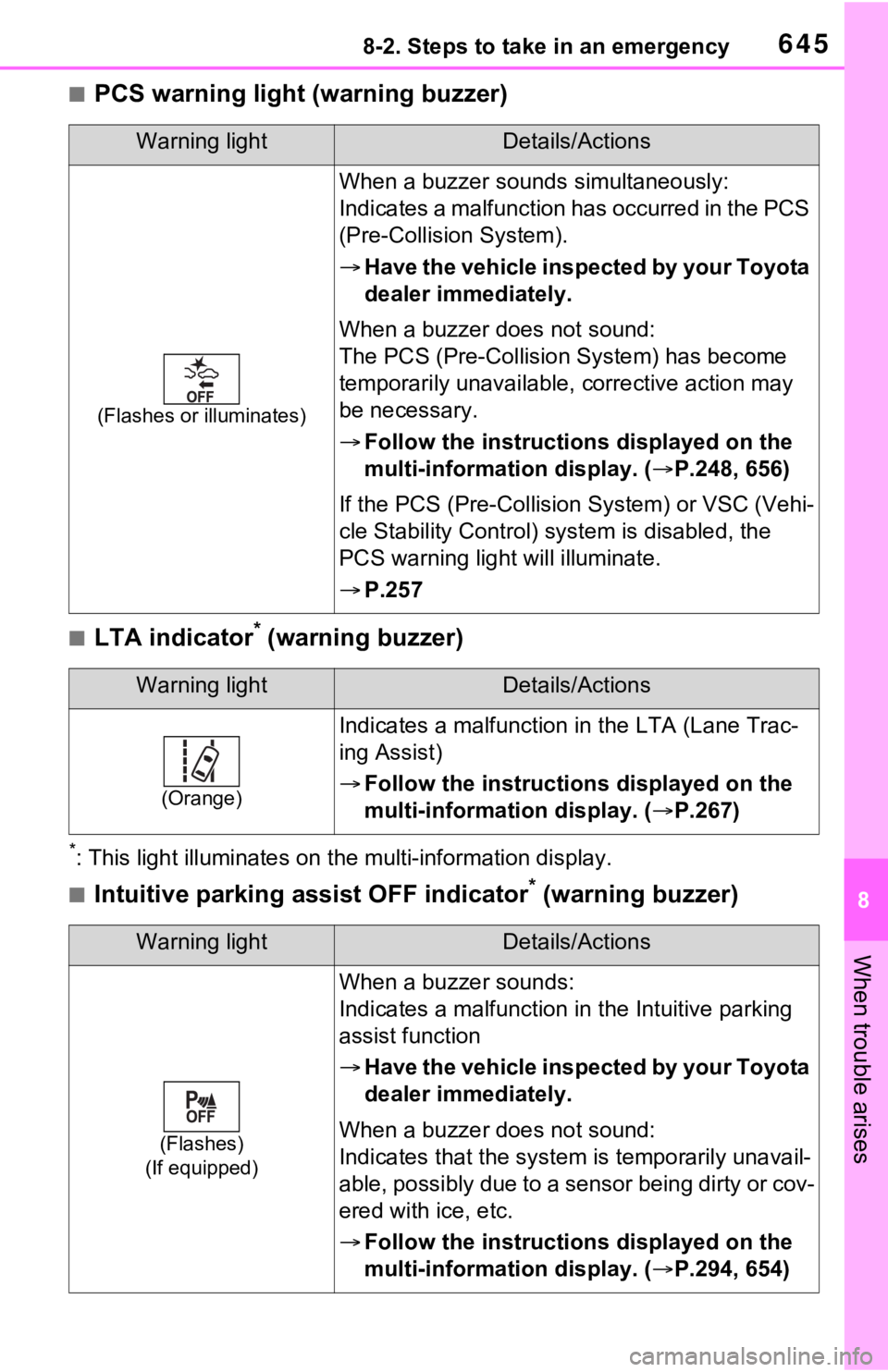
■LTA indicator* (warning buzzer)
*: This light illuminat es on the multi-information display.
■Intuitive parking assist OFF indicator* (warning buzzer)
Warning lightDetails/Actions
(Flashes or illuminates)
When a buzzer sounds simultaneously:
Indicates a malfunction has occurred in the PCS
(Pre-Collision System).
Have the vehicle inspected by your Toyota
dealer immediately.
When a buzzer does not sound:
The PCS (Pre-Collision System) has become
temporarily unavailable, corrective action may
be necessary.
Follow the instructions displayed on the
multi-information display. ( P.248, 656)
If the PCS (Pre-Collision System) or VSC (Vehi-
cle Stability Control) system is disabled, the
PCS warning light will illuminate.
P.257
Warning lightDetails/Actions
(Orange)
Indicates a malfunction in the LTA (Lane Trac-
ing Assist)
Follow the instructions displayed on the
multi-information display. ( P.267)
Warning lightDetails/Actions
(Flashes)
(If equipped)
When a buzzer sounds:
Indicates a malfunction in the Intuitive parking
assist function
Have the vehicle inspected by your Toyota
dealer immediately.
When a buzzer does not sound:
Indicates that the system is temporarily unavail-
able, possibly due to a sensor being dirty or cov-
ered with ice, etc.
Follow the instructions displayed on the
multi-information display. ( P.294, 654)
Page 656 of 752
6568-2. Steps to take in an emergency
■If “Maintenance Required Visit
Your Dealer” is shown
Indicates that all maintenance is
required to correspond to the driven
distance on the maintenance sched-
ule
*.
Comes on approximately 5000
miles (8000 km) after the message
has been reset. (The indicator will
not work properly unless the mes-
sage has been reset.)
Perform the necessary mainte-
nance. Please reset the message
after the maintenance is performed.
( P.573)
*: Refer to the separate “Scheduled
Maintenance Guide” or “Owner’
Manual Supplement” for the main-
tenance interval applicable to your
vehicle.
■If a message that indicates the
malfunction of front camera is
displayed
The following sys tems may be sus-
pended until the pr oblem shown in
the message is resolved. ( P.248,
642)
●PCS (Pre-Collis ion System)
●LTA (Lane Tracing Assist)
●Automatic High Beam
●RSA (Road Sign Assist)*
●Dynamic radar cruise control with
full-speed range
*: If equipped
■If “Radar Cruise Control
Unavailable See Owner’s Man-
ual” is shown
The dynamic radar cruise control
with full-speed range system is sus-
pended temporarily or until the prob-
lem shown in the message is
resolved. (causes a nd coping meth-
ods: P.248)
■If “Radar Cruise Control
Unavailable” is shown
The dynamic radar cruise control
with full-speed range system cannot
be used temporarily. Use the sys-
tem when it becomes available
again.
■Warning buzzer
P.650
WARNING
■If a warning light comes on or
a warning buzzer sounds
when a warning message is
shown on the multi-informa-
tion display
P.651
NOTICE
■“High Power Consumption
Partial Limit On AC/Heater
Operation” is frequently
shown
There is a possible malfunction
relating to the charging system or
the 12-volt battery may be deteri-
orating. Have the vehicle
inspected by your Toyota dealer.
■If “Maintenance Required For
Traction Battery At Your
Dealer” is shown
The hybrid battery (traction bat-
tery) is scheduled to be inspected
or replaced. Hav e the vehicle
inspected by your Toyota dealer
immediately.
●Continuing to dr ive the vehicle
without having the hybrid bat-
tery (traction bat tery) inspected
will cause the hybrid system not
to start.
●If the hybrid system does not
start, contact your Toyota
dealer immediately.
Page 664 of 752
6648-2. Steps to take in an emergency
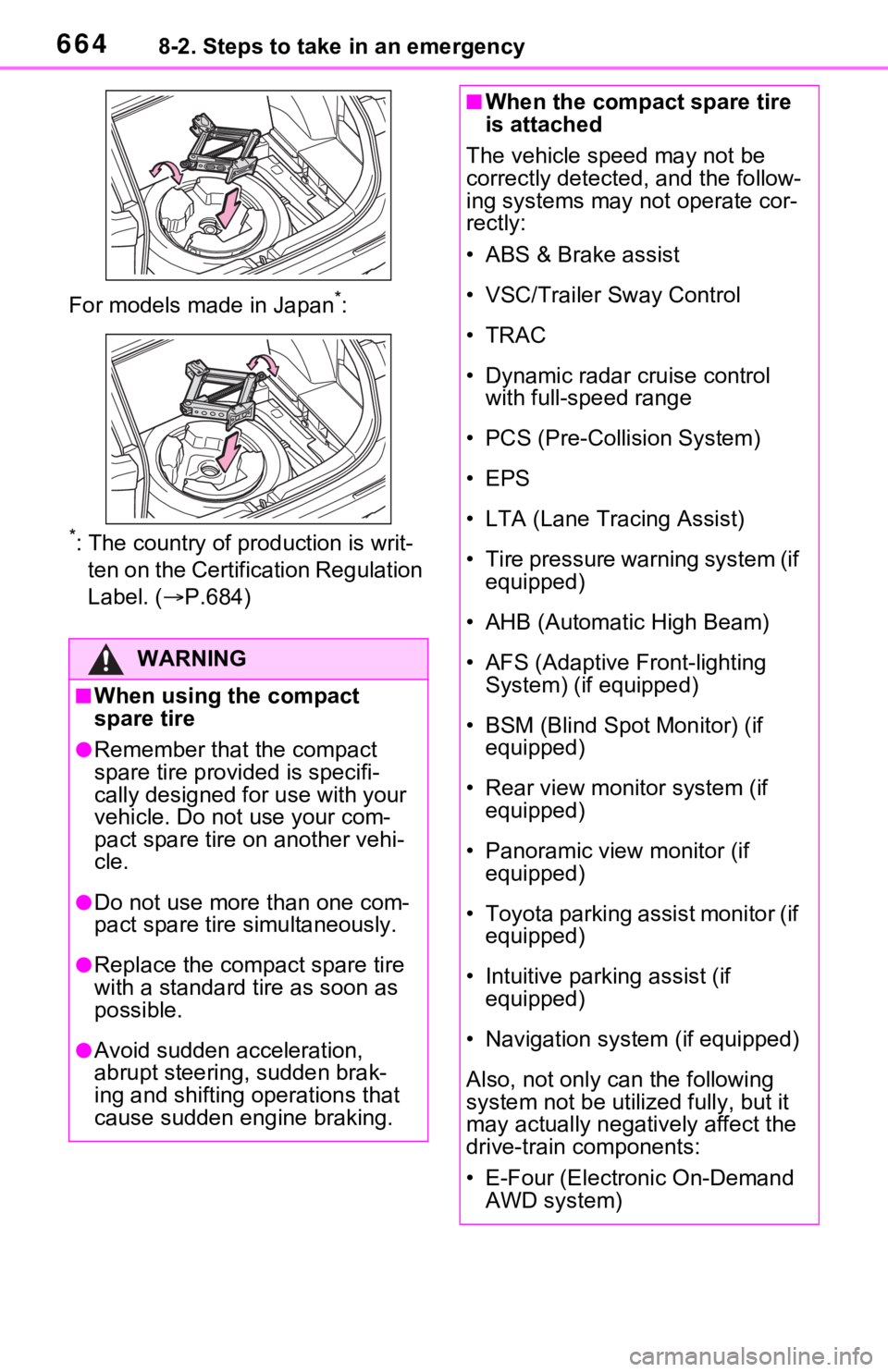
For models made in Japan*:
*: The country of production is writ-
ten on the Certific ation Regulation
Label. ( P.684)
WARNING
■When using the compact
spare tire
●Remember that the compact
spare tire provided is specifi-
cally designed for use with your
vehicle. Do not use your com-
pact spare tire on another vehi-
cle.
●Do not use more than one com-
pact spare tire simultaneously.
●Replace the compact spare tire
with a standard tire as soon as
possible.
●Avoid sudden acceleration,
abrupt steering, sudden brak-
ing and shifting operations that
cause sudden engine braking.
■When the compact spare tire
is attached
The vehicle speed may not be
correctly detected, and the follow-
ing systems may not operate cor-
rectly:
• ABS & Brake assist
• VSC/Trailer Sway Control
•TRAC
• Dynamic radar cruise control with full-speed range
• PCS (Pre-Collision System)
• EPS
• LTA (Lane Tracing Assist)
• Tire pressure warning system (if equipped)
• AHB (Automatic High Beam)
• AFS (Adaptive Front-lighting System) (if equipped)
• BSM (Blind Spot Monitor) (if equipped)
• Rear view monitor system (if equipped)
• Panoramic view monitor (if equipped)
• Toyota parking assist monitor (if equipped)
• Intuitive parking assist (if equipped)
• Navigation system (if equipped)
Also, not only c an the following
system not be utilized fully, but it
may actually negatively affect the
drive-train components:
• E-Four (Electronic On-Demand AWD system)