engine TOYOTA RAV4 HYBRID 2021 Owner's Manual
[x] Cancel search | Manufacturer: TOYOTA, Model Year: 2021, Model line: RAV4 HYBRID, Model: TOYOTA RAV4 HYBRID 2021Pages: 752, PDF Size: 31.25 MB
Page 193 of 752

1934-1. Before driving
4
Driving
WARNING
■If you hear a squealing or
scraping noise (brake pad
wear limit indicators)
Have the brake pads checked and
replaced by your Toyota dealer as
soon as possible.
Rotor damage may result if the
pads are not replaced when
needed.
It is dangerous to drive the vehicle
when the wear lim its of the brake
pads and/or those of the brake
discs are exceeded.
■When the vehicle is stopped
●Do not depress t he accelerator
pedal unnecessarily.
If the vehicle is in any gear other
than P or N, the vehicle may
accelerate suddenly and unex-
pectedly, causing an accident.
●In order to prev ent accidents
due to the vehicle rolling away,
always keep depressing the
brake pedal while stopped with
the “READY” indicator is illumi-
nated, and appl y the parking
brake as necessary.
●If the vehicle is stopped on an
incline, in order to prevent acci-
dents caused by the vehicle roll-
ing forward or backward, always
depress the brake pedal and
securely apply the parking
brake as needed.
●Avoid revving or racing the
engine.
Running the engine at high
speed while the vehicle is
stopped may cause the exhaust
system to overheat, which could
result in a fire if combustible
material is nearby.
■When the vehicle is parked
●Do not leave gla sses, cigarette
lighters, spray cans, or soft
drink cans in the vehicle when it
is in the sun.
Doing so may result in the fol-
lowing:
• Gas may leak from a cigarette lighter or spray can, and may
lead to a fire.
• The temperature inside the vehicle may cause the plastic
lenses and plastic material of
glasses to deform or crack.
• Soft drink cans may fracture, causing the contents to spray
over the interior of the vehicle,
and may also cause a short cir-
cuit in the vehicl e’s electrical
components.
●Do not leave cigarette lighters in
the vehicle. If a cigarette lighter
is in a place such as the glove
box or on the floor, it may be lit
accidentally when luggage is
loaded or the se at is adjusted,
causing a fire.
●Do not attach adhesive discs to
the windshield or windows. Do
not place containers such as air
fresheners on the instrument
panel or dashboard. Adhesive
discs or containers may act as
lenses, causing a fire in the
vehicle.
●Do not leave a door or window
open if the curved glass is
coated with a metallized film
such as a silver-colored one.
Reflected sunlight may cause
the glass to act a s a lens, caus-
ing a fire.
Page 195 of 752

1954-1. Before driving
4
Driving
NOTICE
■Avoiding damage to vehicle
parts
●Do not turn the steering wheel
fully in either direction and hold
it there for an extended period
of time.
Doing so may damage the
power steering motor.
●When driving over bumps in the
road, drive as slowly as possible
to avoid damaging the wheels,
underside of the vehicle, etc.
■If you get a flat tire while driv-
ing
A flat or damaged tire may cause
the following situations.
●It may be difficult to control your
vehicle.
●The vehicle will make abnormal
sounds or vibrations.
●The vehicle will lean abnor-
mally.
Hold the steering wheel firmly and
gradually depress the brake pedal
to slow down the vehicle.
Information on what to do in case
of a flat tire ( P.658)
■When encountering flooded
roads
Do not drive on a road that has
flooded after heavy rain, etc.
Doing so may cause the following
serious damage to the vehicle:
●Engine stalling
●Short in electrical components
●Engine damage caused by
water immersion
In the event that you drive on a
flooded road and the vehicle is
flooded, be sure to have your
Toyota dealer c heck the following:
●Brake function
●Changes in quantity and quality
of oil and fluid used for the
engine, hybrid transaxle (front
and rear), etc.
●Lubricant condition for the bear-
ings and suspension joints
(where possible), and the func-
tion of all joints, bearings, etc.
■When parking the vehicle
Always set the parking brake, and
shift the shift lever to P. Failure to
do so may cause the vehicle to
move or the vehicle may acceler-
ate suddenly if t he accelerator
pedal is accidentally depressed.
Page 207 of 752

2074-1. Before driving
4
Driving
vehicle control. This is espe-
cially true on wet or slippery
surfaces.
Avoid jerky starts or sudden
acceleration.
Avoid jerky steering and
sharp turns, and slow down
before making turn.
Note that when making a turn,
the trailer wheels will be
closer than the vehicle wheels
to the inside of the turn. Com-
pensate by making a wider
than normal turning radius.
Slow down before making a
turn, in cross winds, on wet or
slippery surfaces, etc.
Increasing vehicle speed can
destabilize the trailer.
Take care when passing other
vehicles. Passing requires
considerable distance. After
passing a vehicle, do not for-
get the length of your trailer,
and be sure you have plenty
of room before changing
lanes.
To maintain engine braking
efficiency, when using engine
braking, do not use the trans-
mission in D.
Instability happens more fre-
quently when descending
steep or long downhill grades.
Before descending, slow
down and downshift. Do not
make sudden downshifts
while descending steep or long downhill grades.
Avoid holding the brake pedal
down too long or applying the
brakes too frequently. This
could cause the brakes to
overheat and result in
reduced braking efficiency.
Due to the added load of the
trailer, your vehicle’s hybrid
system may overheat on hot
days (at temperatures over
85°F [30°C]) when driving up
a long or steep grade. If the
engine coolant temperature
gauge indicates overheating,
immediately turn off the air
conditioning (if in use), pull
your vehicle off the road and
stop in a safe spot. ( P.677)
Always place wheel blocks
under both the vehicle’s and
the trailer’s wheels when
parking. Apply the parking
brake firmly, and put the
transmission in P. Avoid park-
ing on a slope, but if unavoid-
able, do so only after
performing the following:
1 Apply the brakes and keep
them applied.
2 Have someone place wheel
blocks under both the vehi-
cle’s and trailer’s wheels.
3 When the wheel blocks are in
place, release the brakes
slowly until the blocks absorb
the load.
Page 208 of 752

2084-1. Before driving
4Apply the parking brake
firmly.
5 Shift into P and turn off the
hybrid system.
When restarting after parking
on a slope:
1 With the transmission in P,
start the hybrid system. Be
sure to keep the brake pedal
depressed.
2 Shift into a forward gear. If
reversing, shift into R.
3 If the parking brake is in man-
ual mode, release the park-
ing brake. ( P.224)
4 Release the brake pedal, and
slowly pull or back away from
the wheel blocks. Stop and
apply the brakes.
5 Have someone retrieve the
blocks.
■Break-in schedule
If your vehicle is new or equipped
with any new power train compo-
nents (such as an engine, transmis-
sion, differential or wheel bearing),
Toyota recommends that you do not
tow a trailer unt il the vehicle has
been driven for over 500 miles (800
km).
After the vehicle has been driven for
over 500 miles (800 km), you can
start towing. However, for the next
500 miles (800 km), drive the vehi-
cle at a speed of less than 45 mph
(72 km/h) when towing a trailer, and
avoid full throttle acceleration.
■Maintenance
●If you tow a traile r, your vehicle
will require more f requent mainte-
nance due to the additional load. (See “Scheduled Maintenance
Guide” or “Owner
’s Manual Sup-
plement”.)
●Retighten the fixing bolts of the
towing ball and bracket after
approximately 600 miles (1000
km) of tra iler towing.
■If trailer sway occurs
One or more factors (crosswinds,
passing vehicles, rough roads, etc.)
can adversely affect handling of
your vehicle and t railer, causing
instability.
●If trailer swaying occurs:
• Firmly grip the steering wheel. Steer straight ahead.
Do not try to contr ol trailer sway-
ing by turning the steering wheel.
• Begin releasing the accelerator pedal immediately but very gradu-
ally to reduce speed.
Do not increase speed. Do not
apply vehicle brakes.
If you make no extreme correction
with the steering or brakes, your
vehicle and trailer should stabilize (if
enabled, Trailer Sway Control can
also help to stabilize the vehicle and
trailer.).
●After the trailer swaying has
stopped:
• Stop in a safe place. Get all occu- pants out of the vehicle.
• Check the tires of the vehicle and
the trailer.
• Check the load in the trailer. Make sure the load has not
shifted.
Make sure the tongue weight is
appropriate, if possible.
• Check the load in the vehicle. Make sure the vehicle is not over-
loaded after occupants get in.
If you cannot find any problems, the
speed at which trailer swaying
occurred is beyond the limit of your
particular vehicle-trailer combina-
tion. Drive at a lower speed to pre-
vent instability. Remember that
Page 217 of 752
2174-2. Driving procedures
4
Driving
If the hybrid system is stopped
with the shift lever in a position
other than P, the power switch
will not be turned to OFF but
instead be turned to ACC. Per-
form the following procedure to
turn the switch to OFF:
1 Check that the parking brake
is set.
2 Shift the shift lever to P.
3 Check that “ACCESSORY” is
displayed on the multi-infor-
mation display and press the
power switch shortly and
firmly.
4 Check that “ACCESSORY”
or “IGNITION ON” on the
multi-information display is
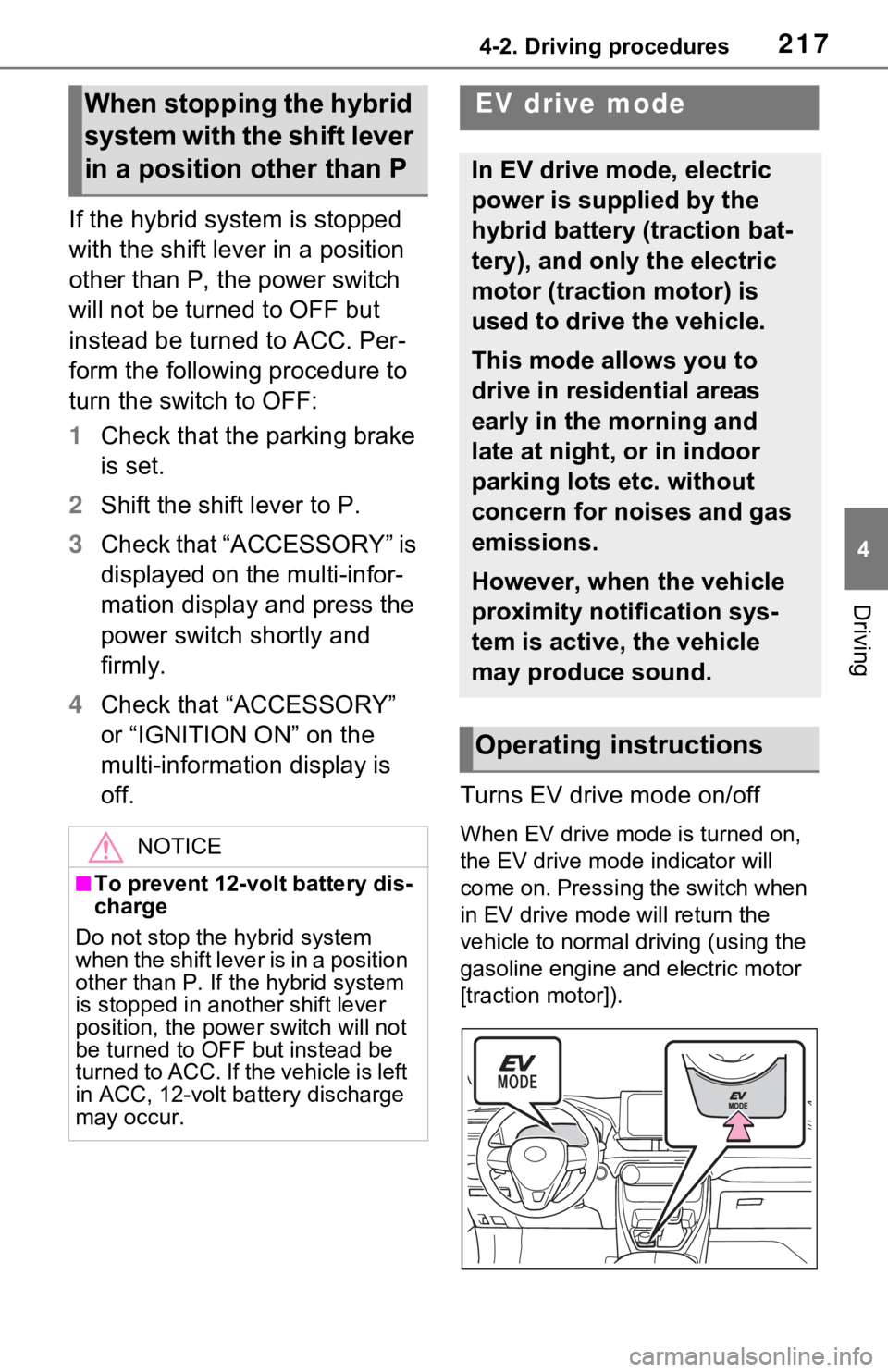
off. Turns EV drive mode on/off
When EV drive mode is turned on,
the EV drive mode indicator will
come on. Pressing the switch when
in EV drive mode will return the
vehicle to normal driving (using the
gasoline engine and electric motor
[traction motor]).
When stopping the hybrid
system with the shift lever
in a position other than P
NOTICE
■To prevent 12-volt battery dis-
charge
Do not stop the hybrid system
when the shift lever is in a position
other than P. If th e hybrid system
is stopped in another shift lever
position, the powe r switch will not
be turned to OFF but instead be
turned to ACC. If the vehicle is left
in ACC, 12-volt bat tery discharge
may occur.
EV drive mode
In EV drive mode, electric
power is supplied by the
hybrid battery (traction bat-
tery), and only the electric
motor (traction motor) is
used to drive the vehicle.
This mode allows you to
drive in residential areas
early in the morning and
late at night, or in indoor
parking lots etc. without
concern for noises and gas
emissions.
However, when the vehicle
proximity notification sys-
tem is active, the vehicle
may produce sound.
Operating instructions
Page 218 of 752

2184-2. Driving procedures
■Situations in which EV drive
mode cannot be turned on
It may not be po ssible to turn EV
drive mode on in t he following situa-
tions. If it cannot be turned on, a
buzzer will sound and a message
will be shown on the multi-informa-
tion display.
●The temperature of the hybrid sys-
tem is high.
The vehicle has been left in the
sun, driven on a hill, driven at high
speeds, etc.
●The temperature of the hybrid sys-
tem is low.
The vehicle has been left in tem-
peratures lower than about 32°F
(0°C) for a long period of time etc.
●The gasoline engine is warming
up.
●The hybrid battery (traction bat-
tery) is low.
The remaining batt ery level indi-
cated in the Energy monitor dis-
play is low. ( P.113)
●Vehicle speed is high.
●The accelerator pedal is
depressed firmly or the vehicle is
on a hill etc.
●The windshield defogger is in use.
Use the EV drive mode when it
becomes available.
■Switching to EV drive mode
when the gasoline engine is
cold
If the hybrid system is started while
the gasoline engine is cold, the gas-
oline engine will star t automatically
after a short peri od of time in order
to warm up.
In this case, you will become unable
t o s w i t c h t o E V d r i v e m o d e . A f t e r t h e
hybrid system has started and the
“READY” indicator has illuminated,
press the EV drive mode switch
before the gasoline engine starts to
switch to EV drive mode.
■Automatic cancelation of EV
drive mode
When driving in EV drive mode, the
gasoline engine may automatically
restart in the follo wing situations.
When EV drive mode is canceled, a
buzzer will sound, the EV drive
mode indicator will flash and go off
and a message will be shown on the
multi-informat ion display.
●The hybrid battery (traction bat-
tery) becomes low.
The remaining batt ery level indi-
cated in the Ener gy monitor dis-
play is low. ( P.113)
●Vehicle speed is high.
●The accelerator pedal is
depressed firmly or the vehicle is
on a hill etc.
Drive the vehicle for a while before
attempting to turn on the EV drive
mode again.
■Possible driving distance when
driving in EV drive mode
EV drive mode’s possible driving
distance ranges from a few hundred
meters to approximately 0.6 mile (1
km). However, depending on vehi-
cle conditions, there are situations
when EV drive mode cannot be
used.
(The distance tha t is possible
depends on the hybrid battery [trac-
tion battery] level a nd driving condi-
tions.)
■Fuel economy
The hybrid system is designed to
achieve the best possible fuel econ-
omy during normal driving (using
the gasoline engine and electric
motor [traction motor]). Driving in
EV drive mode more than neces-
sary may lower fuel economy.
Page 219 of 752
2194-2. Driving procedures
4
Driving
*1: To improve fuel efficiency and reduce noise, shift the shift lever
to D for normal driving.
*2: By selecting shift ranges using S mode, you can control accelerat-
ing force and engine braking
force.
■When driving with dynamic
radar cruise control with full-
speed range activated
Even when perform ing the following
actions with the intent of enabling
engine braking, engine braking will
not activate because dynamic radar
cruise control with full-speed range
will not be canceled.
●While driving in S mode, down-
shifting to 5 or 4. ( P.221)
●When switching th e driving mode
to sport mode while driving in D
position. ( P.366)
WARNING
■Caution while driving
When driving in EV drive mode,
pay special attention to the area
around the vehicle. Because
there is no engine noise, pedestri-
ans, people riding bicycles or
other people and vehicles in the
area may not be aware of the
vehicle starting off or approaching
them, so take ext ra care while
driving.
Hybrid transmission
Select the shift position
depending on your purpose
and situation.
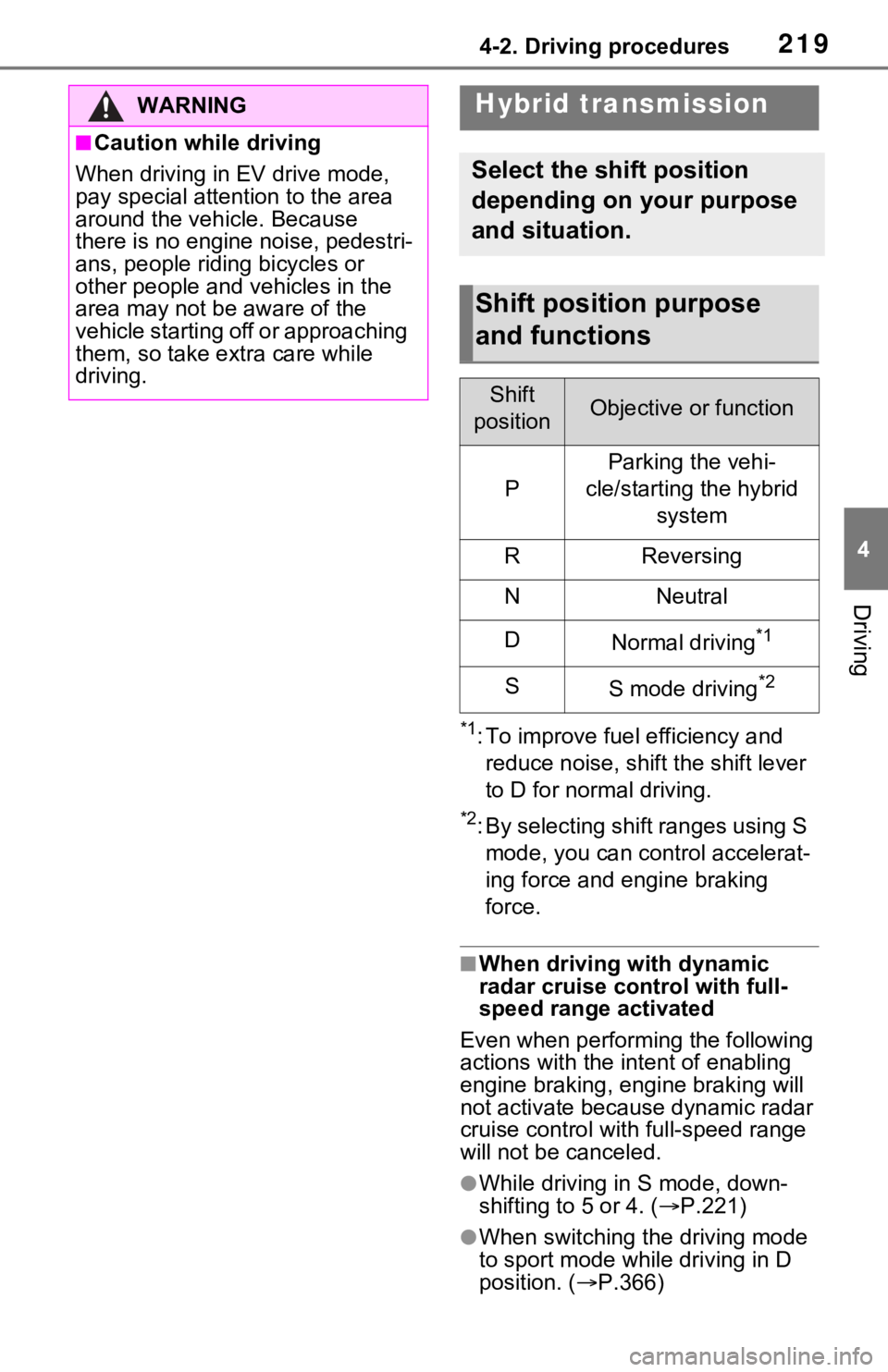
Shift position purpose
and functions
Shift
positionObjective or function
P
Parking the vehi-
cle/starting the hybrid system
RReversing
NNeutral
DNormal driving*1
SS mode driving*2
Page 220 of 752
2204-2. Driving procedures
■Restraining sudden start (Drive-
Start Control)
P.190
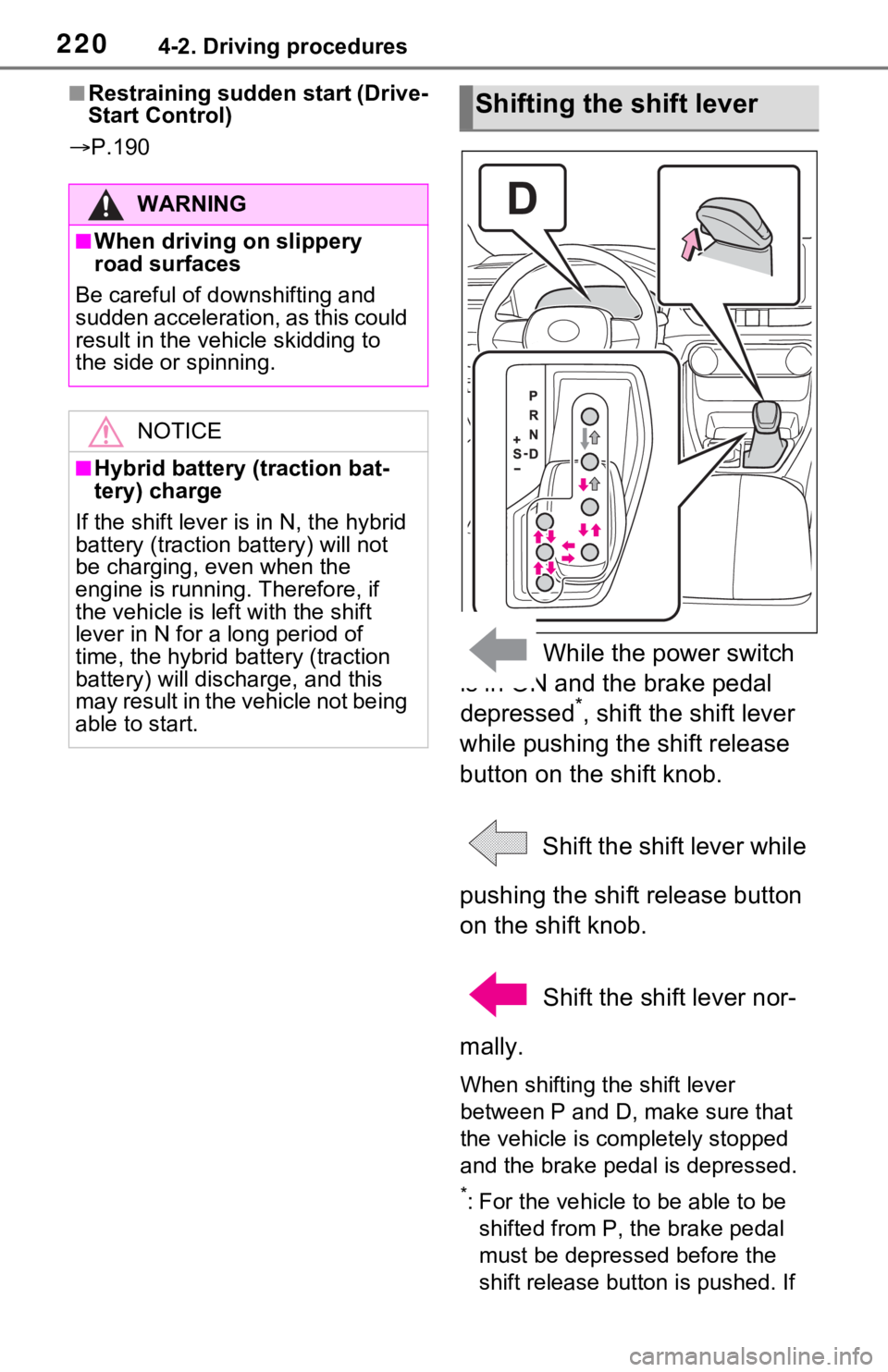
While the power switch
is in ON and the brake pedal
depressed
*, shift the shift lever
while pushing the shift release
button on the shift knob.
Shift the shift lever while
pushing the shift release button
on the shift knob.
Shift the shift lever nor-
mally.
When shifting the shift lever
between P and D, make sure that
the vehicle is completely stopped
and the brake pe dal is depressed.
*: For the vehicle to be able to be
shifted from P, the brake pedal
must be depressed before the
shift release button is pushed. If
WARNING
■When driving on slippery
road surfaces
Be careful of downshifting and
sudden acceleration, as this could
result in the vehicle skidding to
the side or spinning.
NOTICE
■Hybrid battery (traction bat-
tery) charge
If the shift lever is in N, the hybrid
battery (traction battery) will not
be charging, even when the
engine is running. Therefore, if
the vehicle is left with the shift
lever in N for a long period of
time, the hybrid battery (traction
battery) will discharge, and this
may result in the vehicle not being
able to start.
Shifting the shift lever
Page 222 of 752
2224-2. Driving procedures
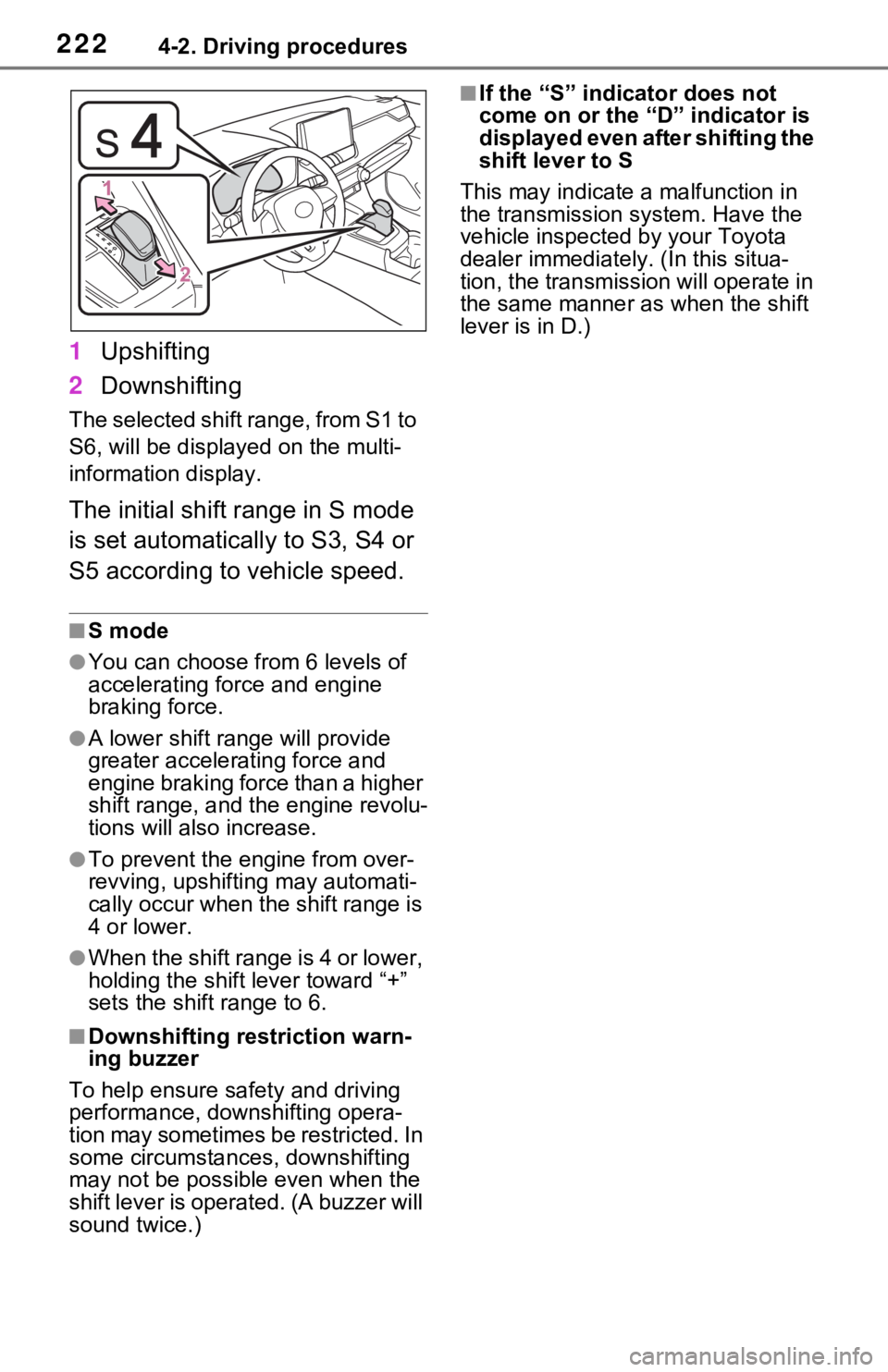
1Upshifting
2 Downshifting
The selected shift range, from S1 to
S6, will be displayed on the multi-
information display.
The initial shift range in S mode
is set automatically to S3, S4 or
S5 according to vehicle speed.
■S mode
●You can choose from 6 levels of
accelerating force and engine
braking force.
●A lower shift range will provide
greater accelerating force and
engine braking force than a higher
shift range, and t he engine revolu-
tions will also increase.
●To prevent the e ngine from over-
revving, upshifti ng may automati-
cally occur when the shift range is
4 or lower.
●When the shift range is 4 or lower,
holding the shift lever toward “+”
sets the shift range to 6.
■Downshifting restriction warn-
ing buzzer
To help ensure safety and driving
performance, downshifting opera-
tion may sometimes b e restricted. In
some circumstances, downshifting
may not be possible even when the
shift lever is operated. (A buzzer will
sound twice.)
■If the “S” indi cator does not
come on or the “D” indicator is
displayed even after shifting the
shift lever to S
This may indicate a malfunction in
the transmission system. Have the
vehicle inspected by your Toyota
dealer immediately. (In this situa-
tion, the transmission will operate in
the same manner as when the shift
lever is in D.)
Page 295 of 752

2954-5. Using the driving support systems
4
Driving
To initialize the system, drive the
vehicle straight ahead for 5 seconds
or more at a speed of approximately
22 mph (35 km/h) or more.
■Sensor detection information
●The sensor’s detection areas are
limited to the areas around the
vehicle’s front and rear bumpers.
●The following situations may occur
during use.
• Depending on the shape of the object and other factors, the
detection distance may shorten,
or detection may be impossible.
• Detection may be impossible if
static objects draw too close to the
sensor.
• There will be a short delay
between static object detection
and display (warning buzzer
sounds). Even at low speeds,
there is a possibilit y that the object
will come within 11. 9 in. (30 cm)
before the display is shown and
the warning buzzer sounds.
• It might be difficult to hear the buzzer due to the volume of the
audio system or air flow noise of
the air conditioning system.
• It may be difficult to hear the sound of this system due to the
buzzers of other systems.
■Conditions under which the
function may not function cor-
rectly
Certain vehicle conditions and the
surrounding environment may affect
the ability of a sensor to correctly
detect objects. Particular instances
where this may occur are listed
below.
●There is dirt, snow or ice on a sen-
sor. (Cleaning the sensors will
resolve this problem.)
●A sensor is frozen. (Thawing the
area will resolve this problem.)
In especially cold weather, if a
sensor is frozen the sensor dis-
play may be displayed abnor-
mally, or objects, such as a wall,
may not be detected.
●A sensor is cove red in any way.
●When a sensor or the area around
a sensor is extremely hot or cold.
●On an extremely bumpy road, on
an incline, on gravel, or on grass.
●The vicinity of the vehicle is noisy
due to vehicle horns, motorcycle
engines, air brakes of large vehi-
cles, or other lou d noises produc-
ing ultrasonic waves.
●There is another vehicle equipped
with parking assist sensors in the
vicinity.
●A sensor is coated with a sheet of
spray or heavy rain.
●If a sensor is hit by a large amount
of water, such as when driving on
a flooded road.
●If the vehicle is significantly tilted.
●The vehicle is approaching a tall
or curved curb.
●If objects draw too close to the
sensor.
■Objects which may not be prop-
erly detected
The shape of the object may pre-
vent the sensor from detecting it.
Pay particular atte ntion to the fol-
lowing objects:
●Wires, fences, ropes, etc.
●Cotton, snow and other materials
that absorb sound waves
●Sharply-angled objects
●Low objects
●Tall objects with upper sections
projecting outwards in the direc-
tion of your vehicle
People may not be detected if they
are wearing certain types of cloth-
ing.
■Certification (Canada only)
This ISM device complies with
Canadian ICES-001.