power steering TOYOTA RAV4 PHEV 2021 Owners Manual
[x] Cancel search | Manufacturer: TOYOTA, Model Year: 2021, Model line: RAV4 PHEV, Model: TOYOTA RAV4 PHEV 2021Pages: 666, PDF Size: 161.28 MB
Page 5 of 666
3TABLE OF CONTENTS
1
6
5
4
3
2
8
7
9
Smart entry & start system . 223
4-3. Adjusting the seats
Front seats .......................... 270
Rear seats .......................... 271
Driving position memory ..... 273
Head restraints ................... 276
4-4. Adjusting the steering wheel
and mirrors
Steering wheel .................... 278
Inside rear view mirror ........ 279
Digital Rear-view Mirror ...... 280
Outside rear view mirrors.... 289
4-5. Opening, closing the win -
dows and moon roof
Power windows ................... 291
Panoramic moon roof ......... 294
5-1. Before driving
Driving the vehicle .............. 300
Cargo and luggage ............. 306
Trailer towing ...................... 308
5-2. Driving procedures
Power (ignition) switch ........ 317
Hybrid transmission ............ 321
Turn signal lever ................. 325
Parking brake...................... 326
Brake Hold .......................... 329
5-3. Operating the lights and wip -
ers
Headlight switch.................. 332
AHB (Automatic High Beam)
.......................................... 334
Fog light switch ................... 337
Windshield wipers and washer
.......................................... 338
Rear window wiper and washer
.......................................... 340
5-4. Refueling
Opening the fuel tank cap ... 342
5-5. Using the driving support sys -
tems
Toyota Safety Sense .......... 344
PCS (Pre-Collision System) 355
LTA (Lane Tracing Assist) .. 362
RSA (Road Sign Assist)...... 372
Dynamic radar cruise control
with full-speed range ........ 376
Cruise control...................... 388
Speed limiter ....................... 391
BSM (Blind Spot Monitor) ... 393
Toyota parking assist-sensor
.......................................... 414
PKSB (Parking Support Brake)
.......................................... 420
Parking Support Brake function
(static objects) .................. 424
Parking Support Brake function
(rear-crossing vehicles) .... 430
Driving mode select switch . 434
Trail Mode ........................... 435
GPF (Gasoline Particulate Filter)
system .............................. 437
Driving assist systems ........ 438
5-6. Driving tips
Winter driving tips ............... 445
Utility vehicle precautions ... 448
5Driving
Page 19 of 666
17Pictorial index
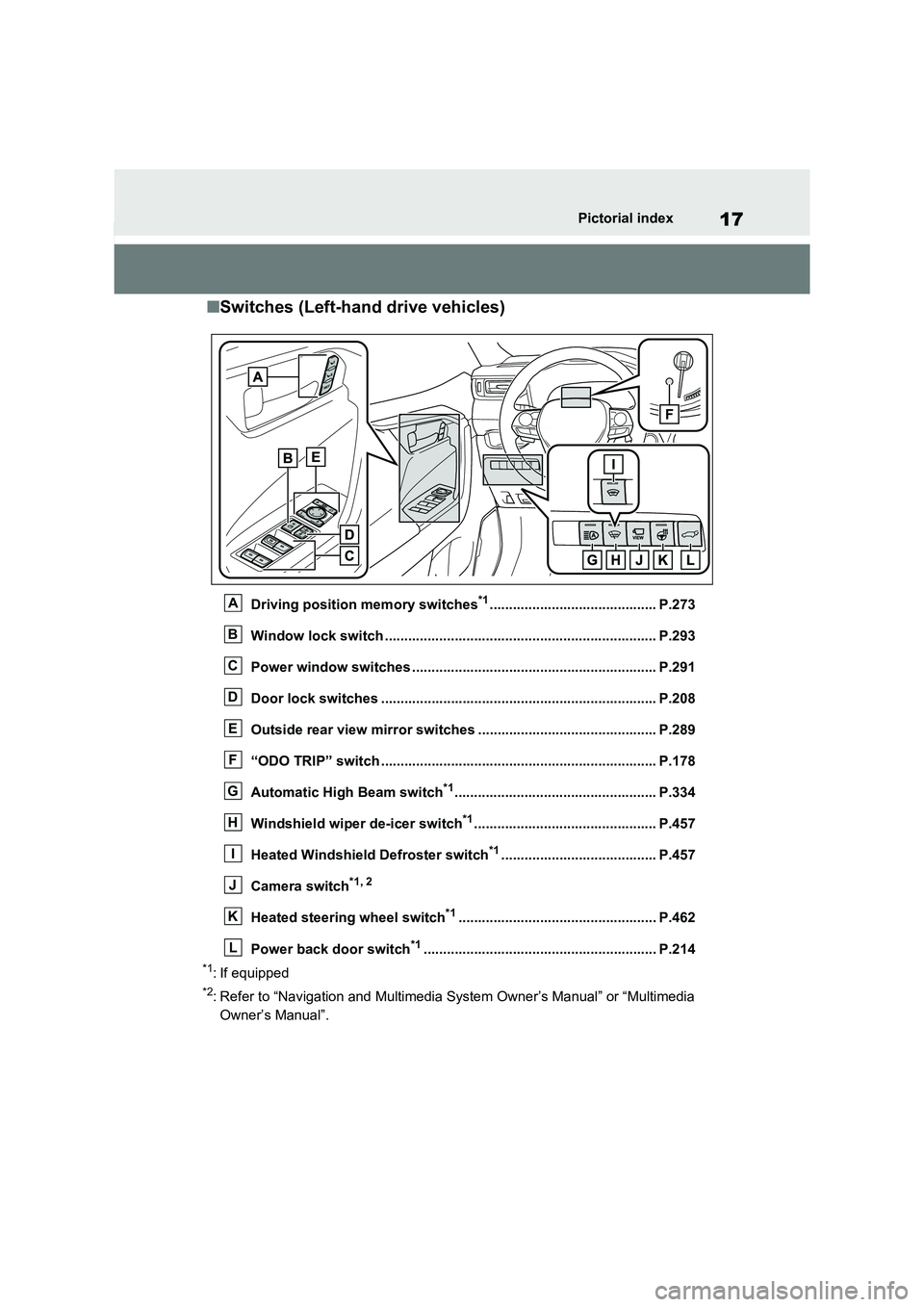
■Switches (Left-hand drive vehicles)
Driving position memory switches*1........................................... P.273
Window lock switch ............................................. ......................... P.293
Power window switches .......................................... ..................... P.291
Door lock switches ............................................. .......................... P.208
Outside rear view mirror switches .............................. ................ P.289
“ODO TRIP” switch .............................................. ......................... P.178
Automatic High Beam switch*1.................................................... P.334
Windshield wiper de-icer switch*1............................................... P.457
Heated Windshield Defroster switch*1........................................ P.457
Camera switch*1, 2
Heated steering wheel switch*1................................................... P.462
Power back door switch*1............................................................ P.2 14
*1: If equipped
*2: Refer to “Navigation and Multimedia System Owner’s Manual” or “Multimedia
Owner’s Manual”.
A
B
C
D
E
F
G
H
I
J
K
L
Page 27 of 666
25Pictorial index
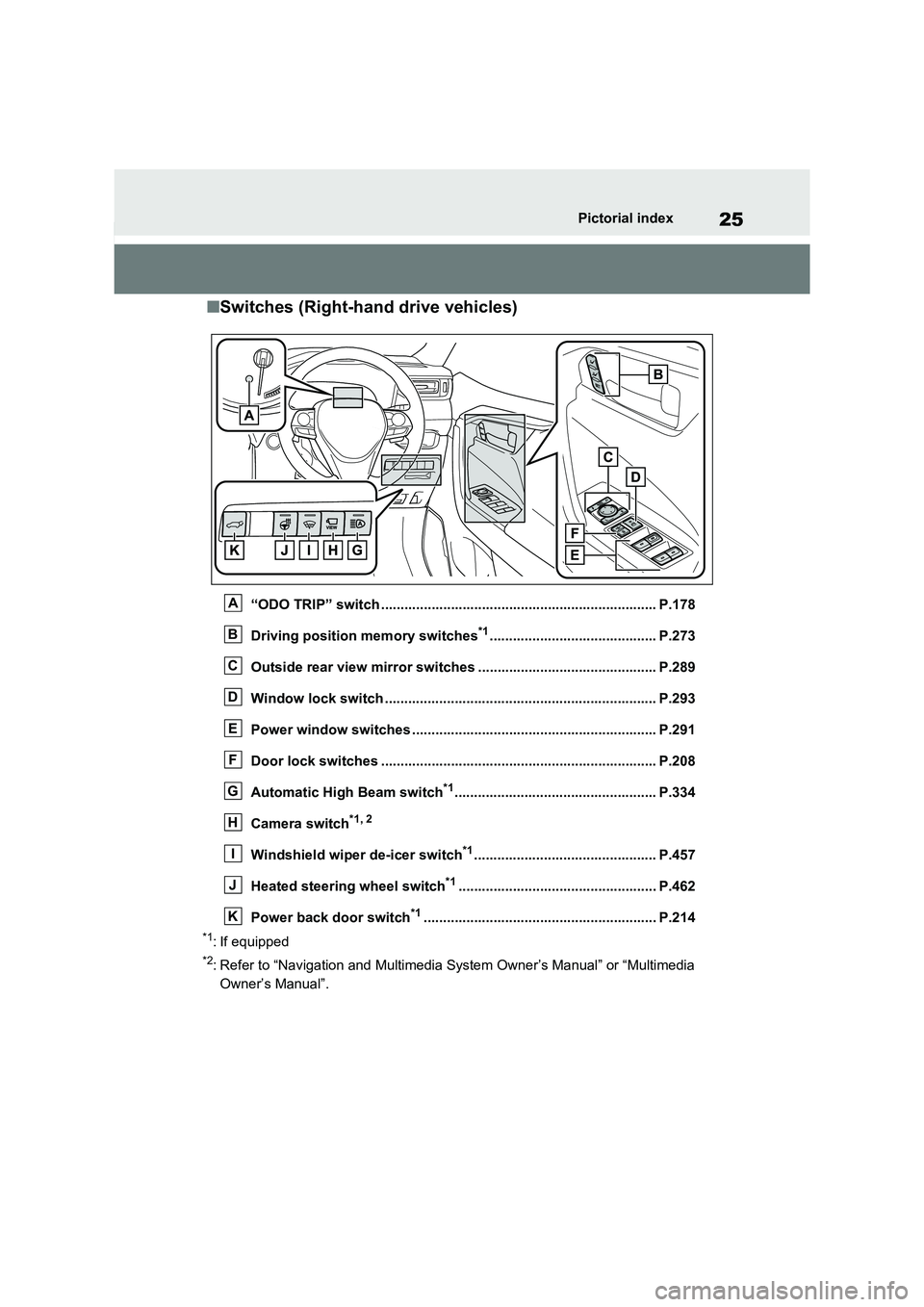
■Switches (Right-hand drive vehicles)
“ODO TRIP” switch ....................................................................... P.178
Driving position memory switches*1........................................... P.273
Outside rear view mirror switches .............................. ................ P.289
Window lock switch ............................................. ......................... P.293
Power window switches .......................................... ..................... P.291
Door lock switches ............................................. .......................... P.208
Automatic High Beam switch*1.................................................... P.334
Camera switch*1, 2
Windshield wiper de-icer switch*1............................................... P.457
Heated steering wheel switch*1................................................... P.462
Power back door switch*1............................................................ P.2 14
*1: If equipped
*2: Refer to “Navigation and Multimedia System Owner’s Manual” or “Multimedia
Owner’s Manual”.
A
B
C
D
E
F
G
H
I
J
K
Page 103 of 666
101
2
2-1. Plug-in hybrid system
Plug-in hybrid system
to EV mode or AUTO EV/HV
mode after leaving the freeway.
( →P.86)
Turn the “A/C” switch off when it
is not needed. Doing so can help
reduce excessive e lectricity and
fuel consumption.
In summer: When the ambient tem -
perature is high, use the recirculated air
mode. Doing so will help to reduce the
burden on the air co nditioning system
and reduce electricity and fuel con -
sumption as well.
In winter: Avoid excessive and unnec-
essary use of the heater. Usage of the
heated steering w heel (if equipped)
( →P.462) and seat heaters (→P.463)
are effective.
Using the Remote Air Condition-
ing System ( →P.460) while the
AC charging cable is connected
to the vehicle can reduce elec -
tricity consumption immediately
after starting off by operating air
conditioning mainly using elec -
tricity from an external power
source.
When setting the charging
schedule, setting the charging
mode to “Departure” and “Cli -
mate Prep” to on can reduce
electricity consumption immedi -
ately after starting off by operat -
ing air conditioning before
charging is completed. ( →P.144)
Make sure to check the tire inflation
pressure frequen tly. If there is
improper tire inflation pressure in
the tires, the EV driving range will
become shorter, and fuel consump-
tion when in HV mode will increase.
Also, as snow tires can cause large
amounts of friction, their use on dry
roads can lead to increased fuel
and electricity consumption.
Carrying heavy luggage will lead to
poor fuel economy. Avoid carrying
unnecessary lugga ge. Installing a
large roof rack will also cause poor
fuel economy.
Since the gasoline engine starts up
and cuts out automatically, warm -
ing up is not necessary.
Air conditioning
Checking tire inflation pres -
sure
Luggage
Warming up before driving
Page 105 of 666
103
2
2-1. Plug-in hybrid system
Plug-in hybrid system
■When starting off, depress the
accelerator pedal smoothly to
accelerate
As a guide, acce lerate up to
approximately 20 km/h (12mph) in
the first 5 seconds.
Electrical and fuel efficiency can be
improved just by using the ECO
Accelerator Guidance displayed on
the multi-informat ion display and
taking care to start off gently.
( →P.182)
When the driving mode is set to Eco
drive mode, depressing the accelerator
pedal generates smooth torque that
makes it easier to operate the accelera -
tor gently.
■Maintain sufficient vehicle-to-
vehicle distance and do not
accelerate or decelerate
unnecessarily
Try to maintain a fixed speed while
driving. Driving at a short vehicle-
to-vehicle distance will result in
repeating wasteful acceleration and
deceleration, which will worsen the
electrical and fuel efficiency.
■Release the accelerator pedal
early before stopping the vehi -
cle, such as at a traffic light
The regenerative brake will operate
to convert the kinetic energy of the
vehicle into electrical energy, which
will charge the hyb rid battery (trac-
tion battery).
The regeneration status can be
checked from the Hybrid System
Indicator. ( →P.177)
When the brake pedal is depressed
lightly during deceleration, the
regeneration amount increases,
enabling more electrical energy to
be recovered.
If the brake pedal is depressed too
strongly, the recovered amount indica -
tor will reach the maximum level and
the upper limit of the recoverable
energy will be exceeded. Therefore, be
sure to operate the brake pedal early.
■Use the air co nditioning sys-
tem appropriately, and also
utilize the heated steering
wheel (if equipped) and seat
heaters
In EV mode, the vehicle is cooled
and heated by electrical energy.
(Except in extremely cold tempera -
tures of approximately -10°C (14°F)
or less.)
Preventing excessive cooling or
heating of the vehicle will reduce
power consumption and improve
electrical efficiency.
The heated steering wheel (if
equipped) and seat heaters are effi -
cient heating device that directly
warm the body using less electric
power.
When used together with the air condi -
tioning system, a low temperature set-
ting can be used to improve electrical
and fuel efficiency.
■Check the tire pressure
If the tire pressure is lower than the
specified value, i t will worsen the
electrical and fuel efficiency.
Page 156 of 666
1542-2. Charging
■When a door is unlocked while using “My Room Mode”
The charging connector unlocks,
charging stops and “My Room Mode” stops. In order to use “My Room Mode”
again, reconnect the AC charging cable
and start “My Room Mode” ( →P.153). When using “My Room Mode” with pub -
lic charging station, operation to start
charging using the charger may be required again before starting “My Room
Mode”.
■Meter display during charging
If “My Room Mode” is not turned on for approximately 100 seconds after the
power switch is turned on during
charging, the power switch will automat- ically turn off.
■While using “My Room Mode”
Any of the follo wing may occur.
●When the remaining charge of the
hybrid battery (traction battery)
reaches the lower l imit, the air condi- tioning system automat ically turns off.
In this situation, the air conditioning
system cannot be us ed until the remaining charge of the hybrid battery
(traction battery) increases. Turn the
power switch off and use “My Room Mode” after the remaining charge of
the hybrid battery ( traction battery) is
restored.
●When the outside te mperature is low,
the heater o utput may be limited due
to the air conditioning system opera - tion being restricted.
●Warning lights and indicators such as electric power steering system warn -
ing light (yellow) and malfunction indi -
cator lamp may turn on, but this is not a malfunction.
Also, when the surrounding area is
dark, the headlight s are turned on. ( →P.332)
■When a charging schedule is regis-
tered
When “My Room Mode” starts while the charging schedule is on standby,
charging schedules are ignored and
charging starts.
■When “My Room Mode” is used while the hybrid battery (traction
battery) is fully charged
When the power switch is turned on while the hybrid battery (traction battery)
is fully charged and the charging con -
nector that supplies power is connected, “Charging Port Lid i s Open” is displayed
on the multi-informati on display. In this
case, press of th e meter control
switches to display the setting screen of “My Room Mode”, and then select “My
Room Mode”.
When “My Room Mode ” is used while the hybrid battery ( traction battery) is
fully charged, the ele ctric power of the
hybrid battery (trac tion battery) may be consumed. In this case, charging may
be performed again.
■When a message related to “My
Room Mode” is displayed
When a message is displayed on the
multi-information display while using or
attempting to start “My Room Mode”, take the following correction proce -
dures.
●“Traction battery is too low for “My
Room Mode””
There is insufficient remaining charge in
the hybrid battery ( traction battery) for
starting “My Room Mode”.
Wait until the charge of the hybrid bat-
tery (traction batter y) increases, then
start “My Room Mode”.
●““My Room Mode” has stopped due to
low traction battery”
The remaining charge in the hybrid bat -
tery (traction battery) is insufficient.
Stop using “My Room Mode” and
charge the hybrid battery (traction bat -
tery).
●““My Room Mode” will stop when trac -
tion battery is too low Reduce power
usage to continue using “My Room
Page 172 of 666
1703-1. Instrument cluster
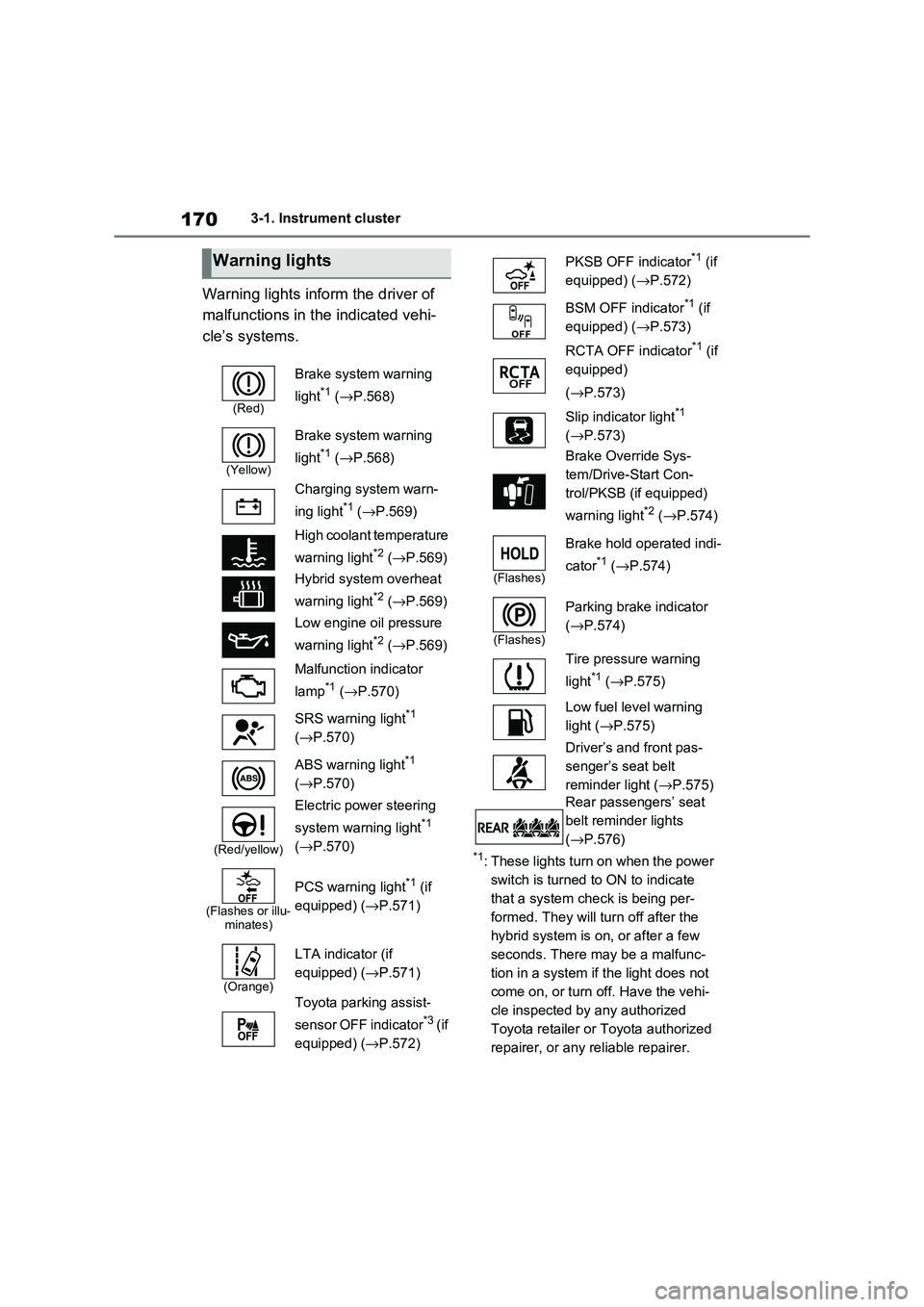
Warning lights inform the driver of
malfunctions in the indicated vehi -
cle’s systems.
*1: These lights turn on when the power
switch is turned to ON to indicate
that a system check is being per -
formed. They will turn off after the
hybrid system is on , or after a few
seconds. There may be a malfunc-
tion in a system if the light does not
come on, or turn off. Have the vehi -
cle inspected by any authorized
Toyota retailer or Toyota authorized
repairer, or any reliable repairer.
Warning lights
(Red)
Brake system warning
light*1 ( →P.568)
(Yellow)
Brake system warning
light*1 ( →P.568)
Charging system warn -
ing light*1 ( →P.569)
High coolant temperature
warning light*2 ( →P.569)
Hybrid system overheat
warning light*2 ( →P.569)
Low engine oil pressure
warning light*2 ( →P.569)
Malfunction indicator
lamp*1 ( →P.570)
SRS warning light*1
( →P.570)
ABS warning light*1
( →P.570)
(Red/yellow)
Electric power steering
system warning light*1
( →P.570)
(Flashes or illu- minates)
PCS warning light*1 (if
equipped) ( →P.571)
(Orange)
LTA indicator (if
equipped) ( →P.571)
Toyota parking assist-
sensor OFF indicator*3 ( i f
equipped) ( →P.572)
PKSB OFF indicator*1 (if
equipped) ( →P.572)
BSM OFF indicator*1 (if
equipped) ( →P.573)
RCTA OFF indicator*1 (if
equipped)
( →P.573)
Slip indicator light*1
( →P.573)
Brake Override Sys -
tem/Drive-Start Con -
trol/PKSB (if equipped)
warning light*2 ( →P.574)
(Flashes)
Brake hold operated indi-
cator*1 ( →P.574)
(Flashes)
Parking brake indicator
( →P.574)
Tire pressure warning
light*1 ( →P.575)
Low fuel level warning
light ( →P.575)
Driver’s and front pas -
senger’s seat belt
reminder light ( →P.575)
Rear passengers’ seat
belt reminder lights
( →P.576)
Page 182 of 666
1803-1. Instrument cluster
A variety of infor mation can be dis-
played by selecting a menu icon.
Additionally, warning or sugges -
tion/advice pop-up displays will be dis-
played in some situations.
Menu icons ( →P.180)
■The multi-information display is
displayed when
The power switch is in ON.
■When changing driving mode
●Background color of the multi-informa -
tion display is changed following the selected driving mode. ( →P.434)
●Background color of the multi-informa- tion display is changed following the
selected driving mode or when Trail
Mode is turned on. ( →P.434, 435)
■Liquid crystal display
Small spots or light spots may appear
on the display. This phenomenon is
characteristic of liqui d crystal displays, and there is no prob lem continuing to
use the display.
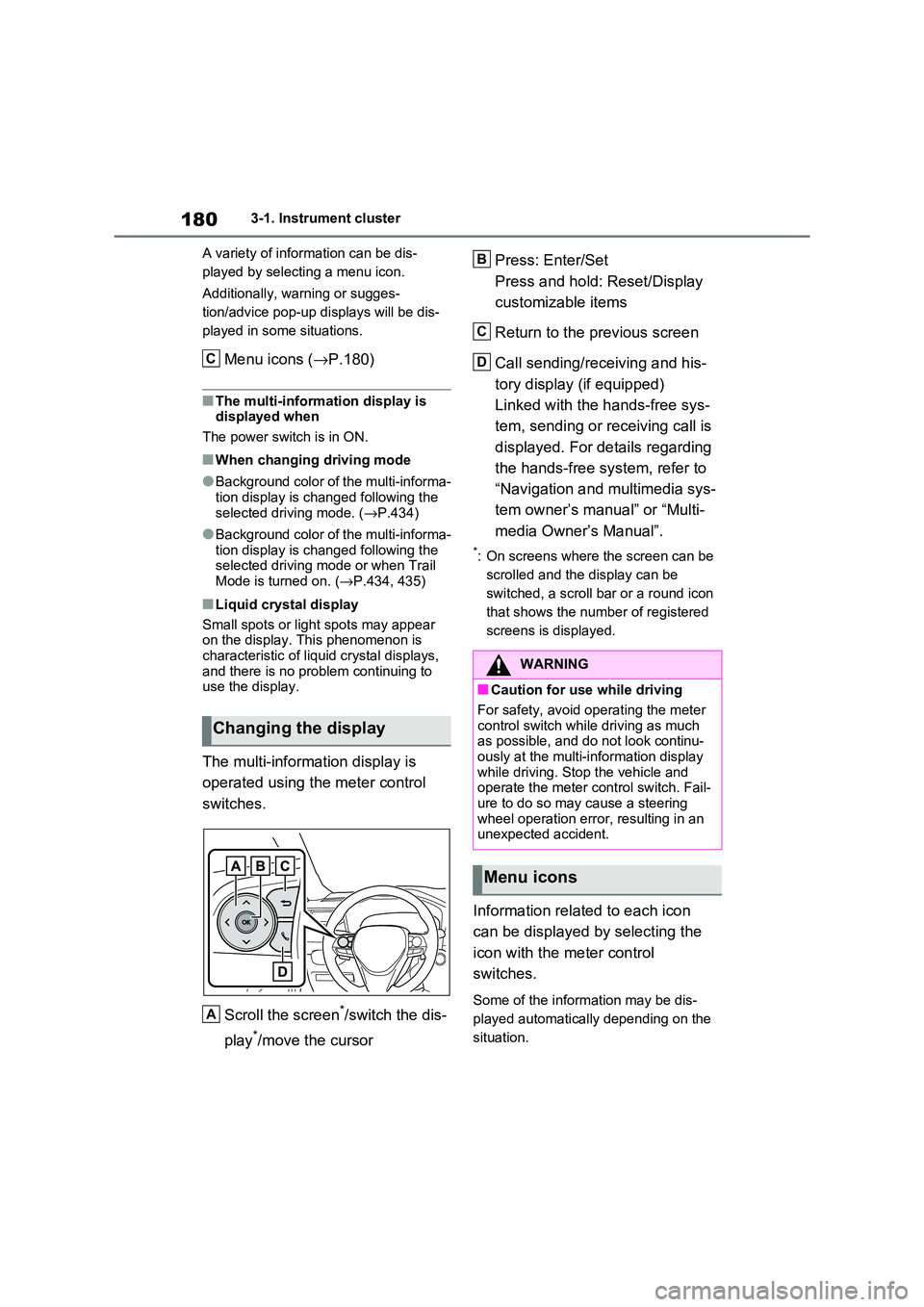
The multi-information display is
operated using the meter control
switches.
Scroll the screen*/switch the dis -
play*/move the cursor
Press: Enter/Set
Press and hold: Reset/Display
customizable items
Return to the previous screen
Call sending/receiving and his -
tory display (if equipped)
Linked with the hands-free sys -
tem, sending or re ceiving call is
displayed. For details regarding
the hands-free system, refer to
“Navigation and multimedia sys -
tem owner’s manual” or “Multi -
media Owner’s Manual”.
*: On screens where the screen can be
scrolled and the display can be
switched, a scroll bar or a round icon
that shows the num ber of registered
screens is displayed.
Information related to each icon
can be displayed by selecting the
icon with the meter control
switches.
Some of the information may be dis -
played automatically depending on the
situation.
Changing the display
C
A
:$51,1*
■Caution for use while driving
For safety, avoid o perating the meter
control switch while driving as much
as possible, and do not look continu - ously at the multi-in formation display
while driving. Stop the vehicle and
operate the meter control switch. Fail - ure to do so may cause a steering
wheel operation error, resulting in an
unexpected accident.
Menu icons
B
C
D
Page 196 of 666
1943-1. Instrument cluster
Brake Override System
( →P.301)
Drive-Start Control (→P.301)
Parking Support Brake function
(static objects) (if equipped)
( →P.424)
Displayed content is the same as that
displayed on the meter. For details,
refer to the explanations of each sys -
tem.
■ / icons
Displays the following multi-infor -
mation display linked icons:
: Master warning icon
Displayed when a warning message is
displayed on the multi-information dis -
play.
: Information icon
Displayed when a suggestion/advice
pop-up display is displayed on the
multi-information display.
■Warning message
Some warning messages are dis -
played when necessary, according
to certain conditions.
Displayed content is the same as that
displayed on the multi-information dis -
play. For details, refer to the explana-
tions of e ach system.
■Audio system operation status
Displayed when an audio remote
control switch on the steering wheel
is operated.
■Hands-free system status (if
equipped)
Displayed when the hands-free
system is operated.
■Outside temperature display
Displayed when the power switch is
turned to ON or when the low out -
side temperature indicator is flash -
ing.
■When a pop-up display is displayed
When a pop-up display is displayed, a
current display may no longer be dis -
played. In this case, the display will return after the p op-up display disap-
pears.
■Outside temperature display
●When the ambient temperature is
approximately 3°C (37°F) or lower,
will flash for approximately 10
seconds and the out side temperature
display will turn off.
●In the following situ ations, the correct
outside temperature may not be dis - played, or the display may take longer
than normal to change:
• When stopped (including when using “My Room Mode”), o r driving at low
speeds (less than 2 0 km/h [12 mph])
• When the outside temperature has changed suddenly (at the
entrance/exit of a garage, tunnel, etc.)
●When “--” or “E” is displayed, the sys -
tem may be malfunctioning.
Take your vehicle to any authorized Toyota retailer or Toyota authorized
repairer, or any reliable repairer.
Display content selected by “HUD
Driving Support” on the screen
is displayed. ( →P.192)
Hybrid System Indica-
tor/Tachometer
Page 197 of 666
195
3
3-1. Instrument cluster
Vehicle status information and indicators
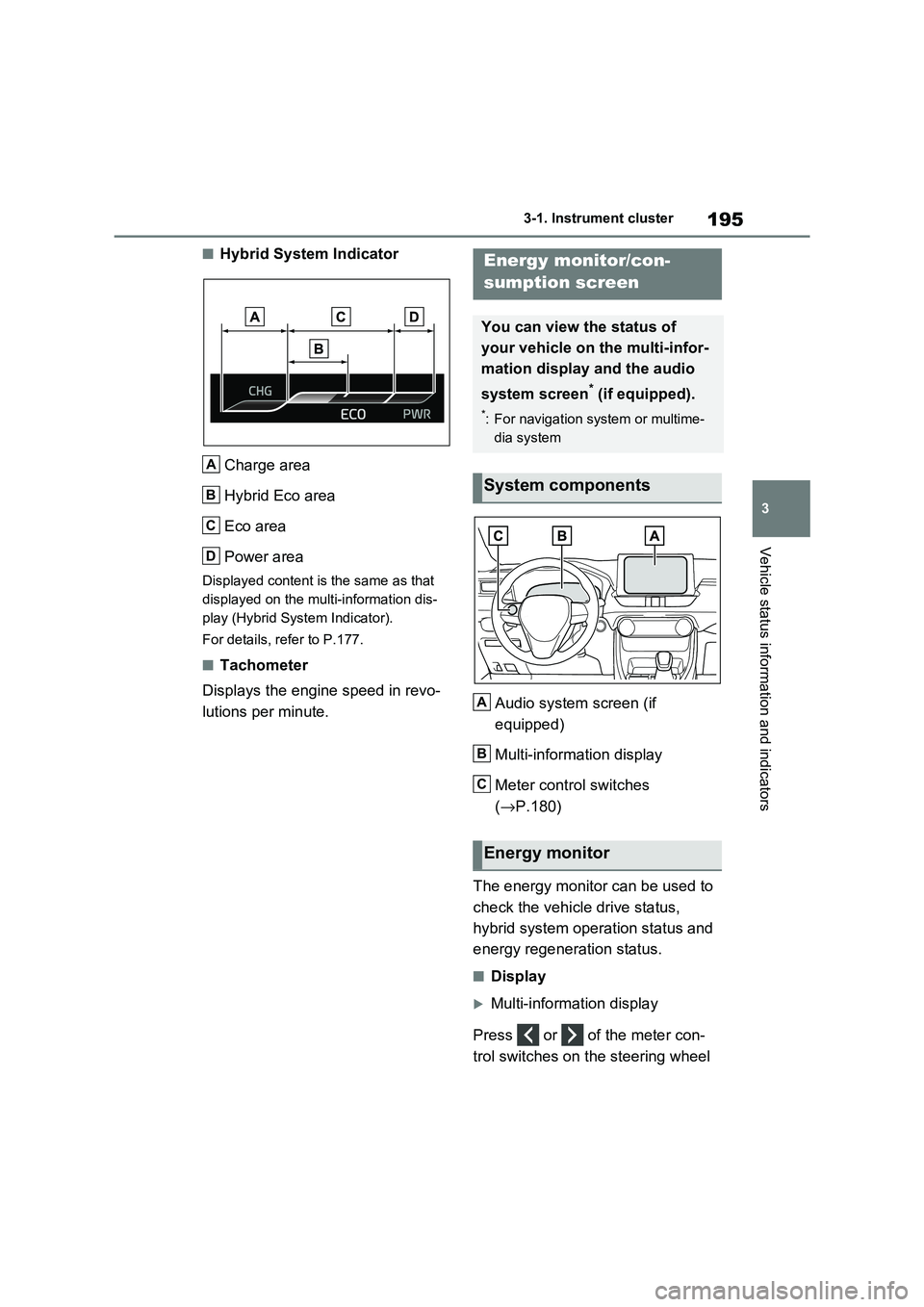
■Hybrid System Indicator
Charge area
Hybrid Eco area
Eco area
Power area
Displayed content is the same as that
displayed on the multi-information dis -
play (Hybrid System Indicator).
For details, refer to P.177.
■Tachometer
Displays the engine speed in revo -
lutions per minute. Audio system screen (if
equipped)
Multi-information display
Meter control switches
( →P.180)
The energy monitor can be used to
check the vehicl e drive status,
hybrid system operation status and
energy regeneration status.
■Display
Multi-information display
Press or of the meter con -
trol switches on the steering wheel
A
B
C
D
Energy monitor/con-
sumption screen
You can view the status of
your vehicle on the multi-infor-
mation display and the audio
system screen* (if equipped).
*: For navigation system or multime -
dia system
System components
Energy monitor
A
B
C