instrument cluster TOYOTA RAV4 PLUG-IN HYBRID 2021 Owner's Guide
[x] Cancel search | Manufacturer: TOYOTA, Model Year: 2021, Model line: RAV4 PLUG-IN HYBRID, Model: TOYOTA RAV4 PLUG-IN HYBRID 2021Pages: 666, PDF Size: 161.28 MB
Page 196 of 666
1943-1. Instrument cluster
Brake Override System
( →P.301)
Drive-Start Control (→P.301)
Parking Support Brake function
(static objects) (if equipped)
( →P.424)
Displayed content is the same as that
displayed on the meter. For details,
refer to the explanations of each sys -
tem.
■ / icons
Displays the following multi-infor -
mation display linked icons:
: Master warning icon
Displayed when a warning message is
displayed on the multi-information dis -
play.
: Information icon
Displayed when a suggestion/advice
pop-up display is displayed on the
multi-information display.
■Warning message
Some warning messages are dis -
played when necessary, according
to certain conditions.
Displayed content is the same as that
displayed on the multi-information dis -
play. For details, refer to the explana-
tions of e ach system.
■Audio system operation status
Displayed when an audio remote
control switch on the steering wheel
is operated.
■Hands-free system status (if
equipped)
Displayed when the hands-free
system is operated.
■Outside temperature display
Displayed when the power switch is
turned to ON or when the low out -
side temperature indicator is flash -
ing.
■When a pop-up display is displayed
When a pop-up display is displayed, a
current display may no longer be dis -
played. In this case, the display will return after the p op-up display disap-
pears.
■Outside temperature display
●When the ambient temperature is
approximately 3°C (37°F) or lower,
will flash for approximately 10
seconds and the out side temperature
display will turn off.
●In the following situ ations, the correct
outside temperature may not be dis - played, or the display may take longer
than normal to change:
• When stopped (including when using “My Room Mode”), o r driving at low
speeds (less than 2 0 km/h [12 mph])
• When the outside temperature has changed suddenly (at the
entrance/exit of a garage, tunnel, etc.)
●When “--” or “E” is displayed, the sys -
tem may be malfunctioning.
Take your vehicle to any authorized Toyota retailer or Toyota authorized
repairer, or any reliable repairer.
Display content selected by “HUD
Driving Support” on the screen
is displayed. ( →P.192)
Hybrid System Indica-
tor/Tachometer
Page 197 of 666
195
3
3-1. Instrument cluster
Vehicle status information and indicators
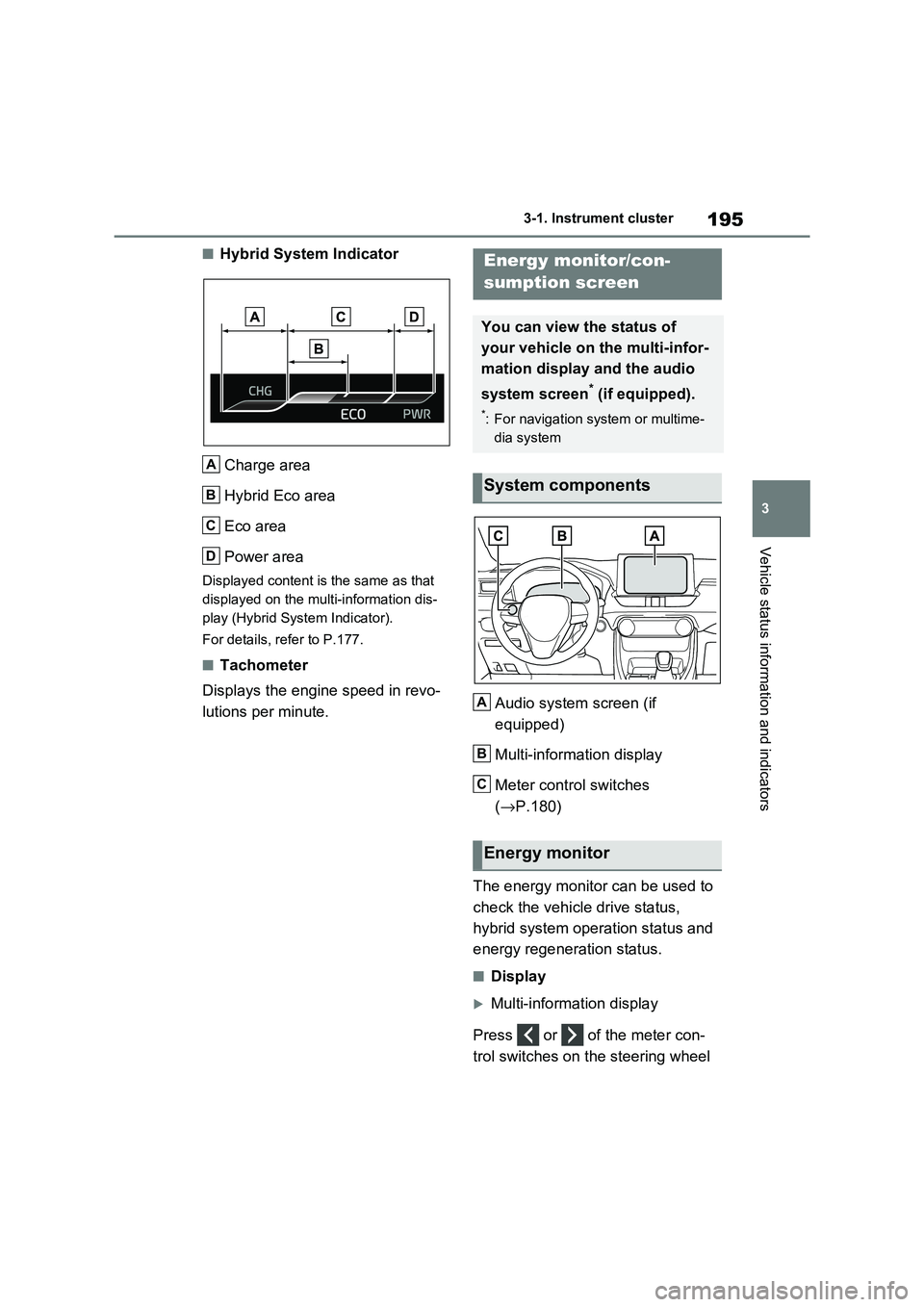
■Hybrid System Indicator
Charge area
Hybrid Eco area
Eco area
Power area
Displayed content is the same as that
displayed on the multi-information dis -
play (Hybrid System Indicator).
For details, refer to P.177.
■Tachometer
Displays the engine speed in revo -
lutions per minute. Audio system screen (if
equipped)
Multi-information display
Meter control switches
( →P.180)
The energy monitor can be used to
check the vehicl e drive status,
hybrid system operation status and
energy regeneration status.
■Display
Multi-information display
Press or of the meter con -
trol switches on the steering wheel
A
B
C
D
Energy monitor/con-
sumption screen
You can view the status of
your vehicle on the multi-infor-
mation display and the audio
system screen* (if equipped).
*: For navigation system or multime -
dia system
System components
Energy monitor
A
B
C
Page 198 of 666
1963-1. Instrument cluster
and select , and then press
or to select the energy mon -
itor display.
Audio system screen (without
navigation function)
1 Press the “MENU” button.
2 Select “Info” on the “Menu”
screen.
If a screen other than “Energy monitor”
is displayed, select “Energy”.
Audio system screen (with navi -
gation function)
1 Press the “MENU” button.
2 Select “Info” on the “Menu”
screen.
3 Select “ECO” on the “Informa-
tion” screen.
If a screen other than “Energy monitor”
is displayed, select “Energy”.
■Reading the display
The arrows will appear in accor-
dance with the energy flow. When
there is no energy flow, arrows will
not be displayed.
The color of the arrows will change as
follows
Green: When the hybr id battery (trac-
tion battery) is rege nerated or charged.
Yellow: When the hybrid battery (trac -
tion battery) is in use.
Red: When the gaso line engine is in
use.
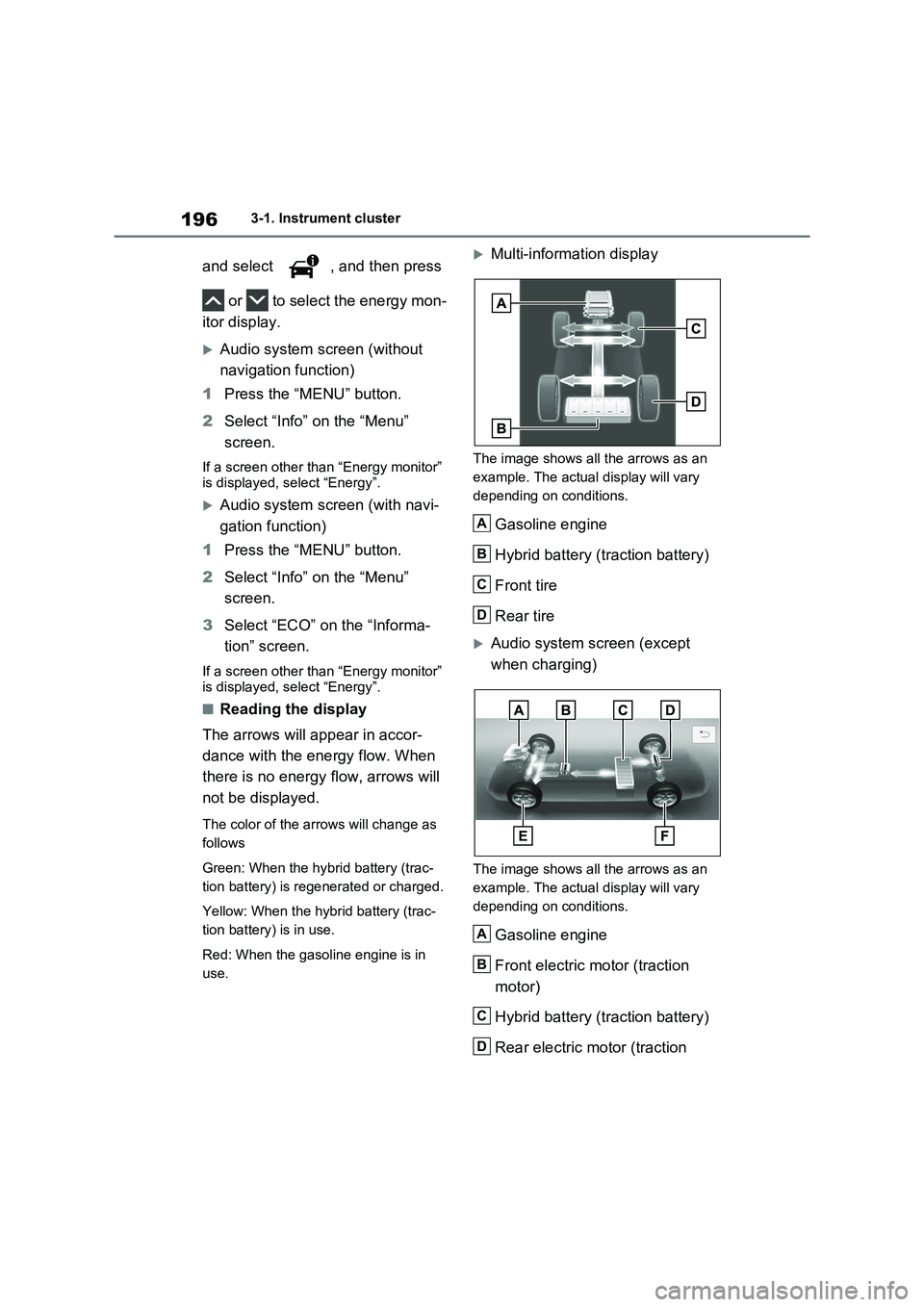
Multi-information display
The image shows all the arrows as an
example. The actual display will vary
depending on conditions.
Gasoline engine
Hybrid battery (traction battery)
Front tire
Rear tire
Audio system screen (except
when charging)
The image shows all the arrows as an
example. The actual display will vary
depending on conditions.
Gasoline engine
Front electric motor (traction
motor)
Hybrid battery (traction battery)
Rear electric motor (traction
A
B
C
D
A
B
C
D
Page 199 of 666
197
3
3-1. Instrument cluster
Vehicle status information and indicators
motor)
Front tire
Rear tire
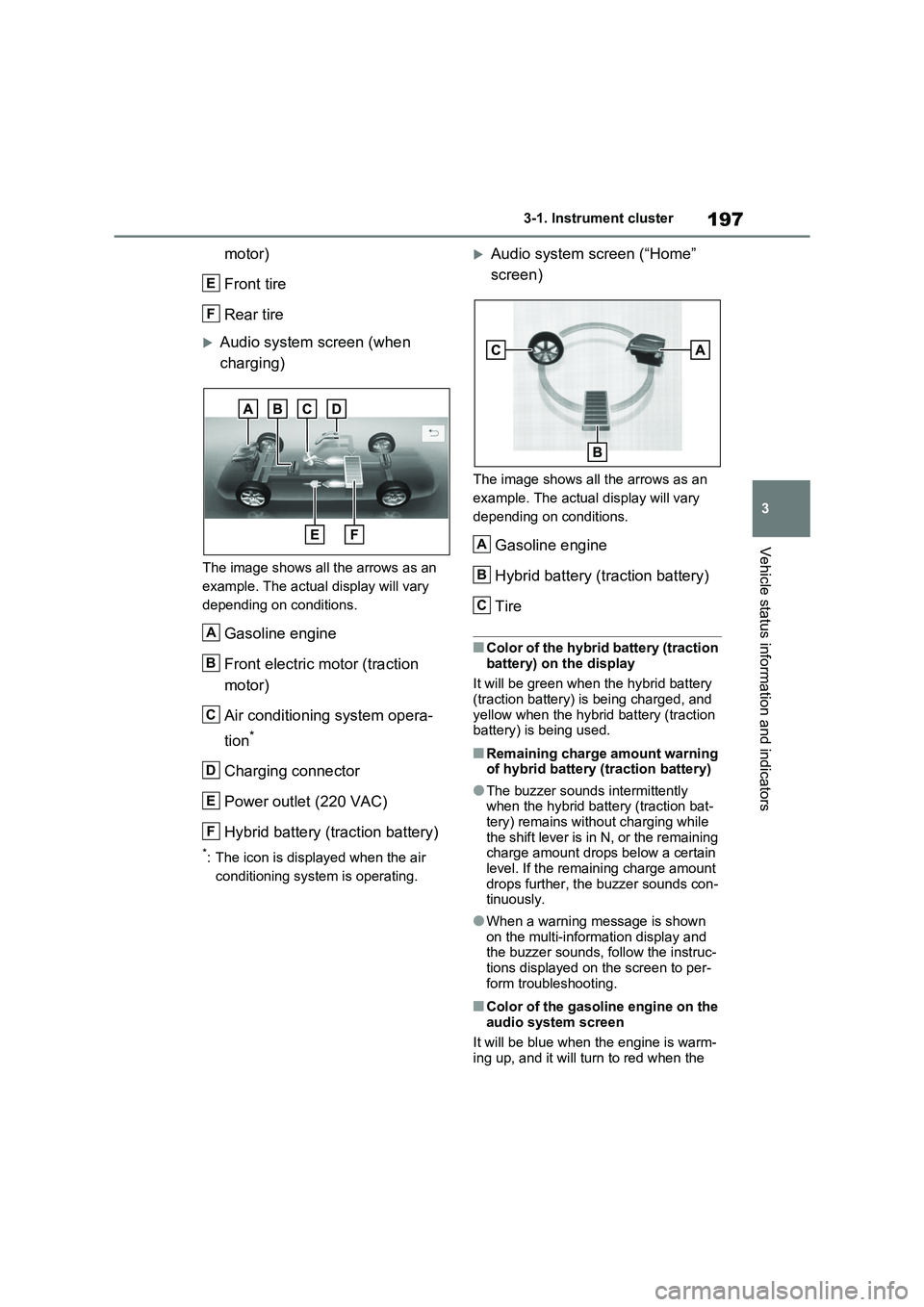
Audio system screen (when
charging)
The image shows all the arrows as an
example. The actual display will vary
depending on conditions.
Gasoline engine
Front electric motor (traction
motor)
Air conditioning system opera -
tion*
Charging connector
Power outlet (220 VAC)
Hybrid battery (traction battery)
*: The icon is displayed when the air
conditioning system is operating.
Audio system screen (“Home”
screen)
The image shows all the arrows as an
example. The actual display will vary
depending on conditions.
Gasoline engine
Hybrid battery (traction battery)
Tire
■Color of the hybrid battery (traction
battery) on the display
It will be green when the hybrid battery (traction battery) is being charged, and
yellow when the hybrid battery (traction
battery) is being used.
■Remaining charge amount warning of hybrid battery (traction battery)
●The buzzer sounds intermittently when the hybrid battery (traction bat -
tery) remains with out charging while
the shift lever is in N, or the remaining charge amount drops below a certain
level. If the remaining charge amount
drops further, the buzzer sounds con - tinuously.
●When a warning message is shown
on the multi-information display and the buzzer sounds, follow the instruc -
tions displayed on the screen to per -
form troubleshooting.
■Color of the gasoline engine on the audio system screen
It will be blue when the engine is warm -
ing up, and it will tu rn to red when the
E
F
A
B
C
D
E
F
A
B
C
Page 200 of 666
1983-1. Instrument cluster
warming up is finished.
Hybrid system output may be restricted when the gasoline engine is displayed in
blue.
■Display
Audio system without navigation
function
1 Press the “MENU” button.
2 Select “Info” on the “Menu”
screen.
3 Select “Trip information” or “His-
tory”.
Audio system with navigation
function
1 Press the “MENU” button.
2 Select “Info” on the “Menu”
screen.
3 Select “ECO” on the “Informa-
tion” screen.
4 Select “Trip information” or “His-
tory”.
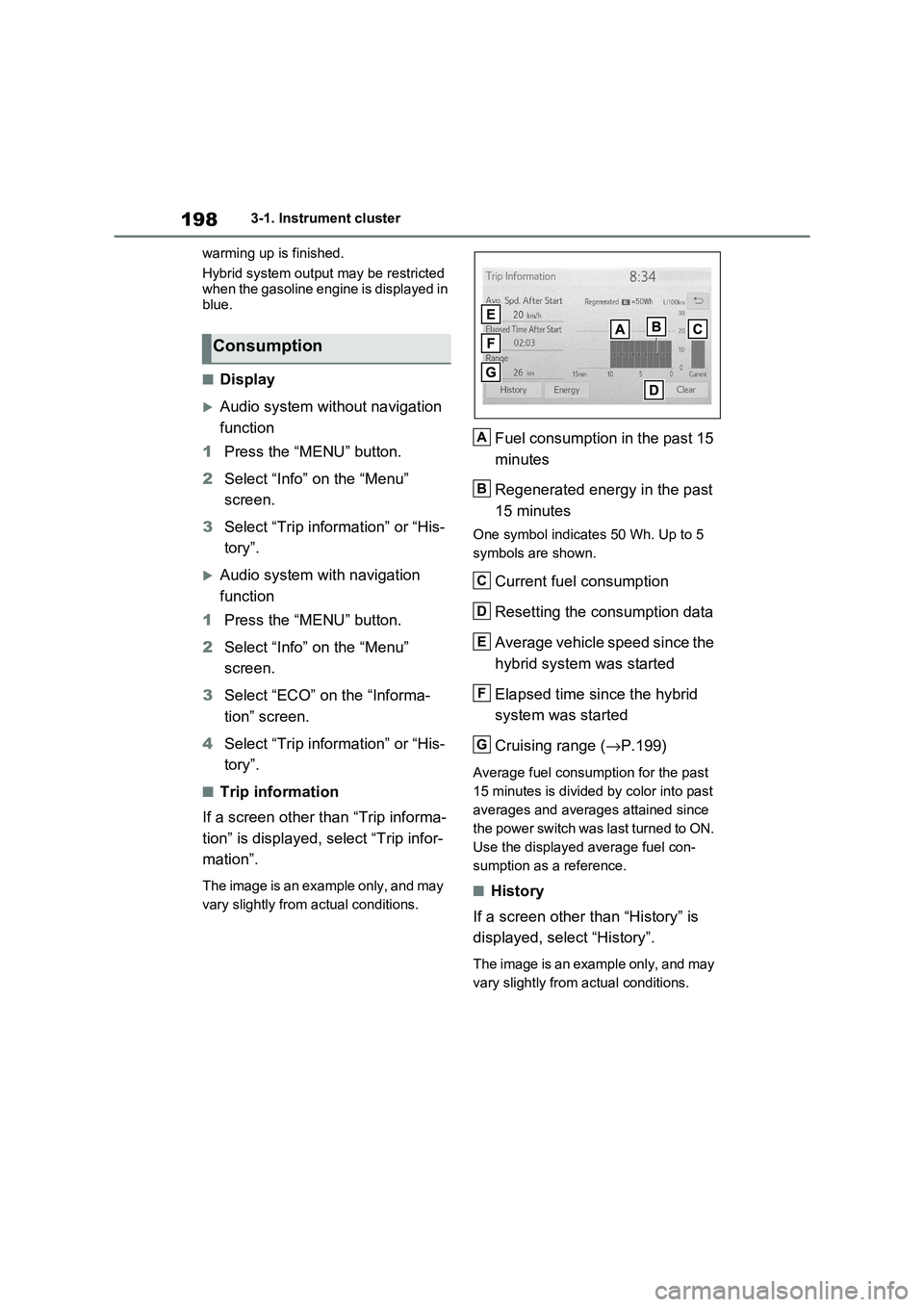
■Trip information
If a screen other than “Trip informa -
tion” is displayed, select “Trip infor -
mation”.
The image is an example only, and may
vary slightly from actual conditions.
Fuel consumption in the past 15
minutes
Regenerated energy in the past
15 minutes
One symbol indicate s 50 Wh. Up to 5
symbols are shown.
Current fuel consumption
Resetting the consumption data
Average vehicle speed since the
hybrid system was started
Elapsed time since the hybrid
system was started
Cruising range ( →P.199)
Average fuel consumption for the past
15 minutes is divided by color into past
averages and averages attained since
the power switch was last turned to ON.
Use the displayed average fuel con -
sumption as a reference.
■History
If a screen other than “History” is
displayed, select “History”.
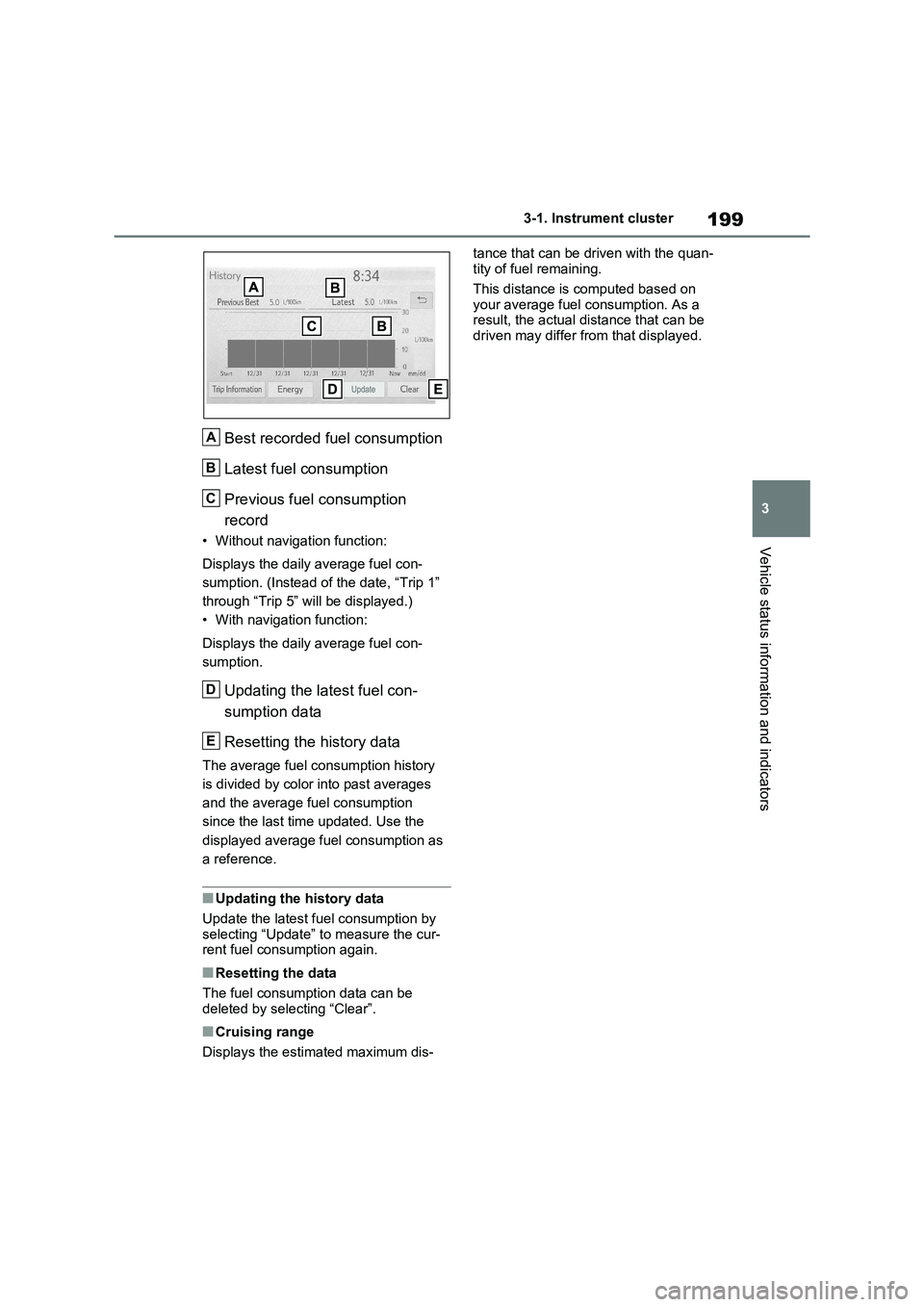
The image is an example only, and may
vary slightly from actual conditions.
Consumption
A
B
C
D
E
F
G
Page 201 of 666
199
3
3-1. Instrument cluster
Vehicle status information and indicators
Best recorded fuel consumption
Latest fuel consumption
Previous fuel consumption
record
• Without navigation function:
Displays the daily average fuel con -
sumption. (Instead of the date, “Trip 1”
through “Trip 5” will be displayed.)
• With navigation function:
Displays the daily average fuel con -
sumption.
Updating the latest fuel con -
sumption data
Resetting the history data
The average fuel consumption history
is divided by color into past averages
and the average fuel consumption
since the last tim e updated. Use the
displayed average fuel consumption as
a reference.
■Updating the history data
Update the latest fue l consumption by
selecting “Update” to measure the cur -
rent fuel consumption again.
■Resetting the data
The fuel consumption data can be
deleted by selecting “Clear”.
■Cruising range
Displays the estimated maximum dis -
tance that can be driven with the quan -
tity of fuel remaining.
This distance is computed based on
your average fuel consumption. As a
result, the act ual distance that can be driven may differ from that displayed.
A
B
C
D
E
Page 202 of 666

2003-1. Instrument cluster
Page 657 of 666
655Alphabetical Index
HV mode .......................................... 85
Hybrid battery ( traction battery)
Charging .................................... 135
Location ....................................... 94
Specification............................... 621
Hybrid battery ( traction battery)
charge mode ................................. 85
Hybrid system
ACCESSORY mode .................. 320
Acoustic Vehicle Alerting System 92
Brake Override System .............. 301
Drive-Start Control ..................... 301
Emergency shut off system.......... 98
Energy monitor/consumption screen
................................................. 195
High voltage components ............ 94
How to start the hybrid system... 317
Hybrid System Indicator ............. 174
If the hybrid system will not start 601
If your vehicle has to be stopped in
an emergency .......................... 560
Ignition switch (power switch) .... 317
Overheating ............................... 611
Plug-in hybrid system precautions94
Plug-in hybrid vehicle driving tips. 99
Power (ignition) switch ............... 317
Regenerative brakin g ................... 90
Starting the hybrid system ......... 317
Hybrid System Indica tor .............. 174
Hybrid transmission ..................... 321
I
Identification
Engine ........................................ 619
Vehicle ....................................... 618
Ignition switch (pow er switch) .... 317
Auto power off function .............. 320
Changing the powe r switch modes
................................................. 320
If your vehicle has to be stopped in
an emergency .......................... 560
Starting the hybrid system..........317
Illuminated entry system.............. 466
Immobilizer system ........................ 76
Indicators....................................... 168
Initialization
Items to initialize......................... 643
Panoramic moon roof ................. 295
Power back door ........................218
Power windows ........ ..................291
Tire pressure war ning system ....523
Inside rear view mirror ......... 279, 280
Installing a child restraint system to
a front passenger seat ................. 52
Instrument cluster light control... 178
Interior lights ................................. 465
Switch.........................................465
Wattage ......................................626
Intrusion sensor.............................. 79
ISOFIX lower anchorages .............. 62
J
Jack
Positioning a floor jack ...............499
Vehicle-equipped jack ........ 583, 594
Jack handle ...........................583, 594
Jam protection function
Electronic sunshade ................... 295
Panoramic moon roof ................. 295
Power back door opener and closer
.................................................216
Power windows ........ ..................291
K
Keyless entry
Smart entry & star t system .........223
Wireless remote control .............203
Keys ............................................... 202
Battery-saving function...............224
Electronic key .............................202
If the electronic key does not operate