high beam TOYOTA RAV4 PLUG-IN HYBRID 2021 Owners Manual
[x] Cancel search | Manufacturer: TOYOTA, Model Year: 2021, Model line: RAV4 PLUG-IN HYBRID, Model: TOYOTA RAV4 PLUG-IN HYBRID 2021Pages: 666, PDF Size: 161.28 MB
Page 5 of 666
3TABLE OF CONTENTS
1
6
5
4
3
2
8
7
9
Smart entry & start system . 223
4-3. Adjusting the seats
Front seats .......................... 270
Rear seats .......................... 271
Driving position memory ..... 273
Head restraints ................... 276
4-4. Adjusting the steering wheel
and mirrors
Steering wheel .................... 278
Inside rear view mirror ........ 279
Digital Rear-view Mirror ...... 280
Outside rear view mirrors.... 289
4-5. Opening, closing the win -
dows and moon roof
Power windows ................... 291
Panoramic moon roof ......... 294
5-1. Before driving
Driving the vehicle .............. 300
Cargo and luggage ............. 306
Trailer towing ...................... 308
5-2. Driving procedures
Power (ignition) switch ........ 317
Hybrid transmission ............ 321
Turn signal lever ................. 325
Parking brake...................... 326
Brake Hold .......................... 329
5-3. Operating the lights and wip -
ers
Headlight switch.................. 332
AHB (Automatic High Beam)
.......................................... 334
Fog light switch ................... 337
Windshield wipers and washer
.......................................... 338
Rear window wiper and washer
.......................................... 340
5-4. Refueling
Opening the fuel tank cap ... 342
5-5. Using the driving support sys -
tems
Toyota Safety Sense .......... 344
PCS (Pre-Collision System) 355
LTA (Lane Tracing Assist) .. 362
RSA (Road Sign Assist)...... 372
Dynamic radar cruise control
with full-speed range ........ 376
Cruise control...................... 388
Speed limiter ....................... 391
BSM (Blind Spot Monitor) ... 393
Toyota parking assist-sensor
.......................................... 414
PKSB (Parking Support Brake)
.......................................... 420
Parking Support Brake function
(static objects) .................. 424
Parking Support Brake function
(rear-crossing vehicles) .... 430
Driving mode select switch . 434
Trail Mode ........................... 435
GPF (Gasoline Particulate Filter)
system .............................. 437
Driving assist systems ........ 438
5-6. Driving tips
Winter driving tips ............... 445
Utility vehicle precautions ... 448
5Driving
Page 19 of 666
17Pictorial index
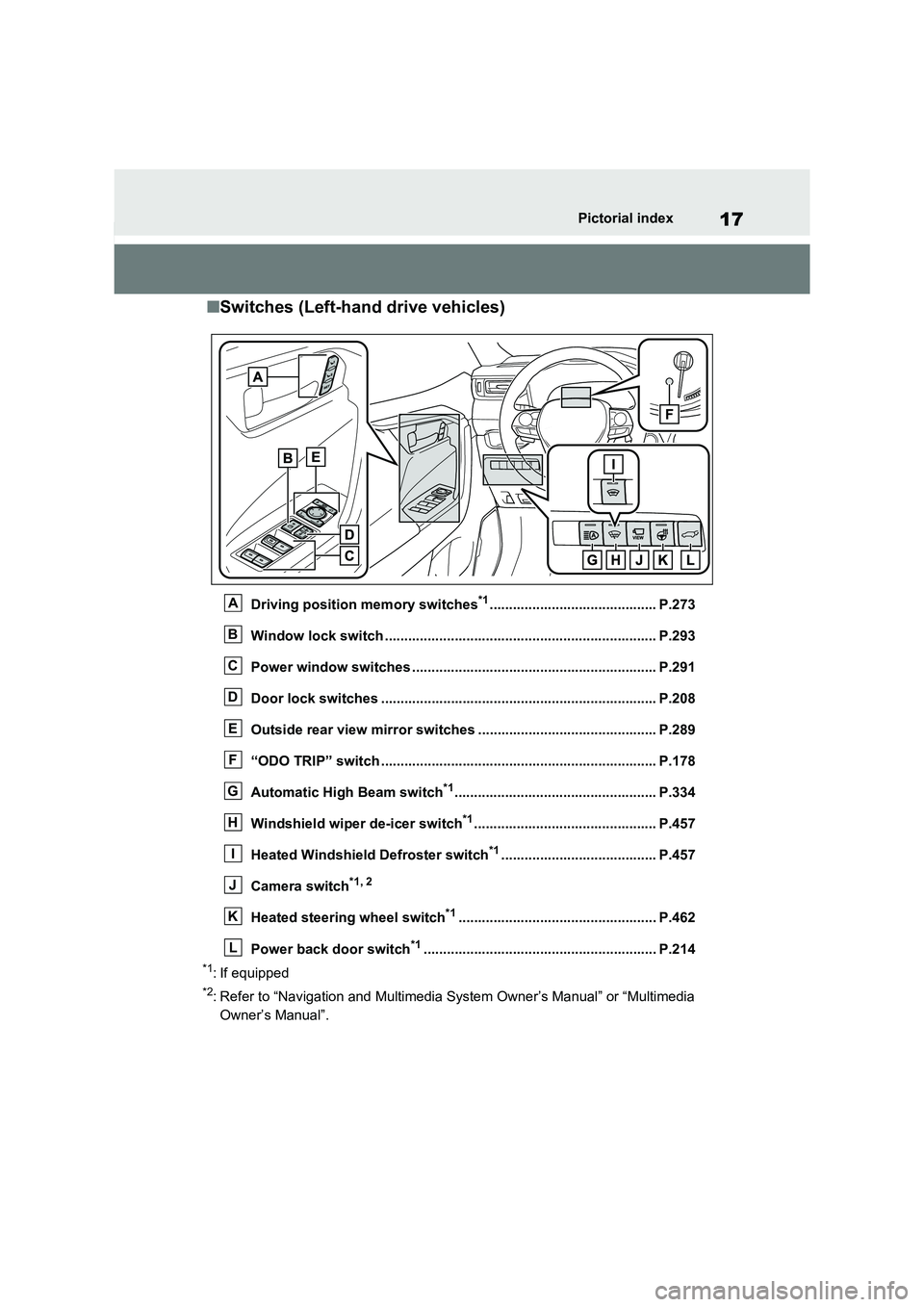
■Switches (Left-hand drive vehicles)
Driving position memory switches*1........................................... P.273
Window lock switch ............................................. ......................... P.293
Power window switches .......................................... ..................... P.291
Door lock switches ............................................. .......................... P.208
Outside rear view mirror switches .............................. ................ P.289
“ODO TRIP” switch .............................................. ......................... P.178
Automatic High Beam switch*1.................................................... P.334
Windshield wiper de-icer switch*1............................................... P.457
Heated Windshield Defroster switch*1........................................ P.457
Camera switch*1, 2
Heated steering wheel switch*1................................................... P.462
Power back door switch*1............................................................ P.2 14
*1: If equipped
*2: Refer to “Navigation and Multimedia System Owner’s Manual” or “Multimedia
Owner’s Manual”.
A
B
C
D
E
F
G
H
I
J
K
L
Page 27 of 666
25Pictorial index
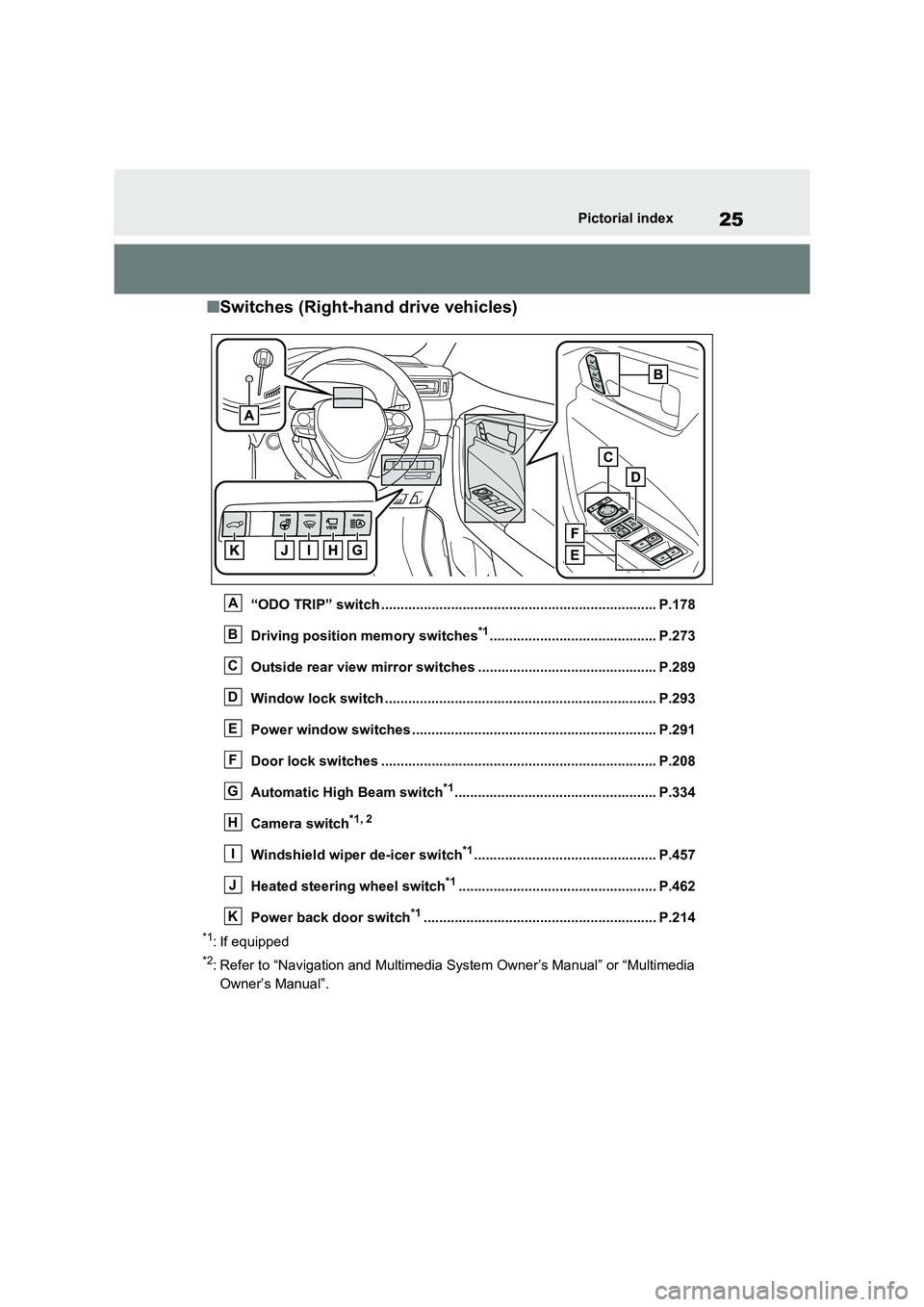
■Switches (Right-hand drive vehicles)
“ODO TRIP” switch ....................................................................... P.178
Driving position memory switches*1........................................... P.273
Outside rear view mirror switches .............................. ................ P.289
Window lock switch ............................................. ......................... P.293
Power window switches .......................................... ..................... P.291
Door lock switches ............................................. .......................... P.208
Automatic High Beam switch*1.................................................... P.334
Camera switch*1, 2
Windshield wiper de-icer switch*1............................................... P.457
Heated steering wheel switch*1................................................... P.462
Power back door switch*1............................................................ P.2 14
*1: If equipped
*2: Refer to “Navigation and Multimedia System Owner’s Manual” or “Multimedia
Owner’s Manual”.
A
B
C
D
E
F
G
H
I
J
K
Page 173 of 666
171
3
3-1. Instrument cluster
Vehicle status information and indicators
*2: This light illumina tes on the multi-
information displa y with a message.
*3: Toyota parking assist-sensor OFF
indicator turns on when the power
switch is turned to ON while the
Toyota parking a ssist-sensor func-
tion is on. It will turn off after a few
seconds.
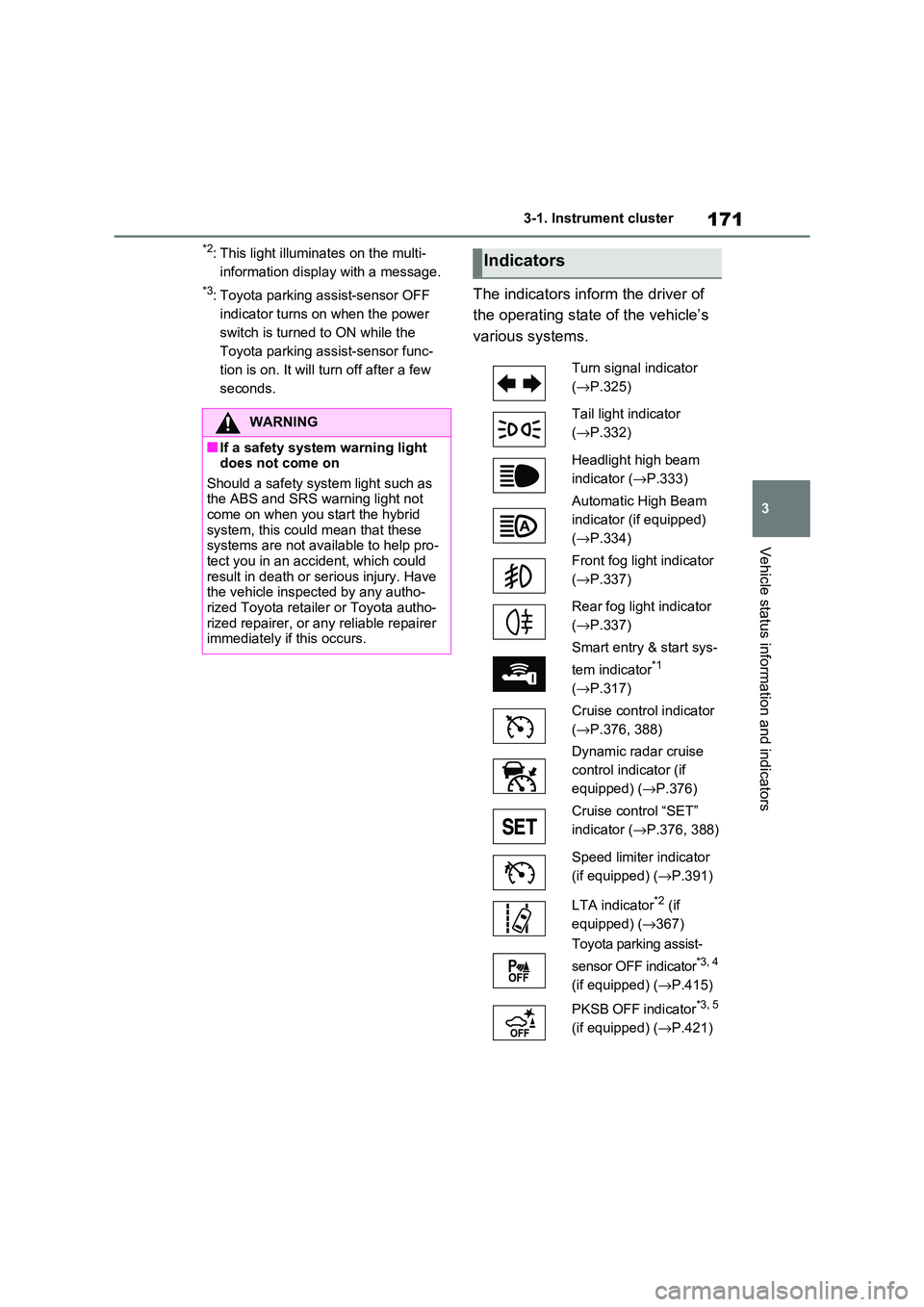
The indicators inform the driver of
the operating state of the vehicle’s
various systems.
WARNING
■If a safety system warning light
does not come on
Should a safety syst em light such as the ABS and SRS wa rning light not
come on when you start the hybrid
system, this could mean that these systems are not ava ilable to help pro-
tect you in an accident, which could
result in death or serious injury. Have the vehicle inspected by any autho -
rized Toyota retailer or Toyota autho -
rized repairer, or any reliable repairer immediately if this occurs.
Indicators
Turn signal indicator
( →P.325)
Tail light indicator
( →P.332)
Headlight high beam
indicator ( →P.333)
Automatic High Beam
indicator (if equipped)
( →P.334)
Front fog light indicator
( →P.337)
Rear fog light indicator
( →P.337)
Smart entry & start sys -
tem indicator*1
( →P.317)
Cruise control indicator
( →P.376, 388)
Dynamic radar cruise
control indicator (if
equipped) ( →P.376)
Cruise control “SET”
indicator ( →P.376, 388)
Speed limiter indicator
(if equipped) ( →P.391)
LTA indicator*2 (if
equipped) ( →367)
Toyota parking assist-
sensor OFF indicator*3, 4
(if equipped) ( →P.415)
PKSB OFF indicator*3, 5
(if equipped) ( →P.421)
Page 301 of 666
5
299
5
Driving
Driving
5-1. Before driving
Driving the vehicle ............ 300
Cargo and luggage ........... 306
Trailer towing .................... 308
5-2. Driving procedures
Power (ignition) switch ...... 317
Hybrid transmission .......... 321
Turn signal lever ............... 325
Parking brake ................... 326
Brake Hold ........................ 329
5-3. Operating the lights and wip -
ers
Headlight switch ............... 332
AHB (Automatic High Beam)
....................................... 334
Fog light switch ................. 337
Windshield wipers and washer
....................................... 338
Rear window wiper and washer
....................................... 340
5-4. Refueling
Opening the fuel tank cap. 342
5-5. Using the driving support
systems
Toyota Safety Sense ........ 344
PCS (Pre-Collision System)
....................................... 355
LTA (Lane Tracing Assist) 362
RSA (Road Sign Assist) ... 372
Dynamic radar cruise control
with full-speed range ...... 376
Cruise control ................... 388
Speed limiter ..................... 391
BSM (Blind Spot Monitor) . 393
Toyota parking assist-sensor
........................................ 414
PKSB (Parking Support Brake)
........................................ 420
Parking Support Brake function
(static objects) ................ 424
Parking Support Brake function
(rear-crossing vehicles) .. 430
Driving mode select switch 434
Trail Mode ......................... 435
GPF (Gasoline Particulate Fil -
ter) system ...................... 437
Driving assist systems ...... 438
5-6. Driving tips
Winter driving tips ............. 445
Utility vehicle precautions . 448
Page 335 of 666
333
5
5-3. Operating the lights and wipers
Driving
■Automatic headlight leveling sys -
tem
The level of the headl ights is automati-
cally adjusted accord ing to the number
of passengers and the loading condition of the vehicle to ens ure that the head-
lights do not interfe re with other road
users.
■12-volt battery- saving function
In order to prevent the 12-volt battery of
the vehicle from discharging, if the light
switch is in po sition when the
power switch is turn ed to OFF, the 12- volt battery-saving function will operate
and automatically turn off all the lights
after approximate ly 20 minutes.
When any of the following are per -
formed, the 12-volt b attery-saving func-
tion is canceled once and then reactivated. All the lights will turn off
automatically 20 minutes after the 12-
volt battery-savin g function has been reactivated:
●When the headlight switch is operated
●When a door is opened or closed
■If “Headlight System Malfunction
Visit Your Dealer” is displayed on the multi-information display
The system may be malfunctioning.
Have the vehicle i nspected by any authorized Toyota retailer or Toyota
authorized repairer, or any reliable
repairer.
■Customization
Settings (e.g. light s ensor sensitivity)
can be changed.
(Customizable features: →P.637)
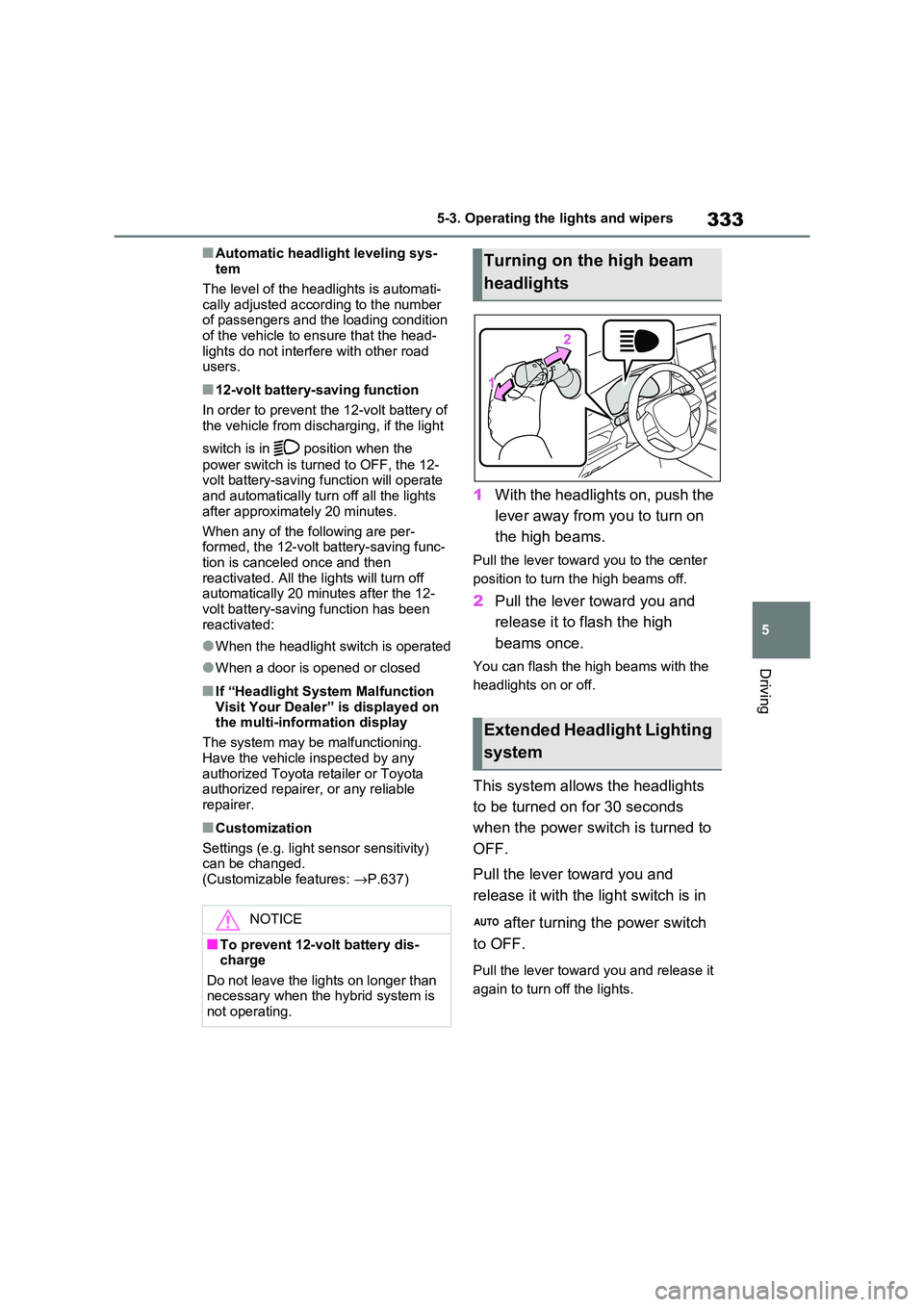
1With the headlights on, push the
lever away from you to turn on
the high beams.
Pull the lever towar d you to the center
position to turn the high beams off.
2 Pull the lever toward you and
release it to flash the high
beams once.
You can flash the hi gh beams with the
headlights on or off.
This system allows the headlights
to be turned on for 30 seconds
when the power switch is turned to
OFF.
Pull the lever to ward you and
release it with the light switch is in
after turning the power switch
to OFF.
Pull the lever towar d you and release it
again to turn off the lights.
NOTICE
■To prevent 12-volt battery dis - charge
Do not leave the lights on longer than
necessary when the hybrid system is not operating.
Turning on the high beam
headlights
Extended Headlight Lighting
system
Page 336 of 666
3345-3. Operating the lights and wipers
*: If equipped
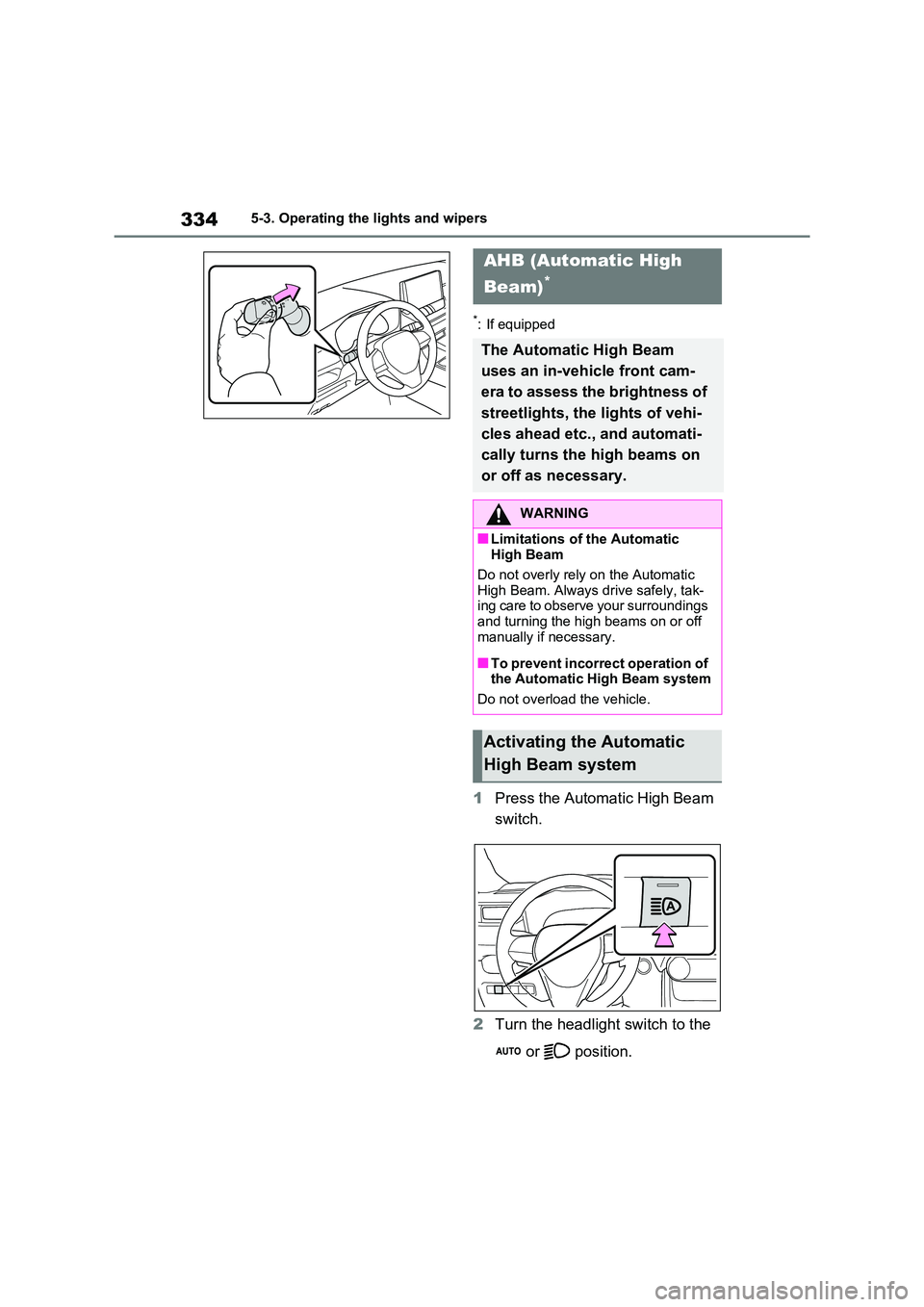
1Press the Automatic High Beam
switch.
2 Turn the headlight switch to the
or position.
AHB (Automatic High
Beam)*
The Automati c High Beam
uses an in-vehicle front cam -
era to assess the brightness of
streetlights, the lights of vehi -
cles ahead etc., and automati -
cally turns the high beams on
or off as necessary.
WARNING
■Limitations of the Automatic
High Beam
Do not overly rely on the Automatic High Beam. Always drive safely, tak -
ing care to observe your surroundings
and turning the high beams on or off manually if necessary.
■To prevent incorrect operation of the Automatic Hi gh Beam system
Do not overload the vehicle.
Activating the Automatic
High Beam system
Page 337 of 666
335
5
5-3. Operating the lights and wipers
Driving
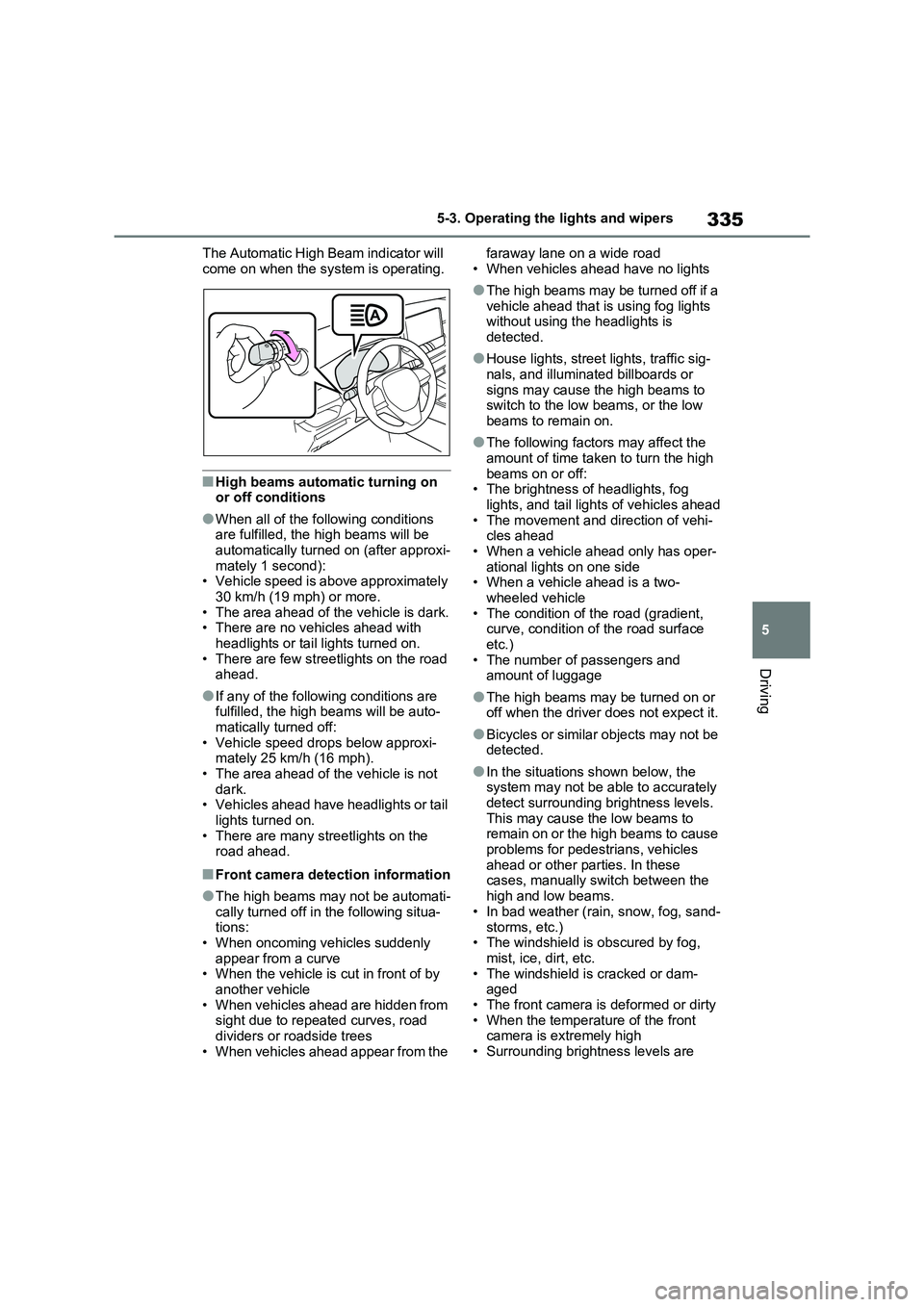
The Automatic High Beam indicator will
come on when the system is operating.
■High beams automatic turning on or off conditions
●When all of the following conditions are fulfilled, the high beams will be
automatically turned on (after approxi -
mately 1 second): • Vehicle speed is above approximately
30 km/h (19 mph) or more.
• The area ahead of t he vehicle is dark. • There are no vehicles ahead with
headlights or tail lights turned on.
• There are few street lights on the road ahead.
●If any of the following conditions are fulfilled, the high beams will be auto -
matically tu rned off:
• Vehicle speed drops below approxi - mately 25 km/h (16 mph).
• The area ahead of t he vehicle is not
dark. • Vehicles ahead have headlights or tail
lights turned on.
• There are many streetlights on the road ahead.
■Front camera detection information
●The high beams may not be automati-
cally turned off in the following situa- tions:
• When oncoming vehicles suddenly
appear from a curve • When the vehicle is cut in front of by
another vehicle
• When vehicles ahead are hidden from sight due to repeated curves, road
dividers or roadside trees
• When vehicles ahead appear from the
faraway lane on a wide road
• When vehicles a head have no lights
●The high beams may be turned off if a
vehicle ahead that i s using fog lights without using th e headlights is
detected.
●House lights, street lights, traffic sig-
nals, and illuminated billboards or
signs may cause t he high beams to switch to the low beams, or the low
beams to remain on.
●The following factors may affect the
amount of time taken to turn the high
beams on or off: • The brightness of headlights, fog
lights, and tail light s of vehicles ahead
• The movement and direction of vehi - cles ahead
• When a vehicle ahead only has oper -
ational lights on one side • When a vehicle ahead is a two-
wheeled vehicle
• The condition of the road (gradient, curve, condition of the road surface
etc.)
• The number of passengers and amount of luggage
●The high beams may be turned on or off when the driver does not expect it.
●Bicycles or similar objects may not be detected.
●In the situations shown below, the system may not be able to accurately
detect surrounding brightness levels.
This may cause the low beams to remain on or the high beams to cause
problems for pedestrians, vehicles
ahead or other parties. In these cases, manually switch between the
high and low beams.
• In bad weather (rain, snow, fog, sand -
storms, etc.) • The windshield is obscured by fog,
mist, ice, dirt, etc.
• The windshield is cracked or dam - aged
• The front camera is deformed or dirty
• When the temperat ure of the front camera is extremely high
• Surrounding brightness levels are
Page 338 of 666
3365-3. Operating the lights and wipers
equal to those of headlights, tail lights
or fog lights • When headlights or t ail lights of vehi-
cles ahead are turned off, dirty,
changing color, or not aimed properly • When the vehicle is hit by water,
snow, dust, etc. from a preceding
vehicle • When driving through an area of inter -
mittently changing brightness and
darkness • When frequently and repeatedly driv-
ing ascending/descending roads, or
roads with rough, bumpy or uneven surfaces (such as stone-paved roads,
gravel roads, etc.)
• When frequently and repeatedly tak - ing curves or driving on a winding
road
• There is a highly reflective object ahead of the vehicle, such as a sign or
mirror
• The back of a vehicle ahead is highly reflective, such as a container on a
truck
• The vehicle’s headlights are damaged or dirty, or are n ot aimed properly
• The vehicle is listi ng or titling due to a
flat tire, a trailer being towed, etc. • The high beams and low beams are
repeatedly being switched between in
an abnormal manner • The driver believes that the high
beams may be causing problems or
distress to other drivers or pedestrians nearby
• The vehicle is used in a territory in
which vehicles travel on the opposite side of the road o f the country for
which the vehicle is approved, for
example using a vehicle designed for right-hand traffic in a left-hand traffic
territory, or vice versa
• When going through the Straits of
Dover
■If “Headlight System Malfunction Visit Your Dealer” is displayed on
the multi-information display
The system may be malfunctioning. Have the vehicle i nspected by any
authorized Toyota retailer or Toyota
authorized repairer, or any reliable
repairer.
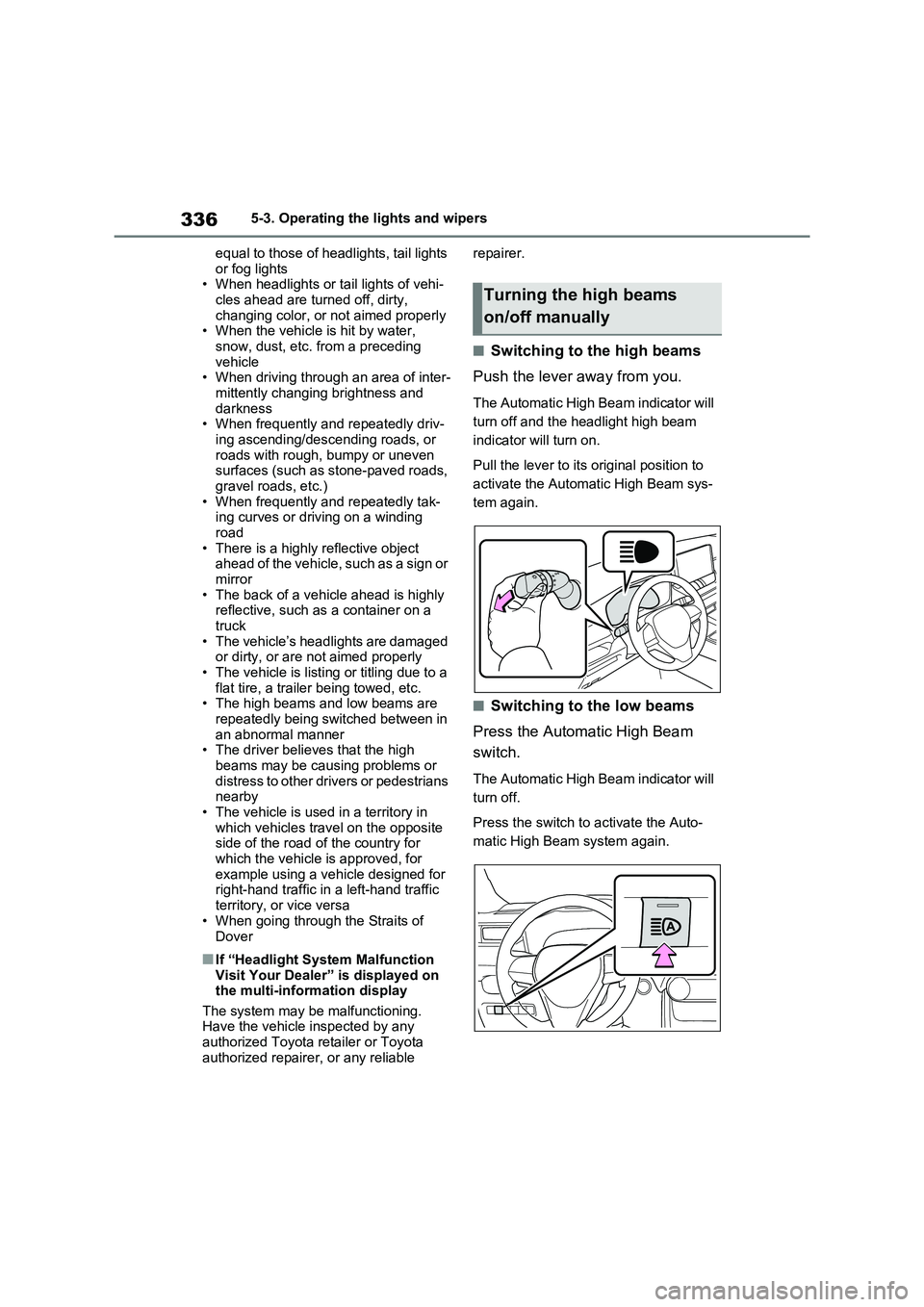
■Switching to the high beams
Push the lever away from you.
The Automatic High Beam indicator will
turn off and the h eadlight high beam
indicator will turn on.
Pull the lever to its original position to
activate the Automa tic High Beam sys-
tem again.
■Switching to the low beams
Press the Automatic High Beam
switch.
The Automatic High Beam indicator will
turn off.
Press the switch to activate the Auto-
matic High Beam system again.
Turning the high beams
on/off manually
Page 339 of 666
337
5
5-3. Operating the lights and wipers
Driving
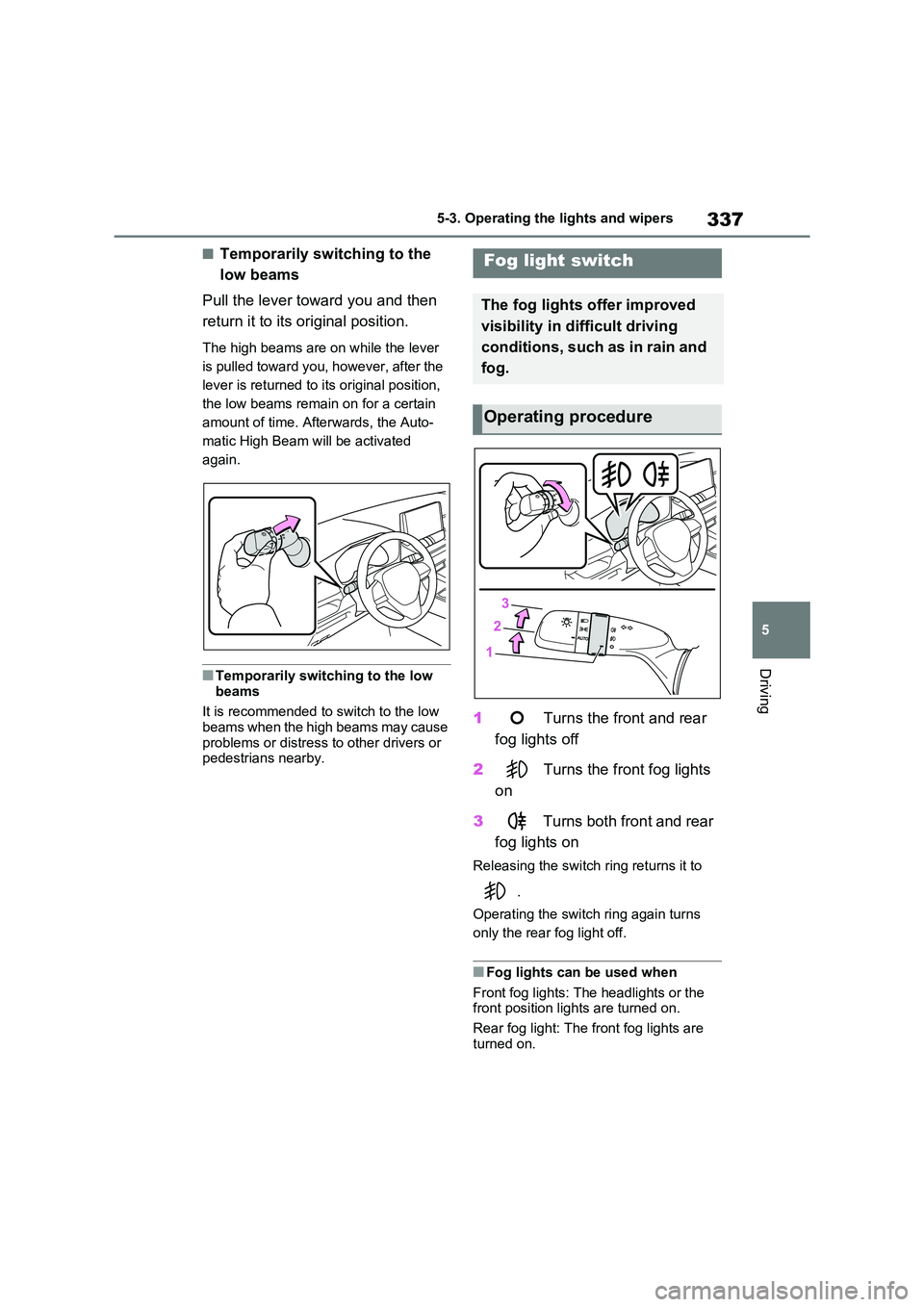
■Temporarily switching to the
low beams
Pull the lever towa rd you and then
return it to its or iginal position.
The high beams are on while the lever
is pulled toward you, however, after the
lever is returned to its original position,
the low beams remain on for a certain
amount of time. Afte rwards, the Auto-
matic High Beam w ill be activated
again.
■Temporarily switching to the low
beams
It is recommended to switch to the low
beams when the high beams may cause
problems or distress to other drivers or pedestrians nearby.
1 Turns the front and rear
fog lights off
2 Turns the front fog lights
on
3 Turns both front and rear
fog lights on
Releasing the switch ring returns it to
.
Operating the switch ring again turns
only the rear fog light off.
■Fog lights can be used when
Front fog lights: The headlights or the
front position lights are turned on.
Rear fog light: The fr ont fog lights are
turned on.
Fog light switch
The fog lights offer improved
visibility in difficult driving
conditions, such as in rain and
fog.
Operating procedure