brakes TOYOTA RAV4 PRIME 2021 (in English) User Guide
[x] Cancel search | Manufacturer: TOYOTA, Model Year: 2021, Model line: RAV4 PRIME, Model: TOYOTA RAV4 PRIME 2021Pages: 616, PDF Size: 34.66 MB
Page 293 of 616
2935-2. Driving procedures
5
Driving
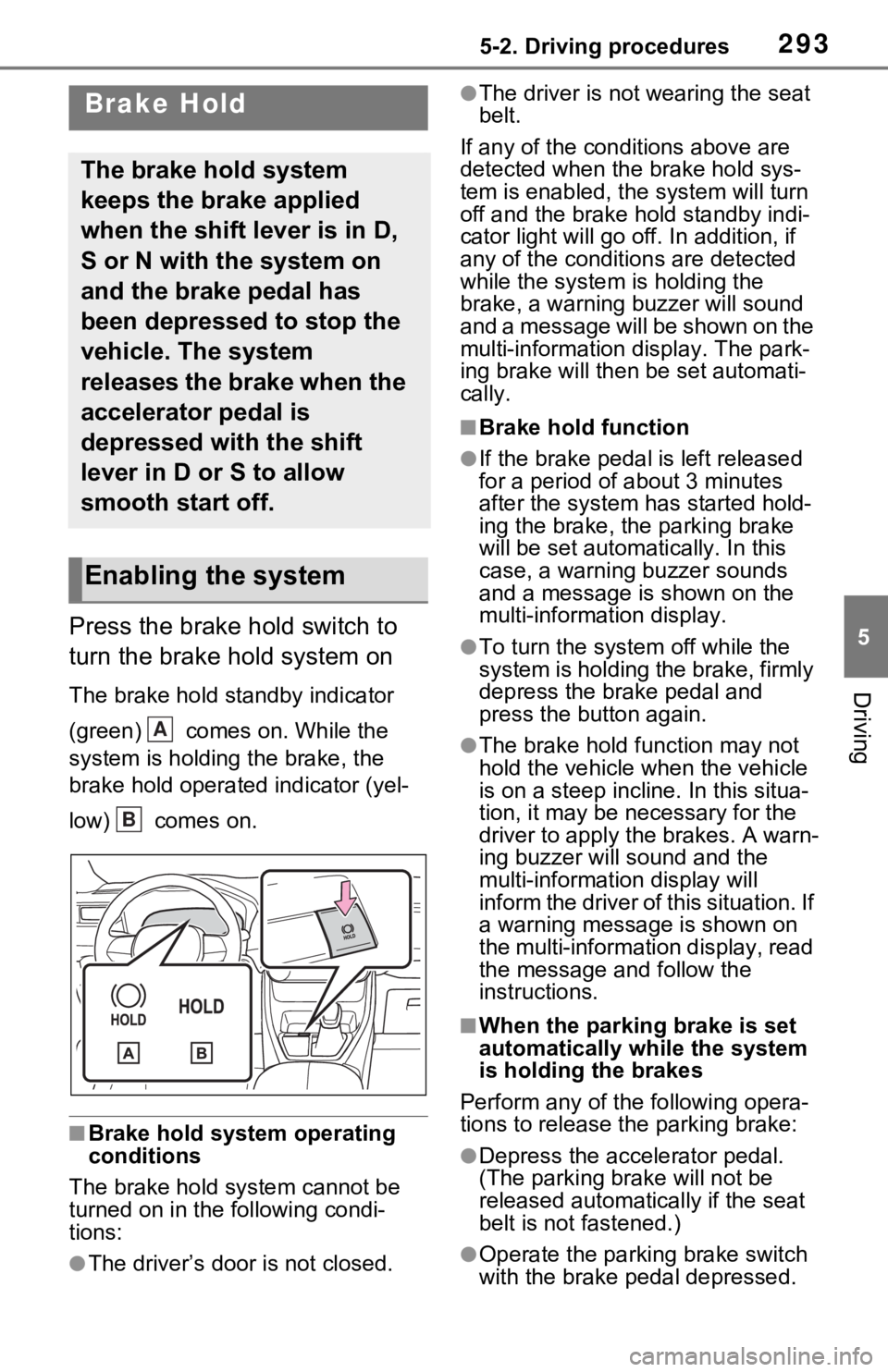
Press the brake hold switch to
turn the brake hold system on
The brake hold standby indicator
(green) comes on. While the
system is holding the brake, the
brake hold operated indicator (yel-
low) comes on.
■Brake hold system operating
conditions
The brake hold system cannot be
turned on in the following condi-
tions:
●The driver’s doo r is not closed.
●The driver is not wearing the seat
belt.
If any of the cond itions above are
detected when the brake hold sys-
tem is enabled, the system will turn
off and the brake hold standby indi-
cator light will go off. In addition, if
any of the conditions are detected
while the system is holding the
brake, a warning buzzer will sound
and a message will be shown on the
multi-information display. The park-
ing brake will then be set automati-
cally.
■Brake hold function
●If the brake pedal is left released
for a period of about 3 minutes
after the system has started hold-
ing the brake, the parking brake
will be set automatically. In this
case, a warning buzzer sounds
and a message is shown on the
multi-information display.
●To turn the syste m off while the
system is holding the brake, firmly
depress the brake pedal and
press the button again.
●The brake hold function may not
hold the vehicle when the vehicle
is on a steep incline. In this situa-
tion, it may be ne cessary for the
driver to apply the brakes. A warn-
ing buzzer will sound and the
multi-information display will
inform the driver of this situation. If
a warning message is shown on
the multi-information display, read
the message and follow the
instructions.
■When the parking brake is set
automatically while the system
is holding the brakes
Perform any of the following opera-
tions to release the parking brake:
●Depress the accelerator pedal.
(The parking brake will not be
released automatically if the seat
belt is not fastened.)
●Operate the parkin g brake switch
with the brake pedal depressed.
Brake Hold
The brake hold system
keeps the brake applied
when the shift lever is in D,
S or N with the system on
and the brake pedal has
been depressed to stop the
vehicle. The system
releases the brake when the
accelerator pedal is
depressed with the shift
lever in D or S to allow
smooth start off.
Enabling the system
A
B
Page 315 of 616
3155-5. Using the driving support systems
5
Driving
The system can detect the fol-
lowing:
Vehicles
Bicyclists
Pedestrians
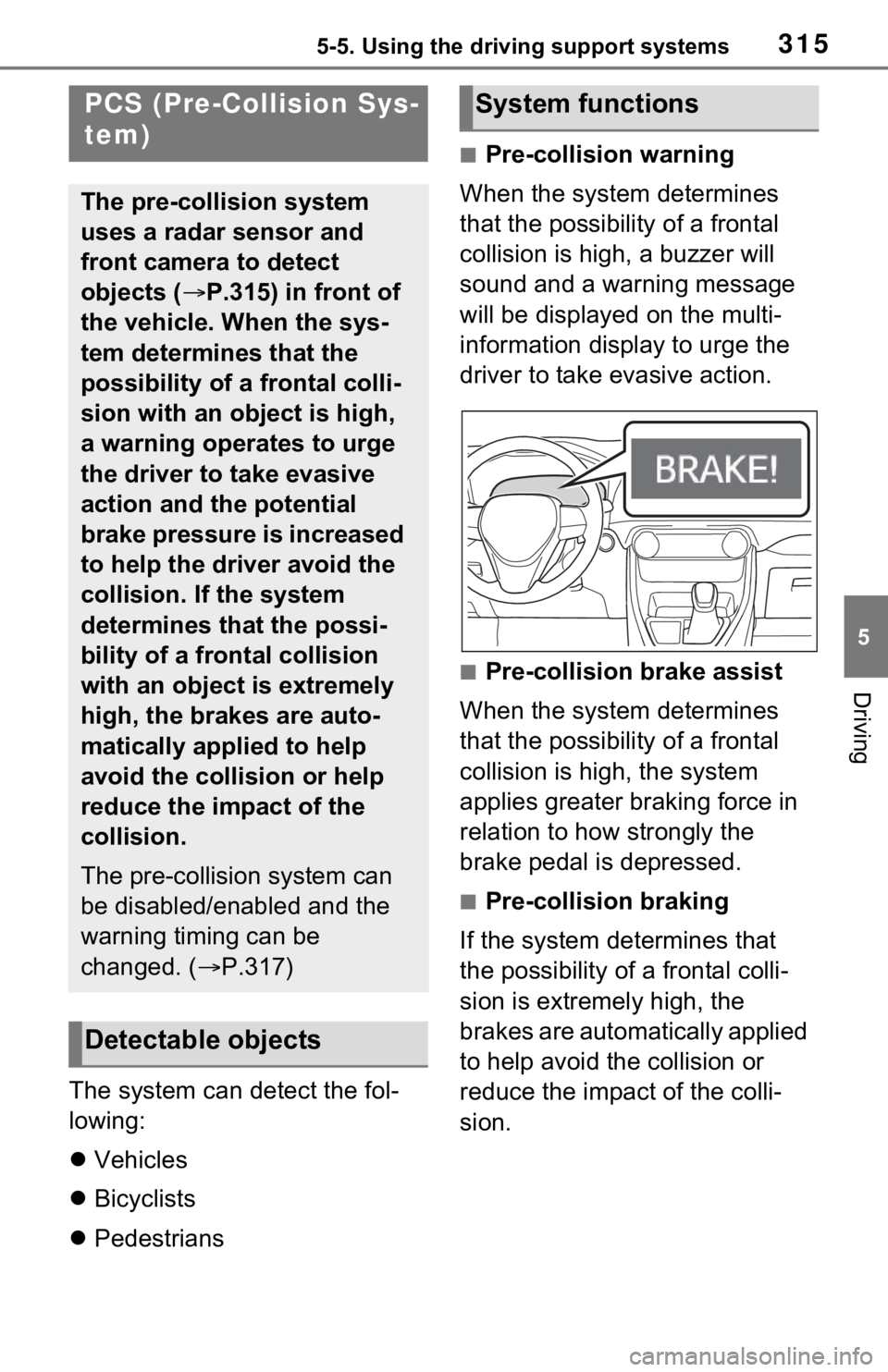
■Pre-collision warning
When the system determines
that the possibility of a frontal
collision is high, a buzzer will
sound and a warning message
will be displayed on the multi-
information display to urge the
driver to take evasive action.
■Pre-collision brake assist
When the system determines
that the possibility of a frontal
collision is high, the system
applies greater braking force in
relation to how strongly the
brake pedal is depressed.
■Pre-collision braking
If the system determines that
the possibility of a frontal colli-
sion is extremely high, the
brakes are automatically applied
to help avoid the collision or
reduce the impact of the colli-
sion.
PCS (Pre-Collision Sys-
tem)
The pre-collision system
uses a radar sensor and
front camera to detect
objects ( P.315) in front of
the vehicle. When the sys-
tem determines that the
possibility of a frontal colli-
sion with an object is high,
a warning operates to urge
the driver to take evasive
action and the potential
brake pressure is increased
to help the driver avoid the
collision. If the system
determines that the possi-
bility of a frontal collision
with an object is extremely
high, the brakes are auto-
matically applied to help
avoid the collision or help
reduce the impact of the
collision.
The pre-collision system can
be disabled/enabled and the
warning timing can be
changed. ( P.317)
Detectable objects
System functions
Page 322 of 616
3225-5. Using the driving support systems
such as heavy rain, fog, snow or a
sandstorm
• When driving through steam or smoke
• When the surrounding area is dim, such as at dawn or dusk, or while
at night or in a t unnel, making a
detectable object appear to be
nearly the same color as its sur-
roundings
• When driving in a place where the surrounding brightness changes
suddenly, such as at the entrance
or exit of a tunnel
• After the hybrid system has started the vehicle has not been
driven for a certain amount of time
• While making a left/right turn and for a few seconds after making a
left/right turn
• While driving on a curve and for a
few seconds after driving on a
curve
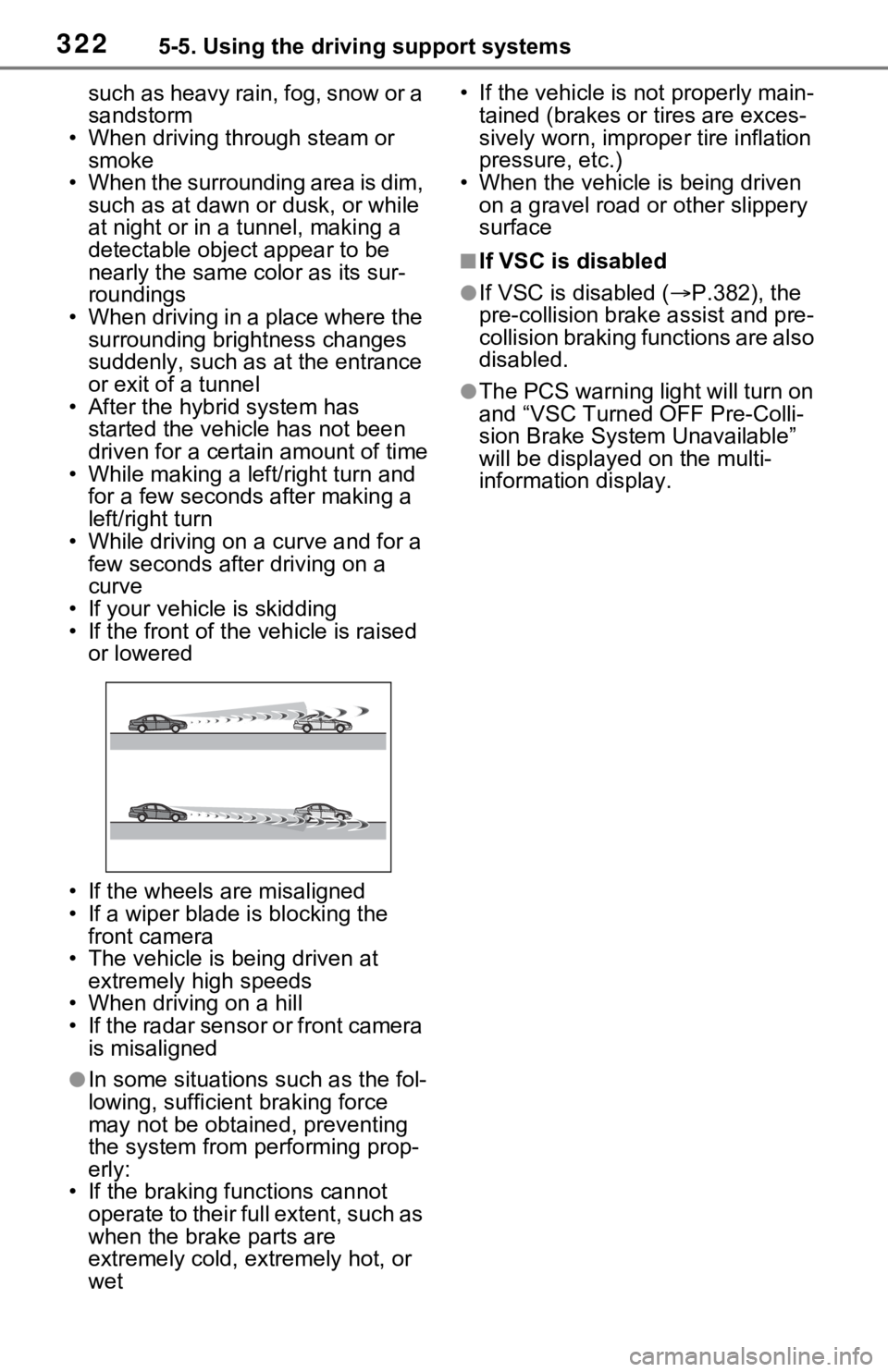
• If your vehicle is skidding
• If the front of the vehicle is raised or lowered
• If the wheels are misaligned
• If a wiper blade is blocking the front camera
• The vehicle is being driven at extremely high speeds
• When driving on a hill
• If the radar sensor or front camera is misaligned
●In some situations such as the fol-
lowing, sufficien t braking force
may not be obtained, preventing
the system from performing prop-
erly:
• If the braking functions cannot operate to their full extent, such as
when the brake parts are
extremely cold, extremely hot, or
wet • If the vehicle is not properly main-
tained (brakes or tires are exces-
sively worn, imprope r tire inflation
pressure, etc.)
• When the vehicle is being driven on a gravel road or other slippery
surface
■If VSC is disabled
●If VSC is disabled ( P.382), the
pre-collision brak e assist and pre-
collision braking functions are also
disabled.
●The PCS warning light will turn on
and “VSC Turned OFF Pre-Colli-
sion Brake System Unavailable”
will be displayed on the multi-
information display.
Page 339 of 616
3395-5. Using the driving support systems
5
Driving
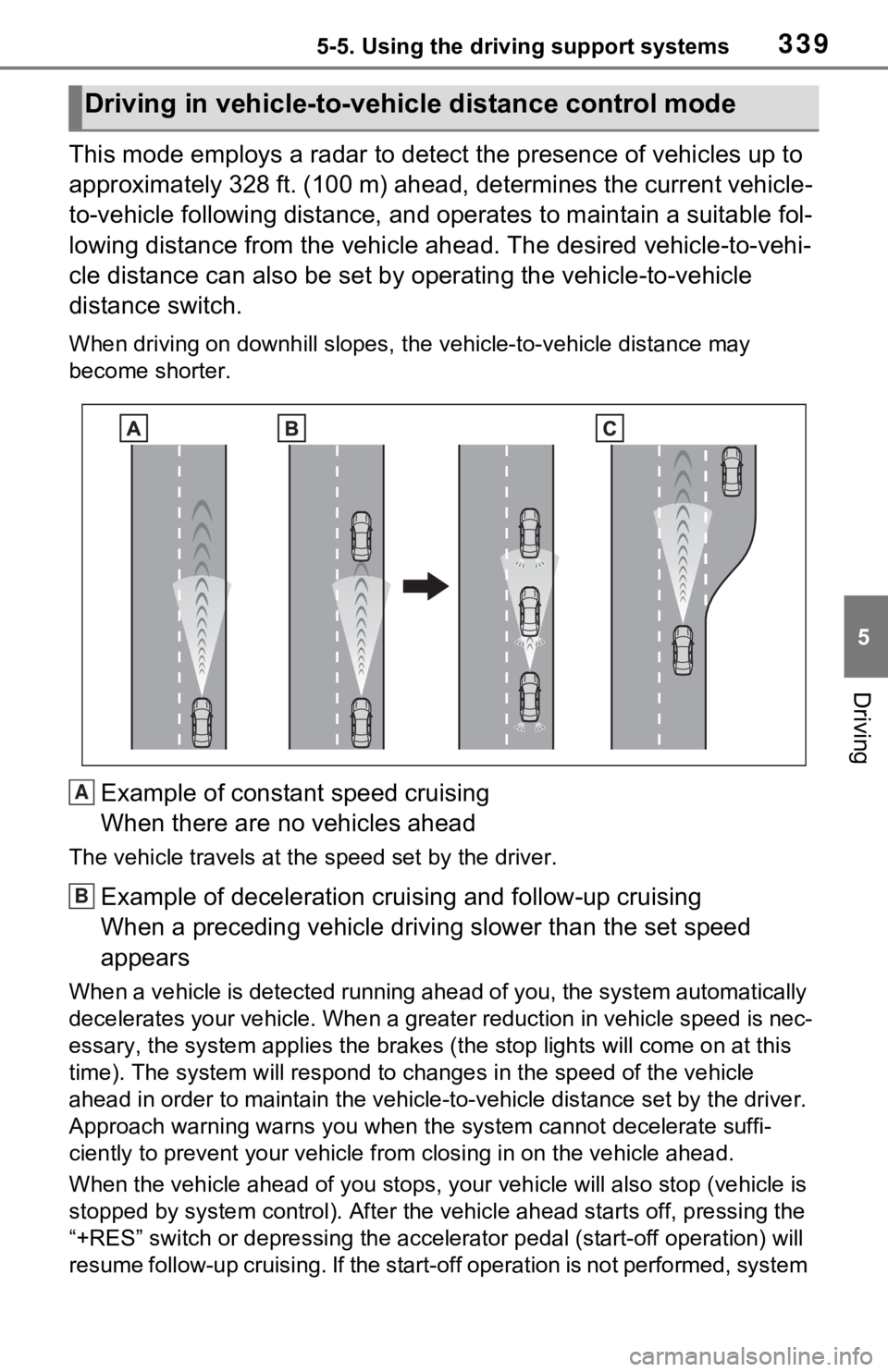
This mode employs a radar to detect the presence of vehicles up to
approximately 328 ft. (100 m) ahead, determines the current vehicle-
to-vehicle following distance, and operates to maintain a suitable fol-
lowing distance from the vehicle ahead. The desired vehicle-to- vehi-
cle distance can also be set by operating the vehicle-to-vehicl e
distance switch.
When driving on downhill slopes, t he vehicle-to-vehicle distance may
become shorter.
Example of constant speed cruising
When there are no vehicles ahead
The vehicle travels at the speed set by the driver.
Example of deceleration crui sing and follow-up cruising
When a preceding vehicle driving slower than the set speed
appears
When a vehicle is detected runni ng ahead of you, the system automatically
decelerates your vehicle. When a greater reduction in vehicle s peed is nec-
essary, the system applies the brakes (the stop lights will come on at this
time). The system will respond to changes i n the speed of the vehicle
ahead in order to maintain the ve hicle-to-vehicle distance set by the driver.
Approach warning warns you when the system cannot decelerate suffi-
ciently to prevent your vehicle from closing in on the vehicle ahead.
When the vehicle ahead of you st ops, your vehicle will also stop (vehicle is
stopped by system control). Afte r the vehicle ahead starts off, pressing the
“+RES” switch or depressing the accelerator pedal (start-off operation) will
resume follow-up cruising. If the start-off operation is not performed, system
Driving in vehicle-to-vehicle distance control mode
A
B
Page 360 of 616

3605-5. Using the driving support systems
detection distance may shorten,
or detection may be impossible.
• Detection may be impossible if static objects draw too close to the
sensor.
• There will be a short delay
between static object detection
and display (warning buzzer
sounds). Even at low speeds,
there is a possibilit y that the object
will come within 9.8 in. (25 cm)
before the display is shown and
the warning buzzer sounds.
• It might be difficult to hear the buzzer due to the volume of the
audio system or air flow noise of
the air conditioning system.
• It may be difficult to hear the sound of this system due to the
buzzers of other systems.
■Conditions under which the
function may not function cor-
rectly
Certain vehicle conditions and the
surrounding environment may affect
the ability of a sensor to correctly
detect objects. Particular instances
where this may occur are listed
below.
●There is dirt, snow or ice on a sen-
sor. (Cleaning the sensors will
resolve this problem.)
●A sensor is frozen. (Thawing the
area will resolve this problem.)
In especially cold weather, if a
sensor is frozen the sensor dis-
play may be displayed abnor-
mally, or objects, such as a wall,
may not be detected.
●A sensor is covered in any way.
●When a sensor or the area around
a sensor is extremely hot or cold.
●On an extremely bumpy road, on
an incline, on gravel, or on grass.
●The vicinity of the vehicle is noisy
due to vehicle horns, motorcycle
engines, air brakes of large vehi-
cles, or other l oud noises produc-
ing ultrasonic waves.
●There is another vehicle equipped with parking assist
sensors in the
vicinity.
●A sensor is coated with a sheet of
spray or heavy rain.
●If a sensor is hit by a large amount
of water, such as when driving on
a flooded road.
●If the vehicle is significantly tilted.
●The vehicle is approaching a tall
or curved curb.
●If objects draw too close to the
sensor.
■Objects which may not be prop-
erly detected
The shape of the object may pre-
vent the sensor from detecting it.
Pay particular atte ntion to the fol-
lowing objects:
●Wires, fences, ropes, etc.
●Cotton, snow and other materials
that absorb sound waves
●Sharply-angled objects
●Low objects
●Tall objects with upper sections
projecting outwards in the direc-
tion of your vehicle
People may not be detected if they
are wearing certain types of cloth-
ing.
■Certification (Canada only)
This ISM device complies with
Canadian ICES-001.
Page 363 of 616
3635-5. Using the driving support systems
5
Driving
operating, the buzzer will be
muted in some situations.
(automatic buzzer mute func-
tion)
■Muting the buzzer sound
●Automatic buzzer mute function
Even when the sensors are operat-
ing, the buzzer will be muted in the
following situations:
• The distance betw een the vehicle
and the detected object does not
become shorter (except when the
distance between the vehicle and
object is 1.0 ft. [30 cm] or less).
• Your vehicle is moving away from the object.
• There are no detectable objects entering the path of your vehicle.
However, if another object is
detected or the situation changes
while the buzzer is muted, the
buzzer begins sounding again.
●To mute the buzzer sound
The buzzer can be temporarily
muted by pressing of the meter
control switches w hile a suggestion
that says mute is available is shown
on the multi-info rmation display.
●When the mute is canceled
Mute will be automat ically canceled
in the followin g situations.
• When the shift position is changed
• When the vehicle speed has reached or excee ded a certain
speed
• When the Intuitive parking assist
is turned off once and turned on
again
• When the power switch is turned
off once and tur ned to ON again
■Customization
The buzzer volume can be adjusted
on the multi-inform ation display.
( P.177)
*: If equipped
■Parking Support Brake
function (static objects)
P.368
■Parking Support Brake
function (rear-crossing
vehicles)
P.373
PKSB (Parking Sup-
port Brake)*
The Parking Support Brake
system consists of the fol-
lowing functions that oper-
ate when driving at a low
speed or backing up, such
as when parking. When the
system determines that the
possibility of a collision
with a detected object is
high, a warning operates to
urge the driver to take eva-
sive action. If the system
determines that the possi-
bility of a collision with a
detected object is extremely
high, the brakes are auto-
matically applied to help
avoid the collision or help
reduce the impact of the
collision.
PKSB (Parking Support
Brake) system
Page 366 of 616
3665-5. Using the driving support systems
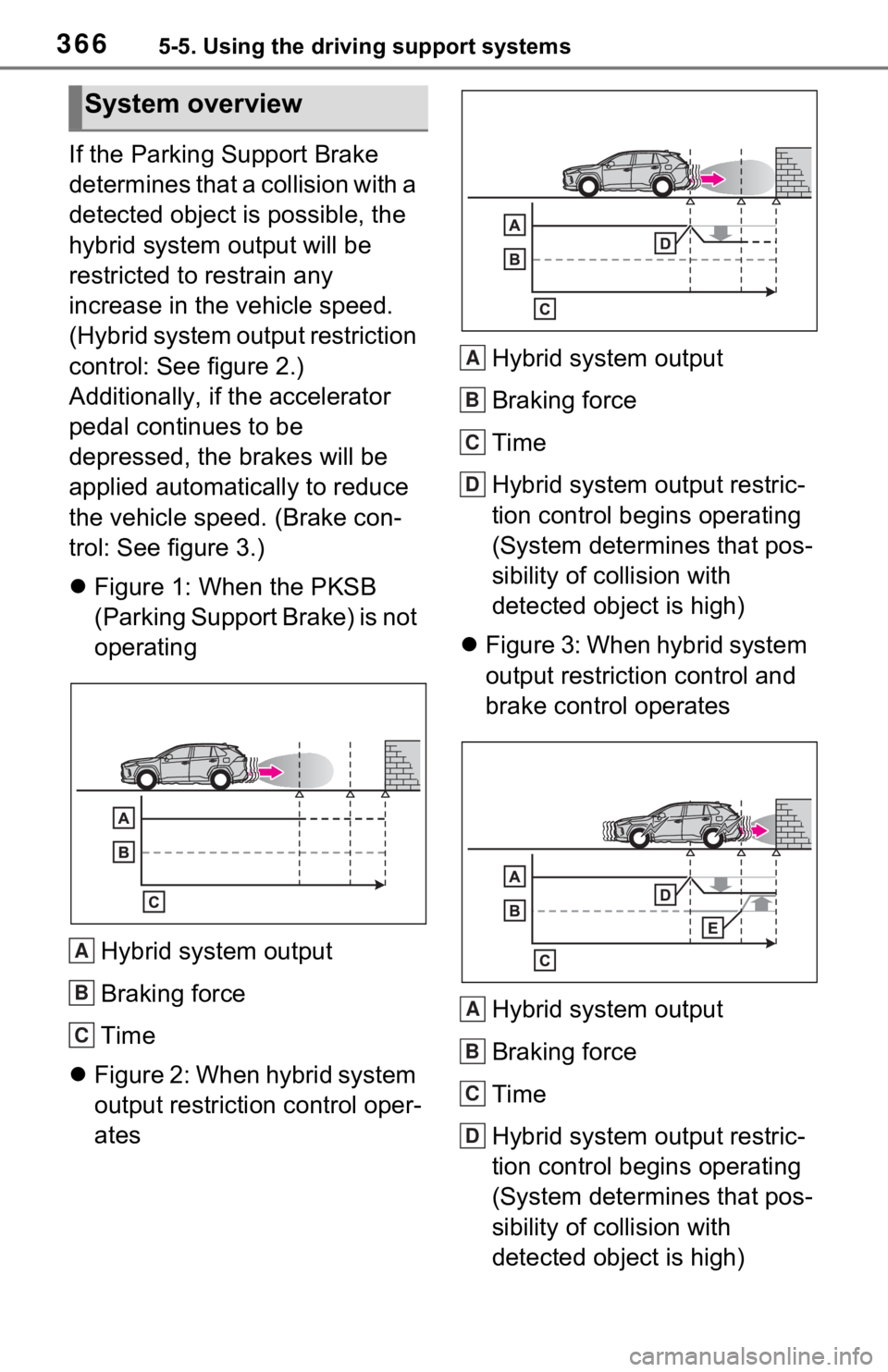
If the Parking Support Brake
determines that a collision with a
detected object is possible, the
hybrid system output will be
restricted to restrain any
increase in the vehicle speed.
(Hybrid system output restriction
control: See figure 2.)
Additionally, if the accelerator
pedal continues to be
depressed, the brakes will be
applied automatically to reduce
the vehicle speed. (Brake con-
trol: See figure 3.)
Figure 1: When the PKSB
(Parking Support Brake) is not
operating
Hybrid system output
Braking force
Time
Figure 2: When hybrid system
output restriction control oper-
ates Hybrid system output
Braking force
Time
Hybrid system output restric-
tion control begins operating
(System determines that pos-
sibility of collision with
detected object is high)
Figure 3: When hybrid system
output restriction control and
brake control operates
Hybrid system output
Braking force
Time
Hybrid system output restric-
tion control begins operating
(System determines that pos-
sibility of collision with
detected object is high)
System overview
A
B
C
A
B
C
D
A
B
C
D
Page 372 of 616
3725-5. Using the driving support systems
of water, such as when driving on
a flooded road
• When loaded on ships or trucks
• Moving type aut omatic car wash
• Lift type parking area or multi- story parking lot
• Underground parking area
• Structures on the ground (speed
bumps, cat’s eyes, etc.)
• Differences in height
• When moving straight ahead or
turning right
• Snow-melting pipes
• Devices for detecting vehicles,
such as traffic lights, devices for
detecting traffic congestion, or
devices for detecting empty
spaces in parking areas
• Railroad tracks
• H-shaped steel
• When there are vehicles on both
sides, or there is a vehicle that
resembles this vehicle
●Weather
• If a sensor is covered with ice,
snow, dirt, etc. (when cleared, the
system will return to normal)
• If heavy rain or water strikes a
sensor
• When driving in inclement weather such as fog, snow or a sandstorm
• Strong wind is blowing
●Other sonic wave sources
• When vehicle horns, vehicle detectors, motorcycle engines, air
brakes of large vehicles, the clear-
ance sonar of other vehicles or
other devices which produce ultra-
sonic waves are near the vehicle
• If a sticker or an electronic compo- nent, such as a backlit license
plate (especially fluorescent type),
fog lights, fender pole or wireless
antenna is insta lled near a sensor
●Changes in the vehicle posture
• If the vehicle is significantly tilted
• If the front of the vehicle is raised or lowered due to the carried load
• If the orientation of a sensor has been changed due t o a collision or
other impact
■Situations in wh ich the Parking
Support Brake function (static
objects) may not operate prop-
erly
In some situations, such as the fol-
lowing, this functi on may not oper-
ate properly.
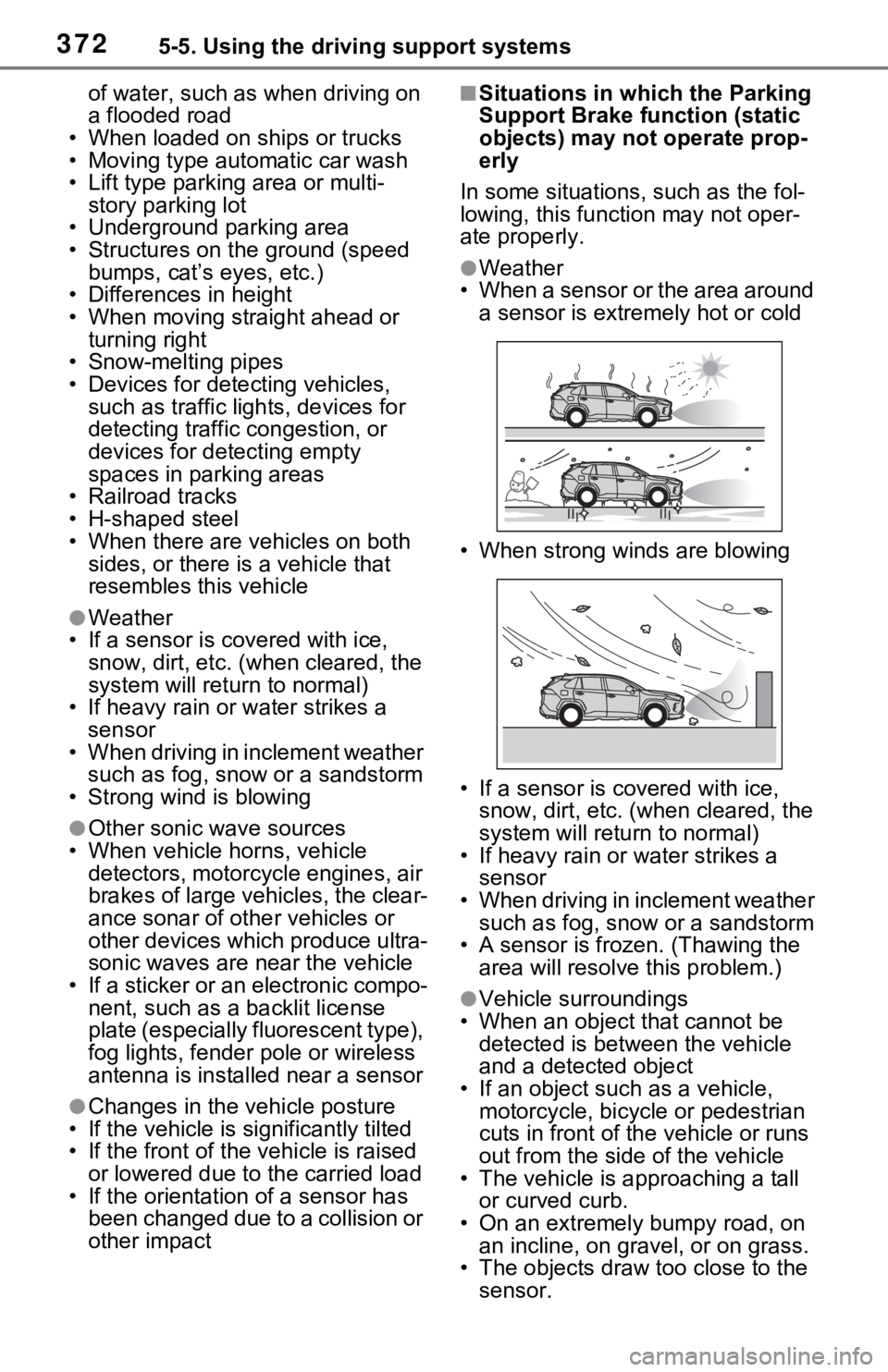
●Weather
• When a sensor or the area around a sensor is extremely hot or cold
• When strong winds are blowing
• If a sensor is covered with ice, snow, dirt, etc. (when cleared, the
system will return to normal)
• If heavy rain or water strikes a sensor
• When driving in inclement weather such as fog, snow or a sandstorm
• A sensor is froz en. (Thawing the
area will resolve this problem.)
●Vehicle surroundings
• When an object that cannot be detected is between the vehicle
and a detected object
• If an object such as a vehicle, motorcycle, bicycle or pedestrian
cuts in front of the vehicle or runs
out from the side of the vehicle
• The vehicle is approaching a tall or curved curb.
• On an extremely bumpy road, on an incline, on gravel, or on grass.
• The objects draw too close to the
sensor.
Page 373 of 616
3735-5. Using the driving support systems
5
Driving
●Other sonic waves sources
• When vehicle horns, vehicle detectors, motorcycle engines, air
brakes of large vehicles, the clear-
ance sonar of other vehicles or
other devices which produce ultra-
sonic waves are near the vehicle
• If a sticker or an electronic compo- nent, such as a backlit license
plate (especially fluorescent type),
fog lights, fender pole or wireless
antenna is insta lled near a sensor
●Changes in the vehicle
• If the vehicle is significantly tilted
• If the front of the vehicle is raised or lowered due to the carried load
• If the orientation of a sensor has been changed due t o a collision or
other impact
• When equipment that may obstruct a sensor is installed, such
as a towing eyelet, bumper pro-
tector (an additi onal trim strip,
etc.), bicycle carrier, or snow plow
• If the suspension has been modi-
fied or tires of a size other than
specified are installed
• If paint or a sticker is applied to
the sensor
*: If equipped
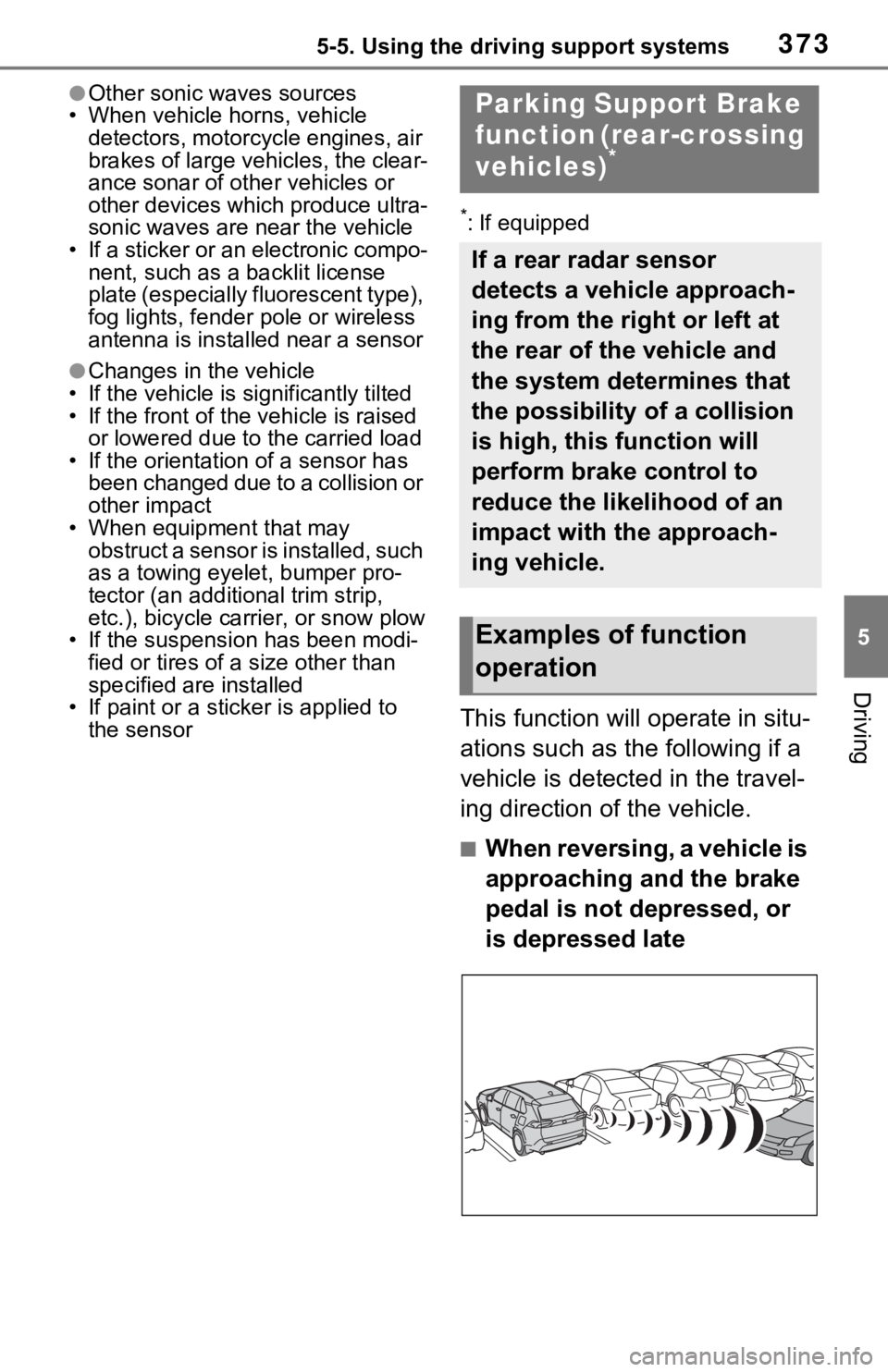
This function will operate in situ-
ations such as the following if a
vehicle is detected in the travel-
ing direction of the vehicle.
■When reversing, a vehicle is
approaching and the brake
pedal is not depressed, or
is depressed late
Parking Suppo rt Brake
function (rear-crossing
vehicles)
*
If a rear radar sensor
detects a vehicle approach-
ing from the right or left at
the rear of the vehicle and
the system determines that
the possibility of a collision
is high, this function will
perform brake control to
reduce the likelihood of an
impact with the approach-
ing vehicle.
Examples of function
operation
Page 380 of 616
3805-5. Using the driving support systems
●When the slip indicator light illumi-
nates while Trail Mode is on
●When the Trail Mode indicator
does not illuminate even though
the Trail Mode s witch is pressed
■ECB (Electronically Con-
trolled Brake System)
The electronically controlled
system generates braking force
corresponding to the brake
operation
■ABS (Anti-lock Brake Sys-
tem)
Helps to prevent wheel lock
when the brakes are applied
suddenly, or if the brakes are
applied while driving on a slip-
pery road surface
■Brake assist
Generates an increased level of
braking force after the brake
pedal is depressed when the
system detects a panic stop sit-
uation
Driving assist systems
To keep driving safety and
performance, the following
systems operate automati-
cally in response to various
driving situations. Be
aware, however, that these
systems are supplementary
and should not be relied
upon too heavily when oper-
ating the vehicle.
Summary of the driving
assist systems