lock TOYOTA RAV4 PRIME 2021 Owners Manual
[x] Cancel search | Manufacturer: TOYOTA, Model Year: 2021, Model line: RAV4 PRIME, Model: TOYOTA RAV4 PRIME 2021Pages: 618, PDF Size: 24.18 MB
Page 498 of 618
4987-3. Do-it-yourself maintenance
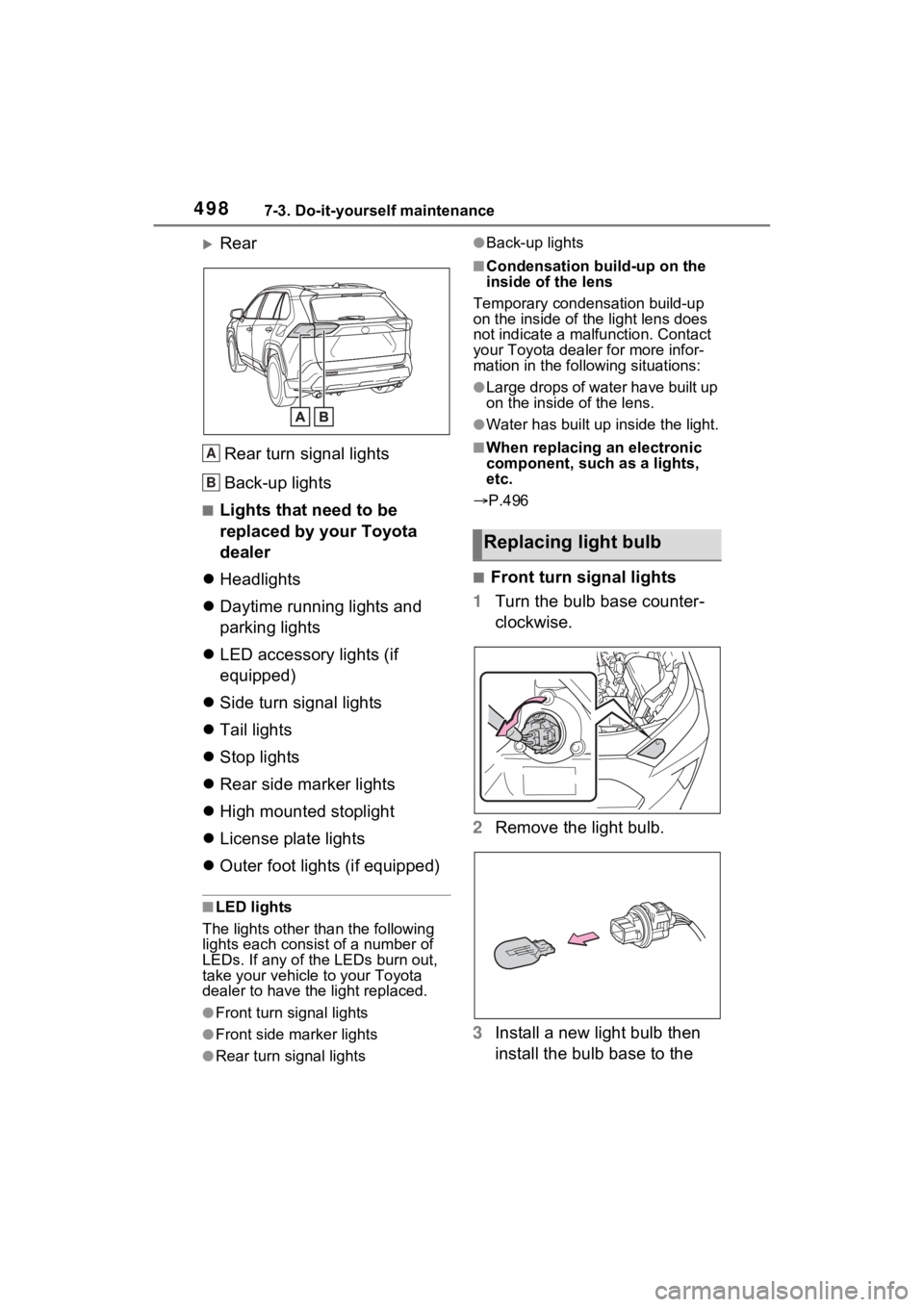
Rear
Rear turn signal lights
Back-up lights
■Lights that need to be
replaced by your Toyota
dealer
Headlights
Daytime running lights and
parking lights
LED accessory lights (if
equipped)
Side turn signal lights
Tail lights
Stop lights
Rear side marker lights
High mounted stoplight
License plate lights
Outer foot lights (if equipped)
■LED lights
The lights other than the following
lights each consist of a number of
LEDs. If any of the LEDs burn out,
take your vehicle to your Toyota
dealer to have the light replaced.
●Front turn signal lights
●Front side marker lights
●Rear turn signal lights
●Back-up lights
■Condensation build-up on the
inside of the lens
Temporary condensation build-up
on the inside of the light lens does
not indicate a mal function. Contact
your Toyota dealer for more infor-
mation in the following situations:
●Large drops of water have built up
on the inside of the lens.
●Water has built up inside the light.
■When replacing an electronic
component, such as a lights,
etc.
P.496
■Front turn signal lights
1 Turn the bulb base counter-
clockwise.
2 Remove the light bulb.
3 Install a new light bulb then
install the bulb base to the
A
B
Replacing light bulb
Page 499 of 618
4997-3. Do-it-yourself maintenance
7
Maintenance and care
light unit by inserting it and
turning the bulb base clock-
wise.
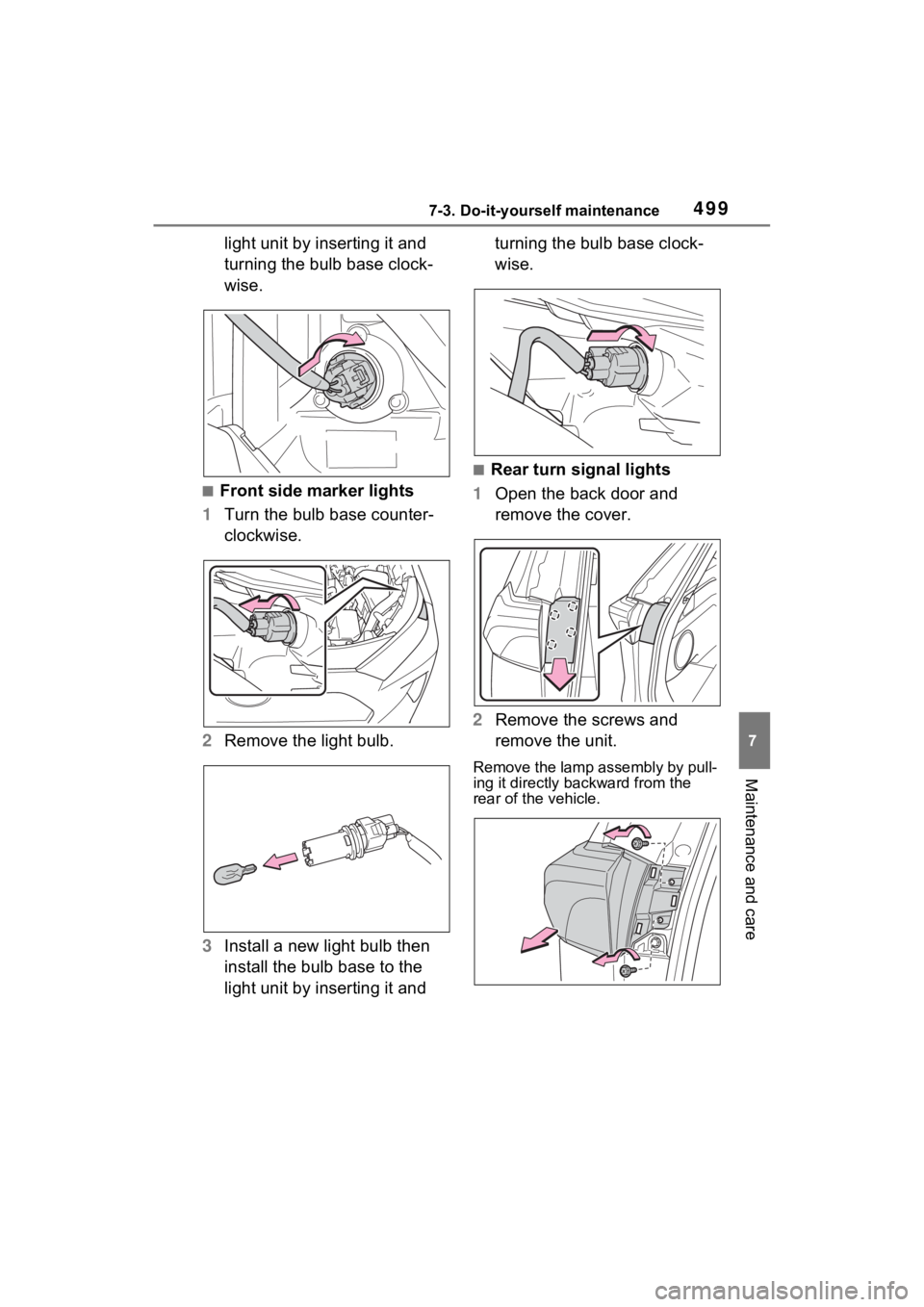
■Front side marker lights
1 Turn the bulb base counter-
clockwise.
2 Remove the light bulb.
3 Install a new light bulb then
install the bulb base to the
light unit by inserting it and turning the bulb base clock-
wise.
■Rear turn signal lights
1 Open the back door and
remove the cover.
2 Remove the screws and
remove the unit.
Remove the lamp assembly by pull-
ing it directly ba ckward from the
rear of the vehicle.
Page 500 of 618
5007-3. Do-it-yourself maintenance
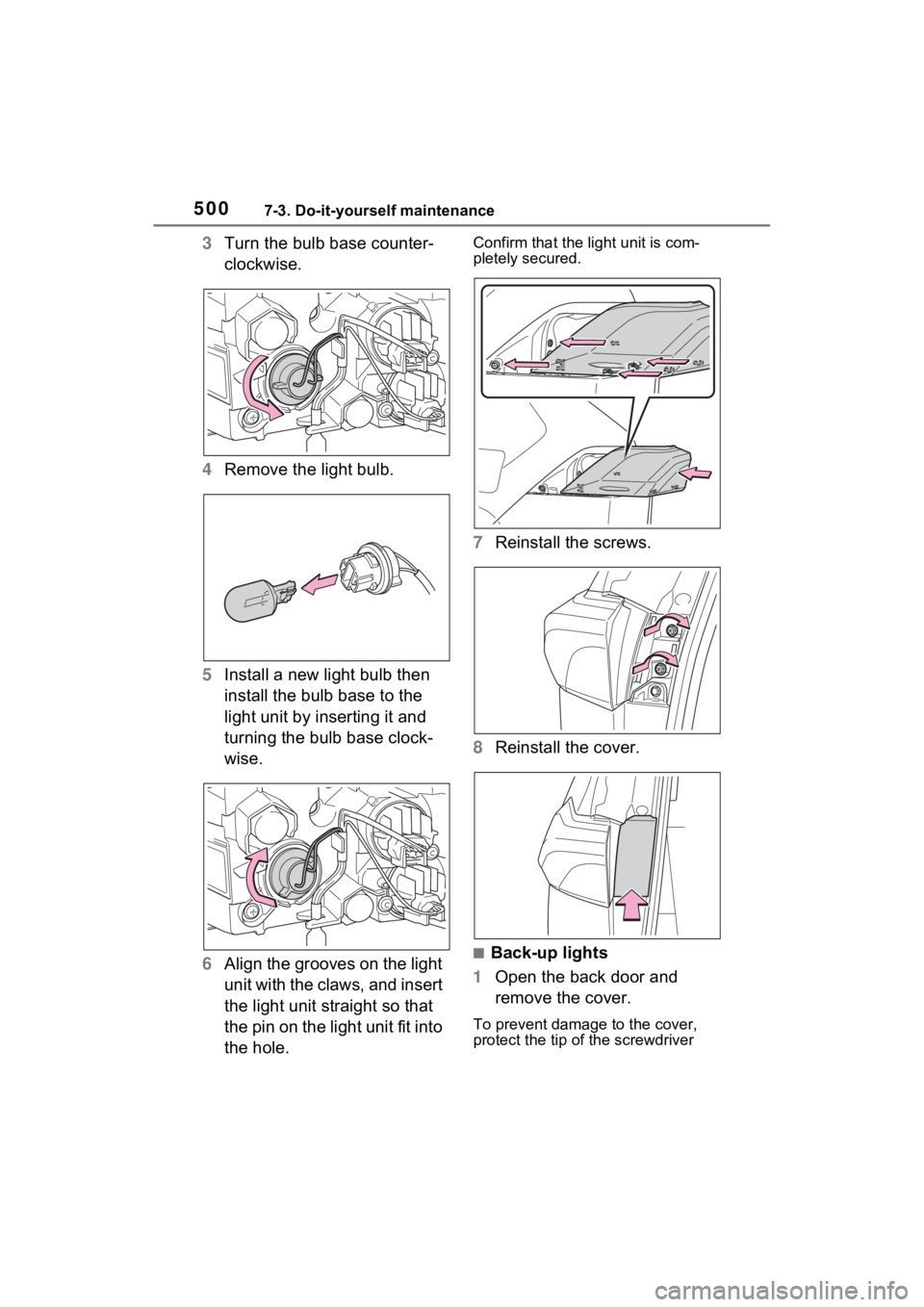
3Turn the bulb base counter-
clockwise.
4 Remove the light bulb.
5 Install a new light bulb then
install the bulb base to the
light unit by inserting it and
turning the bulb base clock-
wise.
6 Align the grooves on the light
unit with the claws, and insert
the light unit straight so that
the pin on the light unit fit into
the hole. Confirm that the light unit is com-
pletely secured.
7Reinstall the screws.
8 Reinstall the cover.
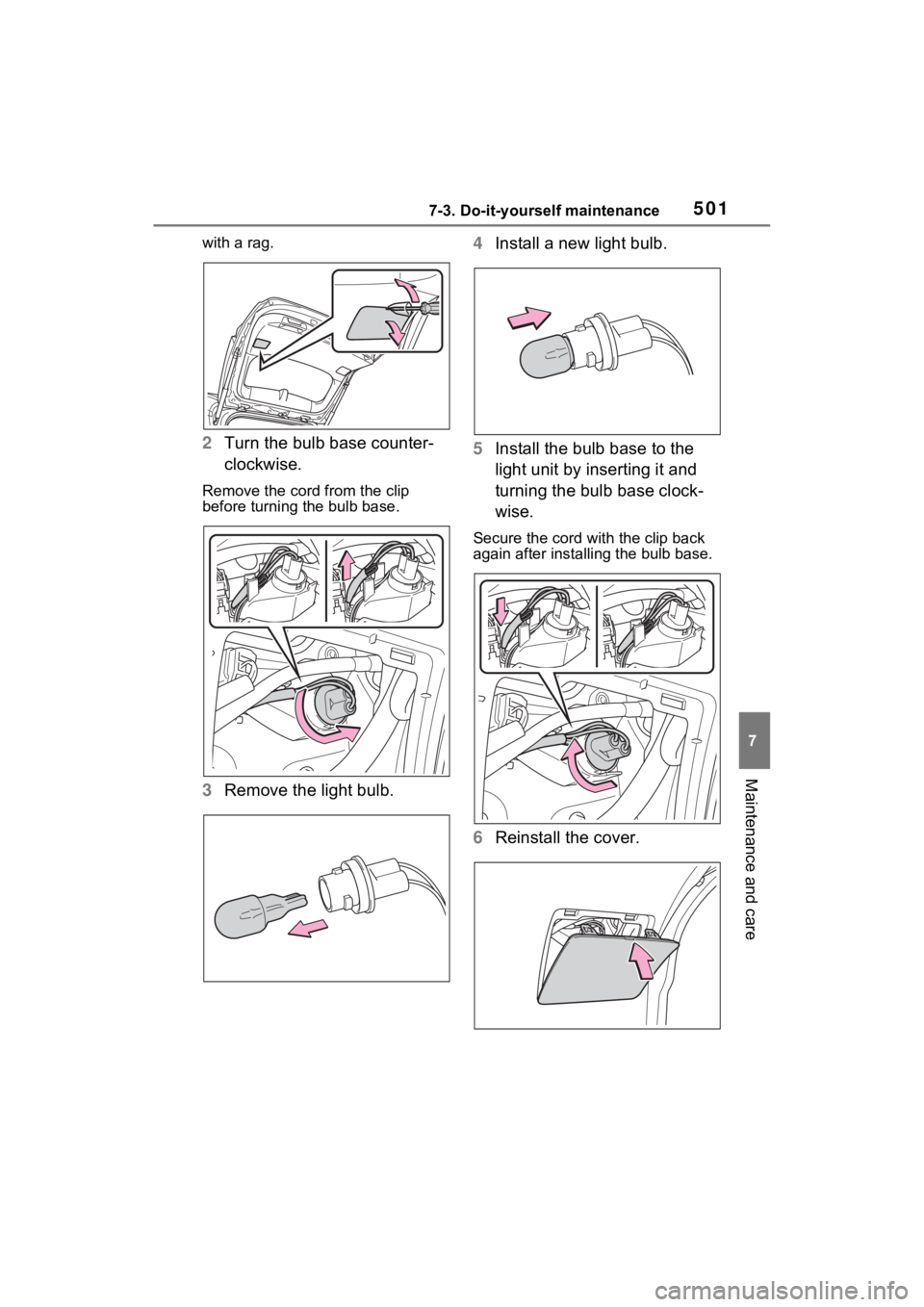
■Back-up lights
1 Open the back door and
remove the cover.
To prevent damage to the cover,
protect the tip of the screwdriver
Page 501 of 618
5017-3. Do-it-yourself maintenance
7
Maintenance and care
with a rag.
2Turn the bulb base counter-
clockwise.
Remove the cord from the clip
before turning the bulb base.
3Remove the light bulb. 4
Install a new light bulb.
5 Install the bulb base to the
light unit by inserting it and
turning the bulb base clock-
wise.
Secure the cord wit h the clip back
again after installing the bulb base.
6 Reinstall the cover.
Page 502 of 618
5027-3. Do-it-yourself maintenance
WARNING
■Replacing light bulb
●Turn off the light. Do not attempt
to replace the bulb immediately
after turning off the light.
The bulb become very hot and
may cause burns.
●Do not touch the glass portion
of the light bulb with bare
hands. When it is unavoidable
to hold the glass portion, use
and hold with a clean dry cloth
to avoid getting moisture and
oils on the bulb.
Also, if the bulb is scratched or
dropped, it may blow out or
crack.
●Fully install light bulb and any
parts used to secure it. Failure
to do so may result in heat dam-
age, fire, or water entering the
light unit. This may damage the
light or cause condensation to
build up on the lens.
●Do not attempt t o repair or dis-
assemble light bulbs, connec-
tors, electric circuits or
component parts.
Doing so may result in death or
serious injury d ue to electric
shock.
■To prevent damage or fire
●Make sure bulb is fully seated
and locked.
●Check the wattage of the bulb
before installing to prevent heat
damage.
Page 507 of 618
5078-2. Steps to take in an emergency
8
When trouble arises
8-2.Steps to take in an emergency
If your vehicle needs
to be towed
If towing is necessary, we
recommend having your
vehicle towed by your
Toyota dealer or commer-
cial towing service, using a
wheel-lift type truck or flat-
bed truck.
Use a safety chain system
for all towing, and abide by
all state/provincial and local
laws.
If towing your vehicle with a
wheel-lift type truck, use a
towing dolly. (P.507, 508)
WARNING
Observe the following precau-
tions. Failure to do so may result
in death or serious injury.
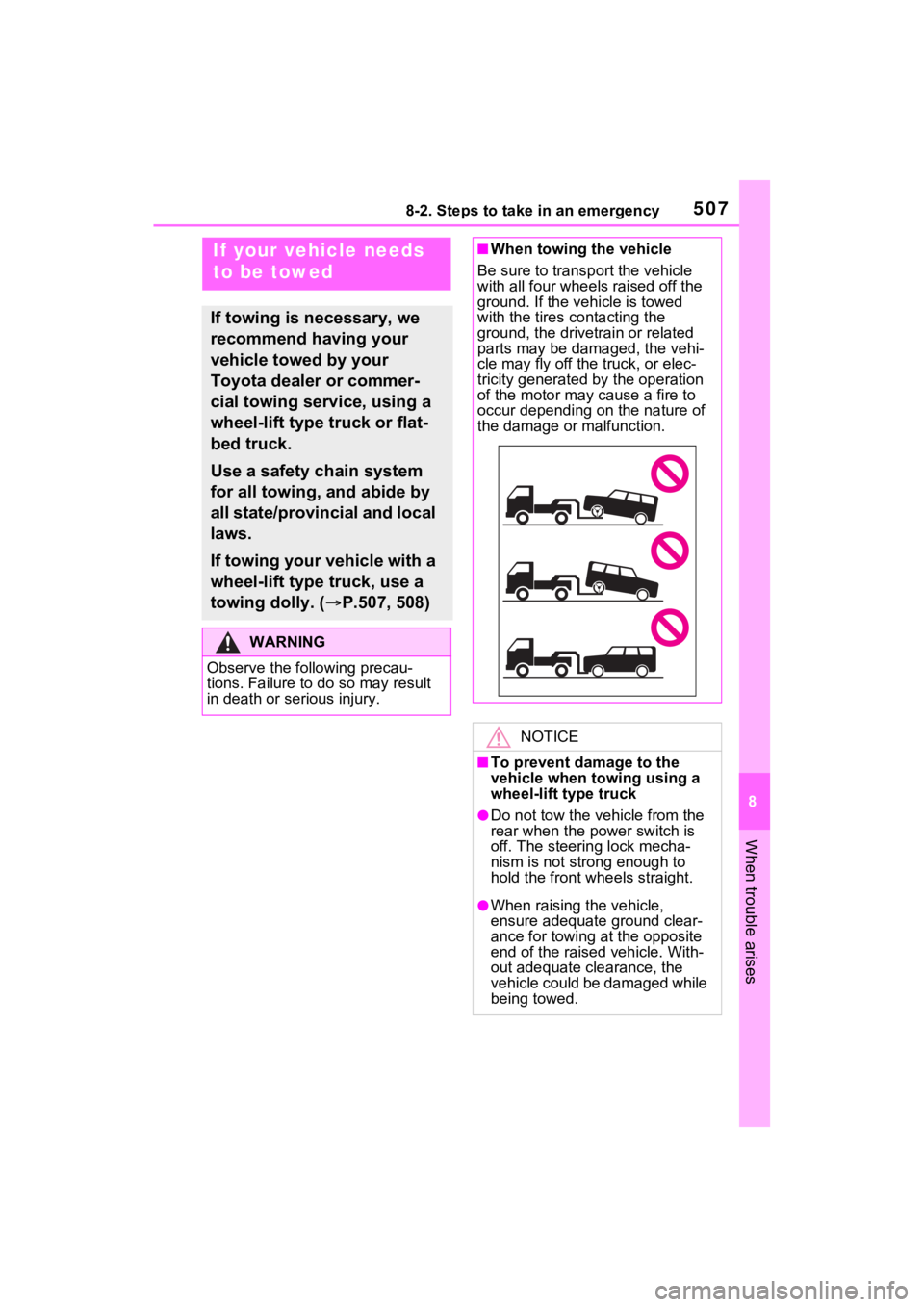
■When towing the vehicle
Be sure to transp ort the vehicle
with all four wheels raised off the
ground. If the vehicle is towed
with the tires co ntacting the
ground, the drivetrain or related
parts may be damaged, the vehi-
cle may fly off the truck, or elec-
tricity generated by the operation
of the motor may cause a fire to
occur depending o n the nature of
the damage or malfunction.
NOTICE
■To prevent damage to the
vehicle when t owing using a
wheel-lift type truck
●Do not tow the vehicle from the
rear when the power switch is
off. The steering lock mecha-
nism is not strong enough to
hold the front wheels straight.
●When raising the vehicle,
ensure adequate ground clear-
ance for towing at the opposite
end of the raised vehicle. With-
out adequate cl earance, the
vehicle could be damaged while
being towed.
Page 524 of 618

5248-2. Steps to take in an emergency
a safe place and, if the fuel level is
low, refuel the vehicle.
• “Hybrid System Stopped”
• “Engine Stopped”
●If “Maintenance required for
DCDC converter cooling parts
See Owner’s Manual” is shown,
the filter may be clogged, the air
intake vent may be blocked, or
there may be a gap in the duct.
Therefore, perform the following
correction procedure.
• If the air intake vent or filter of the DC/DC converter are dirty, per-
form the procedures on P.486 to
clean them.
• If the warning message is shown
when the air intake vent and filter
of the DC/DC converter are not
dirty, have the vehicle inspected
at your Toyota dealer.
●If “12-Volt Battery Charging Sys-
tem Malfunction Stop in a Safe
Place See Owner’s Manual” is
shown
Indicates a malfunction in the vehi-
cle’s charging system. Pull over and
stop the vehicle as soon as it is safe
to do so.
While the message is displayed, the
functions of the air conditioning, etc.
may be partially lim ited in order to
reduce the power consumption of
the 12-volt battery.
■If “Hybrid System Overheated
Output Power Reduced” is
shown
The message may be shown when
driving under severe operating con-
ditions. (For example, when driving
up a long steep hill or driving up a
steep hill in reverse.)
Coping method: P.544
■If “Traction Battery Needs to be
Protected Refrain from the Use
of N Position” is shown
This message may be displayed
when the shift lever is in N. As the hybrid battery (traction bat-
tery) cannot be charged when the
shift lever is in N, shift the shift lever
to P when the vehicle is stopped.
■If “Traction Battery Needs to be
Protected Shift into P to
Restart” is shown
This message is displayed when the
hybrid battery (traction battery)
charge has becom e extremely low
because the shift lever has been left
in N for a certain amount of time.
When operating the vehicle, shift to
P and restart the hybrid system.
■If “Shift to P when Parked” is
shown
Message is displayed when the
driver’s door is opened without turn-
ing the power switch to OFF with the
shift lever in any p osition other than
P.
Shift the shift lever to P.
■If “Shift is in N Release Acceler-
ator Before Shifting” is shown
Message is displayed when the
accelerator pedal has been
depressed and the shift lever is in N.
Release the accelerator pedal and
shift the shift lever to D or R.
■If “Press Brake when Vehicle is
Stopped Hybrid System may
Overheat” is shown
Message is displayed when the
accelerator pedal is depressed to
maintain the vehicl e position when
stopped on a upward slope, etc.
If this continues, the hybrid system
may overheat.
Release the accelerator pedal and
depress the brake pedal.
■If “Auto Power OFF to Conserve
Battery” is shown
Power was turned off due to the
automatic power off function.
Next time when starting the hybrid
system, operate the hybrid system
for approximately 5 minutes to
Page 529 of 618
5298-2. Steps to take in an emergency
8
When trouble arises
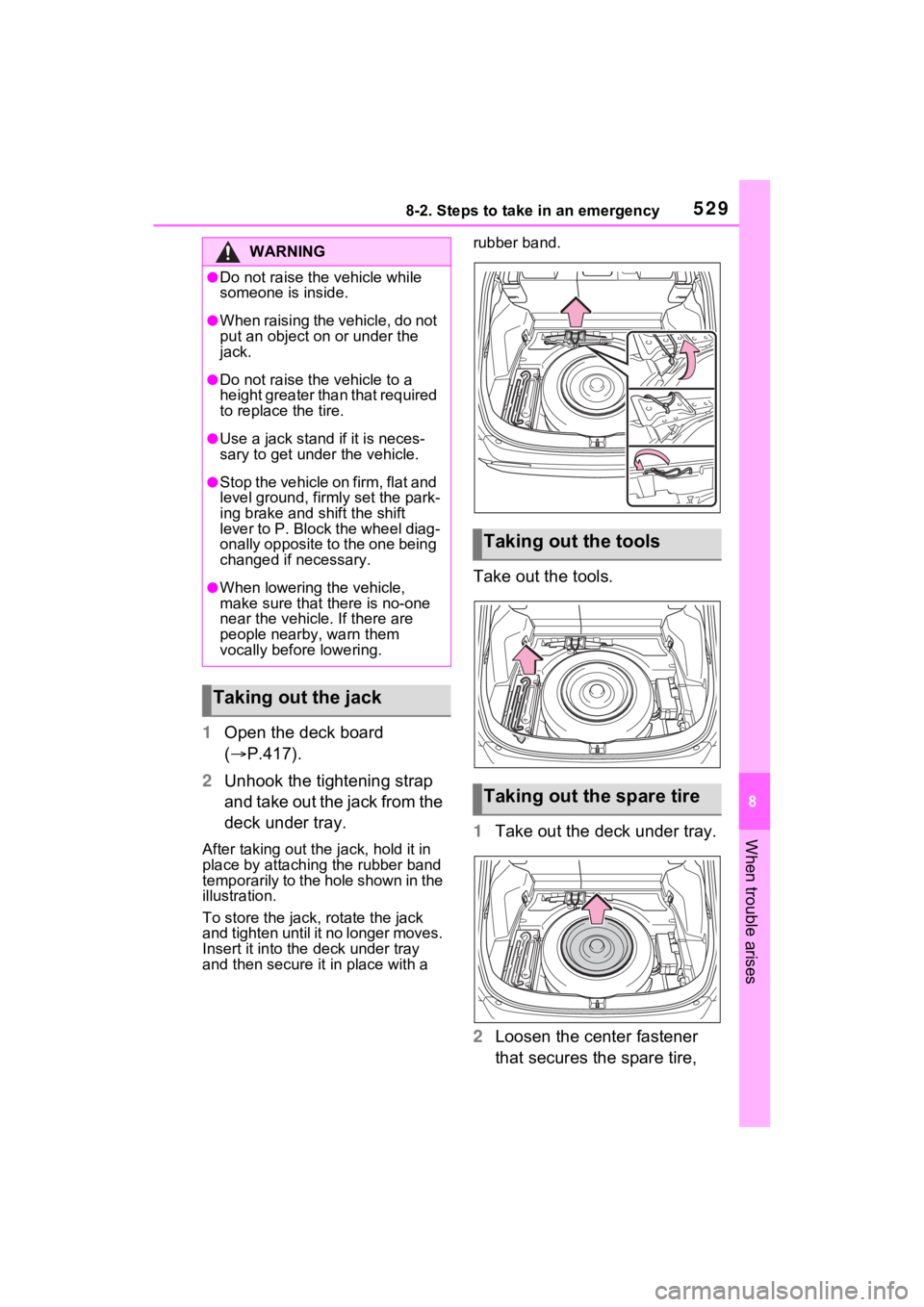
1Open the deck board
( P.417).
2 Unhook the tightening strap
and take out the jack from the
deck under tray.
After taking out the jack, hold it in
place by attaching the rubber band
temporarily to the hole shown in the
illustration.
To store the jack, rotate the jack
and tighten until it no longer moves.
Insert it into the deck under tray
and then secure it in place with a rubber band.
Take out the tools.
1
Take out the deck under tray.
2 Loosen the center fastener
that secures the spare tire,
WARNING
●Do not raise the vehicle while
someone is inside.
●When raising the vehicle, do not
put an object on or under the
jack.
●Do not raise the vehicle to a
height greater than that required
to replace the tire.
●Use a jack stand if it is neces-
sary to get under the vehicle.
●Stop the vehicle on firm, flat and
level ground, firm ly set the park-
ing brake and shift the shift
lever to P. Block the wheel diag-
onally opposite to the one being
changed if necessary.
●When lowering the vehicle,
make sure that there is no-one
near the vehicle. If there are
people nearby, warn them
vocally before lowering.
Taking out the jack
Taking out the tools
Taking out the spare tire
Page 534 of 618
5348-2. Steps to take in an emergency
One of the following may be the
cause of the problem:
The AC charging cable may
be attached to the vehicle.
( P.123)
The electronic key may not be
functioning properly.
( P.537)
There may not be sufficient
fuel in the vehicle’s tank.
Refuel the vehicle. ( P.306)
There may be a malfunction
in the immobilizer system.
( P.72)
There may be a malfunction
in the steering lock system.
The hybrid system may be
malfunctioning due to an elec-
trical problem such as elec-
tronic key battery depletion or
a blown fuse. However,
depending on the type of mal-
NOTICE
■Be careful when driving over
bumps with the compact
spare tire installed on the
vehicle
The vehicle height may become
lower when driving with the com-
pact spare tire compared to when
driving with standard tires. Be
careful when driving over uneven
road surfaces.
■Driving with tire chains and
the compact spare tire
Do not fit tire chains to the com-
pact spare tire.
Tire chains may damage the vehi-
cle body and adversely affect driv-
ing performance.
■When replacing the tires
When removing or fitting the
wheels, tires or the tire pressure
warning valve and transmitter,
contact your Toyota dealer as the
tire pressure warning valve and
transmitter may be damaged if not
handled correctly.
If the hybrid system
will not start
Reasons for the hybrid sys-
tem not starting vary
depending on the situation.
Check the following and
perform the appropriate
procedure:
The hybrid system will not
start even though the cor-
rect starting procedure is
being followed ( P.279)
Page 537 of 618
5378-2. Steps to take in an emergency
8
When trouble arises
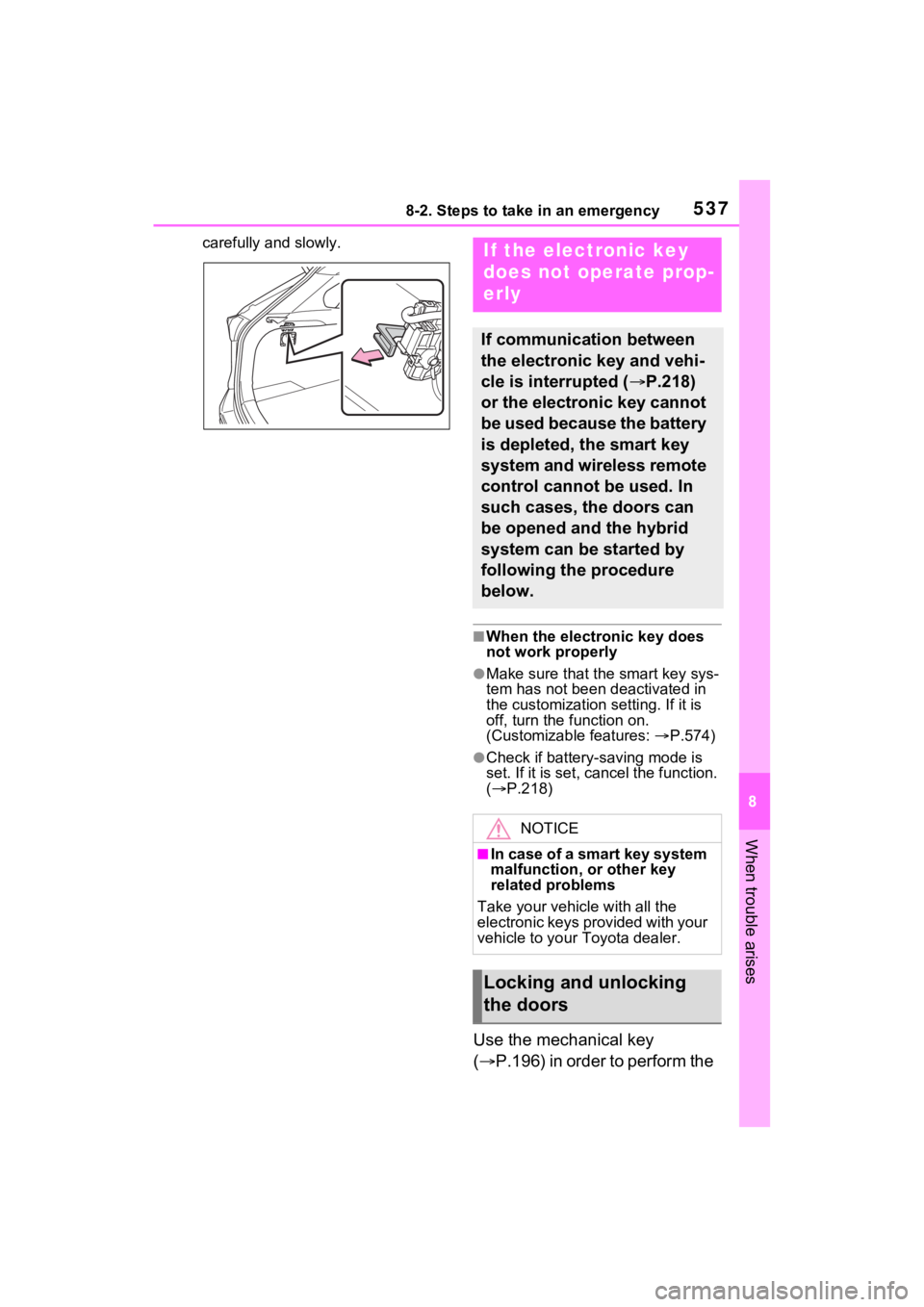
carefully and slowly.
■When the electronic key does
not work properly
●Make sure that the smart key sys-
tem has not been deactivated in
the customization setting. If it is
off, turn the function on.
(Customizable features: P.574)
●Check if battery-saving mode is
set. If it is set, cancel the function.
( P.218)
Use the mechanical key
( P.196) in order to perform the
If the electronic key
does not operate prop-
erly
If communication between
the electronic key and vehi-
cle is interrupted ( P.218)
or the electronic key cannot
be used because the battery
is depleted, the smart key
system and wireless remote
control cannot be used. In
such cases, the doors can
be opened and the hybrid
system can be started by
following the procedure
below.
NOTICE
■In case of a smart key system
malfunction, o r other key
related problems
Take your vehicle with all the
electronic keys provided with your
vehicle to your Toyota dealer.
Locking and unlocking
the doors