lock TOYOTA RAV4 PRIME 2021 Owners Manual
[x] Cancel search | Manufacturer: TOYOTA, Model Year: 2021, Model line: RAV4 PRIME, Model: TOYOTA RAV4 PRIME 2021Pages: 618, PDF Size: 24.18 MB
Page 538 of 618
5388-2. Steps to take in an emergency
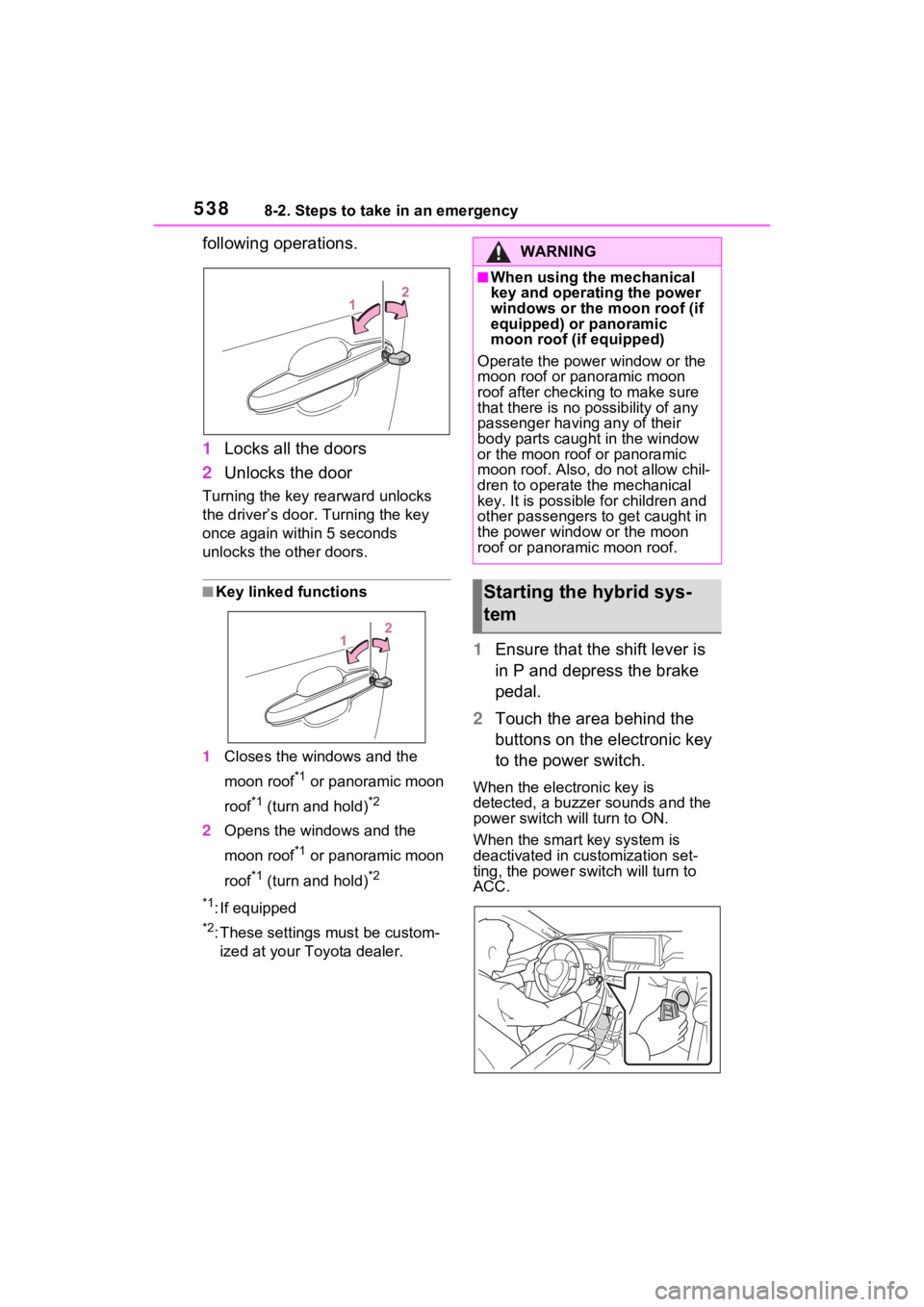
following operations.
1Locks all the doors
2 Unlocks the door
Turning the key rearward unlocks
the driver’s door. Turning the key
once again within 5 seconds
unlocks the other doors.
■Key linked functions
1 Closes the windows and the
moon roof
*1 or panoramic moon
roof
*1 (turn and hold)*2
2 Opens the windows and the
moon roof
*1 or panoramic moon
roof
*1 (turn and hold)*2
*1
: If equipped
*2: These settings must be custom- ized at your Toyota dealer.
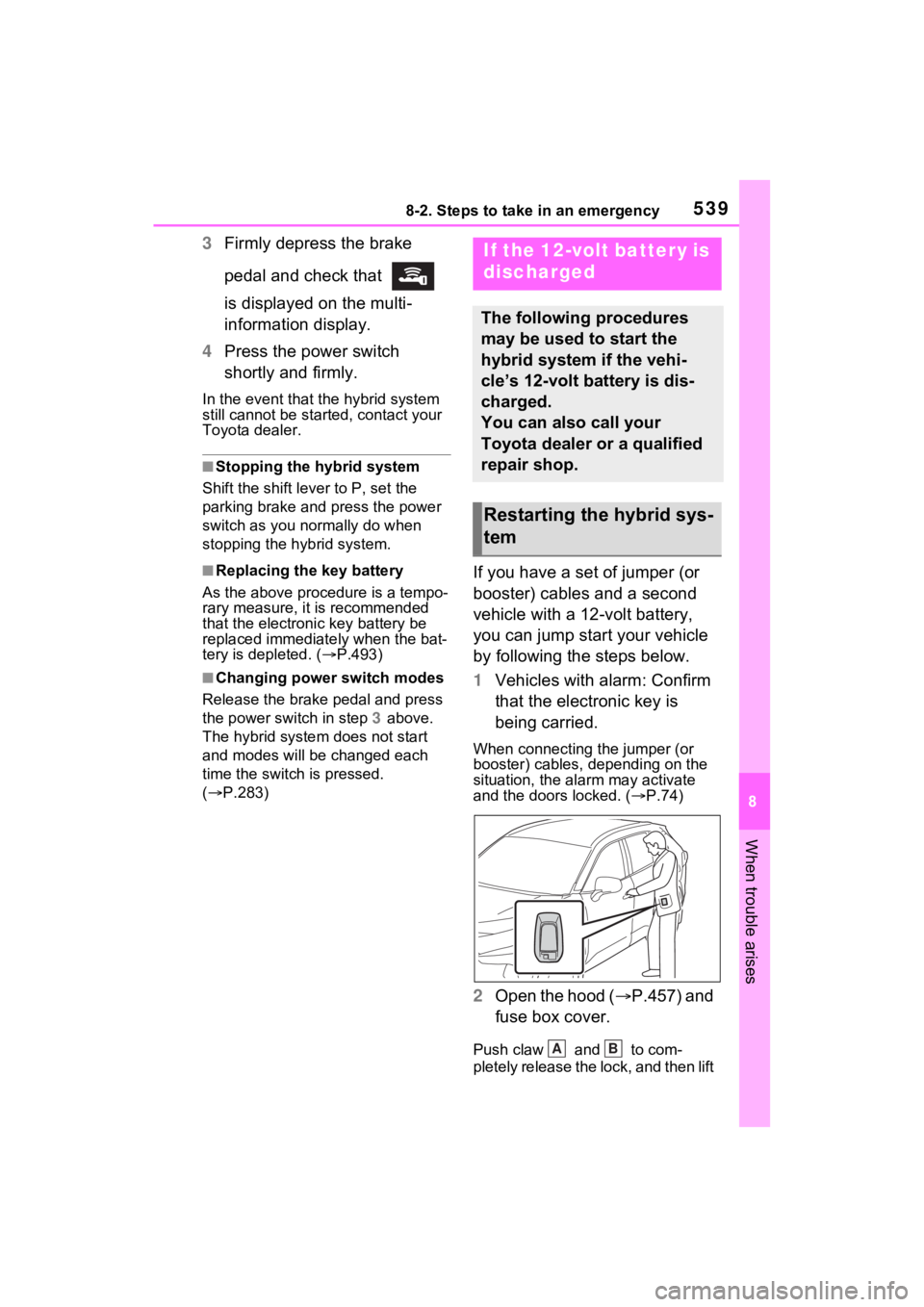
1 Ensure that the shift lever is
in P and depress the brake
pedal.
2 Touch the area behind the
buttons on the electronic key
to the power switch.
When the electronic key is
detected, a buzzer sounds and the
power switch will turn to ON.
When the smart key system is
deactivated in customization set-
ting, the power s witch will turn to
ACC.
WARNING
■When using the mechanical
key and operating the power
windows or the moon roof (if
equipped) or panoramic
moon roof (if equipped)
Operate the power window or the
moon roof or panoramic moon
roof after checking to make sure
that there is no p ossibility of any
passenger having any of their
body parts caught in the window
or the moon roof or panoramic
moon roof. Also, d o not allow chil-
dren to operate t he mechanical
key. It is possible for children and
other passengers to get caught in
the power window or the moon
roof or panoramic moon roof.
Starting the hybrid sys-
tem
Page 539 of 618
5398-2. Steps to take in an emergency
8
When trouble arises
3Firmly depress the brake
pedal and check that
is displayed on the multi-
information display.
4 Press the power switch
shortly and firmly.
In the event that the hybrid system
still cannot be started, contact your
Toyota dealer.
■Stopping the hybrid system
Shift the shift lever to P, set the
parking brake and press the power
switch as you no rmally do when
stopping the hybrid system.
■Replacing the key battery
As the above proc edure is a tempo-
rary measure, it is recommended
that the electronic key battery be
replaced immediate ly when the bat-
tery is depleted. ( P.493)
■Changing power switch modes
Release the brake pedal and press
the power switch in step 3 above.
The hybrid system does not start
and modes will be changed each
time the switch is pressed.
( P.283)
If you have a set of jumper (or
booster) cables and a second
vehicle with a 12-volt battery,
you can jump start your vehicle
by following the steps below.
1 Vehicles with alarm: Confirm
that the electronic key is
being carried.
When connecting the jumper (or
booster) cables, depending on the
situation, the alarm may activate
and the doors locked. ( P.74)
2 Open the hood ( P.457) and
fuse box cover.
Push claw and to com-
pletely release the lock, and then lift
If the 12-volt battery is
discharged
The following procedures
may be used to start the
hybrid system if the vehi-
cle’s 12-volt battery is dis-
charged.
You can also call your
Toyota dealer or a qualified
repair shop.
Restarting the hybrid sys-
tem
AB
Page 541 of 618

5418-2. Steps to take in an emergency
8
When trouble arises
recharge the 12-volt battery
of your vehicle.
6 Open and close any of the
doors of your vehicle with the
power switch off.
7 Maintain the engine speed of
the second vehicle and start
the hybrid system of your
vehicle by turning the power
switch to ON.
8 Make sure the “READY” indi-
cator comes on. If the indica-
tor light does not come on,
contact your Toyota dealer.
9 Once the hybrid system has
started, remove the jumper
cables in the exact reverse
order from which they were
connected.
10 Close the exclusive jump
starting terminal cover, and
reinstall the fuse box cover to
its original position.
Once the hybrid system starts,
have the vehicle inspected at
your Toyota dealer as soon as
possible.
■Starting the hybrid system
when the 12-volt battery is dis-
charged
The hybrid system cannot be
started by push-starting.
■To prevent 12-vol t battery dis-
charge
●Turn off the headlights and the
audio system while the hybrid sys-
tem is off.
●Turn off any unnec essary electri-
cal components when the vehicle is running at a low speed for an
extended period, such as in heavy
traffic.
■When the 12-volt battery is
removed or discharged
●Information stored in the ECU is
cleared. When the 12-volt battery
is depleted, have the vehicle
inspected at you
r Toyota dealer.
●Some systems may require initial-
ization. (P.582)
■When removing the 12-volt bat-
tery terminals
When the 12-volt battery terminals
are removed, the information stored
in the ECU is cleared. Before
removing the 12-vo lt battery termi-
nals, contact your Toyota dealer.
■Charging the 12-volt battery
The electricity stored in the 12-volt
battery will discha rge gradually even
when the vehicle i s not in use, due
to natural dischar ge and the drain-
ing effects of certain electrical appli-
ances. If the vehicle is left for a long
time, the 12-volt battery may dis-
charge, and the hybrid system may
be unable to start. (The 12-volt bat-
tery recharges automatically while
the hybrid system is operating.)
■When recharging or replacing
the 12-volt battery
●In some cases, it may not be pos-
sible to unlock the doors using the
smart key system when the 12-
volt battery is discharged. Use the
wireless remote c ontrol or the
mechanical key to lock or unlock
the doors.
●The hybrid syste m may not start
on the first attemp t after reinstall-
ing the 12-volt battery. In that
case, start the hybrid system in
the same manner as when the
electronic key does not operate
properly ( P.538). This is not a
malfunction, as the hybrid system
will start normally on the second
attempt.
Page 551 of 618
5519-1. Specifications
9
Vehicle specifications
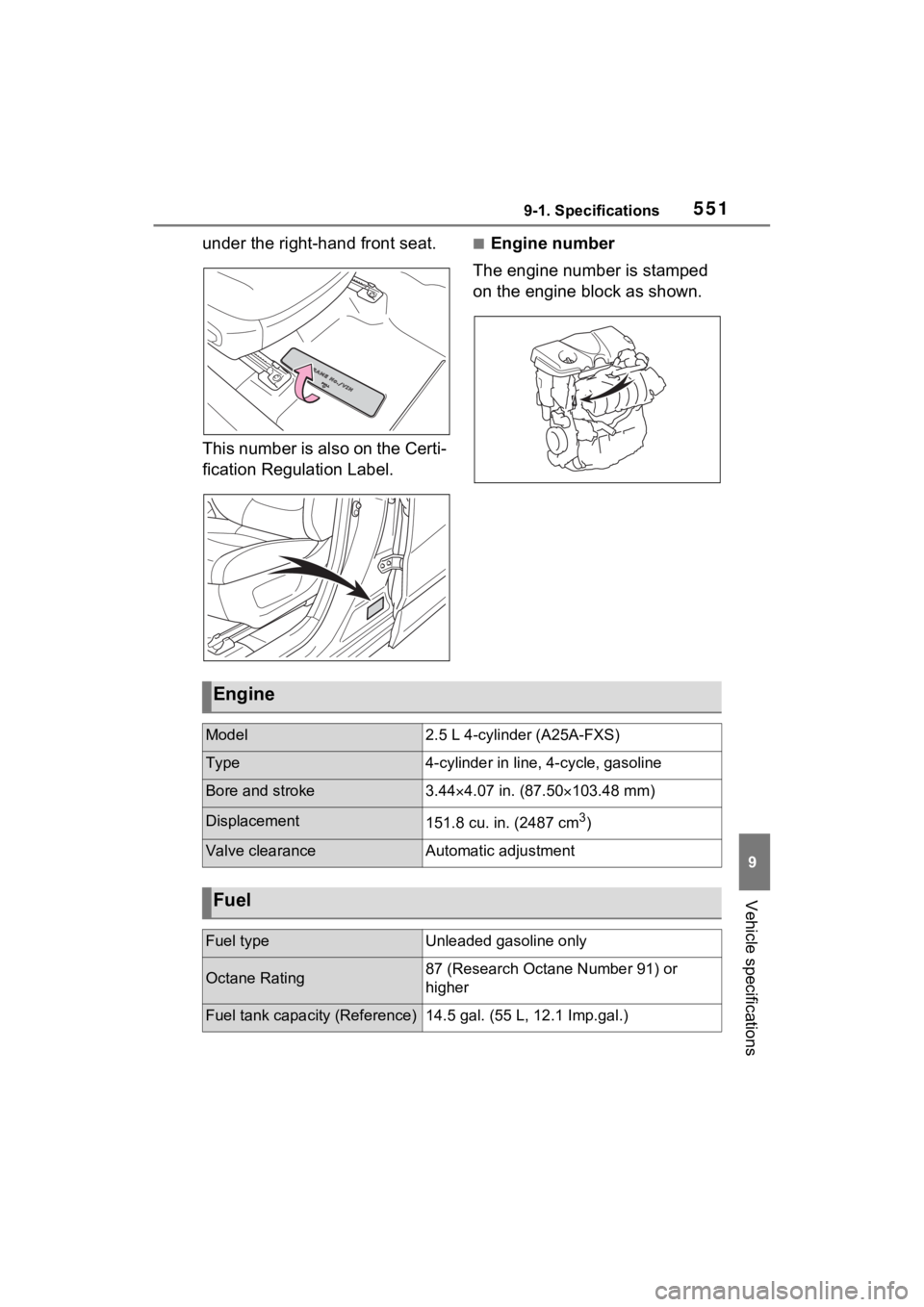
under the right-hand front seat.
This number is also on the Certi-
fication Regulation Label.■Engine number
The engine number is stamped
on the engine block as shown.
Engine
Model2.5 L 4-cylinder (A25A-FXS)
Type4-cylinder in line , 4-cycle, gasoline
Bore and stroke3.444.07 in. (87.50 103.48 mm)
Displacement151.8 cu. in. (2487 cm3)
Valve clearanceAutomatic adjustment
Fuel
Fuel typeUnleaded gasoline only
Octane Rating87 (Research Octane Number 91) or
higher
Fuel tank capacity (Reference)14.5 gal. (55 L, 12.1 Imp.gal.)
Page 572 of 618
5729-2. Customization
*1: For details about each function: P.177
*2: The default setting varies according to country.
*3: This can only be set if GPS ca libration of clock is turned off in the multi-
media system settings.
■Head-up display*1 ( P.182)
*1: If equipped
*2: For details about each function: P.184
Multi-Information display offOffOn–O–
Suggestion functionOn
On (when the
vehicle is stopped)
O–O
Off
Function*2Default settingCustomized setting
Head-up displayOnOff–O–
Gauge informationHybrid Sys-
tem IndicatorTachometer–O–No content
Route guidance to destina-
tion/street name
*1OnOff–O–
Driving support system infor-
mation displayOnOff–O–
Compass*1OnOff–O–
Audio system operation sta-
tus
*1OnOff–O–
Function*1Default settingCustomized settingABC
ABC
Page 573 of 618
5739-2. Customization
9
Vehicle specifications
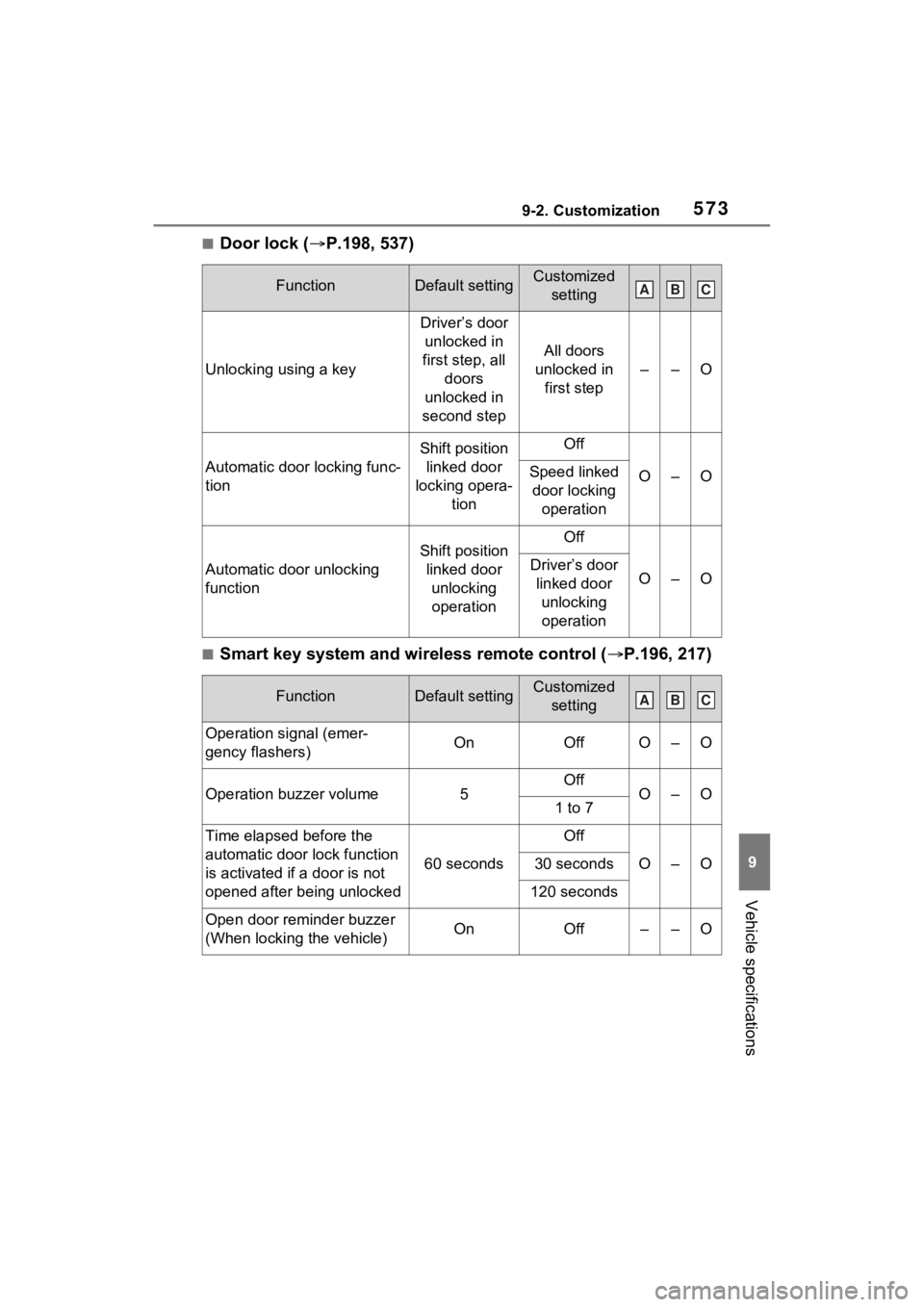
■Door lock (P.198, 537)
■Smart key system and wireless remote control ( P.196, 217)
FunctionDefault settingCustomized
setting
Unlocking using a key
Driver’s door unlocked in
first step, all doors
unlocked in
second step
All doors
unlocked in first step
––O
Automatic door locking func-
tion
Shift position linked door
locking opera- tionOff
O–OSpeed linked door locking operation
Automatic door unlocking
function
Shift position linked door unlocking operationOff
O–ODriver’s door linked door unlocking operation
FunctionDefault settingCustomized setting
Operation signal (emer-
gency flashers)OnOffO–O
Operation buzzer volume5OffO–O1 to 7
Time elapsed before the
automatic door lock function
is activated if a door is not
opened after being unlocked
60 seconds
Off
O–O30 seconds
120 seconds
Open door reminder buzzer
(When locking the vehicle)OnOff––O
ABC
ABC
Page 574 of 618
5749-2. Customization
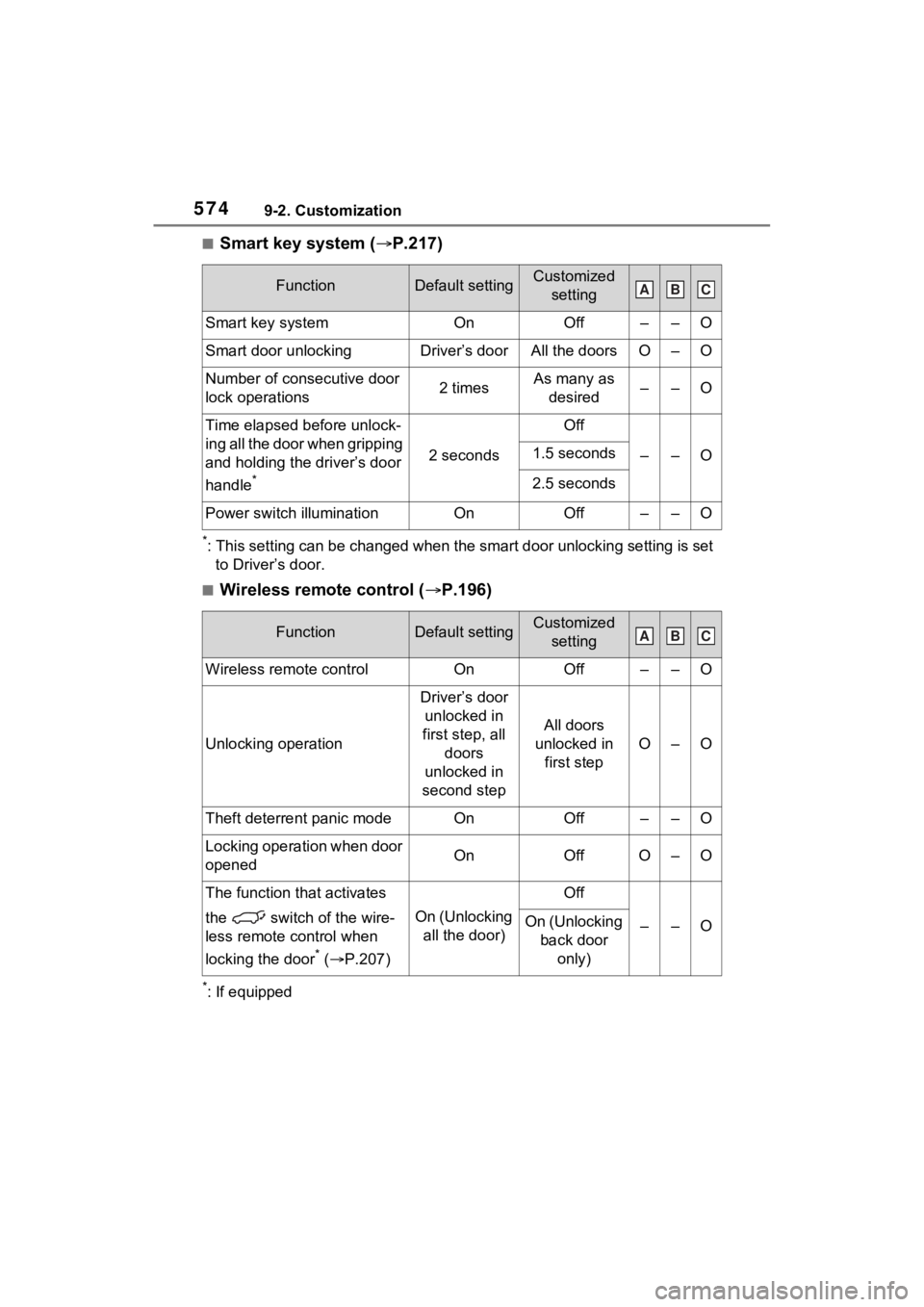
■Smart key system (P.217)
*: This setting can be changed when the smart door unlocking sett ing is set
to Driver’s door.
■Wireless remote control ( P.196)
*: If equipped
FunctionDefault settingCustomized
setting
Smart key systemOnOff––O
Smart door unlockingDriver’s doorAll the doorsO–O
Number of consecutive door
lock operations2 timesAs many as desired––O
Time elapsed before unlock-
ing all the door when gripping
and holding the driver’s door
handle
*
2 seconds
Off
––O1.5 seconds
2.5 seconds
Power switch illuminationOnOff––O
FunctionDefault settingCustomized setting
Wireless remote controlOnOff––O
Unlocking operation
Driver’s door unlocked in
first step, all doors
unlocked in
second step
All doors
unlocked in first step
O–O
Theft deterrent panic modeOnOff––O
Locking operation when door
openedOnOffO–O
The function that activates
the switch of the wire-
less remote control when
locking the door
* ( P.207)
On (Unlocking
all the door)
Off
––OOn (Unlocking back door only)
ABC
ABC
Page 576 of 618
5769-2. Customization
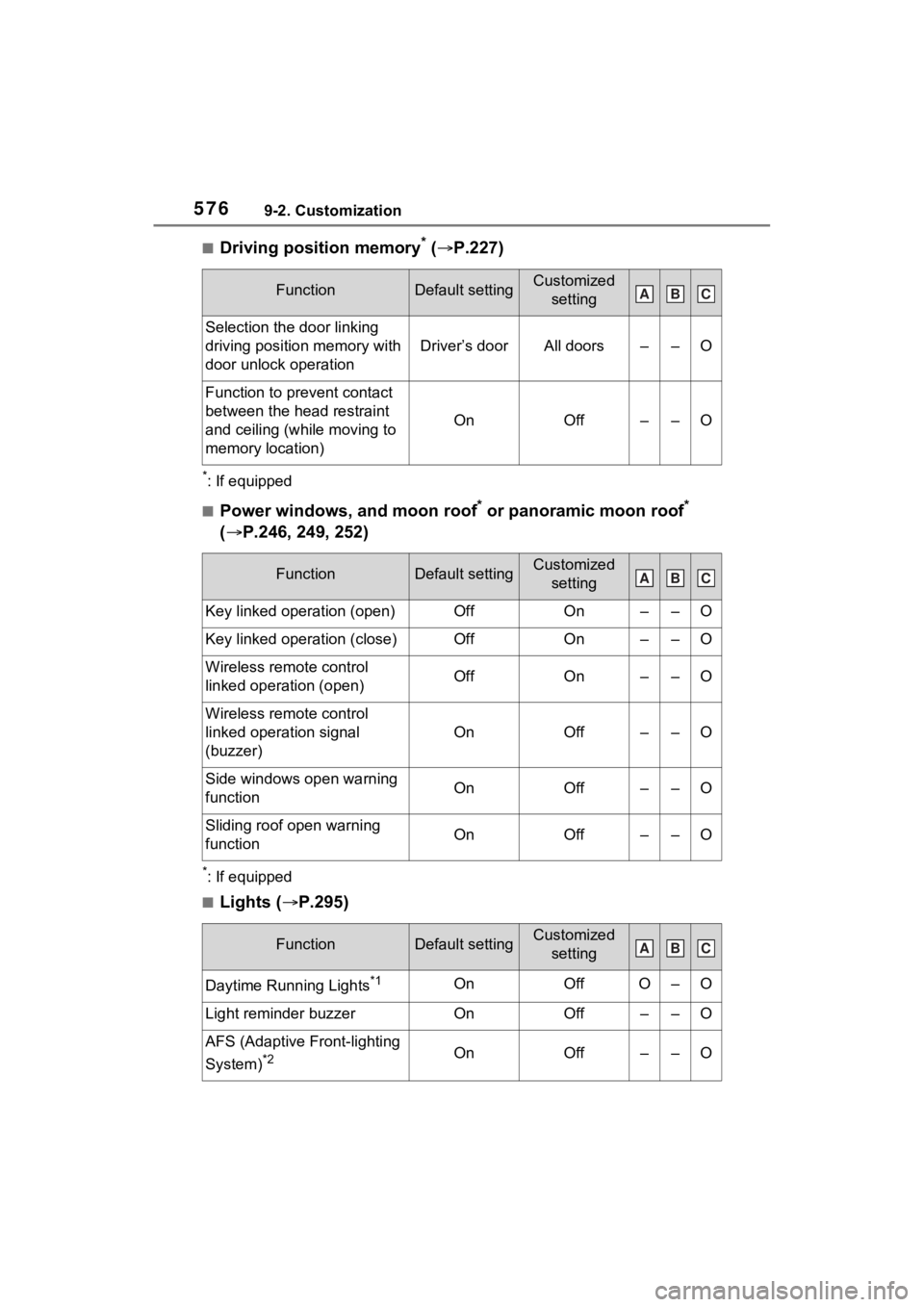
■Driving position memory* ( P.227)
*: If equipped
■Power windows, and moon roof* or panoramic moon roof*
( P.246, 249, 252)
*: If equipped
■Lights ( P.295)
FunctionDefault settingCustomized
setting
Selection the door linking
driving position memory with
door unlock operation
Driver’s doorAll doors––O
Function to prevent contact
between the head restraint
and ceiling (while moving to
memory location)
OnOff––O
FunctionDefault settingCustomized setting
Key linked operation (open)OffOn––O
Key linked operation (close)OffOn––O
Wireless remote control
linked operation (open)OffOn––O
Wireless remote control
linked operation signal
(buzzer)
OnOff––O
Side windows open warning
functionOnOff––O
Sliding roof open warning
function OnOff––O
FunctionDefault settingCustomized setting
Daytime Running Lights*1OnOffO–O
Light reminder buzzerOnOff––O
AFS (Adaptive Front-lighting
System)
*2OnOff––O
ABC
ABC
ABC
Page 581 of 618
5819-2. Customization
9
Vehicle specifications
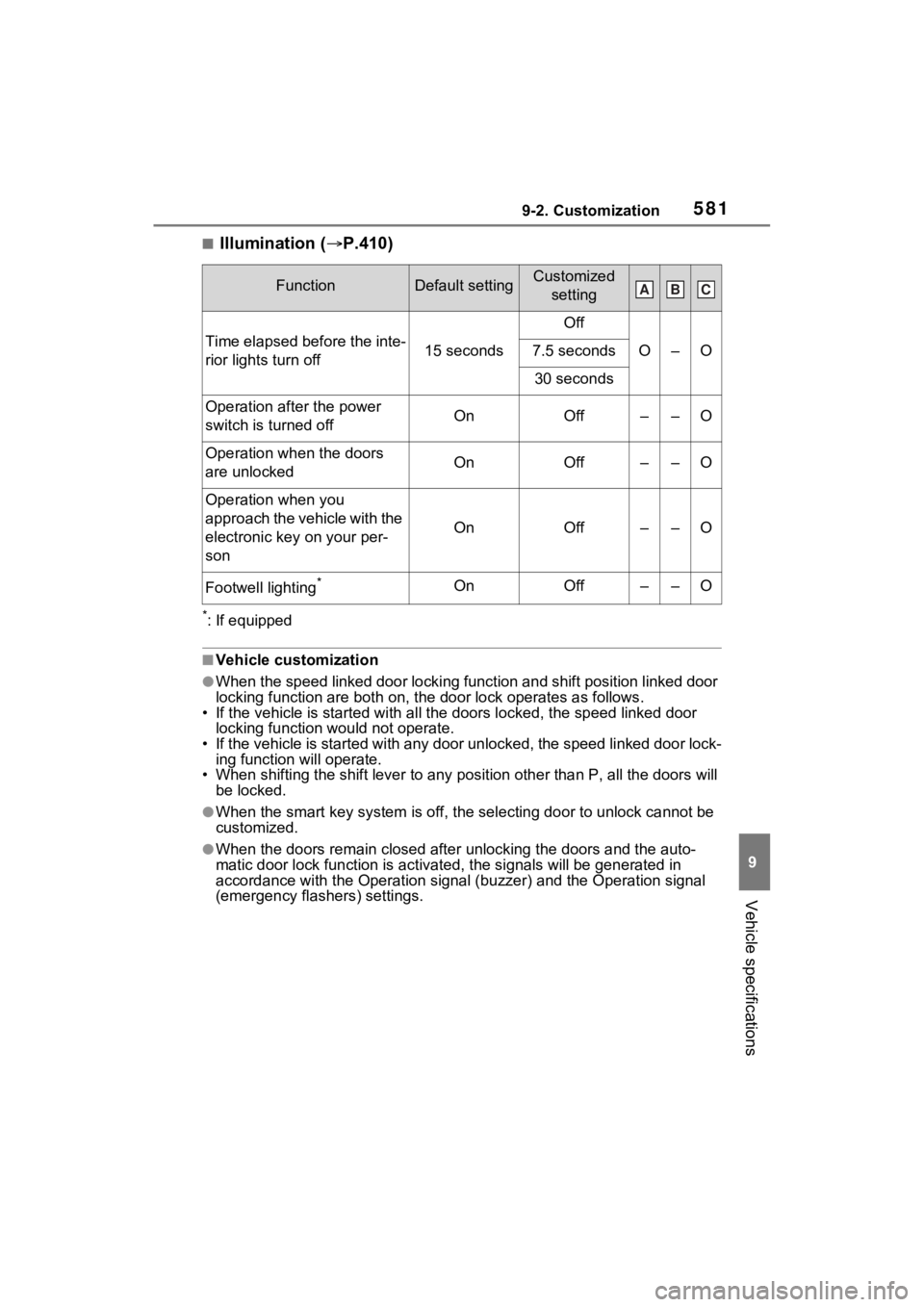
■Illumination (P.410)
*: If equipped
■Vehicle customization
●When the speed linked door locking function and shift position linked door
locking function are both on, th e door lock operates as follows .
• If the vehicle is started with a ll the doors locked, the speed linked door
locking function would not operate.
• If the vehicle is started with any door unlocked, the speed li nked door lock-
ing function will operate.
• When shifting the shift lever to any position other than P, all the doors will
be locked.
●When the smart key system is o ff, the selecting door to unlock cannot be
customized.
●When the doors remain closed after unlocking the doors and the auto-
matic door lock function is ac tivated, the signals will be gene rated in
accordance with the Operation si gnal (buzzer) and the Operation signal
(emergency flashers) settings.
FunctionDefault settingCustomized
setting
Time elapsed before the inte-
rior lights turn off15 seconds
Off
O–O7.5 seconds
30 seconds
Operation after the power
switch is turned offOnOff––O
Operation when the doors
are unlockedOnOff––O
Operation when you
approach the vehicle with the
electronic key on your per-
son
OnOff––O
Footwell lighting*OnOff––O
ABC
Page 596 of 618
596What to do if... (Troubleshooting)
1-1.What to do if... (Troubleshooting)What to do if... (Troubleshooting)
If you lose your keys or
mechanical keys, new genu-
ine keys or mechanical keys
can be made by your Toyota
dealer. ( P.536)
If you lose your electronic
keys, the risk of vehicle theft
increases significantly. Con-
tact your Toyota dealer imme-
diately. ( P.536)
Is the key battery weak or
depleted? ( P.493)
Is the power switch in ON?
When locking the doors, turn
the power switch off.
( P.283)
Is the electronic key left inside
the vehicle?
When locking the doors,
make sure that you have the electronic key on your person.
The function may not operate
properly due to the condition
of the radio wave. ( P.218)
Is the child-protector lock set?
The rear door cannot be
opened from inside the vehi-
cle when the lock is set. Open
the rear door from outside
and then unlock the child-pro-
tector lock. ( P.202)
Did you press the power
switch while firmly depress-
ing the brake pedal?
( P.279)
Is the shift lever in P?
( P.279)
Is the electronic key any-
where detectable inside the
vehicle? ( P.217)
Is the steering wheel
unlocked? ( P.280)
Is the electronic key battery
weak or depleted?
In this case, the hybrid sys-
If you have a problem,
check the following before
contacting your Toyota
dealer.
The doors cannot be
locked, unlocked, opened
or closed
You lose your keys
The doors cannot be
locked or unlocked
The rear door cannot be
opened
If you think something is
wrong
The hybrid system does
not start